
BrainDead Nodes
Comprehensive ComfyUI nodes for 3D mesh processing, PBR texture baking, caching, character consistency, and prompt iteration
Nodes (162)
Put HunyuanMotion animation on any UEFN character without touching a keyframe
Reapply colors to a decimated mesh without breaking the topology
Tile a pile of images into one game-ready atlas, layout JSON included
Cut a character into 18 clothing/body regions with one SegFormer pass
Auto-rig a mesh into a Mixamo-compatible FBX in one node
From Mixamo rig to a real UEFN/Fortnite skeleton in one pass
A placeholder node that exists so the pack doesn't break — skip it
Bake a texture into per-vertex colors so your GLB isn't a white placeholder
One-click mesh cleanup when your generated geometry is a mess
The decimator that remembers your color boundaries
Mark the edges you want to survive, before the geometry tools eat them
One GLB with PBR material and vertex colors, via Blender
Dissolve flat faces into planes without killing your hard edges
Fix inside-out faces before anything renders them black
Give a mesh that clean flat-panel look games actually want
Cut a quad mesh by 16x and keep it all quads
Four remesh modes in one node, from voxel soup to quad grids
The targeted mesh repair pass for holes, doubles, and flipped normals
Copy vertex colors from one mesh onto another that can't keep up
Solidify, smooth, or convert your vertex color domains in one node
The batch-save node that ends the spaghetti
Pickle it when no typed cache exists
Cache audio the same way you cache images — and skip the whole generation
Cache the whole mesh + textures + colors package in one shot
Freeze an expensive image so ComfyUI skips the work on every rerun
Cache the latent, not the pixels
Don't re-run the segmentation just to keep the same mask
Freeze a generated mesh as GLB — materials, UVs and vertex colors included
Cache a string? Yes, and here's the surprisingly real use case
TRELLIS2 conditioning is the boring part — cache it and stop reprocessing
The shape stage is 30-60 seconds you should only pay for once
Cache the textured mesh and the voxelgrid — the last slow stage of TRELLIS2
Make your skin shader's median sit dead-center — the V-curve fix
Paint a character into the red channel — Photoshop blend modes for texture packing
The cleanup node
Pull every blue pixel out of an image as a mask — no model required
Merge edge marks from two detectors without the face-split vertex mess
Stop eyeballing whether your rebuild actually matches
Give every part a shared pivot — the crop that keeps game textures aligned
Crop to the lips, square it, and frame every viseme identically
Pull one part out of a CubePart decomposition
BD CubePart Segment
Get actual quads out of a triangle soup
Turn a 200k-triangle blob into something a game can eat
Fake believable lighting from a depth image
Fake a full PBR set from one image + depth
Fake micro-detail a smooth bake can't give you
Circles (and secret channel-packing) for mask and atlas work
A rectangle node that's secretly a channel-pack swiss army knife
Take the key light off a cel-shading pass without flattening the facets
Get your mesh out the door with its texture intact
Park your TRELLIS2 voxelgrid so you never regenerate it
MediaPipe landmarks, formatted for SAM3 prompts
Turn landmarks into an actual head mesh to bake onto
The anchor point for the whole face-wrap pipeline
A real, textured 3D face straight from a photo
Stitch head views side-by-side without an unwrap
Merge MediaPipe shapes with SAM3 edges for pixel-accurate skin
One-shot face sockets for 2D animation flipbook textures
Unwrap a head into a flat strip for a UV wrap
Nvdiffrast UV bake that turns head photos into a face texture
Keep the real baked face, let Qwen only fill the gaps
Human parsing into 18 regions — and the license asterisk you shouldn't skip
Stop building filenames with string-concat spaghetti — resolve %var% templates in one node
When SAM3 nails the outline but forgets the inside
Flipped normals on your generated mesh? This is the fast, Python-only fix
Fit a real FLAME head model to your landmarks instead of warping a neutral mesh
Iterate a typed list across your queue
Resolve a save context into a filename for ANY save node — even ComfyUI's built-in one
Run a GLSL shader N times with different uniforms — one compile, one pass
Cut the head off — no neck, no angle selector, same result every time
De-speckle your human parse maps in one pass
One parse map in, nine ready-to-use region masks out
Grab one label from a parse map as a mask — no group gymnastics
Finally see what the human parser actually saw
Greyscale the way your game engine does — or just one region of the image
Load audio into the graph from a path — the node everyone forgets exists
Load an image from a path string — and get its alpha as a mask for free
Load an image and keep its name — so every export lands in a folder named after the source
Get a 3D mesh into the pipeline — as TRIMESH, with everything it carries
Reload MediaPipe face masks after the image is gone
Re-bake a TRELLIS2 voxelgrid without regenerating it
Read a text file from a path — the node that finally wires your notes into the graph
Lotus-2 depth/normal — diffusion-grade geometry, but it costs you a FLUX model
Actually run Lotus-2 — and the one background mistake that ruins your depth
A ruler for your greys — measure luminance so your shading pipeline actually hits its targets
Pull the brightest and darkest pixels out as masks — percentiles, not magic numbers
Pull one mask out of a batch — the two-minute bridge for SAM3 outputs
Paint flat colors into mask regions — the fast path to flipbook UV textures
SAM3 is precise but unruly — this node is the shepherd that keeps segments where they belong
Flatten cutouts onto a background — with the alpha-bleed trick that kills UV-edge halos
Separate skin, clothes, and accessories from one silhouette — the shader that became a node
A passthrough node that quietly saves your face landmarks to JSON — the Blender handoff
Landmark-precise face masks in ~5ms with zero prompts — MediaPipe's free win
MediaPipe guides, SAM3 refines — pixel-accurate face masks that finally fix the stylized brow
Spin the mesh in your browser — the check before you bake, export, or commit
The hole-filler for the holes the other hole-fillers miss
Thumbnails for your 3D parts without leaving ComfyUI — the DAM preview that needs no Blender
The daily-driver mesh fix — holes, duplicates, degenerate faces, and normals in one pass
Turn a textured mesh back into a voxelgrid — the round-trip that unlocks retexturing
The adapter that pulls ComfyUI's native meshes into the BD pipeline
The bone-rename bridge between auto-rigging and UEFN's mannequin skeleton
Lips, teeth, tongue into one viseme atlas — BD MP Mouth Parts
Fix your dynamic range before the mask sees it — BD Normalize Luma
Your generated mesh is sideways — BD Orient Mesh is the one-click fix
TRELLIS2 voxelgrid to textured mesh in one node — BD OVoxel Bake
Bake PBR onto the mesh you chose — BD OVoxel Texture Bake
BD Pack Bundle wraps a mesh and all its textures
Roughness in R, metal in G, AO in B — BD Pack Channels builds engine textures
Redraw every part of a character in one run — BD Parts Batch Edit (Qwen)
From segmented masks to per-part crops — BD Parts Builder
Qwen 2.1 layer decomposition that trusts the model for *where*, not for pixels
The stack that has to look like the head you started with
Bald, mouthless, eyeless — the blank head your engine parts sit on
Put the parts back together — BD Parts Compose
From parts bundle to PSD — BD Parts Export ships the whole package
'shoe' + 'sneaker' + 'left shoe' → one part — BD Parts Refine
What's under the jacket? BD Parts Underpaint reveals it
The closed list that stops Qwen 2.1 inventing a hat
One image to a textured 3D asset — BD Pixal3D Image to 3D
The quiet node that makes image-to-3D not look like garbage — BD Pixal3D Preprocess
Keep your flat surfaces flat — BD Planar Grouping before you decimate
Look at your mesh without leaving the graph — BD Preview 3D
Character sheet on autopilot — BD Prompt Iterator cycles your prompts
Suffixes, seeds, and ping-pong — the prompt iterator that grew up
Twenty prompt slots on one node — BD Prompt Iterator (Dynamic)
The run receipt your PNG was never carrying
BD Qwen Character Edit bakes character consistency into the conditioning
The face doesn't change, no matter what else does
The flexible middle child of BrainDead's Qwen encoders
A text-to-image encoder that lets you rewrite the rules
SAM3 matting that actually handles hair
See the skeleton before you ship the rig
One node instead of twelve, and it votes on the mask
Pull TRELLIS2's color data out of the voxels and onto the mesh
Grab color, metallic, and roughness straight from the voxels
One batch, N files, and it filters what passes downstream
Kill the concat-string filename spaghetti
The save node that speaks every type the pack uses
Park your MediaPipe face masks so Blender can read them later
The \"workflow included\" card, drawn by the graph itself
Get a game-friendly triangle count without wrecking the shape
The repose that makes them actually bind
The reliable way to get TRELLIS2 colors onto the mesh
The deprecated KD-tree transfer, and what to use instead
Put the colors back after you decimate
An info node that explains the smart TRELLIS trick
Model config and DinoV3 features, fused into one node
Geometry first, textures later
More than one photo in, better 3D out — TRELLIS.2 multi-view conditioning
Re-skin a 3D shape without regenerating the hard part
The node that turns a TRELLIS.2 shape into an actual painted PBR mesh
The adapter that lets BrainDead meshes talk to ComfyUI's built-in 3D nodes
Open the suitcase — pulling a MESH_BUNDLE back into its parts
Split an RGBA pack into its four channels (and see which one you screwed up)
Stitch multiple face-texture bakes into one clean UV texture
Warp a face texture onto a whole different rig's UV layout
Give a machine-generated mesh a UV layout that doesn't look like a crime scene
An undo history for your whole workflow, saved automatically
The workflow-history janitor (with a safety catch)
Read your workflow's version history before you panic-restore
Get your workflow back from the version timeline
ComfyUI-BrainDead
<div align="center"> <img src="docs/images/banner.jpg" alt="ComfyUI-BrainDead" width="100%">A comprehensive collection of ComfyUI custom nodes for caching, character consistency, prompt iteration, 3D mesh / PBR baking, character segmentation pipelines, image-to-3D generation, and game-asset preparation.




🎯 About BrainDead Nodes
AN internally-used node pack for Biloxi Studios designed to help with character, story, 3D, and audio generation for next-generation UGC game and TV pipelines. All nodes use the ComfyUI V3 API and appear under the 🧠BrainDead category in the node browser.
Workflow Templates
Ready-to-use workflows ship in example_workflows/ and appear in ComfyUI under Workflow → Browse Templates → ComfyUI-BrainDead, each with a thumbnail and an in-canvas note.
Templates appear in Workflow → Browse Templates → ComfyUI-BrainDead and are prefixed
BD-so they're easy to find and identify as BrainDead workflow templates.
Installation
ComfyUI Manager
Search for "BrainDead" in ComfyUI Manager and install. Dependencies in requirements.txt are installed automatically.
Manual Installation
cd ComfyUI/custom_nodes
git clone https://github.com/BizaNator/ComfyUI-BrainDead
cd ComfyUI-BrainDead
pip install -r requirements.txt
Dependencies
requirements.txt is installed automatically by ComfyUI Manager. It covers:
| Package | Purpose |
|---------|---------|
| moge (git) | MoGe-2 monocular geometry for Pixal3D FOV estimation |
| utils3d (git, pinned) | Required by MoGe .pt submodule — PyPI version is incomplete |
| pipeline (git, pinned) | Required by MoGe |
| natten | Neighborhood Attention for Pixal3D NAF upsampler |
Pixal3D model weights (~10 GB) are downloaded automatically on first run.
cube_partis vendored undernodes/cubepart/vendor/— no separate install needed.
Features
Cache Nodes (🧠BrainDead/Cache)
Smart caching with lazy evaluation — upstream nodes are completely SKIPPED when cache is valid.
| Node | Description |
|------|-------------|
| BD Cache Image | Cache IMAGE tensors as PNG files |
| BD Cache Mask | Cache MASK tensors as PNG files |
| BD Cache Latent | Cache LATENT tensors as safetensors |
| BD Cache Audio | Cache AUDIO data as WAV files |
| BD Cache String | Cache STRING data as TXT files |
| BD Cache Any | Cache any data type as pickle |
| BD Cache Mesh | Cache TRIMESH objects as PLY files |
| BD Save File | Save any data in native format, output file path. Optional context_id + suffix for template-based saves |
| BD Bulk Save | Save N inputs in ONE Run using a save context (16 typed slots + parallel labels) |
| BD Save Context | Define a path template + variables once, downstream save nodes auto-resolve |
| BD Get Context Path | Resolve a context's template into a STRING — wire into ComfyUI's built-in SaveImage filename_prefix or any third-party save node |
| BD Load Image | Load image from STRING path |
| BD Load Mesh | Load 3D mesh from STRING path |
| BD Load Audio | Load audio from STRING path |
| BD Load Text | Load text from STRING path |
| BD Clear Cache | Clear cached files by pattern |
How Caching Works:
- Place a cache node after an expensive operation
- First run: generates data, saves to
output/BrainDead_Cache/ - Subsequent runs: loads from cache, skips upstream generation entirely
- Change the
seedto force regeneration
Save Context System — replace ad-hoc concat-string filename chains:
- Add ONE
BD Save Contextnode with a template like%project%/%character%/%character%_%name%_v%version%%suffix%and set vars (character, name, version, project, etc.) - Downstream
BD Save File/BD Bulk Savenodes auto-pick the context (or specifycontext_idif multiple are registered) - Each save just sets its
suffix(e.g._albedo,_skin_mask,_head) — context resolves the rest - Per-save
custom_vars(multilinekey=value) layer on top of the context for one-off variations likesubfolder=PBRormaterials=metal BD Get Context Pathoutputs a STRING path for ANY save node — works with ComfyUI's built-in SaveImage and third-party packs
Character Nodes (🧠BrainDead/Character)
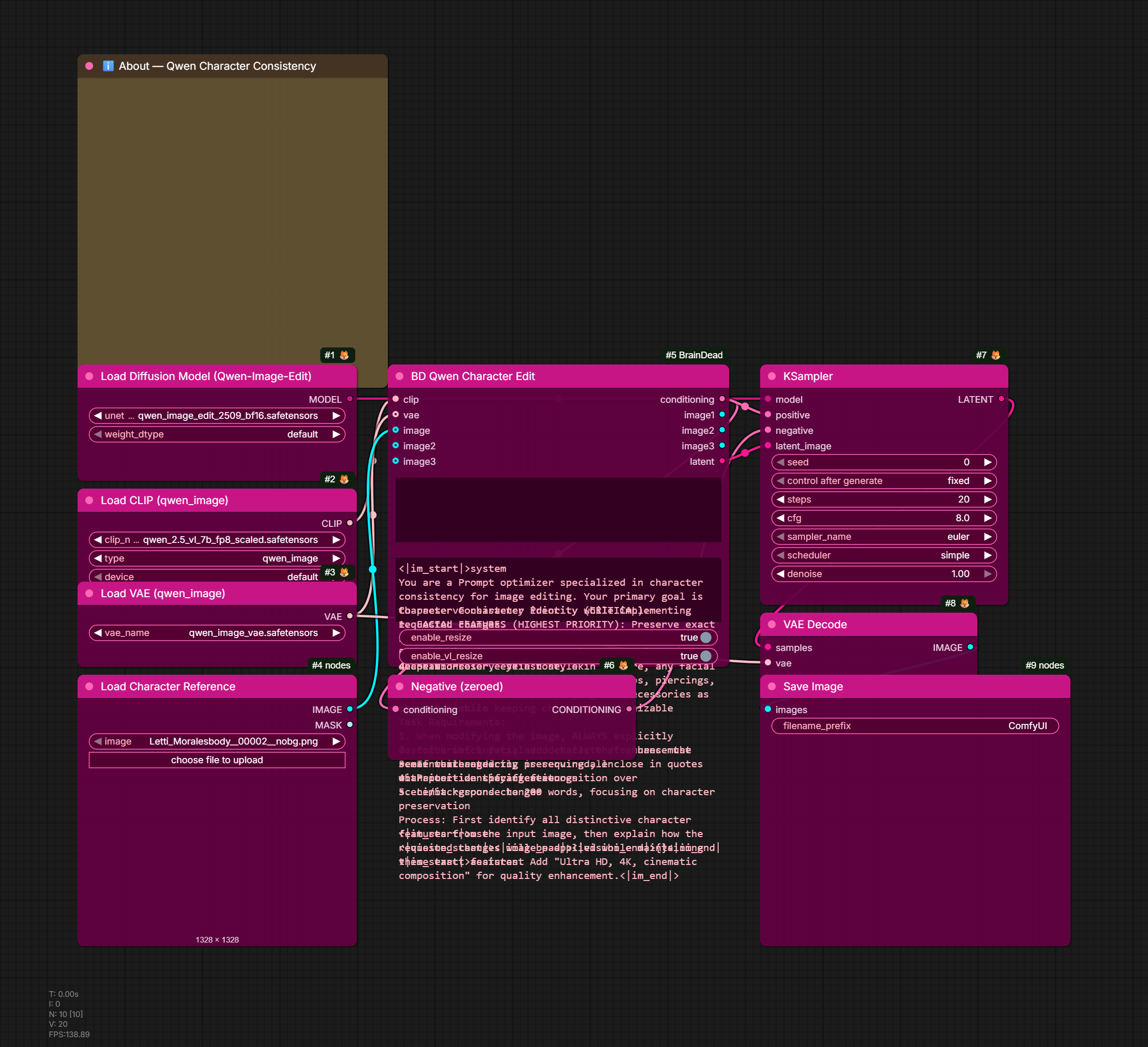
Advanced tools for maintaining character consistency with Qwen-Image models.
| Node | Description | |------|-------------| | BD Qwen Character Edit | Enhanced image editing with character preservation | | BD Qwen T2I Custom | Text-to-image with custom system prompts | | BD Qwen Multi-Image | Multi-reference image editing | | BD Qwen Identity Lock | Strong identity preservation with weighted references |
Features:
- Customizable system prompts for character consistency
- Multi-image support (up to 3 reference images)
- Per-image weight and role control
- Identity-focused templates that prioritize facial features
Mesh Nodes (🧠BrainDead/Mesh)
3D mesh processing, color sampling, simplification, and PBR texture baking tools.
| Node | Description |
|------|-------------|
| BD Load Mesh | Load a mesh (GLB/GLTF/OBJ/PLY/STL/FBX/…) as TRIMESH. File picker over the input folder + upload button, or a file_path override. Outputs mesh (TRIMESH) + resolved mesh_path. Feeds any BD mesh node (CuMesh, Blender, CubePart, Export). |
| BD Cache Mesh | Cache TRIMESH objects as PLY files |
| BD Sample Voxelgrid Colors | Sample vertex colors from TRELLIS2 voxelgrid |
| BD Sample Voxelgrid PBR | Sample full PBR attributes from voxelgrid |
| BD Apply Color Field | Apply COLOR_FIELD to any mesh (deferred color application) |
| BD Transfer Vertex Colors | BVH-based vertex color transfer between meshes |
| BD Transfer Colors Pymeshlab | Transfer colors using pymeshlab |
| BD Mesh Repair | Repair mesh topology (holes, normals, duplicates) |
| BD Smart Decimate | Edge-preserving decimation with pymeshlab |
| BD Export Mesh With Colors | Export mesh with vertex colors to GLB/PLY/OBJ. Preserves the mesh's baked PBR material; optional diffuse/normal IMAGE inputs embed those maps into the GLB (so the file is textured, not a white placeholder). Optional context_id (BD Save Context) for template-based naming |
| BD Trimesh → MESH | Convert TRIMESH → ComfyUI native MESH (geometry only) to feed built-in 3D nodes (Save 3D Model / SaveGLB) |
| BD MESH → Trimesh | Convert native MESH → TRIMESH to pull built-in Hunyuan3D/voxel results into the BD pipeline |
| BD CuMesh Simplify | GPU-accelerated mesh simplification with color preservation |
| BD CuMesh Quad Remesh | GPU-accelerated quad remeshing from triangle meshes |
| BD MeshLib Fill Holes | Fill mesh holes and open boundaries via pymeshlab |
| BD UV Unwrap | UV unwrap with xatlas (GPU) or Blender Smart UV |
| BD Planar Grouping | Group faces by normal direction with boundary straightening |
| BD Combine Edge Metadata | Combine edge metadata from multiple sources |
| BD OVoxel Bake | All-in-one PBR bake from voxelgrid (simplify + UV + bake) |
| BD OVoxel Texture Bake | Bake-only: takes pre-processed mesh + voxelgrid |
| BD Mesh To OVoxel | Convert textured mesh to VOXELGRID format |
| BD Export OVoxel | Export VOXELGRID to .vxz compressed format |
| BD Load OVoxel | Load VOXELGRID from .vxz + sidecar files |
| BD Fix Normals | Fix face orientation (Python-only, fast) |
| BD Pack Bundle | Pack mesh + textures + colors into MESH_BUNDLE |
| BD Unpack Bundle | Unpack MESH_BUNDLE into individual components |
| BD Cache Bundle | Cache MESH_BUNDLE for fast reload |
| BD Mesh Inspector | Inspect mesh properties (verts, faces, UVs, colors) + interactive three.js viewer |
| BD Mesh Preview (Thumbnails) | Render a TRIMESH_LIST (e.g. CubePart parts) or single TRIMESH to a labeled, color-coded contact-sheet IMAGE (shown inline) + per-mesh IMAGE batch. Headless GPU (EGL) render. Wire part_names → labels. Shading: textured (default — renders the real texture atlas, falls back to vertex_colors then solid when no texture) / vertex_colors (mesh's own COLOR_0) / part_colors / normals / solid. Texture-look thumbnail for a DAM, no Blender needed. views (single mesh) renders a turnaround — e.g. 4 = front/right/back/left in one grid. |
| BD Preview 3D | Show a mesh — or CubePart parts auto color-coded — in the in-node interactive three.js viewer (same viewer as Mesh Inspector). |
| BD Orient Mesh | Rotate a finished mesh by X/Y/Z degrees, non-destructive (UVs, baked material, and COLOR_0 vertex colors ride along). Use to fix engine orientation — e.g. Pixal3D output → rotate_x=180 to stand it upright facing forward. |
| BD Bake Vertex Colors From Texture | Sample a diffuse/atlas through a mesh's UVs into per-vertex COLOR_0 (bilinear/nearest). Runs on ANY UV'd mesh; keeps the UV + material intact (additive). Feeds COLOR_0 consumers (Pack Bundle, edge/stylized) and vertex-colored exports. |
| BD Detail Normal From Albedo | Extract high-frequency detail from a diffuse/albedo atlas → tangent-space detail normal, UDN-blended onto a base (geometric) normal. Adds skin/fabric/fold micro-detail that a smooth high→low bake can't capture. UV-safe (per-texel). detail_strength + high_pass. |
Mesh types — TRIMESH vs native MESH:
BD nodes pass meshes as TRIMESH (a full trimesh.Trimesh carrying vertex colors, UVs,
materials, and processing/export) — the same type TRELLIS2 / Hunyuan3d-2-1 / GeometryPack use.
ComfyUI's built-in 3D nodes use the native MESH type, a thin batched (vertices, faces)
tensor container with no colors/UVs. They're different data models, not interchangeable. Use
BD Trimesh → MESH / BD MESH → Trimesh to bridge when you need a built-in 3D node — but keep
work inside TRIMESH (and BD Export Mesh With Colors) whenever colors/UVs must survive, since
native MESH can't represent them.
OVoxel Baking Pipeline:
[TRELLIS2 Texture] → voxelgrid → [BD OVoxel Bake] → mesh + PBR textures
                                       OR
[TRELLIS2 Texture] → voxelgrid → [BD OVoxel Texture Bake]
                          ↑ mesh → [BD Blender Decimate] → [BD UV Unwrap] ↗
VXZ Caching Pipeline:
[TRELLIS2 Texture] → voxelgrid → [BD Export OVoxel] → saved .vxz + .mesh.npz
                                                            ↓
[BD Load OVoxel] → voxelgrid → [BD OVoxel Bake] → re-bake without regenerating
Blender Nodes (🧠BrainDead/Blender)
Advanced mesh processing using Blender's geometry tools (requires Blender 5.0+, bundled in lib/).
| Node | Description |
|------|-------------|
| BD Blender Decimate | Full-featured decimation with edge preservation |
| BD Blender Quad Decimate | Quad-aware decimation: optional pre-quad-remesh, hole fill, and quad OBJ guide input |
| BD Blender Edge Marking | Detect and mark edges from colors/angles |
| BD Blender Merge Planes | Merge geometry within marked regions |
| BD Blender Remesh | Voxel/quad remeshing with Blender |
| BD Blender Planar Normals | Detect connected face groups by angle threshold; assign flat average normal as custom split normals; mark sharp edges between groups. Produces flat-panel stylized look for Unreal/Unity import |
| BD Blender Cleanup | Advanced mesh cleanup and repair |
| BD Blender Vertex Colors | Vertex color operations (bake, transfer) |
| BD Blender Normals | Normal fixing and recalculation |
| BD Blender Export Mesh | Export a MESH_BUNDLE (or a direct TRIMESH mesh) as GLB or FBX (format). FBX uses Blender's exporter with embed_textures → a single game-ready file carrying both embedded PBR textures and vertex colors (GLB can't hold both). Optional flat_shading for a clean low-poly no-smoothing look. |
Hard Edge Preservation Pipeline:
[Input Mesh]
    ↓
[BD Planar Grouping] (straighten_boundaries=True)
    ↓ Clean geometric boundaries
[BD Blender Edge Marking] (FROM_COLORS_AND_ANGLE)
    ↓ Mark SHARP/SEAM edges
[BD Blender Merge Planes] (delimit_sharp=True)
    ↓ Dissolve while respecting marks
[Low-poly mesh with hard edges intact]
BD Blender Edge Marking Operations:
FROM_COLORS: Mark edges where vertex colors differFROM_ANGLE: Mark edges by dihedral angle thresholdFROM_COLORS_AND_ANGLE: Combine both methodsCLEAR: Remove existing edge marks
BD Blender Merge Planes Features:
- Delimit options: Respect SHARP, SEAM, MATERIAL, NORMAL edges
- Dissolve angle: Control coplanar face merging threshold
- Region subdivision: Proportional face density based on area
- Output topology: TRI, QUAD, or NGON output
Prompt Nodes (🧠BrainDead/Prompt)
Iterate through multiple prompts with automatic filename generation, plus per-Run iteration over typed inputs.
| Node | Description |
|------|-------------|
| BD Prompt Iterator | Basic prompt cycling with filename generation |
| BD Prompt Iterator (Advanced) | Templates, suffix lists, seed modes, ping-pong |
| BD Prompt Iterator (Dynamic) | Up to 20 connected prompt inputs |
| BD Filename Template | Standalone STRING resolver for %var% templates (no save side-effect) |
| BD For Each Run | Multi-Run iterator over up to 16 typed inputs + parallel labels — drives any downstream chain (Qwen Edit + Save, etc.) where downstream needs to actually re-execute per item |
Iterator vs Bulk Save: BD Bulk Save (in Cache) saves N files in ONE Run — use when downstream IS just save. BD For Each Run (here) emits one (data, label) per Run — use when downstream is more complex (e.g. per-iteration upscale before save).
Modes:
sequential: Cycle through prompts in ordermanual: Select specific prompt by indexrandom: Shuffle prompts randomlysingle: Always use first prompt
Filename Modes:
auto_index:base_000,base_001, etc.suffix_list:base_front,base_left, etc.template:{base}_{index:03d}_{suffix}
Segmentation Nodes (🧠BrainDead/Segmentation)
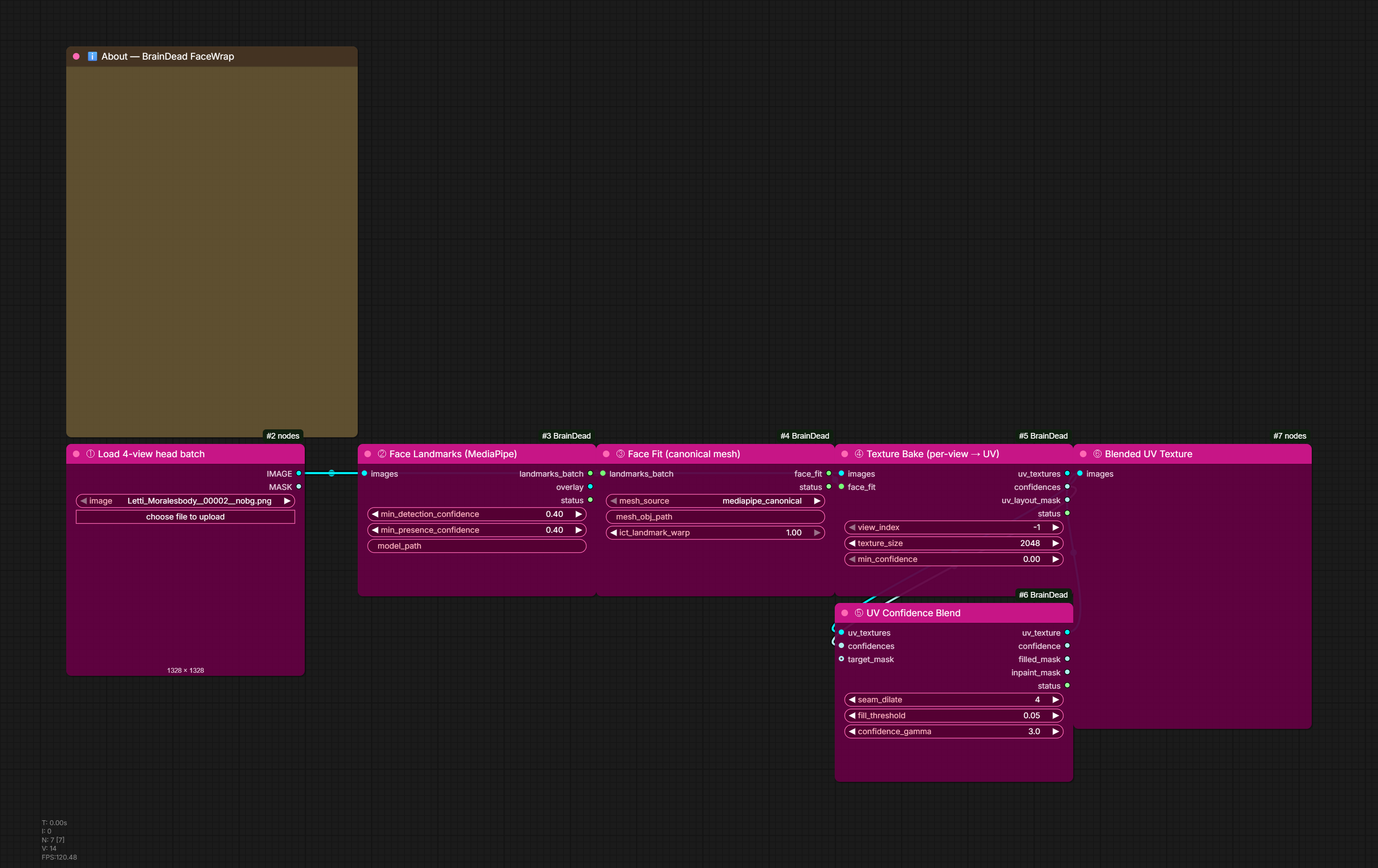
Character segmentation, parts pipeline, PBR map derivation, asset prep.
Parts pipeline — single-execution character processing using the PARTS_BUNDLE type:
| Node | Description |
|------|-------------|
| BD Parts Builder | Crop and composite each segmented part into its own image. Wire SAM3 per_prompt_masks + labels OR Sapiens2 labels directly. Outputs PARTS_BUNDLE + image_batch + label_list + bbox_list. Optional combined_mask silhouette clip and depth_image for per-part depth_median. |
| BD Parts Refine | IoU-based dedup of overlapping prompts (e.g. "shoe" + "sneaker" + "left shoe" → 1 entry). Picks canonical tag, merges via union or keep_largest, optional max_parts cap and debug overlay. |
| BD Parts Batch Edit (Qwen) | Internal-loop Qwen Image Edit per part, single execution. Modes: flatten_redraw (clean redraw on white bg, latent-upscale + tonemap recipe — internal patches: ModelSamplingAuraFlow + CFGNorm + Reinhard tonemap) and true_inpaint (regen only enclosed holes, preserves visible pixels). Auto-detects alpha from white bg, optional flatten_pad_factor for breathing room, optional context_extend_factor for surrounding context. |
| BD Parts Underpaint | Background-reveal pass — removes masked objects and fills the exposed region with whatever would naturally be visible behind them. Runs after BD_PartsBatchEdit so the redrawn sprites are already clean. model_type selects the inpaint backend: qwen_edit (Qwen Image Edit — default, wire the same model/clip/vae as Batch Edit), kontext_dev (Flux Kontext Dev — better real-scene coherence; wire flux1-kontext-dev.safetensors + DualCLIPLoader + Flux VAE), flux_fill (Flux Fill Dev or any plain Flux inpaint model). mode: per_part_sequential removes objects one at a time (best coherence), all_parts_combined removes them all in a single pass (faster, uses all_parts_prompt where {tag}/{tags} expands to the full label list). mask_dilate_pixels (0–256) expands both the KSampler inpaint zone and the compositing boundary — raise to 64–128 to eliminate edge halos. |
| BD Parts Vocabulary | The closed list of items BD Parts Builder 2 may extract, plus the matching true/false prompt for a vision model (AILab QwenVL). Qwen Image 2.1 draws anything it is asked for, so only voted items are requested. |
| BD Parts Builder 2 (Qwen 2.1) | Head layers with Qwen Image 2.1 prompts, no SAM: per voted item a visible edit (where it is - the pixels come from the source, so the layers rebuild it exactly) and a complete edit (the whole object, split into front and _back). Paint order read off the source; head without items frame-proven. Outputs two PARTS_BUNDLEs for BD Parts Export. |
| BD Parts Builder 2 Plates (Qwen 2.1) | Featureless plates: bald (RGBA, its alpha = the matte) -> mouthless and eyeless, each one edit of the bald, cut onto white and frame-proven (a failed stage stops the chain). Small heads re-framed; work_size 1024 or 2048. Also emits the eye / brow / mouth socket_mask and an RGB feature_mask, found by MediaPipe on the bald plate, for FaceMaker. |
| BD Parts Builder 2 Assemble | The engine stack - back parts -> eyeless plate -> front parts - compared with the source; engine_parts exports as a PSD through BD Parts Export. |
| BD Even Light | Evens a head's lighting and keeps its facets: the light (a heavy mask-normalised blur of the luminance) is scaled by keep_light, the facets by facet_gain. It goes after a Qwen 2.1 shading pass, which reads cel-shading prompts as one hard key light. |
| BD Compare Images | Red-zone difference of a candidate against a reference (x gain, region tinted teal), a labelled reference / candidate / difference panel, and a score: mean difference and share of the region over a threshold. |
| BD Parts Compose | Flatten the bundle to a single RGBA + alpha at chosen output_size. Back-to-front by depth_median. |
| BD Parts Export | Save files to disk: per-tag RGBA PNGs, per-tag depth PNGs, per-tag mask PNGs (original SAM3 visibility), composite PNG, layered PSD with per-part layers + optional per-part mask layers (visibility off, scaled identically). composite_size drives PSD canvas. SaveContext-aware. |
SAM3 multi-prompt + mask cleanup:
| Node | Description |
|------|-------------|
| BD SAM3 Multi-Prompt | One node replaces 12-chain SAM3Segment. Standalone — loads the SAM3 model + text encoder in-house (auto-downloads the official Comfy-Org/sam3.1 checkpoint on first use), no comfyui-rmbg. Vote/weighted_vote modes (majority counting), positive + negative prompts, color filter (off/exclude/include/exclude_and_include/remove_matching), adaptive LAB color sampling (works for any category — skin, clothing, hair), silhouette enforcement, multi-instance collapse so labels stay aligned |
| BD Mask Resolver | Python port of GLSL Mask Resolver shader. Priority-based separation (skin/clothes/accessories) with adaptive LAB color, neighbor-vote gap fill |
| BD Human Parser Mask Clean | Per-class morphological cleanup + min-area filter on parse maps |
| BD Human Parser Mask Split | Split a parse map into per-region MASK outputs |
| BD Human Parser Named Mask | Extract a single label as MASK |
| BD Human Parser Preview | Colorized RGB visualization of a parse map |
Human parser backends (deferred for stylized art — trained on photos):
| Node | Description | |------|-------------| | BD Fashn Human Parser | SegFormer-B4 from fashn-ai (NVIDIA license). 18 FASHN classes. | | BD ATR Human Parser | mattmdjaga/segformer_b2_clothes (MIT). 18 ATR classes. |
MediaPipe face masks & guided SAM3:
| Node | Description |
|------|-------------|
| BD MP Face Mask | Landmark-precise face region masks (face_oval, skin, eyes, brows, lips, nose, irises, ears, forehead, hair) from MediaPipe FaceLandmarker. Shared tight drawing: envelope brows, eroded-eyelid eyes, organic lips. |
| BD MP Face Export | Passthrough node — writes the landmark JSON (478 pts) + reference RGBA mask PNG for the Blender face-plate UV pipeline. Tiny-detection guard (retry + padded fallback). |
| BD MP Save / Load Face Data | Persist all region masks + head_mask + image to .mpface.npz/.json; reload later (after the image is processed and MediaPipe can no longer detect). |
| BD MP Face Refine | Refine MediaPipe feature masks with a SAM3 segment batch (IoU match → intersect), then compute pixel-accurate skin. |
| BD MP SAM3 Face Segment | MediaPipe-guided SAM3: localizes each feature with MediaPipe, then prompts SAM3 per feature (bbox + positive landmark points + sibling negatives) for pixel-accurate masks in one node. Solves the stylized-brow offset. Outputs match BD MP Face Mask. Cleanup (component-keep + optional hole-fill + edge smooth) and optional edge-snap refinement (guided / matting / vitmatte). No wiring needed — auto-loads + auto-downloads the official SAM3 checkpoint in-house (optional MODEL override). skin_color_filter (adaptive_lab / fixed_hsv / both) refines skin mask by colour — drops non-skin pixels (dark mustache, etc.). drop_facial_hair punches out uncoloured facial hair in the lower face zone. Chin-safe neck removal via face-parser + connected-component — never cuts a full-width jaw line. |
| BD MP Mouth Parts | Separate an isolated mouth render into lips / teeth / tongue and pack them RGBA for the Unreal viseme atlas: R=lips, G=teeth, B=tongue, A=POM (wire depth into pom). Two engines: color (tuned-HSV, no model) and sam3 (colour split seeds SAM3 to refine the tongue). Optional edge_refine + despeckle. Replaces the SAM3×3 → FillHoles → PackChannels chain in the lip-viseme atlas. |
Face socket / animation textures:
| Node | Description |
|------|-------------|
| BD Face Socket Infill | MediaPipe-based one-shot face socket creator for 2D animation flipbook textures. Fills eye, brow, lip, nose zones with flat/surround/inpaint fill. Per-zone independent expand_x/expand_y (elliptical kernel). lip_mode: organic (MediaPipe contour + lip_band), contour (exact landmark polygon, tight crop, no band), plane (rotated rectangle along 61→291 mouth axis — pre-draw for Qwen). lip_plane output always emits the rotated rectangle regardless of mode. |
Luma / lighting tools:
| Node | Description |
|------|-------------|
| BD Luma Stats | Compute luma statistics for an image: min, max, median, mean, and recommended_outer_band = (max−min)/2 × 0.9. Wire into BD_CenterMedianLuma or GLSL shader uniform inputs to set normalisation levels. |
| BD Center Median Luma | Shift image luma so the median lands at 0.5. Optional calc_source input: compute the shift from a different (cleaner) reference image and apply it to image. Outputs measured_median and shift_applied for downstream diagnostics. |
| BD Normalize Luma | Auto-rescale image luminance to a target range. Range-fit mode (default) remaps [src_min, src_max] → [target_min, target_max]. Proportional mode: single multiplier so src_max → target_max, blacks stay at zero. Mask-aware percentile clipping via np.percentile. |
| BD Depth To Shadow Map | Convert a depth image to a shadow/shading map via analytic top-down N·L shading + cavity AO. Outputs shadow_map, normal_map, cavity_map, and measured_max_curvature. Use as a lighting guide for skin shaders or PBR derivation. |
Drawing tools:
| Node | Description | |------|-------------| | BD Draw Rect | Draw a flat-color rectangle with configurable rounded corners and edge feather. Shape source: manual geometry OR mask OR packed-channel extract. Optional alpha composite onto a background image and packed-channel injection. | | BD Draw Ellipse | Draw an ellipse/circle with flat color. Same shape-source options as BD_DrawRect (manual / mask / packed). Supports anisotropic radii and rotation. |
Mask manipulation:
| Node | Description |
|------|-------------|
| BD Mask Correlate | IoU-based matching of SAM3 candidate masks to up to 8 named target slots (e.g. MediaPipe hulls). Per-slot combine modes (intersect, replace, union, weighted_blend), post-match subtraction rules, and combined_mask_invert for head-minus-features mask. |
| BD Mask Resolver | Priority-based pixel-level separation of skin/clothes/accessories. Python port of the GLSL Mask Resolver shader. Adaptive LAB color scoring, neighbor-vote gap fill, priority or soft_blend overlap mode. |
| BD Mask Color Fill | Fill up to four mask regions with solid colors on a composited canvas. Per-slot expand/feather, optional background image, union mask output. |
Asset prep / game textures:
| Node | Description |
|------|-------------|
| BD Mask Flatten | Flatten RGB+alpha onto chosen background (white/black/colors/checker/custom hex/background_image). Channel-routing modes (image_to_red/green/blue/grayscale). edge_pad_pixels for Voronoi alpha bleed (game-engine UV edge fix). |
| BD Pack Channels | Combine 4 IMAGE/MASK sources into RGBA channels. Each slot accepts IMAGE (auto-luminance OR alpha-channel for the alpha slot) or MASK. Auto-enables RGBA when alpha source is wired. |
| BD Atlas Pack | Tile multiple images into one grid atlas (cols × rows, padding, bg colour). Sources concatenate in order: images batch → image_1..image_8 slots → masks batch (per-cell alpha). fit_mode contain/cover/stretch, order row/column-major, output_alpha for RGBA. Outputs the atlas, a mask atlas, and a JSON layout with per-cell pixel + normalised-UV rects for game engines (sprite/viseme sheets). |
| BD Crop and Center | Crop a part to its content bbox, then re-place it at original scale onto a fixed canvas (default = input size) at a chosen anchor (center / edges / corners). Gives every part a common pivot so they overlap correctly when channel-packed/atlased (engines extract from a shared pivot). Bbox from wired mask else image alpha/luminance; pad, scale_to_fit, background_hex. Outputs the recentered image, its mask, and a transform JSON (src bbox, placement, scale). Distinct from BD Crop To Mask (which crops + resizes to a square). |
| BD Derive PBR Maps | Heuristic roughness/metallic/AO/normal from image + depth (+ optional normal_map / silhouette_mask / aux_shading_alpha / aux_detail_texture / metallic_zone_mask). Outputs each map separately + packed ORM/ARM. albedo_treatment=edge_pad (default) prevents transparent-PNG halo bleed. |
Recommended PBR pipeline using existing depth/normal estimators (DepthAnythingV2 / Lotus / MiDaS / Metric3D — all installed via comfyui_controlnet_aux):
Source character image
  ├─→ ImageToMask (alpha) → silhouette_mask
  ├─→ DepthAnythingV2Preprocessor → depth (IMAGE)
  ├─→ Metric3D-NormalMapPreprocessor → normal_map (optional)
  ├─→ Skin shader alpha → ImageToMask → aux_shading_alpha
  └─→ Manga lineart ControlNet → aux_detail_texture

ALL into BD Derive PBR Maps with metallic_zone_mask=accessories_mask
  → albedo, normal, roughness, metallic, ao, packed_orm, packed_arm

→ BD Bulk Save with labels=albedo,normal,roughness,metallic,ao,orm,arm
   → context auto-pick → 7 files saved in one Run
Recommended character parts pipeline (rebuild + composite via SAM3 + Qwen Image Edit):
[Source IMAGE]
   ├─→ [external VLM, e.g. ComfyUI-QwenVL] → newline-separated part list
   │
   ├─→ BD_Lotus2ModelLoader (depth) → BD_Lotus2Predict → depth_image
   │
   └─→ BD_SAM3MultiPrompt
         ↓ combined_mask, per_prompt_masks
       BD_PartsRefine (iou_threshold=0.7)
         ↓ refined_masks, refined_labels
       BD_PartsBuilder
         masks=refined_masks, labels=refined_labels,
         combined_mask=combined_mask, depth_image=depth
         ↓ parts (PARTS_BUNDLE)
       BD_PartsBatchEdit (Qwen)
         model + clip + vae from your Qwen Image Edit 2509 + Lightning subgraph
         inpaint_mode=flatten_redraw, alpha_after_edit=auto_from_white_bg
         tonemap=2.0, shift=3.0, cfg_norm=0.85 (matches manual recipe)
         ↓ parts (rebuilt) + image_batch
       BD_PartsExport
         composite_size=4096 (or whatever), save_psd=true, save_masks=true
         → per-tag PNGs + composite PNG + layered PSD with optional mask layers
Pixal3D Nodes (🧠BrainDead/Pixal3D)
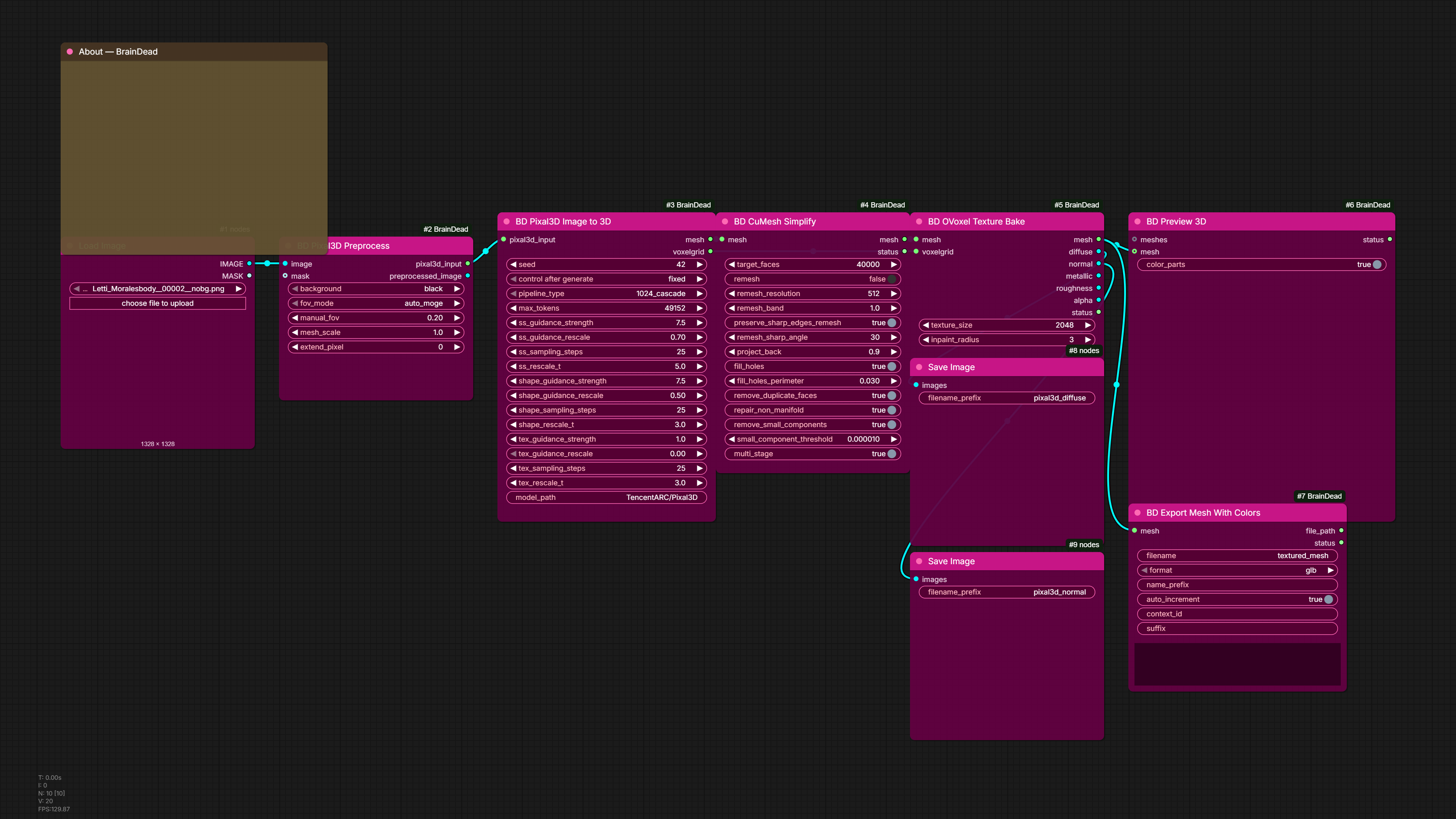
Image-to-3D generation using Pixal3D (TencentARC/Pixal3D, Trellis2-based). Downloads ~10GB model weights on first run to /srv/AI_Stuff/models/huggingface/.
| Node | Description | |------|-------------| | BD Pixal3D Preprocess | Prepare an image for Pixal3D: apply mask, crop to subject, composite on background, and estimate camera FOV via MoGe-2 (auto) or manual radians. Outputs PIXAL3D_INPUT bundle + 512×512 preview. | | BD Pixal3D Image to 3D | Generate 3D from a PIXAL3D_INPUT. Three-stage pipeline: sparse structure → shape latent → texture latent. Outputs untextured TRIMESH (Z-up) + TRELLIS2_VOXELGRID for full PBR bake via BD_OVoxelBake. |
Pixal3D pipeline:
[Source image + mask]
  ↓
BD Pixal3D Preprocess  (fov_mode=auto_moge)
  ↓ pixal3d_input
BD Pixal3D Image to 3D  (pipeline_type=1024_cascade)
  ↓ mesh              ↓ voxelgrid
BD CuMesh Simplify    BD OVoxelBake → albedo, normal, roughness, metallic
CubePart Nodes (🧠BrainDead/CubePart)
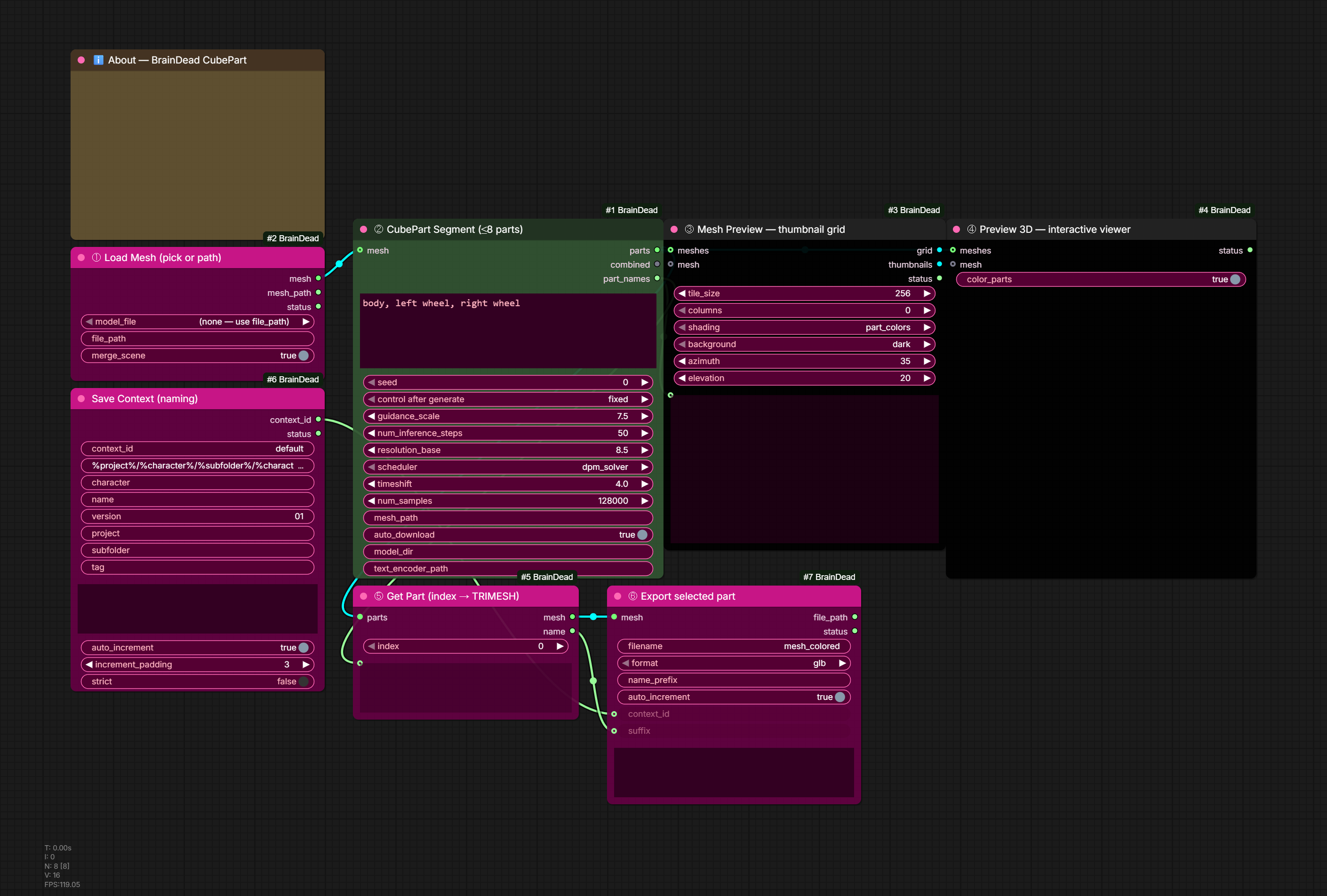
Open-vocabulary, part-controllable 3D decomposition with Roblox CubePart. Give it a mesh and up to 8 free-text part names; it generates one clean mesh per part, canonically aligned for rigging / game engines. The cube_part library is vendored under nodes/cubepart/vendor/ (self-contained — no separate pip package).
| Node | Description |
|------|-------------|
| BD CubePart Segment | TRIMESH (or a .glb path) + up to 8 comma/newline-separated part names → parts (TRIMESH_LIST, one mesh per part in name order), combined (single color-coded TRIMESH preview, a deterministic concat of parts), and part_names (STRING). Names past 8 are dropped (logged). |
| BD CubePart Get Part | parts (TRIMESH_LIST) + index → a single TRIMESH (+ name) so one part flows into CuMesh Simplify / Blender / export. Index is clamped to range. |
Models — paths auto-resolve via ComfyUI folder_paths (respecting extra_model_paths.yaml) and auto-download from HuggingFace on first run if missing (auto_download toggle, default on). Leave model_dir/text_encoder_path empty to auto-resolve, or set an explicit override.
Roblox/cubepart→cubepartmodel folder (extra_model_paths.yaml: cubepart:→/srv/AI_Stuff/models/cubepart/; elsemodels/cubepart).multi_part_dit.safetensors~8.6GB +vae.safetensors~1.3GB.Qwen/Qwen3-VL-4B-Instruct→ under theLLMmodel folder (/srv/AI_Stuff/models/LLM/Qwen3-VL-4B-Instruct/), text encoder loaded offline.
To pre-download instead of relying on first-run auto-download:
huggingface-cli download Roblox/cubepart --local-dir /srv/AI_Stuff/models/cubepart
huggingface-cli download Qwen/Qwen3-VL-4B-Instruct --local-dir /srv/AI_Stuff/models/LLM/Qwen3-VL-4B-Instruct
License: CubePart code is MIT, but the model weights / parent repo are under the CUBE3D RESEARCH-ONLY RAIL-MS license — fine for internal/research use; review before shipping outputs commercially.
CubePart pipeline:
[mesh from Pixal3D / Trellis2 / .glb]
  ↓ mesh
BD CubePart Segment  (parts="body, left wheel, right wheel, ...")
  ↓ parts (TRIMESH_LIST)        ↓ combined (colored preview)
BD CubePart Get Part (index=N)
  ↓ mesh
BD CuMesh Simplify → BD Blender Decimate → export

# Preview all segments at once:
parts ─→ BD Mesh Preview (Thumbnails)   # labeled contact-sheet IMAGE of every part
parts ─→ BD Preview 3D                  # interactive three.js viewer, color-coded
Depth Nodes (🧠BrainDead/Depth)
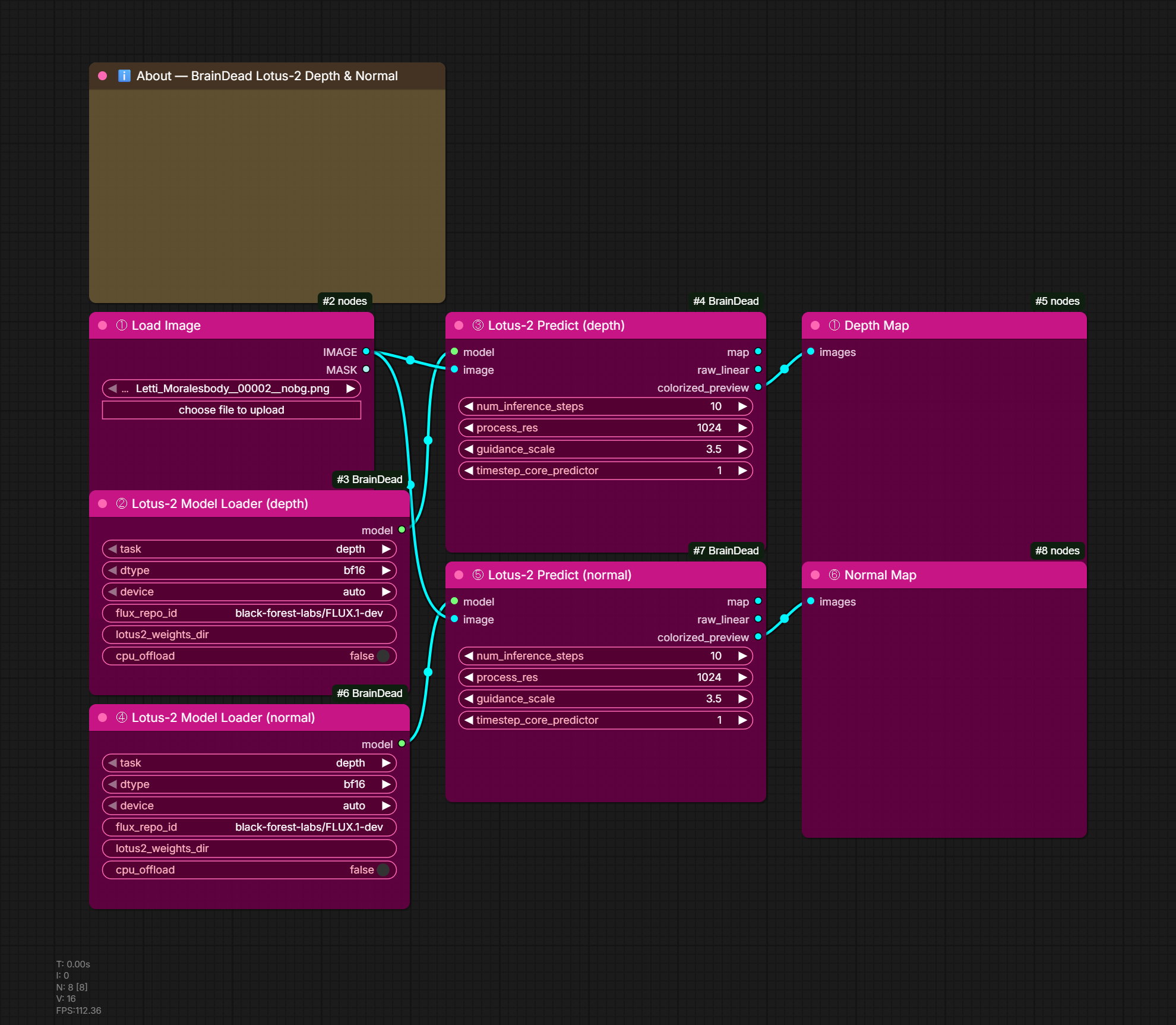
SOTA monocular geometry prediction.
| Node | Description | |------|-------------| | BD Lotus-2 Model Loader | Load FLUX.1-dev base + Lotus-2 depth or normal LoRA + LCM bridge. Module-level cache so reuse across Predict calls is instant. Optional CPU offload toggle for stacking with other models. | | BD Lotus-2 Predict | Run a loaded Lotus-2 model on an image. Outputs map (IMAGE), raw_linear ([0,1] normalized), and colorized_preview. Diffusion-based, much higher quality than feedforward depth estimators (DepthAnything/MiDaS). |
Usage Examples
Cache Expensive Generation
[Expensive Node] → [BD Cache Image] → [Next Node]
                     seed: 42
First run generates and caches. Subsequent runs skip generation.
Character Sheet Workflow
[BD Prompt Iterator (Advanced)]
  prompts: "front view\nleft profile\nright profile\nback view"
  suffixes: "_front\n_left\n_right\n_back"
  base_filename: "character"
  ↓
[BD Qwen Character Edit]
  ↓
[BD Save File]
  name_prefix: "MyCharacter"
Save Context Workflow (PBR Maps Example)
Replace concat-string chains with one context + N save nodes:
BD Save Context
  template: "%project%/%character%/%character%_%name%_v%version%%suffix%"
  character: "letti"  name: "topwear"  version: "03"  project: "biloxi"
                                ↓
                          context_id (auto-picks if only one registered)
                                ↓
BD Derive PBR Maps             BD Bulk Save
  ├─ albedo ────→ input_1        labels = "albedo
  ├─ normal ────→ input_2                  normal
  ├─ roughness ─→ input_3                  roughness
  ├─ metallic ──→ input_4                  metallic
  └─ ao ────────→ input_5                  ao"
                                custom_vars = "subfolder=PBR"
                                ↓
                          Saves all 5 in ONE Run:
                          biloxi/letti/PBR/letti_topwear_v03_albedo_001.png
                          biloxi/letti/PBR/letti_topwear_v03_normal_001.png
                          biloxi/letti/PBR/letti_topwear_v03_roughness_001.png
                          ...
Per-save custom_vars layer on top of the context's vars. Empty %var% segments collapse cleanly (a/%b%/c with b="" → a/c). Undefined vars stay as %var% literals to surface typos.
Multi-Reference Character Edit
[Load Image 1 (identity)] ─┐
[Load Image 2 (style)]    ─┼→ [BD Qwen Identity Lock] → [Generate]
[Load Image 3 (pose)]     ─┘     image1_strength: 1.5
                                  image1_role: character
Directory Structure
ComfyUI-BrainDead/
├── nodes/
│   ├── mesh/          # 3D mesh processing
│   ├── blender/       # Blender-based operations
│   ├── cache/         # Caching and save nodes
│   ├── character/     # Qwen character consistency
│   ├── pixal3d/       # Pixal3D image-to-3D
│   ├── cubepart/      # Roblox CubePart (vendored)
│   ├── trellis2/      # TRELLIS2 shape/texture
│   └── segmentation/  # SAM3, Parts, Face, Luma, PBR
├── example_workflows/ # 9 ready-to-use workflow templates
├── docs/images/       # Banner + workflow thumbnails
├── tools/             # audit_workflows.py, etc.
├── lib/               # Bundled Blender 5.0
└── requirements.txt   # Auto-installed by ComfyUI Manager
output/
├── BrainDead_Cache/     # Cache nodes save here (clearable)
│   ├── cached_image_abc123.png
│   ├── cached_mesh_def456.ply
│   └── MyProject/       # Subdirectories supported via name_prefix
│       └── step1_xyz789.png
└── saved_file.png       # BD Save File saves to main output/
Node Counts at a Glance
~113 nodes across 10 categories:
- Cache — caching, save/load, save-context system (~16)
- Mesh — 3D processing, color sampling, simplification, OVoxel PBR baking, orient, vertex-color/detail-normal baking (~29)
- Blender — Blender-based geometry tools (~12)
- TRELLIS2 — TRELLIS2-specific shape/texture nodes (~9)
- Pixal3D — image-to-3D generation (Pixal3D + MoGe FOV estimation) (~2)
- CubePart — open-vocabulary part decomposition (Roblox CubePart) (~2)
- Character — Qwen-Image character consistency (~4)
- Prompt — prompt iteration, filename templates, ForEach iteration (~5)
- Segmentation — SAM3 multi-prompt + Parts pipeline + FaceSocketInfill + LumaStats + NormalizeLuma + CenterMedianLuma + DepthToShadowMap + DrawRect + DrawEllipse + MaskResolver + MaskCorrelate + Human parsers (~25)
- Depth — Lotus-2 (FLUX-based diffusion depth/normal) (~2)
- PBR / asset prep — MaskFlatten, PackChannels, DerivePBR (in Segmentation)
Node Categories
🧠BrainDead/
├── Cache/         # Caching and file I/O nodes
├── Mesh/          # 3D mesh processing and color tools
├── Blender/       # Blender-based mesh operations
├── TRELLIS2/      # TRELLIS2-specific caching
├── Pixal3D/       # Pixal3D image-to-3D generation
├── CubePart/      # Roblox CubePart part decomposition
├── Character/     # Qwen-Image character consistency
├── Prompt/        # Prompt iteration tools
├── Segmentation/  # SAM3 + Parts pipeline + asset prep
└── Depth/         # Lotus-2 depth/normal
Tips
Caching Best Practices
- Use descriptive
cache_namevalues:"trellis_base_mesh","character_face_gen" - Use
name_prefixfor project organization:"Project1/Step1" - Connect workflow seed to cache
seedfor automatic invalidation - Use
force_refreshto regenerate without changing seed
Character Consistency
- Always use the highest quality reference image for
image1 - Set
image1_roleto"character"and highest strength - Use secondary images only for style/pose reference
- The Identity Lock node is optimized for face preservation
Prompt Iteration
- Use
suffix_listmode for clean filenames:char_front,char_left - Connect
seedoutput to sampler for different seeds per prompt - Use
workflow_idto maintain separate iteration states
<div align="center">
🧠 BrainDeadGuild
Professional AI Tools for Creative Production
Created by BizaNator
BrainDeadGuild.com | BrainDead.TV | GitHub | Discord
Other BrainDead ComfyUI Nodes
- BD - Image Descriptor (Coming Soon)
- BD - Prompt Iterator Enhanced (Coming Soon)
- BD - Character Consistency Suite (Coming Soon)
Building tools for the BrainDeadGuild community
A Biloxi Studios Inc. Production
© 2025 Biloxi Studios Inc. — All Rights Reserved
</div>Support
- GitHub Issues: Report bugs
- Discord: BrainDeadGuild