
kubakub nodes
kubakub nodes for projection mapping: facade regions from masks, Illustrator files and 3D ID maps, region-wise diffusion, the kubakub director (layers, lights, timeline, video, H3 clips) and delivery export.
Nodes (78)
Putting a generated mesh where the projector actually expects it
The 3-pixel drift that ruins a projection
Get your Resolume look into ComfyUI, or your ComfyUI look out
Fix the projector's hotspot before it hits the wall
Timecode on every frame so you can actually talk about frame 738
Stop stretching your 4K matrix to fit a model's grid
Crop the padding, land on the exact matrix size
Get your matrix onto the model's grid without breaking it
Steal the look off a still you like, without the flicker
Because diffusion video flickers and you can't fix it in the graph
A compositing window inside ComfyUI, aimed at buildings
The node the director builds for you (don't hand-wire it)
Turn the timeline into frames, audio and a delivered file
ProRes out of ComfyUI, with the audio attached
Turn a facade into a list of named regions
How far the generated forms stick out of the real wall, as a picture
Real rooms and parasites behind every window
The depth guide that frame in frame replaced
Make the building grow out of the wall, one frame at a time
Animate two frames of the timeline with local MiniMax H3
Put your own hand back on top of the render
Masks that move, on a curve, on the beat
Turn a facade into a grey ramp so masks can travel across it
Your camera stays put, LTX does the repainting
Make the stones of a building jump on the kick drum
The weight that decides which stones move
Clay for the projector, or the matrix cast onto them
The node that actually moves the stones
Set the building's size in metres once, instead of in eleven different nodes
Metres, not a camera you don't have
Two projectors, one wall, and no bright seam down the middle
One prompt per window, written as a text file, not forty nodes
A prompt per region, and nothing else to type
Diffuse a facade one window at a time, and leave the rest pixel-exact
Every object in your scene, as a region with its real name
Houdini ID renders in, named regions out
Read the client's Illustrator file directly, layers and all
Turn any pile of masks into named, groupable regions
Every closed shape in your drawing becomes a region — gaps and all
Turn 'all the windows' into a mask any node can use
60' and get sixty named window masks
Regions out as SVG, PDF or DXF — for a plotter, a laser, or Illustrator
Animate three windows of a building, leave the other four hundred alone
Your own render passes, as a picture plus a mask per pass
Half-speed in-betweens without leaving ComfyUI
A fake building you can light up in 30 seconds — and the fastest way to test kubakub nodes
Learn the 3D half of kubakub without a single 3D file
Phone photo of a pencil sketch in, projector-ready line art out
The node that measures the building in actual metres
Where a MOPS-style facade animation starts
See the projection from the pavement, before you hire the projector
Lamps, HDRI and a projection as a light source — lighting your building in Cycles
The Blender bridge that does the actual hard work
OpenStreetMap neighbours, as grey boxes, for free
A video of someone walking past your projection
Kill the hard line between two regions without re-rendering the whole facade
74 moving pictures on your GPU, no model to download
Two moving pictures and one number between them
Find the tempo once, so every node steps on the same beat
Make the layers trade places on the kick drum
The numbered contact sheet workflow
Where the audience is standing, as three numbers you only write once
A folder loader that runs your graph once per image and can resume where it stopped
Turning a model into a millable relief in millimetres
Walk around the mesh and find every foothold
No camera, just arithmetic you'd otherwise get wrong
A mosaic where the tiles stay real material
Bring your own trained pix2pix model, run it at full resolution
The node that makes your facade unclimbable — relief anti perch
Relief export panel (STL)
Relief export prow (OBJ)
A depth map is a relief panel waiting to happen — relief field (from depth)
Relief mass estimate
Round your relief before the mould laughs at you — relief mould prep
Where can someone stand on this thing? relief safety check
Save the mesh before ComfyUI eats it — save trimesh glb
Clip names that sort themselves by song position — timecode filename prefix
LTX audio that never drifts — trim to exact duration
kubakub nodes
Projection mapping inside ComfyUI. Tools to turn a building facade into a show: split it into its parts, give every part its own material and its own prompt, move it with curves and sound, compose it in a timeline window, and export the result for the projector.
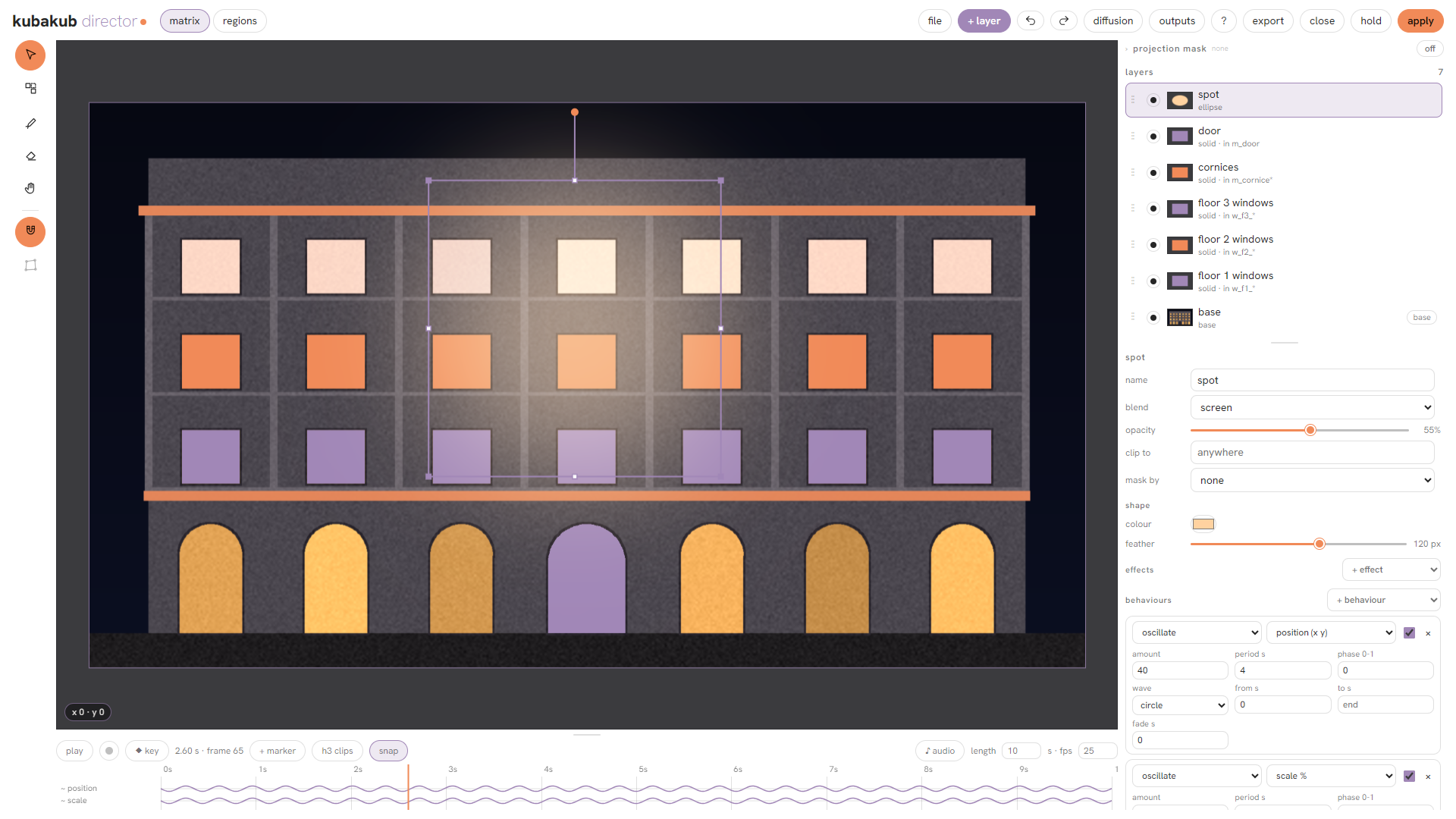
Layers clipped to the windows of the sample facade, moved by behaviours on the timeline (starter 03 with the regions of starter 01 connected):
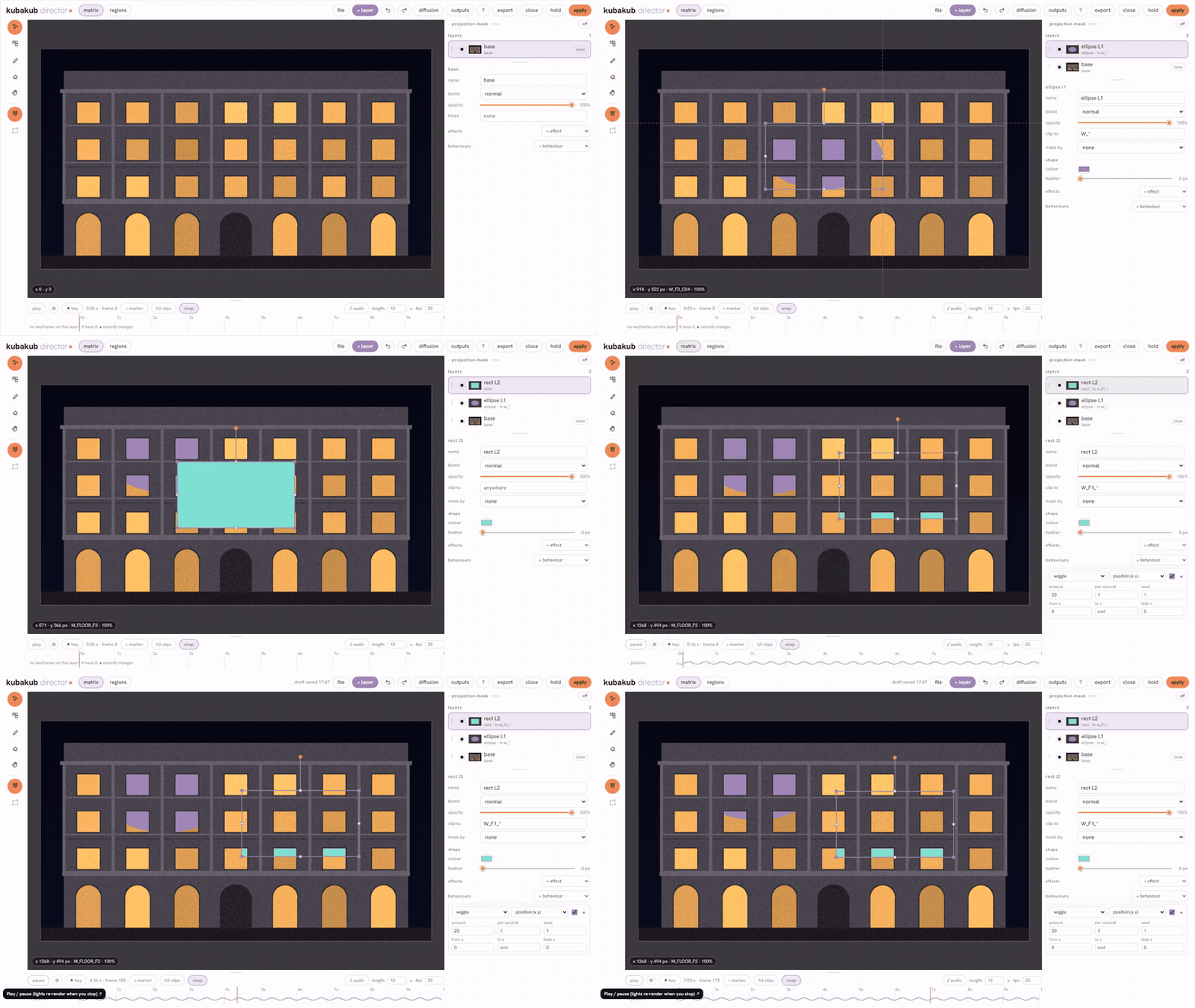
What's new
0.5.0, Flux 3 Klein, and your 3D app live:
- Flux 3 Klein in the region sampler, with the crop and a style picture as references, about 9 s a region on a 12 GB laptop GPU; a flux 3 klein preset in the director.
- The whole facade in one pass, each material in its place.
first_passwith Flux 3 tells the model which regions each prompt is for (boxes taken from your regions). after first pass = whole picture only paints a 75 region facade in under a minute; or let every region refine it for the full detail. - A prompt upsampler turns your short region prompts into full instructions while it looks at each crop.
- Live from Blender or Houdini. kubakub scene render takes the scene open in your app, through your viewport or a camera from a list; press refresh. Installing the add-ons: docs/live-link.md.
- Tidier nodes: the fine-tuning inputs fold behind one more settings row (changed ones stay visible).
- Paste an OSL shader into kubakub shader; video with any LTX or H3 model; and every
which regionsfield reads your text the same way and names the regions when a typo matches none.
Everything that changed, version by version: CHANGELOG.md. Updates arrive through ComfyUI Manager
(Update) or git pull; a problem or a wish: open an issue.
How the parts fit together
The pack answers five questions, and each one has one place where you answer it.
Where? Regions. The facade split into every window, door, cornice and floor, each with a name. From a colour
matrix, a folder of After Effects masks, an Illustrator file, a hand sketch, SAM 3, a cryptomatte or ID render, or
straight from a 3D file. Every other node works on these regions, and wherever you choose some of them the field
is called which regions and reads the same way (W_F1_*, group:Windows).
What? A shader is the material. kubakub shader draws moving pictures and masks on the graphics card, with no AI model: 74 presets picked by their moving picture and adjusted with sliders and colours, or a shader pasted from shadertoy.com. Connect your regions and it draws in them, each window with its own colour, pace or pattern. A second shader node behind the first is a second layer. Its picture is then a material:
- for the eye, as it is, on the facade or as the fill of a shape in the director;
- for a model: one cable into the region sampler and Flux 2 Klein or Qwen Image paints along its forms;
- for video: the same cable into the region video sampler and LTX moves the windows as the shader moves.
When? Curves and sound. A value that runs over time is a curve drawn on the node: buttons for its type, drag for its speed. mask animate runs a reveal, a band or rings across the building, height animate lets forms grow out of the wall. kubakub sound holds your music and how it is heard (tempo, loudness, hits) and carries it on one cable to every node that listens, so all of them step on the same beat.
Who paints it? A prompt per region. A short rule text gives each region, group or floor its own prompt and settings. The region sampler diffuses them one by one and the facade around them stays pixel exact; versions makes a numbered sheet of looks from one queue; LTX 2.5 and MiniMax H3 animate chosen regions while the building stays still.
How does it come together? The director. A compositing window inside ComfyUI, made for facades: layers (images, video, colour, shapes with shader fills, paint, light) that you move, mask and clip to parts of the building, a timeline with keyframes, behaviours, markers and sound, and export as stills, video or ProRes. Any layer can be re-diffused from inside the window.
Around these:
- 3D. scene render reads a
.fbx/.blend/.glbwith Blender and renders the projector's view as clay, depth and ID passes; every stone, window and column becomes a region by itself. projector places a projector in metres from the wall, several projectors get their blend masks. Audience spots and a walk are placed on a map on the node for the previz, and the model's pieces can be pushed, tilted and turned by waves and beats. - Finishing. Colour match, deflicker, retime, burn in, delivery export; even brightness on the real building.
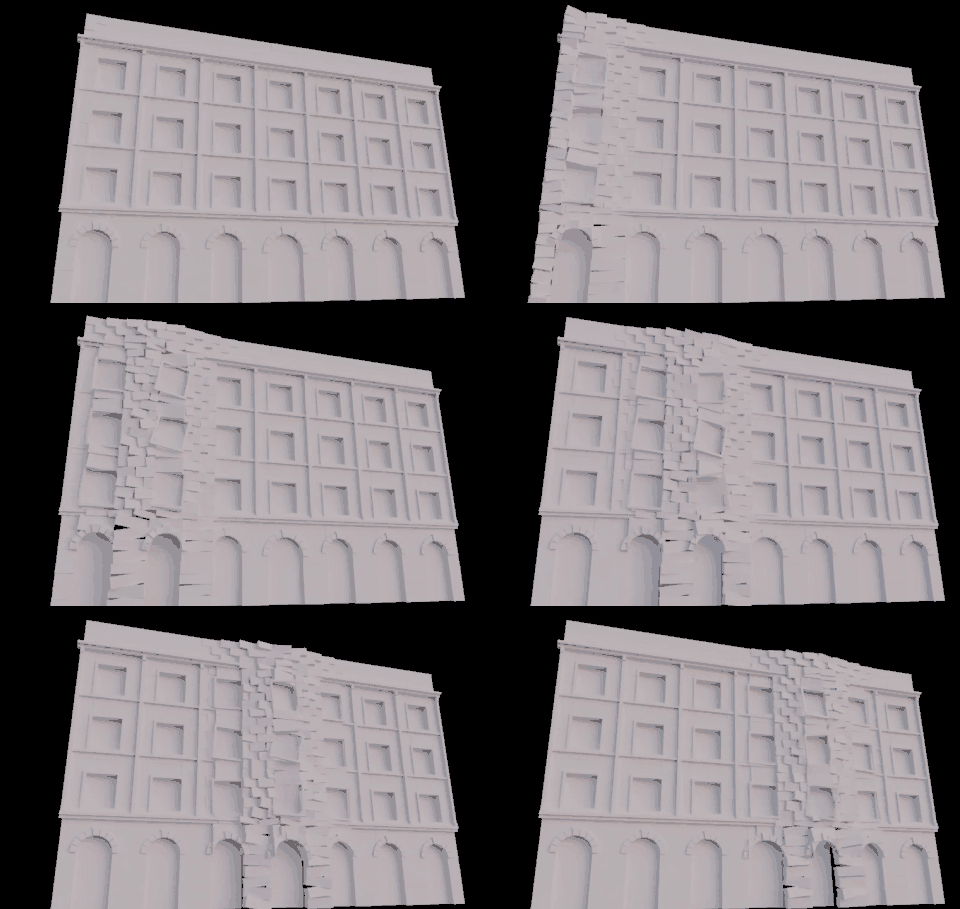
The stones of the sample model pushed out by a band that runs across the facade (starter 08, no AI model):
Masks that move: mask field turns the windows into a grey ramp, mask animate runs bands of light along it (workflow mask_animate, no AI model):
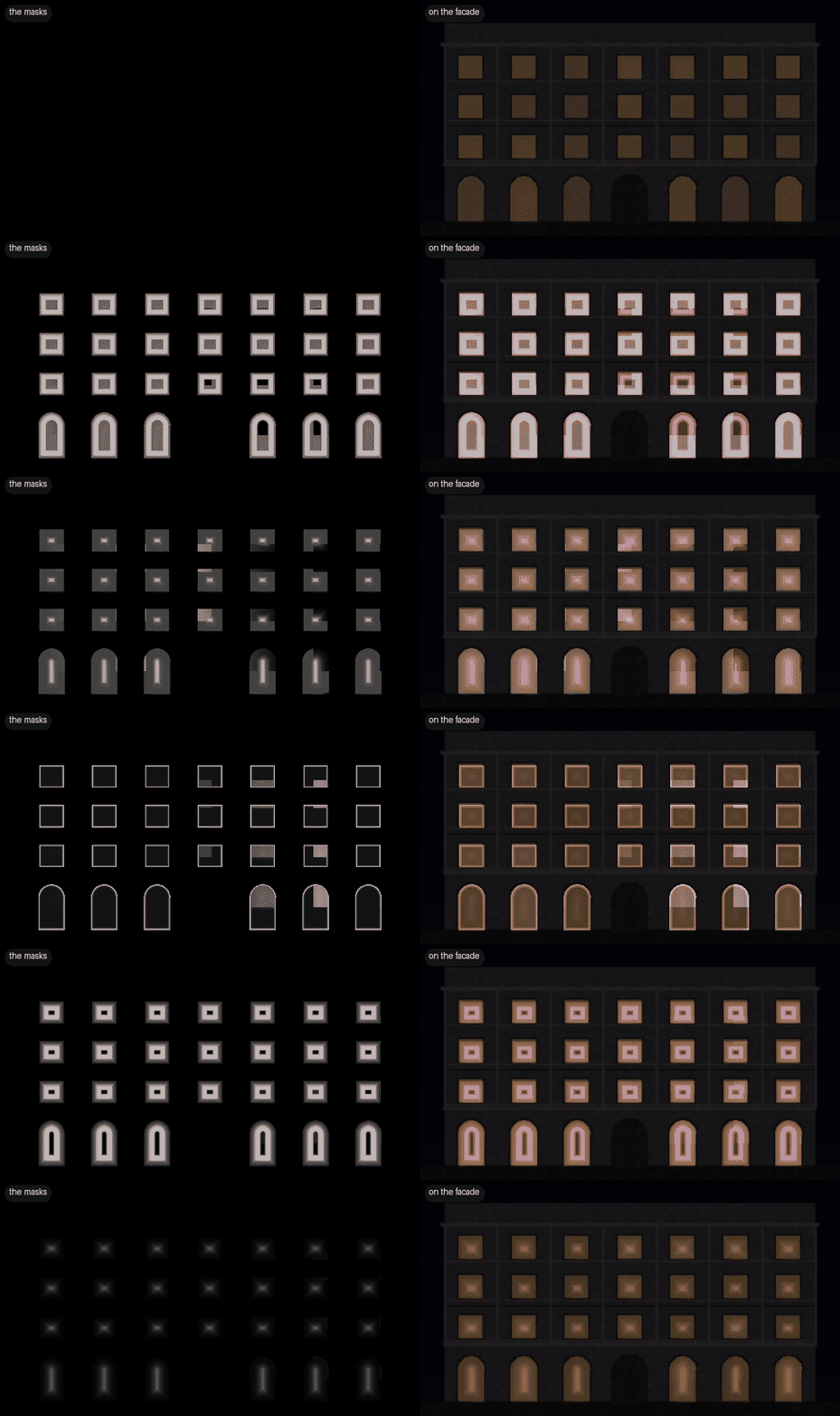
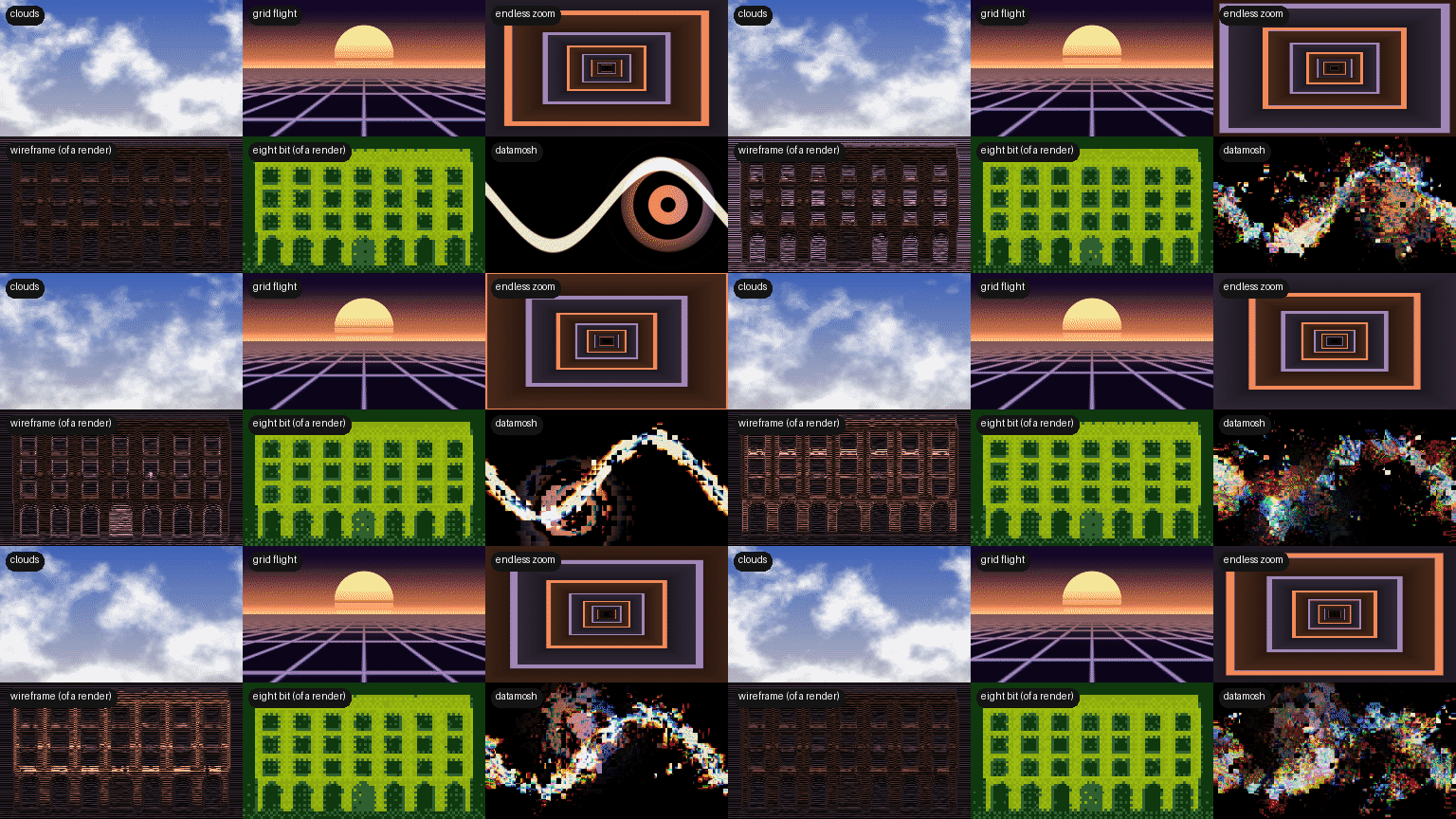
kubakub shader draws moving pictures on the graphics card: 74 presets in eight types, picked by their moving picture and adjusted with sliders and colour swatches, or a shader pasted from shadertoy.com (workflow shader, no AI model):
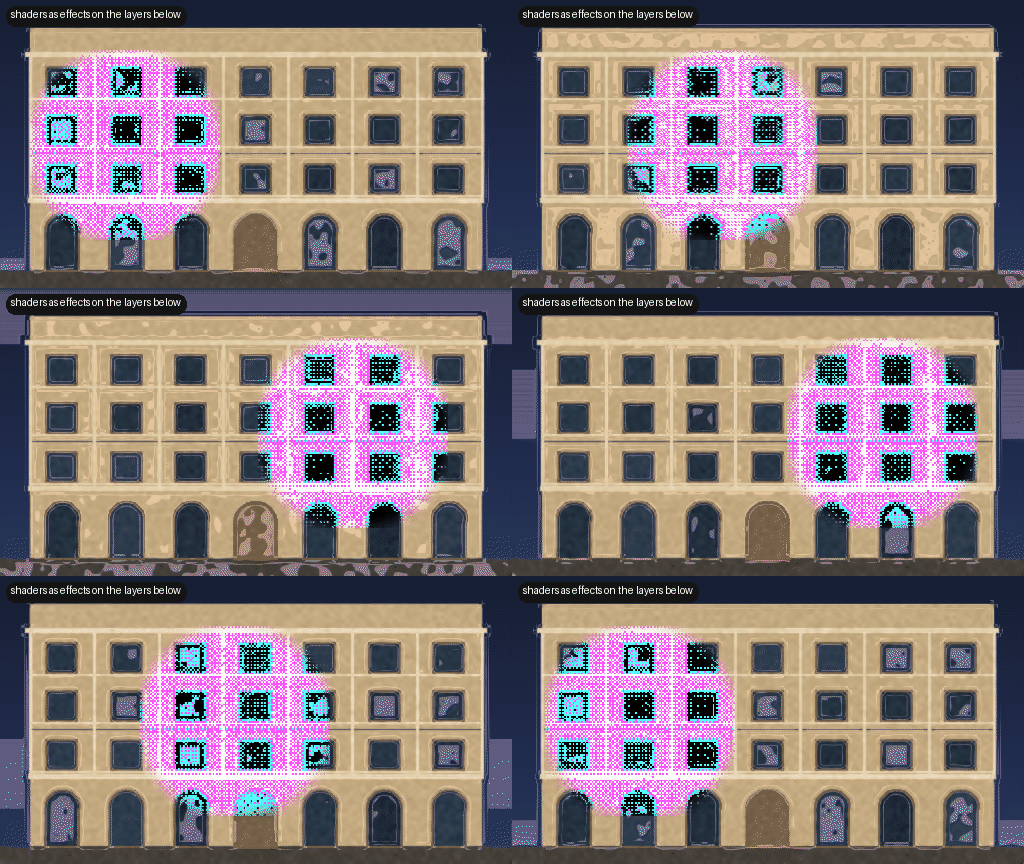
In the director a shader is the fill of a shape, and a preset that works on a picture becomes an effect on everything under it:
Install
With ComfyUI Manager: search for kubakub nodes, install, restart. The pack is in the Comfy Registry as
comfyui-kubanodes (publisher kubakub), so comfy node install comfyui-kubanodes works too. Or by hand:
cd ComfyUI/custom_nodes
git clone https://github.com/kubakubkub/ComfyUI_KubaNodes
python -m pip install -r ComfyUI_KubaNodes/requirements.txt     # the portable build: python_embeded\python.exe -m pip ...
The only package this adds is OpenCV, and only if you don't have it yet. Everything else comes with ComfyUI (0.37.0 or newer). For the 3D nodes and light layers, install Blender 4.x (found by itself). To take the scene open in Blender or Houdini live into scene render, install their add-ons from this pack once: docs/live-link.md.
Models: the example workflows need them, the nodes don't: see docs/MODELS.md. Any variant of a model works (bf16, fp8, int8, NVFP4, GGUF ...): pick your file in the loader when a workflow names another one.
Quick start
- Install, restart ComfyUI.
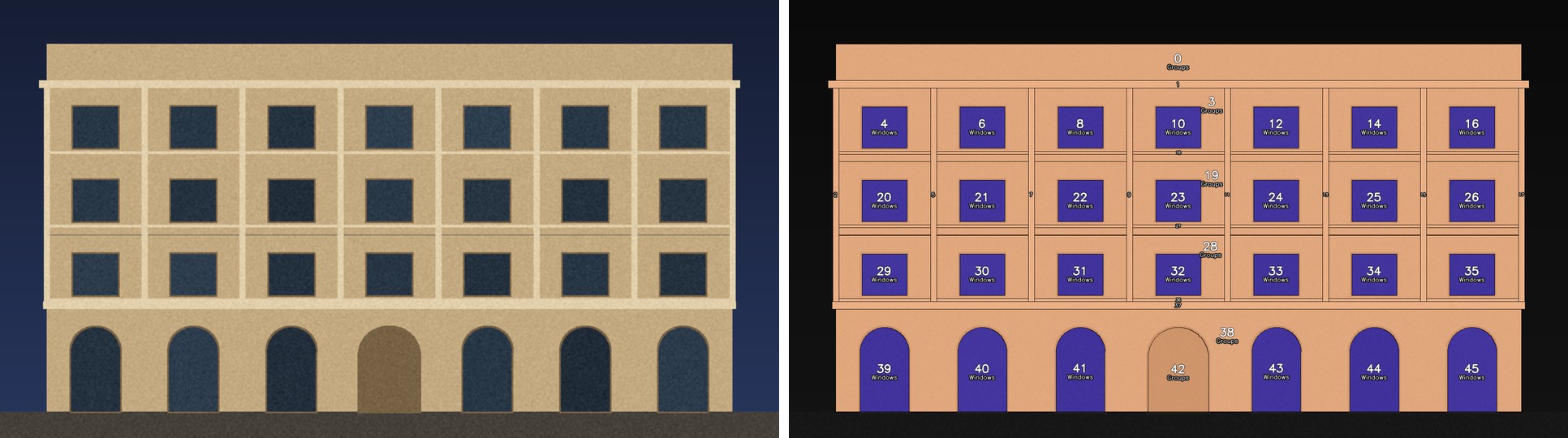
- Workflow → Browse templates → ComfyUI_KubaNodes → 01 regions in 30 seconds, Queue. No models, no files: the kubakub sample facade node draws a facade to try everything on.
- 03 opens the director window on that facade: add a layer, clip it to a floor, give it a behaviour, press play. Still no models.
- Still no models: shader (pick a preset by its picture, adjust it), region_materials (two shaders stacked in the windows of the facade), sound (one sound for a shader and a mask), mask_animate.
- Then 02 (a prompt per region, Klein 4B), region_materials_klein (Klein paints from a shader), 04 (LTX animates the windows), 05 (a hand sketch rendered region by region), 06 (finishing a clip: colour match, deflicker, retime, burn in).
- 3D, with Blender installed and still no files: 07 (a sample building in metres, rendered from a projector
you place: regions from the model, real distances, previz from the audience) and 08 (its stones moved by a
wave). projector_blend: two projectors and their blend masks. Your own model: paste its path into
fileof scene render. - With your own 3D: clay_to_final (scene file → clay → regions → Klein → seam pass → even light), scene3d_to_regions, render_passes_to_final (your own render and its mask passes: only the masked parts are repainted) and regions_from_cryptomatte (a cryptomatte EXR from any renderer). versions makes many versions of the facade from one queue: a numbered contact sheet of drafts, then your picks at full size.
What each part needs
Most of the pack runs on a plain ComfyUI. Add the rest when you get there:
- Nothing extra: regions, the region plan, masks, shader, sound, sketch, post and the director with still layers. Workflows 01 and 03, mask_animate, shader, shader_mix, region_materials and sound.
- Image models (Klein 4B is the smallest, see docs/MODELS.md): region sampler, seam pass, versions, frame in frame, sketch to render. Workflows 02, 05 and region_materials_klein.
- Video models (any LTX 2.x or MiniMax H3: dev or distilled, fl2va or ref2va, fp8 / nvfp4 / int8 / GGUF, with or without a speed LoRA; tested on a 12 GB GPU): region video sampler, motion guide, keyframe clips. Plug in the model you have: the nodes see which one it is and sample it the way it needs. Workflows 04 and motion_guide.
- Blender 4.x: everything under 3d / scene and 3d / pieces, and light layers in the director. Workflows 07 and 08 use the sample model; your own file needs no camera (kubakub projector). Workflow clay_to_final.
- Your own files, for the nodes that read them: an Illustrator file, render passes, ID renders or a cryptomatte EXR, a video clip for 06.
An empty file field is the sample. Every node that reads a file or folder of yours (scene render, render passes, regions from id renders, regions from cryptomatte, regions from illustrator, the mask folder of regions from matrix / masks) runs on a built-in sample when the field is empty, and says so in its report. Pasting a path is the only step to your own file. So the example workflows run without any file of yours. Packages, Blender and ffmpeg are listed under Requirements.
Node groups
The menu is split into 2d (images, masks, video) and 3d (anything that needs a 3D file or render passes).
| group | nodes |
|---|---|
| project | project settings (matrix size, fps, name, audience: link them into the other nodes), sample facade, sample model (the same facade as a 3D file) |
| 2d / regions | regions from matrix / masks (colours, line drawing, After Effects mask folders), regions from masks, regions from sam3, regions from illustrator (.ai / .pdf layers), regions to mask (shows the chosen regions lit up, passes the choice on as text), regions to svg / pdf / dxf; canvas plan / to work / restore. Every which regions field has a pick regions button: the groups, floors and sections your regions hold, as a list to click |
| 2d / masks | mask field (regions as a grey ramp: distance from the edge, a direction, from a point, one step per region, noise; the direction can be drawn as an arrow on the node), mask animate (a mask per frame: reveal, band, rings along a field, or move, rotate, scale, strobe, with a trail; on a ramp, sine, saw, square, random, noise or a sound; the curve is drawn on the node) |
| 2d / shader | shader (moving pictures and masks drawn on the graphics card: 74 presets picked by their picture: light that knows your regions (each its own colour, pace or pattern), contours, wire mesh and point cloud of the building, raymarched 3D scenes with a depth output (melting forms, a colonnade, the facade as a relief, regions extruded, light in fog), endless travel, 8 bit and pixels, VHS tape and composite video, slit scan and datamosh, clouds, fire, a mapping grid; or paste a shader from shadertoy.com; follows a loop, a field, a mask, your regions and the sound; its picture is the material the region samplers paint from), shader mix (two kubakub shaders on its inputs a and b and one mix value: A cuts B in, A bends B, or a fade; on a curve or with the sound) |
| 2d / sketch | scan to line (a phone photo of a drawing, straightened and cleaned), regions from sketch (closed shapes, coloured dots as names), line overlay (your line back on the render) |
| 2d / generate | region prompt (a prompt for chosen regions from fields: pick the regions from a list, write the prompt, set strategy and denoise; chain several), region plan (the same as written rules, with every setting), region sampler (Klein, Qwen Image 2.1; paints from a shader's picture on material, changes as much as a mask on change allows), seam pass, versions (a sheet of looks, ideas per region, prompt rotation, LoRAs and style images: fast numbered drafts, then the picks at full size), frame in frame (rooms and worlds behind windows) |
| 2d / director | kubakub director (the window), director sequence (every frame, sound), director diffuse |
| 2d / motion | sound (your sound and how it is heard, set once and carried on one cable to every node that listens; draws the loudness, the beats and the hits), region video sampler (LTX or H3; a shader clip on material moves the regions), motion guide (LTX or H3: a rough moving clip from the director, a shader or a previz becomes a finished video that keeps its motion), keyframe clips (H3 or LTX, video with sound), height animate (a height map or any depth map grows out of the wall: all together, peaks first, in layers or along a field, on a curve or with the sound; also as a lit relief), sound mask swap (layers trade their masks on beats, on low / high hits, or on a control signal), trim to exact duration (audio clips of a constant length for LTX AV) |
| 2d / post | align to source (an edited picture back onto the picture it was made from, to the pixel), colour match (to a reference picture or a .cube look, saved as .cube too), deflicker, retime (optical flow), burn in, export video / frames |
| 3d / scene | scene render (Blender: clay, depth, ID passes), projector (where it stands: metres from the wall, height, throw ratio, lens shift or tilt), projector blend (soft-edge masks for several projectors), scene relight (Cycles), scene measure, scene preview and walkthrough (previz from the audience; the spots and the walk are placed on a map on the node), scene surroundings (the street around the building, from a place on the map or your own model), align 3d model (a model from image-to-3D, moved, turned and scaled onto the real one; written as .glb or .obj with textures), form height (how far that model stands out of the real wall, as a height map in the projection view), brightness compensation |
| 3d / pieces | scene pieces, pieces falloff, pieces transform, pieces render: the model's parts (or whole regions) moved like MOPS in Houdini (a wave, a pulse, a stagger, noise or the beats of the director's timeline push, tilt, turn and scale stones, windows and cornices), rendered in Cycles as clay or with the matrix projected on them, from the projector or from the audience |
| 3d / from renders | render passes (a folder of your passes: picture, depth, normals, every other pass as a mask), regions from cryptomatte (every object by its name from the 3D scene), regions from id renders (Houdini, Blender, any ID pass) |
| 3d / fabricate | relief panels in millimetres (mould prep with anti perch, safety check, mass, export as STL panel or OBJ prow), mesh to relief field, save GLB |
| lab | experiments: mosaic illusion, onnx style transfer, frame guide (old) |
| utils | load images from a folder, timecode filename prefix (clip start in seconds -> name_mm-ss-ff) |
Show only what you use
Copy kubakub.ini.example to kubakub.ini (same folder) and switch groups off, then restart ComfyUI:
[menu]
3d = off            # everything under kubakub/3d
lab = off
2d/motion = off     # no LTX / H3
Switched-off nodes are not loaded at all, so workflows that use them show them as missing until you switch them on
again. The console says what is hidden: [Kub] kubakub.ini: 3d, lab off (21 nodes hidden).
Search the node menu for kubakub, or for words like projection mapping, facade, sam, ltx, h3, blender.
Speed and caches
Unchanged work is never done twice, also across queues and (for the 3D scene) across ComfyUI restarts. The sizes
are settings in kubakub.ini (section [settings], see kubakub.ini.example); the defaults suit a 12 GB GPU:
| what | cache | setting |
|---|---|---|
| region sampler | every region's result (keyed on its pixels, prompt, seed, settings, model) and every prompt encoding: one changed prompt re-samples one region | region_cache_mb = 4096, cond_cache_mb = 2048 (0 = off) |
| director sequence | the frames: moving the playhead or changing window-only settings reuses them; an identical export is not written twice | director_seq_cache = 2 (results, 0 = off) |
| ltx region video / h3 clips | every clip; H3's enhanced prompt separately (steps or LoRA changes do not re-run the enhancer); models load once for all clips, and not at all while the director holds or nothing is animated | - |
| scene render / relight / walkthrough | ID passes, every relit frame, every walkthrough view, on disk in the user folder (kubakub_cache), least recently used first above the cap | cache_folder = (empty = user/kubakub_cache), cache_gb = 20 |
| Blender | one worker process stays loaded between jobs | blender_idle = 600 (seconds), blender_worker = off to start it for every job |
Requirements
Tested with: ComfyUI 0.38.2, torch 2.10 cu130, Python 3.12, Blender 4.5, Windows 11, RTX 5070 Ti 12 GB. Other systems are untested.
| needs | for | without it |
|---|---|---|
| ComfyUI 0.37.0 or newer | every node (V3 node API, advanced inputs; core SAM3, background removal, H3 guide) | modules fail to load (each one alone; the console says which) |
| torch, numpy, scipy, Pillow | everything | come with ComfyUI; no torch / CUDA version of its own |
| OpenCV (opencv-python-headless, in requirements.txt) | almost everything | the pack does not load; keep an OpenCV build you already have |
| shapely | regions to vector: outlines | that feature only |
| scikit-image | regions to vector: centerlines | that feature only |
| PyMuPDF | regions from illustrator, vector PDF | that feature only |
| imageio | EXR ID maps in regions from id maps | PNG ID maps still work |
| trimesh | mesh to field | that node only |
| onnxruntime | onnx style transfer | that node only |
| Blender 4.x (found in Program Files or on PATH; else blender = ... in kubakub.ini or the blender_path input) | scene render, light layers, relight | the 3D scene nodes and light layers |
| ffmpeg (imageio-ffmpeg or on PATH) | video layers, director sequence export, kubakub export | video in the director and exports |
At startup the console prints [Kub] N nodes from M modules and, only when something is missing, one line per
problem (kub_env.py), e.g. [Kub] not installed (only these features are off): regions to vector (outlines) -> pip install shapely. The models used by the example workflows (Klein, Qwen Image 2.1, LTX 2.5, MiniMax H3) are listed in
each workflow's read-me note; the nodes themselves need none.
Documentation
One page per menu group, with every input, the rule syntax, speeds and tests:
| page | what is in it |
|---|---|
| regions | regions from a matrix, a line drawing, mask folders, any masks, SAM 3, Illustrator; regions to SVG / PDF / DXF; canvas plan / to work / restore |
| masks | mask field, mask animate: effects, curves, things to try |
| shader | shader: the 74 presets by type, your regions in a shader, mixing two shaders, adjusting one with sliders and colours and saving your own, pasting a shader from shadertoy.com step by step (also with Buffer tabs), 3D scenes (raymarching) and the depth output, the names a shader can use, speed |
| sketch | scan to line, regions from sketch, line overlay |
| generate | region prompt (fields, no rule text), region plan (the rule text), region sampler (Klein, Qwen Image 2.1 and its LoRAs), a shader as the material of your regions, seam pass, frame in frame |
| director | kubakub sound; the director window: layers, timeline, sound, LTX and H3 clips, diffuse, light layers, video mapping, behaviours, export |
| post | colour match (a reference picture or a .cube), deflicker, retime, burn in |
| 3d scene | scene render and its ID passes, architecture passes, scene measure, preview, walkthrough, brightness compensation, moving pieces |
| live link | installing the Blender add-on and the Houdini package (in tools/) that send the open scene to scene render; checking, updating, removing, troubleshooting |
| from renders | regions from ID renders (Houdini, Blender, any ID pass), regions from cryptomatte |
| fabricate | relief panels in millimetres, safety check, STL / OBJ |
| models | the models the example workflows use, and where they go |
Every group has a model-free test in tests/, e.g. python_embeded\python.exe ComfyUI\custom_nodes\ComfyUI_KubaNodes\tests\test_plan.py.
Credits
- Crop sampling with the crop latent as reference, and the two-band blend idea: GianlucaMancuso/ComfyUI-TiledUpscale (github.com/GianlucaMancuso/ComfyUI-TiledUpscale).
- Clamped mean/std colour match, consistent noise idea: Gavr728/ComfyUI_KleinTiledUpscaler.
- Differential diffusion step (
kubakub/seams.py): adapted from ComfyUI core comfy_extras/nodes_differential_diffusion.py, originally github.com/exx8/differential-diffusion. The change map of a region's material (kubakub/adapters.py, change_by_steps) uses the same idea, counted in steps. - Pixel drift of whole-picture edits as a thing to correct (
kubakub/align.py; the method is our own): github.com/Mozer/ComfyUI-PixelDriftFix (Mozer). - Pruna 8-step sigmas (
kubakub/schedules.py): model card of huggingface.co/PrunaAI/Pruna-Qwen-Image-2.1 (PrunaAI). - Flux 2 schedule (
kubakub/adapters.py): copied from ComfyUI core comfy_extras/nodes_flux.py (github.com/comfyanonymous/ComfyUI, Comfy Org). - Video layers (
kubakub/director/media.py): stream parsing, the two-step seek, the raw frame pipe and the audio read adapted from ComfyUI-VideoHelperSuite (github.com/Kosinkadink/ComfyUI-VideoHelperSuite, Kosinkadink / AustinMroz). - A sound as a held audio latent in the region video sampler (
nodes/motion/nodes_video.py): the wiring of RuneXX's custom-audio LTX workflows (huggingface.co/RuneXX/LTX-2.3-Workflows). - The buildings of kubakub scene surroundings: map data (c) OpenStreetMap contributors, under the Open Database License (openstreetmap.org/copyright), fetched through the Overpass API (overpass-api.de). Its real ground: the Mapzen / Tilezen terrain tiles on AWS Open Data (SRTM, EU-DEM and other open sources; attribution list at github.com/tilezen/joerd/blob/master/docs/attribution.md).
- The shader presets vhs tape and composite video (
kubakub/shaders/): the steps and their order follow the signal chain of ntsc-rs (github.com/valadaptive/ntsc-rs, valadaptive), found through olegchomp's TouchDesigner version (github.com/olegchomp/ntsc-td). scan modulation: the idea of olegchomp's td-modulation (github.com/olegchomp/td-rnd). All three are written new as single shader passes. - The shader presets of the type grade and lens (
kubakub/shaders/60_*-71_*): which effects belong in such a set follows GIPS by Martin J. Fiedler (github.com/kajott/GIPS), found through theRealAi's ComfyUI-GLSL (github.com/theRealAi/ComfyUI-GLSL). All are written new for this pack. - A colour as a control of a shader, and the idea of a picker for it: comfyui_glslnodes by Patricio Gonzalez Vivo
(github.com/patriciogonzalezvivo/comfyui_glslnodes). Written new (
kubakub/shadertoy.py,web/kubakub_shader.js). - The distance functions and smooth joins a kubakub shader can use for a 3D scene (
kubakub/shadertoy.py, SDF): Inigo Quilez, iquilezles.org/articles/distfunctions. - MKL colour transfer: Pitie & Kokaram 2007, as in the color-matcher library
(github.com/hahnec/color-matcher); reimplemented in torch in
kubakub/ops.py.
License
GPL-3.0 (see LICENSE), the same as ComfyUI. Free to use, change and share, also in paid work; a changed version
that is published must stay GPL-3.0 with its source. The license covers this code only: images and videos you make
with the nodes are yours. The Hanken Grotesk font in web/fonts keeps its own SIL Open Font License.