
ComfyUI LC MaskMaker Nodes
ComfyUI LC MaskMaker Nodes by lonecatone23: on-node Outpaint and Create Mask, background removal, Segment Anything, Smart Detailer (SAM 3, replaces SEGS / Impact detailers), person masks, mask refine, image blend, auto adjust, depth and normal maps. Models load on demand and are labelled with their licenses. Companion to ComfyUI_LC123_nodes; separate Registry name.
Nodes (28)
The levels button ComfyUI never shipped
Detailing One Face at a Time
Chaining Character Detailers Through the LC Pipe
Depth maps from one image, using the weights you already have
One Redraw Per Character, With Its Own Seed — Goodbye Clone Crowd
Find Every Face Once, Then Stop Paying for SAM 3
Putting Your Characters in a Predictable Order
One render, every social format — and nobody's head cut off
Flux 3 Klein inpainting that leaves the rest of your picture alone
Put a layer on a background, 29 blend modes deep
Drag the canvas edges with your mouse, get the mask for free
Rotating a Picture Is Easy — Getting the Mask for the Corners Is the Hard Part
Krea 2 Inpainting That Leaves the Rest of the Picture Alone
A trimap is how you stop losing hair
A ControlNet for the Model Nobody Wrote One For
The normal map your ControlNet was trained on
Face, hair, clothes, skin — one person, six checkboxes
BiRefNet in one node, with the license printed on the dropdown
Inpaint and outpaint any SDXL checkpoint without an inpaint model
Type 'hair, eyes, bikini' and get the mask back
Type \"Hands\" and It Repaints Them
Same Detailer, But It Reads the Model, VAE and Sampler Off One Wire
Draw the mask on the node instead of in a second app
Drawing the Mask You Actually Meant
VOSR 2.0 upscaling that sharpens your render instead of re-drawing its face
The one-wire upscale at the end of the detailer pipe
Z-Image Inpainting, Borrowed From a ControlNet's Inpaint Mode
ComfyUI LC MaskMaker Nodes
Mask, matting, segmentation and image-adjustment nodes for ComfyUI by lonecatone23.
- Repo: https://github.com/lonecatone23/ComfyUI_LC_MaskMaker_nodes
- Civitai: lonecatone23
- Support: Buy me a ☕
- Version: 0.19.8 · 19 Python nodes
Companion to ComfyUI_LC123_nodes. LC123 stays import-free. Anything that needs a model lives here and loads it on demand.
Release history lives in git tags. This page describes the pack as it is right now, not a changelog.
Nodes
| Node | What it does |
|---|---|
| LC Outpaint 🖌️➕ | Drag the canvas edges outward on the node. Drag inside the source to reposition it. free or locked to a common aspect ratio, grey fill. Outputs control_image, control_mask (white = new area), mask_image, width, height. hold_mask: held keeps the canvas you set up, run after run. snap_to_image passes the image through as is while nothing is pulled out; pull the edges out and run again and it continues with them, then the box snaps back to the image only after the whole run has finished (so a new image always starts clean, and a failed or cancelled run keeps your edges). Switching to snap_to_image snaps the box right away. block set to if_empty_mask stops everything downstream while nothing is pulled out: drag the edges out, run again, and it continues. max_megapixels (default 2) stops the edges from being dragged past that size, so the canvas never outgrows what the model handles well. It only limits dragging; 0 = no limit. Run once to get the preview. note: snap_to rounds the final size up to a multiple (8 by default), set it to 1 to turn that off. |
| LC Outpaint, Rotate, & Pad 🔄 | Turn, crop and pad a picture by dragging on the node. The round handle turns it (hold Shift for 15° steps, or type the angle), the frame's square handles pad (drag out) or crop (drag in), and dragging inside the frame moves the picture. The control_mask is white where the model has to paint: the padding and the corners a turn opens up, so it goes straight into LC Krea2 AnyPaint. fit: expand starts the frame around the whole turned picture, crop at the largest box with no empty corners. fill: gray (what Krea 2 and AnyPaint expect), edge (stretches the outer pixels), white, black. aspect locks the output shape, snap_to rounds the size up. max_megapixels (default 2) stops the frame from being dragged past that size, so the canvas never outgrows what the model handles well. It only limits dragging; 0 = no limit. Straight and quarter turns copy pixels, never resample. block: until turned or framed stops the run after this node while the picture is untouched, so the first run only puts the picture on the node; never always passes it on. keep_frame: keep (same image) holds the turn and frame run after run (post processing the same picture), snap back after run resets them once a run finishes so the next image starts clean. Run once to see the picture on the node. |
| LC 360 View 🧭 | Flat camera views out of a 360 panorama (a 2:1 equirectangular picture from any model). Drag the view on the node to look around, the wheel zooms, click the strip under it to jump to a spot. yaw turns, pitch looks up or down, fov is the lens (40 - 60 for a close-up background, 70 - 90 for a room). width and height set the size and aspect. views: one per line, name: yaw, pitch, fov (➕ Add this view writes the current one), and every line becomes one picture in the batch, with names in the same order. close_seam blends the panorama's ends for a picture whose edges don't quite meet. Run once to see the panorama on the node. 💡 One panorama of a room gives every shot of a scene the same room: the reverse angle is yaw + 180. Krea 2 makes good ones with "360 degree equirectangular panorama" at 2048 x 1024. |
| LC Face Crop 📐 | Crops to a format with the faces placed well, not a blind centre crop: one render, every social format, nobody's head cut off. aspect_ratio uses the same presets as LC Aspect Ratio Simplifier (or custom). framing: widest keeps as much picture as the format allows; upper body, head & shoulders and face frame tighter from the face size (character datasets). faces: all keeps every face in the crop, largest frames the main one (use it when posters or background people get picked up). output_size: preset size (e.g. 1080x1350) or keep pixels. SAM 3 finds the faces; wire a mask to frame anything else (a car, a product, a pet). Nothing found: a centre crop, and the console says so |
| LC Create Mask 🖼️✏️ | Draw a mask right on the node. Click to add points (no limit), drag to move, shift+click removes one. Flip the toggle to pencil for freehand. smooth, invert, feather, and opacity are built in. Undo and Clear buttons on the node. block (top widget) set to if_empty_mask stops everything downstream until you have drawn something, same idea as Impact Pack's Preview Bridge. Run once to get the preview. |
| LC Touch Mask (BETA) 👆 | Mask one thing exactly. Draw around it and SAM 3 snaps to its edges. Tap it to grow to the next bigger thing that holds it (face, face + hair, head, whole person), double-tap to step back. Tap empty space to pick the object under it, ctrl + draw or shift + tap cuts out. person_parts uses the Segformer model from LC Person Mask for the steps on a person. A Load Image upstream shows right away, anything else after one run. block, grow, feather, invert, Undo and Clear. Outputs control_image and control_mask, like LC Create Mask. 💡 Built for inpainting one object with my detailers and AnyPaint. Lasso-to-prompt idea from AusBoss' Mask by Touch (MIT). |
| LC Mask Refine ✨ | Tighten a mask with a trimap. edge_erode pulls the sure-foreground in from the mask edge, edge_dilate sets how far the unknown band reaches out. Only that band is decided by the method (vitmatte for hair and fine detail, guided_filter for speed, or none), so a narrower band means a tighter mask. Also grow (negative shrinks), fix_gap, black_point / white_point, feather, and edge_color_spread to cut background halos on the cutout. Plug a mask into detail_region (like hair) to give just that area a wider trimap (detail_erode / detail_dilate). Outputs cutout (RGBA), mask, trimap. Preview on the node, same as the LC123 previews: the result fitted; click a spot for 100% with an before | after wipe, the wheel zooms, double-click goes back. preview_view switches between cutout, mask and trimap. Run once to get the preview. 💡 Start with 10 / 10, then shrink both toward 3 for a tight edge. Micro adjust: every pixel value (grow, fix_gap, edge_erode, edge_dilate, the detail_ ones, feather) takes decimals in 0.1 px steps, the points step by 0.001, and the edges are true circles, not blocks. Wire sliders in as FLOAT (INT sockets will not plug into these). ⚠️ Numbers are real pixels. |
| LC Remove Background ✂️ | Cut the subject out with a BiRefNet model. Outputs cutout (RGBA), mask, and on_background (subject on a solid color). Optional refine (guided_filter or vitmatte) with the same trimap controls (edge_erode / edge_dilate), plus grow, black_point / white_point, and feather. No preview on the node (add LC Mask Refine after it if you want one). Uses ComfyUI's built-in background-removal loader, so no extra dependency. 💡 Raise black_point to clear faint haze, use vitmatte for hair. |
| LC Image Blend Advance 🎚️ | Place a layer on a background and blend it. x_percent / y_percent (0.01 steps), scale, aspect_ratio, rotate, mirror, and 29 blend modes, with opacity in 0.1 steps and an optional layer_mask (multiplied with the layer's own alpha). background_image is optional: leave it off and the layer goes on a transparent canvas the size of the layer (RGBA out, like LayerStyle's V3). transform_method: lanczos, bicubic, bilinear, nearest. Outputs image and mask (where the layer landed). Pure torch, no extra dependency.|
| LC Segment Anything 🎯 | Select things by describing them: type hair, eyes, bikini and each word is found and combined. engine: grounding_dino + sam (GroundingDINO finds boxes, SAM makes masks) or sam3 (SAM 3 does both, using ComfyUI's built-in SAM 3 support). Then the same refine as Mask Refine (refine, edge_erode / edge_dilate, black_point / white_point) and the same click-to-zoom preview with a before/after wipe. Outputs cutout (RGBA), mask, raw_mask. 💡 For sam3, sam3_threshold 0.5 is a good start; near 0.3 it invents matches for words that are not in the image. Every match is found (both hands, every face), and your own sam3.pt / sam3.safetensors work as well as the SAM 3.1 download. |
| LC Smart Detailer 🩹 | Replaces the SEGS / Impact FaceDetailer chain with one node. Finds what you type (hands, face, eyes) with SAM 3 and redraws it at full detail. Each hand or face gets its own crop, scaled to about inpaint_resolution squared pixels, redrawn, then blended back in. The redraw reaches a little past the pasted area and its colour is matched to the original along the seam, so the edge does not show. tone_match (on): the redraw gets the original's brightness, contrast and colour back where it is pasted, keeping the new detail (a light redraw otherwise comes back flat and dull); turn it off when the redraw is meant to change colours. Changing denoise, steps or feather redraws without searching again. grow / feather shape the mask, padding is the context around each crop, blend mixes the original back in (1 = all redraw). Works with 4-D and 5-D latents (SDXL, Flux, Krea 2, Anima, Qwen, etc.). Leave negative empty for cfg 1 models, wire it for SDXL. Nothing found? The image passes through untouched and the node says so. Preview on the node at full size: click a spot for 100% with an before | after wipe (the found areas outlined on the before side), the wheel zooms, double-click goes back. LC Smart Detailer (pipe) 🩹 takes the image, model, VAE and sampler settings from the LC pipe; wire an image, model or vae into it to use that one instead (a node without a pipe changed the picture, a model with LoRAs on it, or a different model). It puts its result back in the pipe's image and leaves two things for the nodes after it: every area the detailers redrew (merged, so face + hands + eyes add up), which LC VOSR2 Upscale (pipe) carries to the new size (its protected output), and what SAM 3 found, so the same word is never searched twice. Both are tied to the picture they were made for and ignored if it changed in between. 💡 Faces: denoise 0.3, blend 0.8. cfg defaults to 1 on both versions (the pipe version no longer takes the main sampler's cfg_1, which made redraws drastic). 1 works for Krea 2, Flux, Z-Image and, at detailer denoise up to about 0.4, SDXL too (tested cfg 1 to 7: the same result). It never goes below 1: below 1 the redraw comes out speckled. 💡 If your positive describes the whole scene, wire a short prompt for the area into inpaint_positive (e.g. "close-up of a woman's face, natural skin"). Otherwise, at denoise 0.3 and up, the scene can get drawn into every crop. |
| LC Character Detailer (BETA) 🩹 / (pipe) | LC Smart Detailer for one character: SAM 3 finds every match (every face) and only one is redrawn, picked left to right, right to left, top to bottom, largest first or in box N of LC Bounding Boxes (wire its elements). The preview numbers every match the way it counts them, so you can read off which is which. One per character: branch the model, add that character's LoRA, pick their face. Same settings and engine as LC Smart Detailer, which is unchanged |
| LC Detail Finder (BETA) 🎯 | A detailer per character, step 1: SAM 3 finds every match once (every face). With face, hair each face gets its own hair. Outlines them on the node. |
| LC Detail Sorter (BETA) 🔢 | Step 2: puts the matches in order (left to right, right to left, top to bottom, largest first) and breaks them out: output 1 = the first, 2 = the second, up to 8. The preview numbers them the same way. |
| LC Detailer For Each (BETA) 🩹 | Step 3, one per character: redraws what it gets with that character's model (its LoRA branch), their conditioned prompt on inpaint_positive and their own seed, so one face can be re-rolled without touching the others. Works on its own or on an LC pipe (a wired pipe fills in model, VAE, prompts and picture; anything wired on the node wins). Wire the Finder straight in to redraw every match. Same engine as LC Smart Detailer. |
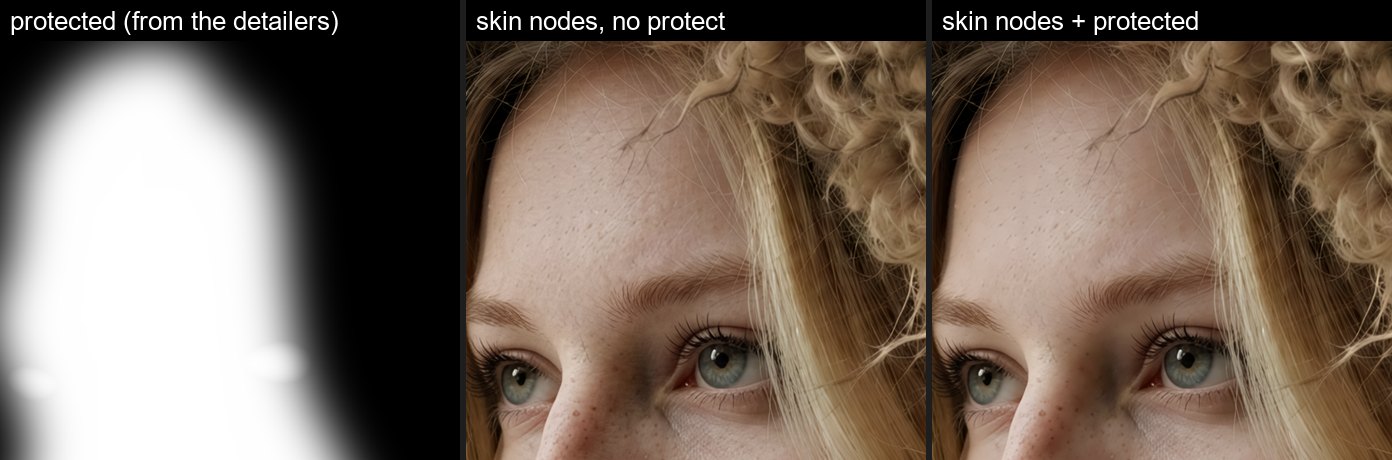
| LC VOSR2 Upscale 🧩 | Upscale that keeps the detailers' work. VOSR 2.0 (one step, built in, no other pack needed) sharpens and adds fine detail to the picture it is given instead of redrawing it with your model, so faces and hands come through as the detailers left them, with no new skin blotches. Run it after the detailers: render → LC Smart Detailer → LC VOSR2 Upscale. upscale_by 1.5x, 2x, 3x or 4x in one pass, 6x (3x + 2x) and 8x (4x + 2x) in two (one big pass breaks the skin up into patches), color_alignment wavelet keeps the colours, tile_size 512 (what it was trained at), vae_tile_size lower = less VRAM. LC VOSR2 Upscale (pipe) 🧩 takes the picture from the LC pipe (what the detailers left in it) and puts the result back, one wire after LC Smart Detailer (pipe). Its protected output is the detailers' areas at the new size: wire it into LC Skin Texture / LC Skin Upscale protect_mask so they do not add skin detail on top of the detailers' work (the plain version takes LC Smart Detailer's mask as protect_mask and gives the same output). 2x of a 1 MP picture: about 5 s and under 7 GB on an RTX 5090. Weights download on first run (about 6.5 GB). |
| LC Krea2 AnyPaint 🩹 | Krea 2 inpaint and outpaint with yijunwang2's AnyPaint LoRA (Here, put it in your loras folder), run the way it was trained. Everything outside the mask comes back exactly as it was. The model sees a small copy of the whole picture while it paints, so the new part matches the light and the scene, and a thin border around the mask is redrawn so the seam disappears. prompt: describe the whole finished picture, not just the change. crop_to_mask on for inpaint (the area is redrawn in its own crop at inpaint_resolution), off for outpaint. composite: keep original pastes back only the painted area, raw is the whole redraw. Use Krea 2 Turbo, 8 steps, euler / simple, cfg 1. 💡 "Remove the car" leaves a flat blob: describe what should be there instead. |
| LC Z-Image AnyPaint 🩹 | The same inpaint and outpaint for Z-Image (Turbo / Base): the same crop, keep, border and seam fix, painted by Alibaba's Z-Image Fun ControlNet Union 2.1 in inpaint mode (Here, put it in models/model_patches; the 8steps one is for Turbo). The only difference from the Krea 2 node is the top two widgets: control (the union patch) and control_strength. Describe the whole finished picture in the prompt. |
| LC SDXL AnyPaint 🩹 | The same inpaint and outpaint for any SDXL checkpoint (SDXL, Pony, Illustrious, your finetunes), no LoRA needed. Painted by xinsir's ControlNet Union SDXL ProMax in repaint mode (Here, put the promax file in models/controlnet). prompt: describe what goes in the mask, short ("a red bucket full of fish on the pier"). To remove something, describe what should be there instead, or leave it empty and it fills from the picture around the mask (outpaint still wants the scene described). SDXL uses a real negative and cfg (25 steps, cfg 5, dpmpp_2m / karras). fooocus_inpaint (optional, off by default): lllyasviel's Fooocus inpaint patch (Here, models/inpaint, needs Acly's ComfyUI Inpaint Nodes) blends best on outpaints and fills but rebuilds what was there more than it adds. ⚠️ With both on, drop control_strength to about 0.5: Pony and Illustrious turn to noise at 1. ⚠️ Outpaint: control_strength about 0.2. At 1 the straight edge of the old picture reads as a real edge, and SDXL paints a window frame, fence or line along it. Inpaint stays at 1 (the mask is surrounded by your picture, so it holds the light and edges through the hole). 💡 A boolean and two floats into control_strength switches it with your inpaint / outpaint toggle. |
| LC Flux 3 Klein AnyPaint 🩹 | The same inpaint and outpaint for Flux 3 Klein (Distilled), painted in edit mode with AusBoss's Outpaint LoRA (Here, put it in your loras folder): the area to paint is filled flat gray and the model fills the gray while your picture stays put. Without the LoRA Flux 3 Klein tends to zoom in or slide the picture. lora_strength 1.5 (AusBoss's pick). Use 16 steps, euler / simple, cfg 1. prompt: describe the whole finished picture; the node adds the LoRA's instruction in front. ⚠️ Keep your picture at about half the canvas or more; for a bigger extension, run it again on the result. |
| LC MOSS Control 🕹️ | A ControlNet for MOSS Image: the picture follows a depth map (pose, shape, front and back, near = white) and / or a color region map (flat colors, one per object). Runs darask0's MOSS-Image Color-Depth Control adapter (Here, put moss-control.safetensors in models/model_patches). 💡 Feed it LC Depth Anything V2 and any photo becomes a pose for a new subject. depth_end / color_end: 1.0 for maps from a real photo; 3D mannequins and painted maps want color 0.4 - 0.5 and depth 0.15 (0.25 with the 8-step turbo LoRA) or no depth, or the mannequin shows through. Either map can be left out. |
| LC MOSS Box Edit 🖌️ (BETA) | Redraws only the boxes you draw on a picture with MOSS Image; everything outside them stays pixel for pixel the same. Draw and describe the boxes on LC Bounding Boxes (change, new or remove), write the whole picture as it should look AFTER the change in LC MOSS Layout Prompt, and wire both in. MOSS sees the whole picture while it works, so the new coat fits the body and the added cat sits in the snow. keep: 0 redraws the box (new things, new colours), 0.3 - 0.5 keeps the shape. ✋ Keep boxes off faces you want to keep. |
| LC Person Mask 🧍 | Pick the parts of a person: face, hair, body, clothes, accessories, background, combined into one mask. engine: segformer (higher resolution, body is arms and legs only) or mediapipe (body includes torso and neck skin). remove_features cuts the eyes, brows, lips and teeth out with SAM 3. 💡 Skin only: mediapipe, face + body, remove_features on, then feed the mask to LC Skin Beauty, LC Skin Upscale or LC Sharpen Pro. Then the same refine as Mask Refine. No preview on the node (add LC Mask Refine after it if you want one). Outputs cutout (RGBA), mask, raw_mask. 💡 For skin work, enable face and body. |
| LC Auto Adjust 🔆 | One-click auto levels. mode: RGB (each channel on its own, also removes color casts), lum + sat, luminance, saturation, or mono. Then red / green / blue balance, brightness, contrast, saturation trims, and strength to blend back toward the original. All in 0.1 steps. An optional mask limits both where the levels are measured and where the result is applied (an alpha channel works as the mask when none is connected). Pure torch, no extra dependency. |
| LC Depth Anything V2 🌊 | Depth map from one image, normalized 0-1 per image, bright = near unless invert is on. Reads the original Depth Anything V2 weights, so a copy you already have in models/depthanything works (it also finds the ones in comfyui_controlnet_aux). Outputs depth (3-channel image) and depth_mask. resolution in steps of 14. Matches comfyui_controlnet_aux's Depth Anything V2 (correlation 1.000). Model code is vendored, no extra package. The model list reads the same on every machine (Small / Base / Large), so shared workflows never show a missing model; older saved workflows still load. |
| LC Normal Map (BAE) 🗺️ | Surface normal map (RGB = XYZ) with the BAE network, the same style ControlNet's normal_bae makes. resolution, flip_y for OpenGL vs DirectX, and optional blur_radius / sigma (ComfyUI's own Blur Image, so it matches chaining that node after this one; radius 0 = off). Matches comfyui_controlnet_aux's BAE (correlation 0.9999). The model entry reads the same on every machine, and older saved workflows still run. Needs the timm package (the installer adds it if missing). 💡 Both maps are what LC Lighting Control in LC123 wants as its depth_map and normal_map. |
LC VOSR2 Upscale🧩
What is it?
- An upscaler built for speed and low VRAM, with the highest quality possible.
- It uses a dedicated upscale model (VOSR 2.0) that sharpens and adds fine detail without redrawing the picture.
- 💡Hook it up after my detailers with the pipe version. It passes along what the detailers already fixed, so LC Skin Upscale and LC Skin Texture don't turn skin pores into freckles or craters.
- 💡 Video: feed the clip in as one batch. Every frame gets the same fine grain, so the detail doesn't boil. LC Auto Adjust, LC Depth Anything V2 and LC Person Mask also notice a clip and steady themselves across frames (separate images and hard cuts are left alone).
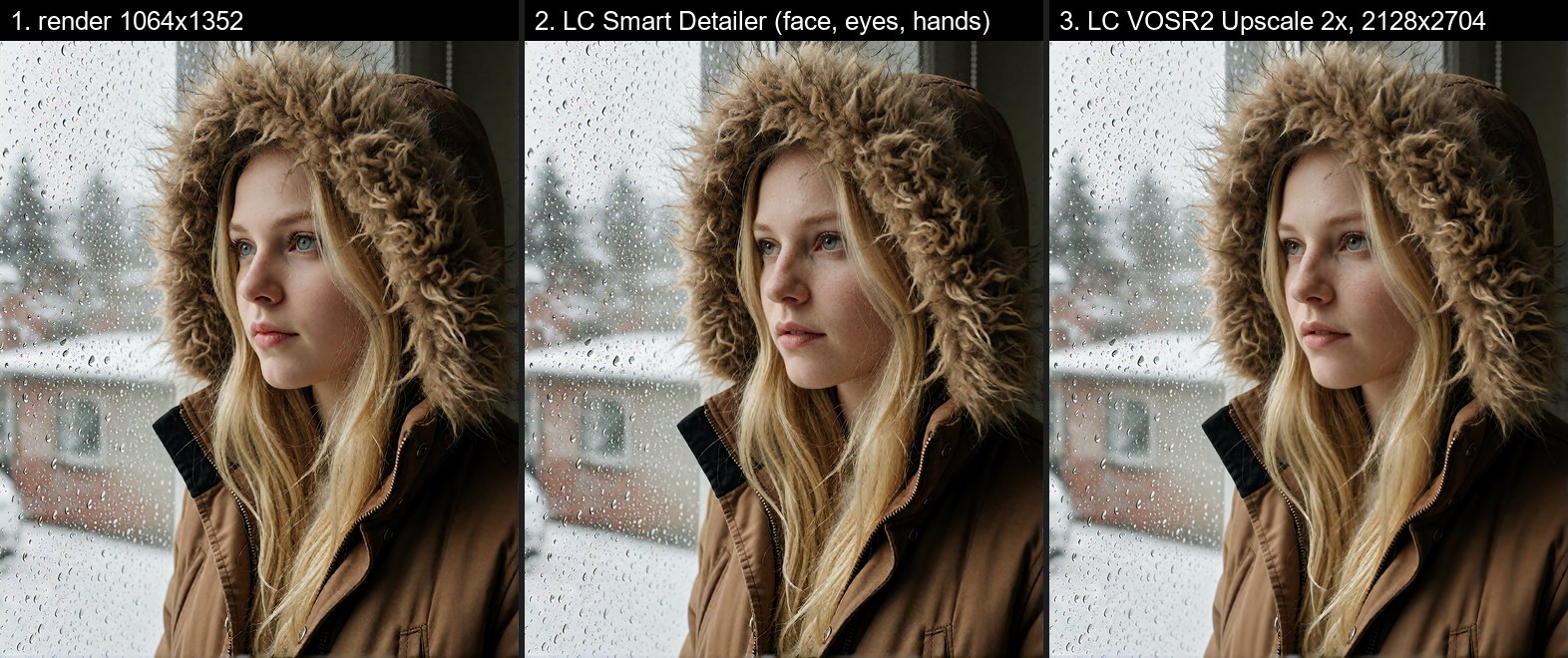
Render → LC Smart Detailer (pipe) → LC VOSR2 Upscale (pipe). One wire.
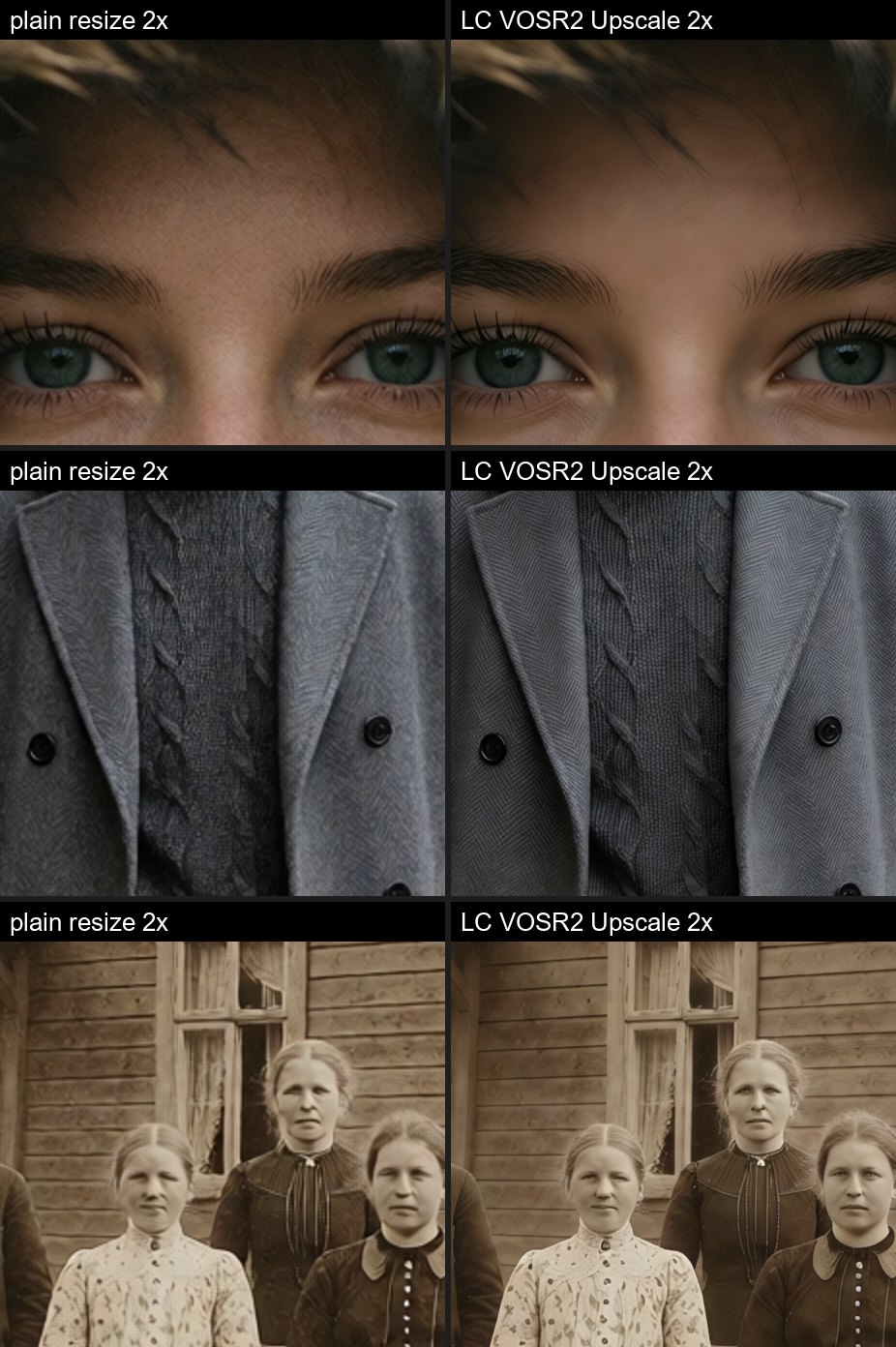
Things to notice:
- Skin: clean and smooth, with the lashes and brows sharp. No painted-on grain.
- Fabric: real herringbone and cable knit instead of mush.
- Small faces: the old photo's faces come back as faces.
Speed and size chart*
| upscale_by | Output size | Time | GPU memory | |---|---|---|---| | 1.5x | 1596 x 2028 | 2.8 s | 4.7 GB | | 2x | 2128 x 2704 | 4.4 s | 4.8 GB | | 3x | 3192 x 4056 | 8.6 s | 5.1 GB | | 4x | 4256 x 5408 | 16 s | 5.7 GB | | 6x (3x + 2x) | 6384 x 8112 | 46 s | 8.4 GB | | 8x (4x + 2x) | 8512 x 10816 | 75 s | 12.0 GB |
*All tests based on a 1064x1352 render on an RTX 5090, warm.
⏱️ Time will vary by card, but the output size will not. About 5 GB covers 1.5x - 3x, so it can almost run on a 🥔
- 6x and 8x run two passes on purpose. One big pass breaks the skin up into patches.
Settings ⚙️
- upscale_by: 1.5x - 4x run in one pass, 6x and 8x in two. 2x is the sweet spot, 1.5x is a third faster.
- color_alignment: wavelet.
- tile_size: 512, what it was trained at. Leave it.
- vae_tile_size: lower = less VRAM, a little slower.
- seed: only changes the finest grain.
- protected: the detailers' areas at the new size. Wire it into protect_mask on LC Skin Upscale and LC Skin Texture so they do not add skin detail twice.
- ✋ The first run downloads the weights (about 6.5 GB) into
models/vosr2. This takes a few minutes.- Download failing (offline mode, firewall, or huggingface.co blocked)? The node's error lists every file with its link and the exact folder to put it in (all from huggingface.co/CSWRY/VOSR, into
models/vosr2/VOSR2). Where huggingface.co is blocked, setHF_ENDPOINT=https://hf-mirror.combefore starting ComfyUI.
- Download failing (offline mode, firewall, or huggingface.co blocked)? The node's error lists every file with its link and the exact folder to put it in (all from huggingface.co/CSWRY/VOSR, into
Example workflows
| Workflow | What it does |
|---|---|
| workflows/LC Maskmaker nodes.json | Every node in the pack wired to one image, each with its own preview, so you can compare them side by side. Also uses LC Image Desaturate and LC Skin Beauty from LC123. Bilingual (English / Chinese) note on the canvas. |
| workflows/Lonecats Krea2 AnyPaint V1.1.json | Inpaint and outpaint with Krea 2 Turbo and LC Krea2 AnyPaint. Paint the mask on LC Create Mask, drag the edges out on LC Outpaint, or turn and pad the picture with LC Outpaint, Rotate, & Pad, and switch between the groups with the Groups Bypasser. Needs LC123 and the AnyPaint LoRA. |
| workflows/MOSS Box Inpaint Module.json | Edit a picture with MOSS Image by drawing boxes: LC Bounding Boxes → LC MOSS Layout Prompt → LC MOSS Box Edit. Starts on a parka girl coat swap. Needs LC123. |
Models and licensing
- ✋ Models are never bundled or redistributed. Model-backed nodes download from the original source the first time you use them, or reuse a copy you already have.
- Each model in a dropdown is labelled with its license, so you can see what you are picking.
- 📂 Shared models folder: running more than one ComfyUI? Keep one copy of each model in a shared folder and point every install at it in ComfyUI's
extra_model_paths.yaml. MaskMaker looks there for every model below (mainmodelsfolder first), so you don't need a copy per install. New downloads still go to the main folder.
shared:
  base_path: D:/shared/models
  sam3: sam3
  checkpoints: checkpoints
  depthanything: depthanything
  vosr2: vosr2
  background_removal: background_removal
- VITMatte (LC Mask Refine):
vitmatte-small-composition-1kandvitmatte-base-composition-1k, both Apache-2.0. Saved undermodels/vitmatte. A copy you already have inmodels/vitmatteis picked up automatically. - BiRefNet (LC Remove Background): general, matting, portrait, and HR 2048 variants, all MIT. Saved under
models/background_removal, the same folder ComfyUI's own loader reads. - RMBG-2.0 (BRIA): used if you already have it in
models/RMBG/RMBG-2.0. Not downloaded for you. ⚠️ Non-commercial license. - Older BiRefNet
.pthfiles (likeBiRefNet-ep480.pth) use an older layout that ComfyUI cannot load, so they are not listed. - GroundingDINO + SAM (LC Segment Anything):
grounding-dino-tiny/-baseandsam-vit-base/-large/-huge, all Apache-2.0, Hugging Face format. Saved undermodels/grounding-dinoandmodels/sam. Your original-format.pthfiles there are not used (different layout). - SAM 3 (LC Segment Anything, sam3 engine): Meta's original
facebook/sam3is gated (manual approval), so it is never downloaded for you. Your ownsam3.safetensorsinmodels/sam3(or ComfyUI'smodels/detectionormodels/checkpoints, where ComfyUI's own SAM 3.1 template keeps it) is picked up. For a one-click option, the dropdown offers SAM 3.1 (sam3.1_multiplex_fp16.safetensors, 1.7 GB) fromComfy-Org/sam3.1, the same ungated copy ComfyUI's own SAM 3 template uses, saved tomodels/sam3. SAM License terms apply (Hugging Face lists it as other). - Segformer clothes (LC Person Mask):
mattmdjaga/segformer_b2_clothes, saved undermodels/segformer_b2_clothes. ⚠️ Its Hugging Face card says license other and it is built on NVIDIA's SegFormer, so treat it as not cleared for commercial use until you have checked. - MediaPipe selfie multiclass (LC Person Mask): Google's
selfie_multiclass_256x256.tflite, saved undermodels/mediapipe. Check its model card for terms. ThemediapipePython package is not installed by this pack. - Depth Anything V2 (LC Depth Anything V2): Small is Apache-2.0, Base / Large / Giant are CC-BY-NC-4.0 (non-commercial). Saved under
models/depthanything. Small is listed first so it is the default. - MOSS-Image Color-Depth Control (LC MOSS Control) by darask0: Apache-2.0, not bundled. Unofficial, community-made. Its training depth maps were made with Depth Anything V2 Large (CC-BY-NC-4.0); the weights are the adapter only.
- LC MOSS Box Edit follows the box-edit method of ComfyUI-Artfat-MOSS-BBox by artfat-creator (MIT): the whole picture with a soft box mask, Differential Diffusion and a paste-back. Our own code, no files copied.
- BAE normals (LC Normal Map):
scannet.ptfrom lllyasviel/Annotators, saved undermodels/normalbae. ⚠️ Trained on ScanNet and the Hugging Face card only says other. Treat as not cleared for commercial use until you have checked. - VOSR 2.0 (LC VOSR2 Upscale): from CSWRY/VOSR, Apache-2.0, including its DINOv2-L encoder (Meta) and Qwen-Image VAE. Saved under
models/vosr2/VOSR2(if you already use the ComfyUI-VOSR2 pack, the same files are used). - ⚠️ Some models are non-commercial. The label tells you. Checking the license before commercial use is on you.
License
MIT for the code in this pack.
Third-party model code in vendor/ is credited in THIRD_PARTY.md.