
ComfyUI LC123 Nodes
ComfyUI LC123 Nodes by lonecatone23 — Image Label, Skin Upscale, Bypass Relay, Image/Mask Pass, Widget To String, Save Image + Metadata, Any Empty Bool/Int/Float, Int Split, LC Batch Image, Tone Match, Color Match mask, MiniMax H3 pipe, Image-Mask Resize, LC Lighting Control, Photo Style, Skin Beauty, Sharpen Pro, prompt builder, sampler configure, Sigma Curve, Sigma Resample, image FX, pipes, notify.
Nodes (156)
Paint your regions, stop hand-drawing masks — Anima Regional Inline Canvas
One node to size your image, mask, and latent — Aspect Ratio Simplifier
Krea2 regional conditioning without the mask headaches
Save a prompt to disk without a regex rodeo
Put your saves where you actually want them
The 'is anything upstream dead?' check
A dead-branch check that emits a number you choose
Return 0 or 1 when an upstream branch goes dead
The switch that just picks whichever wire is live
The boring half that applies the list, with a real off switch
Drop a .cube grade on your image in one node
Pull your sizes back out of a pipe
LC Aspect Ratio Pipe (In/Edit)
The Aspect Ratio Simplifier that also speaks pipe
Fix the color cast without touching a temperature slider
A plain scheduler-to-sigmas node for dual-pass setups
Stack 20 Images Into One Batch Without Fighting ComfyUI's Size Check
A/B compare without the wall of numbers
Glow without blowing out your highlights
Make any number a true/false, on the node face
A one-click NOT gate for your workflow
The A/B switch driven by a checkbox
A checkbox that becomes a wire
Draw where things go instead of describing it
LC Bypass Relay
Name the camera in your prompt without the jargon
LCChangeStepCount is LC Sigma Resample — one node, two names
Add the lens fringe that kills the 'AI look'
The compliance scrubber — and it's your problem, not the node's
Sharpening that doesn't commit a halo crime
Make a regen actually match your reference
Turn a color story into prompt words
One dropdown to drive every sampler in your graph
What LC Control Panel 🎛️ actually saves you
A dropdown you actually define, with a remote
Put the control where your eyes are
Inject the noise your sampler thinks it removed
Fixing the fake-bokeh problem with an actual depth map
Detail Daemon Without the CFG Maths
The Detail Daemon for People Still Using a Plain KSampler
Unpack a pipeline bus without unpacking everything
One value, both sides, no mental math
Smear the frame along one vector, and why 'strength' is the knob you want
Your prompt is wearing the same tag twice
Composite B onto A, then tune the opacity live
Stop drowning in a flat output folder
The cheapest realism you'll buy all day
Grain that survives the encoder
Tri-X, HP5 and Acros, from one dropdown
Portra, Velvia and Cinestill from one dropdown
Keep the bigger (or smaller) of two numbers
The table FLUX 3 wants, built from your boxes
Four reference images, one node
Ask the image its resolution, get six answers
One node, the five grade knobs you actually use
Stop wiring 40 Load Image nodes
Drag the box on the node, not in a photo editor
Smooth the flat bits, keep the edges
Every way to compute grayscale, one factor
A contact sheet for your batch, without the wire spaghetti
A sticker with no sockets that makes a shared workflow readable
Keep your image and mask in the same frame
The One-Wire Kill Switch ComfyUI Never Shipped
Sixteen reference images on one wire
Unpack your references right where the encoder is
The three-knob color cast fixer you didn't know you needed
The before/after wipe that actually saves the split image
Stitch a Dozen Images Without a Dozen Resize Nodes
One number sets the size, and it tells you what it actually did
Pick input #4 of 6 with one number, whatever the type
The bigger-of-two node your dynamic resolutions keep needing
Turn one step count into two samplers that always add up
Not this one — the boolean flip that accepts anything
Ask the graph whether that node is actually running
Assemble prompt parts without a wall of plus-sign nodes
The workflow annotation node that behaves like a Word text box
Hold the last render so you can compare without re-running
Vignette, chromatic aberration and grain — one node, five sliders
Give your render a Helios 44-2 — or try to take it away
The color-wheel grade that reads like you opened a real RAW file
LC 🚦 is a lamp for a boolean
Describe light like a photographer, in two dropdowns
Relight a finished image with real cast shadows, no re-generation
The Power Lora Loader, rebuilt for the frontend that broke it
One LoRA, one row, no CLIP to argue with
Build the LoRA list once, apply it to any model
Kill a Matte Without Rewiring Your Mask Bank
One wire for all your MiniMax H3 reference media
Unpacking
Unpack Your MiniMax H3 Graph Without Rewiring It
MiniMax H3 Has Forty Sockets. This Node Makes Them One Wire.
The checkpoint tells you what's in it, if you know where to look
Turn your drawn boxes into the JSON MOSS Image actually reads
What LC Natural Look actually does to your pixels
The red prompt box, decoupled from the CLIP encoder
Read another node's widgets — without reloading the workflow
Finally know when the queue is done — with your own sound
The Loader That Picks Your Files For You
One Loader, One Wire, Twenty-Five Values
Video Is Where File Choice Actually Bites
Video Loader, One Wire Out
37 Instagram-grade looks without installing WAS Node Suite
The smartphone-snapshot finish, with presets for real cameras
Two Pipes In, One Pipe Out
One wire carries the whole workflow — build it or patch it here
Unpack a whole workflow's worth of sockets from one wire
The green prompt box, standing on its own
The preview that doesn't throw a fit when the branch is muted
Check the matte without killing the queue over a null
The prompt assembler that also emits regional JSON
Encode text without ever retyping it
Same encode, one extra socket that says nothing
Hand FLUX.2 Klein up to eight reference images at once
Relight a finished image without regenerating a single pixel
Your GPU has an upscaler and ComfyUI barely uses it
One node that owns every number your sampler argues about
Unwrap your sampler settings from the pipe bundle
Full dual-pass controls that ride the bundle
The sampler settings node for people who just want one CFG
One CFG, packed into the bundle
One dropdown for every sampler in the graph
A SaveImage that Civitai can actually read
Fill in the details LC Save Image embeds
Stop typing 'cafe interior, golden hour' from memory
A seed node that randomizes when you tell it to, not behind your back
Six seeds from one, spaced exactly how you like
Peek at any value mid-wire without breaking it
Actually see what your string nodes are carrying
Hand-draw the noise schedule your sampler actually runs
Give one half of your schedule more steps than the other
One Node for the Entire Noise Schedule
Stop typing 1216 and hoping the model agrees
Grade the skin, not the whole frame
Fixing AI skin without another diffusion pass
Pores, Borrowed From a Real Photo
Put the pores back without re-rolling the face
A real slider for your numbers, with the right type on the way out
Sample the layout at half size, then grow to full size and finish
The half-resolution trick as a one-node drop-in
Cut one schedule in two, run each half with its own model
Two models, one schedule, zero hand-built sigmas
A pause button for the middle of your workflow
The 'how should this look' module of the prompt builder
Build a character prompt from dropdowns, not from memory
Eight subjects, one prompt line — LC Subject Array demystified
LC Text Overlay — burn real text onto an image without leaving ComfyUI
LC Text Remove — strip words from a prompt without shredding the spaces
LC Text Replace — a wireable find-and-replace that grows to 20 pairs
LC Timer ⏱️ is a stopwatch with no inputs, no outputs, and no reason to exist except that you can't tune speed blind
Put the original light back on your refined frame
LC Vibrance — saturation that doesn't wreck the already-saturated bits
LC Vignette — the edge-darkening that makes AI images read as photographs
LC VRAM Cache Clear — the OOM-stopper that disappears from your workflow
LC Watermark 💧 — stamp a logo on every frame without leaving the graph
Read Any Widget as Text — Without Typing It Twice
🎲 LC Wildcard — random prompt lines without the wildcard syntax
<a id="top"></a>
ComfyUI LC123 Nodes
Custom nodes for ComfyUI by lonecatone23.
- Repo: github.com/lonecatone23/ComfyUI_LC123_nodes
- CivitAI: lonecatone23
- Instagram: synth.studio.models
- Support: Buy me a ☕
- Version: 1.49.29 · 148 Python nodes · 5 JS-only (LC Bypasser, LC Mute, Groups Bypasser, Panel, LC Note)
Small tools that remove friction: less wire mess, fewer clicks, clearer workflows.
- This page describes the pack as it is right now. Release history lives in the git tags.
- Every node and its category:
NODES.md - For Anima regional attention, also grab Sen-sou Anima Regional Conditioning.
On this page
- Canvas tools (Align, Connection FX, Comfy Optimization Report, System & Model Optimization Report, Node Pack Usage Report, Pin all)
- Settings
- Notes, labels and previews
- LC Model Optimizer (loads the right files and speed-ups for your machine)
- LoRA loaders
- Lighting
- Skin, sharpening, depth and looks
- Image FX
- Image and size
- Prompt Builder
- Flux 3 and MOSS Image (boxes and references)
- Sampling, sigmas, latents and pipes
- Saving, metadata and text
- Switches, logic and control
- Regional canvas
- Example workflows, Assets, Quick tips, Install
<a id="canvas-tools"></a>
🧭 Canvas tools
<details> <summary><b>Click to open</b></summary>Tools for the canvas itself, not nodes. Nothing here touches your generations.
Align 📐
- Turn it on and off with the Align button in the top toolbar: the LC logo. Dark gray = off, light gray with the red flame = on.
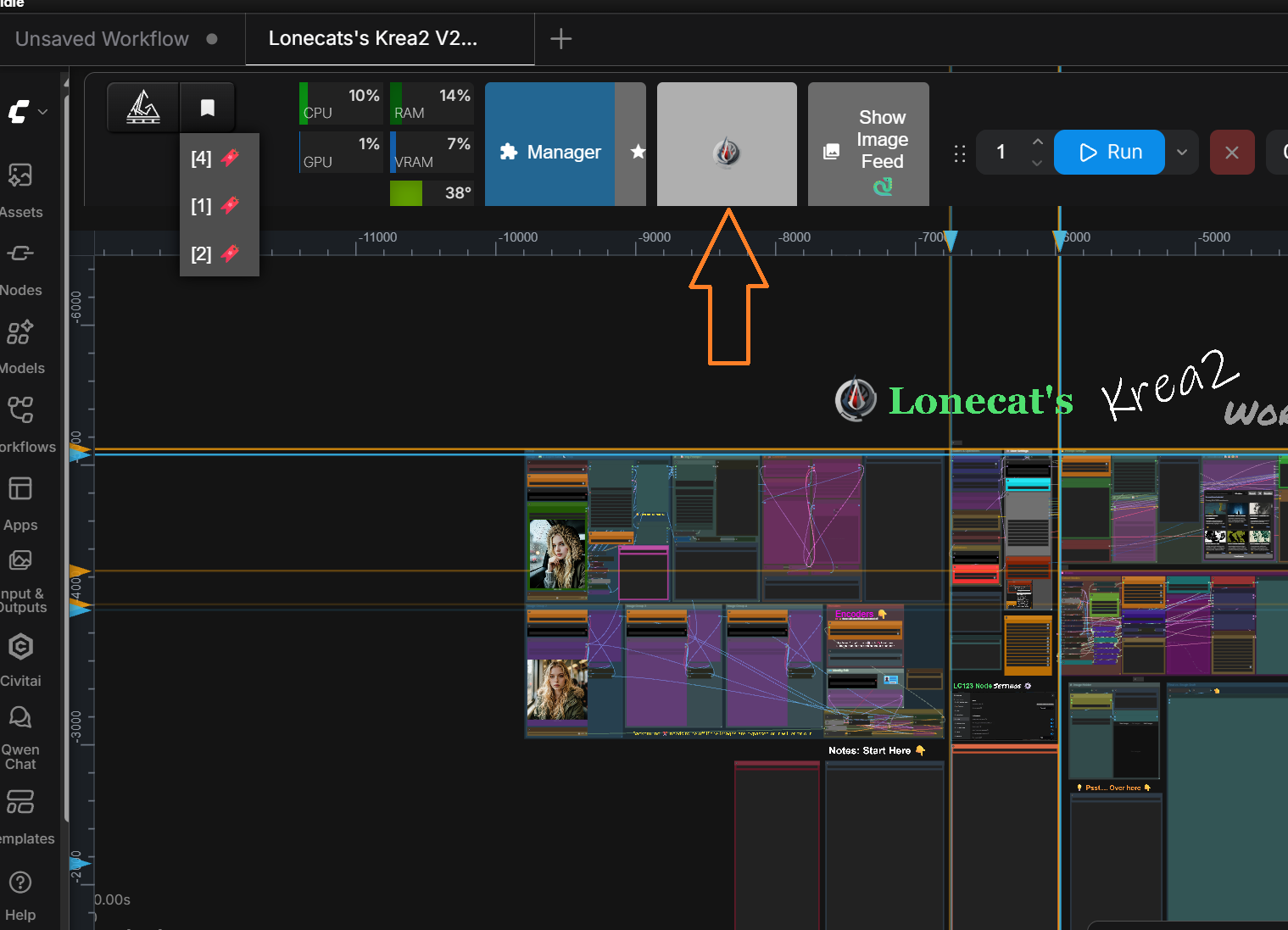
- Rulers appear on the top and left edge:
- Left click a ruler: a Node line (blue). Nodes snap to it.
- Right click a ruler: a Group line (orange). Groups snap to it.
- LC Notes snap to both, since a note can label a node or a group.
- Click a line's marker again to remove it. Drag a marker to move it.
- Lines stay invisible until you get close, then fade in. They save with the workflow.
- Snap distance is ComfyUI's own Snap to grid size (Settings > Lite Graph > Canvas). Want it tighter? Make the grid smaller. New lines land on that grid too.
- Shift while dragging hands the drag to ComfyUI's own grid snap (no line snap). With Always snap to grid on, a line snap still wins on the axis it caught.
- The Align on/off is saved in the workflow. Save it with Align on and it opens with Align on. Every workflow tab keeps its own, so switching tabs never mixes them up.
- note: switching it counts as a change to the workflow, so you get the unsaved dot.
- Don't want it at all? Settings > LC Settings ⚙️ > Align > Align tool turns off the button and everything with it.
Connection FX 🔌 (off by default)
- While you drag a wire, every socket it can plug into glows in its own socket color.
- Get close and rings pulse out of the socket. Closer = bigger and brighter.
- Zoomed out, every valid socket glows brighter so you can still find it.
- A collapsed node with a socket that fits glows around its title, so you can drop the wire straight on it.
- Costs nothing unless you are holding a wire.
Comfy Optimization Report 🩺
- Why is my canvas slow? This tells you.
- It pans your canvas by itself for about 8 seconds, times what every pack in the open workflow draws and runs, and scans their files.
- You get a list, biggest win first:
- ⚠️ big gain · ✅ worthwhile gain · 💡 small gain · ⚪ already set · ➖ does not apply · ℹ️ required, no setting for it
- Sorted into: that pack's own settings (exact name, where it lives, current value), LC123 settings, ComfyUI settings, sidebar tabs, and required to function.
- Show last run flips to the previous report. Each new run shows what got faster and which fixes are done.
- Download CSV saves the report as a .csv file for Excel or Sheets. Made in your browser, and safe to open (no cell can run as a formula).
- Only node packs used in the open workflow are analyzed. Nothing is changed. (Keep the mouse still while it runs.)
- Open it from Settings > LC Settings ⚙️ > Optimization, or right-click the empty canvas.
- 💡 On a big workflow, the usual winner is links: Link Render Mode set to Linear instead of Spline.
System & Model Optimization Report 🖥️
- Will this run on my machine, and which model files should I get? This tells you.
- It tests your machine in about 10 seconds:
- Hardware: graphics card, VRAM, RAM, page file, drive speed, PCIe link.
- Speed-ups: Sage, Triton, Sol-Attn, Comfy Kitchen, fp8 / int8 / nvfp4, llama-cpp for LC Vision. Each one is actually run, not just looked up.
- note: Sage is checked against standard attention, so a Sage that runs but makes gray noise shows up as ⚠️.
- ⚠️ problem · 💡 worth changing · ✅ works · ℹ️ info · ➖ not installed
- Recommended to install: when Sage, Triton, Comfy Kitchen or llama-cpp is missing (or failed its test), links to reliable builds matched to YOUR card, PyTorch and install type, plus the command. Links only: they're other people's projects, nothing is installed for you.
- LC Vision model suggestion: the Qwen3-VL size and quant for your card (Quality / Optimal / Fast), and the context size to set.
- When picking a model (includes custom models): what file type to get on YOUR machine for Quality, Optimal and Fast, a size guide, and what to avoid. Works for finetunes and merges too.
- Model recommendations: pick a model and a goal, get the exact files: download link, size, how close it is to bf16, time per step on your machine, and whether it fits. ✅ = you already have it.
- All base models at a glance lists every model at once.
- Models covered: MiniMax H3 (FL2VA and Ref2VA), Krea 2 (Turbo and Raw), LTX 2.5, LTX 2.3, Anima, Z-Image Turbo, Qwen-Image 2.1, Flux.2 Klein 9B (Distilled and Base), Flux 3 Klein (Distilled and Base), Ideogram 4, SDXL, Illustrious XL, Pony Diffusion V6 XL.
- Measured on an RTX 5090 and an 8 GB RTX 5060 Laptop. Image models land within about 15 %; video models are rougher and it says so.
- Show last run, Copy report and Download CSV work like the Comfy Optimization Report. It will not run while ComfyUI is generating.
- Nothing is changed. Open it from Settings > LC Settings ⚙️ > Optimization, or right-click the empty canvas.
- The LC Model Optimizer nodes use this report to load the right files and speed-ups for you.
Node Pack Usage Report 🧹
- Which of your installed node packs do your workflows actually use? This tells you.
- ⚠️ It scans your ComfyUI workflows folder and reads every saved workflow (subgraphs included). Read-only: nothing is changed or uninstalled.
- Lists the packs no workflow uses (with their size on disk), the ones only one or two workflows use, the tools worth keeping anyway, and nodes your workflows need that no installed pack provides.
- Show last run, Copy report and Download CSV work like the other reports. Open it from Settings > LC Settings ⚙️ > Optimization, or right-click the empty canvas.
Pin (all) / Unpin (all) 📌
- Right-click any node, group or the empty canvas.
- Pins or unpins everything in the graph you are looking at, nothing needs to be selected.
note: Align works on the classic canvas and in Nodes 2.0. Connection FX is classic only; with Nodes 2.0 turned on it stays out of the way.
Nodes 2.0: every LC node works, but the live on-canvas extras (drag-to-place, the Sigma Curve editor, the crop box) are classic only. The preview zoom (click, wheel, double-click) works in both. In Nodes 2.0 you get the result as it was at the last run instead: the finished image on FX nodes, the cropped image, a picture of the sigma curve, and the Get Image / Image-Mask Resize / Boolean readouts as a line of text. Classic always comes first.
</details><a id="settings"></a>
⚙️ LC Settings
<details> <summary><b>Click to open</b></summary>Open Settings (the gear) and pick LC Settings ⚙️. These are UI only: smoother canvas, lighter previews. They never touch VRAM, generation or the image that comes out of a socket. (A lighter preview never means a lighter image.)
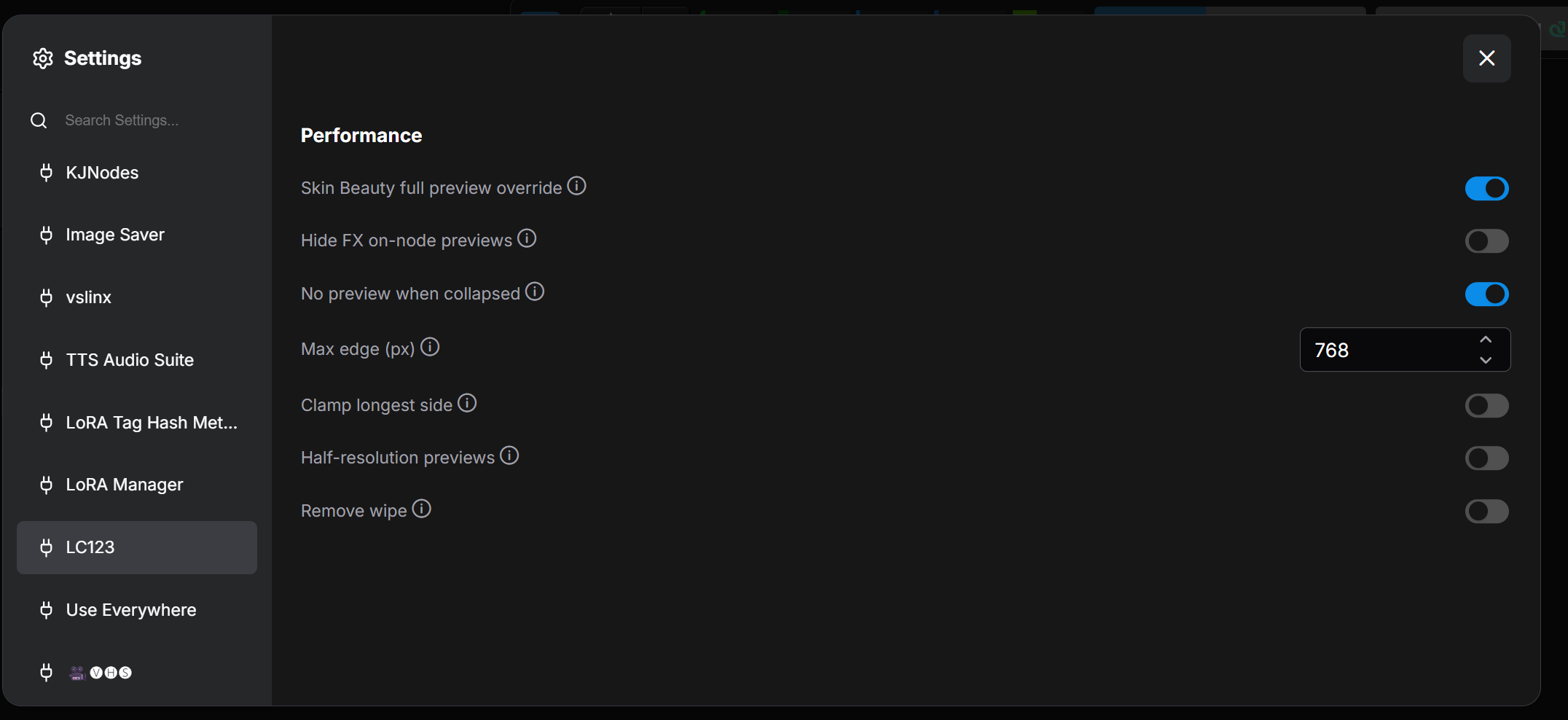
Align
| Setting | Default | What it does | |--------|---------|--------| | Align tool | On | The whole tool, including its logo button in the toolbar. Off = no button, no rulers, no snapping | | Rulers | On | Top and left rulers while Align is on | | Line reveal distance (px) | 120 | Lines stay invisible until you get this close | | Also snap to other nodes and groups | Off | On = also snap to other nodes' edges and centers (no line is shown for those) |
Connections
| Setting | Default | What it does | |--------|---------|--------| | Connection FX | Off | Socket glow and rings while you drag a wire | | Connection FX reach (px) | 160 | How close the cursor has to be before the rings start | | Connection FX zoomed-out glow (%) | 60 | How much brighter valid sockets glow when zoomed out |
Notes
| Setting | Default | What it does |
|--------|---------|--------|
| Note language | Same as ComfyUI | The language every LC Note opens in (when it has that translation) |
| Translate all notes | button | Translates every LC Note in the open workflow into your Note language (needs LC Vision) |
| Link cards | On | @[card](https://…) lines show as link cards. Off = plain links |
Optimization
| Setting | Default | What it does | |--------|---------|--------| | Fast cancel | on | Cancel stops a run in a fraction of a second instead of finishing the step first. Every model block checks the Cancel button: on a 6 s Krea 2 step it stops in 0.2 s instead of 2.6 s, with no speed cost. Works for every sampler (KSampler, USDU, video), nothing to wire | | Free text encoder before sampling | on | When sampling starts, any big text encoder (1 GB or more) still in VRAM moves to RAM, so the diffusion model gets the whole card. Biggest win on H3 and Krea 2. A new prompt reloads it from RAM in a second or two | | Comfy Optimization Report | button | See Canvas tools | | System & Model Optimization Report | button | See Canvas tools | | Node Pack Usage Report | button | See Canvas tools |
Performance
| Setting | Default | What it does | |--------|---------|--------| | Half-resolution previews | Off | FX previews drawn at half size | | Clamp longest side | Off | Shrinks preview textures to Max edge | | Max edge (px) | 768 | Used by Clamp. Try 512 on heavy graphs | | No preview when collapsed | On | Collapsed FX nodes skip their preview | | Hide FX on-node previews | Off | The lightest option: no FX previews at all | | Preview distance (px) | 40 | Like node text, a preview switches off when you zoom out far enough that it is drawn smaller than this. Smaller previews switch off first. 0 = always draw | | Skin Beauty full preview override | On | Skin Beauty keeps a full-quality preview even with Half-res or Clamp on | | Recent colors | On | Your last 8 custom colors in the right-click Colors menu (adds a 🎨 Custom picker if Custom Scripts is not installed) | | LoRA loader info button | On | The ℹ button on each LC LoRA Loader row |
- LC Image Compare, LC Image Split and LC Dynamic Overlay keep their full preview and wipe no matter what (only Preview distance switches them off when zoomed far out).
- 💡 Laggy graph? Turn on Half-resolution previews and Clamp longest side (512). Still laggy? Hide FX on-node previews, then run the Comfy Optimization Report.
Full directions: LC123_Performance_Settings_Note.md
<a id="notes"></a>
📝 Notes, labels and previews
<details> <summary><b>Click to open</b></summary>LC Note 📝
A markdown note that speaks your reader's language. Write it once, translate it, and the translations ship inside the workflow.
- The dropdown at the top lists ComfyUI's 14 languages, each in its own script: ✏️ original · ✅ translated · ⚠️ the original changed since it was translated · ❌ not translated.
- The language every LC Note opens in is set in Settings > LC Settings ⚙️ > Notes > Note language. Same as ComfyUI follows your ComfyUI language. A note without that translation shows its original.
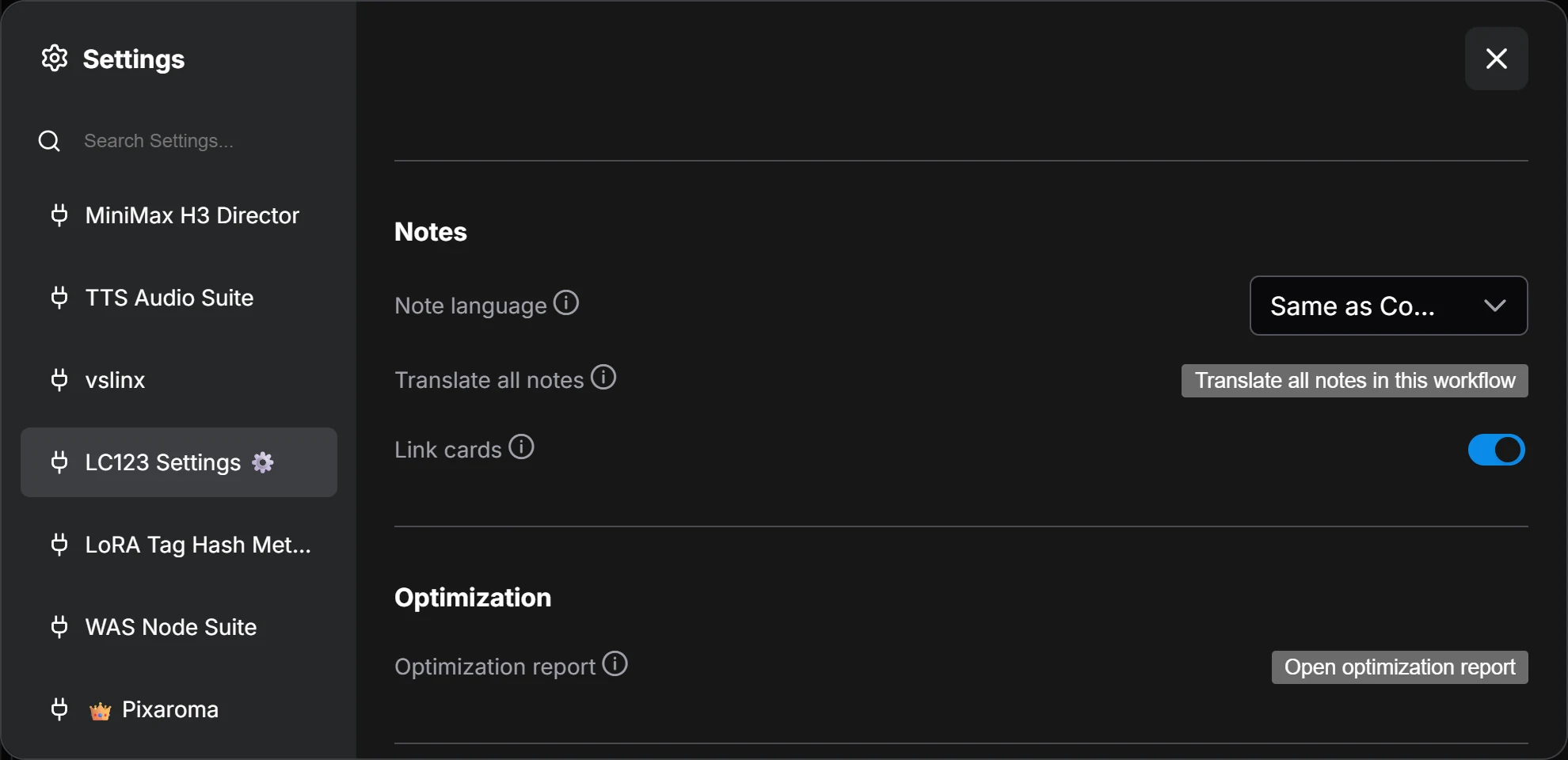
- Pick a ❌ (or ⚠️) language and click Translate now. Nothing ever translates on its own, so edit as much as you like before you ship it.
- ⚠️ keeps showing the older translation until you re-translate, so readers never get an empty note.
- 💡 Translating needs LC Vision installed. Nothing to wire. Reading and switching languages works for everyone with just LC123.
- The title follows the language too. A translation on screen shows
⚙️ Settings/ ⚙️ 设置. No translated title? You get the same words twice, so you know it is not an error. - Renaming always changes the original title. Translations then show ⚠️ until you re-translate.
- ✏️ follows your ComfyUI language. A Spanish ComfyUI starts a new note as Español ✏️. Right-click the note to change which language is the original.
- The ◀ ▶ arrows only flip between languages the note actually has. To translate a new one, open the list.
- عربي, فارسی and עברית display right to left. You can edit any translation by hand.
- Translate all notes (Settings > LC Settings ⚙️ > Notes) translates every LC Note in the open workflow, subgraphs too, into your Note language in one go. Notes already in that language or with an up-to-date translation are skipped; ⚠️ ones are redone. Only LC Notes are touched. Needs LC Vision. ⚠️ Save the workflow afterwards.
- Link cards. Put a link on a line of its own as
@[card](https://…)and it shows as a card: the page's picture, site, title and description.@[card: Download here](https://…)adds your own caption. Click the card to open the page. Normal links stay normal links.- Works for GitHub, CivitAI, YouTube (videos, Shorts and channels), Instagram and most sites that share a preview.
- ComfyUI reads each card's page once to get its title and picture, and the picture loads from that site. Only public web addresses, never your own machine or network. Turn cards off in Settings > LC Settings ⚙️ > Notes > Link cards.
- Download buttons. A line with just
@[download: file.safetensors · 2 GB | loras](https://…)shows as a button with the size, and 📂 Place in: ComfyUI/models/loras under it. Leave out| folderfor a button alone. Pixaroma notes swapped in by the Vision Assistant use these. - ✍️ Write this note (right-click, needs LC Vision): LC Vision writes a first draft from the workflow's groups, nodes and model files (with their real folders). Read it through before you share it.
- 🔤 Fix spelling (right-click, needs LC Vision): fixes typos only. Wording, links, code, names and numbers stay as they are. ↩️ Undo the LC Vision change puts the note back.
- Nodes 2.0: a note keeps the size you give it. Long text scrolls inside (the mouse wheel scrolls it, Ctrl+wheel zooms) instead of stretching the node.
LC Label 🏷️
A text label for annotating a workflow, with a rotate handle like Word or Paint. No title, no sockets, no execution.
- Rotate: select it, drag the round handle. Snaps to 5° with a magnet at 0, 90 and 180 (Shift = 15°, Alt = free).
- Scale: drag a corner. Wrap: drag a side handle and the text reflows (Wrap width 0 = auto).
- Pin it and it locks: clicks pass straight through, and only Ctrl+drag a box around it selects it again.
- Settings: double-click. Text, font, size, bold / italic, align, color, outline, shadow, background.
- Never buried: drawn as HTML above the canvas, so nodes and links can't cover it.
- Fonts: 14 ship with the pack (Bebas Neue, Oswald, Permanent Marker, Pacifico, Lobster, Great Vibes, Abril Fatface, Cinzel Decorative, UnifrakturMaguntia, Monoton, Bangers, Creepster, Rubik Glitch, Press Start 2P), licenses included in
web/fonts, plus your system fonts. Each one shows in its own typeface in the dropdown.
LC Image Label 🖼️⚙️
- A chromeless sticker: drag an image onto the canvas (or double-click > Load Image) and it floats there. No title bar, no sockets.
- Rotate, grow (corners) or stretch (sides, Shift keeps the proportions). Double-click for width, height, angle, padding, border and background.
- Baked into the workflow as a small webp, so it survives sharing even after the original upload is gone.
LC Preview Image 🖼️ / LC Preview Mask 🎭
Previews that stay quiet when nothing arrives. The core previews complain when an upstream node is muted, bypassed or hands over a null. These just sit there.
- Optional input: nothing connected, a muted branch, a null or an empty batch is fine. No error.
- Pass-through output: the image / mask comes out the other side. No signal = anything after it is skipped quietly.
- They show as soon as their image is ready, not after the whole workflow finishes. Batches show the first frame.
- Preview Image launches in the LC teal. Preview Mask launches black.
<a id="optimizer"></a>
⚡ LC Model Optimizer (loader + speed-ups)
<details> <summary><b>Click to open</b></summary>The System & Model Optimization Report tells you what suits your machine. The LC Model Optimizer sets it up for you. It replaces your model, text encoder and VAE loaders: the first thing you wire in.
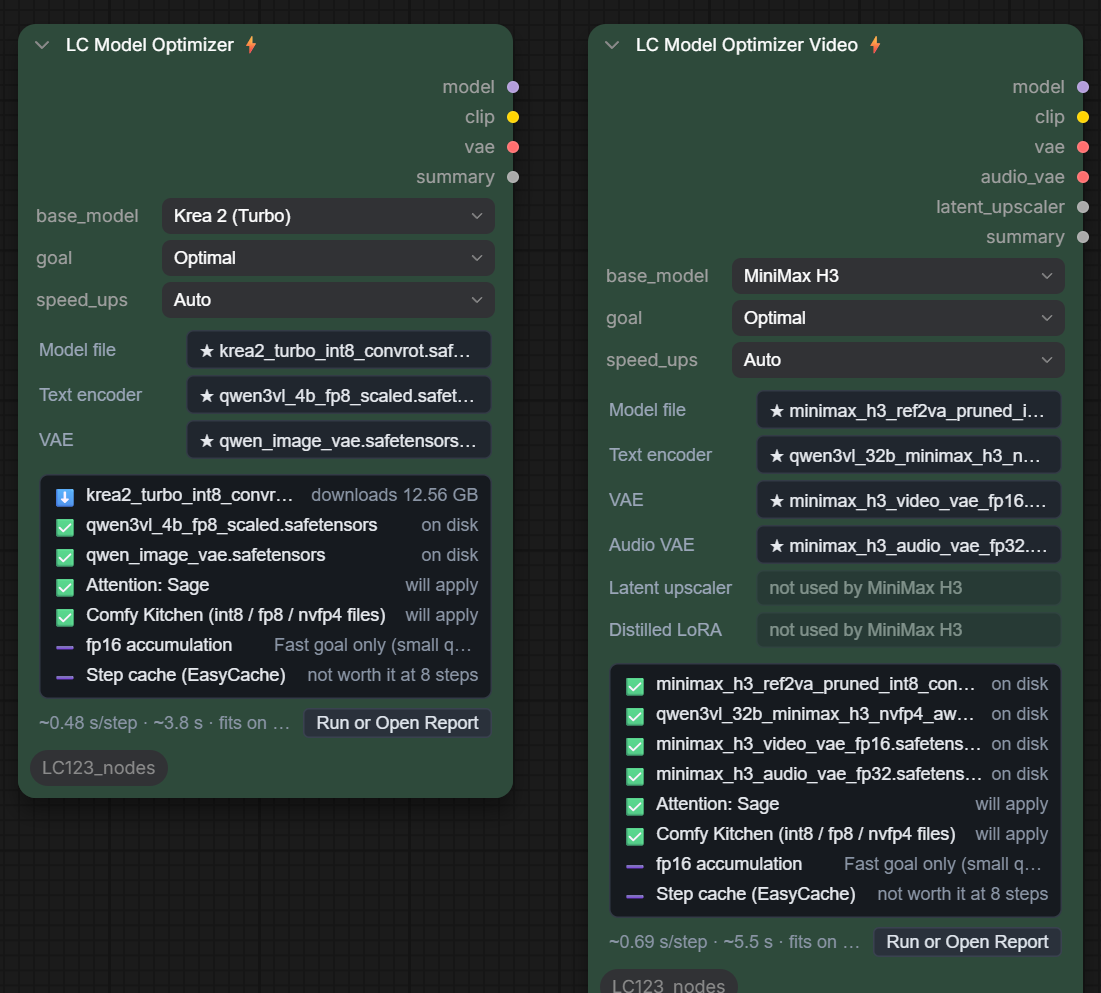
LC Model Optimizer ⚡ / LC Model Optimizer (pipe) ⚡ (image models)
- Outputs:
model,clip,vae,summary. The pipe version adds anLC_PIPEin front (model 2 = Ideogram 4's second model). - Krea 2 (Turbo and Raw), Qwen-Image 2.1, Z-Image Turbo, Flux.2 Klein 9B (Distilled and Base), Flux 3 Klein (Distilled and Base), MOSS Image (SFT and Base, needs ComfyUI with native MOSS-Image), Ideogram 4, Anima, SDXL, Illustrious XL, Pony Diffusion V6 XL (the SDXL family loads as one checkpoint: text encoders and VAE come from it).
LC Model Optimizer Video ⚡ / LC Model Optimizer Video (pipe) ⚡ (video models)
- Outputs:
model,clip,vae,audio_vae,latent_upscaler,summary. The pipe version adds anLC_PIPEin front (vae 2 = audio VAE). - MiniMax H3 FL2VA (first and last frame, the default) and MiniMax H3 Ref2VA (reference to video), LTX 2.5, LTX 2.3 (its distilled LoRA is applied at 0.5, like Comfy's template).
- note: the outputs never change with the base model. These nodes sit at the start of the graph, so your wires stay put. A part the model doesn't use just shows not used by (e.g. no upscaler on MiniMax H3).
How it works
- Pick the base model and a goal (Quality / Optimal / Fast, same as the report).
- Every file defaults to ★ Recommended: the file the report picked for this machine. No report yet? Comfy's own default files, and a 💡⚠️ banner on the node telling you to run the report first.
- File pickers work like the LC LoRA Loader: click to browse your folders, with a search box. On top:
- ★ Recommended (and the actual file name it will use)
- ★ Krealism V3.1 / ★ Animosity: Lonecat's newest release for that base model, in the quant that suits YOUR machine and goal (e.g. Fast = nvfp4, Quality = bf16). On disk first, else it downloads on the first run.
- ★ The workflow author's pick: a model, text encoder or VAE the author named in the Vision Assistant tour. Left blank = the defaults.
- From checkpoint / None
- ⬇ Download: recommended files you don't have yet. They download on the first run, then the picker switches to the real file name.
- On disk for this model: every file on disk made for the base model: Krealism and Animosity by name, any other finetune by reading its header. Your recommended files are pinned on top, the rest expand family › version › quant.
- note: SDXL, Illustrious and Pony are the same model type to ComfyUI, so they share one list.
- On Krea 2 (Turbo), the Krealism V3.1 files you don't have yet sit at the top of ⬇ Download.
- Then all your folders, so custom models work too.
- All-in-one checkpoints: the text encoder and VAE come from the checkpoint (you can still pick your own).
- Custom (any other model or workflow): set the base model to Custom (image and video).
- Pick your own files. ★ Recommended, downloads, estimates and file checks show as unsupported (we have no data for it).
- The speed-ups still apply.
clip_type(Custom only): how the text encoder loads. auto works when the encoder matches one of the models above; otherwise set it (e.g.chromafor Chroma).
- GGUF: loads through ComfyUI-GGUF. A GGUF it refuses (e.g. a
krea2tag) falls back to the calcuis gguf pack if you have it.
Speed-ups (Auto)
- Attention: Sage (or Flash) only if it passed the report's test on this machine.
- ⚠️ Don't put
--use-sage-attentionin your .bat. It forces Sage on every model, and some (e.g. Krea 2 image edit) give black images with it. Leave it out and let the node turn Sage on per model. The node shows a ⚠️ when the flag is on.
- ⚠️ Don't put
- Comfy Kitchen: used on its own for int8 / fp8 / nvfp4 files. The node just tells you if it's working.
- fp16 accumulation and Step cache (EasyCache): Fast goal only. The step cache only when it's worth it (20+ steps).
- Spectrum (MiniMax H3 FL2VA only): Optimal and Fast goals, when ComfyUI-Spectrum-MiniMax-H3 by xmarre is installed. About 1.3x faster on 8-step runs at about 1 MP, same lip sync, face and sharpness. Step- and size-aware: it sits out runs over 12 steps or under 0.9 MP (1344 x 768 is in, 1152 x 640 is out), where it cost lip sync in my tests. It stays off on Ref2VA: it smeared reference videos and scrambled text in my tests. It replaces the step cache when on. To opt out, set
spectrumto off (it shows on H3 even with speed_ups on Auto). - Spectrum (MOSS Image, Krea 2): built in, nothing to install. Optimal and Fast goals. Faces, hands and text unchanged at full size in my tests:
- MOSS: about 1.7x faster at 2 MP on a 5090, 2x on an 8 GB laptop (Fast forecasts more: about 2.1x, small sign lettering can change style).
- Krea 2 Raw: about 1.6x at 52 steps.
- Krea 2 Turbo: about 1.2x at 10 steps (up to 1.33x stacked with LC Speed Boost). Little to forecast in so few steps. Fast stays at the Optimal setting on Turbo: forecasting more left a ghost pattern.
- The first 20% of the steps always run (the layout forms there; a fixed short warm-up re-laid-out Raw's scene) and it sits out runs under 8 steps. It replaces the step cache when on. To opt out, set
spectrumto off (it shows on MOSS and Krea 2 even with speed_ups on Auto). Written from the Spectrum paper (arXiv 2603.01623).
- Veda (MiniMax H3, low resolution): Optimal and Fast goals, when Veda-on-ComfyUI by veda-sparse and its predictor (
models/veda) are installed. It runs under 0.9 MP, where Spectrum sits out: about 1.4x faster on an 8 GB laptop at 0.4 MP, same lip sync, face and sharpness. Above that it goes back to full attention (the face drifted at 1 MP in my tests). To opt out, setvedato off. - Manual: set
speed_upsto Manual and pick each one yourself, torch.compile included.
The status panel (on the node)
- Each file: ✅ on disk · ⬇️ downloads X GB · 📦 from the checkpoint.
- Each speed-up: will apply / applied, or ➖ and why not.
- Estimated time per step on YOUR machine, whether it fits on the card, and Run or Open Report (shows the saved report, or runs one if there isn't one yet).
- ⚠️ Mismatch hints: a text encoder or VAE that doesn't belong to the base model (e.g. Qwen3 8B on Krea 2) gets a warning. It is read from the file header, nothing loads. It still lets you use it: a hint, not a block.
<a id="lora"></a>
🎚️ LoRA loaders
<details> <summary><b>Click to open</b></summary>LC LoRA Loader 🎚️
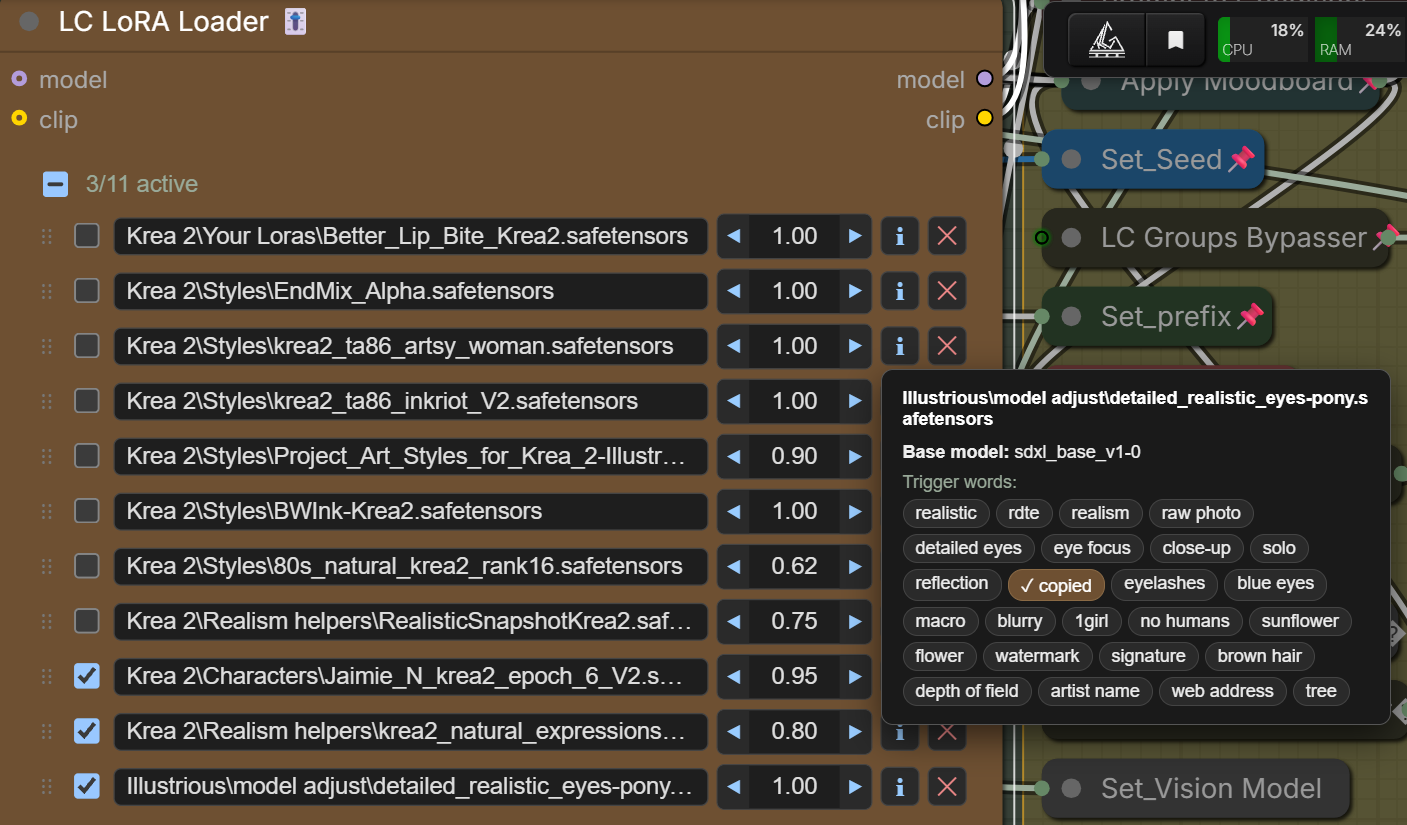
A multi-row LoRA loader modeled on rgthree's Power Lora Loader, rebuilt to fix three things: it did not render in Nodes 2.0, it re-centred on a cross-page paste, and its Info never showed anything.
- Rows: enable, pick the file, set a strength. Drag the ⋮⋮ handle to reorder.
- Strength: ◀ number ▶. Click an arrow to step 0.05, drag the number to scrub, click it to type.
- model and clip are both optional: leave one unconnected for a model-only or clip-only chain.
- ➕ Add LoRA / ✕ per row, plus Select all / Deselect all / Remove all in the right-click menu.
- Folder picker: click a row's file to browse your folders (as deep as they go), with a search box that fuzzy-matches your whole library.
- ℹ Info: trigger words from the LoRA file's own metadata, no network call.
- A LoRA you moved to another subfolder still loads: it finds the one file with that name (the console says where). Rows that are off, at 0, or point at a file that's gone are skipped instead of failing the whole graph.
- Real HTML in one widget, so it works the same in classic and Nodes 2.0, and copy/paste never resets it.
LC LoRA Loader Stack 🎚️ / LC Apply LoRA Stack 🎚️
- The loader split in two (like Comfyroll's CR LoRA Stack): build the rows once, apply them to more than one model/clip pair.
- Stack: the same face as LC LoRA Loader, no sockets in, a
LORA_STACKout. - Apply:
model/clip/lora_stackin,model/clipout, and a bypass switch. LORA_STACKis the standard community shape, so it also plugs into Comfyroll, Efficiency Nodes, Impact Pack, etc.
<a id="lighting"></a>
🔦 Lighting
<details> <summary><b>Click to open</b></summary>LC Lighting Control V2 🔦
Relight an image after the fact. Feed it a normal map + depth map (and optionally a subject mask) and it repaints light and shadow on the same pixels, with real cast shadows. No re-generation.
- Presets: Soft window, Rembrandt, Split, Top light, Under light, Rim, Golden hour, Campfire, Cyberpunk, Key + fill, Flat front. Change any value and it flips to custom.
- Light stage: drag = XY, Shift+drag / wheel = Z. A blue arrow shows where the shadow falls.
- Shadows: soft, hard or off, with shadow_blur, self_shadow (head on body) and background_shadow (0 = distant background, 1 = wall right behind).
- Spot or sun per light, plus warmth and an optional colored gel (color + color_amount).
- advanced toggle for the fine controls.
- Outputs: image · shadow_mask (white = lit) · light_layer.
LC Lighting Control 🔦 (the original, deprecated: use V2)
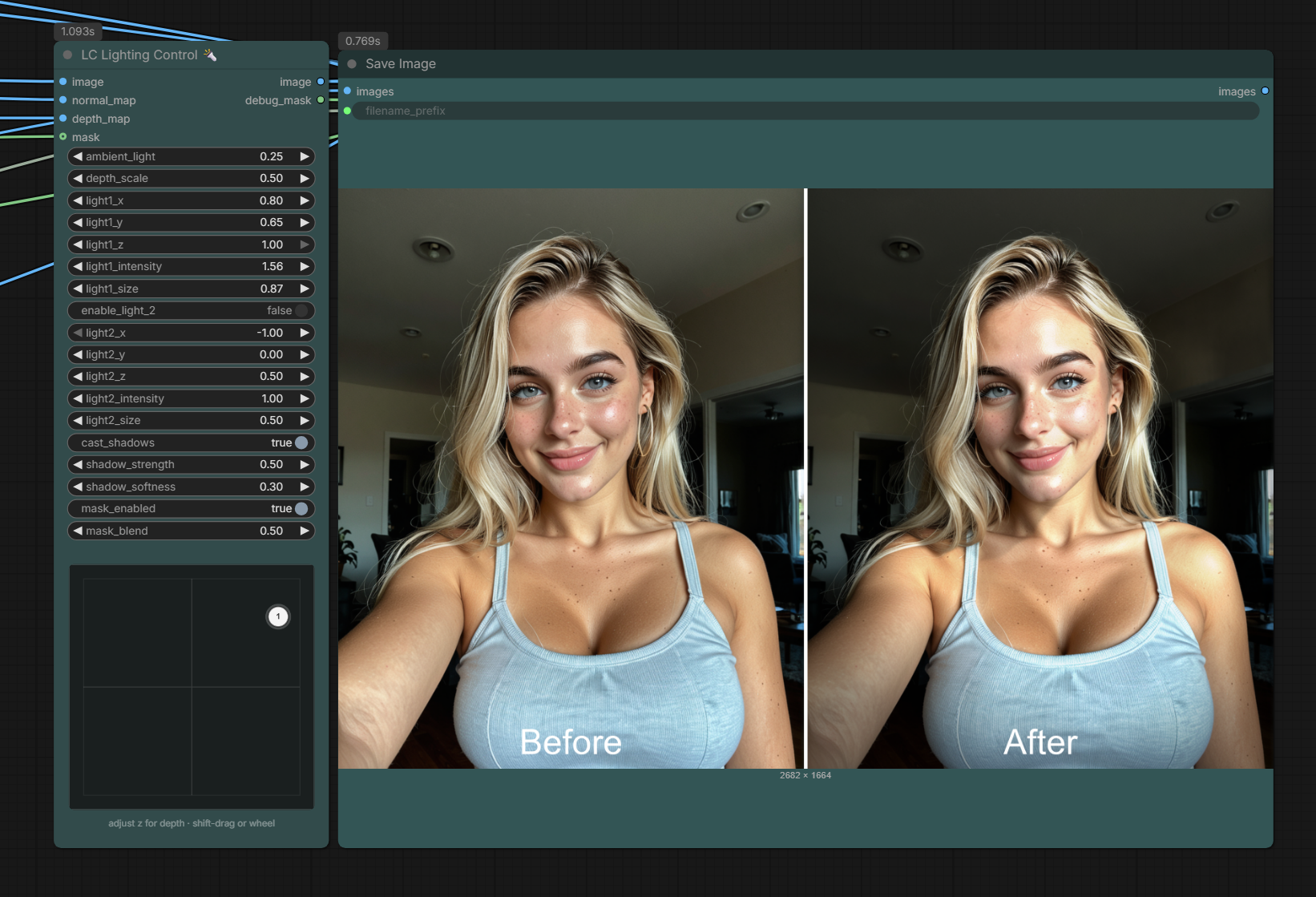
| Input | Role | |--------|------| | image | Photo / render to relight | | normal_map | Surface facing (BAE / DSINE recommended) | | depth_map | Near vs far (Depth Anything V2 recommended; invert if lighting looks inside-out) | | mask (optional) | Subject matte, used only when mask_enabled. High blend can fringe: ~0.2 to 0.45 or leave it off |
- How it works: every pixel is multiplied by how much light actually hits it. Facing the light = brighter. Turned away or blocked = darker. Ambient is the floor, so shadows don't crush to black.
- XYZ = aim. +X = from the right · +Y = from above · Z 0 to 1 (1 = front). Size = spot to flood. Intensity 0 = that light is off.
- Two lights, each with its own aim and shadows. Light stage: white = light 1, red = light 2.
- Outputs: image (relit) · debug_mask (ignore it).
- Needs (not bundled): Depth Anything V2, a normal-map preprocessor, optional remBG.
- 💡 Intensity ~1.0 to 1.3, ambient ~0.25 to 0.4, shadow strength ~0.4. Grey fringe? Turn the mask off.
<a id="skin"></a>
✨ Skin, sharpening, depth and looks
<details> <summary><b>Click to open</b></summary>LC Skin Beauty ✨
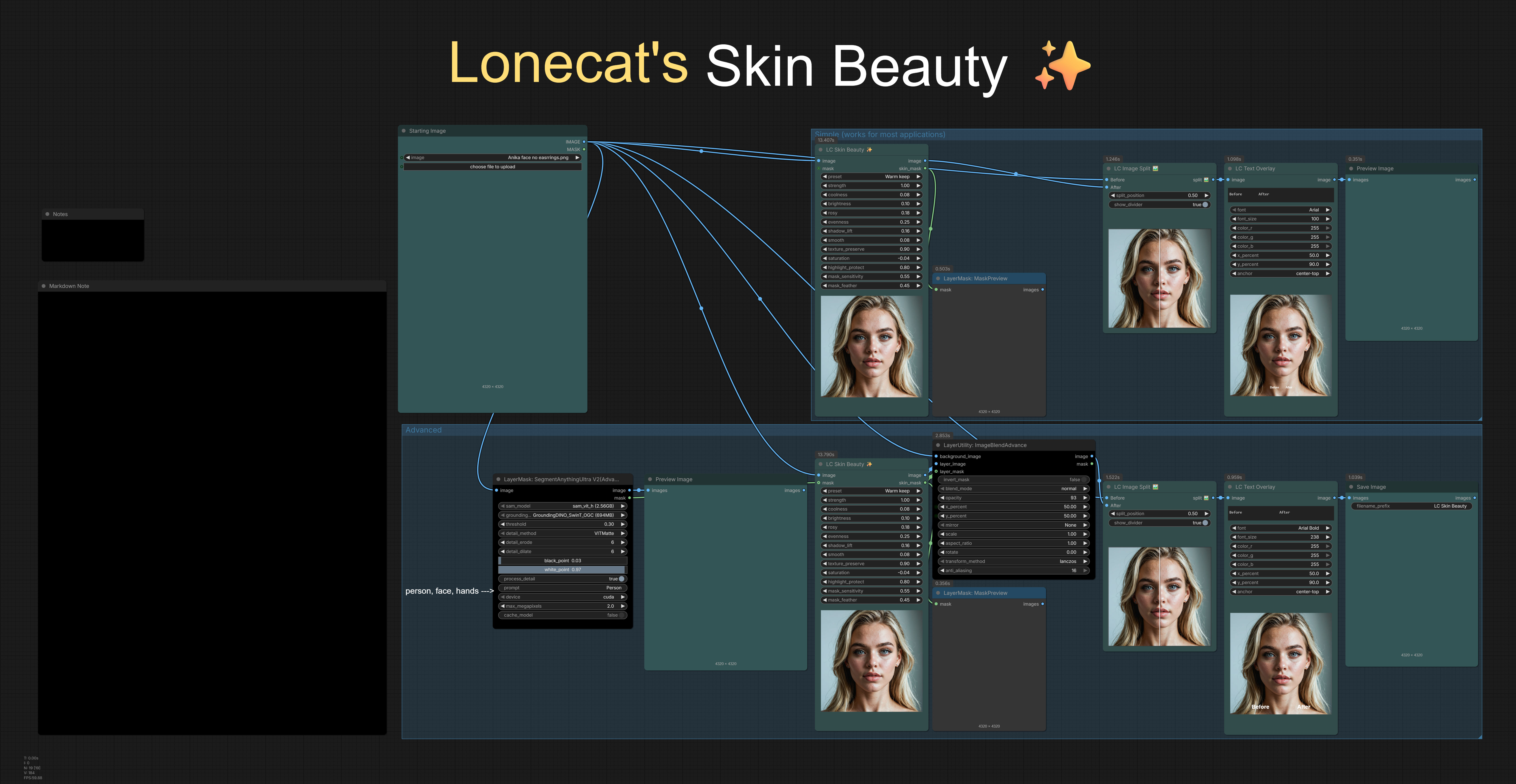
Mask-aware skin cooling and brightening, done in CIELAB. It grades the skin, not your whole frame.
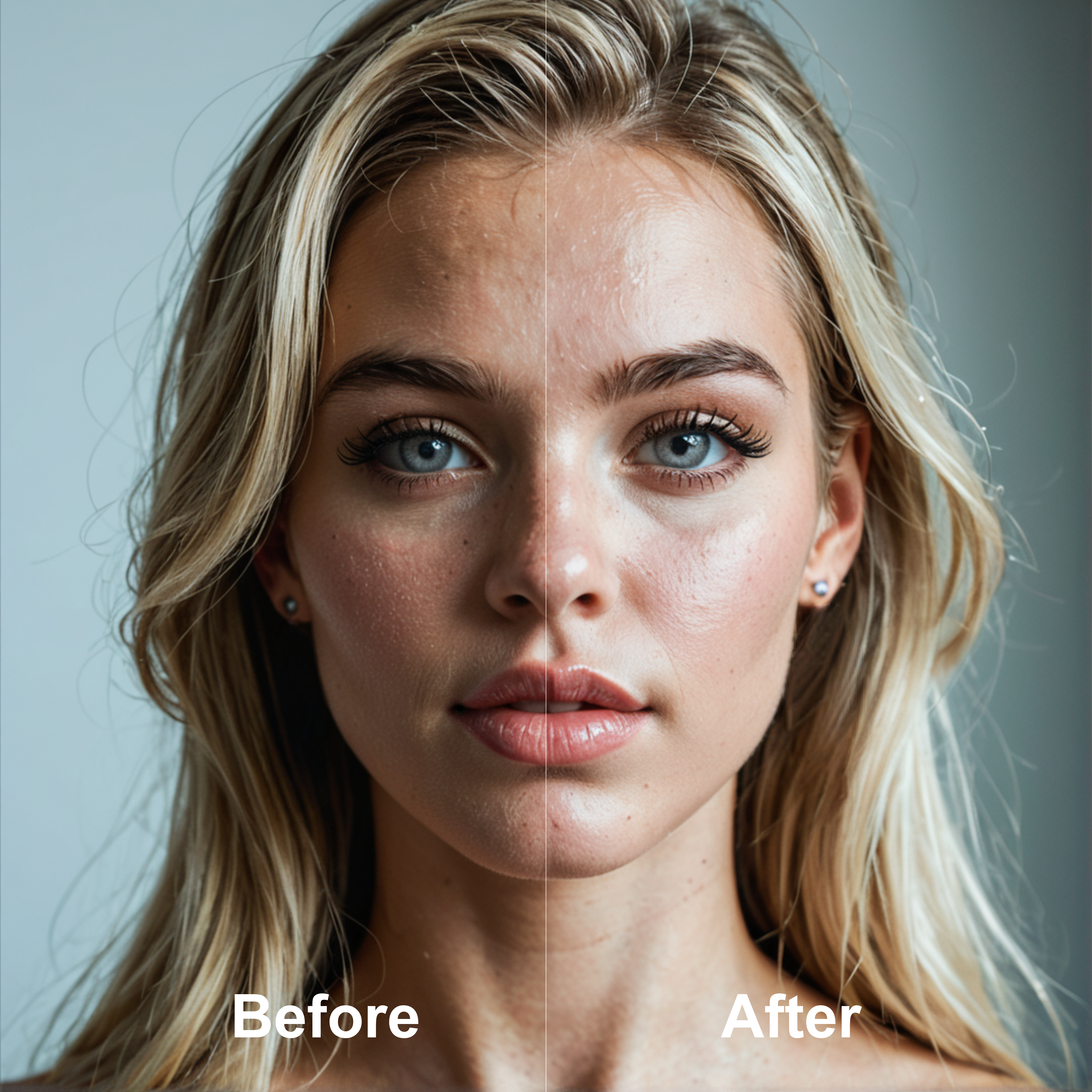
- Auto skin mask (eyes and lips protected, busy fabric suppressed).
- Feed it an external MASK (SAM person, say) and it intersects with the auto mask.
- Presets load the sliders. From there, what you see is what runs.
- On-node wipe preview. Outputs image + skin_mask.
- device: auto (default) runs it on the GPU when there is plenty of free VRAM (about 250x faster), otherwise on the CPU. cpu never touches VRAM. Same result either way.
| Goal | Tip | |------|-----| | Natural cleanup | Preset Natural or Warm keep, strength ~0.7 to 1.0 | | Less plastic | Lower smooth, raise texture_preserve | | Fabric leaks | Lower mask_sensitivity, or feed a person/skin MASK | | Check targeting | Look at the skin_mask output first |
LC Skin Upscale ✨
One UPSCALE_MODEL + an optional MASK. It crops to the matte, runs the model, feathers it back in. That's it. It is not Ultimate SD Upscale wearing a disguise.
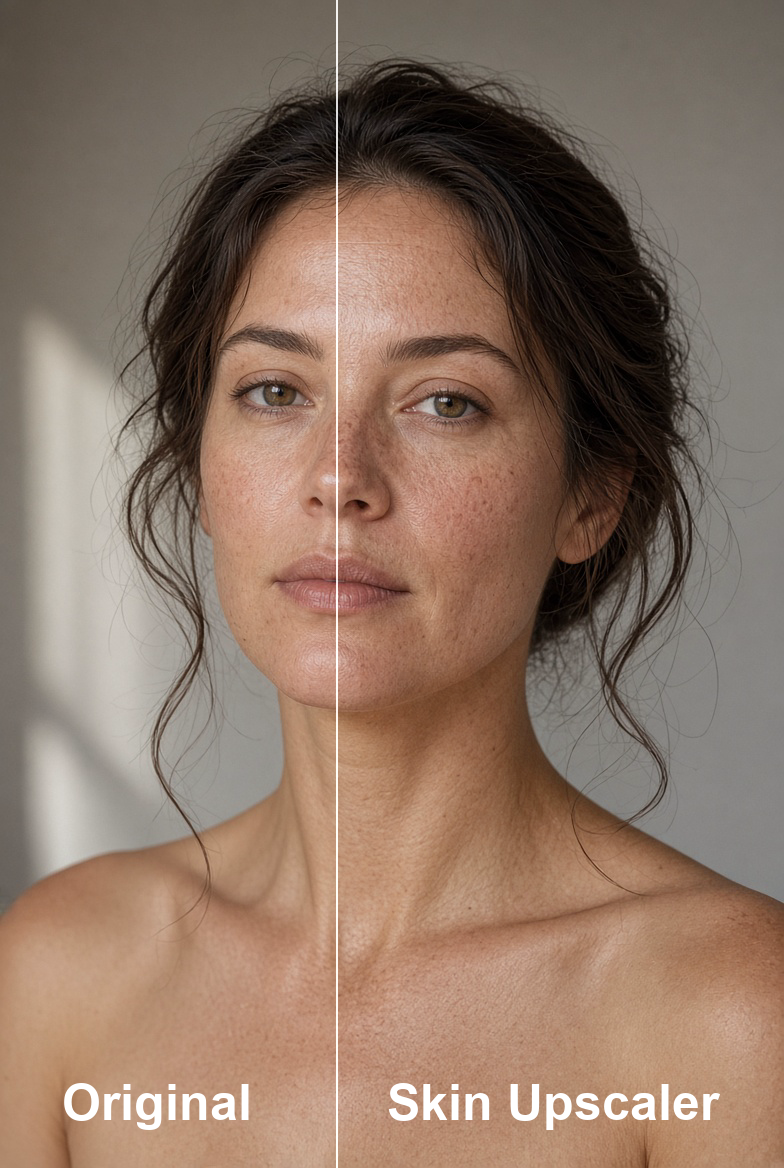
detail 1x: pastes back at the source size. Use this for 1x SkinContrast / ITF.scale: keeps the model's native factor. Everything outside the mask stays bilinear.- Optional MASK (PersonMaskUltra
face+bodyis the good combo).mask_source: input / chroma / input+chroma. - blend 0 = original, 1 = full patch under the matte.
- Optional protect_mask: areas left alone, e.g. the faces and hands the detailers already redrew (LC VOSR2 Upscale (pipe) protected output), so skin detail is not added twice.
- transfer: detail band (default) takes only the model's pore and fold detail, brightness only and softly capped, so no colour shift and no 1-pixel grain. full paste is the old behaviour. softness smooths the detail band.
- ⚠️ Don't load a 4x model in
detail 1x. You pay for 4x the time and throw the extra pixels in the trash. - 💡 Daily setup:
1xSkinContrast-High-SuperUltraCompact·detail 1x· blend0.75· Ultraface+body·mask_source: input· tile256/ overlap16.
Example: workflows/LC123 Examples - Image Tools & Post Processing.json
LC Sharpen Pro 🔪
Works on brightness only, so colors never shift, in three stages:
- sharpen: capture sharpening by deconvolution. It undoes softness instead of drawing outlines around everything.
- texture: mid-size detail like pores, fur, fabric and pencil hatching.
- clarity: large-scale punch on an edge-aware base, so no dark rings around your subject.
- halo: how far an edge may overshoot. 1 = no rims at all.
- Flat areas are left alone based on the noise in each image, so anime fills and gradients stay clean.
- Presets: Natural, Subtle, Portrait, Product, Landscape, Crisp, plus Lineart, Anime sharp and Illustration. Touch a slider and it flips to Custom.
- 💡 Line art, anime and illustration: keep skin_protect at 0 (the art presets already do).
- skin_mask (optional): wire LC Skin Master's skin_mask and skin_protect covers all the skin. Unwired, skin is found by colour, which misses part of it.
- Upscaled 4K no longer gets pores dug into craters: the sharpening follows the softness measured in the picture instead of guessing from its size, and skin_protect now covers sharpening too.
Updated settings: Natural, Subtle and Portrait retuned for upscaled and detailed images (1.49.17). Old → new:
| Preset | clarity | sharpen | strength | halo | skin_protect | radius | texture | |---|---|---|---|---|---|---|---| | Natural | 0.3 → 0.2 | 0.35 → 0.3 | 0.7 | 0.6 → 0.7 | 0.5 → 0.6 | 0.35 → 0.3 | 0.25 → 0.15 | | Subtle | 0.15 → 0.1 | 0.25 → 0.2 | 0.7 → 0.6 | 0.7 → 0.8 | 0.5 → 0.7 | 0.35 → 0.3 | 0.1 → 0.05 | | Portrait | 0.2 → 0.1 | 0.3 → 0.2 | 0.7 → 0.6 | 0.7 → 0.8 | 0.8 → 1.0 | 0.4 → 0.35 | 0.1 → 0 |
- Subtle also moved shadow / highlight protect from 0.25 to 0.3.
- A saved workflow set to a preset picks up the new values when it loads. Custom keeps your own numbers. The looks on LC Depth FX, Bloom, Lens Profile, Vignette, Film Stock and Film Grain work the same way.
- ⚠️ 1.53.15: Bloom intensity, Depth FX haze / light_wrap / dof_blur / bokeh, Lens Profile strength and Natural Look strength now read on a doubled scale (old 0.5 = new 1.0), so everyday settings are no longer crammed at the bottom. Looks are updated. Custom numbers in saved workflows: double them to keep the old look.
LC Depth FX 🌫️ + Looks 🎞️
What a real camera does to a scene, in the order light travels. Wire a depth map from LC Depth Anything (LC MaskMaker) and you get what AI images are missing.
- haze: the far distance loses contrast toward its own color, like real air. The subject is never touched, and a dark room stays dark.
- light_wrap: bright background light bleeds over the subject's edges. Kills the cut-out sticker look.
- dof_blur: depth of field that grows with distance from focus. The subject never smears into the background.
- auto_focus: finds the subject and focuses on the top of it (the head). A curtain at the side gets ignored.
- focus_mask (optional): wire a face or person mask and focus lands exactly there.
- bokeh: isolated lights out of focus turn into discs. A whole city of glints stays faint.
- The depth direction is detected automatically, so no Invert node.
LC Bloom has a mode:
- Bloom: the classic glow. Old workflows render exactly the same.
- Pro-Mist: a diffusion filter in front of the lens. Soft warm glow, gentler contrast, blacks kept deep.
- Halation: the red-orange glow film gets around bright edges.
Looks: Natural, Portrait, Cinematic, Golden hour, Vintage, Dreamy, Landscape, Night, B&W.
- Pick the same look on Depth FX, Bloom, Lens Profile, Vignette, Film Stock (Color / B&W) and Film Grain and they're built to match. Click it and forget it.
- Moving any slider switches that node to Custom. Old workflows load as Custom with every value as saved.
- 💡 The B&W look drives LC Film Stock (B&W). On the Color stock node it turns itself off.
The order (scene, lens, film):
- LC Image Denoise / LC Skin Upscale
- LC Skin Beauty
- LC Sharpen Pro (before the blur, never after)
- LC Depth FX
- Color: LC Auto White Balance, Color / Tone Match, Lift Gamma Gain, Vibrance or LUT
- LC Bloom (Pro-Mist)
- LC Lens Profile (or LC Chromatic Aberration)
- LC Bloom (Halation)
- LC Film Stock
- LC Film Grain, always last
- 💡 LC Photo Style / Phone Look replaces steps 6 to 10. Use one path or the other.
LC Photo Style 📷 (still BETA)
- A camera/phone finish, not lens geometry. Presets drive the sliders, and most controls sit at 0 = no change.
- Strength blends against the original so you can always pull it back.
- Presets: Standard, Natural, Dramatic, Quiet, Muted, Amateur, Cool day, Warm evening, Bright open, iPhone, Nikon Z7 II, Canon R5. Full list:
LC_Photo_Style_Note.md
<a id="image-fx"></a>
🎨 Image FX (on-node preview + wipe)
<details> <summary><b>Click to open</b></summary>The preview: the result, fitted to the node. Click a spot: it zooms to 100% there and the pointer wipes against the original (before left, after right). The wheel zooms in and out, double-click goes back. It also goes back when you zoom the canvas far out or the node leaves the screen. The original is only loaded once you zoom. LC Skin Master shows its preview beside its widgets. Heavy graph? See Performance in Settings.
| Node | What it does |
|------|----------------|
| LC Image Adjust | Brightness, contrast, saturation, hue |
| LC Auto White Balance | Auto WB, no fuss |
| LC Sharpen Pro | See above |
| LC Lens Profile | Lens-style FX. (LC Lens FX (deprecated) is hidden from search but still runs in old workflows) |
| LC Lift Gamma Gain | Color-wheel style lift / gamma / gain |
| LC Image RGB | Per-channel RGB control |
| LC Film Grain | Grain. A little goes a long way. response: classic (mostly midtones, the old look), film (strongest in the shadows and midtones, gone in the highlights, like a negative) or sensor (phone / digital camera noise: grows with the light, colour speckle, blue noisiest) |
| LC Film Grain (Video) 🎞️ | The same grain for a whole clip: GPU, a few frames at a time, with a progress bar (about 1 s for 124 frames of 1080p). The grain is sized to the video, so it survives the h264 / h265 save (pixel-sized grain is smeared away and only bloats the file). grain_motion changing (new grain every frame, like film) or fixed. frame_offset carries the grain on across a video made in parts. 💡 0.25 is a light film texture |
| LC Film Stock (B&W) / (Color) | Stock film looks, real blacks on B&W. Bright colours roll off and keep their hue instead of clipping |
| LC Vibrance | Smart saturation that won't blow out skin. Works on colour strength only, so hues never shift |
| LC Natural Look 🍃 | Takes the AI look out without making it dull: only the loudest colours are pulled back, orange / plastic skin is calmed (skin sets how much), highlights roll off instead of clipping, the glossy large-scale glow is reduced and fine texture lifted (flat skin left out), then the original black point, contrast and brightness are given back with a whisper of grain. strength 0.6 - 1.2 for most renders. Before/after wipe on the node |
| LC Vignette | Edge darkening: real lens falloff, or (cos4 off) an old-photo vignette up to black corners |
| LC Bloom | Glow, Pro-Mist or Halation |
| LC Depth FX 🌫️ | Haze, light wrap and depth of field from a depth map |
| LC Chromatic Aberration | RGB fringe |
| LC Image Denoise | smart (default) measures the noise in each image, cleans brightness grain and colour speckle separately, and brings back pores and hair where they stand above the noise. noise_report says how noisy each image was. legacy is the old edge-gated blur. 💡 On heavy noise, add LC Film Grain after it so skin does not look plastic |
| LC Color Match 🎨 | Matches a reference with skin_protect. oklab (default) matches how all the colours relate, not each channel on its own; oklab + distribution also matches the shape of the colours (best for copying a grade, can over-match a different scene); adain / mean_std are the old methods. oklab methods use every reference frame and run on the GPU. Optional mask: white = match, black = keep |
| LC Tone Match | image supplies the detail, reference supplies lighting / color. Optional mask (white = lock). split: guided (default) follows the image's own edges, so no bright or dark rim on hard edges; blur is the old split. Wipes against the reference |
| LC Image Desaturate | Desaturate, plain and simple |
| LC Skin Beauty ✨ / LC Skin Upscale / LC Photo Style 📷 | See above |
| LC Skin Texture ✨ (BETA) | Adds real pore texture to skin that came out too smooth (after a strong denoise, a beauty pass or a plastic-looking model). Takes only the fine relief of a real skin photo, never its colour, and adds less where skin already has detail or sits in shadow. mask: LC Person Mask (mediapipe, face + body, remove_features) is ideal; unwired, skin is found by colour. reference: your own skin close-up, or the bundled CC0 photo protect_mask (optional): areas left alone, e.g. the faces and hands the detailers already redrew (LC VOSR2 Upscale (pipe) protected output), so skin detail is not added twice. |
| LC Skin Master ✨ (BETA) | The whole skin chain in one node, each step done once on one face-aware skin map: clean (grit out), pores (crisp or ease the skin's own), add_pores (real pore relief on plastic skin), even_skin, wrinkles (below 0 softens, above 0 deepens the lines already there), even_colour, pigmentation (freckles where the sun lands, grown from her own), eye_detail, then skin warmth, brightness, rosy, saturation, shadow_lift. preset: Natural, Clean Even Tone, Soft Beauty, Editorial Detail, Real Skin Restore, Mature Skin, Weathered, Body Skin, Sun-Kissed; moving a slider switches to Custom. Keep pores at 1 or more with pigmentation. mask (optional): for body skin wire LC Person Mask (face + body). Unwired, faces are found for you and body skin only partly, clothes kept out (✋ first run downloads about 80 MB into models/facexlib). skin_mask out: wire it into LC Sharpen Pro so its skin_protect covers all the skin. The preview's before side outlines the skin it worked on. Retouch and skin finding adapted from sd-living-skin by sca-285 (MIT). |
| LC Apply LUT | Reads .cube files from ComfyUI/models/luts/. Launches with LC_Crushed_Blacks at 0.3. Sample LUTs copy over from assets/luts/ and never overwrite yours. interpolation: tetrahedral (default, GPU, cleaner greys) or the old trilinear |
| LC Text Overlay | Text on an image: align, drag or type the position. Shrinks to fit if the font would run off the edge. Includes the 14 bundled fonts |
| LC Phone Filters 📱 | The 37 phone-app presets (1977, Aden, Brooklyn, Xpro2, etc.). Pick one, dial strength, wipe to compare |
| LC Directional Blur | Motion blur along one angle/length. Drag the arrow on the node, or double-click a readout to type. strength blends back toward the original. taps = smoothness, edge = what it reads past the border |
<a id="image-size"></a>
🖼️ Image and size
<details> <summary><b>Click to open</b></summary>| Node | What it does |
|------|----------------|
| 📐 Aspect Ratio Simplifier | aspect_ratio_source = image/mask: keeps the image's aspect ratio and scales it up or down so the longer side is max_resolution (0 = keep its size). Or a preset / custom size. Resizes image and mask together. Crop / stretch / pad / total pixels. Outputs an empty latent too. Default upscale is lanczos |
| 📐 Aspect Ratio Simplifier (pipe) | Same node plus a pipe out |
| LC Aspect Ratio Pipe (In/Edit) | Packs image, mask, width, height, latent, batch, resolution into a pipe, or edits one. Only the sockets you wire overwrite |
| LC Aspect Ratio Pipe Out | Unpacks the aspect pipe. 💡 This used to be called Pipe (In/Edit), old workflows still load it |
| LC Get Image 📐 | Megapixels, width, height, batch, aspect, longer side |
| LC Dimension Resize 📐 | One value in, add / sub / mul / div both sides, rounded outputs |
| LC Image-Mask Resize 📐 | Image + mask only. match_aspect_ratio, upscale_by none / multiplier / megapixels. The real WxH is drawn on the node after a run |
| LC RTX Super Resolution ⚡ | NVIDIA RTX Video Super Resolution on pictures or video frames. mode: upscale (up to 4x), upscale (clean source) for lossless or high-bitrate sources, denoise, deblur (same size). quality LOW to ULTRA, scale or megapixels, strength blends back toward a plain resize. Optional mask is resized along. About half a second per 2x. Video frames run one at a time with a progress bar, and Cancel stops it between frames. Needs an RTX card and nvidia-vfx |
| LC Image to Total Megapixels 📐 | Scales to a total megapixel count, plus resolution and megapixels outputs. 1 MP = 1,000,000 pixels, the same count LC Get Image uses (the native node counts 1024 x 1024) |
| LC Batch Image 🖼️ | Autogrow IMAGE slots into one batch. Muted or empty sockets are skipped. Mixed sizes follow the first live image |
| LC Image Stitch Multi 🖼️🪡 | Stitch images side by side or stacked from autogrow slots. direction right / down / left / up, match_size scales every image to the first one's height (side by side) or width (stacked) so the edges line up, align places smaller images when sizes differ, gap + gap_color add space between them. Muted or empty slots are skipped; batches stitch frame by frame. Outputs image, width, height |
| LC Image Batch From Folder 📂 | A whole folder as one batch (img2 before img10). Full path or a folder in ComfyUI/input, pasted however you like. max_images (0 = all) and start_index to load in chunks. Outputs the batch, counts and file names |
| LC Image Compare 🔎 | Batch A/B with one slider per pair |
| LC Image Split 🖼️ | Saveable A|B wipe. The output is the baked split. divider_width / divider_color: the seam on the cut (0 = none) |
| LC Image Grid 🖼️ | Contact sheet: columns, gap, pad, outline |
| LC Last Image Holder | Holds the last image so you can clear it without a re-run. Hold until seed change (wire the seed socket) keeps the first image of a seed to compare tweaks against, and takes a new one when the seed changes |
| LC Dynamic Overlay | Overlays B on A. Outputs the blended image |
| LC Image Pass / LC Mask Pass | Identity pass. enable off (widget or a wired BOOLEAN) blocks the output, so optional sockets downstream see nothing |
| LC Watermark 💧 | Image watermark with size, opacity and drag-to-place. Transparent PNG: wire Load Image's MASK to watermark_mask |
<a id="prompt-builder"></a>
🗒️ Prompt Builder
<details> <summary><b>Click to open</b></summary>A modular stack that funnels into 🧩LC Prompt Assembler.
Subjects + Scene + Camera + Lighting + Style + Palette
        → 🧩LC Prompt Assembler
              → prompt  → CLIP / conditioning
              → json    → Krea2 / Ideogram builder
| Node | Role |
|------|------|
| 🗒️LC Subject / Subject Array | Character + placement (bbox trailers for JSON) |
| 🗒️LC Scene / Camera / Lighting / Style | Environment and look |
| 🎨LC Color Palette | Preset or sampled from an image |
| 🎲LC Wildcard | A random line from assets/wildcards/ |
| 🧩LC Prompt Assembler | include_scene_bboxes is off by default: subject boxes only |
- 💡
promptgoes to CLIP.jsonis for the regional builders only. Don't cross the streams.
Full directions: LC_Prompt_Builder_Note.md
<a id="flux3"></a>
🖼️ Flux 3 and MOSS Image (boxes and references)
<details> <summary><b>Click to open</b></summary>| Node | What it does | |------|----------------| | LC Bounding Boxes 🔲 | Draw boxes on a picture: drag on empty space for a box, drag a box to move it, a corner to resize it. Each box gets a name (hat, cup), what happens to it (new, change, move with a second dashed box, remove), a description and, for text, the exact words. For MOSS Image a box can be a character and get its own palette. size: use image size (a connected picture sets the canvas) or custom (width / height win, the picture is stretched to fit). Connect a Load Image and the picture shows right away (any other picture source after its first run; a bypassed one is ignored). Chain several (one per panel for multi_panel): wire one node's bboxes or elements into the next; each canvas shows the boxes from further up (dimmed, live) and the last one outputs them all. block if_empty stops the run until boxes are drawn; keep_boxes reset_after_run clears the canvas after each run. Outputs a preview plus the same bboxes and elements as ComfyUI's Create Bounding Boxes, so it plugs into anything that takes those. Works in the classic canvas and in Nodes 2.0 | | LC Flux 3 Layout Prompt 🗺️ | Adds the boxes to a Flux 3 prompt as the element table the model was trained on (Black Forest Labs' own format): the layout table for a new picture, the edit table (from, source box, target box) for an edit. Write <1>, <2> in the prompt for box 1, box 2: they become the box ids (<hat_1>). Edits end with "everything else stays identical", and info lists any box the prompt doesn't name | | LC MOSS Layout Prompt 🗺️ | Turns the boxes into MOSS Image's layout prompt: each box becomes an object, a character or a block of text with its own caption and palette, right where you drew it. Adds the picture's canvas (single, multi panel, collage) and outputs the width and height the boxes were drawn on, so the latent always matches. width / height override the size (after an upscale). | | LC Flux 3 Reference Latent 🖼️ | Flux 3 references in one node: up to 4 pictures (<ref_image_0> to <ref_image_3>) on the positive and the negative, the negative the model wants (zeroed for the distilled model, an empty prompt for Base) and the latent to sample, at picture 1's size or your own. No pictures = plain text to image |
</details><a id="sampling"></a>
🧪 Sampling, sigmas, latents and pipes
<details> <summary><b>Click to open</b></summary>| Node | What it does |
|------|----------------|
| LC Sampler Configure | Dual-pass control in one place: steps, swap point, detailer, denoise, CFG 1/2, sampler, scheduler |
| LC Sampler Configure (pipe) | Same, with pipe in / out |
| LC Sampler Configure Simple (+ pipe) | Single CFG, no step swap |
| LC Sampler Configure Pipe Out | Unpacks an LC_PIPE into sampler sockets, plus latent |
| LC Split Sigma Scheduler | Splits one noise schedule across two models |
| LC Split Sigmas (Advanced) | Two sigma curves + two models + denoise. Falls back to model 1 if model 2 is missing |
| LC Basic Scheduler | Scheduler + steps = sigmas. No denoise |
| LC Sigma Curve | No MODEL needed. Named schedules (simple, karras, beta57, bong_tangent, linear_quadratic, kl_optimal, etc.), your saved curves, and Custom. Drag a knot and it becomes Custom. Save curve arms the save, you still queue it. Your saves live in ComfyUI/user/LC123/sigma_curves/, so an update never touches them (older saves in the pack still load) |
| LC Sigma Resample | Same sigma path, new real step count: new_steps = round(old x multiplier) + adder. Put it after a split, on the slice you want denser |
| LC Sigmas (BETA) | One scheduler for one- and two-pass sampling. sampler (the line under the graph shows what tested best for your model; RES4LYF / ClownShark sampler names work too) + sigma_curve_presets: base (any scheduler, picked in base_scheduler), beta (your own alpha / beta), flowmatch, hyperbolic and gaussian (the same curves as the FlowMatch, RES4LYF Sigmas Hyperbolic / Gaussian nodes, without needing them), plus every curve you saved. Drag the points on the graph to bend the curve (edit_mode smooth or spike, smooth_radius); reset curve clears it, save curve adds it to the presets. first_pass_resample spreads the first pass over more steps along the same path. step_swap: the step where the second model (model_2) takes over, starting exactly where the first pass stopped. denoise for image to image, with denoise_steps: full schedule (the whole run) or at step swap (the first pass only, so the second pass refines on its own). low_pass: continue noise schedule (the leftover noise, one schedule over two samplers) or renoise (the first pass finishes, fresh noise goes back up to the swap level, and the second pass refines like a detailer). sigma_shift: use model default, by image size or custom. Outputs both sigmas, the noise for each pass and the sampler. Live graph on the node: drag it taller and the graph grows. Only the settings for the chosen preset are shown |
| LC Detail Daemon (BETA) / (model) | Adds fine detail by telling the model there is a little less noise than there really is. The same amount scale and step window (start / end / peak / exponent) as the original Detail Daemon, so settings carry over, but never multiplied by CFG. mode: look only (default) = crisp detail without big reshuffles, classic = the original (more detail, small things like folds and background focus shift), keep structure = only the fine part of the change is kept, so the layout stays (about 45% slower). Defaults peak 0 and exponent 0.1: full strength across the window, strongest at its start. 💡 Krea 2 / Krealism: look only 1.0, start 0.15, end 0.85, peak 0, exponent 0 (the defaults). classic and keep structure hit harder, so start them lower. ✋ Put it on the low pass sampler: detail is made in the last steps, and on the high pass it moves the layout. The window follows the sampler it's plugged into; sigmas only draws the graph |
| LC Speed Boost (BETA) 🚀 | About 2x faster first passes, same quality. Plug it into the high pass sampler only: it starts the picture at half size and grows it to full size partway through (LC Detail Daemon goes on the low pass). auto picks the grow step from the schedule; grow_at_step sets it yourself, counted like step_swap (0 = off). The layout follows the model's trained size, so a seed frames differently with it on. Works on Krea 2, Z-Image, Flux.2 Klein, Qwen-Image and Wan, and on SDXL / Pony / Illustrious (about 1.4x faster there, switching a little later). On Flux 3 Klein auto grows early (about 1.2x faster): its schedule stays noisy longer, and growing later breaks text and small faces. It switches itself off on upscale / image to image passes (denoise under 0.9) and inpaint masks and MOSS layout boxes (placed in full-size pixels), and the console says why. On Qwen-Image 2.1 auto stays off: its half size is so coarse that line art, anime, text, logos and flat color come out with doubled lines and blocky color (photos are fine, so set grow_at_step by hand, about 6 of 25 steps, for photos). ⚠️ Does not work on MOSS Image: faces age and stretch, skin goes waxy, gibberish text shows up and the subjects crowd the frame. Leave it out of MOSS workflows. Based on SPEED (Xiao, Chao, Yariv and Wetzstein, 2026) and ComfyUI-SPEED-SwarmNeo (MIT) |
| LC Speed Boost 🚀 KSampler (BETA) | A KSampler with LC Speed Boost built in, for everyone on a plain KSampler: drop it in where your KSampler was. About half the processing time, same VRAM, same detail. speed_boost (auto) and grow_at_step sit on top (grow_at_step 0 = a plain KSampler, pixel for pixel). start_at_step, end_at_step and return_with_leftover_noise work like KSampler (Advanced), so it can hand its leftover noise to a regular or ClownShark sampler to finish. ClownShark (RES4LYF) samplers are in the sampler list when RES4LYF is installed, or wire a ClownSampler into sampler to use its own settings. Works on SDXL / Pony / Illustrious too (about 1.4x faster). Samples like a plain KSampler on image to image (denoise under 0.9) and inpaint masks and MOSS layout boxes (placed in full-size pixels). On Qwen-Image 2.1 auto stays off (see LC Speed Boost). ⚠️ Does not work on MOSS Image (see LC Speed Boost). |
| LC Reference Latent | Up to 8 optional reference latents into conditioning. All empty = pass-through |
| LC Denoise 💉 | Latent injection: noise_std = 1 - denoise. Match the sampler's denoise |
| LC Pipe (in/edit) / Pipe Out / Detail Pipe Out | Bundle or unpack models, clips, VAEs, prompts, seed, steps, the works. protect_mask (bottom of both Outs): the areas LC MaskMaker's pipe detailers redrew, at the size of the pipe's picture. Wire it into LC Skin Upscale / LC Skin Texture protect_mask |
| LC Pipe Combine | Edits the top pipe with a second pipe: whatever the edit pipe carries overwrites the top one, everything else rides along. The LC detailers' protect masks and SAM 3 finds add up instead (combining a face branch and a hands branch keeps both) |
| LC MiniMax H3 Pipe / Pipe Out | H3 refs on one pipe: fl2va / ref2va model + clip, VAEs, size, length, frame rate, ref images and videos |
| LC MiniMax H3 Pipe V2 | Everything above plus prompt, total_steps, cfg, sampler_name, scheduler. Feed a V1 pipe in to upgrade it |
| LC Image Ref Pipe In / Out | Up to 16 reference images on one wire. Sockets grow as you fill them, same as Text Encode Qwen Image 2.1 |
| Prompt to Conditioning / + Zero | A string into conditioning |
| Prompt / LC Negative | Pre-colored prompt boxes. Prompt (was LC Positive) is a plain prompt box for any text |
- 💡 H3 prompt tags are 1-based:
<Picture 1>=ref_image_0. Native MiniMax Ref2V needsref_videoto be at least 5 frames. - 💡 Aspect Ratio Simplifier's pipe into the H3 pipe socket only copies the size. Length and fps still need their own wires.
<a id="saving"></a>
📁 Saving, metadata and text
<details> <summary><b>Click to open</b></summary>| Node | What it does |
|------|----------------|
| LC Easy Folder 📂 | A combined prefix for Save Image, or wire it into LC Save Image's filename_prefix |
| LC Advanced Folder 📂 | Filename and path split apart |
| LC Save Metadata 🏷️ | Optional LC_PIPE in. Fills prompts, seed, steps, CFG, sampler, scheduler, size and denoise. Widgets win when set (seed -1, steps/cfg 0 = use the pipe). civitai_air takes one or more AIR tags or CivitAI URLs, comma-separated (e.g. the model and your workflow page) |
| LC Save Image 💾 | filename + path under the output folder. PNG gets the workflow, parameters, civitaiResources and AutoV2 hashes. JPEG/WebP only get a short comment (a format limit, not a bug). Only resources that feed the saved image are listed: LoRAs that are muted, bypassed, switched off, at strength 0 or on another branch are skipped. A lora_metadata chunk records each LoRA's model and CLIP strength |
| 📝 LC Save Text | Writes text to a file, cleaning illegal path characters |
| LC Join Strings 🔗 | Joins N strings. Empty slots skip the delimiter. \n allowed |
| LC Show Text 🔤 | Text on the node |
| LC Show Any 🔤 | Wire in anything, it shows on the node and the same value comes out. Images, masks and latents show their size |
| LC Text Replace ✂️ / LC Text Remove 🔪 | Up to 20 pairs, the node grows as you add them |
| LC ✂️ Duplicate Tags 🏷️ | Removes repeated tags so none gets double weight. long_hair, Long Hair and (long hair:1.2) count as one. keep: first (as written) or strongest (the most heavily weighted copy). Optional text_2 merges a second prompt (your own plus a generated one) and cleans both together. Sentences, blank-line breaks and BREAK pass through. removed shows what it took out |
| CivitAI 🚩🔪 | Removes the words in assets/lists/civitai_compliance_remove.txt from a prompt (whole words only), like the "child" / "late teens" wording LLMs sometimes (and abliterated models especially) add to adults. Off when you place it: switching it on is your choice. Workflows saved before the switch keep stripping. ⚠️ A word filter, not a safety system: it guarantees nothing, and what you post is on you. Read assets/lists/README_civitai_compliance.txt |
- 💡 Name tokens: type %model %seed %steps %cfg %sampler %scheduler %denoise %width %height anywhere in Easy Folder, Advanced Folder or LC Save Image, e.g.
Krea2/%model/Test_%seed. LC Save Image fills them from the LC Save Metadata pipe. Missing value? The token drops out and the leftover_is tidied up. ComfyUI's%date:yyyy-MM-dd%still works too. - 💡 Hash files: leave them on so CivitAI can list your resources (it matches by AutoV2 hash, not file name). The first hash per model is slow, then a
.sha256sidecar makes it instant.
Details: LC123_Save_Image_Note.md
<a id="switches"></a>
🔀 Switches, logic and control
<details> <summary><b>Click to open</b></summary>| Node | What it does |
|------|----------------|
| LC AnySwitch | First connected input wins. The type locks in from whatever wired first |
| LC Any Index Switch | Index widget plus dynamic any_* slots. Output length matches the selected slot only |
| LC Custom Combo | inputcount sets the options: STRING + INDEX + OPT_CONNECTION out |
| LC Custom Combo Panel | A compact remote for a combo hub elsewhere in the graph |
| LC Combo Selector | A dropdown that mirrors another node's combo |
| LC Boolean / Invert Boolean | Coerce to true/false. Both carry a hidden boolean widget so Bypasser / Mute read a live signal without a queue |
| LC Is Bypassed / Muted | True if the node wired into value is bypassed or muted. Only which node the wire comes from matters |
| LC Widget To String | The KJ WidgetToString pattern. Unwired + id 0 + empty title = dormant (returns ""), that is on purpose |
| LC Boolean Switch / Flip / Value | Pick or emit booleans |
| LC Int Compare / LC Float Compare | Largest or smallest of two values |
| LC Any Empty Bool / Int / Float | Autogrow any_*. True / empty if any plugged source is empty, muted or bypassed. Only plugged sockets count |
| LC Int Split | total splits into a + b. split_point is a fraction (0 to 1), not a count |
| LC Seed Jump 🌱 | One seed + a jump = six stepped seeds |
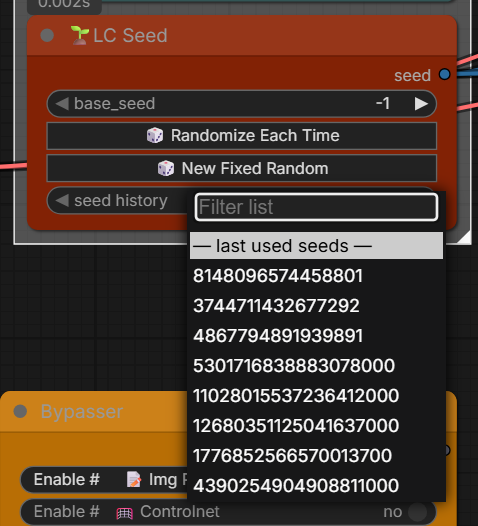
| 🌱LC Seed | Type a number for a fixed seed, or Randomize Each Time / New Fixed Random. A seed history remembers the last 10 seeds this node actually ran with. On Randomize, saved images carry the seed actually used, not the randomize setting. Capped at 2^53-1, the browser's safe integer limit |
| LC Slider | A plain slider that looks the same in classic and Nodes 2.0. Double-click the value to type. min / max / step / decimals behind the faint gear |
| LC Size Pad 📐 | A 2D slider for width × height: the frame is pinned to the bottom-left; drag its top-right corner (or click anywhere on the pad). model (MiniMax H3, Krea 2, SDXL, LTX, Klein 9B, Wan 2.2, Custom) snaps to that model's step (H3 and LTX 32, SDXL 64, the rest 16) and stops the drag at its megapixel limit (Max megapixels reached). aspect locks the shape, megapixels resizes it, ⇄ flips portrait / landscape. Outputs width, height and an info line. 💡 Wan: 0.92 MP is 720p, 0.4 MP is 480p |
| LC 🚦 | A light for a boolean. One input, no widgets: lit in one color for true, another for false. The faint ⚙ sets each color, or none. Follows a boolean widget upstream live, otherwise shows the last run. Dark when it or its source is muted or bypassed |
| LC Timer ⏱️ | Times every run and scores the newest one against the 5 before it: faster in green, slower in red, plus how it compares to their average. The last 10 runs are listed, newest first. Stopped and fully cached runs are left out of the score. The history saves with the workflow; right-click to clear it |
| LC Control Panel 🎛️ | Up to 16 LC Sliders on one node, each on its own output. The ⚙ at the end of a row sets its name, min, max, step and decimals (0 = INT, otherwise FLOAT), or deletes it. + Add slider adds a row. Plug a new row into a number input and it copies that input's name, range and value. Double-click a value to type one |
| LC Sampler Scheduler ⚙️ | Pick the sampler and scheduler once and wire them to every KSampler, so they all change together. Uses ComfyUI's own lists, so samplers other packs add show up too. Based on Sampler Scheduler Settings from JPS Nodes |
| LC Model Info ℹ️ | Wire any MODEL output in: it follows the wire upstream (LoRA loaders, merges, patches, LC Model Optimizer) and reads each file's header only, never the weights. Shows the workflow a save node baked into the file (base models, LoRAs with strengths, merges), Kohya training info and top tags on LoRAs, card fields, GGUF type and size. Live on the node as soon as it's wired, no queue needed. The model passes through; outputs info, loras (one per line) and metadata (all header fields as JSON) |
| LC Node Snapshot 📋 | Reads another node's widgets: value / dump / JSON. With source wired it shows the values the node actually ran with, so a seed or slider plugged into a widget shows its real value. |
| LC Notify 🔊 | Plays a sound from assets/sounds/ when the run reaches it. always / on empty queue / never |
| LC Bypasser / LC Mute / Groups Bypasser / Bypasser Panel | Remote bypass (pass-through) or mute (never runs). Panel's hub accepts any of the three |
| LC Bypass Relay | Autogrow * targets on the left. Its OPT_CONNECTION goes into a Bypasser or Mute, and every target follows the hub. The state survives a refresh |
| LC Stop 🛑 | Pauses the graph until you press the button |
| LC VRAM Cache Clear | Clears VRAM / cache, then passes through |
- 💡 Bypass vs mute: Bypasser passes through (mode 4). Mute never runs (mode 2).
- Manual node sizes and colors you set yourself stick across a reload. Pack colors only apply on the first drop.
<a id="regional"></a>
🎨 Regional canvas
| Node | What it does | |------|----------------| | LC Anima Regional Inline Canvas | RGB paint for Sen-sou Anima regional conditioning | | LC Krea2 Regional Inline Canvas | Same idea for Krea2 CLIP regions (beta) |
<a id="workflows"></a>
📂 Example workflows
<details> <summary><b>Click to open</b></summary>| File | Description |
|------|-------------|
| workflows/LC123 Examples - Logic & Switches.json | Bypassers, booleans, switches, number tools and flow control, each with a short note |
| workflows/LC123 Examples - Utility, Text & Saving.json | Show & inspect, text tools, seeds, labels and notes, folders and saving |
| workflows/LC123 Examples - Models, Sampling & Sigmas.json | Model Optimizer, LoRAs, conditioning, Sampler Configure, sigmas, Speed Boost and Detail Daemon |
| workflows/LC123 Examples - Image Tools & Post Processing.json | Size and crop, batch and compare, color, film and lens, skin, light and depth, photo looks |
| workflows/LC123 Examples - Pipes & Prompt Builders.json | The LC pipes, the prompt builder and the regional canvases |
| workflows/LC Skin Beauty.json | Skin Beauty with an optional mask |
| workflows/LC Skin Beauty basic (no deps).json | Skin Beauty on its own |
| workflows/LC Dual sigma workflow example.json | Split sigma |
| workflows/LC Dual Sigma Advanced workflow example.json | Advanced split sigmas |
| workflows/LC Better Sigmas V2.0.json | LC Sigmas + LC Detail Daemon against a plain euler / simple baseline, with I2I and LC Vision prompt assist |
| workflows/Anima Inline Regional Canvas workflow.json | Anima inline canvas |
| workflows/Krea2 Inline Regional Canvas Example.json | Krea2 inline canvas |
| workflows/MOSS Regional BBOX Prompt Module v1.1.json | MOSS Image with regional boxes: LC Bounding Boxes (two chained) into LC MOSS Layout Prompt, plain KSampler (Speed Boost does not work on MOSS). Saves the picture and a boxes-next-to-result sheet |
| workflows/LC Lighting Control (BETA).json | The original Lighting Control (V1) with overlays |
| workflows/Lonecat's Photo style Node.json | Photo style |
| workflows/Photo style test edit.json | Photo style test sheet, edit version |
Workflow > Open, or just drag it onto the canvas.
</details><a id="assets"></a>
📦 Assets
<details> <summary><b>Click to open</b></summary>| Path | Use |
|------|-----|
| assets/readme/ | README screenshots |
| assets/sounds/ | LC Notify (drop your own audio in, restart once) |
| assets/lists/ | CivitAI compliance list, etc. |
| assets/luts/ | Sample LUTs, copied to models/luts/ on first load if missing |
| assets/wildcards/ | LC Wildcard |
| assets/prompt_builder/ | Prompt Builder presets |
| assets/skin_texture/ | LC Skin Texture's CC0 skin photo (credits in its README) |
| web/fonts/ | The 14 bundled fonts (with their licenses) |
<a id="tips"></a>
💡 Quick tips
<details> <summary><b>Click to open</b></summary>- Skin Beauty: check the skin_mask output first. Fabric leaking in? Lower the sensitivity.
- Image Split: set the wipe, queue, and save the split output, not the two source images.
- Reference Latent: all slots empty = pass-through. Bypasser-safe.
- Tone Match: same crop only. Doing a head-swap? Mask the new head black. It is not a Color Match substitute.
- Color Match mask: white = regrade, black = keep. Leave it unconnected for the old behavior.
- Save Image: needs
path+filename. The metadata node is optional. JPEG/WebP won't carry the full Comfy JSON. - Index Switch: output length is whatever the selected slot is. Other wired lists don't get zipped to match.
- Sigma Curve: saves to
ComfyUI/user/LC123/sigma_curves/, safe from updates. Stretch the node to grow the plot. Save curve doesn't queue for you. - Sigma Resample: after the split, on the high band, the low band or both. It changes the real step count on that band only.
- Batch Image: autogrows. Muted / empty slots are skipped, and the node height follows the slots in use.
- Bypass Relay: wire A/B/C into the Relay's left side (
any_1grows), Relay's OPT into a Bypasser or Mute. Hub off = all of them off together. - Image / Mask Pass:
enableoff mutes only that one tap. - Video: feed the clip in as one batch. Auto White Balance, Color Match, Natural Look, Skin Beauty, Sharpen Pro, Depth FX and both Lighting Controls notice it's a clip and steady their readings across frames, so nothing pumps or shimmers. Separate images and hard cuts are left alone (no switch needed).
<a id="install"></a>
Install
- Get the files. Clone into
ComfyUI/custom_nodes/:
Or grab the zip from the repo page and unzip it there.git clone https://github.com/lonecatone23/ComfyUI_LC123_nodes.git - Check the folder.
__init__.pyhas to sit directly inComfyUI/custom_nodes/ComfyUI_LC123_nodes/, not one level deeper. If the zip unpacked with an extra folder, move the inner files up. - 💡 No
requirements.txt. LC123 only needs what ComfyUI already ships with (torch,numpy), so there is no pip step. - Restart ComfyUI. The console prints an
[LC123] +line per module as it loads. Nothing? The folder structure is off, go back to step 2. - Missing nodes in an example workflow? ComfyUI Manager > Install Missing Custom Nodes (Depth Anything, SAM, remBG, etc. are separate installs).
- 💡 After any update, restart and press Ctrl+F5 so the browser loads the new files.
<a id="license"></a>
License
MIT. See LICENSE.
Borrowed code, with thanks (all MIT): colour science in vendor/chromagrade from ComfyUI-ChromaGrade (MONKEYFOREVER2), guided filter and tetrahedral LUT adapted from the same; band-pass detail transfer and skin texture synthesis adapted from ComfyUI-SkinDetailer; Photo Style local tone mapping re-written after ComfyUI-CameraForensicRealism.
This represents hundreds of hours of work. If you enjoy it, please 👍 like, 💬 comment, and feel free to ⚡ tip 😉
"True Nothing is. Permitted Everything is"- Yoda Auditore, Assassin's Wars