
ComfyUI_Isulion Random Prompt Generator
ComfyUI Nodes that generate prompts and many more.
Nodes (41)
A text box with wires
Shove any image URL straight into your workflow
Turn a pile of generations into a mood board, without the manual layout
The node that makes your scenes move
Five dropdowns to a habitable alien planet
Give your animal shots something to actually do
A 100-animal dropdown for when you can't decide what to draw
Roll a legendary sword for your fantasy shot
An art-style roulette for when you're stuck
Blur Out the Bit You Can't Post
Turn Civitai API text back into actual pixels
Search Civitai's model catalog without leaving your graph
Pull today's hottest Civitai images into your workflow
Stop typing 'ornate robes' by hand
A cuteness-focused animal picker
Give your character a feeling to wear
Time-travel your prompt, one era at a time
Pick your fantasy race without the lore dump
Where does your subject actually live? Picking habitats without the blank-page stare
Feed a whole folder into a workflow — the Isulion directory loader explained
Fire, ice, or 'mystic circles' — the lazy way to add magic to a fantasy prompt
The Isulion Mega Prompt V3, dissected
The Prompt Slot Machine That Re-Rolls on Every Queue
The Isulion Multiple Prompt Generator rolls a full batch
Dragon's lair or goblin market? Rolling the dice on where your fantasy scene happens
A negative prompt generator — but know which models still listen to one
The QR-code stamping node (yes, that's what it's for)
Wizard, zookeeper, or software developer — the job-roulette for character prompts
The one-word prompt enhancer — set your expectations accordingly
A Dropdown for Every Prompt You Ever Saved
Save the Prompt You'll Want Again Next Week
Real, scannable QR codes generated locally — no API, no key, no fuss
Composition as a dice roll
Yes, it really shuts down your PC — read this before you wire it in
From 'stealth frigate' to 'living ship' — rolling a whole spaceship, prefix and all
Yes, It's Space Invaders. Yes, It's Inside a Node.
The most honest 'style mixer' you'll ever use — it joins two phrases
Quantum blades, gravity guns, and the other 58 sci-fi gadgets this node rolls
Golden Hour, Blue Hour, Witching Hour — pick a mood by the clock
Full video prompts with camera moves, lighting, and 83 themes
Weather control for your prompts, minus the meteorology
Mega Prompt Generator Node
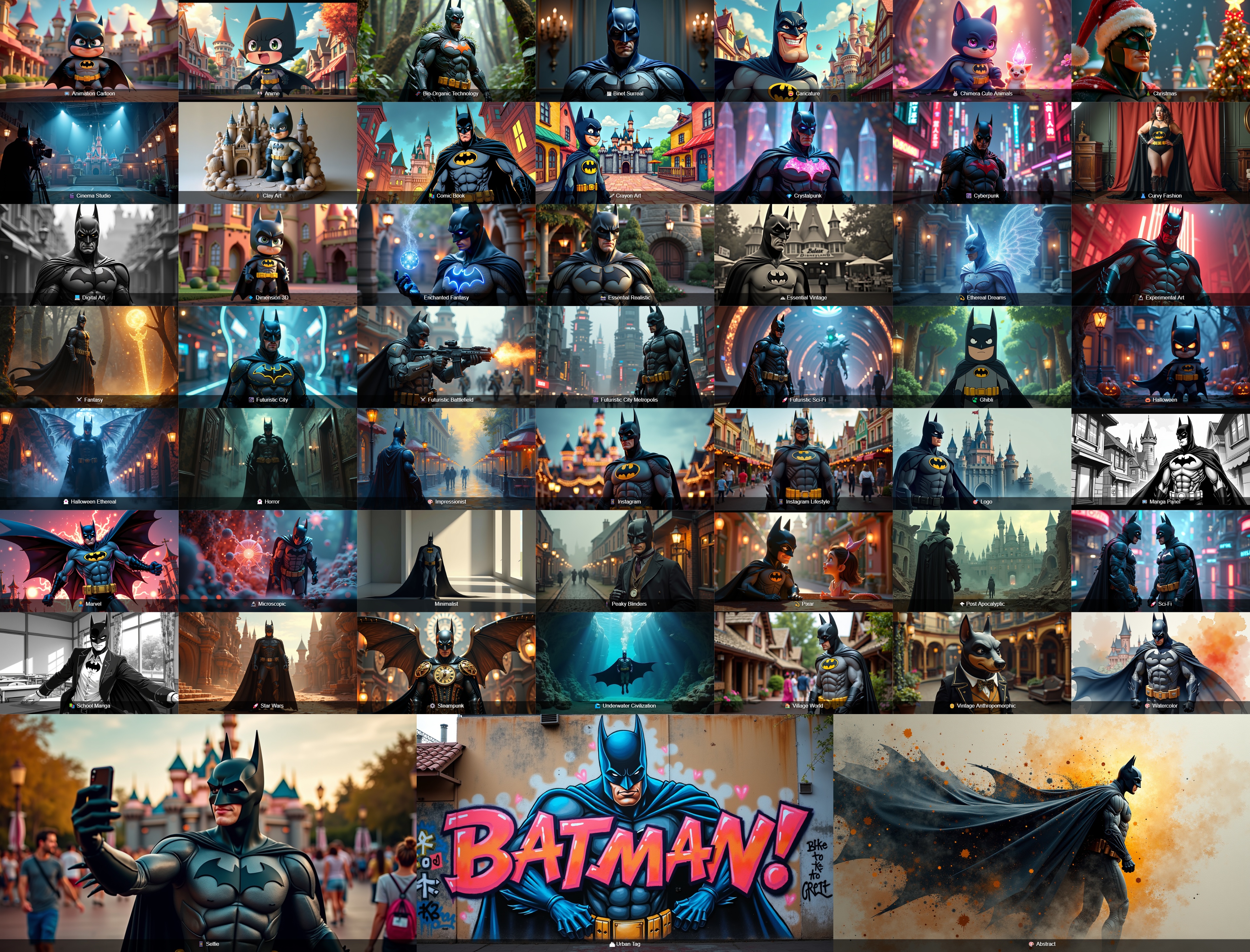
The Mega Prompt Generator is a sophisticated ComfyUI node that generates detailed, thematic prompts for image generation. It supports multiple themes and styles with extensive customization options.
Installation
ComfyUI Manager (recommended): open the Custom Nodes Manager, search for Isulion and install.
Manual install:
cd your_ComfyUI_install_dir/custom_nodes
git clone https://github.com/Isulion/ComfyUI_Isulion
Restart ComfyUI, then refresh the browser page. The only extra Python dependency is requests (see requirements.txt); everything else comes with ComfyUI.
Interactive nodes
These two nodes draw their own interface inside the node (their frontend lives in web/).
🕹️ Isulion Mega Prompt V4 — "Prompt Jackpot"
A slot machine that writes your prompt. Five reels each draw one part of the prompt from the Isulion themes, and the node has a single output: prompt.
How to use it
- Add 🕹️ Isulion Mega Prompt V4 (category
Isulion/Core) and connectpromptto your text encoder (e.g.CLIPTextEncode). - Pull the PULL lever to preview draws in the browser, without running the workflow.
- Queue the workflow: the machine spins again on every run, and the screen shows exactly the prompt that was sent.
| Control | What it does |
|---|---|
| Reels | THEME (◀ ▶ to browse, 🔍 to search the 109 themes), SUBJECT, PLACE, STYLE, EFFECTS |
| 🔒 Lock | A locked reel never moves, neither with the lever nor when the workflow runs. Picking a theme locks it; leave it unlocked for a random theme each time. |
| ✏️ Your own text | On SUBJECT and PLACE: your text stays on every draw and the theme rebuilds the wording around it. ✕ clears it. |
| 👁 / 🚫 On / off | PLACE, STYLE and EFFECTS can be switched off: they turn grey and leave the prompt. |
| SIMPLE / DETAILED / COMPLEX | From no quality boilerplate, to a few detail words, to a richer block (composition, textures, lighting). |
| LoRA | Fixed text always added at the end, e.g. a trigger word or <lora:name:0.8>. |
| PROMPT screen | Each reel has its colour. Click a piece to re-draw only that reel. COPY copies the prompt; EDIT freezes a hand-written prompt, sent as-is on every run until you pull the lever again. |
| Last draws | The last 5 draws. Click one to load it back; ☆ keeps it as a favourite, on top of the list. The footer shows the draw counter and the seed. |
| ? | Built-in help in English or French; the language you choose is remembered. |
The machine state (theme, locks, your texts, complexity, LoRA) is saved with the workflow. Mega Prompt V3 is still available, unchanged, for existing workflows.
👾 Isulion Space Invaders
A small Space Invaders game you play inside the node, for while the queue runs.
<p align="center"> <img src="assets/readme/space_invaders.png" alt="Space Invaders game running inside a ComfyUI node" width="380"> </p>- Click the game to give it focus, then Enter or Space to start (Enter to play again after a game over).
- ← → or A D to move, Space to fire, P to pause. The game pauses when it loses focus and only reads the keyboard while it has focus, so ComfyUI shortcuts keep working.
- Outputs:
high_score(INT),last_score(INT) andsummary(STRING). Scores are saved with the workflow, so your best score can feed a seed or a prompt.
Prompt generators
🚀 Isulion Mega Prompt V3
The classic generator: pick a theme and a complexity, and it builds a detailed prompt. Unlike V4, it also exposes each part on its own output (prompt, subject, environment, style, effects, seed).
Inputs
- Theme: one of the 109 themes, or 🎲 Dynamic Random
- Complexity: simple, detailed or complex
- Randomization: enable or disable random generation
- Custom subject / custom location: force your own subject or place, and let the theme describe the rest
- include environment / style / effects: leave any part out of the prompt
🔄 Isulion Multiple Prompt Generator produces one prompt per theme in a single run: tick the themes you want (or use a selection mode) and it outputs a list of prompts with their theme names.
<details> <summary><b>All 109 themes, by category</b></summary>1. Art Styles & Techniques
- 🎨 Abstract
- 🎨 Concept Art
- 🖍️ Crayon Art
- 🖼️ Digital Art
- 🔬 Experimental Art
- 🧊 Glassmorphism
- 🎨 Impressionist
- 🎈 Inflatable World
- 🧶 Knitted World
- 🧊 Liquid Chrome
- ⬜ Minimalist
- 🏺 Clay Art
- ✂️ Papercraft
- 🎨 Watercolor
- 🪩 Y2K Retro-Futurism
2. Animation & Entertainment
- 📺 Animation Cartoon
- 🎌 Anime
- 🎬 Cinema Studio
- 📚 Comic Book
- 🎡 Disney
- 🎬 Dreamworks
- 🐱 Giant Cat-zilla
- 🍃 Ghibli
- 🎯 Logo
- 📺 Manga Panel
- 🦸 Marvel
- 🎬 Nolan Epic
- 👾 16-Bit Pixel Art
- 💫 Pixar
- 📚 School Manga
- 🎭 Stop Motion
- 🕹️ Voxel Low-Poly
3. Science Fiction & Fantasy
- 🧬 Bio-Organic Technology
- 🪼 Bioluminescent Jelly
- 🌧️ Cinematic Neon Rain
- 💎 Crystalpunk
- 👟 Cyber Hypebeast
- 🌆 Cyberpunk
- ✨ Enchanted Fantasy
- ⚔️ Fantasy
- ⚔️ Futuristic Battlefield
- 🌆 Futuristic City
- 🌆 Futuristic City Metropolis
- 🚀 Futuristic Sci-Fi
- ⚔️ Miura Dark Fantasy
- 🍄 Psychedelic Cyber Fungus
- 🚀 Sci-Fi
- 🚀 Star Wars
- ⚙️ Steampunk
- 🌊 Underwater Civilization
- 🩻 X-Ray Anatomy
4. Character Art
- 😄 Caricature
- 👤 Character Designer
- 🦄 Chimera Animals
- 🐰 Chimera Cute Animals
5. Architectural & Spaces
- 🏛️ Architectural
- 🏠 Interior Spaces
- 🏙️ Urban Tag
- 🏠 Village World
6. Dark & Horror
- 👻 Halloween Ethereal
- 👻 Horror
- ⚔️ Miura Dark Fantasy
- 📹 VHS Found Footage
7. Holiday Themes
- 🏮 Chinese New Year
- 🎄 Christmas
- 👹 Dia de los Muertos
- 🐰 Easter
- 🎃 Halloween
- 👻 Halloween Ethereal
- 🎆 New Year's Eve
- 🍀 St. Patrick's Day
- 🦃 Thanksgiving
- 💘 Valentine's Day
8. Nature & Environment
- 🌌 Astrophotography
- 🌿 Nature
- 🌿 Overgrown Ruins
- 🌊 Underwater Civilization
9. Photography & Fashion
- 🎬 Analog 35mm Film
- 👗 Curvy Fashion
- 📸 Essential Realistic
- 📱 Fisheye Action Cam
- 📱 Instagram Lifestyle
- 📱 Selfie
10. Food
- 🍳 Culinary/Food
- 🍕 Food Apocalypse
- 🥙 Street Food Kebab
11. Vintage & Historical
- 🧺 50s Commercial
- 🪩 Disco Medieval
- 🕰️ Essential Vintage
- 🏛️ Historical Monuments
- 🕴️ Peaky Blinders
- 🛒 Retro Vaporwave Mall
- 👴 Vintage Anthropomorphic
- 📸 Vintage 1800s Photography
12. Surreal & Dreams
- 🖼️ Binet Surreal
- 💠 Dimension 3D
- ✨ Ethereal Dreams
- 🌌 Glitch Core
- 🛋️ IKEA Backrooms
- 🔬 Microscopic
- 🧩 Puzzle Dimension
- 🦆 Rubber Duck Supremacy
- 💗 Spectral Mist
- 📦 Unboxing Surrealism
13. Post-Apocalyptic
- 🌪️ Post Apocalyptic
14. Random
- 🎲 Dynamic Random
Bonus Themes
- 🧸 Starter Pack
- 🚀 Space Colony
- 🏝️ Tropical Paradise
- 👧 Skinny Blonde Girl
- ⚔️ Medieval
- 🏛️ Spartan 300
Want to add your own theme? See the Theme Creation Guide.
All nodes
| Category | Nodes | |---|---| | Interactive | 🕹️ Isulion Mega Prompt V4 · 👾 Isulion Space Invaders | | Prompt generators | 🚀 Isulion Mega Prompt V3 · 🔄 Isulion Multiple Prompt Generator · 🎥 Isulion Video Prompt Generator (camera angle, lighting, quality presets for video models) | | Animals | 🦁 Animal Selector · 🐰 Cute Animal Selector · 🦊 Animal Behavior Generator (actions and poses) | | Scene | 🌳 Habitat Generator · 🌤️ Weather Generator · 🌅 Time of Day Generator · 🖼️ Art Style Generator · ⚡ Action Generator · 🎬 Scene Composition (camera angles, shot types) | | Character | 👨💼 Profession Generator · 🧝♂️ Fantasy Race Generator · 👔 Clothing Generator · ⏳ Epoch Generator (historical periods) | | Fantasy | ✨ Magical Effect Generator · 🏰 Mythical Location Generator · ⚔️ Artifact Generator (magical items) | | Sci-Fi | 🤖 Tech Generator · 👽 Alien World Generator · 🛸 Spacecraft Generator | | Enhancement | 😊 Emotion Generator · 🎨 Style Mixer (blend several art styles) · 💫 Prompt Enhancer (details, mood, composition, lighting, colour) · ⛔ Negative Prompt Generator (adjustable strictness) | | Image | 🖼️ Image Collage · 📁 Load Images from Directory · 🔒 Censored Part · ⧉ IsulionOverlay (overlays and watermarks) · 🧩 QRCode Generator · 🖼️ Display Image From URL | | Utilities | 📝 Custom Text Node · 💾 Prompt Vault Save · 🗃️ Prompt Vault Load · 💤 Isulion Shutdown | | Civitai | 🔍 Civitai Model Explorer · 🔥 Civitai Trending · 🖼️ Civitai Image Display |
In the node search, the full names start with "Isulion" (e.g. Isulion Weather Generator), except 📝 Custom Text Node.
Notes on some nodes
- 📁 Load Images from Directory loads every image of a folder as a batch. Folders are resolved strictly inside ComfyUI's
inputdirectory; absolute paths outside it are rejected. - 🖼️ Image Collage builds a collage from several input images, for collections or mood boards.
- 🔒 Censored Part censors part of an image with blur, pixelate, pixelate + blur, black bar or noise. Pick the area with a painted mask (MaskEditor) or the built-in rectangle widgets; supports mask grow/shrink, invert and edge feathering, and outputs the censor mask for inpainting.
- 🖼️ Display Image From URL downloads an image and shows it in the queue. URL download nodes only accept http(s) and refuse private or internal network addresses.
- 💤 Isulion Shutdown shuts ComfyUI down when a workflow finishes. It does nothing unless the environment variable
ISULION_ENABLE_SHUTDOWN=1is set. - 🔍 Civitai Explorer / 🔥 Civitai Trending authenticate with the
CIVITAI_API_TOKENenvironment variable; there is no API key widget, so tokens never end up in shared workflow files.
🗃️ Prompt Vault
A shared library of named prompt fragments, stored in ComfyUI's user directory (ComfyUI/user/isulion/prompt_vault.json) so your entries survive node updates. Until your first save, the example entries from Core_Nodes/prompt_vault.example.json are offered.
- 💾 Isulion Prompt Vault Save stores the
textwidget (typed, or connected from any STRING node such as Mega Prompt) undername, and passes the text through unchanged so it can go straight on to your encoder. Saving an existing name updates it. - 🗃️ Isulion Prompt Vault Load picks a stored entry from a dropdown and outputs its text.
The vault path can be changed with the ISULION_PROMPT_VAULT environment variable. A missing or corrupt vault file gives an empty vault instead of breaking the queue.
Note: the load node's dropdown is filled at page load, so newly saved entries appear after a browser refresh (Ctrl+Shift+R). Meanwhile you can type any entry name in the widget: it accepts free text, and the load node re-runs whenever the vault file changes.
Example workflows
Drag a file from example_workflows/ onto the ComfyUI canvas:
| Workflow | Contents |
|---|---|
| Simple_Megaprompt_V4.workflow.json | Mega Prompt V4 and Space Invaders. No other node pack needed. |
| Simple_Megaprompt_V3.workflow.json | Mega Prompt V3 and a text display. |
| Full_Flux_Megaprompt_v3.workflow.json | Mega Prompt V3 driving a full FLUX (GGUF) text-to-image pipeline. |
| Multiple Mega Prompt.json | Multiple Prompt Generator: one prompt per selected theme. |
| Isulion_Civitai_Nodes_Workflow.json | Civitai Trending and Civitai Image Display (set CIVITAI_API_TOKEN). |
| All_Isulion_Nodes_Workflow.json | A tour of most nodes of the pack. |
Except for the V4 one, these workflows use ShowText|pysssss from ComfyUI-Custom-Scripts to display text. Install that pack, or replace those nodes with any text-display node. The FLUX workflow also needs the GGUF loader nodes and the FLUX models it references.
Older FLUX examples
More workflows and examples on Civitai
Basic MegaPrompt (old) workflow
Chimera (with Ollama) (old) workflow
MegaPrompt + Ollama + LoRA (old) workflow
The Ollama workflows need the Ollama_generator node in ComfyUI, with the environment variables OLLAMA_KEEP_ALIVE=0 and OLLAMA_ORIGINS=*.
Directory structure
ComfyUI_Isulion/
├── __init__.py               # node registration, version, WEB_DIRECTORY
├── Core_Nodes/
│   ├── mega_prompt_V3.py     # Mega Prompt V3
│   ├── mega_prompt_v4.py     # Mega Prompt V4 (machine state, roll, prompt assembly)
│   ├── mega_prompt_v4_routes.py  # /isulion/megaprompt_v4/* HTTP routes used by the lever
│   ├── mega_prompt_all_themes.py # Multiple Prompt Generator
│   ├── space_invaders_node.py
│   ├── theme_handlers/       # one handler per theme
│   ├── configs/              # theme word lists (JSON) and config manager
│   ├── animals_nodes/  character_nodes/  scene_nodes/
│   ├── fantasy_nodes/  scifi_nodes/  enhancement_nodes/
│   ├── civitai_nodes/
│   └── …                     # image and utility nodes (collage, load images, QR code, vault…)
├── web/                      # frontend of the interactive nodes
│   ├── mega_prompt_v4.js     # slot machine widget
│   ├── mega_prompt_v4_core.js  # pure helpers and EN/FR texts
│   └── space_invaders.js
├── example_workflows/
├── Docs/                     # Theme Creation Guide
├── assets/readme/            # README images
└── tests/                    # Python tests, tests/js for the V4 widget
Development
python3 tests/run_all.py
Runs the whole suite without pytest (it works with pytest too). It also runs the JavaScript tests of the V4 widget, node tests/js/test_mega_prompt_v4.mjs (skipped when Node.js is not installed).
See CHANGELOG.md for the release history and breaking changes.