
SpicyAPI
API nodes for 180+ hosted image, video, audio and chat models (Seedance, Kling, Wan, MiniMax, Vidu, LTX, Suno, GPT Image, Nano Banana, Seedream, FLUX LoRA, TTS) through SpicyAPI. No local GPU needed; each node shows its USD price before you queue. Requires a SpicyAPI key from https://spicyapi.ai.
Nodes (191)
One frame in, fifteen seconds of video with sound out
Hold a cast, a wardrobe, or a room steady across a shot
Getting a watchable clip out of nothing but a prompt
Narration with tone instructions that actually do something
Instruction editing with an optional mask for the pixels you care about
Edit a photo in a style you trained into a LoRA
Your own LoRA, by URL, no download required
The open-weight Qwen you can't be bothered to load locally
Camera angles and relights without training anything
The base refresh that actually likes your LoRAs
One image, one instruction, and a shape you have to choose yourself
The short-prompt Qwen, and why the version numbers lie to you
Merge references and change the words already in the picture
Retype the cover line without redrawing the cover
Pay the extra cent when skin, glass and typography have to hold up
The node you use when the image needs readable text in it
Three inputs, no mask, and the least polite editor in the pack
Put your character's face on someone else's dance
The open model, minus the 25-minute render
Separate LoRA slots for the high-noise and low-noise experts
Attach your own weights to the one Wan you can still download
The uncensored endpoint, and why 'Spicy' isn't Alibaba's word
Uncensored endpoint, your weights on top
Adding seconds to a clip you already have
The cheap baseline, and what you give up for it
When you need the audio, not just the motion
Text in, ten seconds of video with sound out
The cheap tier, and why it has no soundtrack
15 seconds with sound, and a multi-shot switch nobody uses
Cast a subject from a clip, not a photo
Uncensored, with the 15-second runway
Write the shot list, get 15 seconds with sound
Edit up to nine reference images with one instruction
The 2k canvas, for edits with several moving parts
4k canvases and a colour palette you actually control
Uncensored, up to 15 seconds, with a negative prompt
The reasoning pass that plans the shot before drawing it
30 seconds, and a '-1' that lets the model pick the length
Same schema as 3.0, about a third more per second
Hand it a script, a web page and five clips
One frame in, an unfiltered clip out
Prompt-only video with sound, on someone else's GPU
Animate a still at 2K and 4K (which are upscales)
The expensive tier, and when it earns it
Lock a face, a garment and a voice
4K video from a sentence, at $0.234 a second
Keep the same person, product or place
The mid-tier that's usually the smart buy
The cheapest way to keep a subject consistent
Animate a still without the filter conversation
The cheap drafting node you'll end up keeping
Restyle a photo with your own LoRAs
Test your trained LoRA for a cent and a half
You set the pixels, up to 2560 a side
Exact pixel control for about a penny
Restyle a photo in about a second's worth of compute
Your LoRA, hosted, for a cent a picture
A penny a picture, and the cheapest good frame in the graph
The revival act, with a mask that actually works
Borrow a 12B LoRA library without the 12B download
The still you already made, now moving
Same shot, fewer refusals
A whole shot with sound from one prompt
What '-1' does, and why audio is free here
No first frame, just your own material
Uncensored, and audio costs nothing extra
The switch that makes it search the web first
The one that goes to 4K
Seedance 2.0 for about two cents a second
The cheapest way to point at your own footage
The uncensored option that doesn't cost the earth
No image, no GPU, cheap takes
Nine images, three clips, three tracks, one shot
Uncensored, and it goes to 4K
Seven ratios, 4K, and what web search really costs
30-second clips, and why 'adaptive' is your only ratio
30 images of your own material is the whole trick
The priciest node in the Seedance line
Half a minute of footage from one prompt
One prompt, a whole scene, several speakers
Pick the exact pixels before you describe the change
One prompt, sixteen exact sizes, one flat rate
Ten references, fifteen ratios, and a real alpha channel
Turn a flat PNG into sixteen movable layers
Fifteen ratios, three resolutions, one price
Eight exact sizes, one uncensored edit model
A 2K frame from a short prompt, at eight fixed sizes
Thinking mode, ten references, real transparency
Split a finished image into named, movable layers
The thinking pass is free, so leave it on
41 voices, knobs for speed and pitch, no filter
25 text models in one node, writing your prompts for you
The strength dial that decides how much of your photo survives
Restyle a photo with weights you already trained
Your anime LoRAs, rented by the image
The cheapest anime node in the pack, and the most literal
30 voices, acted-out cues like [sighs], and two-speaker dialogue
The cheapest voice in the pack, with one caveat
30 voices, cues that get acted out, half the Pro price
Fourteen reference images, and it can search the web mid-render
4K for twelve cents, and it can Google your prompt first
Stack up to 14 reference images and tell Google what to change
The model that plans the poster before it draws it
Get the lyrics back out of a song you generated
Bring your own weights for three cents, without the fp8 headache
Two and a half cents for a photoreal portrait, no GPU involved
The cheapest way to make a still move
1080p motion at twenty-two cents a second, and you'd better mean it
$2.16 for ten seconds, silent, 1080p
Sound on every clip, whether you want it or not
1080p with sound for twenty-eight cents a clip
Put your character's face on someone else's dance
1080p, sound optional, and the audio toggle doubles the price
Describe the scene, decide whether you want sound
The version with knobs — orientation, shots, original audio
3 to 15 seconds, 4K if you're feeling wealthy, and a real shot list
Write a shot list, get a multi-shot clip back
You pay more for less, and that's the trade
Four widgets, sound always on, no negative prompt
One portrait, one audio file, and the picture talks
Animate one still, and keep an eye on the meter
Seven photos, one shot, characters that stay put
No image, no seed, and no free retries
Change one thing in a clip and leave the rest frozen
The finishing tier, complete with reference images and anamorphic frames
The volume tier, and the only Krea with a format switch
A penny and a half per idea, ten style references included
All the LTX, none of the 22GB text encoder
Your own weights, no GPU, no VAE archaeology
Stack three of your own weights on a hosted LTX
20 seconds with a soundtrack for under thirty cents
The release that fixed frozen clips, without the filter
Thirteen built-in LoRAs, and the one input that will confuse you
The architectural jump, up to 4K, with an ending you choose
Long single takes at 4K, and a soundtrack you don't have to ask for
It never loads a LoRA — it just points the server at a file
Put the same face in a new scene, from one prompt
Four megapixels, your weights, four cents
The audio-native model, at two and a half cents a second
Your own weights on an audio-native model
Nine Images, Three Clips and Your Own LoRAs in One Shot
Pick Your Own Weights Without Leaving ComfyUI
Give It a First Frame, Get the Shot With Sound
Fast H3 Clips, and Mind That 1:1 Default
Nine Images In, One Character Who Actually Stays Put
The Community Fine-Tune, With Your LoRAs Stacked On
Nine Images, Three Clips, Three LoRAs
An Unfiltered H3 Build for the Frames Others Refuse
2K Clips With Real Sound, From About 2.5 Cents a Second
A Finished Song for Eighteen Cents, Vocals Included
472 Voices, an Emotion Dial, and (sighs) Actually Performed
The Cheap One. For Most Scripts, Take It.
Booru Tags or Plain English, Twelve Bucks a Thousand Images
Sixteen Sources, One Mask, and an Alpha Channel You Can Actually Use
The One You Use When the Picture Needs Legible Words
Same Inputs as Flare, Slower, Better, Worth the Wait
4K, Legible Type, and a Local Alternative Muscling In
Ten Sources, and an `auto` Aspect Ratio That Just Keeps Your Frame
Medium Quality, Legible Type, and Fifteen Aspect Ratios
Booru Tags, Score Tags, and Your Pony LoRAs, Rented by the Image
Pony's prompt dialect without the 6 GB download
The open-weights TTS everyone clones voices with, no install
You want the alpha mask, not the flat image
The analysis pass that doesn't touch your video
One JSON list and the person is someone else
$0.16 a shot when the cheap swap isn't good enough
The thirteen-cent swap, and what it won't do
Skin tone is 90% of why swaps look fake
Keeping one face on the same head for 30 seconds
The last stage your silent render has been missing
When the hair has to come with the face
Find every head in the clip before you change one
The swap call, and the two values that must match
Outpaint to a new aspect ratio without painting a mask
8K costs the same as 2K, so think about which you're asking for
Redub the mouth, keep the performance
The weird one, and why it can't be seeded
Name the thing, and it's gone
One portrait, one voice clip, one video
The cheap way to make a 480p render look finished
Two Finished Songs for Seven Cents
Hand It Your Lyrics or Let It Write Them
The Suno Node You Use When the Safe One Sounds Boring
Two-Cent Seconds, and the Prompt Is Optional
Cheap, Silent, and Weirdly Unfiltered
Sound Included, at 1080p and Seven Cents a Second
Cheaper Per Second, and Permanently 540p
The Unfiltered Vidu Node, and What It Doesn't Have
The Video Node You'd Actually Draft With
Two Hours of Audio Transcribed for About a Quarter
71 Voices, and One Setting That Will Ruin Your Audio
SpicyAPI for ComfyUI
Seedance, Kling, Wan, MiniMax H3, Suno, GPT Image, Nano Banana and more AI models as ComfyUI nodes. No GPU, no model downloads.
Get an API key · Setup guide · All models · Status


comfyui-spicyapi is a ComfyUI custom node pack that runs hosted SpicyAPI models from inside your workflows. Each model is one node whose options come from that model's published input schema, so the node offers exactly what the model accepts. Generation runs on SpicyAPI's servers: you need an internet connection and an API key, not a graphics card or model weights. Every request is paid in US dollars from a prepaid balance, and each node shows its price before it runs.
189 model nodes (104 video, 69 image, 16 audio) from 117 model families, plus 25 text models in one Chat node.
<!-- stats:end -->At a glance
| | |
| --- | --- |
| What it adds | One node per hosted model, a Chat node for text models, and a LoRA node |
| Inputs and outputs | Standard ComfyUI IMAGE, MASK, VIDEO, AUDIO and STRING |
| Hardware | None: models run on SpicyAPI, so it works on laptops, Macs and CPU-only machines |
| Dependencies | None beyond ComfyUI itself (Python 3.10+, the V3 node API; tested with ComfyUI 0.39) |
| Pricing | Pay per request from a prepaid USD balance; the rate is shown on every node |
| New models | Picked up automatically: the node list is rebuilt from your account at each start |
| License | MIT |
Install
cd ComfyUI/custom_nodes
git clone https://github.com/spicyapi-ai/comfyui-spicyapi
Then restart ComfyUI. Prefer not to use git? Download the
ZIP, unpack it into
ComfyUI/custom_nodes, and restart. There is nothing else to install.
Quick start
-
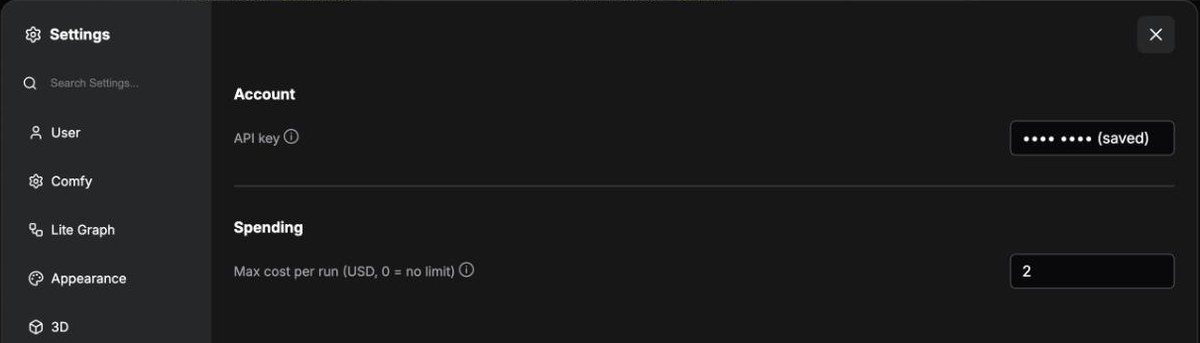
Add your key. Open Settings > SpicyAPI, paste a key from spicyapi.ai/console/keys; a notice shows your balance. Restart ComfyUI once so the node list comes from your account.
-
Add a model node. Double-click the canvas and type a model name (
seedance,kling,wan,suno,nano banana...), or browse SpicyAPI > Video / Image / Audio in the node menu.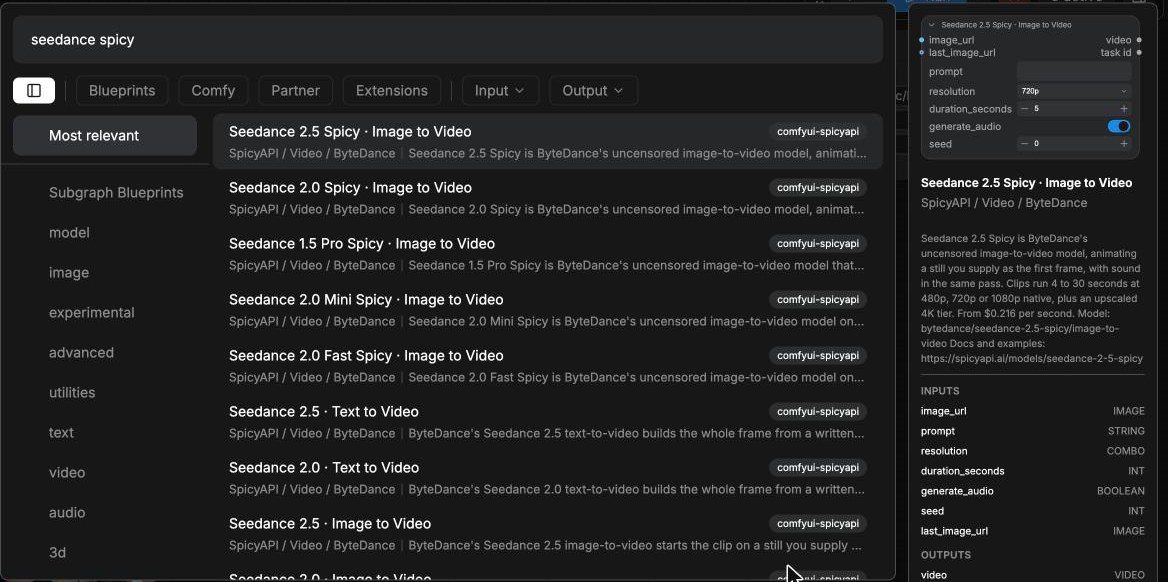
-
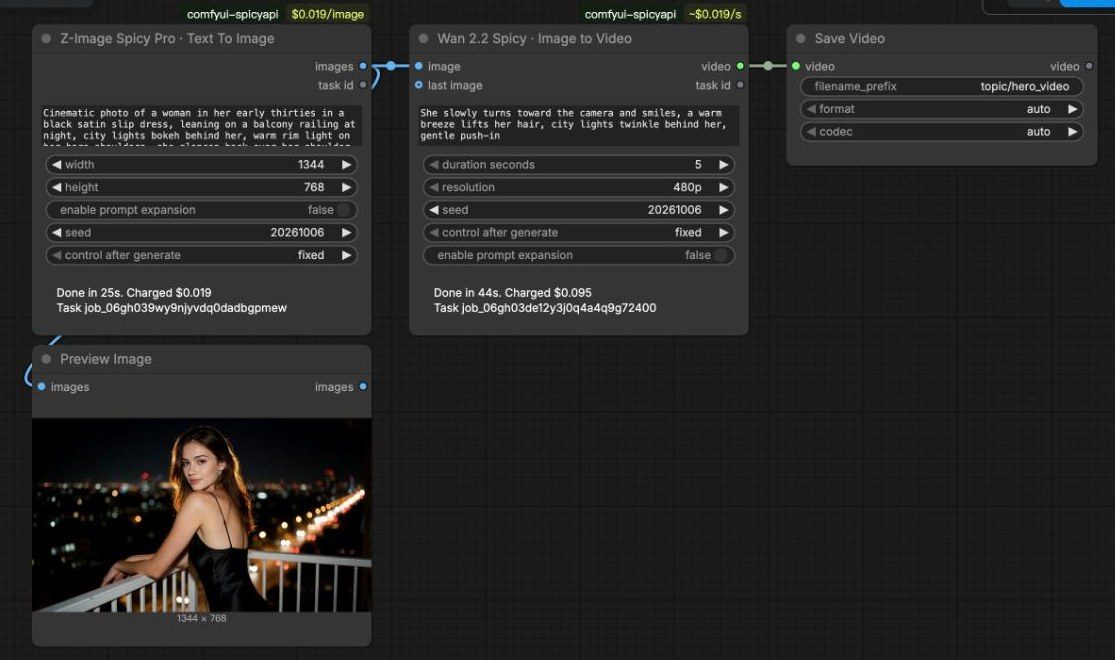
Connect and run. Wire a Load Image into the node's image input if the model takes one, connect Save Image, Save Video or Save Audio to its output, and press Run. The node shows its progress, then what the run cost.
Prefer to start from a working graph? Open ComfyUI's template browser: under comfyui-spicyapi you will find text to image, image to video, a chat model writing the prompt for an image model, text to speech, and LoRA.
Supported models
The node list follows the live SpicyAPI catalogue. At the time of this release:
<!-- models:start -->Video (104 nodes)
| Maker | Models | | --- | --- | | MiniMax | MiniMax H3 Singularity LoRA, MiniMax H3 Max, MiniMax H3 LoRA, MiniMax H3 Spicy, MiniMax H3 | | Lightricks | LTX 2.5, LTX 2.3 Spicy, LTX 2.3 Spicy LoRA, LTX-2 19B, LTX-2 19B LoRA | | Alibaba | Wan 3.0 Prime, Wan 3.0, Wan 3.0 Pro Prime, Wan 3.0 Pro, Wan 3.0 Spicy, Wan 3.0 Prime Spicy, HappyHorse 1.1, Wan 2.7 Spicy, Wan 2.6 Flash, Wan 2.6 Spicy, Wan 2.6, Wan 2.5, Wan 2.2 Animate, Wan 2.2 Spicy, Wan 2.2 Spicy LoRA, Wan 2.2 LoRA, Wan 2.2 | | ByteDance | Seedance 2.5 Spicy, Seedance 2.5, Seedance 2.0 Mini Spicy, Seedance 2.0 Mini, Seedance 2.0 Spicy, Seedance 2.0, Seedance 2.0 Fast Spicy, Seedance 2.0 Fast, Seedance 1.5 Pro Spicy, Seedance 1.5 Pro | | Kling | Kling 3.0 Turbo, Kling O3, Kling 3.0, Kling Avatar 2.0, Kling 2.6, Kling 2.5 Turbo, Kling 2.1 Master, Kling 2.1 | | Vidu | Vidu Q3 Turbo, Vidu Q3 Spicy, Vidu Q3, Vidu Q3 Pro | | Tencent | HunyuanVideo 1.5 | | SpicyAPI tools | Video Character Swap, Video Head Swap, Video Face Swap, Video Upscaler, Talking Avatar, Lip Sync, Video Sound Effects |
Image (69 nodes)
| Maker | Models | | --- | --- | | Alibaba | Qwen Image 2.1, Qwen Image 2.1 LoRA, Qwen Image 3.0 Pro, Qwen Image 3.0, Qwen Image Edit Spicy, Wan 2.7 Pro, Wan 2.7, Qwen Image 2, Z-Image Base LoRA, Qwen Image 2512 LoRA, Z-Image Spicy Pro, Z-Image Spicy, Z-Image, Z-Image Turbo LoRA | | ByteDance | Seedream 5.0 Flash, Seedream 5.0 Pro, Seedream 5.0 Lite, Seedream 4.0 | | OpenAI | GPT Image 2.5 Sunburst, GPT Image 2.5 Flare, GPT Image 2 | | MiniMax | MiniMax H3 Image LoRA | | CircleStone Labs | Anima Turbo, Anima Turbo LoRA | | Krea | Krea 2 Large, Krea 2 Medium Turbo, Krea 2 Medium | | Google | Nano Banana 2, Nano Banana Pro | | J1B | Jib Mix Qwen, Jib Mix Qwen LoRA | | Prefect | Prefect Pony XL LoRA, Prefect Pony XL | | Neta.art Lab | Neta Lumina | | Black Forest Labs | FLUX.1 Dev LoRA | | SpicyAPI tools | Face Swap Pro, Face Swap Plus, Celebrity Look-Alike, Face Swap, Head Swap, Background Remover, Image Upscaler, Object Eraser, Image Expander |
Audio (16 nodes)
| Maker | Models | | --- | --- | | Google | Gemini 3.8 Flash-Lite TTS, Gemini 3.8 Flash TTS, Gemini 2.5 Pro TTS | | Suno | Suno v6 Mini, Suno v6 Wild, Suno v6 | | HeartMuLa | HeartMuLa Transcribe | | ByteDance | Seed Audio 1.0, Seed Speech 2.0 | | MiniMax | MiniMax Music 3.0, MiniMax Speech 2.8 HD, MiniMax Speech 2.8 Turbo | | xAI | Grok STT, Grok TTS | | Alibaba | Qwen3 TTS | | Resemble AI | Chatterbox |
Text (25 models in the SpicyAPI Chat node)
Claude Sonnet 5.5, Claude Opus 5.5, Grok 4.7, DeepSeek V4.1 Flash, GLM 5.3 Flash, GLM 5.3, DeepSeek V4 Pro, Gemini 3.7 Flash, Grok 4.6, DeepSeek V4 Flash, Claude Opus 5, Gemini 3.5 Flash-Lite, Kimi K3, Grok 4.5, Claude Sonnet 5, GLM 5.2, Claude Fable 5, Grok 4.3, Gemini 3.1 Pro Preview, Claude Sonnet 4.6, Claude Opus 4.6, Gemini 3 Flash Preview, Claude Opus 4.5, Claude Sonnet 4.5, Gemini 2.5 Flash.
Every node with its model ID and starting price: MODELS.md.
<!-- models:end -->How the nodes work
- Inputs follow the model. Dropdowns, sliders and switches mirror each model's schema. Image, video and audio inputs are sockets, uploaded for you when the node runs. Models that take several references grow a new socket every time you connect one.
- Defaults are the model's own. A dropdown set to
model default, or a number set to-1, is left out of the request so the model decides. - Outputs are ordinary ComfyUI values. Video nodes return
VIDEO(and the last frame asIMAGEwhenreturn_last_frameis on), audio nodes returnAUDIO, image nodes returnIMAGE, and background removal also returns analphamask. Transcription returnsSTRING. - SpicyAPI Chat sends a prompt, optional system instructions and optional images to any text
model on SpicyAPI and returns the answer as a
STRING, ready to wire into another node's prompt. - SpicyAPI LoRA adds a LoRA weights file by URL to models with LoRA support. Chain several to stack them.
Costs and safety
- Price on the node. Each node's badge shows the current rate for the options you picked, for
example
$0.0525/sfor video or$0.01/image, and updates as you change them. - Quote before every run. Set Settings > SpicyAPI > Max cost per run and any run quoted above it stops before anything is charged.
- No surprise re-runs. Seeds start on
fixed, so queueing the same graph twice reuses the first result. Switch control after generate torandomizefor a new result each run. Models that take no seed (Seedream, for example) still get aseedwidget for this; it is never sent to the model and only decides whether the node runs again. - Your key stays out of shared files. It is stored in the ComfyUI user folder
(
user/spicyapi/config.json, readable by your account only), never in a workflow or the metadata of a saved image. On a server, setSPICY_API_KEYinstead. - Cancelling stops the wait, not the job. A cancelled run keeps going on SpicyAPI, is charged if it succeeds, and its result is in your console for up to 14 days.
FAQ
How do I use Seedance in ComfyUI?
Install this pack and add your key, then add the Seedance 2.5 · Image to Video node (or any
other Seedance node), connect Load Image to its image input and Save Video to its
video output, write a prompt and run. Resolution, duration and audio are options on the node.
The same steps work for Kling, Wan, MiniMax H3, Vidu and LTX video models.
Do I need a GPU or to download model weights?
No. The models run on SpicyAPI's servers, and the nodes only send inputs and receive results. A laptop or a CPU-only machine is enough.
How much does a run cost?
Each model has its own rate, shown on the node and on its page at spicyapi.ai/models: image models are priced per image, video models per second of output, speech per character, per second or per request. A run is quoted before it starts, and the node prints the final charge when it finishes. Failed runs are not charged unless a model's page says otherwise.
Is my API key safe when I share a workflow or an image?
Yes. ComfyUI writes node settings into workflow files and into PNG metadata, so the key is never
a node setting. It lives in a file in your ComfyUI user folder, or in the SPICY_API_KEY
environment variable.
Can I use my own LoRA?
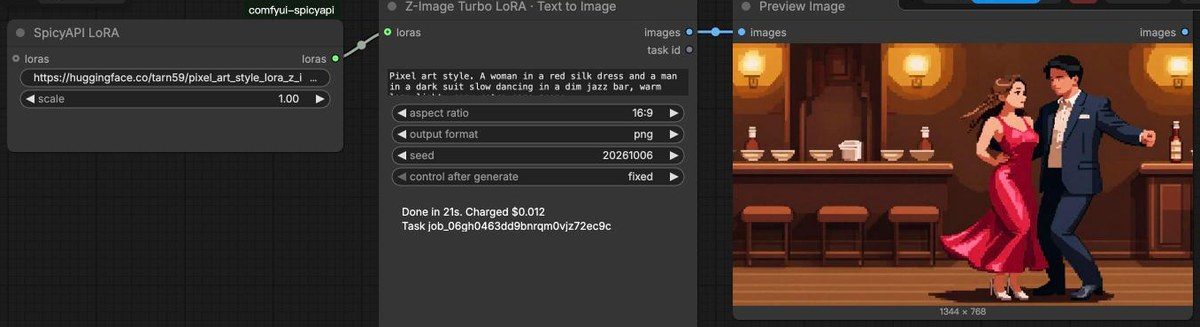
Yes, with the LoRA model nodes (their names end in LoRA). Add a SpicyAPI LoRA node with a
direct download link to a .safetensors file and its strength, and connect it to the model node's
loras input. The link must open without a login. The lora template comes ready to run with an
Apache-2.0 pixel-art LoRA for Z-Image Turbo (by tarn59 on Hugging Face); swap in your own link.
A model I saw on spicyapi.ai is not in my node list
Restart ComfyUI. The node list is built from your account's catalogue when ComfyUI starts, so models added since the last start appear after a restart. Without a key, the list bundled with this release is used.
Does it work with ComfyUI on a remote server or in the cloud?
Yes, as long as that machine can reach api.spicyapi.ai. Set SPICY_API_KEY in its environment,
or enter the key in Settings from the browser. Proxies set through HTTPS_PROXY are honoured.
Troubleshooting
| You see | What to do |
| --- | --- |
| No SpicyAPI key is set | Add the key in Settings > SpicyAPI, or set SPICY_API_KEY. |
| 40310 email not verified | Open the verification link from your sign-up email. |
| 40004 no deployment serves this combination | Change the option named in the message. |
| An error ending in request_id ... | Send that id to support; it identifies the request exactly. |
| a proxy or firewall ... may be intercepting the request | Check that HTTPS_PROXY, if set, points at a working proxy. |
Other ways to use SpicyAPI
- Python SDK, TypeScript SDK, Go, PHP and Java clients
- CLI for the terminal, and an MCP server for AI assistants
- Documentation and the API reference
Development
python -m unittest discover -s tests -t .
python scripts/update_snapshot.py   # needs SPICY_API_KEY; refreshes the bundled model list
python scripts/render_docs.py       # rewrites the model lists in README.md and MODELS.md