
ComfyUI-Wan-Video-Integrated-KSampler
WanVideo Integrated KSampler - Github: https://github.com/luguoli - K-sampler for video generation with integrated high/low noise stages,supports generating videos with start/end frames,automatic VRAM/RAM management, sage attention, block swapping, SD3 sampling
Nodes (2)
🐳 ComfyUI WanVideo Integrated KSampler


English | 简体中文
WanVideoIntegratedKSampler
This is an integrated ComfyUI WanVideo generation sampler node. Compared to using the official K-sampler, it eliminates the messy connections, supporting both text-to-video and image-to-video generation. It integrates dual-model sampling for high and low noise, single-frame generation, start/end frame generation, Motion Amplitude Enhancement, automatic GPU/RAM memory cleanup, batch generation, various attention optimizations, and more. Moms no longer have to worry about messy connections~~~~
If this project helps you, please give it a ⭐Star — it lets me know there are humans out there using it!
🏆 Features
🎬 Supported Generation Modes
- Text-to-Video: Generate videos from text prompts
- Image-to-Video: Generate videos from a single reference image
- Start/End Frame-to-Video: Generate videos from start and end frame images
⚡ Advanced Optimizations
- Dual-Stage Model Sampling: Integrated high and low noise dual-stage model sampling with configurable parameters for each stage
- Separate High/Low Noise Settings: Configure sampling steps and CFG values for high and low noise stages respectively
- Sage Attention Optimization: Integrated multiple attention optimization modes supporting memory-efficient computation
- FP16 Accumulation: Support Torch FP16 accumulation to improve VRAM utilization
- SD3 Sampling Integration: Integrated SD3 sampling algorithm, no additional nodes needed
- Motion Amplitude Enhancement: Integrated motion amplitude enhancement to improve video motion effects, reference project: PainterFLF2V
🖼️ Image Processing
- Integrated Prompt Input: Integrated prompt input box, no additional nodes needed
- Automatic Image Scaling: Automatically scales to target dimensions while maintaining aspect ratio
- Direct Video Frame Retrieval: Obtain video frame sequences directly, no additional decoding required
- Last Frame Retrieval: Obtain the last frame of generated video directly, no additional processing needed
🔧 Productivity Enhancer
- Batch Generation: Generate multiple videos in a single operation
- Automatic GPU Memory Cleanup: Automatic cleanup option for GPU/VRAM
- Automatic RAM Memory Cleanup: Automatic cleanup option for RAM
- CLIP Vision Enhancement: Support CLIP Vision model for enhanced perspective control
- Completion Sound Notification: Play audio alert upon completion
📦 Other
- Simple Version Provided: Includes only dual-model sampling integration for advanced custom use
🍧 Comparison Demo
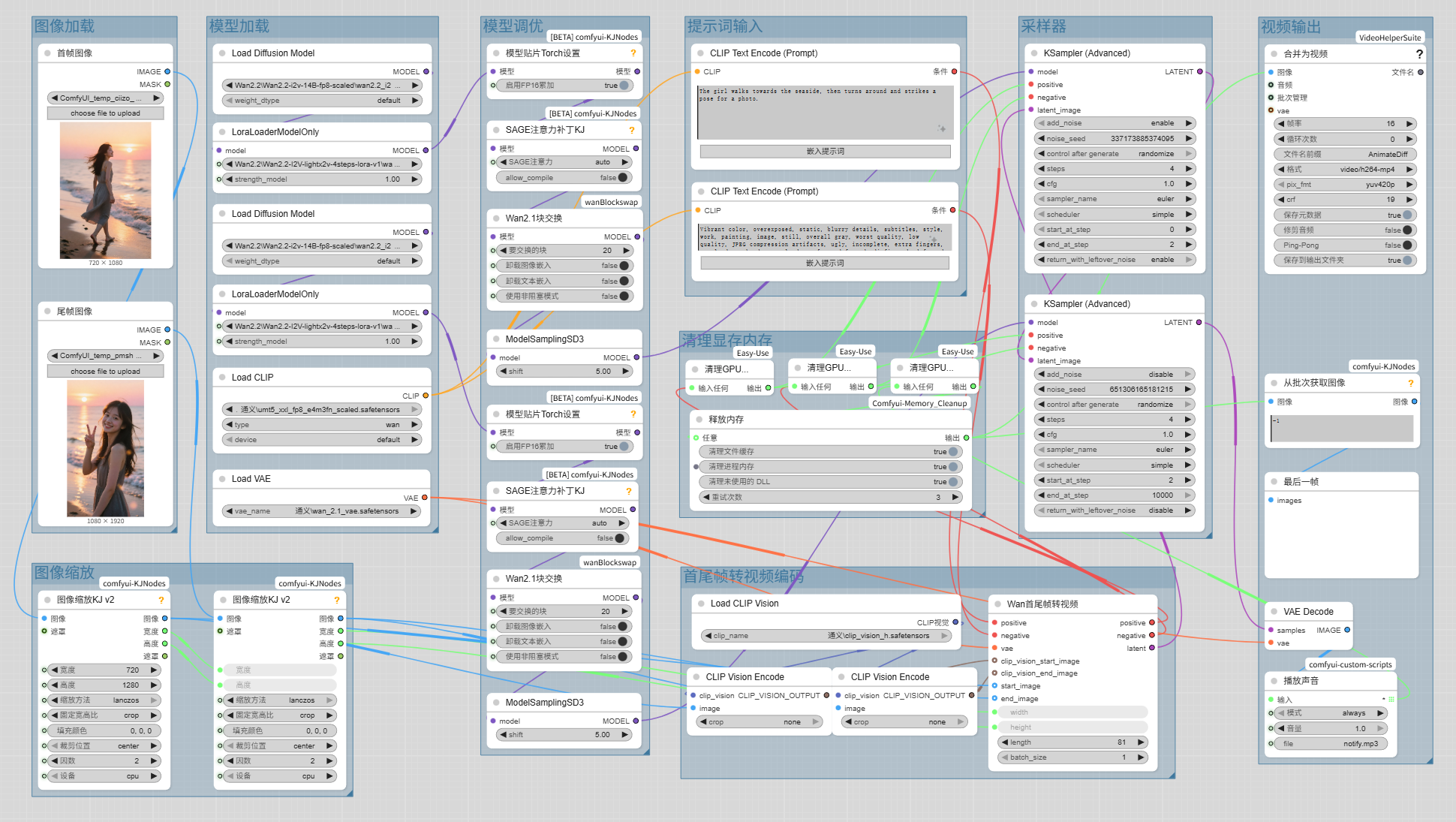
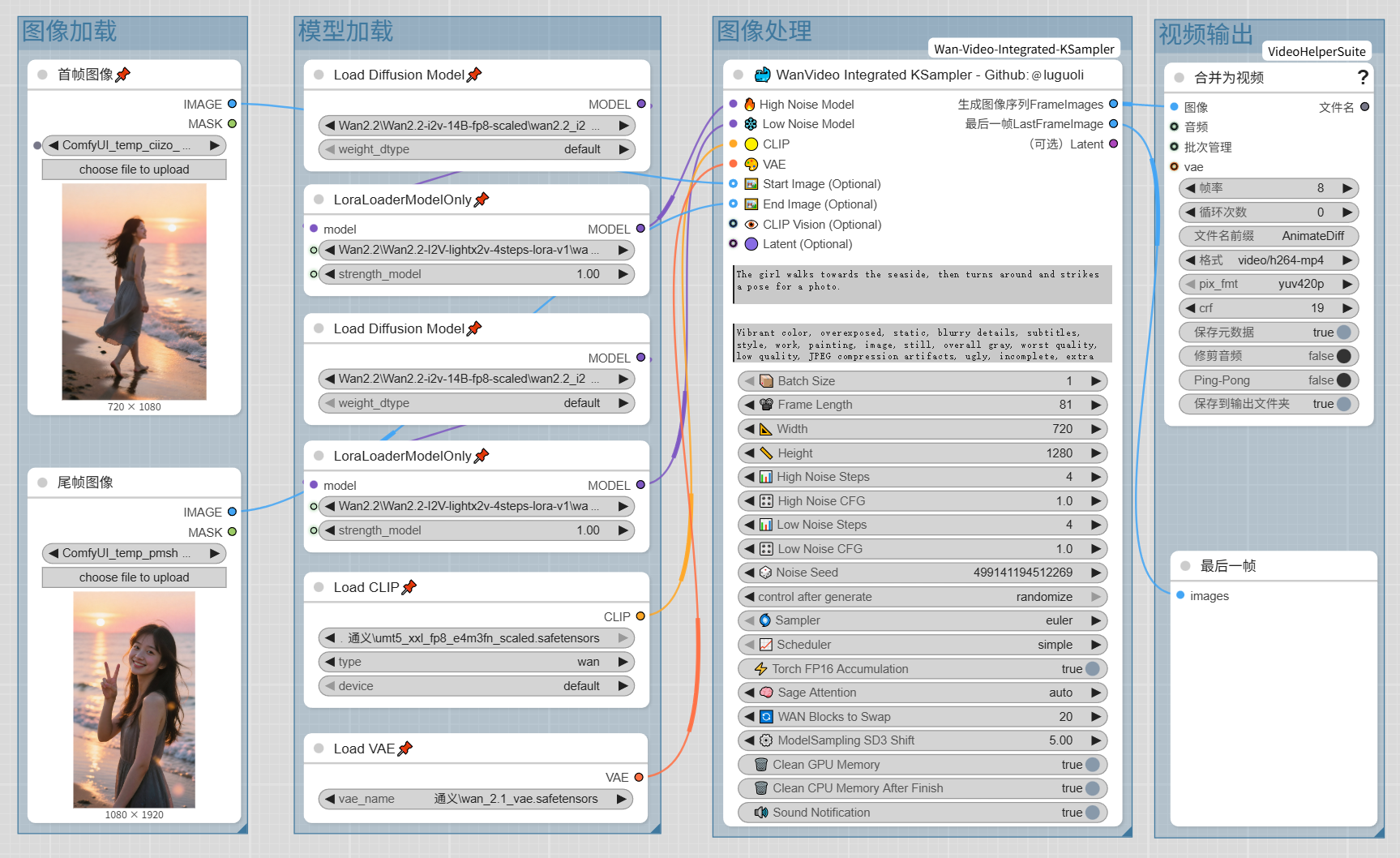
🔄 Workflow Complexity Comparison
- ❌ Workflow without WanVideo Integrated KSampler (complex, many nodes, many connections, two samplers)
- ✅ Workflow with WanVideo Integrated KSampler (ultra-simple, single node, almost no connections, single sampler)
📦 Installation
Method 1: Via ComfyUI Manager (Recommended)
- Open ComfyUI Manager in ComfyUI interface
- Search for "ComfyUI-Wan-Video-Integrated-KSampler"
- Click Install
Method 2: Manual Installation
-
Navigate to your ComfyUI custom nodes directory:
cd /path/to/ComfyUI/custom_nodes -
Clone the repository:
git clone https://github.com/luguoli/ComfyUI-Wan-Video-Integrated-KSampler.git Or Gitee repository: git clone https://gitee.com/luguoli/ComfyUI-Wan-Video-Integrated-KSampler.git -
Install dependencies:
pip install -r requirements.txt -
Restart ComfyUI
🚀 Usage
Workflow Example
Basic Text-to-Video Generation
- Add the "🐳 WanVideo Integrated KSampler" node to your workflow
- Connect the required inputs:
- 🔥 High Noise Model
- ❄️ Low Noise Model
- 🟡 CLIP
- 🎨 VAE
- Input positive and negative prompts
- Set relevant parameters:
- Set video frame length, width, height
- Configure sampling steps and CFG values for high/low noise
- Set batch size, seed, etc.
- Execute the workflow
Image-to-Video Generation
- Add the node to the workflow
- Connect required inputs:
- 🔥 High Noise Model
- ❄️ Low Noise Model
- 🟡 CLIP
- 🎨 VAE
- Connect at least one reference image:
- 🖼️ Start Image
- 🖼️ End Image
- Optionally connect 👁️ CLIP Vision for enhanced control
- Input positive/negative prompts
- Configure other parameters
- Execute the workflow
⚠️ Notes
📝 Usage Requirements
- Text-to-Video Mode: No reference images needed, pure text prompts
- Image-to-Video Mode: At least one reference image required, start/end frames can be combined for precision control
🎛️ Parameter Recommendations
- Frame Length: Adjust based on GPU memory, start testing from 41 frames
- Resolution: Must be multiples of 8, start testing from 720x1280
- Batch Size: Choose between 1-10, adjust based on GPU memory
- Sampling Steps: Start testing from 4
- CFG Value: Default 1.0, recommended range 0.5-7.0
- FP16 Accumulation: Recommended to enable
- Sage Attention: Recommended to set to auto
- SD3 Shift: Recommend setting to 5
- Motion Amplitude: Default 1.0 (no enhancement), increase above 1.0 for stronger motion when using start/end frames
💾 Memory Management
- GPU Memory Cleanup: Enable enable_clean_gpu_memory to automatically clean VRAM before/after sampling
- CPU Memory Cleanup: Enable enable_clean_cpu_memory_after_finish to clean RAM after completion (includes file cache, processes, dynamic libraries),During continuous large-scale generation, always enable memory cleanup options to prevent memory overflow
🔊 Notification Function
- Sound Notification: Only supported on Windows systems
📝 Update Log
v1.0.1:
- Added translation script: Starting from ComfyUI v0.3.68, Chinese language files became invalid. Added an automatic translation script. Double-click [自动汉化节点.bat] and restart ComfyUI. Requires ComfyUI-DD-Translation plugin to be installed.
- Removed block swap settings: Latest ComfyUI version blocks block swapping, so this setting has been removed.
📞 Contact for Special Customization 📞
- Author: @luguoli(墙上的向日葵)
- Author Email: [email protected]
Made with ❤️ for the ComfyUI community