
ComfyUI-Depth-Visualization
Works with any Depth Map and visualizes the applied version it inside ComfyUI
Nodes (10)
Your depth estimator just put a hole in the middle of the face — here's the repair shop
Your eyes are bad at reading grayscale depth — let viridis do the reading
Every depth map is a mess of arbitrary ranges — this is the node that fixes it
Make your photos move — parallax frames with validity masks so the tears actually get fixed
Want to relight the foreground without touching the sky? This is your selection tool
Before you trust a depth map, ask it how it's feeling — this node does the asking
Turn a flat photo's depth into a real GLB mesh you can drop in Blender — no extra packages, no servers
Turn depth into surface normals that actually survive contact with a renderer
The node that turns your flat image into actual 3D points
Turn an image and its depth map into a parallax preview
ComfyUI Depth Visualization
A complete offline depth-conditioning, diagnostics, 3D export, and parallax toolkit for ComfyUI. It cleans and normalizes arbitrary depth maps, creates masks, normals and colormaps, measures quality, exports real geometry, generates motion frames, and previews depth interactively in the graph.
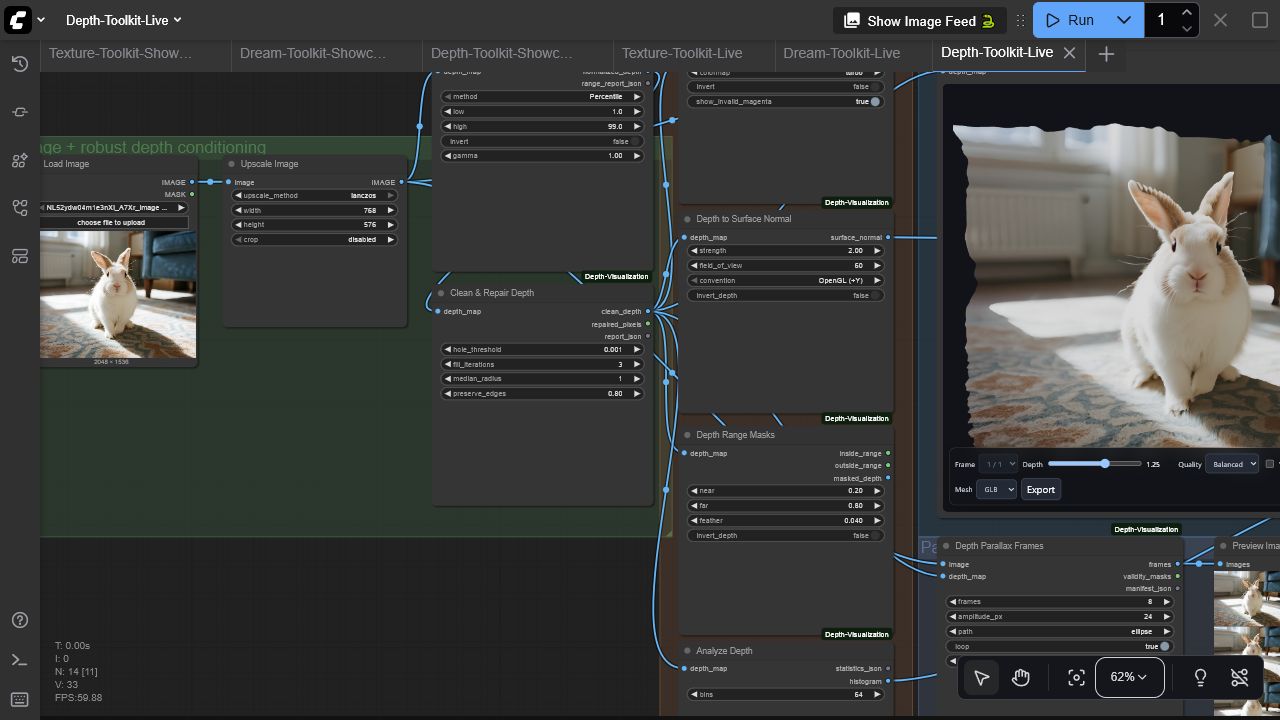
Nodes
| Node | Purpose | Outputs | | --- | --- | --- | | Depth Viewer Pro | GPU-accelerated displaced-mesh preview with adaptive quality | image/depth passthrough + live UI | | Normalize Depth | Percentile, min-max, or fixed-range normalization with gamma/invert | normalized depth + JSON report | | Clean & Repair Depth | Fill invalid holes and reduce noise while preserving edges | clean depth, repair MASK, report | | Colorize Depth | Viridis, magma, turbo, plasma, or grayscale visualization | IMAGE | | Depth to Surface Normal | Camera-aware normal generation with OpenGL/DirectX convention | normal map | | Depth Range Masks | Feathered near/far selection | inside MASK, outside MASK, masked depth | | Analyze Depth | Per-batch statistics and histogram rendering | JSON + histogram IMAGE | | Depth to Point Cloud | Binary PLY export with optional colors | file paths + manifest | | Depth to Mesh | Zero-dependency binary glTF 2.0 GLB export with optional colors | file paths + manifest | | Depth Parallax Frames | Horizontal, vertical, ellipse, or dolly camera motion | IMAGE batch, validity MASK batch, manifest |
Viewer highlights
- Orbit, pan, zoom, positive/negative displacement, reset, and wireframe
- Fast, balanced, and high adaptive mesh density
- Batch selection with single-image broadcasting
- PNG capture and baked GLB, GLTF, or OBJ export
- Lazy/offscreen rendering, bounded pixel ratio, stale-load cancellation, cleanup, and WebGL context recovery
- Local pinned Three.js r185 assets; no runtime CDN or telemetry
Install
Install with ComfyUI Manager, or clone manually:
cd ComfyUI/custom_nodes
git clone https://github.com/gokayfem/ComfyUI-Depth-Visualization.git
python -m pip install -r ComfyUI-Depth-Visualization/requirements.txt
Restart ComfyUI. Nodes are under visualization/3D and depth/toolkit.
Start with the live example
Load examples/workflows/Depth-Toolkit-Live.json, select a reference image and depth map, and queue it. The bundled demonstration uses image luminance as stand-in depth so it runs without a model; replace that connection with any real depth estimator for production work. The API-format version is examples/api/depth_toolkit_api.json.
The graph normalizes and repairs depth, renders a diagnostic colormap and surface normals, extracts range masks, produces a histogram, generates loopable parallax frames, and opens the live displaced-mesh viewer. Point-cloud and GLB exporters can be added anywhere after cleanup.
Geometry conventions
- Depth is interpreted in normalized
[0, 1]space after conditioning. - Export nodes use a pinhole camera model and configurable field of view/depth scale.
- GLB is the recommended portable mesh format; binary PLY is recommended for point clouds.
validity_masksfrom parallax indicate pixels not introduced by camera warping and can drive compositing/inpainting.
Compatibility and performance
- Python 3.10+; tested in CI on Linux, Windows, and macOS
- Real ComfyUI test: ComfyUI 0.3.60, frontend 1.26.13, Windows, NVIDIA RTX 3090
- Conditioning/export nodes run deterministically on CPU tensors; the live viewer uses browser WebGL and is independent of CUDA, ROCm, or MPS
- 16-bit grayscale temp previews preserve depth precision; browser mesh quality is selectable to control GPU load
- No runtime network requests; images and geometry stay local
Development
python -m pip install -r requirements.txt pytest build
python -m compileall -q .
pytest -q
python -m build
node --check web/viewer_extension_3_0.js
node --check web/js/threeVisualizer.mjs
The vendored Three.js files are MIT licensed; see web/vendor/THREE-LICENSE.txt. See SECURITY.md for privacy and disclosure guidance.
If ComfyUI Depth Visualization supports your work, GitHub provides ready-to-copy APA and BibTeX entries via Cite this repository.
@software{Aydogan_ComfyUI_Depth_Visualization_2026,
  author  = {Aydoğan, Gökay},
  title   = {ComfyUI Depth Visualization},
  version = {3.0.0},
  year    = {2026},
  url     = {https://github.com/gokayfem/ComfyUI-Depth-Visualization}
}
Acknowledgements
The original viewer was inspired by ComfyUI-Flowty-TripoSR.