
⚗ AlchemicaSampler
Calibrated sampler for Krea 2 Turbo: schedules measured on your checkpoint, two-phase prompts, composition previews, a prompt enhancer that uses Krea 2's own text encoder, NAG (negative prompt at cfg 1) and PAG/SEG. Idea: AlchemicaMente · code: Claude (Anthropic).
Nodes (56)
A negative prompt that works at CFG 1 — how Alchemica's NAG node earns its 40%
Getting a negative prompt to work at CFG 1 without changing the picture
Same monochrome, Italian names
Black and white conversion that thinks like a darkroom, not a desaturate slider
Measure your checkpoint instead of guessing at step counts
Krea 2 needs three files and one specific CLIP type — this node fixes all four of those problems
That 2-pixel grid on your Krea 2 images is the VAE, and it takes one node to kill
Solver, detail boost and ancestral noise — and why 0.40 is the setting that ruins skin
Krea 2's own text encoder writes your prompt — no Ollama, no API key, no copy-paste
Blending 2–6 photos trait by trait instead of averaging them
An ArcFace score for your generated faces
Improving a real photo with Krea 2 without melting the face
Keeping everything except the bit you changed
What it is, and how to move off it
Why 1 is a special number, and what a CFG curve buys you
Fusing traits of several photos into one new creature
What changed, and which one your workflow is on
Blend the photos into a latent and let the sampler sort them out
The whole sampler in one node, with the step schedule measured instead of guessed
Preview the composition at low res, then commit to the seed that works
The all-in-one Krea 2 sampler, and the honest answer about whether it's better
What Alchemica KSampler Flex is actually for
Pick the composition before you spend the render
The Krea 2 loader that stops the conditioning-size error
The tidy-wiring LoRA stack
Six LoRA slots in one node — and a clip socket most model-only loaders don't give you
Italian params, same ghost-in-a-latent trick
Burn the seed into the corner of every preview so you stop losing the good ones
The step-scheduler control panel, for when the calibrated profile isn't enough
What skin tone did your model actually paint?
Repaint one zone, keep the rest pixel-identical
Img2img on a real photo without wrecking it
Loader to sampler in one node, prompt and negative included
The English twin that got replaced before you found it
The prompt writer that runs inside your text encoder
Scene for the picture, detail for the texture
Write, keep, list or generate the prompt — then encode it
An empty latent that does the aspect maths for you — and knows 4 MP is the sweet spot
Re-noise halfway down and take a second run at the detail
A Save Image with a folder menu instead of a path you type
Presets, plus a chain of option nodes that override them
The sampler that tells you what it did
Alchemica's sampler loop as a SAMPLER socket — for people who live in SamplerCustom
Alchemica's solver as a plain SAMPLER for SamplerCustom
The English folder-dropdown saver, already superseded
Save where you want, named after the workflow
The Schedule options node, from a two-lobe analytic curve to the calibrated one
Hand the sigmas to SamplerCustom instead of hiding them
The Alchemica schedule as a SIGMAS you can plug into SamplerCustom
Measure the skin tone your render actually has, in ITA°
20 minutes of GPU time to teach the sampler how your Krea 2 actually thinks
Three prompt boxes, three conditionings, and one negative that only NAG can hear
Scene, detail and negative, encoded for NAG in one go
One prompt for composition, another for texture
Compose at half resolution, refine at full — and why you want 0.5, not 0.45
A real identity score instead of squinting at two faces
⚗ Five nodes, one straight line
Most Krea 2 graphs are a tangle of loaders, text encoders, patches and samplers. The starter workflow here is five nodes in four coloured groups, with the model, the text encoder and the VAE travelling through the chain instead of being wired to every node:
Load Krea 2 → LoRA Stack → Prompt → KSampler Flex → Save Image
| Step | Node | What it saves you | |---|---|---| | 1 | ⚗ Load Krea 2 | model + text encoder + VAE in one node, the encoder always loaded with the right type | | 2 | ⚗ LoRA Stack | six LoRAs in one node, a readable list of what is active and what was not found | | 3 | ⚗ Prompt | writes the prompt with Krea 2's own encoder (or Ollama, or your own text), encodes it, applies NAG, sets the latent size | | 4 | ⚗ KSampler Flex | any ComfyUI sampler and scheduler, or the calibrated ones; two stages; DeGrid; a report of what it did | | 5 | ⚗ Save Image | pick drive and folder in a browser, name the file after the workflow |
Open KreaAlchemicaMente_K2AM (Workflow → Browse templates → ComfyUI-AlchemicaSampler), write an idea in the
Prompt node, press Queue. That is the whole setup.
⚗ What is in the box
More than twenty nodes and thirteen example workflows, so you do not have to bolt anything on:
| Area | Nodes |
|---|---|
| Build | Load Krea 2 · LoRA Stack (6 slots + pass-through) · Resolution |
| Prompt | Prompt (idea / improve / as written / list / string / example, wildcards, NAG) · Text Encode (scene / detail / negative) · Two-Phase Text Encode · Attention Guidance (NAG / PAG / SEG) |
| Sample | KSampler Flex · KSampler · KSampler Pro (two-phase prompt, composition previews) · Sampler (advanced) · Scheduler and Sampler Select for SamplerCustom |
| Measure | Calibration — measures your checkpoint and writes a profile; (auto) finds it afterwards |
| Finish | DeGrid (removes the VAE's 2-pixel grid) · Black and White · Save Image |
| Work on a photo | Photo Prepare / Composite (improve, upscale, change only a painted zone) |
| People | Face Blend · Hybrid · Image Mix · Face Match (identity score) · Skin Colorimeter |
The 1.0 nodes are still registered under legacy, so older workflows keep loading.
⚗ Start in three minutes
1. Install, then restart the ComfyUI server (a browser reload is not enough):
# ComfyUI-Manager: search "AlchemicaSampler"
# or comfy-cli:
comfy node install comfyui-alchemicasampler
# or git:
cd ComfyUI/custom_nodes && git clone https://github.com/Nessuno76/ComfyUI-AlchemicaSampler
2. Get the models (not included, see license and models):
| File | Folder |
|---|---|
| krea2_turbo_nvfp4.safetensors or krea2_turbo_fp8_scaled.safetensors | models/diffusion_models |
| qwen3vl_4b_fp8_scaled.safetensors | models/text_encoders |
| qwen_image_vae.safetensors | models/vae |
3. Open KreaAlchemicaMente_K2AM and queue it. No calibration yet? It still works: the nodes fall back to an
analytic schedule and the report says so. For the full effect, calibrate once per checkpoint (below).
⚗ An honest comparison
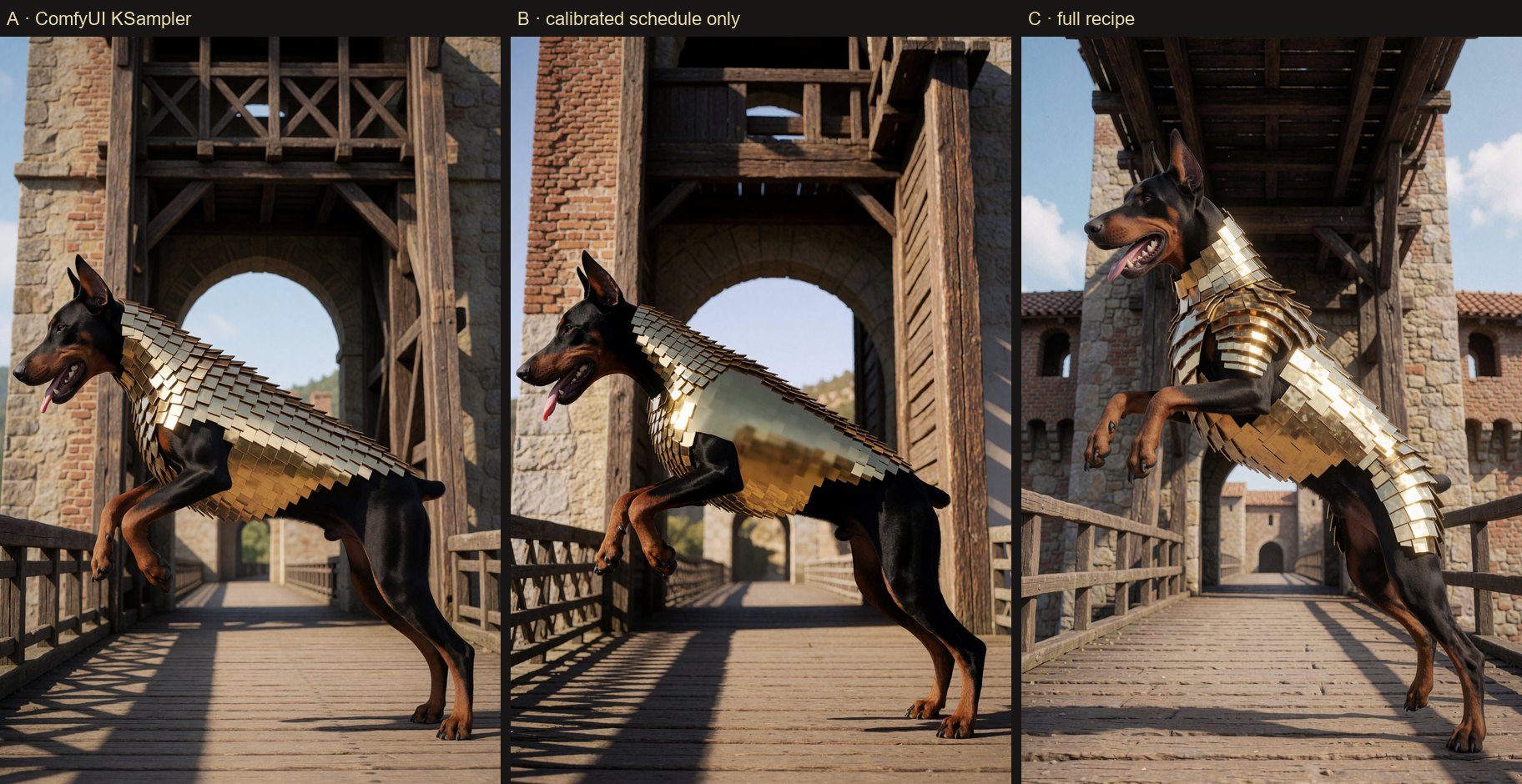
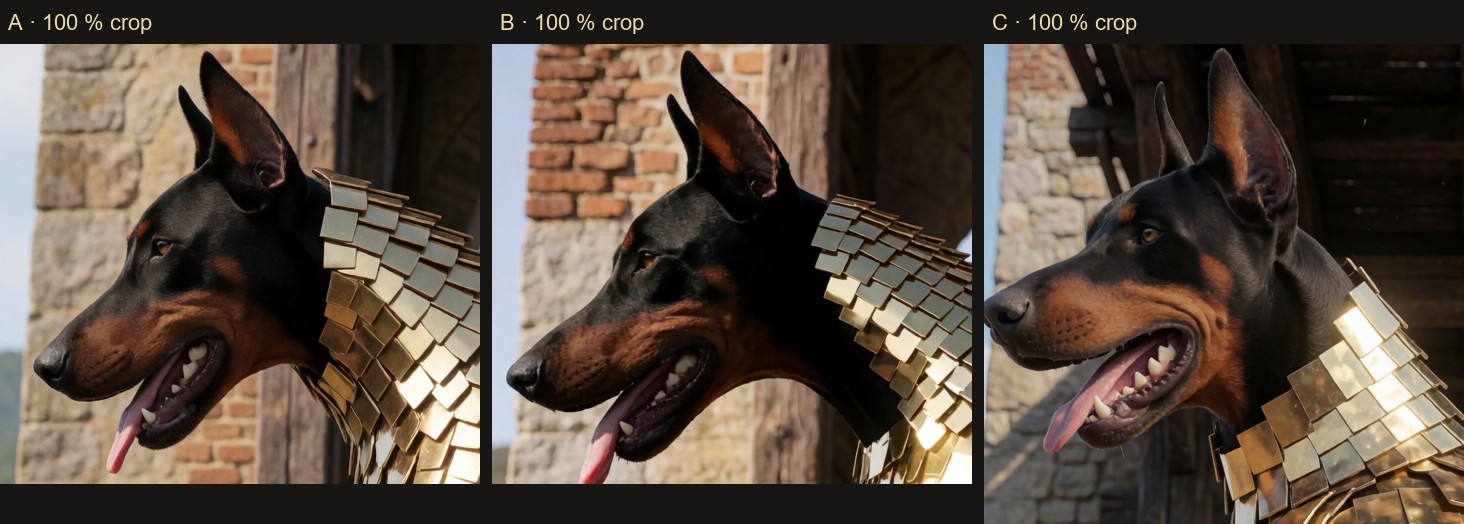
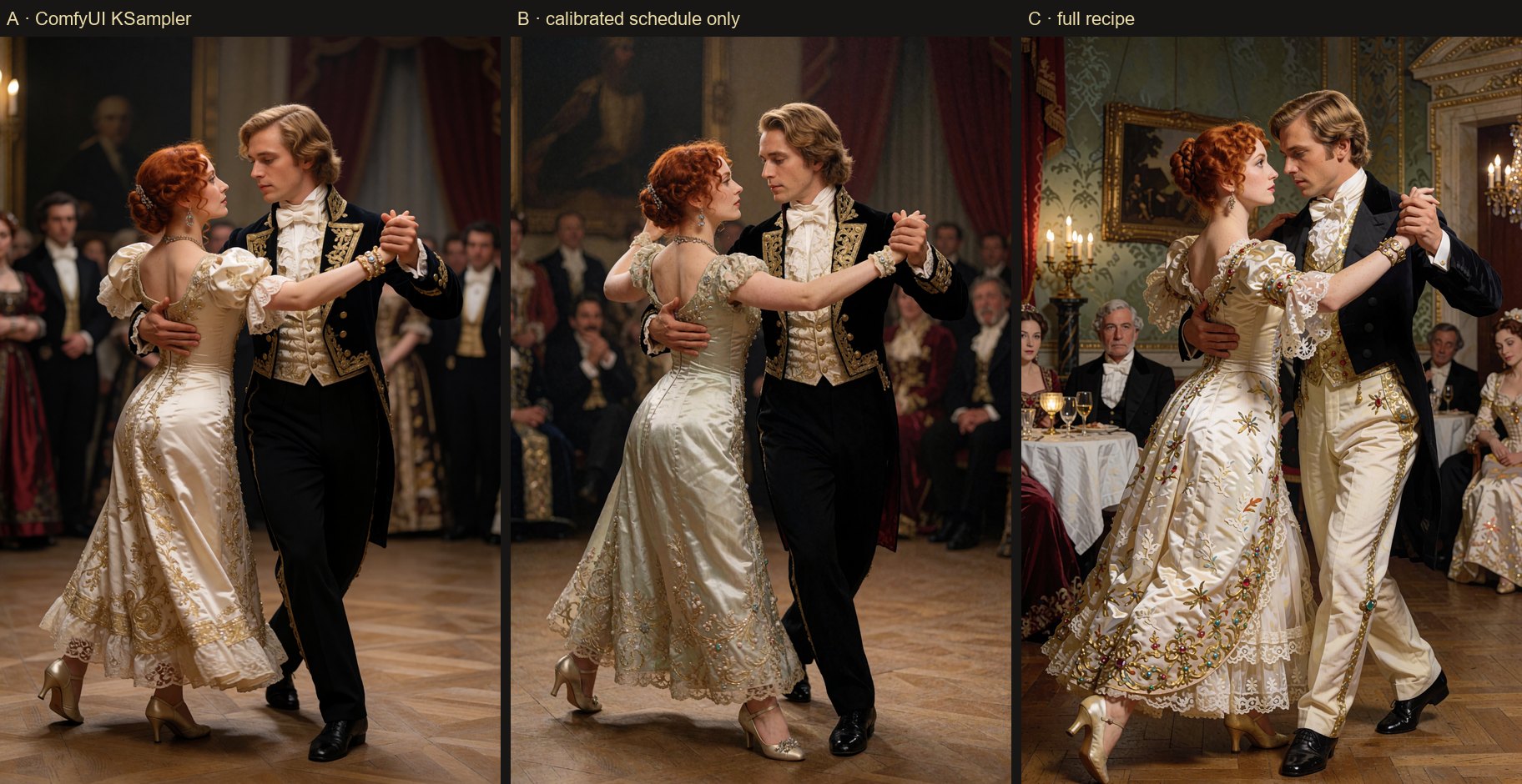
Same checkpoint, same prompt, same seed, same size, NAG off, so that only the sampling changes. Three branches, built
by the workflow KREA2_CONFRONTO_ONESTO that ships with the package — run it yourself with your own prompts.
- A — ComfyUI's own KSampler: Euler,
simple, 8 steps. - B — the same Euler solver and the same 8 steps, but with the step spacing measured on the checkpoint. Nothing else.
- C — the full recipe of the starter workflow: two stages (4 steps at half resolution, then 8 at full), detail boost, gated variety noise, 2 restart steps, DeGrid.
1. A dog in golden armour, seen in profile ("an albino Doberman with blue eyes, in profile, jumping off a medieval drawbridge, golden Spartan-inspired armour" — none of the three rendered "albino, blue eyes")
2. A tango, he blond, she red-haired, late-19th-century English nobility
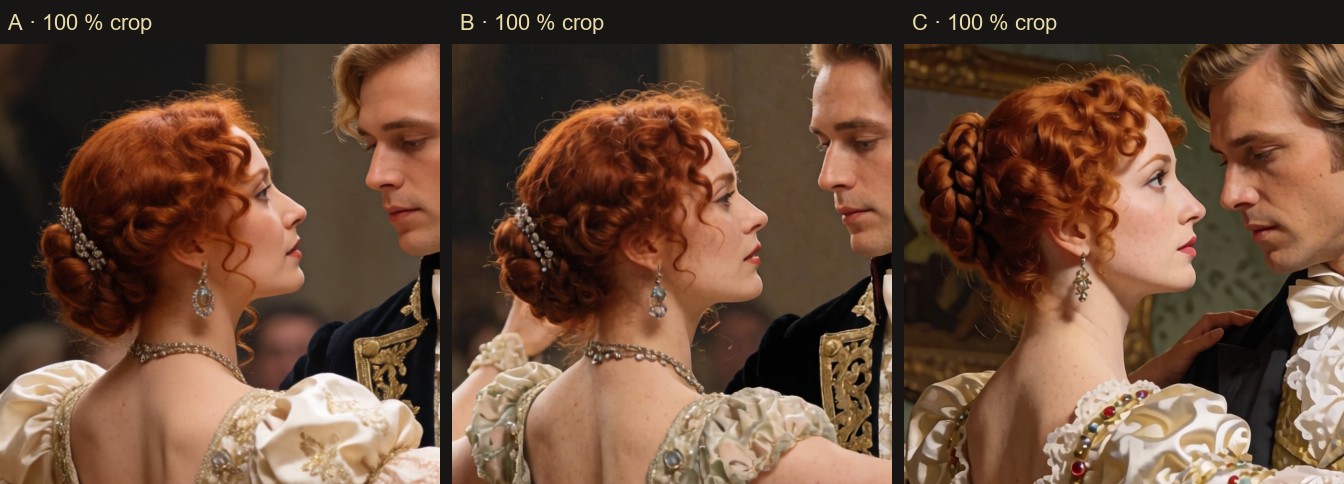
3. The same couple, closer
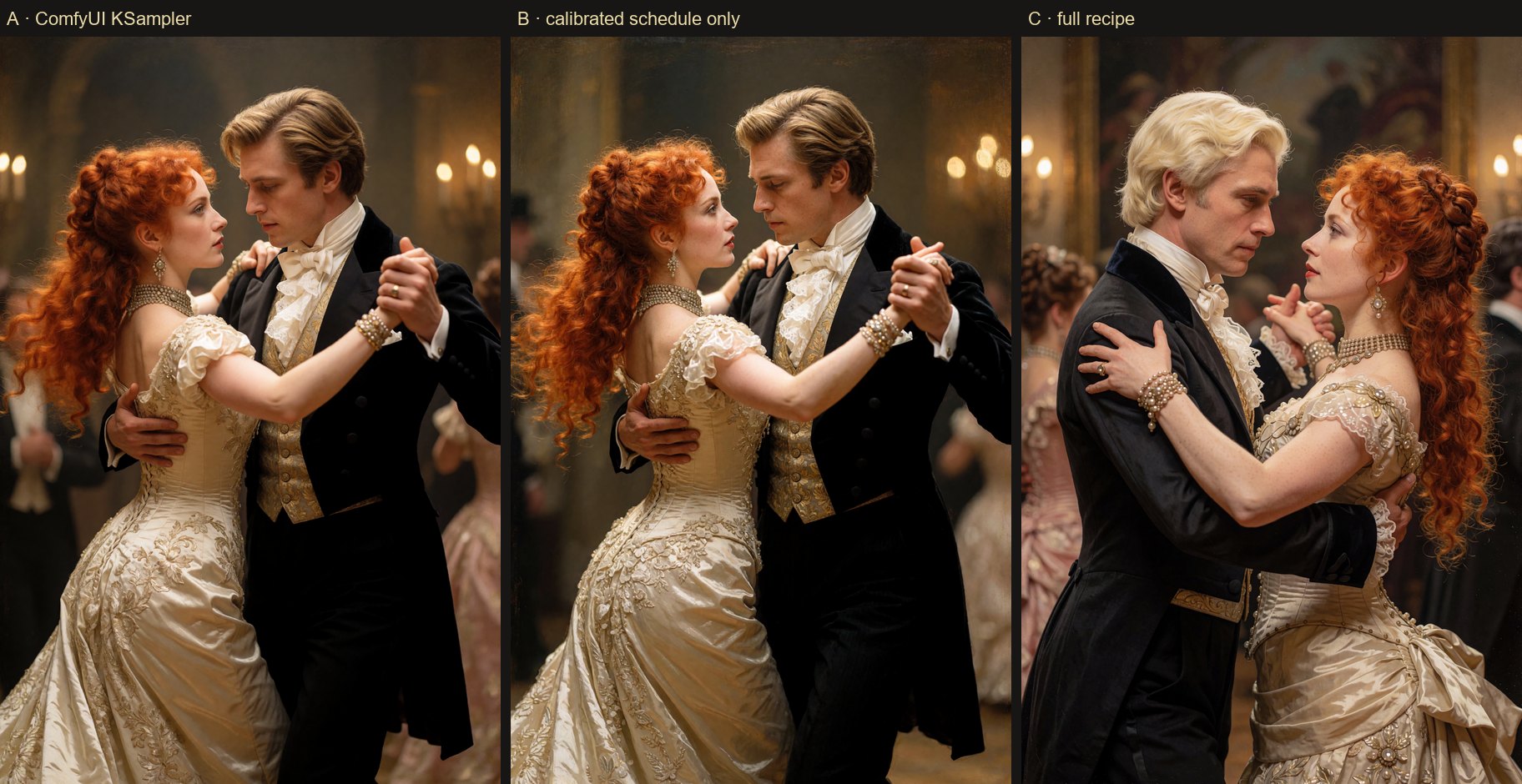
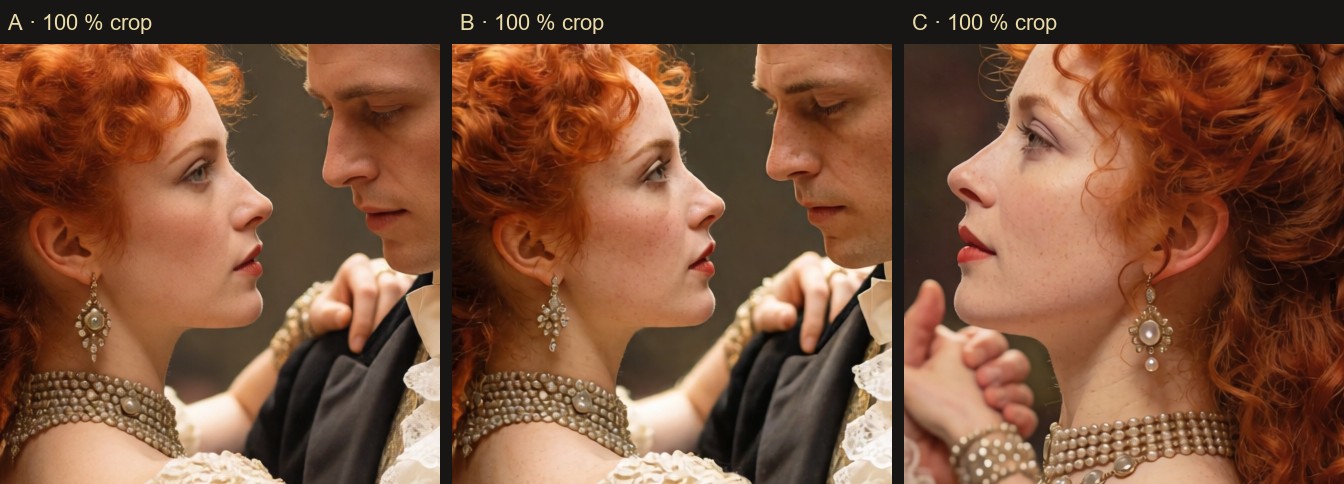
What we see, without spin
| | Composition vs A | Fine detail vs A | What to watch | |---|---|---|---| | B | same scene | slightly crisper, a bit more contrast and skin texture | in picture 1 a patch of the armour is smooth and blocky; in picture 3 a painterly grain appears at the edges | | C | a different picture every time: other room, other pose, other hair | clearly the most detailed: fur, whiskers, teeth, pearls, freckles | slower (more model calls); picture 2 looks more "illustrated" than A; it will not give you the same composition as the plain KSampler |
- If you want the plain KSampler's picture, with a little more bite, B is the closest and is not always an improvement.
- If you want the most detail and do not mind a different scene, C. Keep the same seed and you will get the same C.
- If A already looks right to you, keep A. Krea 2 Turbo at 8 steps is good out of the box; this package is about control, tooling and the last bit of detail, not a miracle.
- This is three prompts, not a benchmark. The seed is fixed, so what you see is one draw per prompt.
What we measured separately
Measured on an RTX 5070 Ti, Krea 2 Turbo NVFP4, same seed, one factor changing at a time:
| Feature | Result | |---|---| | NAG from the calibrated hand-off sigma | unwanted water drops removed, image 99.3 % identical to the original, about +40 % time on the refinement stage | | Two-phase prompt | composition 0.996–0.997 similar to the scene-only image; one prompt with the same words gives 0.35–0.71 | | Composition previews | preview → final similarity 0.87–0.90 (different seeds: 0.45) | | KSampler Flex with every improvement off | pixel-identical to the all-in-one KSampler (difference 0) | | DeGrid | the 2-pixel grid peak of Krea 2 images drops from 2.3–4.2× the neighbouring frequencies to about 1× |
⚗ Calibrate once per checkpoint
Open KREA2_TARATURA (3 MP) or KREA2_TARATURA_4MP, pick your checkpoint, press Queue. Several prompts are measured
and averaged into one profile (about 15–20 minutes at 4 MP). From then on (auto) finds the profile of your
checkpoint by itself. Profiles are not shipped: the node creates them on your machine.
How it works: a dense sampling run records, sigma by sigma, when the composition locks, where fine detail is born and how fast the prediction changes. From that comes the step schedule, the hand-off between the two stages and the detail window.
⚗ Example workflows
| Workflow | Use it for |
|---|---|
| KreaAlchemicaMente_K2AM | start here: the five-node line above |
| KREA2_CONFRONTO_ONESTO | the honest A / B / C comparison shown above, with your own prompt |
| KREA2_COMPLETO | everything together: loader → prompt enhancer → text → NAG → KSampler Pro |
| KREA2_SEMPLICE | the essential: LoRA stack + one sampler node |
| KREA2_PRO | two-phase prompt, previews and refinement variants |
| KREA2_TARATURA / _4MP | calibration of your checkpoint at 3 / 4 MP |
| KREA2_ALCHEMICA / _CONFRONTO | the advanced sampler; same-seed comparison with ComfyUI's simple |
| KREA2_IBRIDO | compose with one model, refine with another |
| KREA2_RISOLUZIONE | resolution ladder 2.5 / 3 / 4 / 5 MP with the same seed |
| KREA2_FOTO_RAPIDO, KREA2_BIANCO_NERO | photo improve / change-a-zone; black and white |
The workflows use only core ComfyUI nodes plus AlchemicaSampler.
⚗ Requirements
- ComfyUI 0.36.0 or newer (Krea 2 support and
CLIP.generate, used by the prompt enhancer). - NVFP4 on RTX 50-series (Blackwell) runs at full speed only with PyTorch built for CUDA 13.0 (cu130); the Calibration node reports your torch/CUDA build and warns you if it is not right.
- VRAM: 16 GB is enough for 4 MP with NVFP4.
- No dependencies beyond ComfyUI itself.
⚗ Learn more
- docs/REFERENCE.md — every node, the lab notes, troubleshooting, how to extend.
- CHANGELOG.md — what changed in each version.
- README_IT.md — manuale completo in italiano.
- CREDITS.md and THIRD_PARTY_NOTICES.md.
Something wrong or missing? Open an issue: bug reports and ideas are welcome.
⚗ License and models
Code: GPL-3.0 (LICENSE), the same license as ComfyUI, from which the NAG forward is adapted. Parts adapted from
MIT-licensed projects are listed with their licenses in THIRD_PARTY_NOTICES.md.
Models are not included and are not redistributed. Download them from their official sources and follow their licenses: Krea 2 (Raw / Turbo) — Krea 2 Community License (commercial use only below USD 1M annual revenue, plus acceptable-use and content-filtering obligations); Qwen3-VL-4B — Apache-2.0; Qwen-Image VAE — see its model page.
⚗ Credits and thanks
⚗ AlchemicaMente had the idea, directed the project, ran every test and made every call. Claude (Anthropic) wrote the code, the measurements and the documentation in sessions guided by AlchemicaMente.
Thank you to ComfyUI and its contributors, Krea, the Qwen team, Kostiantyn Hrytsuk (KreaPhoton, CyberKrea), Auryg, the authors of NAG, PAG, SEG, HiFlow and SharpEuler, pamparamm, pythongosssss and the whole ComfyUI and Civitai community. The full list is in CREDITS.md.
Thank you to everyone who will use AlchemicaSampler, to everyone who will help us, and to the whole community. And if this idea brings even a little progress, we will be happy. ⚗