
Neons Style Explorer
Neons Style Explorer — a hand-written style-prefix catalog for ComfyUI, in natural language or booru tags, with a preview gallery.
Nodes (5)
Pressing Save When Nobody's at the Keyboard
The LoRA loader that remembers what each LoRA looks like on each checkpoint
A Checkpoint Loader That Remembers What Each Model Likes
3,015 Style Prefixes in One Dropdown
The Style Picker That Ends in CONDITIONING
Neons Style Explorer
A style catalog node for ComfyUI. A style entry is a style prefix and nothing
else: it describes how the picture is rendered and closes with the medium —
... anime style image, ... photograph style image, ... cgi style image.
No instructions to the model, no sentences about what the image contains.
Nodes (category Neons):
- Neons Style Explorer — text in, text out
- Neons Style Explorer (Encode) — the same plus CLIP encode
- Neons LoRA Explorer — a LoRA loader with a preview gallery per model folder
- Neons Model Explorer — a checkpoint loader with the same gallery, and notes
- Neons Gallery Capture — headless equivalent of the Save button
Quick start · Read the manual · pre-release audit — every widget, the browser, previews, the crawl workflow, catalogs and troubleshooting.
What it looks like
| | | |---|---| | <img src="screenshots/node-prompt-only.jpg" width="300" alt="The node with no style selected"> | <img src="screenshots/node-style-selected.jpg" width="300" alt="The node with a style selected"> | | Prompt only — every slot on None, the node passes your prompt through. | A style chosen, with its family and preview on the node. |
New here? Read the quick start — six steps with pictures.
Install
ComfyUI Manager — search for Neons Style Explorer and install, then restart ComfyUI.
Manually — clone into ComfyUI/custom_nodes/ and restart:
cd ComfyUI/custom_nodes
git clone https://github.com/Neon-Sparks/ComfyUI-NeonsStyleExplorer
Restart ComfyUI after installing or updating — a browser refresh loads the new interface but not the node's HTTP routes, so new features fail until the process restarts.
No extra dependencies: it uses Pillow and numpy, both of which ComfyUI already ships. Python 3.9+.
Output
masterpiece, best quality, Anime broadcast still, flat cel colouring in hard
shadow bands, simplified on-model faces, painted matte background, mild
compression softness and grain, TV-frame colour, anime style image, a woman on
a fire escape at night
masterpiece, best quality, (anime_screenshot:1.1), (anime_coloring:1.1),
(cel_shading:1.1), (film_grain:1.1), 1girl, rooftop
output_format— natural | danbooru | natural + danboorustyle_weight— a 1.0–5.0 slider; wraps the clause as(clause:weight)in natural mode and every style tag as(tag:weight)in booru modesstyle_position— put the style clause at the start or the endquality— a separate quality-prefix box, always kept at the very front- three axes —
style,format(what job the frame does),finish(a stackable realism qualifier) random_roll— a switch that rolls a style for every run, withrandom_source(all / main / extra / custom) choosing the pool,roll_scopenarrowing it (all / family / favourites / recent / has preview / missing preview) androll_seedplus its control-after-generate widget (set it to randomize so every run rolls anew)- Named catalogs — keep a separate preview set per model ("my Krea 2", "SDXL", a client project): each catalog has its own gallery, favourites and recents, while the style texts and your edits stay shared. Pick one from the toolbar, add one with + New catalog
- Crawl through — a switch that walks the main style dropdown one entry per
queued run instead of rolling, starting from the style you have selected, over
whatever
roll_scopeselects; setroll_scopeto missing preview,auto_galleryto every, queue a few hundred runs and the gallery fills itself in order - Favourites and recents — star entries from the card or the node toolbar, filter the browser by them, and let the dice roll inside either list; every run records the style it used
The panel
The preview scales with the node on both axes, the button row sits under it, and
the panel body is click-through so the node still drags from anywhere. Buttons:
Roll, Catalog, Save, Edit, and a ⋯ menu (browse formats and
finishes, new custom style, clear styles, delete shots). The composed
prompt updates live underneath.
Random
random_roll rolls a style each run; random_source picks the pool — all,
main, extra or custom — and roll_scope narrows it (family, favourites,
recent, by preview state). The old 🎲 Random entry in the dropdowns is gone;
a workflow that used it switches over on load.
Catalog browser
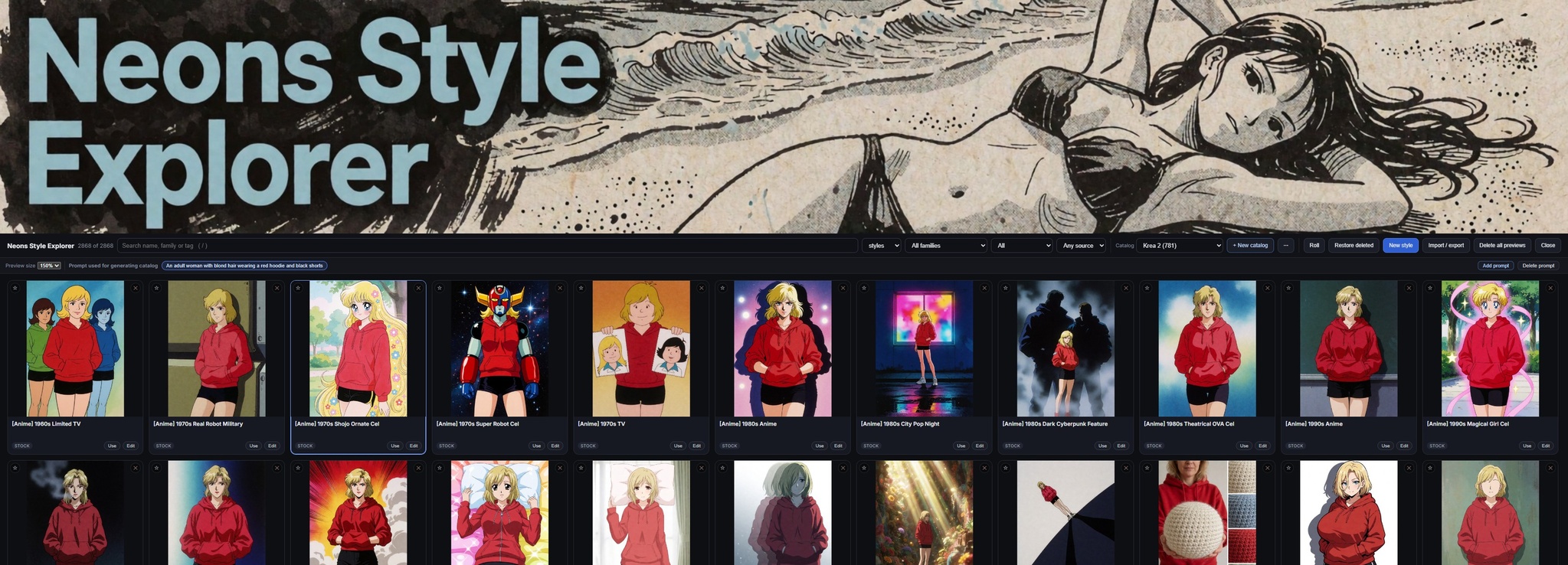
Banner at the top that scrolls away under a sticky toolbar, then a virtualised grid — only the visible cards are mounted, so a thousand entries scroll smoothly. Search over name, alias, family and tags; filter by axis, family, source and preview state; hover shows the clause; Edit opens the entry; JSON import/export for style packs.
Gallery
The gallery ships empty — nothing is bundled. Generate, then press Save: the last result becomes that style's preview.
Up to eight shots per style, click a thumbnail in the strip to make it the
cover, auto_gallery can fill them automatically. Previews are keyed on the
style's stable id, so renaming never orphans an image.
LoRA node
Neons LoRA Explorer loads a LoRA and keeps a preview gallery beside it. The
list is ComfyUI's own loras folder, and the folders do the filing: a
top-level folder is a gallery, a folder inside it is a family, and loose
files land in Unsorted. No configuration.
loras/krea 2/film_grain.safetensors            gallery "krea 2"
loras/krea 2/portraits/soft_light.safetensors  gallery "krea 2", family "portraits"
loras/loose_one.safetensors                    gallery "Unsorted"
Each gallery keeps its own previews, so the same LoRA filed under two checkpoint folders has two separate sets of images — you can see how it behaves on each model instead of one mixed pile.
- Gallery opens the browser: search, filter by gallery, family, favourites or preview state, click a card to load that LoRA. ✕ on a card deletes its previews, ★ favourites it, Rescan re-reads the folder after you add LoRAs without restarting. The browser reopens on the search, filters and scroll position you left it on.
- Trigger words are edited under the preview and shown on every card. They come out of the node's triggers output, so the words travel with the LoRA straight into your prompt.
- Save files the newest generated image against the current LoRA. Saving is manual — no crawl, no auto-populate.
- Outputs:
model,clip,lora_name,triggers.
Previews live in user/loras/<gallery>/ and trigger words in
user/loras/triggers.json. Nothing is ever written to your loras folder.
Model node
Neons Model Explorer is the LoRA explorer pointed at your base models — both
checkpoints and diffusion_models, each its own gallery so the gallery
dropdown switches between them. The folders do the filing, each top folder keeps its own previews, Save files
the newest image against the checkpoint that made it, and each one can carry a
note — the sampler, CFG and resolution it likes, which comes out of the
node as a string. No roll: a checkpoint is a choice, not a variation.
Outputs: model, clip, vae, model_name, notes. A diffusion model has no
CLIP or VAE of its own, so those stay empty for one — wire your own loaders.
The catalog
3015 entries — 1419 with every clause hand-written for this catalog, plus the 1596-entry imported Extra family, across nine families: photography & film 249, traditional painting 208, anime & manga 164, design & aesthetics 150, 3D & games 148, illustration 122, comics & print 83, experimental & material 79, western animation 68. Three axes — 2867 styles, 97 formats, 51 finishes. The Extra family is imported from ThetaCursed's Krea 2 style collection under its MIT licence; see THIRD-PARTY-NOTICES.md. Old [Clio] names are relabelled [v2], and every merged duplicate keeps its old name as a search alias. STYLES.md lists everything.
tools/build_all.sh               # import + lint + index + docs + examples + tests
python3 tools/lint.py --all      # every finding
node tools/check_web.mjs         # UI: undefined calls and bad imports
python3 tests/test_compose.py    # 57 tests
The source of truth for the text is tools/written/*.json; import_source.py
merges it into styles/. The linter enforces the wording rules: the clause must
close with its medium, must not contain instruction or scope language, must not
name picture content, ≤380 characters, and every tag must exist in
data/tags.txt.
Layout
catalog.py    loading, merging, caching, lookup, roll
catalogs.py   named catalogs, each with its own previews and favourites
compose.py    the one composer (the UI calls it over HTTP)
nodes.py      the nodes
gallery.py    preview gallery on disk
runs.py       per-prompt records, so a saved image gets the right style
loras.py      LoRA folders, previews, favourites, trigger words
bundle.py     catalog export / import as a zip
store.py      overrides / custom / hidden styles
styles/       the catalog, one file per family
data/tags.txt validated booru tag vocabulary
web/          api, css, panel, catalog_ui, lora, main
tools/        import, lint, harnesses, and the source in tools/written/
Contributions welcome — CONTRIBUTING.md. Security reports: SECURITY.md.
MIT licensed.