
LSDub
Lip-sync for music videos in ComfyUI: dub the singers' mouths to the song, shot by shot, with QA. Every input is a slot (bring a clip and song, or generate them with LTX-2.5, Qwen-Image-Edit and ACE-Step); vocal split, lyric alignment, lip kits, sync QA.
LSDub for ComfyUI
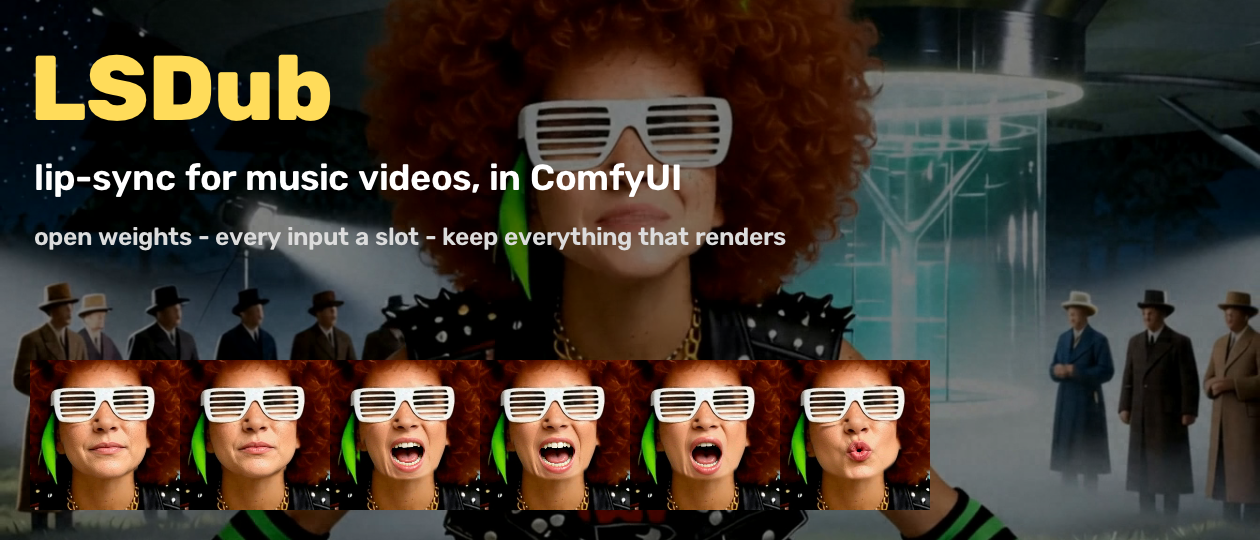
Lip-sync for music videos. LSDub re-animates the singers' mouths in a finished video so they sing your song, shot by shot, and tells you which shots worked. It cuts the film into shots, finds who sings in each, times every sung word, builds a mouth kit from the singer's own face, dubs the close-ups and mediums, leaves the rest untouched, and grades the result.
- Every input is a slot. Bring a clip, a song, lyrics and a lip kit, or let the pack make them with open-weights models: LTX-2.5 (video), Qwen-Image-Edit-2511 (stills and mouth shapes), ACE-Step 1.5 XL (songs).
- It keeps everything that renders. Each node saves its output in a project folder, keyed by its inputs. A re-run reuses everything unchanged. Change a lyric or force one shot, and only that work is redone.
- Test & Learn first. Before you spend any GPU time on the dub, run the analysis and QA: triage, alignment, measured sync and a fix-it list.
- Local by default. Everything runs in your ComfyUI. Comfy Cloud is an opt-in setting for the generators.
Start here
Start with workflow 2 (CPU, about 10-15 min with the demo pack), then workflow 3 on your own video. Workflows 1 and 4 need a big GPU (or a paid Comfy Cloud plan) and the generator models.
Install
- ComfyUI Manager: search for LSDub and install it.
- comfy-cli:
comfy node install lsdub - git:
Use the Python that runs ComfyUI (its venv, orcd ComfyUI/custom_nodes git clone https://github.com/HumanjavaEnterprises/comfyui-lsdub <ComfyUI's python> -m pip install -r comfyui-lsdub/requirements.txtpython_embeded/python.exein the Windows portable build).
Requirements:
- ComfyUI 0.3.48 or newer (the first release with the V3 node API
comfy_api.v0_0_2); tested on 0.34. - Python 3.10 or newer.
ffmpegon PATH.- The Python packages in
requirements.txt: numpy, OpenCV, SciPy, MediaPipe, Pillow, faster-whisper, SoundSwallower, g2p and transformers.
Optional extras:
pip install sam2 hydra-core iopathfor LSDub Occluders. SetSAM2_BUILD_CUDA=0to skip its CUDA extension.pip install comfy-sdkfor the Comfy Cloud backend.
Demo assets for the example workflows: python custom_nodes/comfyui-lsdub/scripts/fetch_demo.py. This downloads
about 29 MB, checks its checksum, and installs into ComfyUI/input/. You get a 7.5 s clip, its song and dry lead
vocal, the lyrics and their transcript, a start still, a lip kit, and 15 s of "About That Time" (an ACE-Step song of ours)
with its lyrics for workflow 4. All are original synthetic characters and original songs.
If the download fails, get lsdub-demo-0.1.0.zip from the GitHub Releases page by hand and run
python scripts/fetch_demo.py --zip lsdub-demo-0.1.0.zip.
Models
Nothing is downloaded when ComfyUI starts.
- Placed by you (not downloaded by LSDub): the generator models (ACE-Step, Qwen-Image-Edit, LTX-2.5) and the Mel-Band RoFormer vocal checkpoint. Put them in the ComfyUI model folders below. They are standard ComfyUI files: if you already run these models in ComfyUI, LSDub uses your copies.
- Downloaded on first use: Whisper, DINOv2, the face models and the Occluders models, into
models/lsdub. - Disk: about 120 GB for Prompt Everything (all the generators), about 3.5 GB for the other workflows (Whisper, DINOv2, the face models; plus 0.9 GB for the RoFormer in workflow 4).
| used by | needed by workflows | file | size | licence | folder |
|---|---|---|---|---|---|
| Song slot | 1 | acestep_v1.5_xl_turbo_bf16.safetensors | 9.3 GB | MIT (ACE-Step 1.5) | diffusion_models |
| Song slot | 1 | ace_1.5_vae, qwen_0.6b_ace15, qwen_4b_ace15 (same repo) | 0.3 + 1.2 + 7.9 GB | MIT (ACE-Step 1.5) | vae, text_encoders |
| Still slot, Lip Kit | 1, 4 | qwen_image_edit_2511 (int8 or bf16) | 20 GB | Apache-2.0 | diffusion_models |
| Still slot, Lip Kit | 1, 4 | qwen_2.5_vl_7b, qwen_image_vae, Qwen-Image-Edit-2511-Lightning-8steps lora | 16 + 0.2 + 0.8 GB | Apache-2.0 | text_encoders, vae, loras |
| Video slot, Performance | 1, 4 | ltx-2.5-22b-distilled-transformer-bf16 | 40 GB | LTX-2.x Community License Agreement (see its card) | diffusion_models |
| Video slot, Performance | 1, 4 | gemma4-12b-with-proj-ltx-2.5 (text encoder), ltx-2.5-video-vae, ltx-2.5-audio-vae | 25 + 1.4 + 0.3 GB | Apache-2.0 (Gemma 4); LTX-2.x Community License (VAEs) | text_encoders, vae |
| Vocal Split | 4 | MelBandRoformer_kim_vocals.ckpt: download MelBandRoformer.ckpt from KimberleyJSN/melbandroformer and save it under this name | 0.9 GB | MIT | audio_separation |
| Align | all | Whisper large-v3 (faster-whisper / CTranslate2): downloaded on first use (~3 GB) | 3 GB | MIT | lsdub/whisper |
| Cast, Triage, Verify | all | DINOv2 base (facebook/dinov2-base), downloaded on first use | 0.3 GB | Apache-2.0 | lsdub/dinov2 |
| every face node | all | MediaPipe Face Landmarker + YuNet, downloaded on first use (checksummed) | 4 MB | Apache-2.0 / MIT | lsdub |
| Occluders | optional | Florence-2-large + SAM 2.1 base+, downloaded on first use | 1.6 GB | MIT / Apache-2.0 | lsdub/occluders |
The first Align run downloads Whisper large-v3 (about 3 GB) with no progress bar in the UI; let it finish once.
Workflows 2 and 3 ship the demo transcript (lsdub_demo_landing_stt.json), so their alignment is the same on every run.
Rough GPU memory needs: ACE-Step about 12 GB, Qwen-Image-Edit (int8) about 24 GB, LTX-2.5 (bf16) about 70 GB. ComfyUI offloads to system RAM on smaller cards, which is slower.
The nodes
Every input and output has a tooltip. Categories are LSDub (the Project node), LSDub/video, LSDub/audio,
LSDub/mouth and LSDub/qa.
Project
- LSDub Project: the project folder for one cut.
mode:runortest_learn.fpsandsong_offset: video time = song time + offset.preset:landingis the demo cast;nonelets any named character sing.seedandforce_shots(e.g.21,23redoes those shots once).backend:localorcomfy_cloud.
VIDEO lane
- LSDub Video: a finished clip or a still, or a still plus a prompt, animated with LTX-2.5.
- LSDub Still: an image, optionally edited by an instruction with Qwen-Image-Edit-2511.
- LSDub Performance: a character image + a song -> a performance video as long as the song: LTX-2.5 shots of ~5 s on the song timeline, each from the character image with a new seed (or chained from the last frame).
- LSDub Shot Split: finds the cuts. Fades and flashes are not cuts.
- LSDub Cast: enrolls the singers from reference pictures, a refs folder or a saved cast file, and names the faces in every shot.
- LSDub Triage: labels every shot DUB, DUB-MEDIUM or NO, with the reason. The reasons are face size, profile, mouth hidden, too short, or no singing.
AUDIO lane
- LSDub Song: a finished song (plus an optional dry lead vocal), or a song generated from tags and your lyrics with ACE-Step.
- LSDub Lyrics: the sung words.
- LSDub Vocal Split: vocals and instrumental (Mel-Band RoFormer).
- LSDub Lead Vocal: lead, backing, and a lead-activity curve.
- LSDub Align: times every word (lyrics optional: without them the transcript is used). It runs speech-to-text (prompted with your lyrics), reconciles the result with them, then force-aligns. If what is sung matches the lyrics poorly (below 0.5) it warns and places the lyrics on the voice; below 0.2 it stops and asks you to check the lyrics. It builds the viseme track with vocalisations (ooh, da da) marked to skip, and writes a lyric check.
MOUTH lane
- LSDub Lip Kit: the singer's 13 mouth shapes, the "mouth LoRA" every dub needs. Bring a kit folder, or build one from a close-up shot.
- LSDub Mouth Tweaks: lead, word_close, face_target, snap, auto, continuity, raw warp flags, and an optional jaw-curve CSV.
- LSDub Dub: dubs each DUB and DUB-MEDIUM shot.
- The shot is cropped to a 512 px face and warped at 2x the frame rate. The lower face is pasted back and a measured sync gate is applied.
- With
auto, the full-frame warp also runs, and the version with better measured sync is kept. - A continuity repair runs afterwards.
vocalisations:skipkeeps the video's own mouth on ooh / da da,restcloses it,mouthsings them.- Each shot is saved as it finishes, so the dub resumes. Failed shots are reported, and by default the cut keeps their original frames.
- LSDub Occluders: masks a microphone or hand in front of the mouth, so the next dub keeps it in front. Uses Florence-2 + SAM 2.1.
- LSDub Continuity: repairs chosen shots again with stricter settings.
QA
- LSDub Verify: a likely-success score per dubbed shot (PASS, REVIEW or FAIL), compared with the source.
- LSDub Scorecard: every shot of the cut scored 0-100, worst first.
- LSDub Sync QA: the measured mouth against the vocal (correlation and lag), with a review card that scrolls the vocal waveform past a playhead.
- LSDub Fix It: each problem, what to try, and the
force_shotsstring to paste into the project. - LSDub Save Cut: saves to
final/with LSDub's invisible watermark.
Example workflows
They are in example_workflows/ and appear in ComfyUI's template browser. Workflows 1-3 use preset=landing (4 uses none), all
backend=local.
- Prompt Everything (the hero). Still → video (LTX-2.5), tags + lyrics → song (ACE-Step), lip kit built from the generated clip, then dub, QA and save. Needs a GPU and the generator models.
- BYO Clip and Song. The demo clip, song, lead vocal, lyrics and lip kit, then triage, align, dub, verify, fix-it and save. It uses the bundled lip kit, so it runs on the CPU only (no GPU, no generator models). The models it needs (Whisper, DINOv2, the face models) download on first use.
- Test and Learn. Triage, alignment, sync QA with its card, and the fix-it notes, with no dub. Run this first on any new video.
- Make Your Character Sing (experimental). A song + a character image (+ optional lyrics): vocal split, lead
vocal, alignment, a performance video made with LTX-2.5 to the song's length, a lip kit built from it, the dub,
verify (the sync score), and the saved video with the song. Needs a GPU, the generator models, and
MelBandRoformer_kim_vocals.ckptinmodels/audio_separation(for Vocal Split). Works best with worded lyrics: the Dub here setsvocalisationstomouth, so scat (da da, ooh) is sung like words; withskip, those passages keep LTX-2.5's own mouth motion and may fail Verify.
Test & Learn vs Run: in test_learn mode the Dub node passes the source through untouched, so the QA nodes
measure your original video. Their analysis is cached and reused when you switch to run.
Runtimes, measured on a 100 s internal test film (not the demo pack):
- Shot split: ~20 s.
- Triage: ~8 min on the CPU, ~3 min with a GPU (identity on the GPU).
- Align: ~1 min.
- The dub: ~7-8 min per dubbed shot on the CPU, with auto.
- Building a lip kit: ~8 min on a 24 GB card.
- LTX-2.5: ~35 s for a 2 s clip on a 96 GB card.
- ACE-Step: ~12 s for 15 s of song.
Re-runs are cache hits.
On the 7.5 s demo clip, workflow 2 dubs its one close-up in about 8 minutes on the CPU (triage and align add a few minutes on the first run). Workflow 2 uses the lip kit in the demo pack, so it needs no GPU and no generator models.
Comfy Cloud (opt-in)
Set the project's backend to comfy_cloud to run the GPU generators on Comfy Cloud: the Song, Still and Video
slots and Lip Kit building. They run there through the Comfy Python SDK (pip install comfy-sdk).
- Sign-in: your comfy.org account, the same sign-in as ComfyUI's API nodes. If that isn't available, LSDub uses
the
COMFY_API_KEYenvironment variable. The key is never logged or saved. - What runs where: the dub and QA always run locally.
- Plan: API-key runs need a paid Comfy Cloud plan; free-tier accounts are refused, and LSDub says so in plain words.
- Models: Comfy Cloud has the same generator models; LSDub renames the one file whose name differs there (the Qwen-Image-Edit Lightning LoRA). Tested 2026-10-29: a Still edit in 54 s and a 2 s LTX-2.5 clip in 16 s.
- Cost: cloud runs use your Comfy credits. Local is the default, and the example workflows use local.
Built on and learned from
- ComfyUI V3 node API: the node schema, tooltips and extension entry point the pack is written in (GPL-3.0 host; the pack only imports its API).
- cookiecutter-comfy-extension: the pack layout, tests and CI shape (MIT).
- Mel-Band RoFormer (Wang et al., 2023): the vocal split architecture, reimplemented from the paper. It loads the MIT-licensed MelBandRoformer_kim_vocals.ckpt checkpoint.
- MediaPipe Face Landmarker: the 478-point face mesh every mouth measurement runs on (Apache-2.0).
- YuNet: face detection at any scale (MIT).
- DINOv2: the identity embedding behind Cast and Triage (Apache-2.0).
- Whisper via faster-whisper: the speech-to-text stage of alignment (MIT).
- SoundSwallower + CMUdict, g2p: phone-level forced alignment and pronunciations (BSD / MIT).
- Florence-2 and SAM 2.1: occluder grounding and video masks (MIT / Apache-2.0).
- LTX-2.5: the Video slot generator (LTX-2.x Community License Agreement).
- Qwen-Image-Edit-2511: the Still slot and the lip-kit mouth shapes (Apache-2.0).
- ACE-Step 1.5: the Song slot generator; it also made the demo songs (MIT).
- Comfy Python SDK: the opt-in Comfy Cloud backend (MIT).
Licence and responsible use
Apache-2.0. If you redistribute LSDub or a work derived from it:
- Keep
NOTICE. - Keep the copyright headers.
- State what you changed.
To cite LSDub, use CITATION.cff.
LSDub's output carries an invisible watermark and a metadata tag. Dub only people and characters you have the right to use. The demo characters are synthetic.