Extensions/FiL_Design_ImageMind
ComfyUI Extension

FiL_Design_ImageMind

⚡ AI-powered ComfyUI nodes for image analysis, prompt generation, and intelligent workflows

By FiL-Design-Ai·Created 2 months ago·Updated 16 days ago· 3
FiL-Design-Ai/FiL_LLM
Nodes17
On cloudLocal install
Category🎨 FiL Design/Tools, 🎨 FiL Design/Styling
Stars3
Updated16 days ago
Readme
<p align="center"> <img src="docs/images/hero.png" alt="FiL Design ImageMind" width="100%"> </p> <h1 align="center">FiL Design ImageMind</h1> <p align="center"> AI-powered ComfyUI node pack for image analysis, prompt engineering, tiled upscaling, sampling and colour work in one coherent, themed UI. </p> <p align="center"> <a href="https://github.com/FiL-Design-Ai/FiL_Design_ImageMind/actions/workflows/ci.yml"><img alt="CI" src="https://github.com/FiL-Design-Ai/FiL_Design_ImageMind/actions/workflows/ci.yml/badge.svg"></a> <a href="https://www.python.org/"><img alt="Python 3.10+" src="https://img.shields.io/badge/Python-3.10%2B-3776ab?style=flat-square&logo=python"></a> <a href="https://github.com/comfyanonymous/ComfyUI"><img alt="ComfyUI 0.3.60+" src="https://img.shields.io/badge/ComfyUI-0.3.60%2B-111111?style=flat-square"></a> <a href="https://docs.comfy.org/custom-nodes/backend/lifecycle"><img alt="ComfyUI API V3" src="https://img.shields.io/badge/ComfyUI_API-V3-7c5cff?style=flat-square"></a> <a href="#node-reference"><img alt="Nodes" src="https://img.shields.io/badge/Nodes-17-f08a45?style=flat-square"></a> <a href="LICENSE"><img alt="License" src="https://img.shields.io/badge/License-MIT-yellow?style=flat-square"></a> </p> <p align="center"> <a href="#installation">Installation</a> - <a href="#quick-start">Quick start</a> - <a href="#node-reference">Nodes</a> - <a href="#provider-setup">Providers</a> - <a href="#screenshots">Screenshots</a> </p> <p align="center"> <a href="#english">English</a> / <a href="#русский">Русский</a> </p>

English

What is this

A custom node pack for ComfyUI, written against the V3 node API (io.ComfyNode, declarative define_schema(), async execute()), with a Vue 3 + TypeScript frontend bundled into frontend/dist. It covers four areas:

| Area | What you get | |---|---| | 🧠 LLM & vision | Seven providers (local and cloud), 12 subject agents plus a neutral describer — each composable with 5 craft focuses — model-specific prompt profiles for Z-Image, FLUX, SDXL, QWEN, Krea 2, Ideogram 4 and a universal Video profile for video models | | 🖼️ Image pipeline | Tile-grid planning with real overlap maths, model upscaling, per-tile crops in pixel and latent space, feathered re-assembly, automatic colour correction | | 🎛️ Sampling | A full KSampler with every sampler/scheduler, passthrough sockets, built-in preview, plus HighRes-fix and Noise-Control scripts | | 🎨 UI | Every node draws a real Vue panel — twelve themes, full ru/en localization, compact toggles, numeric steppers, contract-driven option lists |

Design rules the pack follows: node files stay thin (schema + orchestration) while the logic lives in common/; the widget contract in common/contracts/ is the single source of truth and is generated into the frontend, so a panel can never offer a value the backend rejects; every node in this release went through a hardening checklist (audit → UX → functional fixes → UI → tests → contract → live smoke on a running ComfyUI), recorded in docs/release/HARDENING_LEDGER.md.

Why ImageMind

ImageMind is for ComfyUI builders who want image understanding, prompt craft and upscale utilities inside the same graph instead of jumping between separate tools. Use it when you need to inspect an image with a vision model, turn that analysis into a model-specific prompt, or build a repeatable image pipeline with themed controls and predictable backend contracts.

Start here

| If you want to... | Start with | |---|---| | Describe an image or make a prompt from it | 🕵️ Optic Scanner + 🔌 Provider Loader | | Convert analysis into model-ready text | 🎛️ Style Mixer and the model prompt profiles | | Upscale large images in a controlled way | 🔍 Upscaler Advanced → 🧩 Tile Assembly | | Try the pack without cloud keys | Ollama or LM Studio as the provider |

Interface preview

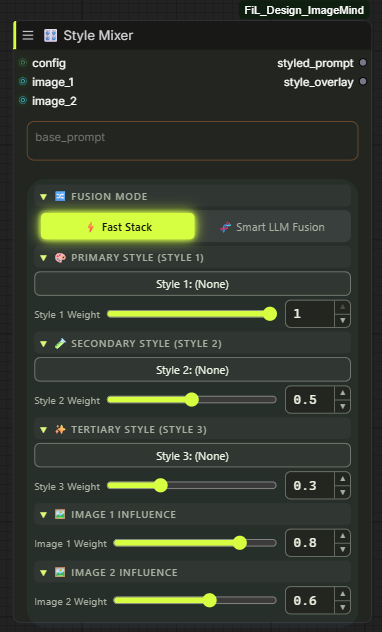
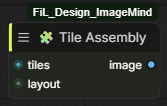
| Optic Scanner | Style Mixer | Tile Assembly | |---|---|---| | FiL Optic Scanner node | FiL Style Mixer node | FiL Tile Assembly node |
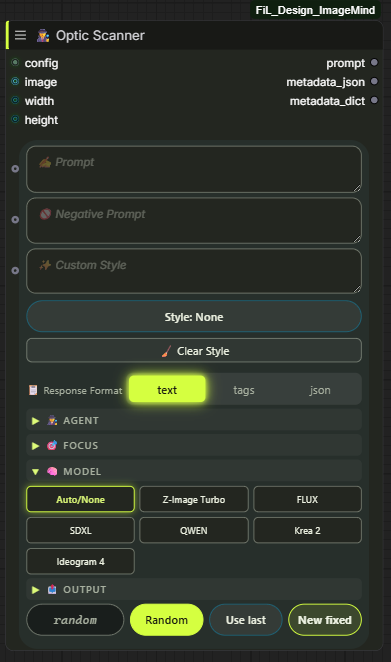
The full gallery, grouped by category, is under Screenshots.

Requirements

| | | |---|---| | ComfyUI | 0.3.60+ (V3 node API) | | Python | 3.10 / 3.11 / 3.12 | | Python deps | requests>=2.31, aiohttp>=3.9, PyYAML>=6.0.1, Pillow>=10, numpy>=1.26 | | GPU | Not required by the pack itself — the sampling/upscale nodes use whatever ComfyUI already uses | | LLM | Optional. Local (Ollama / LM Studio) works with no key and no account |

The frontend is shipped pre-built (frontend/dist is committed), so Node.js is not needed to run the pack — only to develop it.

Installation

ComfyUI Manager — search for FiL_Design_ImageMind and install.

Manual:

cd ComfyUI/custom_nodes
git clone https://github.com/FiL-Design-Ai/FiL_Design_ImageMind.git
pip install -r FiL_Design_ImageMind/requirements.txt

On a portable/embedded ComfyUI install, use its interpreter for the requirements:

python_embeded\python.exe -m pip install -r ComfyUI\custom_nodes\FiL_Design_ImageMind\requirements.txt

On Windows, install_requirements.bat in the pack folder does that step for you: it finds ComfyUI's own Python (python_embeded, venv or .venv), installs the requirements into it and verifies the imports.

Restart ComfyUI. The nodes appear under 🎨 FiL Design/ in the node browser (LLM, Analysis, Styling, Sampling, Image, Values, Tools).

Provider setup

Seven providers ship in common/config.py. Local ones need nothing but a running server; cloud ones need a key.

| Provider | Type | Endpoint | Key | |---|---|---|---| | 🦙 Ollama | Local | http://127.0.0.1:11434 | none | | 🤖 LM Studio | Local | http://127.0.0.1:1234 | none | | 🧠 OpenAI | Cloud | api.openai.com/v1 | OPENAI_API_KEY | | 🔵 Google AI (Gemini) | Cloud | generativelanguage.googleapis.com | GOOGLE_API_KEY | | ⚡ Groq | Cloud | api.groq.com/openai/v1 | GROQ_API_KEY | | 🌐 OpenRouter | Cloud | openrouter.ai/api/v1 | OPENROUTER_API_KEY | | ☁️ Cloudflare Workers AI | Cloud | per-account endpoint | CLOUDFLARE_API_TOKEN + CLOUDFLARE_ACCOUNT_ID |

Where keys are read from, in order:

  1. data/auth.json — written by Settings → FiL_Design_ImageMind → Providers (git-ignored).
  2. A real OS environment variable.
  3. API.env in the pack root — KEY=value lines, git-ignored.

config.yaml holds non-secret defaults (timeouts, rate limits, local server URLs). OLLAMA_URL and LMSTUDIO_URL can be overridden from the environment. The pack ships config.example.yaml, not config.yaml — copy it under the shorter name and edit the copy, and updating the pack can never overwrite your settings. Every value in it is already the built-in default, so an untouched copy changes nothing.

Verify a provider without running a graph: the Provider Loader panel shows a live status badge (the pack probes configured providers in the background and surfaces the error text when one fails), and GET /fil_design_imagemind/models/<provider> lists the models it can actually see.

OpenRouter has a built-in free-model vision fallback: if the selected model can't do vision or is rate-limited, the request is retried down a curated chain of free vision models (common/config.py, common/provider_resilience.py).

Quick start

Two ready workflows ship in example_workflows/ — drag the .json onto the canvas, or pick them in Workflows → Browse Templates:

| Workflow | What it does | |---|---| | fil-image-to-prompt.json | Load image → Provider Loader → Optic Scanner → prompt out | | fil-text-prompt-studio.json | Text idea → prompt expansion with styles and model profile |

Building it by hand takes three nodes:

  1. 🔌 Provider Loader — pick provider + model (hit refresh to pull the live model list).
  2. 🕵️ Optic Scanner — wire config in, connect an image (or type into prompt), choose an agent and a model_type, and wire your target width/height in (they are sockets, not fields).
  3. Wire prompt into your CLIP Text Encode and queue.

Examples

Four less obvious things the pack does in one pass, each a short node chain:

  • Batch a LoRA dataset. LoadImage (a folder batch) → 📚 LoRA Dataset Forge — one caption per frame, aspect-bucketed, written straight into a kohya_ss-ready folder. config is optional; skip it and pass your own captions instead.
  • Blend a reference photo with a style preset. LoadImage🎛️ Style Mixer (image_1 + style_1, each with its own weight) → styled_prompt into your CLIP Text Encode. Weighted Stack needs no LLM call.
  • Vary one detail, hold the rest fixed. LoadImage👁️‍🗨️ Image Decomposer → keep subject, composition and style as they came out, rewrite only lighting before recombining.
  • Match a batch's colour to one reference frame. LoadImage🎨 Color Wizard with reference wired to your target look; turn on preserve_skin for portraits.

Node reference

All 17 nodes, grouped by category. Ranges below are the real schema limits.

🎨 FiL Design/LLM

<details> <summary><b>🔌 Provider Loader</b> — <code>FiLProviderLoader</code> — selects provider, model and generation parameters</summary>

Outputs a config object that every LLM-aware node in the pack consumes, plus the resolved model name as a string.

| Input | Type | Default | Range / options | |---|---|---|---| | provider | COMBO | ollama | ollama, lmstudio, openai, google, groq, openrouter, cloudflare | | model | COMBO | live list | fetched from the provider | | refresh_models | BOOLEAN | false | re-fetches the model list | | temperature | FLOAT | 0.7 | 0.0 – 2.0, step 0.05 | | max_tokens | INT | 0 | 0 – 65536 (0 = provider default) | | rate_limit_ms | INT | 100 | 0 – 5000 — minimum gap between requests | | max_image_side | INT | 1024 | 128 – 4096, step 64 — images are downscaled before upload |

Outputs: config (FilProviderConfig), model (STRING)

</details> <details> <summary><b>🕵️ Optic Scanner</b> — <code>FiLOpticScanner</code> — vision analysis and prompt generation</summary>

The centrepiece: analyses an image (or expands a text idea) and writes a prompt tuned for the target diffusion model. Prompt fields are resizable and also work as input sockets.

| Input | Type | Default | Range / options | |---|---|---|---| | config | FilProviderConfig | — | from Provider Loader | | agent | COMBO | ⚪ None | subject domain, 13 options — Portrait, Products, Nature & Landscape, Art & Illustration, Fashion, Animals, Architecture, Interior, City, Transport, Food, Games | | agent_focus | COMBO | ⚪ None | craft layer laid over the agent — 📐 Composition, 💡 Lighting & Color, 🔬 Ultra Detail, 🎬 Cinematic, 🎭 Emotion & Motion | | image | IMAGE (optional) | — | leave empty for text-only mode | | width / height | INT socket (optional) | 0 | connection-only — wire the target resolution in from Empty Latent Image or a resolution picker; > 0 tailors the prompt to that aspect ratio | | prompt | STRING (optional) | "" | your idea / seed text | | negative_prompt | STRING (optional) | "" | passed through to the metadata | | detail_level | COMBO | normal | tiny, short, normal, detailed, ultra | | language | COMBO | en | en, ru | | model_type | COMBO | Auto/None | Z-Image Turbo, FLUX, SDXL, QWEN, Krea 2, Ideogram 4, Video (universal video profile), MiniMax H3 (timeline shot-blocks) | | video_duration | INT | 0 | visible for video model types only. Requested clip length in seconds; 0 = Auto. Range follows the profile: Video 2-20, MiniMax H3 4-15 (API limit, clamped at injection) | | video_aspect | COMBO | Auto | visible for video model types only. Auto, 16:9, 9:16, 1:1, 21:9 — written into the shot framing (H3 timeline header) | | video_sound | COMBO | Auto | visible for video model types only. Auto / Off (silent clip) / Layered (mandatory ambience + foley + music clause) | | video_camera | COMBO | Auto | visible for video model types only. Preferred camera move — Locked-off, Dolly in/out, Orbit, Pan, Handheld follow, Crane up, FPV push, Rack focus | | prompt_mode | COMBO | Auto | Auto, Hybrid, Two-Stage | | photo_style / art_style | COMBO | None | 171 photo + 129 art presets, grouped by category | | nsfw_photo_style / nsfw_art_style | COMBO | None | separate 18+ catalogs | | custom_style | STRING (optional) | "" | free-form style text, merged with the picks | | seed | INT | -1 | -1 – 999999999999 (-1 = random) | | response_format | COMBO | text | text, tags (flat comma list), json (enables the Ideogram 4 / FLUX JSON schema) |

Outputs: prompt (STRING), metadata_json (STRING), metadata_dict (FilDict)

metadata_dict carries sent_prompt — the exact system/user text of the LLM call that produced the result, which is what you want when debugging a bad generation.

</details>

🎨 FiL Design/Analysis

<details> <summary><b>👁️‍🗨️ Image Decomposer</b> — <code>FiLImageDecomposer</code> — splits an image or prompt into layers</summary>

| Input | Type | Default | Options | |---|---|---|---| | config | FilProviderConfig | — | from Provider Loader | | image | IMAGE (optional) | — | visual decomposition | | prompt | STRING (optional) | "" | text decomposition | | language | COMBO (optional) | English | en, ru |

Outputs: subject, lighting, composition, style, full_prompt (all STRING)

Wire the individual layers into separate conditioning branches when you want to vary one aspect (lighting, say) while holding the rest fixed.

</details>

🎨 FiL Design/Styling

<details> <summary><b>🎛️ Style Mixer</b> — <code>FiLStyleMixer</code> — weighted blend of styles and reference images</summary>

| Input | Type | Default | Notes | |---|---|---|---| | config | FilProviderConfig (optional) | — | only needed for LLM fusion | | fusion_mode | COMBO | Weighted Stack (Fast) | or Smart LLM Fusion (Gen-Mix) | | base_prompt | STRING | "" | the prompt the styles are applied to | | image_1..4 | IMAGE (optional) | — | reference images | | img_weight_1..4 | FLOAT (optional) | 0.8 / 0.6 / 0.4 / 0.2 | influence per reference | | img_focus_1..4 | COMBO (optional) | Auto / General | Style & Texture, Color & Lighting, Subject & Composition, Mood & Atmosphere | | style_1..3 | COMBO (optional) | (None) | from the full 409-preset catalog (photo, art and both NSFW libraries) | | weight_1..3 | FLOAT (optional) | 1.0 / 0.5 / 0.3 | influence per style |

Outputs: styled_prompt (STRING), style_overlay (STRING)

Weighted Stack is deterministic string composition (no API call). Smart LLM Fusion sends the stack to the vision model for a coherent rewrite and needs config.

</details> <details> <summary><b>🎬 Cinema Rig</b> — <code>FiLCinemaRig</code> — camera-department shot builder</summary>

| Input | Type | Default | Notes | |---|---|---|---| | config | FilProviderConfig (optional) | — | only needed for LLM Polish | | scene_prompt | STRING | "" | what is happening in the frame; the rig wraps it without touching it | | mode | COMBO | Original Shot | or Reshoot (lock a reference image, change only the camera treatment) | | camera | COMBO | RED V-RAPTOR XL | film bodies wrap the shot in analog stock language, digital in sensor language | | lens | COMBO | Helios 44-2 (Vintage) | spherical or anamorphic optical character | | focal_length | COMBO | 50mm (Human Eye) | ultra-wide pressure → telephoto compression | | aperture | COMBO | f/11 (Deep Focus) | how much of the frame holds focus | | color_grading | COMBO | Teal & Orange (Blockbuster) | finish applied over the frame | | enable_grading | BOOLEAN | true | off keeps the rig to hardware and medium only | | polish_mode | COMBO | Deterministic (Fast) | or LLM Polish (Gen-Rig) |

Outputs: rigged_prompt (STRING), rig_overlay (STRING)

The five axes are the camera department; the scene rides through them untouched. Deterministic is pure string assembly (no API call). LLM Polish rewrites the assembled rig into fluent prose through the provider model and needs config; on any failure it falls back to the deterministic rig. rig_overlay is the camera treatment alone, ready to stack under any prompt elsewhere.

</details>

🎨 FiL Design/Sampling

<details> <summary><b>⚡ KSampler</b> — <code>FiLKSampler</code> — full sampler with passthrough and scripts</summary>

| Input | Type | Default | Range / options | |---|---|---|---| | model | MODEL | — | | | seed | INT | 0 | | | steps | INT | 20 | | | cfg | FLOAT | 7.0 | | | sampler_name | COMBO | euler | every sampler ComfyUI exposes (loaded lazily at schema time) | | scheduler | COMBO | simple | simple, sgm_uniform, karras, exponential, ddim_uniform, beta, … | | positive / negative | CONDITIONING | — | | | latent | LATENT | — | | | denoise | FLOAT | 1.0 | | | eta (η) | FLOAT | 1.0 | ancestral/SDE samplers only — see docs/ETA_GUIDE.md | | bongmath | BOOLEAN | true | | | preview_method | COMBO | auto | auto, latent2rgb, taesd, vae_decoded_only, none | | vae_decode | COMBO | true | true, true (tiled), false | | vae | VAE (optional) | — | connection-only | | script | FilHiresScript (optional) | — | HighRes Fix and/or Noise Control |

Outputs: model, positive, negative, latent, vae, image — the five passthroughs let you chain samplers without re-dragging every wire.

</details> <details> <summary><b>🔬 HighRes Fix</b> — <code>FiLHighResFix</code> — upscale + re-sample script for KSampler</summary>

Produces a script object; it does not sample on its own. Wire its output into the KSampler's script input.

| Input | Type | Default | Range / options | |---|---|---|---| | upscale_type | COMBO | latent | latent, pixel, both | | hires_ckpt_name | COMBO | (use same) | optionally re-sample with a different checkpoint | | latent_upscaler | COMBO | nearest-exact | nearest-exact, bilinear, area, bicubic, bislerp | | pixel_upscaler | COMBO | first model found | your models/upscale_models folder | | upscale_by | FLOAT | 1.25 | | | use_same_seed / seed | BOOLEAN / INT | true / 0 | | | hires_steps | INT | 12 | | | denoise | FLOAT | 0.56 | | | iterations | INT | 1 | repeat the hires pass | | use_controlnet | BOOLEAN | false | | | control_net_name | COMBO | first found | tile ControlNets live here | | strength | FLOAT | 1.0 | ControlNet strength | | preprocessor | COMBO | none | none, canny | | script | FilHiresScript (optional) | — | chain another script (e.g. Noise Control) |

Output: script

</details> <details> <summary><b>🎛️ Noise Control</b> — <code>FiLNoiseControl</code> — RNG source and seed variation script</summary>

| Input | Type | Default | Options | |---|---|---|---| | rng_source | COMBO | cpu | cpu, gpu | | add_seed_noise | BOOLEAN | false | enables the variation blend | | seed | INT | 0 | variation seed | | weight | FLOAT | 0.5 | blend strength | | script | FilHiresScript (optional) | — | chain with HighRes Fix |

Output: script

The variation blend uses a sin/cos rotation rather than a linear lerp, so noise keeps unit variance at every weight — a linear blend would quietly weaken the effective denoise in the middle of the range. Built on the public comfy.sample API; the legacy A1111 cfg_denoiser patching is deliberately not ported.

</details>

🎨 FiL Design/Image

<details> <summary><b>🔍 Upscaler Advanced</b> — <code>FiLUpscaleTileCalc</code> — tile-grid planner + model upscaler</summary>

| Input | Type | Default | Range / options | |---|---|---|---| | image | IMAGE (optional) | — | omit for latent-only mode | | upscale_model | UPSCALE_MODEL (optional) | — | connect one to actually upscale pixels | | latent | LATENT (optional) | — | resized with bislerp and tiled 1:1 with the image grid | | upscale_factor | FLOAT | 2.0 | 0.1 – 8.0, step 0.25 | | tile_size | INT | 1024 | 64 – 2048, step 64 | | tile_overlap | INT | 64 | 0 – 512, step 8 — clamped at half the tile | | auto_overlap | BOOLEAN | false | derives overlap from tile size (~12.5%) | | auto_mode | BOOLEAN | false | full auto — profile picks tile size and overlap | | auto_profile | COMBO | Balanced | Low VRAM, Balanced, High VRAM, Max Quality, Ultra Quality | | manual_tile_cols / manual_tile_rows | INT | 0 | 0 – 64 — pin an exact grid (0 = derive it) | | non_square_tiles | BOOLEAN | false | rectangular tiles, aspect clamped at 1.5:1 | | auto_fix_thin_edges | BOOLEAN | false | shrinks the tile to the next standard size to avoid a thin edge strip (no-op at 512 — the floor) |

Outputs (21): image, tiles, upscale_by, denoise, tile_width, tile_height, mask_blur, tile_padding, overlap, width, height, tile_cols, tile_rows, tile_count, latent_w, latent_h, info, warnings, latent, latent_tiles, layout

Notes worth knowing:

  • Without upscale_model the image output is a passthrough — the node then only plans the grid.
  • tiles are real cropped pixels. Edge tiles shift inward to stay full-size instead of being zero-padded, so no black strips.
  • overlap is a FLOAT: with non_square_tiles the per-axis overlaps can differ and the reported average is legitimately fractional.
  • layout carries the exact per-tile rectangles — that is what 🧩 Tile Assembly consumes.
</details> <details> <summary><b>🔍 Upscaler Simple</b> — <code>FiLUpscaleSimple</code> — same tiling panel, four outputs</summary>

Identical widget panel to Advanced and 100% delegation to it (one source of truth for the geometry), trimmed to the outputs most graphs actually use.

Outputs: image, tiles, latent, latent_tiles, layout

</details> <details> <summary><b>🧩 Tile Assembly</b> — <code>FiLTileAssembly</code> — stitches processed tiles back together</summary>

| Input | Type | Notes | |---|---|---| | tiles | IMAGE | the processed tile batch, same order as it came out | | layout | FilTileLayout | from either Upscaler |

Output: image — tiles are feathered across the real overlap zones, so seams don't show.

</details> <details> <summary><b>🎨 Color Wizard</b> — <code>FiLColorWizard</code> — automatic colour correction</summary>

| Input | Type | Default | Range / options | |---|---|---|---| | image | IMAGE | — | | | method | COMBO | Full Auto | Full Auto, Gray World, White Patch, Channel Stretch, LAB Enhance | | strength | FLOAT | 0.8 | 0.0 – 1.0 (0 = no change) | | saturate | FLOAT | 0.5 | 0.0 – 5.0 — percentile saturation for Channel Stretch | | temperature | FLOAT | 0.0 | -1.0 – 1.0 | | tint | FLOAT | 0.0 | -1.0 – 1.0 | | preserve_skin | BOOLEAN | false | protects skin tones from the correction | | reference | IMAGE (optional) | — | match the palette of another image | | wb_mask | MASK (optional) | — | white-balance picker: mask the area that should be neutral |

Output: image

</details>

🎨 FiL Design/Dataset

<details> <summary><b>📚 LoRA Dataset Forge</b> — <code>FiLDatasetForge</code> — batch → training-ready LoRA dataset on disk</summary>

One pass: aspect-ratio buckets at the target resolution, one LLM caption per frame, files written where kohya_ss / sd-scripts can read them.

| Input | Type | Default | Notes | |---|---|---|---| | image | IMAGE | — | the whole batch; one file per frame | | config | FilProviderConfig (optional) | — | from 🔌 Provider Loader; only needed for LLM captions | | captions | STRING (optional) | — | manual captions split on a --- line — takes Optic Scanner output as-is and skips the LLM | | dataset_name | STRING | my_lora | folder under ComfyUI/output/datasets, sanitized | | trigger_word | STRING | — | token that activates the LoRA, prepended to every caption | | class_token | STRING | — | woman, car, … — follows the trigger in captions and in the kohya folder name | | base_resolution | COMBO | 1024 | 512 – 1536; buckets are built around this area | | layout | COMBO | kohya | kohyaimg/<repeats>_<trigger> <class>/ + dataset.toml; flat → images next to captions | | repeats | INT | 10 | repeats per image per epoch | | caption_mode | COMBO | natural | natural (Flux/SDXL) · tags (SD 1.5/Pony) · hybrid · none | | crop_mode | COMBO | center | entropy crops toward the most detailed region instead | | dry_run | BOOLEAN | false | plan the whole run, write nothing | | write_mode | COMBO | append | overwrite deletes this node's image/caption pairs only — foreign files stay | | caption_max_words, caption_language, dont_caption, caption_instruction | | | caption shaping | | bucket_step, caption_extension, image_format, jpg_quality, seed | | | output details |

Outputs: preview (bucketed frames letterboxed onto one square canvas), report, dataset_path, manifest.

Captioning follows the rule that decides whether a LoRA generalizes: describe what varies (pose, clothing, background, lighting, camera angle, medium) and never describe the invariant — that belongs to the trigger word. List the invariants in dont_caption and the prompt forbids them explicitly.

The node never upscales. Sources smaller than their bucket are still written, counted in upscaled_count and flagged in the report — run them through 🔍 Upscaler Simple first.

</details>

🎨 FiL Design/Values · Tools

<details> <summary><b>♻️ Seed</b> — <code>FiLSeed</code> · <b>🧹 Cleaner</b> — <code>FiLNeuroCleaner</code> · <b>🔀 Cyber Switch</b> — <code>FiLSignalSwitch</code> · <b>📡 Channel</b> — <code>FiLChannel</code></summary>

♻️ Seedseed INT (0 – 2⁶⁴-1) → SEED INT. Panel is one row: the value plus 🔀 randomize, ♻️ reuse last, 🎲 new fixed random. Typing digits switches it to fixed and applies the value.

🧹 Cleaner — two switches, each doing exactly what it says:

| Input | Type | Default | |---|---|---| | clean_vram | BOOLEAN | true — flush the CUDA cache, leaving loaded models alone | | unload_models | BOOLEAN | true — unload every model ComfyUI holds; the next run reloads them | | anything | ANY (optional) | — passthrough, so you can insert it anywhere in a chain |

Earlier versions offered four per-kind switches (diffusion / CLIP / VAE / ControlNet). They sorted the loaded models by matching class names and could not do it reliably, so unloading is now all or nothing. A workflow opened in the UI carries its old unload_diffusion value onto unload_models (widget values map positionally); a saved API-format prompt falls back to the defaults, because ComfyUI only passes inputs that are still in the schema.

Output: output (ANY) — the same value that came in.

🔀 Cyber Switchinput (ANY, optional) + enable BOOLEAN → output (ANY). ON forwards the value untouched. OFF puts None on the wire and the graph below keeps running — which is the point: a consumer that took this signal on an optional input still executes, just without it. A node that needed a real LATENT/IMAGE will of course raise on the None, and the error will name that node rather than the switch. ON with nothing connected is a different case — a misconfigured graph, not muting — and it returns an ExecutionBlocker carrying a message that says so.

📡 Channelvalue0, value1, ... (ANY, optional, they grow as you use them), no outputs. Plug something in and free inputs of the same type across the graph pick it up, with no wire drawn. One node carries one channel per wired input, so a single Channel can broadcast the model, the VAE and the CLIP at once. A channel is named after its data type (MODEL, VAE); to name it yourself, rename the slot — there is no name widget, because one widget could not name several inputs. When two channels could feed the same input, or a node offers two identical inputs a channel could not tell apart (a KSampler's positive/negative, say), nothing auto-wires and the input waits for a manual pick — open the gear on the Channel's own panel to choose targets by hand, or check the "Wireless" tab in the bottom panel (next to Essential/View Controls) for a graph-wide list of every channel and everything currently unresolved. A subgraph is its own scope: a Channel placed inside one serves receivers inside that same subgraph only, never the parent workflow or a sibling.

</details>

Tiled upscale pipeline

The three image nodes are designed to chain:

LoadImage ─┬─► 🔍 Upscaler Advanced ─┬─ image  (upscaled, if a model is connected)
           │      ▲                  ├─ tiles  ──► your per-tile processing ──┐
UpscaleModelLoader                   ├─ latent / latent_tiles ──► per-tile KSampler
                                     └─ layout ─────────────────────────────┐ │
                                                                            ▼ ▼
                                                              🧩 Tile Assembly ──► image

What the planner actually does: aligns the target size to the tile grid, picks a tile size (fixed, auto-profile, or derived from an explicit cols×rows), applies overlap per axis as a real grid step (step = tile − overlap), clamps overlap at half a tile so the tile count can't explode, keeps non-square tiles within a 1.5:1 aspect, and emits both the numeric plan (for Ultimate SD Upscale-style downstream nodes) and the concrete crops.

Latent tiles use the same grid divided by 8 and are resized with bislerp, not lanczos — lanczos is an RGB-specific interpolation and does not belong in latent space.

Prompting system

🕵️ Optic Scanner is the node that matters most in this pack — everything else feeds it or consumes what it writes. Its output is not one template with a text box; it's five independent axes that stack (agent, agent_focus, detail_level, model_type, style), plus prompt and negative_prompt steering on top. Knowing what each one actually changes — not just that it exists — is the difference between guessing at the panel and getting the exact prompt you want.

What prompt and negative_prompt actually do

  • With an image connected, prompt is not the description — the image is the source of truth, and the agent template already tells the model what to look at. prompt is a targeted instruction layered on top of that. Write emphasize the fabric texture and stitching and the agent's usual field order stays the same, but that field gets pulled out and expanded. Write describe this like a fashion catalog listing and the tone shifts without inventing anything that isn't in the photo. Leave it empty and the node falls back to "Describe this image in detail."
  • Without an image, prompt becomes the entire text input — a text-only idea to expand into a full generation prompt, with no photo underneath to keep it honest.
  • negative_prompt never reaches the model as a literal "negative prompt" the way SDXL uses one — it's rewritten to fit the target model. For FLUX / Z-Image / Krea 2 / Ideogram 4 / Video (which read better as positive constraints — none of their current APIs takes a negative-prompt input) it becomes Constraints (do not include these — express the scene positively without them): <your text>; for everything else it's a plain Avoid: <your text>. Type blurry, watermark with model_type = FLUX and the exact same text with model_type = SDXL produces two different sentences in the actual system call — same intent, model-appropriate phrasing chosen for you.

agent — what the model is told to look at, and what to ignore

Twelve subject lenses plus a neutral default (⚪ None). Each is a fixed list of fields to describe, an order to describe them in, and things to explicitly not say — not a vague mood:

| Agent | Pulls out | Deliberately ignores | |---|---|---| | 👤 Portrait | hair, facial micro-expression, gaze, pose, body tension, clothing, skin | emotion labels ("nervous") — described as physical markers instead | | 📦 Products | shape, material/finish, branding, lighting, reflections, ports/buttons on devices | value judgments ("premium", "high-quality") | | 🌿 Nature & Landscape | terrain, vegetation, water, sky/cloud type, weather, depth layers | "majestic", "peaceful" | | 🎨 Art & Illustration | medium, technique, palette, style, composition, surface texture | "masterpiece", guessed artistic intent | | 👗 Fashion | garment cut, fabric/drape, colour/pattern, accessories, brand hardware | trend opinions ("chic", "outdated") | | 🐾 Animals | species/breed cues, coat markings, build, head/face, environment | anthropomorphic emotion ("sad eyes") | | 🏛 Architecture | building type, structural logic, materials, facade elements, scale | style labels without visible evidence ("brutalist" unless clear) | | 🪑 Interior | room type, furniture, layout, materials, lighting fixtures | "cozy", "luxurious" | | 🌆 City | street elements, building density, infrastructure, atmosphere | neighbourhood-quality judgment | | 🚗 Transport | vehicle type/make cues, body style, condition, wheels | performance speculation, owner identity | | 🍽 Food | dish type, visible ingredients, plating, texture, freshness cues | taste, dietary category | | 🎮 Games | genre, graphics style, HUD/UI elements, character/environment quality | review opinion, story narrative |

Example: run a product photo through 📦 Products and you get "anodized unibody, MagSafe and two USB-C on the left edge, lid closed." Run the same photo through 👤 Portrait and the model still tries to chase hair/pose/skin fields that simply aren't in the frame — the output gets visibly worse. Matching the agent to the actual subject is the single biggest quality lever on this node. response_format = tags composes with any agent instead of replacing it — it changes the shape of the output (flat tags vs prose), not which fields get pulled out.

agent_focus — a craft layer laid on top, never a replacement

agent_focus never overrides the agent — it appends a second instruction block asking the model to weigh one layer heavier while still covering everything the agent already asks for:

| Focus | Weighs heavier | |---|---| | 📐 Composition | shot type, camera angle, crop, subject placement, depth of field, lens feel | | 💡 Lighting & Color | light source/direction/contrast, palette, reflections, atmosphere | | 🔬 Ultra Detail | pores, fibre/grain, wear/patina, gloss level, fabric weave — the finest observable grain | | 🎬 Cinematic | lens character, depth of field, colour grading, frame geometry — read as a film still | | 🎭 Emotion & Motion | facial state, gaze, body tension, the stage of the action, momentum, the physical evidence movement leaves behind |

agent = 🚗 Transport + agent_focus = 💡 Lighting & Color still describes the car (make/model, body, wheels) but pushes noticeably more words into how it's lit — useful when the plain agent output undersells the lighting you actually need to match downstream.

🎭 Emotion & Motion is the odd one out: the other four describe how the picture was made, this one describes what is going on inside it — the axis the rest can skip entirely. 👤 Portrait already carries body language, but only Portrait does, and a car mid-corner or a crowd flowing one way is the same question asked of a different subject, which is why this is a focus rather than a fourteenth agent. It keeps the pack's rule about markers over labels, and holds it hardest here: "outer brow raised, lower lid tight, mouth corner pulled back on one side only" — never "happy". On a genuinely still frame it says what holds the subject still rather than inventing movement.

detail_level — a real word budget, not just "more adjectives"

Each level is a target word count the model is instructed to hit: tiny (20–50 words), short (40–80), normal (100–250), detailed (250–500), ultra (500–1200). Past detailed you're trading generation time and tokens for coverage of increasingly minor details — reach for ultra when one small cue (a logo, a scar, a specific fabric pattern) keeps getting dropped at normal.

prompt_mode — one call or two

  • Hybrid — a single LLM call that already knows the style. Fastest, cheapest.
  • Two-Stage — stage 1 writes a plain factual description with no style at all; stage 2 takes that locked description and restyles it. If stage 2 comes back too short or empty, the node quietly falls back to the stage-1 description instead of failing outright.
  • Auto (the default) switches to Two-Stage the instant any style is selected, Hybrid otherwise — restyling an already-locked factual description is more reliable than asking one call to invent facts and style at the same time. You rarely need to touch this yourself.

Presets rename the photo, they don't repaint it

Picking a preset (photo_style / art_style, or the 18+ variants) hands the model a contract, not a free hand: required cue words it must use, forbidden words it must avoid, and — only in Two-Stage mode, where a separate factual description exists to check against — a live support check. Each preset defines its own "support signals" (words meaning the photo actually shows what the style expects) and "contradiction signals" (words meaning it plainly doesn't). Pick a neon-cyberpunk-city preset on a daylight countryside photo in Two-Stage mode and the contradictions outweigh the support: the mode drops to BLOCKED, and the model is told to keep the preset as background flavour instead of inventing neon signs into a field where they aren't. In Hybrid mode this check doesn't run at all — there's no separate factual pass to check against — which is one more reason Auto reaches for Two-Stage the moment a style is picked. Separately from all that, metadata_dict.response_outcome always reports whether the final text actually used the required cues and avoided the forbidden words, whichever mode ran — check it when a style "didn't take." custom_style free text is appended after the preset and is not covered by this contract at all — it's for a specific instruction the preset library doesn't have.

response_format — three different consumers

  • text — a normal prose paragraph, for a CLIP Text Encode.
  • tags — flat comma-separated tags ordered by visual weight, no prose ("cyberpunk street, neon signs, wet asphalt, holographic advertisement, rain, purple and blue lighting").
  • json — structured output; only meaningfully different for Ideogram 4, which has its own JSON prompt schema (see the Ideogram 4 profile).

Model profiles

model_type rewrites phrasing style and length ceiling for the target generator — Z-Image Turbo, FLUX, SDXL, QWEN, Krea 2, Ideogram 4 — it never touches which facts the agent pulled out. Rules live in common/model_prompt_adapters.py and are documented in docs/prompting.md ("Model Type Adaptation"); the historical vendor research those rules grew out of is archived in docs/MODEL_PROMPTING_GUIDE.md.

Video is the odd one out on purpose: it targets a whole class instead of one product — MiniMax H2/H3, Wan 2.x, HunyuanVideo, LTX Video, Kling and other DiT video models all read the same shape of prompt. The profile asks for one continuous present-tense shot description with explicit motion and camera direction, caps it at ~150 words, and flips any negative_prompt into positive wording, because video models have no negative-prompt input. Pair it with a text idea (image left empty) to write image-to-video prompts, or feed a still frame and ask for the motion to add.

Other nodes, the tricks worth knowing

  • ⚡ KSampler scripts🔬 HighRes Fix and 🎛️ Noise Control both produce a script object instead of sampling on their own; chain them by wiring one script's script input into the other, then the combined result into KSampler.script. Both merge into the same pass.
  • 🎛️ Style Mixer fusion modesWeighted Stack (Fast) is deterministic string composition, no LLM call — use it for a fast iteration loop. Switch to Smart LLM Fusion (Gen-Mix) (needs config) the moment the stacked result reads like a list of disconnected clauses instead of one coherent scene.
  • 🎨 Color Wizard reference vs wb_maskreference grades your image to match another photo's overall palette; wb_mask is a white-balance pick — mask the one area that should be neutral grey, and the node corrects the whole image's colour temperature from that sample alone. They solve different problems and combine fine (white-balance first, then palette match).
  • 🧩 Tiled upscale pipeline — see the dedicated section above; the short version is: plan the grid once with 🔍 Upscaler Advanced/Simple, process tiles (or latent_tiles) individually, and always feed the same layout back into 🧩 Tile Assembly — it's what tells the assembler where the feathered seams go.

Styles catalog

171 photo + 129 art presets in common/styles/, browsable through a searchable picker with preview tiles. See docs/styles.md.

Settings

Settings → FiL_Design_ImageMind:

| Setting | Key | Default | |---|---|---| | Default LLM Provider | FiL_Design_ImageMind.DefaultProvider | Ollama | | Language of FiL panels | FiL_Design_ImageMind.Language | en | | Log level | FiL_Design_ImageMind.Logging.Level | WARNING | | Node theme | FiL_Design_ImageMind.Theme | Default | | Theme applies to | FiL_Design_ImageMind.Appearance.Scope | FiL nodes only | | Theme animations | FiL_Design_ImageMind.Appearance.Animations | true | | Wheel scrolling in FiL Design panels | FiL_Design_ImageMind.Wheel.Enabled | true | | Show connection toasts | FiL_Design_ImageMind.ConnectionFX.ShowToasts | false | | Highlight the running node | FiL_Design_ImageMind.RunFx.Mode | FiL nodes only |

Every setting listed here is registered with ComfyUI and read by the code. Earlier entries that are gone: RequestTimeout and AutoCleanVRAM were never read by anything (timeouts come from config.yaml / per-provider defaults, and VRAM cleanup is the 🧹 Cleaner node's job); the RunButton.* pair was never registered, and its 400 ms flash is now the RunFx.Mode pulse above; Shortcuts.Enabled went with the keyboard shortcuts themselves.

The Providers tab in the same panel manages accounts and API keys (stored in data/auth.json).

Themes and localization

Themes (applied live, no reload): Default, Cyberpunk, Cyberpunk 2077, Fallout, Pipboy, FiL Green, Pixaroma (matches the ComfyUI-Pixaroma pack's colors, for graphs that mix both), Neo Emerald, NFT Vibe, Hollywood Teal, Cyber Punch (translucent red/black glass, wide blur), Cyber Punch HUD (same palette, sharp edges, chamfered corner, corner-bracket accents). Theme applies to extends the tint to nodes wired to this pack's, or to every node — title bar only, never the node body, since body colour is saved into the workflow file. Theme animations stops the looping flourishes and is off by default when the system asks for reduced motion. All node panels read the same CSS variables, including --fil-accent-ink for text on accent backgrounds, so a light-accent theme stays readable. Every palette is checked against WCAG AA on its own surfaces — the measured ratios sit next to the values in styles/brand.ts.

Localization: English and Russian, complete — panels, tooltips, toasts and node help all come from data/locales/{en,ru}.json, and a test enforces key coverage.

HTTP API

The pack registers these routes on the ComfyUI server (prefix from common/brand.py):

| Method | Route | Purpose | |---|---|---| | GET | /fil_design_imagemind/health | liveness + version | | POST | /fil_design_imagemind/log_level | set the pack's log level at runtime | | GET | /fil_design_imagemind/providers | provider catalog | | GET | /fil_design_imagemind/models/{provider} | model list (?force=1 bypasses the cache) | | GET/POST | /fil_design_imagemind/auth | account/key management | | POST | /fil_design_imagemind/provider_probe | test a provider/model round-trip | | GET | /fil_design_imagemind/locale/{lang} | locale bundle | | GET | /fil_design_imagemind/node_contracts | the widget contracts the frontend renders from |

Screenshots

LLM

| Provider Loader | Optic Scanner | Image Decomposer | |---|---|---| | Provider Loader | Optic Scanner | Image Decomposer |

Styling and analysis

| Style Mixer | Color Wizard | LoRA Dataset Forge | |---|---|---| | Style Mixer | Color Wizard | LoRA Dataset Forge |

Sampling — Noise Control feeds HighRes Fix, which feeds the sampler's script socket.

Noise Control, HighRes Fix and KSampler

Upscaling

| Upscaler Advanced | Upscaler Simple | Tile Assembly | |---|---|---| | Upscaler Advanced | Upscaler Simple | Tile Assembly |

Values and tools

| Seed | Cyber Switch | Cleaner | |---|---|---| | Seed | Cyber Switch | Cleaner |

Wireless — one 📡 Channel carries a MODEL and a VAE at once; free inputs of the same type pick their channel up when the prompt is queued.

Channel broadcasting a MODEL and a VAE

Provider settings — keys are stored in data/auth.json and shown redacted.

Provider settings

Troubleshooting

| Symptom | Fix | |---|---| | Nodes don't appear | Check the ComfyUI console for an import error; confirm ComfyUI ≥ 0.3.60; confirm the folder is custom_nodes/FiL_Design_ImageMind | | Model list is empty | Is the local server running (ollama serve / LM Studio)? For cloud, re-enter the key in Settings → Providers and press refresh | | Auth error | The key is read from data/auth.json → OS env → API.env; a stale value in an earlier source wins — clear it | | Vision request fails on OpenRouter | The selected model probably isn't vision-capable; the pack retries down a free-vision chain, but picking a vision model directly is faster | | Panels look unstyled / old | Hard-reload the browser (Ctrl+Shift+R) — the bundle is cached by the browser | | Backend change didn't take effect | Python edits need a full ComfyUI restart; rebuilding the frontend is not enough | | Tile count looks wrong | Overlap grows the count by design (step = tile − overlap); an explicit cols×rows grid keeps the count and grows the tile instead | | Set a node's log level | Settings → Log level, or POST /fil_design_imagemind/log_level |

Development

# Python tests (use the interpreter that has torch — e.g. ComfyUI's embedded one)
python -m pytest -q

# Frontend
cd frontend
npm ci
npm run build          # vue-tsc type check + vite build into frontend/dist
npm run test           # vitest
npm run lint           # eslint
npm run gen:contracts  # regenerate contracts.ts/json from common/contracts/

# Static release checks
python tools/preflight_check.py       # node files, ids, entrypoint, bundle, syntax
python tools/scan_node_conflicts.py   # node-id collisions with other installed packs

Two things that bite if you skip them:

  • npm run gen:contracts must run with an interpreter that can import ComfyUI, otherwise sampler/scheduler lists collapse to a one-item fallback and the generated contract regresses. Pass it explicitly: PYTHON=/path/to/python npm run gen:contracts.
  • frontend/dist is committed on purpose — that is how the UI ships through the Registry and through git clone. Rebuild it in the same commit as any frontend change.

Release gate: common/release_gate.py registers only node-ids listed in RELEASE_NODES, so a new node stays out of the ComfyUI menu until it has been through the hardening checklist. Set FIL_RELEASE_ALL=1 to register everything (CI and whole-package smoke tests do this).

Project layout

FiL_Design_ImageMind/
├── __init__.py            # ComfyExtension entrypoint (V3), node registration
├── nodes/                 # thin node classes: schema + orchestration only
├── common/                # the actual logic
│   ├── contracts/         # widget contracts — single source of truth for the UI
│   ├── styles/            # photo + art style catalogs
│   ├── tile_calc.py       # tile geometry, crops, latent tiling
│   ├── sampling.py        # sampler loop, hires-fix, noise control
│   ├── color_correction.py
│   └── config.py          # providers, keys, YAML/env config
├── frontend/
│   ├── src/               # Vue 3 + TS: components, nodes2/, stores/, api/
│   └── dist/              # built bundle (committed)
├── data/locales/          # en.json, ru.json
├── docs/                  # guides, architecture, workflows, release ledger
├── tests/                 # pytest suite
└── tools/                 # preflight and conflict-scan scripts

Further reading: architecture · scanner internals · getting started · auth · prompting · styles · eta guide · changelog

Privacy & security

  • API keys live in data/auth.json or API.env, both git-ignored; they are never written to workflow files or logs.
  • Images are sent only to the provider you selected, and only when a node that needs vision runs. Local providers (Ollama, LM Studio) keep everything on your machine.
  • Images are downscaled to max_image_side before upload — smaller payloads, lower cost.
  • HTTP routes validate their inputs; the request timeout and per-provider rate limit are configurable rather than hardcoded.

Русский

Что это

Набор кастомных узлов для ComfyUI на V3 API (io.ComfyNode, декларативный define_schema(), асинхронный execute()) с фронтендом на Vue 3 + TypeScript, собранным в frontend/dist. Четыре направления:

| Направление | Что даёт | |---|---| | 🧠 LLM и зрение | Семь провайдеров (локальные и облачные), 12 предметных агентов плюс нейтральный описатель — каждый сочетается с 4 фокус-оверлеями, профили промптов под Z-Image, FLUX, SDXL, QWEN, Krea 2, Ideogram 4 и универсальный Video-профиль для видео-моделей | | 🖼️ Работа с изображением | Планирование сетки тайлов с честной математикой нахлёста, апскейл моделью, реальные кропы тайлов в пиксельном и латентном пространстве, сборка с растушёвкой, авто-цветокоррекция | | 🎛️ Сэмплинг | Полноценный KSampler со всеми сэмплерами/планировщиками, passthrough-сокетами и встроенным превью, плюс скрипты HighRes Fix и Noise Control | | 🎨 Интерфейс | У каждого узла настоящая Vue-панель — двенадцать тем, полная ru/en локализация, компактные тумблеры, степперы у числовых полей, списки опций из контракта |

Правила, которым следует пакет: файлы нод тонкие (схема + оркестрация), логика живёт в common/; контракт виджетов в common/contracts/ — единственный источник истины, из него генерируется фронтенд, поэтому панель физически не может предложить значение, которое отвергнет бэкенд; каждая нода в этом релизе прошла чек-лист харденинга (аудит → UX → фиксы функционала → UI → тесты → контракт → живой смоук на работающем ComfyUI), см. docs/release/HARDENING_LEDGER.md.

Зачем ImageMind

ImageMind нужен ComfyUI-сборщикам, которые хотят держать анализ изображения, работу с промптом и апскейл в одном графе, без прыжков между отдельными инструментами. Используйте его, когда нужно описать изображение через vision-модель, превратить анализ в промпт под конкретную модель или собрать повторяемый image pipeline с понятным UI и проверяемыми backend-контрактами.

С чего начать

| Если нужно... | Начните с | |---|---| | Описать изображение или получить промпт из картинки | 🕵️ Optic Scanner + 🔌 Provider Loader | | Превратить анализ в текст под модель | 🎛️ Style Mixer и профили промптов | | Апскейлить большие изображения контролируемо | 🔍 Upscaler Advanced → 🧩 Tile Assembly | | Попробовать пакет без облачных ключей | Ollama или LM Studio как провайдер |

Превью интерфейса

| Optic Scanner | Style Mixer | Tile Assembly | |---|---|---| | Узел FiL Optic Scanner | Узел FiL Style Mixer | Узел FiL Tile Assembly |

Полная галерея по категориям — в разделе Скриншоты.

Требования

| | | |---|---| | ComfyUI | 0.3.60+ (V3 node API) | | Python | 3.10 / 3.11 / 3.12 | | Зависимости | requests>=2.31, aiohttp>=3.9, PyYAML>=6.0.1, Pillow>=10, numpy>=1.26 | | GPU | Самому пакету не нужен — узлы сэмплинга/апскейла используют то же, что и ComfyUI | | LLM | Опционально. Локальные (Ollama / LM Studio) работают без ключа и аккаунта |

Фронтенд поставляется собранным (frontend/dist в репозитории), поэтому Node.js нужен только для разработки, не для работы.

Установка

ComfyUI Manager — найдите FiL_Design_ImageMind и установите.

Вручную:

cd ComfyUI/custom_nodes
git clone https://github.com/FiL-Design-Ai/FiL_Design_ImageMind.git
pip install -r FiL_Design_ImageMind/requirements.txt

Для портативной сборки ставьте зависимости её интерпретатором:

python_embeded\python.exe -m pip install -r ComfyUI\custom_nodes\FiL_Design_ImageMind\requirements.txt

В Windows этот шаг делает install_requirements.bat из папки пака: он сам находит Python самого ComfyUI (python_embeded, venv или .venv), ставит туда зависимости и проверяет импорты.

Перезапустите ComfyUI. Узлы появятся в разделе 🎨 FiL Design/ (LLM, Analysis, Styling, Sampling, Image, Values, Tools).

Настройка провайдеров

Семь провайдеров описаны в common/config.py. Локальным нужен только запущенный сервер, облачным — ключ.

| Провайдер | Тип | Адрес | Ключ | |---|---|---|---| | 🦙 Ollama | Локальный | http://127.0.0.1:11434 | не нужен | | 🤖 LM Studio | Локальный | http://127.0.0.1:1234 | не нужен | | 🧠 OpenAI | Облако | api.openai.com/v1 | OPENAI_API_KEY | | 🔵 Google AI (Gemini) | Облако | generativelanguage.googleapis.com | GOOGLE_API_KEY | | ⚡ Groq | Облако | api.groq.com/openai/v1 | GROQ_API_KEY | | 🌐 OpenRouter | Облако | openrouter.ai/api/v1 | OPENROUTER_API_KEY | | ☁️ Cloudflare Workers AI | Облако | эндпоинт аккаунта | CLOUDFLARE_API_TOKEN + CLOUDFLARE_ACCOUNT_ID |

Откуда читается ключ, по порядку:

  1. data/auth.json — пишется из Settings → FiL_Design_ImageMind → Providers.gitignore).
  2. Реальная переменная окружения ОС.
  3. API.env в корне пакета — строки KEY=value, в .gitignore.

config.yaml хранит несекретные умолчания (таймауты, лимиты частоты, адреса локальных серверов). OLLAMA_URL и LMSTUDIO_URL можно переопределить через окружение. В паке лежит config.example.yaml, а не config.yaml — скопируйте его под коротким именем и правьте копию: тогда обновление пака не затрёт ваши настройки. Все значения в нём и так совпадают со встроенными умолчаниями, поэтому нетронутая копия ничего не меняет.

Проверить провайдера без запуска графа: панель Provider Loader показывает живой статус (пакет фоново пробит настроенных провайдеров и выводит текст ошибки, если проверка не прошла), а GET /fil_design_imagemind/models/<provider> показывает модели, которые он реально видит.

У OpenRouter встроен фолбэк на бесплатные vision-модели: если выбранная модель не умеет зрение или упёрлась в лимит, запрос повторяется по подобранной цепочке бесплатных моделей (common/config.py, common/provider_resilience.py).

Быстрый старт

В example_workflows/ лежат два готовых воркфлоу — перетащите .json на холст или выберите в Workflows → Browse Templates:

| Воркфлоу | Что делает | |---|---| | fil-image-to-prompt.json | Загрузка картинки → Provider Loader → Optic Scanner → промпт | | fil-text-prompt-studio.json | Текстовая идея → расширение промпта со стилями и профилем модели |

Руками собирается из трёх узлов:

  1. 🔌 Provider Loader — выбрать провайдера и модель (кнопка refresh тянет живой список).
  2. 🕵️ Optic Scanner — подключить config, подать image (или писать в prompt), выбрать агента и model_type, подать целевые width/height (это сокеты, а не поля панели).
  3. Вывод prompt — в CLIP Text Encode, и в очередь.

Примеры

Четыре не самых очевидных вещи, которые пакет умеет одним проходом, каждая — короткая цепочка узлов:

  • Собрать LoRA-датасет батчем. LoadImage (батч из папки) → 📚 LoRA Dataset Forge — одна подпись на кадр, бакеты по соотношению сторон, готовая папка под kohya_ss. config не обязателен: без него подписи берутся из своих captions.
  • Смешать референсное фото с пресетом стиля. LoadImage🎛️ Style Mixer (image_1 + style_1, у каждого свой weight) → styled_prompt в CLIP Text Encode. Weighted Stack работает без обращения к LLM.
  • Поменять одну деталь, остальное не трогать. LoadImage👁️‍🗨️ Image Decomposersubject, composition и style оставить как есть, переписать только lighting перед сборкой обратно.
  • Подогнать цвет партии кадров под один референс. LoadImage🎨 Color Wizard с reference, подключённым к эталонному кадру; для портретов включить preserve_skin.

Справочник по узлам

Все 17 узлов по категориям. Диапазоны ниже — реальные пределы схемы.

🎨 FiL Design/LLM

<details> <summary><b>🔌 Provider Loader</b> — <code>FiLProviderLoader</code> — провайдер, модель и параметры генерации</summary>

Отдаёт объект config, который потребляют все LLM-узлы пакета, плюс имя выбранной модели строкой.

| Вход | Тип | По умолчанию | Диапазон / опции | |---|---|---|---| | provider | COMBO | ollama | ollama, lmstudio, openai, google, groq, openrouter, cloudflare | | model | COMBO | живой список | тянется у провайдера | | refresh_models | BOOLEAN | false | перечитать список моделей | | temperature | FLOAT | 0.7 | 0.0 – 2.0, шаг 0.05 | | max_tokens | INT | 0 | 0 – 65536 (0 = умолчание провайдера) | | rate_limit_ms | INT | 100 | 0 – 5000 — минимальный интервал между запросами | | max_image_side | INT | 1024 | 128 – 4096, шаг 64 — картинки ужимаются перед отправкой |

Выходы: config (FilProviderConfig), model (STRING)

</details> <details> <summary><b>🕵️ Optic Scanner</b> — <code>FiLOpticScanner</code> — анализ изображений и генерация промптов</summary>

Центральный узел: анализирует изображение (или расширяет текстовую идею) и пишет промпт под целевую диффузионную модель. Поля промптов растягиваются мышью и работают как входные сокеты.

| Вход | Тип | По умолчанию | Диапазон / опции | |---|---|---|---| | config | FilProviderConfig | — | от Provider Loader | | agent | COMBO | ⚪ None | предметная область, 13 вариантов — Portrait, Products, Nature & Landscape, Art & Illustration, Fashion, Animals, Architecture, Interior, City, Transport, Food, Games | | agent_focus | COMBO | ⚪ None | акцент поверх агента — 📐 Composition, 💡 Lighting & Color, 🔬 Ultra Detail, 🎬 Cinematic, 🎭 Emotion & Motion | | image | IMAGE (опц.) | — | пусто = текстовый режим | | width / height | INT-сокет (опц.) | 0 | только соединением — целевое разрешение приходит от Empty Latent Image или пикера разрешений; при > 0 промпт подстраивается под эту пропорцию | | prompt | STRING (опц.) | "" | ваша идея / затравка | | negative_prompt | STRING (опц.) | "" | пробрасывается в метаданные | | detail_level | COMBO | normal | tiny, short, normal, detailed, ultra | | language | COMBO | en | en, ru | | model_type | COMBO | Auto/None | Z-Image Turbo, FLUX, SDXL, QWEN, Krea 2, Ideogram 4, Video (универсальный видео-профиль), MiniMax H3 (таймлайн-блоки) | | video_duration | INT | 0 | виден только для видео-моделей. Длительность клипа в секундах; 0 = Auto. Диапазон следует профилю: Video 2-20, MiniMax H3 4-15 (лимит API, клампится при инъекции) | | video_aspect | COMBO | Auto | виден только для видео-моделей. Auto, 16:9, 9:16, 1:1, 21:9 — вшивается в кадр (у H3 — в заголовок таймлайна) | | video_sound | COMBO | Auto | виден только для видео-моделей. Auto / Off (немой клип) / Layered (обязательный слоёный Sound-клауз) | | video_camera | COMBO | Auto | виден только для видео-моделей. Предпочтительное движение камеры — Locked-off, Dolly in/out, Orbit, Pan, Handheld follow, Crane up, FPV push, Rack focus | | prompt_mode | COMBO | Auto | Auto, Hybrid, Two-Stage | | photo_style / art_style | COMBO | None | 171 фото + 129 арт-пресетов по категориям | | nsfw_photo_style / nsfw_art_style | COMBO | None | отдельные 18+ каталоги | | custom_style | STRING (опц.) | "" | свой текст стиля, подмешивается к выбранным | | seed | INT | -1 | -1 – 999999999999 (-1 = случайный) | | response_format | COMBO | text | text, tags (плоский список через запятую), json (включает JSON-схему Ideogram 4 / FLUX) |

Выходы: prompt (STRING), metadata_json (STRING), metadata_dict (FilDict)

В metadata_dict есть sent_prompt — точный system/user-текст того вызова LLM, который дал результат. Именно это нужно, когда разбираешься, почему генерация вышла не такой.

</details>

🎨 FiL Design/Analysis

<details> <summary><b>👁️‍🗨️ Image Decomposer</b> — <code>FiLImageDecomposer</code> — разбор изображения или промпта на слои</summary>

| Вход | Тип | По умолчанию | Опции | |---|---|---|---| | config | FilProviderConfig | — | от Provider Loader | | image | IMAGE (опц.) | — | визуальный разбор | | prompt | STRING (опц.) | "" | текстовый разбор | | language | COMBO (опц.) | English | en, ru |

Выходы: subject, lighting, composition, style, full_prompt (все STRING)

Разведите слои по разным веткам кондишенинга, когда нужно менять один аспект (например, свет), удерживая остальное.

</details>

🎨 FiL Design/Styling

<details> <summary><b>🎛️ Style Mixer</b> — <code>FiLStyleMixer</code> — взвешенное смешивание стилей и референсов</summary>

| Вход | Тип | По умолчанию | Примечание | |---|---|---|---| | config | FilProviderConfig (опц.) | — | нужен только для LLM-фьюжна | | fusion_mode | COMBO | Weighted Stack (Fast) | либо Smart LLM Fusion (Gen-Mix) | | base_prompt | STRING | "" | промпт, к которому применяются стили | | image_1..4 | IMAGE (опц.) | — | референсные изображения | | img_weight_1..4 | FLOAT (опц.) | 0.8 / 0.6 / 0.4 / 0.2 | влияние каждого референса | | img_focus_1..4 | COMBO (опц.) | Auto / General | Style & Texture, Color & Lighting, Subject & Composition, Mood & Atmosphere | | style_1..3 | COMBO (опц.) | (None) | из полного каталога на 409 пресет (фото, арт и обе NSFW-библиотеки) | | weight_1..3 | FLOAT (опц.) | 1.0 / 0.5 / 0.3 | влияние каждого стиля |

Выходы: styled_prompt (STRING), style_overlay (STRING)

Weighted Stack — детерминированная сборка строки (без обращения к API). Smart LLM Fusion отправляет стек vision-модели на связный переписанный вариант, ему нужен config.

</details> <details> <summary><b>🎬 Cinema Rig</b> — <code>FiLCinemaRig</code> — конструктор кадра по осям операторского цеха</summary>

| Вход | Тип | По умолчанию | Примечания | |---|---|---|---| | config | FilProviderConfig (опц.) | — | нужен только для LLM-полировки | | scene_prompt | STRING | "" | что происходит в кадре; риг оборачивает сцену, не трогая её | | mode | COMBO | Original Shot | либо Reshoot (зафиксировать референс, менять только операторскую обработку) | | camera | COMBO | RED V-RAPTOR XL | плёночные тушки оборачивают кадр в язык плёнки, цифровые — в язык сенсора | | lens | COMBO | Helios 44-2 (Vintage) | сферическая или анаморфотная оптика | | focal_length | COMBO | 50mm (Human Eye) | от сверхширокого давления окружения до телеобъективного сжатия | | aperture | COMBO | f/11 (Deep Focus) | какая часть кадра остаётся в фокусе | | color_grading | COMBO | Teal & Orange (Blockbuster) | финиш, применяемый поверх кадра | | enable_grading | BOOLEAN | true | выкл — риг остаётся только с железом и медиумом | | polish_mode | COMBO | Deterministic (Fast) | либо LLM Polish (Gen-Rig) |

Выходы: rigged_prompt (STRING), rig_overlay (STRING)

Пять осей — это операторский цех; сцена проходит сквозь них нетронутой. Deterministic — чистая сборка строки (без обращения к API). LLM Polish переписывает собранный риг в связную прозу через модель провайдера, ему нужен config; при любой ошибке он откатывается на детерминированный риг. rig_overlay — только операторская обработка, её можно подкладывать под любой промпт отдельно.

</details>

🎨 FiL Design/Sampling

<details> <summary><b>⚡ KSampler</b> — <code>FiLKSampler</code> — полный сэмплер с passthrough и скриптами</summary>

| Вход | Тип | По умолчанию | Диапазон / опции | |---|---|---|---| | model | MODEL | — | | | seed | INT | 0 | | | steps | INT | 20 | | | cfg | FLOAT | 7.0 | | | sampler_name | COMBO | euler | все сэмплеры ComfyUI (список грузится лениво при построении схемы) | | scheduler | COMBO | simple | simple, sgm_uniform, karras, exponential, ddim_uniform, beta, … | | positive / negative | CONDITIONING | — | | | latent | LATENT | — | | | denoise | FLOAT | 1.0 | | | eta (η) | FLOAT | 1.0 | только ancestral/SDE — см. docs/ETA_GUIDE.md | | bongmath | BOOLEAN | true | | | preview_method | COMBO | auto | auto, latent2rgb, taesd, vae_decoded_only, none | | vae_decode | COMBO | true | true, true (tiled), false | | vae | VAE (опц.) | — | только соединением | | script | FilHiresScript (опц.) | — | HighRes Fix и/или Noise Control |

Выходы: model, positive, negative, latent, vae, image — пять passthrough-выходов позволяют цеплять сэмплеры друг за другом, не перетаскивая каждый провод.

</details> <details> <summary><b>🔬 HighRes Fix</b> — <code>FiLHighResFix</code> — скрипт апскейла и ре-сэмплинга для KSampler</summary>

Сам не сэмплит — отдаёт объект script, который подключается во вход script у KSampler.

| Вход | Тип | По умолчанию | Диапазон / опции | |---|---|---|---| | upscale_type | COMBO | latent | latent, pixel, both | | hires_ckpt_name | COMBO | (use same) | можно ре-сэмплить другим чекпоинтом | | latent_upscaler | COMBO | nearest-exact | nearest-exact, bilinear, area, bicubic, bislerp | | pixel_upscaler | COMBO | первая найденная | из вашей папки models/upscale_models | | upscale_by | FLOAT | 1.25 | | | use_same_seed / seed | BOOLEAN / INT | true / 0 | | | hires_steps | INT | 12 | | | denoise | FLOAT | 0.56 | | | iterations | INT | 1 | повтор hires-прохода | | use_controlnet | BOOLEAN | false | | | control_net_name | COMBO | первый найденный | сюда идут tile-ControlNet'ы | | strength | FLOAT | 1.0 | сила ControlNet | | preprocessor | COMBO | none | none, canny | | script | FilHiresScript (опц.) | — | сцепить с другим скриптом (например, Noise Control) |

Выход: script

</details> <details> <summary><b>🎛️ Noise Control</b> — <code>FiLNoiseControl</code> — источник RNG и вариация seed</summary>

| Вход | Тип | По умолчанию | Опции | |---|---|---|---| | rng_source | COMBO | cpu | cpu, gpu | | add_seed_noise | BOOLEAN | false | включает подмешивание вариации | | seed | INT | 0 | seed вариации | | weight | FLOAT | 0.5 | сила смешивания | | script | FilHiresScript (опц.) | — | сцепить с HighRes Fix |

Выход: script

Смешивание идёт поворотом sin/cos, а не линейным lerp — так шум сохраняет единичную дисперсию при любом weight, тогда как линейное смешивание молча занижало бы эффективную силу денойза в середине диапазона. Реализовано на публичном API comfy.sample; легаси-патчинг A1111 cfg_denoiser намеренно не портирован.

</details>

🎨 FiL Design/Image

<details> <summary><b>🔍 Upscaler Advanced</b> — <code>FiLUpscaleTileCalc</code> — планировщик сетки тайлов + апскейл моделью</summary>

| Вход | Тип | По умолчанию | Диапазон / опции | |---|---|---|---| | image | IMAGE (опц.) | — | можно не подключать (latent-only режим) | | upscale_model | UPSCALE_MODEL (опц.) | — | подключите, чтобы реально апскейлить пиксели | | latent | LATENT (опц.) | — | ресайзится bislerp'ом и режется 1:1 с пиксельной сеткой | | upscale_factor | FLOAT | 2.0 | 0.1 – 8.0, шаг 0.25 | | tile_size | INT | 1024 | 64 – 2048, шаг 64 | | tile_overlap | INT | 64 | 0 – 512, шаг 8 — клэмпится половиной тайла | | auto_overlap | BOOLEAN | false | нахлёст выводится из размера тайла (~12.5%) | | auto_mode | BOOLEAN | false | полный авто — профиль сам выбирает тайл и нахлёст | | auto_profile | COMBO | Balanced | Low VRAM, Balanced, High VRAM, Max Quality, Ultra Quality | | manual_tile_cols / manual_tile_rows | INT | 0 | 0 – 64 — зафиксировать сетку (0 = считать самому) | | non_square_tiles | BOOLEAN | false | прямоугольные тайлы, пропорция ограничена 1.5:1 | | auto_fix_thin_edges | BOOLEAN | false | уменьшает тайл до следующего стандартного размера, чтобы убрать тонкую краевую полосу (на 512 — no-op, это нижняя граница) |

Выходы (21): image, tiles, upscale_by, denoise, tile_width, tile_height, mask_blur, tile_padding, overlap, width, height, tile_cols, tile_rows, tile_count, latent_w, latent_h, info, warnings, latent, latent_tiles, layout

Что стоит знать:

  • Без upscale_model выход image — passthrough: узел тогда только планирует сетку.
  • tiles — реальные кропы. Крайние тайлы сдвигаются внутрь, чтобы остаться полного размера, а не паддятся нулями, поэтому чёрных полос нет.
  • overlap — FLOAT: при non_square_tiles нахлёст по осям разный, и усреднённое значение законно бывает дробным.
  • layout несёт точные прямоугольники каждого тайла — именно его потребляет 🧩 Tile Assembly.
</details> <details> <summary><b>🔍 Upscaler Simple</b> — <code>FiLUpscaleSimple</code> — та же панель, четыре выхода</summary>

Панель виджетов идентична Advanced, вся геометрия делегируется ему на 100% (один источник истины), выходы урезаны до тех, что реально нужны большинству графов.

Выходы: image, tiles, latent, latent_tiles, layout

</details> <details> <summary><b>🧩 Tile Assembly</b> — <code>FiLTileAssembly</code> — сборка обработанных тайлов обратно</summary>

| Вход | Тип | Примечание | |---|---|---| | tiles | IMAGE | обработанный батч тайлов в том же порядке | | layout | FilTileLayout | от любого из двух апскейлеров |

Выход: image — тайлы растушёвываются по реальным зонам нахлёста, швов не видно.

</details> <details> <summary><b>🎨 Color Wizard</b> — <code>FiLColorWizard</code> — автоматическая цветокоррекция</summary>

| Вход | Тип | По умолчанию | Диапазон / опции | |---|---|---|---| | image | IMAGE | — | | | method | COMBO | Full Auto | Full Auto, Gray World, White Patch, Channel Stretch, LAB Enhance | | strength | FLOAT | 0.8 | 0.0 – 1.0 (0 = без изменений) | | saturate | FLOAT | 0.5 | 0.0 – 5.0 — перцентиль насыщения для Channel Stretch | | temperature | FLOAT | 0.0 | -1.0 – 1.0 | | tint | FLOAT | 0.0 | -1.0 – 1.0 | | preserve_skin | BOOLEAN | false | защищает тона кожи от коррекции | | reference | IMAGE (опц.) | — | подогнать палитру под другое изображение | | wb_mask | MASK (опц.) | — | пипетка баланса белого: маска области, которая должна быть нейтральной |

Выход: image

</details>

🎨 FiL Design/Dataset

<details> <summary><b>📚 LoRA Dataset Forge</b> — <code>FiLDatasetForge</code> — батч → готовый датасет для LoRA на диске</summary>

Один прогон: aspect-бакеты нужного разрешения, по одной подписи от LLM на кадр, файлы раскладываются так, как их ждёт kohya_ss / sd-scripts.

| Вход | Тип | По умолчанию | Заметки | |---|---|---|---| | image | IMAGE | — | весь батч, один файл на кадр | | config | FilProviderConfig (опц.) | — | из 🔌 Provider Loader, нужен только для подписей от LLM | | captions | STRING (опц.) | — | ручные подписи через строку ---; принимает вывод Optic Scanner как есть и отключает вызов LLM | | dataset_name | STRING | my_lora | папка внутри ComfyUI/output/datasets, имя санитизируется | | trigger_word | STRING | — | токен, активирующий LoRA; ставится в начало каждой подписи | | class_token | STRING | — | woman, car, … — идёт после триггера в подписях и в имени папки kohya | | base_resolution | COMBO | 1024 | 512 – 1536, бакеты строятся вокруг этой площади | | layout | COMBO | kohya | kohyaimg/<repeats>_<trigger> <class>/ + dataset.toml; flat → изображения рядом с подписями | | repeats | INT | 10 | повторов на изображение за эпоху | | caption_mode | COMBO | natural | natural (Flux/SDXL) · tags (SD 1.5/Pony) · hybrid · none | | crop_mode | COMBO | center | entropy режет в сторону самой детализированной области | | dry_run | BOOLEAN | false | посчитать весь прогон, ничего не записывая | | write_mode | COMBO | append | overwrite удаляет только пары изображение/подпись этой ноды — чужие файлы остаются | | caption_max_words, caption_language, dont_caption, caption_instruction | | | настройка подписей | | bucket_step, caption_extension, image_format, jpg_quality, seed | | | детали вывода |

Выходы: preview (бакеты, вписанные в один квадратный холст), report, dataset_path, manifest.

Каптионинг работает по правилу, от которого зависит, обобщится ли LoRA: описываем то, что меняется (поза, одежда, фон, свет, ракурс, медиум) и не описываем инвариант — он принадлежит триггер-слову. Перечисли инварианты в dont_caption, и промпт запретит их явно.

Нода не апскейлит. Исходники меньше своего бакета всё равно записываются, считаются в upscaled_count и попадают в предупреждение отчёта — прогони их сначала через 🔍 Upscaler Simple.

</details>

🎨 FiL Design/Values · Tools

<details> <summary><b>♻️ Seed</b> — <code>FiLSeed</code> · <b>🧹 Cleaner</b> — <code>FiLNeuroCleaner</code> · <b>🔀 Cyber Switch</b> — <code>FiLSignalSwitch</code> · <b>📡 Channel</b> — <code>FiLChannel</code></summary>

♻️ Seedseed INT (0 – 2⁶⁴-1) → SEED INT. Панель в одну строку: значение и три кнопки — 🔀 рандом, ♻️ повторить прошлый, 🎲 новый фиксированный. Ввод цифр переключает в режим fixed и применяет значение.

🧹 Cleaner — два тумблера, каждый делает ровно то, что написано:

| Вход | Тип | По умолчанию | |---|---|---| | clean_vram | BOOLEAN | true — сбросить кэш CUDA, загруженные модели не трогать | | unload_models | BOOLEAN | true — выгрузить все модели, что держит ComfyUI; следующий запуск загрузит их заново | | anything | ANY (опц.) | — passthrough, чтобы вставлять узел в любое место цепочки |

Раньше тумблеров было четыре — по видам моделей (diffusion / CLIP / VAE / ControlNet). Они сортировали загруженные модели по именам классов и делали это ненадёжно, поэтому выгрузка теперь только целиком. Воркфлоу, открытый в интерфейсе, переносит прежнее значение unload_diffusion на unload_models (значения виджетов сопоставляются по порядку); сохранённый промпт в API-формате — нет: ComfyUI передаёт только входы, которые остались в схеме, так что нода возьмёт значения по умолчанию. Если выгрузка была выключена, проверьте тумблер после обновления.

Выход: output (ANY) — то же значение, что пришло.

🔀 Cyber Switchinput (ANY, опц.) + enable BOOLEAN → output (ANY). ON пробрасывает значение как есть. OFF кладёт на выход None, и граф ниже продолжает считаться — ради этого всё и сделано: нода, которая брала сигнал в опциональный вход, отработает и без него. Нода, которой нужен настоящий LATENT/IMAGE, на None разумеется упадёт, и в ошибке будет её имя, а не имя выключенного шлюза. ON без подключённого входа — другой случай: это не глушение, а неправильно собранный граф, и он возвращает ExecutionBlocker с текстом, который об этом говорит.

📡 Channelvalue0, value1, … (ANY, опц., входы отрастают по мере использования), выходов нет. Воткните что-нибудь — и свободные входы того же типа по всему графу подхватят это без единого провода. Один узел несёт по каналу на каждый занятый вход, так что одна нода может раздавать модель, VAE и CLIP разом. Канал называется по типу данных (MODEL, VAE); чтобы задать имя, переименуйте слот — отдельного поля для имени нет, одним полем несколько входов не назовёшь. Если на один вход претендуют два канала, или у ноды два одинаковых входа, которые канал не может различить (positive и negative у KSampler, например) — автоматика не подключает ничего, вход ждёт ручного выбора: шестерёнка на панели самого Channel открывает список адресатов с галочками, а вкладка «Wireless» в нижней панели (рядом с Essential/View Controls) показывает все каналы графа и всё, что осталось неразрешённым. Подграф — своя область видимости: Channel внутри подграфа обслуживает только приёмники внутри него самого, наружу и в соседние подграфы не выходит.

</details>

Конвейер тайлового апскейла

Три узла Image спроектированы под сцепку:

LoadImage ─┬─► 🔍 Upscaler Advanced ─┬─ image  (апскейлено, если подключена модель)
           │      ▲                  ├─ tiles  ──► ваша обработка каждого тайла ──┐
UpscaleModelLoader                   ├─ latent / latent_tiles ──► KSampler по тайлам
                                     └─ layout ─────────────────────────────────┐ │
                                                                                ▼ ▼
                                                                  🧩 Tile Assembly ──► image

Что реально делает планировщик: выравнивает целевой размер под сетку тайлов, подбирает размер тайла (фиксированный, по авто-профилю или из явных cols×rows), применяет нахлёст по каждой оси как настоящий шаг сетки (шаг = тайл − нахлёст), ограничивает нахлёст половиной тайла, чтобы число тайлов не взорвалось, держит non-square тайлы в пределах 1.5:1 и отдаёт и числовой план (для даунстрима в духе Ultimate SD Upscale), и конкретные кропы.

Латент-тайлы используют ту же сетку, делённую на 8, и ресайзятся bislerp, а не lanczos — lanczos это RGB-специфичная интерполяция, в латентном пространстве ей не место.

Система промптинга

🕵️ Optic Scanner — самый важный узел в паке: всё остальное либо кормит его данными, либо потребляет то, что он написал. Его вывод — не один шаблон с полем текста, а пять независимых осей, которые складываются друг с другом (agent, agent_focus, detail_level, model_type, стиль), плюс prompt и negative_prompt поверх них. Понимать, что именно меняет каждая ось — не просто что она существует — это разница между угадыванием в панели и получением ровно того промпта, который нужен.

Что на самом деле делают prompt и negative_prompt

  • Если подключена картинка, prompt — это не описание: изображение является источником истины, а что смотреть, уже задаёт шаблон агента. prompt — прицельная инструкция поверх этого. Напишите сделай акцент на текстуре ткани и строчке — обычный порядок полей агента сохранится, но это поле вытянется и распишется подробнее. Напишите опиши это как для каталога модной одежды — сместится тон, но ничего не выдумается сверх того, что есть на фото. Пустой prompt откатывается на «Опиши это изображение подробно».
  • Без картинки prompt становится всем текстовым вводом целиком — идея-затравка, которую нужно развернуть в полноценный промпт для генерации, без фото под ней, которое держало бы модель в рамках реальности.
  • negative_prompt никогда не попадает в модель как буквальный «негативный промпт» в духе SDXL — он переписывается под конкретную целевую модель. Для FLUX / Z-Image / Krea 2 / Ideogram 4 / Video (которые лучше воспринимают позитивные ограничения — ни у одной из их текущих API нет входа для негативного промпта) он превращается в Constraints (do not include these — express the scene positively without them): <ваш текст>; для всех остальных — простое Avoid: <ваш текст>. Напишите blurry, watermark при model_type = FLUX — и тот же текст при model_type = SDXL — в реальном системном вызове получатся два разных предложения: один и тот же смысл, но фразировка подобрана под конкретную модель за вас.

agent — на что модели велено смотреть, а что игнорировать

Двенадцать предметных линз плюс нейтральный вариант по умолчанию (⚪ None). У каждой — жёсткий список полей для описания, порядок их перечисления и то, что явно нельзя говорить — не расплывчатое настроение:

| Агент | Вытягивает | Сознательно игнорирует | |---|---|---| | 👤 Portrait | волосы, микровыражение лица, взгляд, поза, напряжение тела, одежда, кожа | ярлыки эмоций («нервничает») — вместо них физические маркеры | | 📦 Products | форму, материал/отделку, брендинг, свет, отражения, порты/кнопки у гаджетов | оценочные суждения («премиум», «высокое качество») | | 🌿 Nature & Landscape | рельеф, растительность, воду, тип неба/облаков, погоду, слои глубины | «величественный», «умиротворяющий» | | 🎨 Art & Illustration | технику, материал, палитру, стиль, композицию, фактуру поверхности | «шедевр», угаданный творческий замысел | | 👗 Fashion | крой, ткань/драпировку, цвет/принт, аксессуары, фурнитуру бренда | оценки моды («стильно», «немодно») | | 🐾 Animals | признаки вида/породы, окрас, сложение, морду/голову, окружение | очеловеченные эмоции («грустные глаза») | | 🏛 Architecture | тип здания, конструктивную логику, материалы, фасадные элементы, масштаб | ярлыки стиля без визуальных подтверждений («брутализм», если не очевидно) | | 🪑 Interior | тип комнаты, мебель, планировку, материалы, световые приборы | «уютно», «роскошно» | | 🌆 City | уличные элементы, плотность застройки, инфраструктуру, атмосферу | оценку района («опасный», «престижный») | | 🚗 Transport | тип/марку транспорта, кузов, состояние, колёса | домыслы о характеристиках, личность владельца | | 🍽 Food | тип блюда, видимые ингредиенты, подачу, текстуру, признаки свежести | вкус, категорию диеты | | 🎮 Games | жанр, графический стиль, элементы HUD/UI, качество персонажей/окружения | оценочное мнение, сюжет |

Пример: прогоните фото товара через 📦 Products — получите «anodized unibody, MagSafe и два USB-C слева, крышка закрыта». Прогоните то же фото через 👤 Portrait — модель всё равно попытается вытянуть поля волос/позы/кожи, которых в кадре просто нет, и результат заметно просядет. Совпадение агента с реальным сюжетом — самый сильный рычаг качества у этого узла. response_format = tags сочетается с любым агентом, а не заменяет его — он меняет форму вывода (плоские теги вместо прозы), а не то, какие поля вытягиваются.

agent_focus — слой поверх агента, никогда не замена

agent_focus никогда не отменяет агента — он добавляет второй блок инструкции: попросить модель сильнее взвесить один слой, продолжая покрывать всё, что и так требует агент:

| Фокус | Взвешивает сильнее | |---|---| | 📐 Composition | тип кадра, ракурс, кроп, расположение объекта, глубину резкости, характер объектива | | 💡 Lighting & Color | источник/направление/контраст света, палитру, отражения, атмосферу | | 🔬 Ultra Detail | поры, волокна/зерно, износ/патину, уровень глянца, фактуру ткани — тончайший наблюдаемый уровень | | 🎬 Cinematic | характер объектива, глубину резкости, цветокоррекцию, геометрию кадра — читать как кадр из фильма | | 🎭 Emotion & Motion | состояние лица, взгляд, напряжение тела, стадию действия, инерцию и физические следы, которые оставляет движение |

agent = 🚗 Transport + agent_focus = 💡 Lighting & Color по-прежнему описывает машину (марку, кузов, колёса), но добавляет заметно больше слов о том, как она освещена — пригодится, когда обычный вывод агента недодаёт по свету, который важен именно вам.

🎭 Emotion & Motion стоит особняком: остальные четыре описывают, как снят кадр, а этот — что в нём происходит, ось, которую все прочие могут пропустить целиком. 👤 Portrait уже несёт язык тела, но только он один, а машина в повороте или толпа, текущая в одну сторону, — тот же вопрос, заданный про другой объект; поэтому это слой, а не четырнадцатый агент. Правило пака «маркеры вместо ярлыков» он держит жёстче всех: «внешний край брови поднят, нижнее веко напряжено, уголок рта оттянут только с одной стороны» — но не «счастлив». На действительно статичном кадре он скажет, чем объект удерживает неподвижность, а не выдумает движение.

detail_level — реальный бюджет слов, а не просто «больше прилагательных»

Каждый уровень — это цель по числу слов, к которой модель стремится: tiny (20–50 слов), short (40–80), normal (100–250), detailed (250–500), ultra (500–1200). После detailed вы меняете скорость генерации и токены на покрытие всё более мелких деталей — берите ultra, когда одна мелкая деталь (логотип, шрам, конкретный узор ткани) постоянно теряется на normal.

prompt_mode — один вызов или два

  • Hybrid — один обогащённый вызов, который сразу знает про стиль. Быстрее и дешевле всего.
  • Two-Stage — первая стадия пишет чисто фактическое описание без всякого стиля; вторая берёт это зафиксированное описание и переоформляет его под стиль. Если вторая стадия вернулась слишком коротким или пустым текстом, узел тихо откатывается на описание первой стадии вместо ошибки.
  • Auto (по умолчанию) переключается на Two-Stage в тот момент, когда выбран любой стиль, иначе остаётся на Hybrid — переоформить уже зафиксированное фактическое описание надёжнее, чем просить один вызов одновременно придумывать факты и стиль. Трогать это вручную почти никогда не нужно.

Пресеты переодевают фото, а не перерисовывают его

Выбор пресета (photo_style / art_style или их 18+ варианты) даёт модели не карт-бланш, а контракт: обязательные слова-подсказки, которые нужно использовать, запрещённые слова, которых нужно избегать, и — только в режиме Two-Stage, где есть отдельное фактическое описание для сверки — живую проверку поддержки. У каждого пресета свой набор «сигналов поддержки» (слова, означающие, что на фото реально есть то, чего ждёт стиль) и «сигналов противоречия» (слова, означающие, что явно нет). Выберите неоново-киберпанковый пресет на дневном фото сельской местности в режиме Two-Stage — противоречий окажется больше, чем поддержки: режим упадёт до BLOCKED, и модели скажут оставить пресет лишь лёгким фоновым оттенком, а не выдумывать неоновые вывески там, где их явно нет. В режиме Hybrid эта проверка вообще не выполняется — там нет отдельного фактического прохода для сверки, — и это ещё одна причина, почему Auto переключается на Two-Stage в момент выбора стиля. Отдельно от всего этого metadata_dict.response_outcome всегда сообщает, использовал ли итоговый текст обязательные слова-подсказки и избежал ли запрещённых — независимо от того, какой режим отработал; проверяйте это, когда стиль «не взялся». Свободный текст custom_style добавляется после пресета и этим контрактом вообще не покрывается — это поле для конкретной инструкции, которой нет в библиотеке пресетов.

response_format — три разных потребителя

  • text — обычный связный абзац, для CLIP Text Encode.
  • tags — плоский список тегов через запятую по визуальному весу, без прозы ("cyberpunk street, neon signs, wet asphalt, holographic advertisement, rain, purple and blue lighting").
  • json — структурированный вывод; предметно отличается только для Ideogram 4, у которой своя JSON-схема промпта (см. профиль Ideogram 4).

Профили моделей

model_type переписывает фразировку и потолок длины под целевой генератор — Z-Image Turbo, FLUX, SDXL, QWEN, Krea 2, Ideogram 4 — и никогда не трогает сами факты, которые вытянул агент. Правила — в common/model_prompt_adapters.py и в docs/prompting.md («Model Type Adaptation»); исторический архив исследований вендоров, из которого эти правила выросли, — в docs/MODEL_PROMPTING_GUIDE.md.

Video сознательно стоит особняком: он нацелен не на один продукт, а на целый класс — MiniMax H2/H3, Wan 2.x, HunyuanVideo, LTX Video, Kling и другие DiT-видео-модели читают промпт одной и той же формы. Профиль требует одно связное описание кадра в настоящем времени с явным движением и указаниями камере, ограничивает его ~150 словами и выворачивает любой negative_prompt в положительные формулировки — у видео-моделей нет входа для негативного промпта. Работает и как генератор промптов image-to-video: подключите кадр и попросите описать движение для него, либо оставьте вход картинки пустым и разверните текстовую идею.

Другие узлы: приёмы, которые стоит знать

  • ⚡ KSampler-скрипты🔬 HighRes Fix и 🎛️ Noise Control оба производят объект script, а не сэмплируют сами; сцепляются проводом одного script-входа в другой, а итоговый результат — в KSampler.script. Оба сливаются в один проход.
  • 🎛️ Режимы Style MixerWeighted Stack (Fast) — детерминированная сборка строки, без вызова LLM — берите для быстрой итерации. Переключайтесь на Smart LLM Fusion (Gen-Mix) (нужен config), как только собранный стек читается как список несвязанных фраз, а не единая сцена.
  • 🎨 Color Wizard: reference против wb_maskreference подгоняет общую палитру вашего изображения под другое фото; wb_mask — это точка баланса белого: маскируете участок, который должен быть нейтрально-серым, и узел выправляет цветовую температуру всего изображения по этому образцу. Это разные задачи, и их можно комбинировать (сначала баланс белого, затем подгонка под референс).
  • 🧩 Конвейер тайлового апскейла — см. раздел выше; коротко: спланируйте сетку один раз через 🔍 Upscaler Advanced/Simple, обработайте tiles (или latent_tiles) по отдельности и всегда подавайте тот же самый layout обратно в 🧩 Tile Assembly — именно он говорит сборщику, где проходят растушёванные швы.

Каталог стилей

171 фото + 129 арт-пресетов в common/styles/, доступны через поисковый пикер с плитками превью. См. docs/styles.md.

Настройки

Settings → FiL_Design_ImageMind:

| Настройка | Ключ | По умолчанию | |---|---|---| | Default LLM Provider | FiL_Design_ImageMind.DefaultProvider | Ollama | | Language of FiL panels | FiL_Design_ImageMind.Language | en | | Log level | FiL_Design_ImageMind.Logging.Level | WARNING | | Node theme | FiL_Design_ImageMind.Theme | Default | | Theme applies to | FiL_Design_ImageMind.Appearance.Scope | FiL nodes only | | Theme animations | FiL_Design_ImageMind.Appearance.Animations | true | | Wheel scrolling in FiL Design panels | FiL_Design_ImageMind.Wheel.Enabled | true | | Show connection toasts | FiL_Design_ImageMind.ConnectionFX.ShowToasts | false | | Highlight the running node | FiL_Design_ImageMind.RunFx.Mode | FiL nodes only |

Все перечисленные настройки зарегистрированы в ComfyUI и реально читаются кодом. Убранные записи: RequestTimeout и AutoCleanVRAM не читались нигде (таймауты берутся из config.yaml и дефолтов провайдеров, а очистка VRAM — задача ноды 🧹 Cleaner); пара RunButton.* не была зарегистрирована, её вспышка заменена пульсацией RunFx.Mode выше; Shortcuts.Enabled ушла вместе с самими горячими клавишами.

Вкладка Providers в той же панели управляет аккаунтами и ключами (хранятся в data/auth.json).

Темы и локализация

Темы (применяются на лету, без перезагрузки): Default, Cyberpunk, Cyberpunk 2077, Fallout, Pipboy, FiL Green, Pixaroma (повторяет цвета пака ComfyUI-Pixaroma — для графов, где смешаны оба), Neo Emerald, NFT Vibe, Hollywood Teal, Cyber Punch (полупрозрачное красно-чёрное стекло, широкое размытие), Cyber Punch HUD (та же палитра, острые углы, срезанный уголок, акценты-скобки по углам). Theme applies to распространяет подкраску на ноды, соединённые с нашими, или на все — только заголовок, не тело: цвет тела сохраняется внутрь воркфлоу. Theme animations останавливает бесконечные эффекты и выключается сам, если система просит уменьшить движение. Все панели читают одни и те же CSS-переменные, включая --fil-accent-ink для текста на акцентном фоне — поэтому тема со светлым акцентом остаётся читаемой. Каждая палитра проверена по WCAG AA на своих же поверхностях, измеренные коэффициенты лежат рядом со значениями в styles/brand.ts.

Локализация: английский и русский, полностью — панели, тултипы, тосты и справка по узлам берутся из data/locales/{en,ru}.json, покрытие ключей проверяется тестом.

HTTP API

Пакет регистрирует на сервере ComfyUI следующие маршруты (префикс из common/brand.py):

| Метод | Маршрут | Назначение | |---|---|---| | GET | /fil_design_imagemind/health | живость + версия | | POST | /fil_design_imagemind/log_level | установка уровня логов пакета на лету | | GET | /fil_design_imagemind/providers | каталог провайдеров | | GET | /fil_design_imagemind/models/{provider} | список моделей (?force=1 мимо кэша) | | GET/POST | /fil_design_imagemind/auth | управление аккаунтами и ключами | | POST | /fil_design_imagemind/provider_probe | тестовый round-trip к провайдеру/модели | | GET | /fil_design_imagemind/locale/{lang} | бандл локали | | GET | /fil_design_imagemind/node_contracts | контракты виджетов, из которых рисуется фронтенд |

Скриншоты

LLM

| Provider Loader | Optic Scanner | Image Decomposer | |---|---|---| | Provider Loader | Optic Scanner | Image Decomposer |

Стилизация и анализ

| Style Mixer | Color Wizard | LoRA Dataset Forge | |---|---|---| | Style Mixer | Color Wizard | LoRA Dataset Forge |

Сэмплинг — Noise Control отдаёт скрипт в HighRes Fix, тот — в сокет script сэмплера.

Noise Control, HighRes Fix и KSampler

Апскейл

| Upscaler Advanced | Upscaler Simple | Tile Assembly | |---|---|---| | Upscaler Advanced | Upscaler Simple | Tile Assembly |

Значения и утилиты

| Seed | Cyber Switch | Cleaner | |---|---|---| | Seed | Cyber Switch | Cleaner |

Wireless — один 📡 Channel несёт сразу MODEL и VAE; свободные входы того же типа подхватывают свой канал при постановке в очередь.

Channel раздаёт MODEL и VAE

Настройки провайдеров — ключи хранятся в data/auth.json и показываются скрытыми.

Настройки провайдеров

Решение проблем

| Симптом | Что делать | |---|---| | Узлы не появились | Посмотрите консоль ComfyUI на ошибку импорта; проверьте ComfyUI ≥ 0.3.60 и что папка называется custom_nodes/FiL_Design_ImageMind | | Пустой список моделей | Запущен ли локальный сервер (ollama serve / LM Studio)? Для облака — перевведите ключ в Settings → Providers и нажмите refresh | | Ошибка авторизации | Ключ читается по цепочке data/auth.json → окружение ОС → API.env; устаревшее значение в более раннем источнике побеждает — уберите его | | Vision-запрос падает на OpenRouter | Скорее всего выбранная модель не умеет зрение; пакет повторит по цепочке бесплатных vision-моделей, но быстрее выбрать vision-модель сразу | | Панели выглядят старыми / без стилей | Жёсткая перезагрузка браузера (Ctrl+Shift+R) — бандл кэшируется | | Правка бэкенда не подхватилась | Изменения в Python требуют полного перезапуска ComfyUI; пересборки фронтенда недостаточно | | Число тайлов выглядит странно | Нахлёст увеличивает счётчик по построению (шаг = тайл − нахлёст); явная сетка cols×rows сохраняет число тайлов и вместо этого увеличивает сам тайл | | Поднять уровень логов | Settings → Log level или POST /fil_design_imagemind/log_level |

Разработка

# Python-тесты (интерпретатором, в котором есть torch — например, встроенным в ComfyUI)
python -m pytest -q

# Фронтенд
cd frontend
npm ci
npm run build          # проверка типов vue-tsc + сборка vite в frontend/dist
npm run test           # vitest
npm run lint           # eslint
npm run gen:contracts  # регенерация contracts.ts/json из common/contracts/

# Статические проверки перед релизом
python tools/preflight_check.py       # файлы нод, id, entrypoint, бандл, синтаксис
python tools/scan_node_conflicts.py   # коллизии node-id с другими установленными пакетами

Две вещи, на которых легко обжечься:

  • npm run gen:contracts нужно запускать интерпретатором, который умеет импортировать ComfyUI, иначе списки сэмплеров/планировщиков схлопнутся в фолбэк из одного элемента и контракт деградирует. Передавайте явно: PYTHON=/path/to/python npm run gen:contracts.
  • frontend/dist закоммичен намеренно — так UI едет через Registry и через git clone. Пересобирайте его в том же коммите, что и правку фронтенда.

Release gate: common/release_gate.py регистрирует только node-id из RELEASE_NODES — новая нода не попадёт в меню ComfyUI, пока не пройдёт чек-лист харденинга. FIL_RELEASE_ALL=1 включает все ноды (так делают CI и сквозные смоук-прогоны).

Структура проекта

FiL_Design_ImageMind/
├── __init__.py            # точка входа ComfyExtension (V3), регистрация нод
├── nodes/                 # тонкие классы нод: только схема и оркестрация
├── common/                # собственно логика
│   ├── contracts/         # контракты виджетов — единый источник истины для UI
│   ├── styles/            # каталоги фото- и арт-стилей
│   ├── tile_calc.py       # геометрия тайлов, кропы, латентный тайлинг
│   ├── sampling.py        # цикл сэмплинга, hires-fix, noise control
│   ├── color_correction.py
│   └── config.py          # провайдеры, ключи, YAML/env-конфиг
├── frontend/
│   ├── src/               # Vue 3 + TS: components, nodes2/, stores/, api/
│   └── dist/              # собранный бандл (в репозитории)
├── data/locales/          # en.json, ru.json
├── docs/                  # гайды, архитектура, воркфлоу, релизный ledger
├── tests/                 # pytest-набор
└── tools/                 # preflight и скан конфликтов

Дальше: архитектура · внутренности сканера · getting started · авторизация · промптинг · стили · гайд по eta · changelog

Приватность и безопасность

  • API-ключи лежат в data/auth.json или API.env — оба в .gitignore; в файлы воркфлоу и логи они не пишутся.
  • Изображения уходят только выбранному провайдеру и только когда выполняется узел, которому нужно зрение. Локальные провайдеры (Ollama, LM Studio) не выпускают данные с вашей машины.
  • Перед отправкой изображения ужимаются до max_image_side — меньше трафика и стоимости.
  • HTTP-маршруты валидируют входные данные; таймаут запроса и лимит частоты у провайдера настраиваются, а не захардкожены.

<p align="center"> <b>MIT</b> · <a href="https://github.com/FiL-Design-Ai/FiL_Design_ImageMind">GitHub</a> · <a href="https://github.com/FiL-Design-Ai/FiL_Design_ImageMind/issues">Issues</a> · <a href="CHANGELOG.md">Changelog</a> </p>