
FiL_Design_ImageMind
FiL Design ImageMind nodes for ComfyUI — image understanding and prompt generation (V3 API).
Nodes (26)
Broadcast a value to the whole graph without drawing a single wire
Stop typing '35mm, shallow depth of field' by hand into every prompt
Fix a green cast or match a whole batch to one reference frame, without burning a diffusion pass
A batch of images in, a kohya-ready LoRA dataset out — captions included
One node where core FLUX.2 editing wants six
The two-pass upscale-and-resample script that works only with FiLKSampler — and that's fine
Split an image into subject, lighting, composition and style — then change only the lighting
Krea 2 tiled upscaling that remembers where every tile lives
A KSampler with passthroughs, a preview, and an honest bongmath toggle
Land your Hires pass on a real grid, not 1824×1248
Stack every LoRA in your workflow from one node
Click your trigger words instead of half-remembering them
Queue up five checkpoints and let the cycler A/B them for you
The two-switch node that flushes VRAM and unloads models so the next one doesn't OOM
Controlled seed variation that doesn't quietly wreck the denoise
Turn any image into a prompt your model will actually obey
Restyle a prompt you already like without losing the subject
A prompt helper whose LLM never runs at queue time
The unglamorous node every FiL LLM node is secretly waiting for
One seed, five samplers, zero guesswork about what the number means
See what's actually on that wire — without breaking the graph
Mute a branch of your graph without killing everything downstream of it
Blend reference photos and style presets into one coherent prompt
The quiet node that turns your tile pile back into one image
Plan a tiled upscale grid once, then do what you want per tile
The tile-grid calculator that lets you upscale huge images on a small GPU
English
- What is this
- Why ImageMind
- Start here
- Interface preview
- Requirements
- Installation
- Provider setup
- Quick start
- Examples
- Node reference
- Tiled upscale pipeline
- Prompting system
- Settings
- Themes and localization
- HTTP API
- Screenshots
- Troubleshooting
- Development
- Project layout
- Privacy & security
What is this
A custom node pack for ComfyUI, written against the V3 node API (io.ComfyNode,
declarative define_schema(), async execute()), with a Vue 3 + TypeScript frontend bundled
into frontend/dist. It covers four main areas across 24 specialized nodes:
| Area | What you get | |---|---| | 🧠 LLM & vision | Nine providers (local and cloud), 12 subject agents plus a neutral describer — each composable with 5 craft focuses — model-specific prompt profiles for Z-Image, FLUX, SDXL, QWEN, Krea 2, Ideogram 4 and a universal Video profile for video models | | 🖼️ Image pipeline | Tile-grid planning with real overlap maths, model upscaling, per-tile crops in pixel and latent space, feathered re-assembly, automatic colour correction, LoRA Dataset Forge | | 🎛️ Sampling & Cycling | A full KSampler with every sampler/scheduler, passthrough sockets, built-in preview, HighRes-fix, Noise-Control scripts, plus automated Model Cycler with VRAM flushing and watermark label outputs | | 🎨 UI Engine | Every node draws a real Vue panel — twelve HUD themes (Cyberpunk Neon, Pip-Boy Green, Vault-Tec Amber, etc.), full ru/en localization, Graph Undo Guard, Takeover Wire Replacement with Undo toasts, compact toggles, numeric steppers, contract-driven option lists |
Design rules the pack follows: node files stay thin (schema + orchestration) while the logic
lives in common/; the widget contract in common/contracts/ is the single source of truth and is
generated into the frontend, so a panel can never offer a value the backend rejects; every node in
this release went through a hardening checklist (audit → UX → functional fixes → UI → tests →
contract → live smoke on a running ComfyUI), recorded in
docs/release/HARDENING_LEDGER.md.
Why ImageMind
ImageMind is for ComfyUI builders who want image understanding, prompt craft and upscale utilities inside the same graph instead of jumping between separate tools. Use it when you need to inspect an image with a vision model, turn that analysis into a model-specific prompt, build a repeatable image pipeline with themed controls, cycle model checkpoints automatically, or generate training datasets.
Start here
| If you want to... | Start with | |---|---| | Describe an image or make a prompt from it | 🕵️ Optic Scanner + 🔌 Provider Loader | | Rewrite or restyle an existing prompt (anime → photorealism) | 💬 Prompt Director + 🔌 Provider Loader | | Convert analysis into model-ready text | 🎛️ Style Mixer and the model prompt profiles | | Upscale large images in a controlled way | 🔍 Upscaler Advanced → 🧩 Tile Assembly | | Automatically cycle through checkpoints | 🔄 Model Cycler | | Automatically cycle through LoRA adapters | 🧬 LoRA Loader | | Prepare a LoRA dataset with aspect-bucketing | 📚 LoRA Dataset Forge | | Try the pack without cloud keys | Ollama or LM Studio as the provider |
Interface preview
| Optic Scanner | Style Mixer | Tile Assembly |
|---|---|---|
| 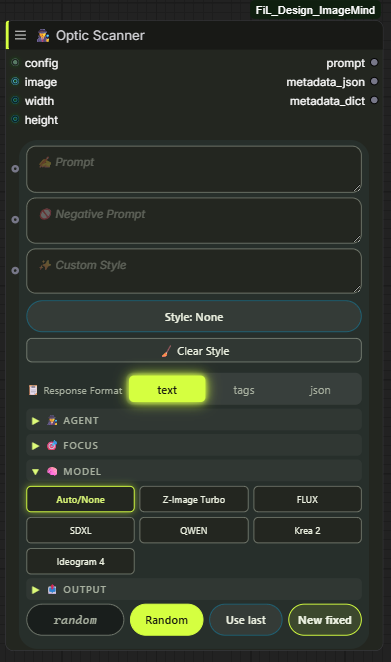 |
| 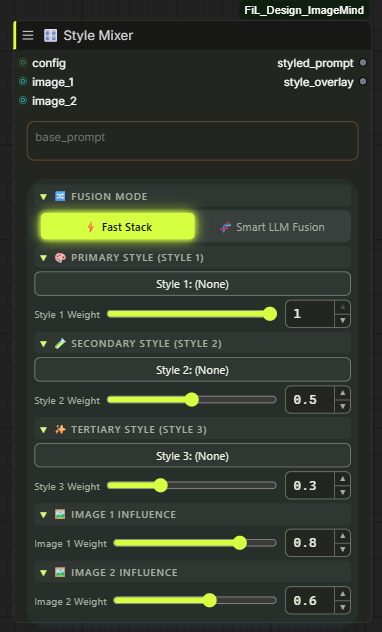 |
| 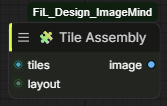 |
|
The full gallery, grouped by category, is under Screenshots.
Requirements
| | |
|---|---|
| ComfyUI | 0.3.60+ (V3 node API) |
| Python | 3.10 / 3.11 / 3.12 |
| Python deps | requests>=2.31, aiohttp>=3.9, PyYAML>=6.0.1, Pillow>=10, numpy>=1.26 |
| GPU | Not required by the pack itself — the sampling/upscale nodes use whatever ComfyUI already uses |
| LLM | Optional. Local (Ollama / LM Studio) works with no key and no account |
The frontend is shipped pre-built (frontend/dist is committed), so Node.js is not needed to
run the pack — only to develop it.
Installation
ComfyUI Manager — search for FiL_Design_ImageMind and install.
Manual:
cd ComfyUI/custom_nodes
git clone https://github.com/FiL-Design-Ai/FiL_Design_ImageMind.git
pip install -r FiL_Design_ImageMind/requirements.txt
On a portable/embedded ComfyUI install, use its interpreter for the requirements:
python_embeded\python.exe -m pip install -r ComfyUI\custom_nodes\FiL_Design_ImageMind\requirements.txt
On Windows, install_requirements.bat in the pack folder does that step for you:
it finds ComfyUI's own Python (python_embeded, venv or .venv), installs the
requirements into it and verifies the imports.
Restart ComfyUI. The nodes appear under 🎨 FiL Design/ in the node browser
(LLM, Analysis, Styling, Sampling, Image, Values, Tools).
Provider setup
[!IMPORTANT] Don't forget to configure your API keys in the menu! Cloud vision and LLM models require an API key to function. Open the FiL Providers tab in the ComfyUI sidebar (look for the key icon 🔑 on the sidebar), enter your API keys for the providers you plan to use (Google Gemini, OpenAI, Groq, OpenRouter, Cloudflare, Hugging Face, DeepInfra), and click Save. You can immediately test connection with the Probe button.
Nine providers ship in common/config.py. Local ones need nothing but a running server; cloud ones
need a key.
| Provider | Type | Endpoint | Key |
|---|---|---|---|
| 🦙 Ollama | Local | http://127.0.0.1:11434 | none |
| 🤖 LM Studio | Local | http://127.0.0.1:1234 | none |
| 🧠 OpenAI | Cloud | api.openai.com/v1 | OPENAI_API_KEY |
| 🔵 Google AI (Gemini) | Cloud | generativelanguage.googleapis.com | GOOGLE_API_KEY |
| ⚡ Groq | Cloud | api.groq.com/openai/v1 | GROQ_API_KEY |
| 🌐 OpenRouter | Cloud | openrouter.ai/api/v1 | OPENROUTER_API_KEY |
| ☁️ Cloudflare Workers AI | Cloud | per-account endpoint | CLOUDFLARE_API_TOKEN + CLOUDFLARE_ACCOUNT_ID |
| 🤗 Hugging Face | Cloud | router.huggingface.co/v1 | HF_TOKEN (Free, no credit card) |
| ⚡ DeepInfra | Cloud | api.deepinfra.com/v1/openai | DEEPINFRA_API_KEY |
Where keys are read from, in order:
data/auth.json— written by the FiL Providers sidebar tab (🔑) / Settings panel (git-ignored).- A real OS environment variable.
API.envin the pack root —KEY=valuelines, git-ignored.
config.yaml holds non-secret defaults (timeouts, rate limits, local server URLs). OLLAMA_URL
and LMSTUDIO_URL can be overridden from the environment. The pack ships
config.example.yaml, not config.yaml — copy it under the shorter name and edit the copy, and
updating the pack can never overwrite your settings. Every value in it is already the built-in
default, so an untouched copy changes nothing.
Verify a provider without running a graph: the Provider Loader panel shows a live status badge
(the pack probes configured providers in the background and surfaces the error text when one fails),
and GET /fil_design_imagemind/models/<provider> lists the models it can actually see.
OpenRouter has a built-in free-model vision fallback: if the selected model can't do vision or
is rate-limited, the request is retried down a curated chain of free vision models
(common/config.py, common/provider_resilience.py).
Quick start
Two ready workflows ship in example_workflows/ — drag the .json onto the canvas, or pick them in Workflows → Browse Templates:
| Workflow | What it does |
|---|---|
| fil-image-to-prompt.json | Load image → Provider Loader → Optic Scanner → prompt out |
| fil-text-prompt-studio.json | Text idea → prompt expansion with styles and model profile |
Building it by hand takes three nodes:
- 🔌 Provider Loader — pick provider + model (hit refresh to pull the live model list).
- 🕵️ Optic Scanner — wire
configin, connect animage(or type intoprompt), choose an agent and amodel_type, and wire your targetwidth/heightin (they are sockets, not fields). - Wire
promptinto your CLIP Text Encode and queue.
Examples
Five core workflows the pack simplifies into compact node chains:
- Batch a LoRA dataset.
LoadImage(a folder batch) → 📚 LoRA Dataset Forge — one caption per frame, aspect-bucketed, written straight into akohya_ss-ready folder.configis optional; skip it and pass your owncaptionsinstead. - Cycle checkpoints per generation. 🔄 Model Cycler → wire model into
KSampler Pro→ automatically steps through model list on each run with VRAM cleanup and watermark text labels. - Blend a reference photo with a style preset.
LoadImage→ 🎛️ Style Mixer (image_1+style_1, each with its ownweight) →styled_promptinto your CLIP Text Encode.Weighted Stackneeds no LLM call. - Vary one detail, hold the rest fixed.
LoadImage→ 👁️🗨️ Image Decomposer → keepsubject,compositionandstyleas they came out, rewrite onlylightingbefore recombining. - Match a batch's colour to one reference frame.
LoadImage→ 🎨 Color Wizard withreferencewired to your target look; turn onpreserve_skinfor portraits.
Node reference
All 23 nodes, grouped by category. Ranges below are the real schema limits.
🎨 FiL Design/🧠 LLM
<details> <summary><b>🔌 Provider Loader</b> — <code>FiLProviderLoader</code> — selects provider, model and generation parameters</summary>Outputs a config object that every LLM-aware node in the pack consumes, plus the resolved model
name as a string.
| Input | Type | Default | Range / options |
|---|---|---|---|
| provider | COMBO | ollama | ollama, lmstudio, openai, google, groq, openrouter, cloudflare, huggingface, deepinfra |
| model | COMBO | live list | fetched from the provider |
| refresh_models | BOOLEAN | false | re-fetches the model list |
| temperature | FLOAT | 0.7 | 0.0 – 2.0, step 0.05 |
| max_tokens | INT | 0 | 0 – 65536 (0 = provider default) |
| rate_limit_ms | INT | 100 | 0 – 5000 — minimum gap between requests |
| max_image_side | INT | 1024 | 128 – 4096, step 64 — images are downscaled before upload |
Outputs: config (FilProviderConfig), model (STRING)
The centrepiece: analyses an image (or expands a text idea) and writes a prompt tuned for the target diffusion model. Prompt fields are resizable and also work as input sockets.
| Input | Type | Default | Range / options |
|---|---|---|---|
| config | FilProviderConfig | — | from Provider Loader |
| agent | COMBO | ⚪ None | subject domain, 13 options — Portrait, Products, Nature & Landscape, Art & Illustration, Fashion, Animals, Architecture, Interior, City, Transport, Food, Games |
| agent_focus | COMBO | ⚪ None | craft layer laid over the agent — 📐 Composition, 💡 Lighting & Color, 🔬 Ultra Detail, 🎬 Cinematic, 🎭 Emotion & Motion |
| image | IMAGE (optional) | — | leave empty for text-only mode |
| width / height | INT socket (optional) | 0 | connection-only — wire the target resolution in from Empty Latent Image or a resolution picker; > 0 tailors the prompt to that aspect ratio |
| prompt | STRING (optional) | "" | your idea / seed text |
| negative_prompt | STRING (optional) | "" | passed through to the metadata |
| detail_level | COMBO | normal | tiny, short, normal, detailed, ultra |
| language | COMBO | en | en, ru |
| model_type | COMBO | Auto/None | Z-Image Turbo, FLUX, SDXL, QWEN, Krea 2, Ideogram 4, Video (universal video profile), MiniMax H3 (timeline shot-blocks) |
| video_duration | INT | 0 | visible for video model types only. Requested clip length in seconds; 0 = Auto. Range follows the profile: Video 2-20, MiniMax H3 4-15 (API limit, clamped at injection) |
| video_aspect | COMBO | Auto | visible for video model types only. Auto, 16:9, 9:16, 1:1, 21:9 — written into the shot framing (H3 timeline header) |
| video_sound | COMBO | Auto | visible for video model types only. Auto / Off (silent clip) / Layered (mandatory ambience + foley + music clause) |
| video_camera | COMBO | Auto | visible for video model types only. Preferred camera move — Locked-off, Dolly in/out, Orbit, Pan, Handheld follow, Crane up, FPV push, Rack focus |
| prompt_mode | COMBO | Auto | Auto, Hybrid, Two-Stage |
| photo_style / art_style | COMBO | None | 163 photo + 122 art presets, grouped by category |
| nsfw_photo_style / nsfw_art_style | COMBO | None | separate 18+ catalogs |
| custom_style | STRING (optional) | "" | free-form style text, merged with the picks |
| seed | INT | -1 | -1 – 999999999999 (-1 = random) |
| response_format | COMBO | text | text, tags (flat comma list), json (enables the Ideogram 4 / FLUX JSON schema) |
Outputs: prompt (STRING), metadata_json (STRING), metadata_dict (FilDict)
metadata_dict carries sent_prompt — the exact system/user text of the LLM call that produced
the result, which is what you want when debugging a bad generation.
| Input | Type | Default | Options |
|---|---|---|---|
| clean_vram | BOOLEAN | true | flush CUDA memory cache |
| unload_models | BOOLEAN | true | unload all models from GPU VRAM |
| anything | ANY (optional) | — | passthrough socket |
Output: output (ANY)
🎨 FiL Design/🔍 Analysis
<details> <summary><b>👁️🗨️ Image Decomposer</b> — <code>FiLImageDecomposer</code> — splits an image or prompt into layers</summary>| Input | Type | Default | Options |
|---|---|---|---|
| config | FilProviderConfig | — | from Provider Loader |
| image | IMAGE (optional) | — | visual decomposition |
| prompt | STRING (optional) | "" | text decomposition |
| language | COMBO (optional) | English | en, ru |
Outputs: subject, lighting, composition, style, full_prompt (all STRING)
Wire the individual layers into separate conditioning branches when you want to vary one aspect (lighting, say) while holding the rest fixed.
</details>🎨 FiL Design/🎨 Styling
<details> <summary><b>🧪 Style Mixer</b> — <code>FiLStyleMixer</code> — weighted blend of styles and reference images</summary>| Input | Type | Default | Notes |
|---|---|---|---|
| config | FilProviderConfig (optional) | — | only needed for LLM fusion |
| fusion_mode | COMBO | Weighted Stack (Fast) | or Smart LLM Fusion (Gen-Mix) |
| base_prompt | STRING | "" | the prompt the styles are applied to |
| image_1..4 | IMAGE (optional) | — | reference images |
| img_weight_1..4 | FLOAT (optional) | 0.8 / 0.6 / 0.4 / 0.2 | influence per reference |
| img_focus_1..4 | COMBO (optional) | Auto / General | Style & Texture, Color & Lighting, Subject & Composition, Mood & Atmosphere |
| style_1..3 | COMBO (optional) | (None) | from the full 396-preset catalog (photo, art and both NSFW libraries) |
| weight_1..3 | FLOAT (optional) | 1.0 / 0.5 / 0.3 | influence per style |
Outputs: styled_prompt (STRING), style_overlay (STRING)
Weighted Stack is deterministic string composition (no API call). Smart LLM Fusion sends the
stack to the vision model for a coherent rewrite and needs config.
| Input | Type | Default | Notes |
|---|---|---|---|
| config | FilProviderConfig (optional) | — | only needed for LLM Polish |
| scene_prompt | STRING | "" | what is happening in the frame; the rig wraps it without touching it |
| mode | COMBO | Original Shot | or Reshoot (lock a reference image, change only the camera treatment) |
| camera | COMBO | RED V-RAPTOR XL | film bodies wrap the shot in analog stock language, digital in sensor language |
| lens | COMBO | Helios 44-2 (Vintage) | spherical or anamorphic optical character |
| focal_length | COMBO | 50mm (Human Eye) | ultra-wide pressure → telephoto compression |
| aperture | COMBO | f/11 (Deep Focus) | how much of the frame holds focus |
| color_grading | COMBO | Teal & Orange (Blockbuster) | finish applied over the frame |
| enable_grading | BOOLEAN | true | off keeps the rig to hardware and medium only |
| polish_mode | COMBO | Deterministic (Fast) | or LLM Polish (Gen-Rig) |
Outputs: rigged_prompt (STRING), rig_overlay (STRING)
The five axes are the camera department; the scene rides through them untouched. Deterministic
is pure string assembly (no API call). LLM Polish rewrites the assembled rig into fluent prose
through the provider model and needs config; on any failure it falls back to the deterministic rig.
rig_overlay is the camera treatment alone, ready to stack under any prompt elsewhere.
🎨 FiL Design/⚡ Sampling
<details> <summary><b>⚡ KSampler</b> — <code>FiLKSampler</code> — full sampler with passthrough and scripts</summary>| Input | Type | Default | Range / options |
|---|---|---|---|
| model | MODEL | — | |
| seed | INT | 0 | |
| steps | INT | 20 | |
| cfg | FLOAT | 7.0 | |
| sampler_name | COMBO | euler | every sampler ComfyUI exposes (loaded lazily at schema time) |
| scheduler | COMBO | simple | simple, sgm_uniform, karras, exponential, ddim_uniform, beta, … |
| positive / negative | CONDITIONING | — | |
| latent | LATENT | — | |
| denoise | FLOAT | 1.0 | |
| eta (η) | FLOAT | 1.0 | ancestral/SDE samplers only — see docs/ETA_GUIDE.md |
| bongmath | BOOLEAN | true | |
| preview_method | COMBO | auto | auto, latent2rgb, taesd, vae_decoded_only, none |
| vae_decode | COMBO | true | true, true (tiled), false |
| vae | VAE (optional) | — | connection-only |
| script | FilHiresScript (optional) | — | HighRes Fix and/or Noise Control |
Outputs: model, positive, negative, latent, vae, image — the five passthroughs let
you chain samplers without re-dragging every wire.
Producing a script object; it does not sample on its own. Wire its output into the KSampler's
script input.
| Input | Type | Default | Range / options |
|---|---|---|---|
| upscale_type | COMBO | latent | latent, pixel, both |
| hires_ckpt_name | COMBO | (use same) | optionally re-sample with a different checkpoint |
| latent_upscaler | COMBO | nearest-exact | nearest-exact, bilinear, area, bicubic, bislerp |
| pixel_upscaler | COMBO | first model found | your models/upscale_models folder |
| upscale_by | FLOAT | 1.25 | |
| use_same_seed / seed | BOOLEAN / INT | true / 0 | |
| hires_steps | INT | 12 | |
| denoise | FLOAT | 0.56 | |
| iterations | INT | 1 | repeat the hires pass |
| use_controlnet | BOOLEAN | false | |
| control_net_name | COMBO | first found | tile ControlNets live here |
| strength | FLOAT | 1.0 | ControlNet strength |
| preprocessor | COMBO | none | none, canny |
| script | FilHiresScript (optional) | — | chain another script (e.g. Noise Control) |
Output: script
| Input | Type | Default | Options |
|---|---|---|---|
| rng_source | COMBO | cpu | cpu, gpu |
| add_seed_noise | BOOLEAN | false | enables the variation blend |
| seed | INT | 0 | variation seed |
| weight | FLOAT | 0.5 | blend strength |
| script | FilHiresScript (optional) | — | chain with HighRes Fix |
Output: script
The variation blend uses a sin/cos rotation rather than a linear lerp, so noise keeps unit variance
at every weight — a linear blend would quietly weaken the effective denoise in the middle of the
range.
High-fidelity tiled diffusion engine designed for Krea2 / Flux.2 architectures with edge-aware Sobel texture preservation, color matching and identity LoRA integration.
| Input | Type | Default | Notes |
|---|---|---|---|
| model | MODEL | — | base diffusion model |
| image | IMAGE | — | input source image to upscale |
| vae | VAE | — | VAE for tiled encode/decode |
| positive | CONDITIONING | — | positive conditioning |
| negative | CONDITIONING (optional) | — | negative conditioning |
| prompt | STRING | "" | guided detail prompt |
| steps | INT | 20 | sampling steps per tile |
| denoise | FLOAT | 0.35 | tile denoise strength |
| tile_grid | COMBO | 2x2 | 2x2 (4 tiles) – 4x4 (16 tiles) |
| texture_injection | FLOAT | 0.15 | Sobel edge-aware high-frequency detail preservation |
| color_match | COMBO | lab | none, lab, wavelet, rgb color transfer |
Outputs: image (IMAGE), latent (LATENT)
🎨 FiL Design/🖼️ Image
<details> <summary><b>🧮 Upscaler Advanced</b> — <code>FiLUpscaleTileCalc</code> — tile-grid planner + model upscaler</summary>| Input | Type | Default | Range / options |
|---|---|---|---|
| image | IMAGE (optional) | — | omit for latent-only mode |
| upscale_model | UPSCALE_MODEL (optional) | — | connect one to actually upscale pixels |
| latent | LATENT (optional) | — | resized with bislerp and tiled 1:1 with the image grid |
| upscale_factor | FLOAT | 2.0 | 0.1 – 8.0, step 0.25 |
| tile_size | INT | 1024 | 64 – 2048, step 64 |
| tile_overlap | INT | 64 | 0 – 512, step 8 — clamped at half the tile |
| auto_overlap | BOOLEAN | false | derives overlap from tile size (~12.5%) |
| auto_mode | BOOLEAN | false | full auto — profile picks tile size and overlap |
| auto_profile | COMBO | Balanced | Low VRAM, Balanced, High VRAM, Max Quality, Ultra Quality |
| manual_tile_cols / manual_tile_rows | INT | 0 | 0 – 64 — pin an exact grid (0 = derive it) |
| non_square_tiles | BOOLEAN | false | rectangular tiles, aspect clamped at 1.5:1 |
| auto_fix_thin_edges | BOOLEAN | false | shrinks the tile to the next standard size to avoid a thin edge strip (no-op at 512 — the floor) |
Outputs (21): image, tiles, upscale_by, denoise, tile_width, tile_height,
mask_blur, tile_padding, overlap, width, height, tile_cols, tile_rows, tile_count,
latent_w, latent_h, info, warnings, latent, latent_tiles, layout
Identical widget panel to Advanced and 100% delegation to it (one source of truth for the geometry), trimmed to the outputs most graphs actually use.
Outputs: image, tiles, latent, latent_tiles, layout
| Input | Type | Notes |
|---|---|---|
| tiles | IMAGE | the processed tile batch, same order as it came out |
| layout | FilTileLayout | from either Upscaler |
Output: image — tiles are feathered across the real overlap zones, so seams don't show.
| Input | Type | Default | Range / options |
|---|---|---|---|
| image | IMAGE | — | |
| method | COMBO | Full Auto | Full Auto, Gray World, White Patch, Channel Stretch, LAB Enhance |
| strength | FLOAT | 0.8 | 0.0 – 1.0 (0 = no change) |
| saturate | FLOAT | 0.5 | 0.0 – 5.0 — percentile saturation for Channel Stretch |
| temperature | FLOAT | 0.0 | -1.0 – 1.0 |
| tint | FLOAT | 0.0 | -1.0 – 1.0 |
| preserve_skin | BOOLEAN | false | protects skin tones from the correction |
| reference | IMAGE (optional) | — | match the palette of another image |
| wb_mask | MASK (optional) | — | white-balance picker: mask the area that should be neutral |
Output: image
Smart latent scaler that prevents border seams, blur and edge artifacts on SD1.5, SDXL, and DiT architectures (Flux, SD3) by aligning latent dimensions to clean mathematical step boundaries.
| Input | Type | Default | Range / options |
|---|---|---|---|
| samples | LATENT | — | input latent tensor to scale |
| mode | COMBO | By Factor | By Factor, Target Size, Longest Edge |
| scale_by | FLOAT | 1.5 | 0.05 – 8.0, step 0.05 |
| target_width | INT | 1024 | 64 – 8192, step 64 |
| target_height | INT | 1024 | 64 – 8192, step 64 |
| longest_edge | INT | 1536 | 128 – 8192, step 64 |
| upscale_method | COMBO | bislerp | bislerp, nearest-exact, area, bilinear, bicubic |
| snap_to | COMBO | 64 px (U-Net & DiT Safe) | 64 px (U-Net & DiT Safe), 16 px (DiT Patch 2x2), 8 px (1 Latent Pixel), Disabled (Exact) |
| round_mode | COMBO | nearest | nearest, up, down |
Outputs: latent (LATENT), width (INT), height (INT), latent_w (INT), latent_h (INT), effective_scale (FLOAT)
🎨 FiL Design/📁 Dataset
<details> <summary><b>📚 LoRA Dataset Forge</b> — <code>FiLDatasetForge</code> — batch → training-ready LoRA dataset on disk</summary>One pass: aspect-ratio buckets at the target resolution, one LLM caption per frame, files written where kohya_ss / sd-scripts can read them.
| Input | Type | Default | Notes |
|---|---|---|---|
| image | IMAGE | — | the whole batch; one file per frame |
| config | FilProviderConfig (optional) | — | from 🔌 Provider Loader; only needed for LLM captions |
| captions | STRING (optional) | — | manual captions split on a --- line |
| dataset_name | STRING | my_lora | folder under ComfyUI/output/datasets, sanitized |
| trigger_word | STRING | — | token that activates the LoRA |
| class_token | STRING | — | woman, car, … |
| base_resolution | COMBO | 1024 | 512 – 1536 |
| layout | COMBO | kohya | kohya → img/<repeats>_<trigger> <class>/ + dataset.toml |
| repeats | INT | 10 | repeats per image per epoch |
| caption_mode | COMBO | natural | natural (Flux/SDXL) · tags (SD 1.5/Pony) · hybrid · none |
| crop_mode | COMBO | center | entropy crops toward detailed regions |
Outputs: preview, report, dataset_path, manifest.
🎨 FiL Design/🔢 Values · 🧰 Tools
<details> <summary><b>🔄 Model Cycler</b> — <code>FiLModelCycler</code> — automated model cycler with VRAM cleanup</summary>Cycles through checkpoints, UNet/diffusion models, or connected MODEL signals on each generation run.
| Input | Type | Default | Notes |
|---|---|---|---|
| model_list | STRING | "" | newline-separated list of model names / paths |
| model_1..4 | MODEL (optional) | — | optional direct model input wires |
| cycle_mode | COMBO | sequential | sequential, random, shuffle |
| unload_previous | BOOLEAN | true | flush VRAM before loading the next checkpoint |
| watermark_format | STRING | {model_name} | format string for image overlay labels |
Outputs: model (MODEL), model_name (STRING), clean_name (STRING), formatted_label (STRING)
Cycles through LoRA adapters on each generation run with automatic trigger-word extraction and bypass slot for clean vs. LoRA A/B testing.
| Input | Type | Default | Notes |
|---|---|---|---|
| model | MODEL (optional) | — | input diffusion model |
| clip | CLIP (optional) | — | input CLIP text encoder |
| lora_list | STRING | "" | newline-separated list of LoRAs; inline weight support lora.safetensors:0.8:0.5 |
| filter_pattern | STRING | "" | wildcard filter when scanning auto-list (e.g. *cyber*) |
| cycle_mode | COMBO | Sequential (Loop) | Sequential (Loop), Sequential (Stop), Ping-Pong, Random, Fixed Index |
| index | INT | 0 | 0-based starting index |
| strength_model | FLOAT | 1.0 | default MODEL strength (-10.0 to 10.0) |
| strength_clip | FLOAT | 1.0 | default CLIP strength (-10.0 to 10.0) |
| include_bypass | BOOLEAN | false | ON inserts a [Bypass / None] slot at index 0 for A/B comparison |
| auto_advance | BOOLEAN | true | ON advances to next LoRA on each queue run |
| skip_on_error | BOOLEAN | true | ON logs warning and skips corrupt files instead of crashing |
Outputs: MODEL, CLIP, LORA_NAME (STRING), CLEAN_NAME (STRING), TRIGGER_WORDS (STRING), LABEL (STRING)
Replaces core's scattered chain (ImageScaleToTotalPixels → VAEEncode → chained
ReferenceLatent nodes) for FLUX.2-family edit workflows (Krea2, Klein, Dev). Two channels
carry a reference: vision hands it to the text encoder, which looks at it without putting
anything into the frame; latents VAE-encodes it into the frame's own tokens, which is the
Kontext behaviour that tiles the source into the output. Each reference gets a card — a job
and a pull of its own — and the node says in words what it did with them.
| Input | Type | Default | Notes |
|---|---|---|---|
| clip | CLIP | — | edit model's text encoder (e.g. Qwen3-VL for FLUX.2/Krea2) |
| prompt | STRING | "" | edit instruction |
| vae | VAE | — | only needed when references are VAE-encoded, or when a mask is wired |
| images | IMAGE ×N | — | auto-growing reference slots (image1..image10) |
| mask | MASK | — | edit only this area of the FIRST reference; the latent output carries it aligned |
| reference_cards | STRING | "" | a job per reference as JSON, e.g. [{"role": "lighting", "strength": 0.6}] |
| reference_mode | COMBO | vision | vision, latents, both |
| reference_treatment | COMBO | normal | legacy — a role brings the treatment it needs; hidden in the panel |
| reference_strength | FLOAT | 1.0 | multiplies every card at once — for driving them from the graph; hidden in the panel |
| vision_megapixels | FLOAT | 0.15 | size of the copy the text encoder reads |
| latent_megapixels | FLOAT | 1.0 | cap for the copy the VAE encodes (smaller references stay native) |
| reference_latents_method | COMBO | index_timestep_zero | index_timestep_zero, index, offset, uxo |
| prompt_strength | FLOAT | 1.0 | how loudly the written instruction speaks against the pictures |
The panel is four things: the prompt, the reference mode, one card per wired reference, and what the last run did. Everything else the node accepts stays out of the way — the legacy widgets a card replaced are hidden, and the size caps and the latents method sit under advanced.
A card carries a role, a signed strength, an optional window, and an optional
treatment override — e.g. [{"role": "lighting"}, {"role": "palette", "window": "look"}].
Windows say when during sampling a reference speaks, and the boundaries are measured, not
guessed: on Krea 2 the early steps settle the layout and the later ones the look. layout
(the first 15%) lets a reference choose the framing and then go quiet; look (after 40%) holds
it back until the frame is decided, so it lends its surface without dictating the composition;
whole run is the default. Each distinct window costs an encoder pass the first time.
Roles (reference_cards): as is · material (surface, subject loosens) ·
lighting (light and layout, subject replaced) · palette (colours only). Each brings the
treatment that makes it true. A card's strength is signed: 1 holds the reference, 0
drops it, and below zero steers away from it. Per-reference strength needs a
vision-language encoder (Qwen3-VL); the card says so on itself when there is none, and the
summary output spells it out.
Prompt strength cross-fades between the words and the pictures, and measured on Krea 2 it
does it evenly: 0 is what the model took from the references alone, 0.5 brings the written
scene in half way, 1 is the instruction as written, 1.5 pushes it harder. Anything but 1
encodes a second time with the instruction silenced in place — the tokens stay, their
embeddings go to zero — so both passes are the same length and can be weighed against each
other. Note the contrast with a card's own strength, which holds its reference right up to 0
and then lets go all at once.
Each card shows a thumbnail of the copy the model actually received, treatment already
applied — picking palette turns the portrait on the card into a colour field.
Outputs: CONDITIONING · summary (STRING — what the run actually did) ·
references (IMAGE — the prepared copies the model received) · latent (LATENT — the first
reference encoded, carrying the mask)
One-shot prompt rewriter: you give it a free-form instruction and a prompt you already have, the LLM rewrites the prompt to follow the instruction — style transfer (anime → photorealism), re-lighting, medium change — while keeping the subject, composition and every detail the instruction does not touch. The output follows the pack's DiT rules: high density, tactile physical truth, zero meta-noise.
| Input | Type | Default | Notes |
|---|---|---|---|
| config | FilProviderConfig | — | from Provider Loader (owns temperature / max_tokens / rate limit / unload) |
| instruction | STRING | "" | what to do with the prompt, in free form |
| source_prompt | STRING | "" | the prompt to rewrite; a wired STRING link overrides the widget |
| language | COMBO | en | language of the finished prompt: en / ru / zh |
| seed | INT | 0 | fixed seed reuses the cached answer (instant, no API call); a new seed asks for a fresh variant |
Outputs: prompt (STRING — the rewritten prompt, wire it into your pipeline)
♻️ Seed — seed INT (0 – 2⁶⁴-1) → SEED INT. Panel is one row: the value plus 🔀 randomize,
♻️ reuse last, 🎲 new fixed random.
🧹 Cleaner — clean_vram BOOLEAN + unload_models BOOLEAN → output (ANY).
🔀 Cyber Switch — input (ANY, optional) + enable BOOLEAN → output (ANY). ON forwards the
value untouched; OFF passes None on the wire without blocking optional downstream nodes.
🖥️ Show Any — source (ANY, optional) + text (STRING) → output (ANY). Universal data inspector & pass-through monitor. Displays interactive image/mask previews or formatted text/JSON/latents with counters and 1-click clipboard copy.
📡 Channel — Wireless signal broadcasting across the graph without visible wires.
</details>Русский
- Что это
- Зачем ImageMind
- С чего начать
- Превью интерфейса
- Требования
- Установка
- Настройка провайдеров
- Быстрый старт
- Примеры
- Справочник по узлам
- Конвейер тайлового апскейла
- Система промптинга
- Настройки
- Темы и локализация
Что это
Набор кастомных узлов для ComfyUI на V3 API (io.ComfyNode, декларативный
define_schema(), асинхронный execute()) с фронтендом на Vue 3 + TypeScript, собранным в
frontend/dist. Четыре основных направления (24 узла):
| Направление | Что даёт |
|---|---|
| 🧠 LLM и зрение | Девять провайдеров (локальные и облачные), 12 предметных агентов плюс нейтральный описатель — каждый сочетается с 5 фокус-оверлеями, профили промптов под Z-Image, FLUX, SDXL, QWEN, Krea 2, Ideogram 4 и универсальный Video-профиль для видео-моделей |
| 🖼️ Работа с изображением | Планирование сетки тайлов с честной математикой нахлёста, апскейл моделью, кропы тайлов в пиксельном и латентном пространстве, сборка с растушёвкой, авто-цветокоррекция, LoRA Dataset Forge |
| 🎛️ Сэмплинг и Циклер | Полноценный KSampler со всеми сэмплерами/планировщиками, Krea2 Tiled Diffusion с сохранением текстур и контуров, passthrough-сокетами и встроенным превью, скрипты HighRes Fix, Noise Control, плюс авто-переключатель моделей Model Cycler и LoRA-адаптеров LoRA Loader с очисткой VRAM и водяными знаками |
| 🎨 Интерфейс и UX | У каждого узла настоящая Vue-панель — 12 HUD-тем (Cyberpunk Neon, Pip-Boy Green, Vault-Tec Amber), полная ru/en локализация, Graph Undo Guard (защита от срыва графа при Ctrl+Z), Takeover Wire Replacement с тоастом отмены, компактные тумблеры, степперы |
Настройка провайдеров и ввод API-ключей
[!IMPORTANT] Не забудьте добавить API-ключи в меню ввода! Для работы узлов анализа, зрения и генерации промптов (Optic Scanner, Prompt Director, LoRA Dataset Forge, Prompter) через облачные нейросети необходим API-ключ соответствующего сервиса.
🔑 Как настроить API-ключи прямо в интерфейсе ComfyUI:
- Откройте вкладку FiL Providers с иконкой ключа 🔑 на боковой панели ComfyUI (Sidebar).
- В карточке нужного провайдера (Google Gemini, OpenAI, Groq, OpenRouter, Cloudflare, Hugging Face, DeepInfra) вставьте ваш ключ в поле API-ключ (API Key).
- Нажмите Сохранить (Save).
- Нажмите кнопку Probe (Проверить), чтобы моментально протестировать доступность соединения и загрузить список актуальных моделей без запуска очередей генерации.
Альтернативные способы передачи ключей:
- Системные переменные окружения ОС:
GOOGLE_API_KEY,OPENAI_API_KEY,GROQ_API_KEY,OPENROUTER_API_KEY,CLOUDFLARE_API_TOKEN,HF_TOKEN,DEEPINFRA_API_KEY.- Файл
API.envв корне папки узла со строками видаKEY=value(файл добавлен в.gitignoreи защищён от перезаписи при обновлениях).Локальные провайдеры (Ollama, LM Studio) работают сразу «из коробки» без ключей — достаточно запустить локальный сервер.
Быстрый старт
Два готовых шаблона воркфлоу поставляются в папке example_workflows/ — перетащите .json файл на холст ComfyUI:
| Воркфлоу | Что делает |
|---|---|
| fil-image-to-prompt.json | Загрузка картинки → Provider Loader → Optic Scanner → промпт |
| fil-text-prompt-studio.json | Текстовая идея → расширение промпта со стилями и профилем модели |
Справочник по узлам
Все 24 узла по категориям:
🎨 FiL Design/LLM
- 🔌 Provider Loader (
FiLProviderLoader) — выбор провайдера, модели и параметров запроса. - 🕵️ Optic Scanner (
FiLOpticScanner) — зрение, анализ кадра и генерация промптов под DiT-архитектуры. - 💬 Prompt Director (
FiLPromptDirector) — переработка готового промпта по свободной инструкции: смена стиля (аниме → фотореализм), свет, медиум. - 📝 Prompter (
FiLPrompter) — смарт-текстовое поле с 3 кнопками улучшения промпта на лету. - 🧹 LLM Unloader (
FiLLLMUnloader) — мгновенный сброс VRAM и выгрузка моделей.
🎨 FiL Design/Analysis
- 👁️🗨️ Image Decomposer (
FiLImageDecomposer) — разбор изображения или текста на слои (subject, lighting, composition, style).
🎨 FiL Design/Styling
- 🎛️ Style Mixer (
FiLStyleMixer) — смешивание стилей и референсных изображений. - 🎬 Cinema Rig (
FiLCinemaRig) — операторский конструктор кадра и фирменная сигнатура режиссера.
🎨 FiL Design/Sampling
- ⚡ KSampler (
FiLKSampler) — сэмплер с passthrough и скриптами. - 🎨 Krea2 Tiled Diffusion (
FiLKrea2TiledDiffusion) — тайловая диффузия с сохранением контуров (Edge-Aware) и инъекцией микротекстур. - 🔬 HighRes Fix (
FiLHighResFix) — скрипт двухстадийного апскейла и повторного сэмплинга. - 🎛️ Noise Control (
FiLNoiseControl) — управление RNG и вариативный шум.
🎨 FiL Design/Conditioning
- 🎯 Edit Encoder (
FiLEditEncoder) — промпт + референсы в одном кондее для edit-моделей семейства FLUX.2 (Krea2, Klein, Dev).
🎨 FiL Design/Image
- 🔍 Upscaler Advanced (
FiLUpscaleTileCalc) — планировщик тайловой сетки и апскейлер. - 🔍 Upscaler Simple (
FiLUpscaleSimple) — упрощенный тайловый планировщик. - 🧩 Tile Assembly (
FiLTileAssembly) — бесшовная сборка тайлов с растушевкой. - 🎨 Color Wizard (
FiLColorWizard) — авто-цветокоррекция, баланс белого и подгонка палитры.
🎨 FiL Design/Dataset
- 📚 LoRA Dataset Forge (
FiLDatasetForge) — пакетирование, подпись и генерация LoRA датасетов под kohya_ss.
🎨 FiL Design/Values & Tools
- 🔄 Model Cycler (
FiLModelCycler) — авто-переключатель моделей на каждом шаге с очисткой VRAM и водяными знаками. - 🧬 LoRA Loader (
FiLLoraLoader) — авто-переключатель и парсер LoRA с автоизвлечением триггер-слов, режимом bypass и плашками подписей. - ♻️ Seed Generator (
FiLSeed) — управление генератором случайных чисел (до MAX_SAFE_INTEGER). - 🔀 Cyber Switch (
FiLSignalSwitch) — универсальный переключатель сигналов с пробросомNone. - 👁️ Show Any (
FiLShowAny) — универсальный инспектор и монитор любых данных со сквозной передачей, счётчиком и копированием. - 🧬 LoRA Prompter (
FiLLoraPrompter) — смарт-компоновщик промптов с интерактивными кликабельными чипсами триггеров из LoRA Loader. - 📡 Channel (
FiLChannel) — беспроводная трансляция сигналов по всему графу.
Темы и локализация
В настройках Settings → FiL_Design_ImageMind:
- Языки интерфейса: Полная поддержка Русский (RU) / English (EN).
- Стили интерфейса: Cyberpunk Neon, Fallout Pip-Boy Green, Vault-Tec Amber и классический HUD.
FiL Design ImageMind — Built for speed, style, and perfection in ComfyUI.