
ComfyUI Stash
Stash nodes for ComfyUI: Load content from Stash for use in Comfy workflows.
Nodes (4)
Grab any image from your Stash library straight into the graph
The connection node every other Stash node is plugged into
The node that makes face swapping on VR180 footage actually work
Put the swapped VR faces back — distortion and all
ComfyUI-Stash
ComfyUI-Stash provides nodes for ComfyUI to access content within Stash, the organizer for gentlemens' special-interest content.
These nodes let you easily use Stash content in your Comfy workflow.
Installing and Using
Easy User Install
The best way to use ComfyUI-Stash is via the ComfyUI Manager. Search for "Stash" in its Custom Nodes Manager. As usual, install and then restart Comfy to activate the nodes.
You Must Set Stash Settings
To use Stash, you must configure Comfy with the correct Stash URL and API Key.
In ComfyUI, click the lower-left "gear" to open its settings. On the left, click the Stash section which will reveal settings for Stash API.
You must copy the API Key from your Stash security page. For example, if Stash is on your local computer, the security page is at http://localhost:9999/settings?tab=security. (If not, correct the hostname of that URL.) Paste the entire API key into ComfyUI.
The API URL may already be correct if Stash is on your local computer. If not, correct the hostname (and possibly port) but remember to keep the /graphql path.
Developer Install
From your root ComfyUI clone, change into its custom_nodes directory and clone this repo there:
git clone https://github.com/zyquon/ComfyUI-Stash
Nodes
These nodes currently exist and work.
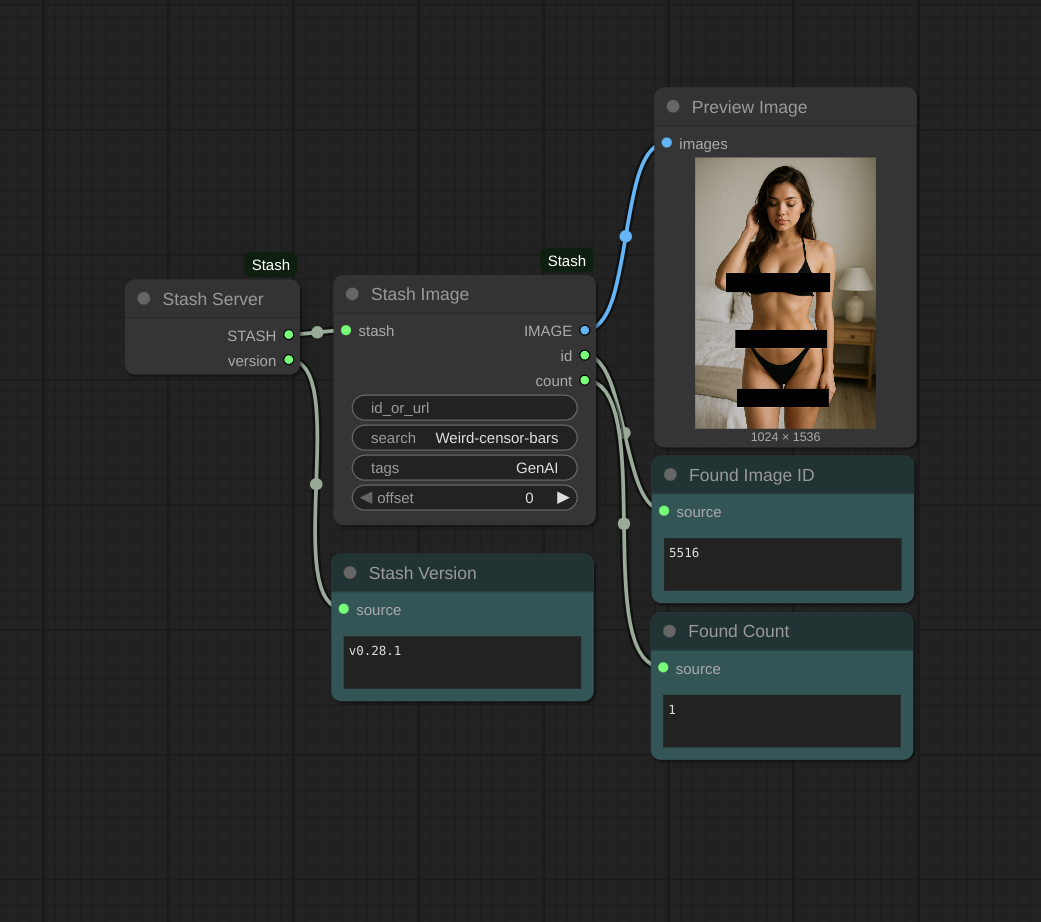
Stash Server
This required node handles connecting to Stash from ComfyUI.
Outputs
- STASH - The Stash service, needed by other nodes
- version - A string representing the current Stash version, useful for confirming things work
Stash Image
This node queries Stash for an image which can be used broadly by ComfyUI. It supports several ways to search and query Stash, such as by ID or by filename. Stash Image will combine ("OR") all results for all search parameters you provide, and it will output the first matching image by default, or the nth matching image by setting offset.
Inputs
- stash - Required Stash server
- id_or_url - Optional search by ID. You can paste the Stash web UI's URL for that image; the node will use the ID from within that URL. So if you see something in Stash that you like, just copy/paste it here. Or, you can just paste an ID here, or even a comma-separated list of IDs.
- search - Optional search query, the same as the Stash Search bar in its web UI. This is useful for searching by filename or folder name.
- tags - Optional tag names (comma-separated); upper-case and lower-case must match.
- offset - Which image from the search results to use (0 is the first)
Outputs
- IMAGE - The image. Animated webp and GIFs will include all frames as an image batch.
- id - The ID of the Stash Image used, useful for testing
- count - The number of all Stash images matching this query, useful for testing. The
offsetinput must always be smaller than this.
Future
The following additions are planned but not finished yet.
- Using Stash video content
- Storing back into Stash