
ComfyUI Extension
ComfyUI-VRAM-watcher
Displays GPU VRAM usage and system RAM usage as bar widgets in a ComfyUI node.
zwaigani/ComfyUI-VRAM-watcher
Nodes1
On cloudLocal install
Categoryutils
Stars2
Updated10 months ago
Nodes (1)
Readme
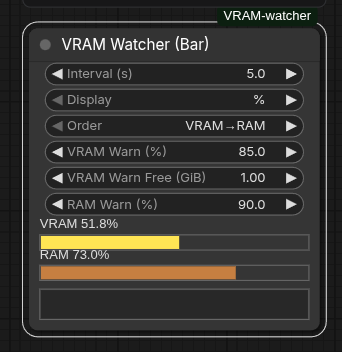
ComfyUI-VRAM-watcher
English
A simple ComfyUI custom node that shows VRAM / RAM usage bars on the canvas.
- VRAM: read via
torch.cuda(shows unavailable when CUDA is not available) - RAM: on Linux via
/proc/meminfo, otherwise viapsutilwhen installed
Install
In ComfyUI/custom_nodes:
git clone https://github.com/zwaigani/ComfyUI-VRAM-watcher.git
Restart ComfyUI.
Usage
- Start ComfyUI
- Add node: VRAM Watcher (Bar) (category:
utils) - Configure the widgets in the node
Node Settings
- Interval (s): polling interval
- Display:
%orMB - Order:
VRAM→RAM/RAM→VRAM
WARNING Messages
Below the bars, a small message panel shows warnings and clears automatically when usage goes down.
VRAM WARNINGRAM WARNING
Threshold widgets:
- VRAM Warn (%): shows
VRAM WARNINGwhen VRAM usage is above this - VRAM Warn Free (GiB): shows
VRAM WARNINGwhen free VRAM is below this - RAM Warn (%): shows
RAM WARNINGwhen RAM usage is above this
Tip: OOM can happen even when usage is below 90%, so using VRAM Warn Free (GiB) is recommended.
Dependencies
- Uses
torchfrom your ComfyUI environment - Uses
psutilfor RAM stats on non-Linux platforms (seerequirements.txt)
License
MIT License. See LICENSE.
Changelog / Releases
- Changes are tracked in CHANGELOG.md.
- For a new release: update
CHANGELOG.md, bump the version inpyproject.toml, create a git tag (e.g.v1.0.1), then publish a GitHub Release.
Troubleshooting
- VRAM shows unavailable
torch.cuda.is_available()is false (CPU-only, CUDA not installed, unsupported GPU, etc.)
- RAM shows unavailable on Windows/macOS
psutilmight not be installed
日本語
ComfyUI の画面上に VRAM / RAM 使用量バーを表示するためのシンプルなカスタムノードです。
- VRAM:
torch.cudaから取得(CUDA が無い場合は unavailable 表示) - RAM: Linux では
/proc/meminfo、それ以外はpsutilがあれば取得
インストール(git clone)
ComfyUI/custom_nodes で:
git clone https://github.com/zwaigani/ComfyUI-VRAM-watcher.git
ComfyUI を再起動。
使い方
- ComfyUI を起動
- ノード追加から
VRAM Watcher (Bar)を追加(カテゴリ:utils) - ノード内のウィジェットで表示を調整
ノードの設定
- Interval (s): ポーリング間隔(秒)
- Display:
%またはMB - Order:
VRAM→RAM/RAM→VRAM
WARNING メッセージ
バーの下にメッセージパネルが表示され、条件を満たすと WARNING が出ます。空きが戻れば自動で消えます。
VRAM WARNINGRAM WARNING
しきい値(ウィジェットで調整可能):
- VRAM Warn (%): VRAM 使用率が指定以上で
VRAM WARNING - VRAM Warn Free (GiB): 空きVRAMが指定以下で
VRAM WARNING - RAM Warn (%): RAM 使用率が指定以上で
RAM WARNING
※ OOM は使用率が 90% 未満でも発生し得るため、VRAM Warn Free (GiB) の併用がおすすめです。
依存関係
- ComfyUI の環境に含まれる
torchを利用します - RAM 表示を Linux 以外でも有効にするため
psutilを使用します(requirements.txt)
トラブルシュート
- VRAM が unavailable
torch.cuda.is_available()が false の環境です(CPU 実行、CUDA 未導入、対応GPUなし等)
- RAM が unavailable(Windows/macOS 等)
psutilがインストールされていない可能性があります
ライセンス
MIT License(LICENSE)。