
QAlign
Reference-guided image alignment custom node for ComfyUI
Qalign
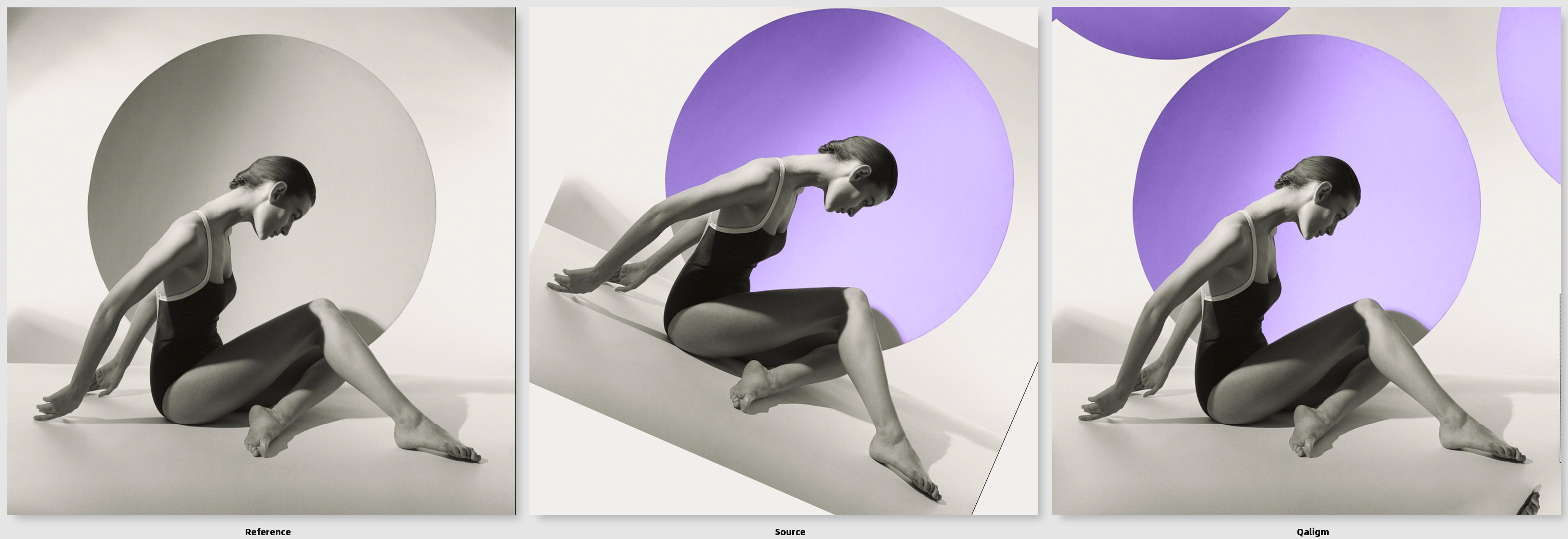
QAlign is a ComfyUI custom node for geometrically aligning an enhanced or generated image to a reference image while preserving the source image's appearance.
Core principle: The reference defines where things belong; the source defines how they look.
QAlign estimates and applies image-space transformations. It does not blend the reference into the result, run a generative model, or attempt to harmonize lighting and texture. Its purpose is to correct geometric drift between two images that are intended to depict the same scene or subject.
- Node display name:
QAlign - Node class:
QAlignImageAlign - Package/repository name:
Qalign - Version documented here:
0.5.0 - License: Apache-2.0
Contents
- What QAlign does
- Installation
- Inputs and outputs
- Alignment pipeline
- Alignment modes
- Parameters explained
- Understanding the report
- Recommended workflow
- Troubleshooting and limitations
- Technical notes
- License
What QAlign does
QAlign is designed for workflows in which an image model changes an image's appearance---such as clothing, materials, color, lighting, or surface detail---but the result should remain geometrically close to the original.
A target image may be the correct size yet still contain geometric drift: the subject may be slightly translated, rotated, stretched horizontally or vertically, or locally displaced. Matching the input dimensions alone does not correct these differences.
QAlign therefore separates the task into two stages:
- Global alignment: estimate a single image-wide transform to correct translation and, depending on the selected mode, rotation and scale.
- Optional local correction: estimate a dense displacement field to refine remaining local differences after global alignment.
The aligned output is the transformed source image. The reference is used to estimate geometry; it is not composited into the output.
What QAlign is not
- It is not an image generator or inpainting tool.
- It does not guarantee semantic or anatomical correspondence.
- It does not decide which appearance changes are intentional.
- It does not make lighting, color, texture, or reflections match the reference.
- It cannot reliably recover geometry when the images share too little visual structure.
Installation
-
Use ComfyUI Manager or Download or git clone this repository into your ComfyUI custom-nodes directory, for example:
ComfyUI/ └── custom_nodes/ └── Qalign/ -
Restart ComfyUI and search the node menu for QAlign.
No model weights, API credentials, or external services are required.
Inputs and outputs
Inputs
| Input | Type | Description |
|---|---|---|
| reference | IMAGE | The geometric reference. The source is aligned to this image's coordinate system. |
| source | IMAGE | The image to transform. Its appearance is retained as the basis of the output. |
| subject_mask | MASK, optional | A soft or binary mask identifying the region where local correction should be applied. Useful when the foreground subject should be corrected without applying dense local displacement everywhere. |
The node expects ComfyUI image tensors. If the images have different
dimensions, QAlign normalizes the working images to the reference
dimensions by default. For predictable comparisons, it is often useful
to normalize both inputs upstream---for example, with KJNodes
Load & Resize---and then let QAlign focus on alignment rather than
initial sizing.
Outputs
| Output | Type | Description |
|---|---|---|
| aligned_image | IMAGE | The transformed source image. |
| overlay_preview | IMAGE | A 50/50 blend of the reference and aligned output when diagnostic_overlay is enabled; otherwise, a copy of the aligned output. |
| difference_preview | IMAGE | A normalized grayscale absolute-difference visualization. It highlights pixel differences, not just geometric errors. |
| alignment_report | STRING | A JSON report containing the selected method, estimated transform, settings, flow statistics, and diagnostic values. |
Alignment pipeline
QAlign uses classical computer-vision methods through OpenCV. These are image-registration techniques, not learned AI models.
1. Image preparation
Images are converted from ComfyUI tensors to 8-bit RGB arrays for processing. A grayscale representation is blurred slightly and enhanced with CLAHE (Contrast Limited Adaptive Histogram Equalization) before feature detection or registration.
CLAHE improves local contrast and may help expose structural details under uneven illumination. It does not remove all appearance differences; strong style, lighting, or material changes can still affect matching.
2. Automatic global estimation: ORB, ratio test, and RANSAC
When alignment_mode is Automatic, QAlign attempts feature-based
registration:
- ORB features: ORB (Oriented FAST and Rotated BRIEF) detects keypoints and computes compact binary descriptors. QAlign requests up to 10,000 keypoints.
- Descriptor matching: a brute-force Hamming-distance matcher compares binary descriptors between the source and reference.
- Lowe-style ratio test: a candidate match is retained only when its best descriptor match is sufficiently better than its second-best match. This filters ambiguous matches.
- Spatial balancing: in v0.5.0, retained matches are bucketed into an 8 × 8 grid over the reference image, with up to 80 matches per cell. This reduces domination by a single highly textured region. It is spatial balancing, not semantic subject detection.
- RANSAC affine estimation:
cv2.estimateAffine2Destimates a global affine transform while rejecting correspondences inconsistent with the dominant transformation. QAlign uses a 3-pixel reprojection threshold, up to 5,000 iterations, 0.995 confidence, and 20 refinement iterations. - Transform validation: the estimate is checked against the configured translation, rotation, and scale limits. A feature estimate is accepted only if the transform is valid and there are at least eight RANSAC inliers.
- ECC fallback: if feature matching is insufficient or the estimated transform is outside the allowed limits, Automatic falls back to the multi-scale ECC estimator. The report records which path was used.
ORB and RANSAC do not understand the meaning of an object. They find repeatable local visual patterns and seek a transformation supported by consistent matches. A changed outfit, a new object, repeated patterns, or a large appearance change can create misleading correspondences. A high inlier ratio is useful evidence, but is not a guarantee that the correct semantic region drove the alignment.
3. Global registration: phase correlation and ECC
The Hybrid and Affine paths use phase correlation to obtain an
initial translation estimate and then refine the transformation with
multi-scale ECC. Translation uses the phase-correlation shift without
the affine refinement.
Phase correlation compares image frequency information to estimate a global translation. It can provide a useful initial guess, but appearance changes can make its response weak or misleading.
ECC (Enhanced Correlation Coefficient) image alignment optimizes a transformation to improve the correlation between reference and source intensity patterns. QAlign runs ECC from coarse to fine through an image pyramid. Coarse levels can help capture larger displacements; finer levels refine the estimate at higher resolution.
ECC can be sensitive to major appearance changes, repeated structures, poor initialization, and low shared detail. Its score measures intensity-pattern correlation under the optimization; it is not a universal probability that the alignment is correct.
4. Affine transform
A 2 × 3 affine matrix represents the global transform. In simplified form:
x' = a*x + b*y + tx
y' = c*x + d*y + ty
The linear terms can represent rotation, scaling, and shear; tx and
ty represent translation. Affine transforms preserve straight lines
and parallelism, but do not model arbitrary perspective changes or local
shape deformation.
QAlign uses OpenCV's affine-warp convention and inverse-map rendering to map the estimated correspondence into the aligned source image.
5. Anisotropic X/Y scale
With scale_mode = Anisotropic X/Y, QAlign keeps independent horizontal
and vertical scale estimates, along with rotation and translation, while
suppressing shear. This is useful when a target has been stretched or
compressed differently along the two axes even though an upstream resize
node has made the image dimensions identical.
With scale_mode = Full affine, the affine matrix is not reduced to
independent axis scales, so shear can remain in the estimated
transformation.
The maximum scale-deviation parameters are acceptance limits, not
requested scale values. For example, a deviation limit of 0.08 permits
an estimated scale from approximately 0.92 to 1.08; it does not
force an 8% correction.
6. Optional local correction: Farneback dense optical flow
After global alignment, optional local correction estimates a dense displacement field using OpenCV's Farneback optical-flow algorithm. Rather than applying one transform to the entire image, optical flow estimates a displacement vector at each pixel based on local image patterns.
QAlign uses a coarse-to-fine Farneback configuration (pyr_scale=0.5,
levels=5, winsize=31, iterations=5, poly_n=7, poly_sigma=1.5).
It then:
- measures the raw flow magnitude;
- smooths the horizontal and vertical flow components with a Gaussian kernel;
- limits the smoothed displacement magnitude to
max_local_flow; - scales the field by
correction_strength; - optionally gates the flow using a supplied subject mask or the built-in background-protection proxy;
- remaps the globally aligned source using the resulting displacement field.
Optical flow is not semantic. It may interpret changed clothing, highlights, shadows, reflections, or textures as motion. Excessive flow can bend edges, deform anatomy, or distort fine details. Use it to address residual local displacement, not as a substitute for a good global transform.
7. Background protection and subject masks
protect_background uses a heuristic based on image detail and detected
edges to reduce local correction in areas that appear smooth or lack
structural detail. It is a detail-based proxy, not a semantic background
segmentation model; it cannot reliably identify every foreground subject
or every background region.
A supplied subject_mask is more explicit. It gates local flow by the
mask and blends the corrected result with the globally aligned source
outside the mask. Use a soft mask or feathered boundary when appropriate
to avoid abrupt transitions. The mask affects local correction, not
the global transform estimation.
Alignment modes
| Mode | Global behavior | Typical use |
|---|---|---|
| Automatic | ORB matching + ratio test + RANSAC; falls back to multi-scale ECC if the feature estimate is not sufficiently supported or fails configured limits. | General-purpose automatic estimation when images share enough recognizable structures. |
| Hybrid | Phase-correlation translation seed followed by multi-scale ECC affine refinement. | A conventional global alignment path with translation initialization. |
| Translation | Phase-correlation translation only; no rotation or scale correction. | Images that are already the same scale and orientation and differ mainly by offset. |
| Affine | Phase-correlation initialization followed by multi-scale ECC affine refinement. | Manual control over the allowed affine scale/rotation limits; often useful for scale, rotation, or global drift. |
| Local only | Skips global registration and starts local optical flow from the untransformed source after dimension normalization. | Only when global placement is already correct and residual differences are local. |
In Automatic, the report's automatic_estimate_source indicates
whether feature RANSAC or the ECC fallback supplied the global estimate.
Parameters explained
The available values below describe v0.5.0's node interface. The UI defaults are conservative starting values; the largest permitted values are not recommended defaults.
Global alignment
| Parameter | Default | UI range | Meaning and guidance |
|---|---:|---|---|
| alignment_mode | Affine | Automatic, Hybrid, Translation, Affine, Local only | Chooses the global estimation path. Start with Automatic to estimate from feature correspondences; use Affine or Translation to test a more constrained path. |
| max_global_shift | 256 px | 1–4096 px | Maximum absolute X/Y translation accepted by the estimator. Raise it for larger framing offsets. This is a translation limit, not a scale limit. |
| pyramid_levels | 4 | 1–6 | Number of coarse-to-fine resolution levels requested for ECC. More levels can help with larger drift, but add computation and do not guarantee a better solution. Very small images may use fewer distinct levels. |
| ecc_iterations | 100 | 10–500 | Maximum ECC optimization iterations at each pyramid level. More iterations allow more optimization work but can increase runtime and do not fix incorrect correspondences. |
| max_scale_deviation | 0.12 | 0.01–1.0 | Allowed deviation from unit scale for the global transform in Full affine mode and ECC validation. 0.12 allows roughly ±12% scale deviation. |
| max_rotation_degrees | 12° | 1–90° | Maximum absolute rotation accepted by the global estimator. Increase only when large rotation is plausible. |
| scale_mode | Anisotropic X/Y | Full affine, Anisotropic X/Y | Anisotropic X/Y retains separate horizontal and vertical scales while suppressing shear; Full affine allows the full affine linear component. |
| max_scale_deviation_x | 0.08 | 0.005–1.0 | Allowed horizontal scale deviation from 1.0 in Anisotropic X/Y mode. 0.08 allows approximately 0.92–1.08. |
| max_scale_deviation_y | 0.08 | 0.005–1.0 | Allowed vertical scale deviation from 1.0 in Anisotropic X/Y mode. 0.08 allows approximately 0.92–1.08. |
The v0.5.0 interface permits larger manual adjustment ranges than earlier releases: translation up to 4096 pixels, scale-deviation limits up to 100%, and rotation up to 90°. These are guardrails, not recommended starting values. Large limits can permit a mathematically valid but visually incorrect transformation.
Local correction
| Parameter | Default | UI range | Meaning and guidance |
|---|---:|---|---|
| local_correction | true | Boolean | Enables or disables dense Farneback optical-flow refinement after global alignment. Disable it to inspect the global transform alone. |
| correction_strength | 100% | 0–100%, step 5 | Scales the estimated local displacement field. 0 applies no local correction; 100 applies the full bounded field. Reduce it when local warping damages details. |
| max_local_flow | 16 px | 0–256 px | Maximum magnitude of the smoothed local displacement before strength scaling. Raise it only when residual local displacement is real and supported by shared image structure. |
| flow_smoothing | 81 px | 3–301 px, odd values | Gaussian kernel size for smoothing the horizontal and vertical flow fields. Larger kernels produce smoother, broader corrections; smaller kernels allow more localized variation but can create distortion. |
| protect_background | false | Boolean | Uses a detail/edge heuristic to suppress local flow in some low-detail regions. It is not semantic segmentation. |
| subject_mask | None | Optional MASK input | If connected, gates local flow by the mask and retains the globally aligned source outside the mask. This takes precedence over the heuristic background-protection mask for flow gating. |
max_local_flow and correction_strength interact. A 20-pixel flow
limit at 50% strength produces a maximum applied magnitude of
approximately 10 pixels, assuming the field reaches the limit. Actual
displacement varies spatially.
Output and sizing
| Parameter | Default | Meaning |
|---|---|---|
| preserve_source_size | false | When disabled, the source is resized to the reference dimensions before alignment and output dimensions follow the reference. When enabled, the reference is resized to the source dimensions for processing, preserving source output dimensions. |
| diagnostic_overlay | true | Enables the 50/50 reference/output overlay. If disabled, overlay_preview returns the aligned output instead. |
QAlign is an image-space alignment node. If aspect ratio, crop, or dimensions differ, upstream resizing may itself change geometry. For controlled experiments, normalize dimensions consistently before QAlign, then use its transform to correct remaining drift.
Understanding the report
The alignment_report output is JSON and includes settings and
measurements from the executed path. Fields vary slightly by alignment
mode and fallback path.
Global-estimation fields
global_method,global_success: selected method and whether the estimator reported success.automatic_estimator: identifies ORB + ratio test + RANSAC for Automatic mode.reference_keypoints,source_keypoints: number of detected ORB keypoints.ratio_test_matches: candidate matches retained by the descriptor ratio test before spatial balancing.spatially_balanced_matches,occupied_match_cells: spatial coverage diagnostics added in v0.5.0.ransac_inliers,ransac_inlier_ratio: matches consistent with the estimated affine transform.automatic_estimate_source:feature RANSACorECC fallback.scale_x_estimate,scale_y_estimate,rotation_degrees_estimate,translation_x_estimate_px,translation_y_estimate_px: estimated global geometry when available.ecc_score/global_score_final: ECC correlation score where applicable.transform: the 2 × 3 affine matrix used for global alignment. Matrix conventions depend on OpenCV's warp operation; do not interpret the raw translation entries independently of the matrix's linear component.
Local-flow fields
local_flow_raw_mean_px,local_flow_raw_p95_px,local_flow_raw_max_px: magnitudes before smoothing and clipping.local_flow_smoothed_max_px: maximum magnitude after smoothing, before clipping.local_flow_applied_mean_px,local_flow_applied_p95_px,local_flow_applied_max_px: magnitudes after clipping, strength scaling, and any mask gating.local_flow_limit_px,local_strength_percent,local_correction_applied: actual local-correction configuration and state.background_protection,subject_mask_used_for_flow,subject_mask_used: report whether flow protection or a mask was applied.
Interpreting the numbers responsibly
- A high RANSAC inlier ratio indicates that many retained matches agree with one transform; it does not prove that the transform follows the subject rather than the background.
- ECC scores are not confidence probabilities.
- Large raw flow but small applied flow means smoothing, clipping, or masking has reduced the estimated displacement.
mean_absolute_differenceincludes appearance differences such as clothing, lighting, texture, and color. It is not a pure geometric alignment score.- Use the overlay and recognizable structural landmarks---such as eye position, joints, shoe contours, object edges, or stable background features---to judge the result.
Recommended workflow
- Normalize image dimensions. Use the same intended width and height for both images upstream if that suits the workflow. QAlign will still handle working dimensions, but avoiding inconsistent resizing makes results easier to interpret.
- Start with
Automatic. Inspect the report to see whether feature RANSAC or the ECC fallback was used. - Inspect global alignment before local correction. Temporarily
disable
local_correctionto determine whether the global transform is already correct. - Choose the scale model. Use
Anisotropic X/Ywhen horizontal and vertical scale drift may differ; useFull affinewhen shear may be needed. - Increase global limits only when justified. Increase
max_global_shift, scale-deviation limits, ormax_rotation_degreeswhen the actual mismatch exceeds the current limits. Large limits do not make estimation inherently more accurate. - Enable local correction conservatively. Start with moderate
max_local_flowand reducecorrection_strengthif the subject or fine details deform. - Use a subject mask for targeted correction. If only the subject should receive local deformation, connect an appropriate mask instead of relying on the detail-based background heuristic.
- Compare outputs. Use
overlay_preview,difference_preview, andalignment_reporttogether. A difference image is a diagnostic aid, not an automatic quality score.
Example v0.5.0 workflow
The accompanying example workflow uses KJNodes LoadAndResizeImage to
provide the reference and source to QAlignImageAlign. It compares the
source and aligned output with ComfyUI's ImageCompare, and displays
the overlay, difference preview, and JSON report.
The included example configuration uses Affine, Anisotropic X/Y,
local correction enabled, correction_strength = 100,
max_global_shift = 346, max_local_flow = 17.5,
flow_smoothing = 189, pyramid_levels = 5, ecc_iterations = 300,
max_scale_deviation = 0.34, max_rotation_degrees = 39,
max_scale_deviation_x = 0.785, and max_scale_deviation_y = 0.365.
These are the settings recorded in that example workflow, not
universal recommended defaults. The report and visual comparison
should be evaluated for each image pair.
Troubleshooting and limitations
The result is still shifted or scaled incorrectly
- Check the reported transform and whether the feature estimate or ECC fallback was used.
- Confirm that scale and rotation limits are wide enough to accept the required transformation.
- Try
AutomaticandAffineas separate comparisons. - Verify that upstream resize settings have not introduced an unwanted crop or stretch.
- Check the overlay for background-versus-subject disagreement.
Automatic mode finds many matches but the subject is still misaligned
Feature methods may be dominated by repeated textures or stable background structure. The 8 × 8 spatial balancing in v0.5.0 improves image-wide coverage, but it does not identify the semantic subject. A high inlier ratio can therefore coexist with imperfect subject alignment.
Local correction makes the image look warped
- Disable local correction to isolate the global transform.
- Reduce
correction_strength. - Reduce
max_local_flow. - Increase
flow_smoothingfor a smoother field, while understanding that excessive smoothing can spread corrections over broad regions. - Supply a subject mask if only a defined region should be locally corrected.
The difference preview remains bright
The difference preview includes all pixel differences. If the source has new clothing, changed materials, different lighting, or a new background, those differences can remain even when geometry is good. Judge geometric alignment with the overlay and structural landmarks rather than trying to minimize the difference image alone.
Processing fails because OpenCV is missing
Install opencv-python into the Python environment used by ComfyUI and
restart. The node raises a clear runtime error if cv2 cannot be
imported.
Technical notes
- The node uses NumPy, PyTorch, and OpenCV.
- Automatic mode uses ORB descriptors, a Hamming matcher, a descriptor ratio test, spatial match balancing, and RANSAC affine estimation, with ECC fallback.
- ECC registration is coarse-to-fine and bounded by the configured translation, rotation, and scale limits.
- Local correction uses Farneback dense optical flow and OpenCV remapping.
- The implementation processes the first image in a batch
(
image[0]); use one image pair per QAlign execution for predictable behavior. - Pixel interpolation and border handling can affect edge appearance. QAlign uses Lanczos interpolation and reflected borders for geometric warps.
License
Licensed under the Apache License, Version 2.0. See LICENSE.