
ComfyUI-ZFRNodes
Story / sequence image generation for ComfyUI: generate a whole consistent multi-frame story from one JSON prompt in a single node, plus single-image text-to-image / image-to-image, an in-node inpainting studio, a folder-based LoRA dataset + captioning pipeline, and small JSON & type helpers.
Nodes (17)
Build a reusable character sheet without hand-writing a single prompt
Caption an entire folder for LoRA training without leaving ComfyUI
Teaching ComfyUI to Understand \"Yes\"
When \"0.75\" Shows Up as Text, Not a Number
Getting Whole Numbers Out of Strings, Floats, and Booleans
The Node That Turns Anything Into Text
Batch-generate a LoRA dataset in one node run
Paint a mask inside the node
See what your story JSON actually contains — the debugging node
The bundled prompting manual, as a node — write prompts the model's own docs say to
Upload reference images inside the node — no Load Image chains
Load a whole folder of reference images as one batch
Tidy contact sheet from messy renders — auto-crop and line them up
The whole t2i/i2i pipeline in one node — no wiring, no sampler chain
Several reference images in, one composite out — the multi-reference editor
The prompt-writer's prompt writer — one sentence becomes a story plan
One JSON in, a whole consistent story out — without wiring six samplers
ComfyUI-ZFRNodes
Generate a whole, consistent multi-frame story from a single JSON prompt — in one node, one queue run.
ComfyUI custom nodes for story / sequence image generation, single-image text-to-image + image-to-image, an in-node inpainting studio, a folder-based LoRA dataset pipeline (batch generation + LLM captioning), plus a few small type/JSON helper nodes.
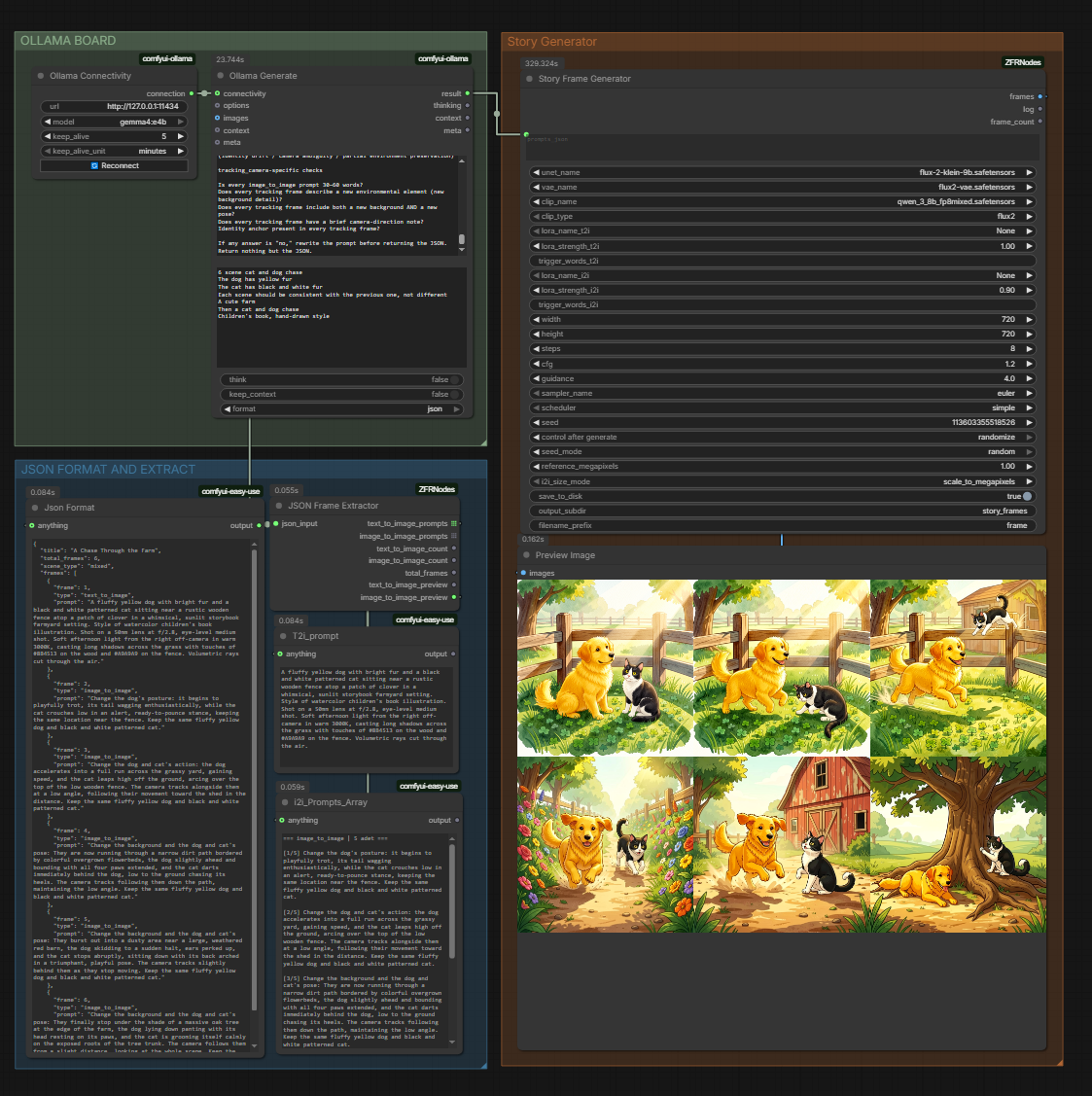
The headline node, Story Frame Generator, takes a JSON describing a sequence of frames (first a text-to-image shot, then image-to-image edits) and produces the entire chain inside one node — each frame continuing from the previous one — so you don't need to wire six samplers or queue the graph repeatedly.
| Story preview | Workflow |
| --- | --- |
|  |
|  |
|
What's new in 1.1.1
This release adds a dataset-building pipeline — pull reference images straight from a folder on disk, batch-generate variations from them, caption every image with a vision-LLM, and edit any single image with a full mask-painting node — plus a cleaner contact-sheet preview.
New nodes
| Node | One-liner |
| --- | --- |
| Reference Image Loader (Path) | Point at a folder on disk (native folder picker or a pasted path) and load every image inside it as one IMAGE batch — no manual multi-upload. |
| Dataset Prep | Batch-run image-to-image or text-to-image generation over a whole folder of references in one node, saving every result to disk — for building LoRA training datasets. |
| Caption Generator | Send each image in a folder to a vision-LLM (Ollama, OpenAI, Anthropic, DeepSeek, Google, OpenRouter) and write a training-ready .txt caption next to it. |
| Inpaint Studio | A self-contained "mini Photoshop" node: load an image, paint a mask with ComfyUI's built-in Mask Editor, and inpaint just that area — model loading, masking, and sampling all in one node. |
Improvements to existing nodes
- Sheet Compositor — now has a screenshot in this README showing an actual before/after contact sheet.
What's new in 1.1.0
This release turned the pack from "render a story JSON" into a full idea → consistent visual story pipeline. You can write one short sentence (in any language) and let the nodes plan the prompts, lock character identity with reference sheets, and render the whole sequence.
New nodes
| Node | One-liner |
| --- | --- |
| Story Director | Turn a short idea (any language) into the exact system + user prompt an LLM needs to produce story JSON. Per-scene boxes, per-scene t2i/i2i type, reference awareness. |
| Asset Sheet Director | Build prompts for reusable character / object reference sheets (front / side / action / back, or your own custom views). |
| Sheet Compositor | Crop the generated sheets to their content and lay them out side by side into one clean contact sheet. |
| Prompt Guide | Pull model-specific prompting guides (t2i / i2i / both) straight from the bundled docs. |
| Reference Image Loader | Upload several reference images directly inside the node and output them as one IMAGE batch. |
Improvements to existing nodes
- Simple Image Generator (Multiple) — now takes one batched
reference_imagesinput (connect a Reference Image Loader directly) instead of wiring slots one by one. Added a reference thumbnail preview,save_to_disk, and aspect-preserving sizing (no stretch / squash / crop). - Story Frame Generator — optional
reference_imagesinput: connect a contact sheet and every frame is conditioned on it, so character identity stays locked across the whole story. - All generators —
clip_typeis now pulled dynamically from ComfyUI (≈23 types:flux2,sd3,wan,qwen_image,hidream,chroma, …) instead of a fixed 5-item list.
Why this exists
ComfyUI's graph can't feed a node's output back into the next iteration within one run (no feedback loops). So generating "frame N edits frame N-1" normally means either chaining many samplers by hand or re-queuing with manual indexing. Story Frame Generator runs the loop inside the node, keeping the resolution fixed across the chain to avoid the gradual "fading"/drift you get when reference and sampler sizes drift apart.
Nodes (category: zfr-nodes)
Story / sequence generation
| Node | What it does |
| --- | --- |
| Story Frame Generator | Reads frame JSON, generates the full sequence (t2i then chained i2i) in one node. Optional reference_images keeps character identity across frames. Returns all frames as one IMAGE batch and saves them to disk. |
| Story Director | Converts a short, free-text idea (any language) into the system_prompt + user_prompt an LLM needs to output valid story JSON. Dynamic per-scene boxes, per-scene t2i/i2i choice, reference-aware. |
| JSON Frame Extractor | Parses the frame JSON; outputs prompt lists, per-type counts, and human-readable preview strings for debugging. |
Single image / references
| Node | What it does |
| --- | --- |
| Simple Image Generator | Single image from a prompt. Optional reference_image switches it to image-to-image (edit) mode. |
| Simple Image Generator (Multiple) | Multi-reference version. Takes one batched reference_images input, splits it internally, and conditions on every reference at once. Works with zero references (text-to-image) too. |
| Reference Image Loader | Upload multiple reference images inside the node (no Load Image chains); outputs them as a single IMAGE batch + count. |
| Reference Image Loader (Path) | Point at a folder on disk instead of uploading one by one; loads every image inside as a single IMAGE batch + folder path + count. |
Inpainting
| Node | What it does | | --- | --- | | Inpaint Studio | Load an image, paint a mask with ComfyUI's Mask Editor, and inpaint just the masked area — model loading, masking, and sampling all inside one node. |
Character / asset sheets
| Node | What it does | | --- | --- | | Asset Sheet Director | Builds prompts for reusable character / object reference sheets (configurable views + asset type). | | Sheet Compositor | Auto-crops generated sheets to their content and arranges them side by side into one contact sheet. |
Dataset & captioning
| Node | What it does |
| --- | --- |
| Dataset Prep | Batch-generates image-to-image or text-to-image results over a whole folder of references, saving every output to disk — for building LoRA training datasets. |
| Caption Generator | Sends each image in a folder to a vision-LLM and writes a training-ready .txt caption next to it (image-name-matched, for LoRA trainers). |
Helpers
| Node | What it does |
| --- | --- |
| Prompt Guide | Loads bundled model-specific prompting docs by mode (t2i / i2i / both). |
| Convert To Integer / Float / String / Boolean | Small type-conversion utilities. |
Requirements
- ComfyUI with Flux-style model support, ideally a Flux2-compatible build such as
flux-2-klein(the image-to-image / reference path relies on Flux2'sReferenceLatent). - Python packages:
numpy,torch,Pillow(these are usually already installed by ComfyUI). - A compatible diffusion model, VAE, and text encoder for the chosen
clip_type(theclip_typelist is pulled live from ComfyUI, so all supported types show up automatically). - For LLM-driven prompt generation (Story Director / Asset Sheet Director), the ComfyUI Ollama node: https://github.com/stavsap/comfyui-ollama. A vision-capable model (e.g.
qwen3.5:9b) is recommended if you want the LLM to read reference contact sheets. - Caption Generator talks to its LLM provider directly (no separate Ollama node needed) — install
pip install ollamaif you use theollamaprovider, orpip install requestsfor any of the API providers (openai,deepseek,google,openrouter,anthropic). Most ComfyUI installs already haverequests. - A
requirements.txtfile is included for quick dependency installation withpip install -r requirements.txt.
Installation
Via ComfyUI-Manager
Search for ComfyUI-ZFRNodes in the Manager and install, then restart ComfyUI.
Manual install
Clone this repository into your ComfyUI custom_nodes directory:
cd /path/to/ComfyUI/custom_nodes
git clone https://github.com/zfrsgtcu/ComfyUI-ZFRNodes.git
If the directory already exists, update it instead:
cd /path/to/ComfyUI/custom_nodes/ComfyUI-ZFRNodes
git pull
Then fully restart ComfyUI. A browser refresh is not enough because the Python process caches loaded modules.
Usage
This node collection is designed to make story-driven image generation easier in ComfyUI.
- Use
JSON Frame Extractorto validate JSON prompts and preview detected text-to-image / image-to-image frames. - Use
Simple Image Generatorwhen you want a single image from a prompt or a one-shot reference edit. - Use
Story Frame Generatorwhen you want a full sequence of frames generated in one node run.
Why this helps
You can give the system a natural-language directive instead of carefully engineering a prompt. With LLM-based workflows, the language model rewrites or expands your instruction into structured story/frame JSON, and the node then converts that JSON directly into visual scenes.
Common use cases
- Storyboarding and visual narrative generation
- Concept art and scene composition
- Character progression or transformation sequences
- Marketing visuals, mood boards, and cinematic frames
- Reference-based editing and continuity between frames
Full identity-locked story pipeline
For a story where the same character must stay consistent across every frame, the nodes chain like this:
1. Asset Sheet Director → Ollama → Story Frame Generator   →  character/object sheets
2. Sheet Compositor                                        →  one contact sheet
3. Story Director → Ollama (+ contact sheet) → Story Frame Generator (reference_images)
You only write a short idea. Step 1–2 build a reference sheet of your cast; step 3 plans the story and renders it while every frame is conditioned on that sheet — so the character keeps its look from start to finish. For a simpler run, skip steps 1–2 and use Story Director → Ollama → Story Frame Generator on its own.
Example workflows
Ready-to-use workflow files are in the workflows/ folder. Each workflow is separate and can be loaded by dragging its .json onto the ComfyUI canvas.
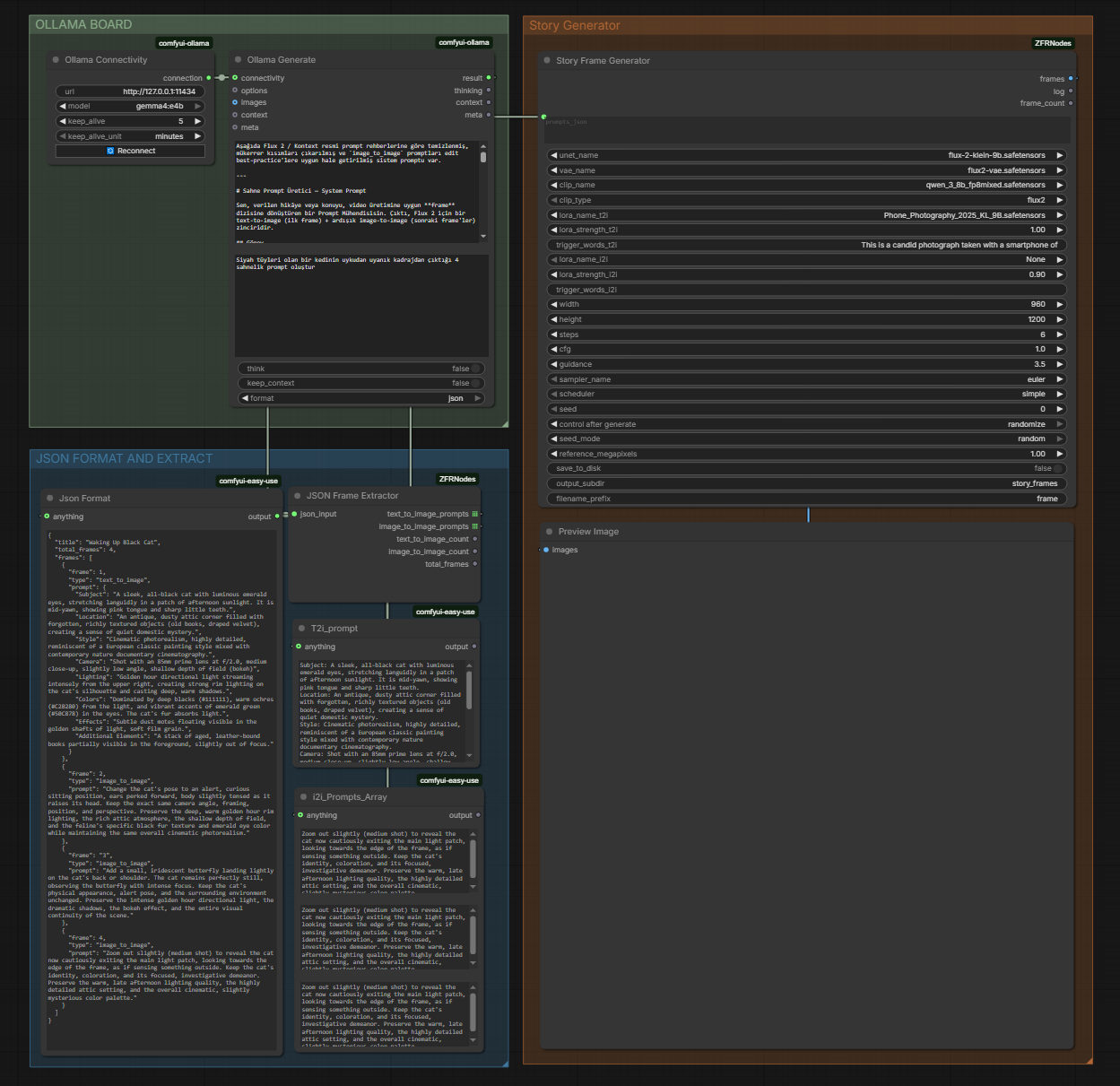
ZFRNodes-LLM-Story-Generator.json— Ollama generates story JSON, thenStory Frame Generatorrenders the full sequence.ZFRNodes-LLM-Simple-Generator.json— Ollama generates a single natural prompt forSimple Image Generator.ZFRNodes-Simple-Image-Generator.json— plain text-to-image withSimple Image Generator.ZFRNodes-Reference-Simple-Image-Generator.json— reference image editing withSimple Image Generator.
Ollama / LLM integration
Use Ollama to convert user-friendly directives into the prompt or JSON structure that the nodes need.
- ComfyUI Ollama node: https://github.com/stavsap/comfyui-ollama
- Ollama install guide: https://docs.ollama.com/
- Ollama Download Link : https://ollama.com/download
Suggested Ollama install commands
For Windows, install Ollama from the official installer or using Winget if available:
winget install --id Ollama.Ollama
Then pull a model:
ollama pull llama2
Or choose another Ollama-supported model.
How to use with this repo
- Install the ComfyUI Ollama node.
- Load
ZFRNodes-LLM-Story-Generator.jsonorZFRNodes-LLM-Simple-Generator.json. - Enter a natural instruction such as a story description or scene directive.
- Let Ollama generate the story / prompt JSON.
- The node collection turns that JSON into one or more final images.
Example prompts
Create a dramatic fantasy scene of a knight entering a glowing crystal cave at sunset, then transition to the knight drawing a sword as shadow creatures approach.Generate a futuristic street scene with neon signs, rain, and a lone detective, then show the detective discovering a holographic clue.Turn this into a sequence: first a cozy library interior, then a magical book opening and releasing floating runes.
JSON Frame Extractor
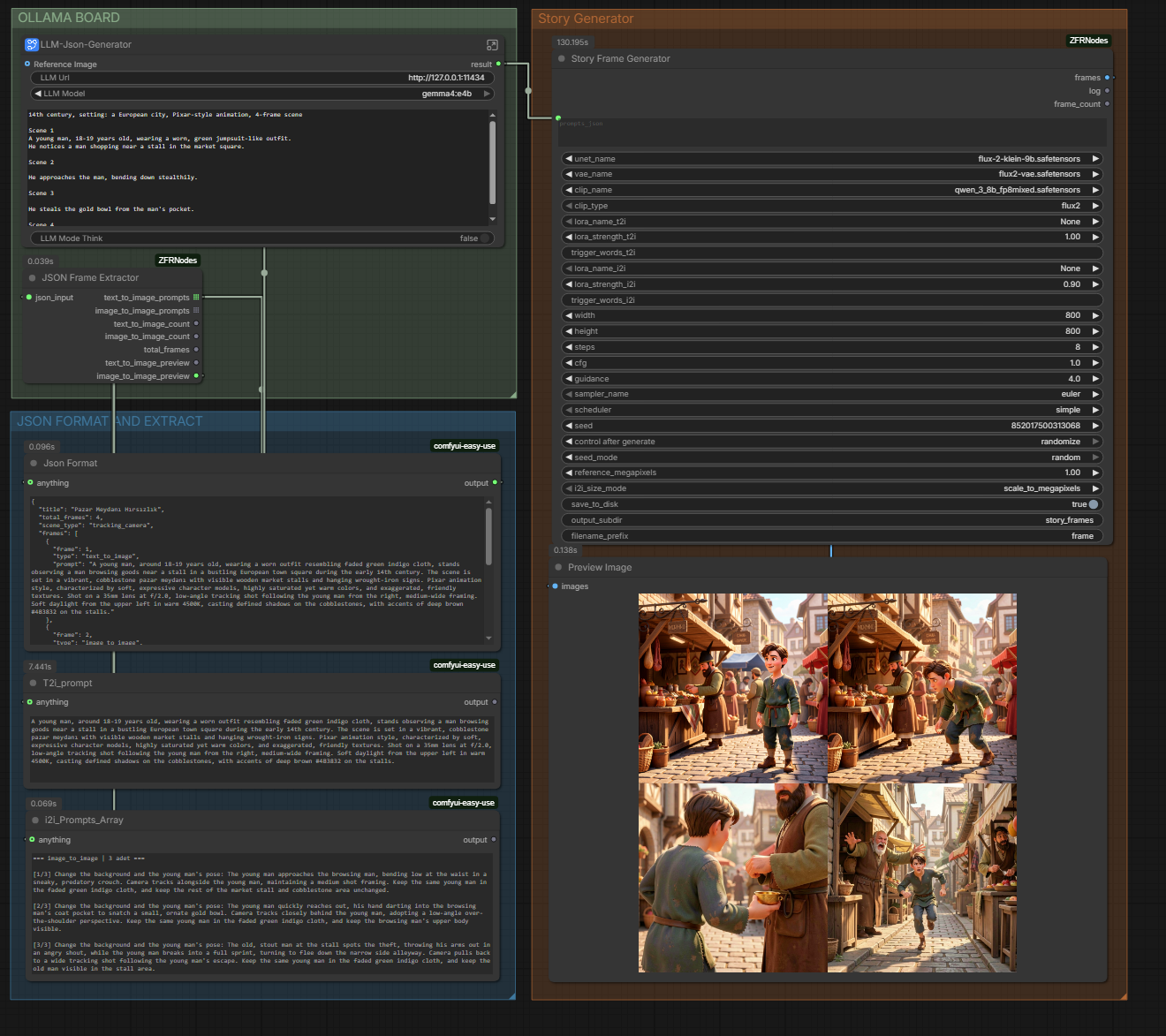
Parses the JSON and separates prompts so you can verify what was detected.
text_to_image_prompts,image_to_image_prompts(STRING lists,OUTPUT_IS_LIST).text_to_image_count,image_to_image_count,total_frames(INT).text_to_image_preview,image_to_image_preview(STRING) — all prompts in one numbered block with a count header.
For debugging, connect the
*_previewoutputs to a Show Text node. The*_promptslist outputs get iterated by ComfyUI when wired into a non-list node (so it looks like only the last prompt shows). The preview strings grow dynamically with however many frames the JSON contains — no fixed limit.
Simple Image Generator
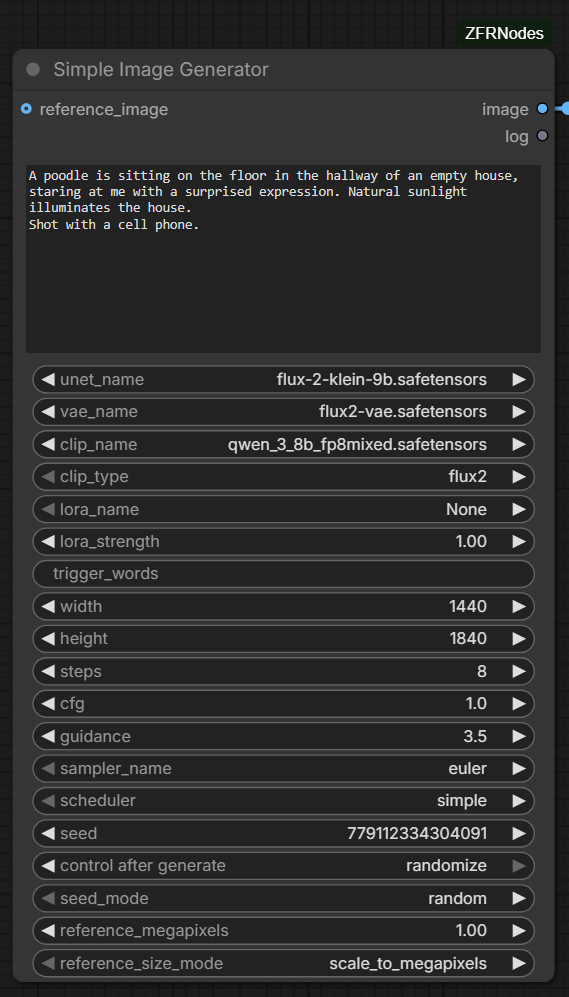
Single-image generator for ComfyUI with two modes in one node:
- Text-to-image when
reference_imageis not connected. - Image-to-image editing when
reference_imageis connected.
The node uses the same Flux2-style conditioning logic as Story Frame Generator, but
for a single prompt and optional reference image. It loads the selected UNET, VAE, and CLIP
once, applies an optional LoRA, and generates either a fresh image or an edit of the
reference image.
| Text-to-image | Image-to-image (with reference) |
| --- | --- |
| 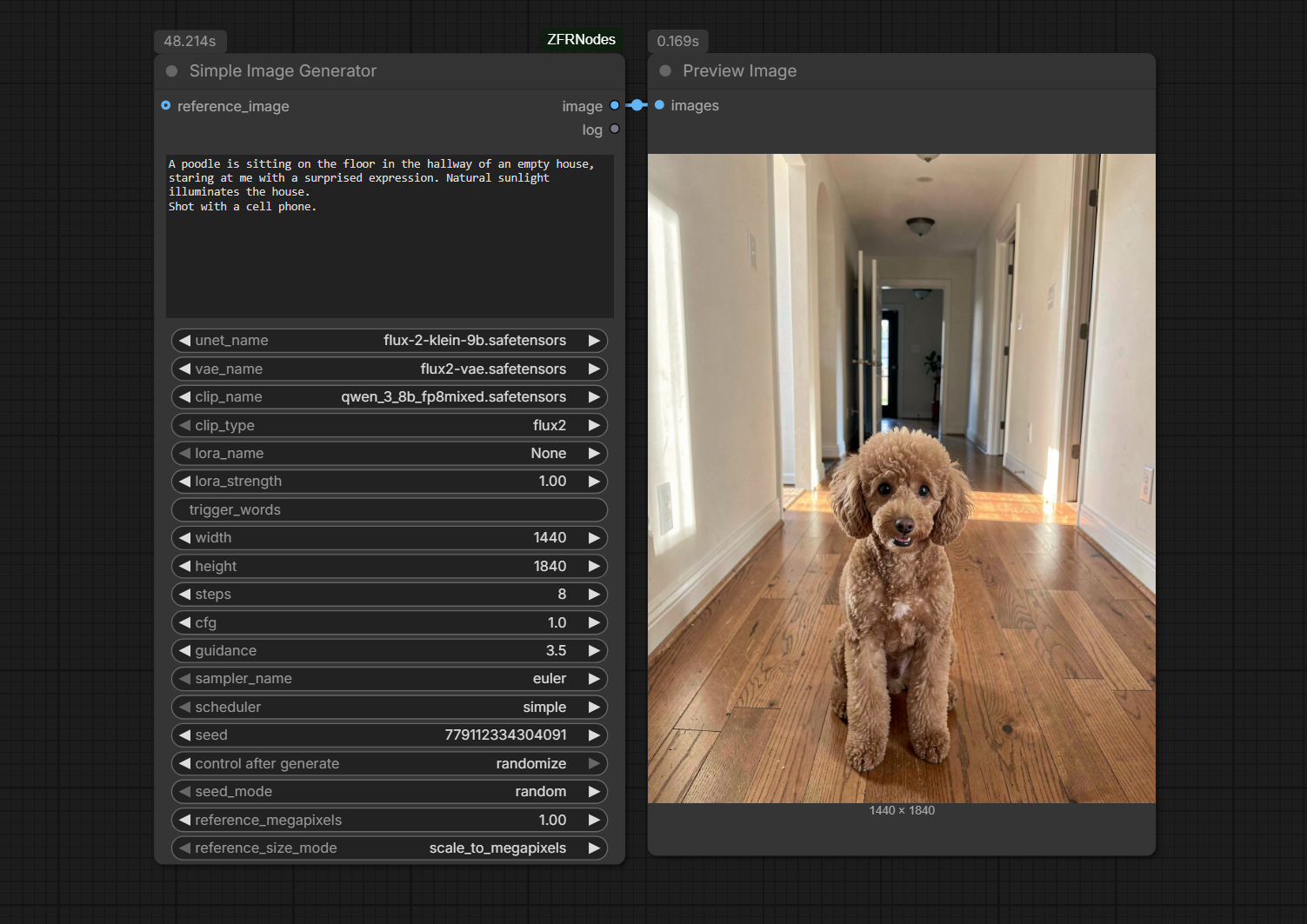 |
| 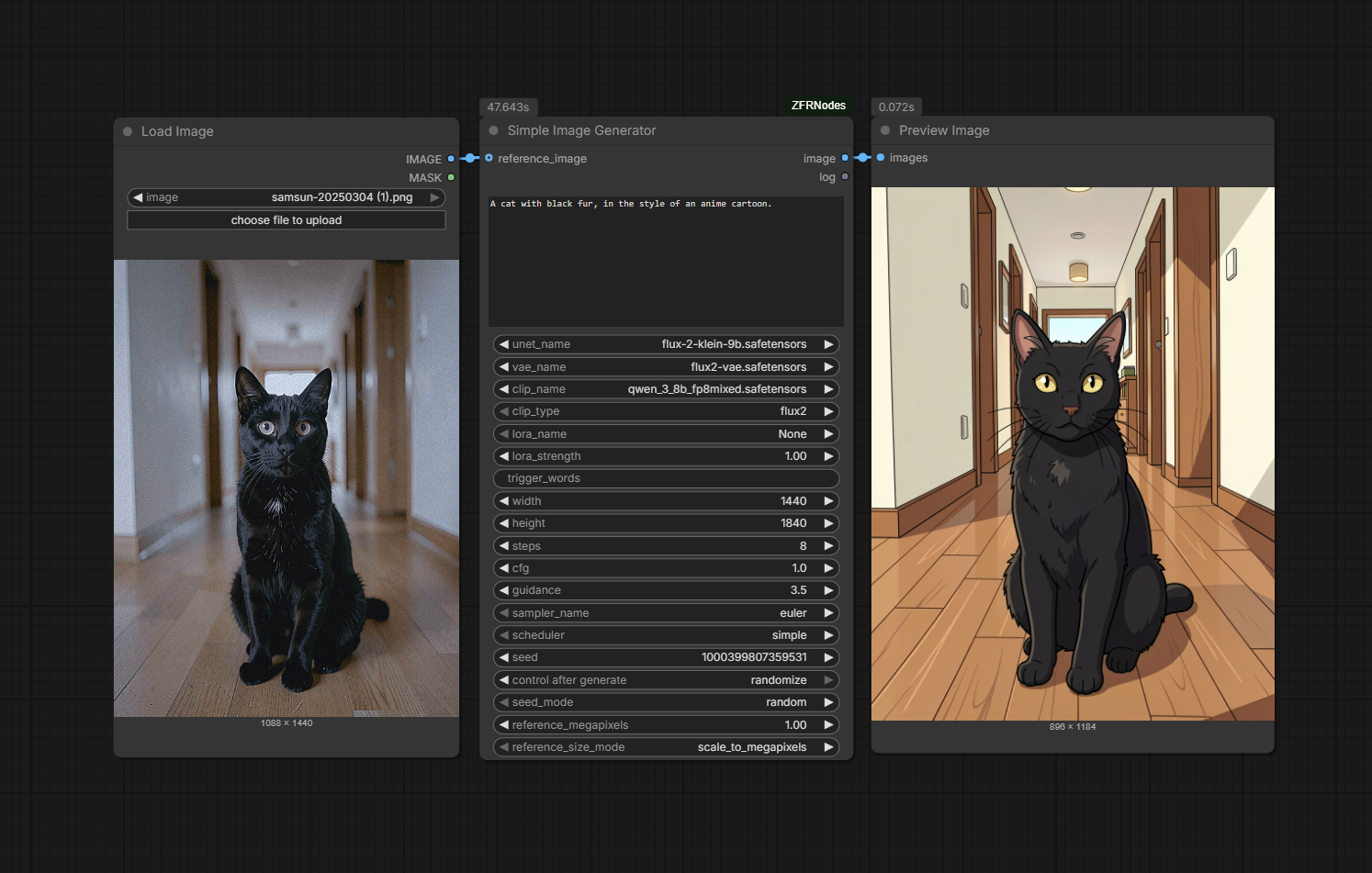 |
|
- No
reference_image→ text-to-image: empty latent + denoise 1.0, output atwidth×height. reference_imageconnected → image-to-image: reference is VAE-encoded and injected into positive conditioning viaReferenceLatent, then a new image is sampled.
Inputs:
promptunet_name,vae_name,clip_name,clip_typelora_name,lora_strength,trigger_wordswidth,height,steps,cfg,guidance,sampler_name,schedulerseed,seed_mode- optional
reference_image,reference_megapixels,reference_size_mode
Outputs:
imagelog
Simple Image Generator (Multiple)
The multi-reference version of Simple Image Generator. Everything is identical — same Flux2-style conditioning, same loaders, same sampler settings — except it can take several reference images at once (up to 8) instead of just one.
| Node |
| --- |
| 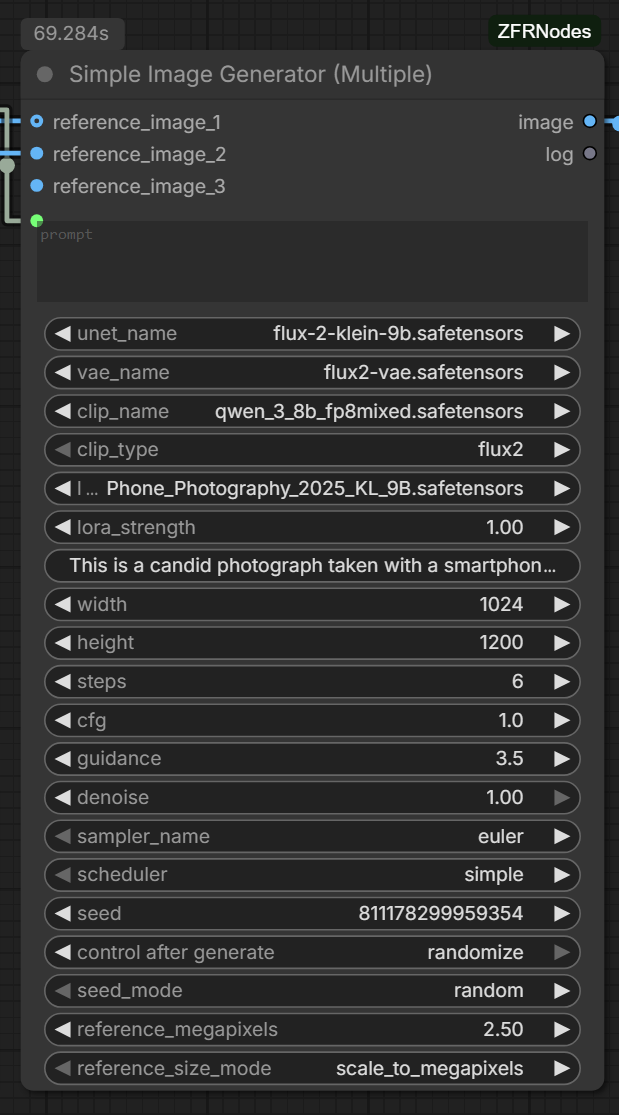 |
|
It takes one batched reference_images input: connect a Reference Image Loader
(or any IMAGE batch) and the node splits it internally into image 1, image 2, … — no
slot-by-slot wiring. After a run, a small thumbnail strip of the references used is
shown at the top of the node. With nothing connected it behaves as a plain
text-to-image generator.
How it differs from Simple Image Generator
Simple Image Generatorhas one fixedreference_imageinput → one mode switch (text-to-image vs. single-reference edit).Simple Image Generator (Multiple)takes onereference_imagesIMAGE batch and splits it internally (up to 8), so you connect a single wire instead of managing eight slots.- Every reference is VAE-encoded and appended to the positive conditioning as its own
ReferenceLatent, so the model can condition on all of them at once (Flux2 multi-reference editing). - Aspect-preserving sizing —
match_first_referenceorfit_to_width_height; references are scaled with their aspect ratio kept (no stretch / squash / crop). - Adds
save_to_disk/output_subdir/filename_prefixfor writing the result straight to disk. - Otherwise the inputs/outputs (
prompt, model loaders, LoRA,width/height,steps,cfg,guidance,denoise,sampler_name,scheduler,seed,image,log) are the same asSimple Image Generator.
Note: the node's UI (thumbnail strip, output-mode select) is added by a frontend script, so it needs a full ComfyUI restart (not just a browser refresh) after installing/updating, so
web/zfrnodes.jsis registered.
Examples
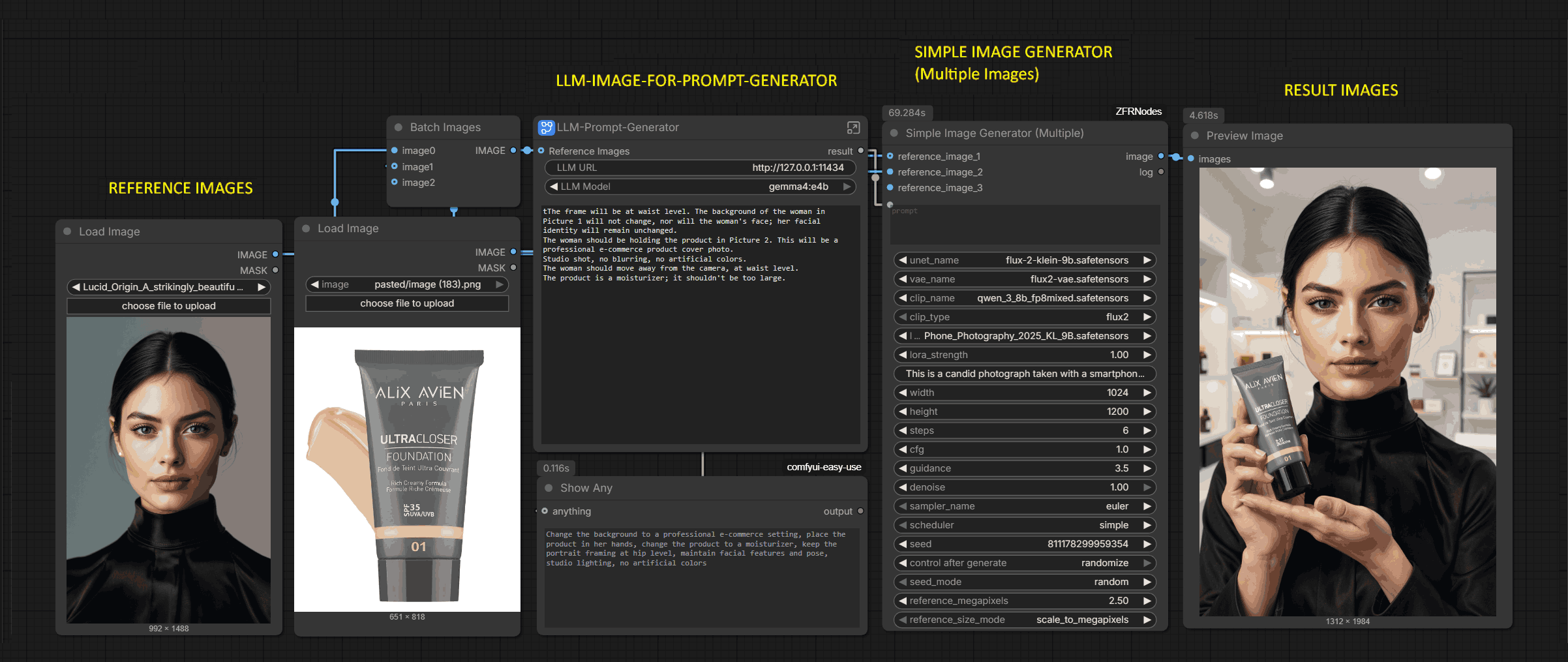
The screenshots below show the node driven by an LLM-generated prompt, taking product / character reference photos and compositing them into a single result.
| Example |
| --- |
| 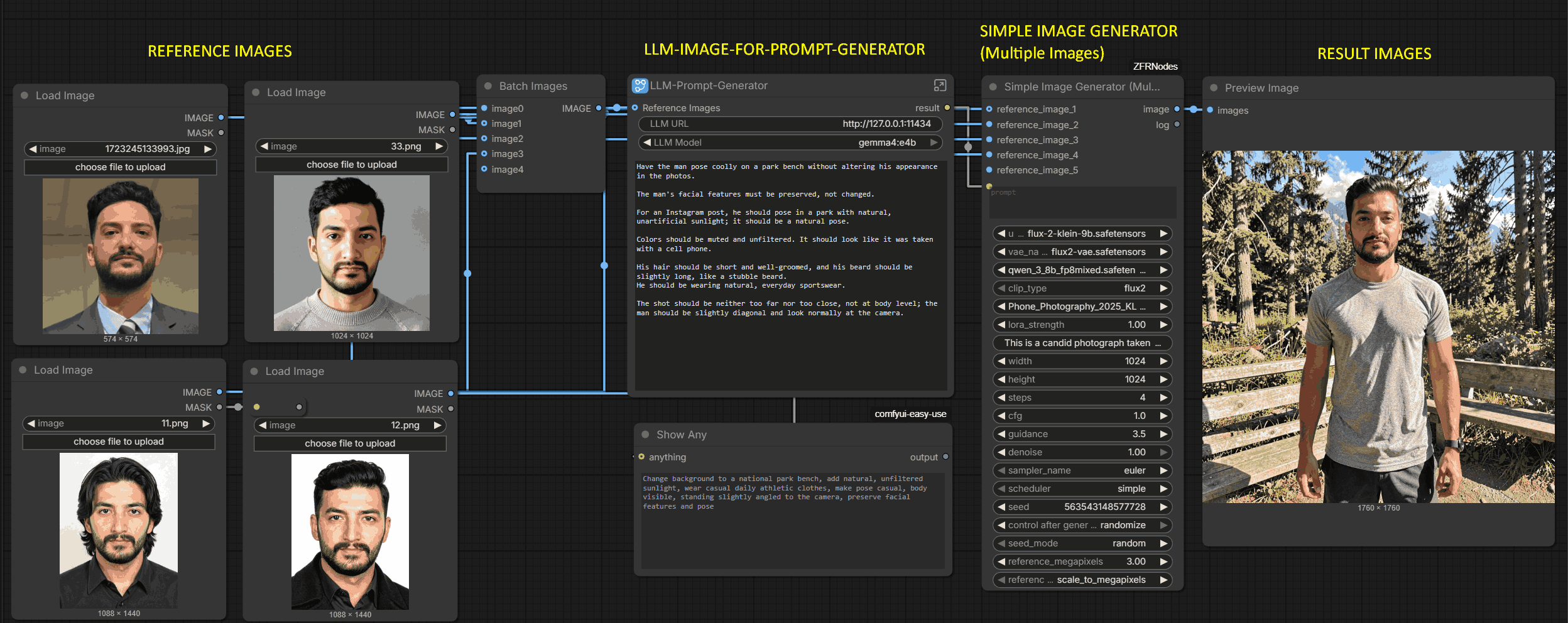 |
|
Full pipeline — reference images → LLM prompt → result. On the left, two Load Image
nodes feed reference photos (a face/character and a product) into the dynamic reference
slots. An LLM (LLM-Image-For-Prompt-Generator) writes a detailed prompt describing how
the references should be combined, that prompt drives Simple Image Generator (Multiple),
and the node returns a single composited image on the right. This is the typical use case:
let the language model describe the scene while the node grounds it in your real reference
photos.
| Example |
| --- |
|  |
|
Reference-grounded product/character shot. The same setup with the model holding the
referenced product. Because each reference is injected as its own ReferenceLatent, the
output keeps the subject's identity and the product's appearance from the separate
reference photos — useful for marketing visuals, product placement, character + prop
continuity, and mood boards where several real inputs must appear together in one generated
frame.
Story Frame Generator
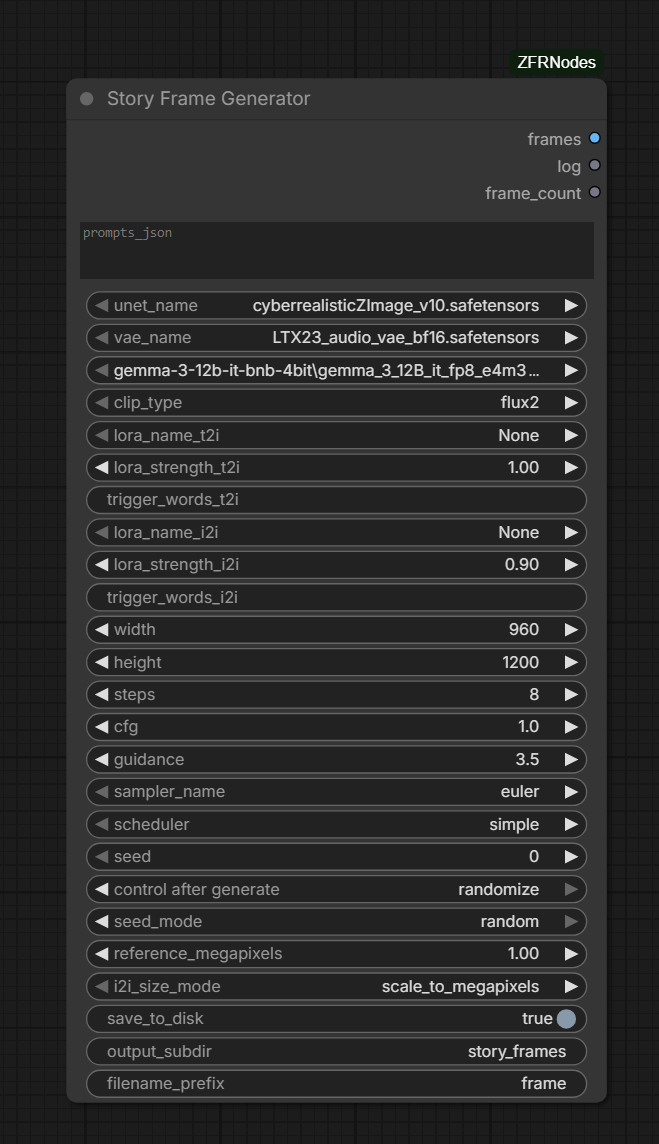
Reproduces, in pure Python, a text-to-image + chained image-to-image workflow (Flux2-style reference-latent editing), so an entire story is produced from one node in a single run.
Expected JSON
{
  "title": "The Awakening Cat",
  "total_frames": 4,
  "frames": [
    {
      "frame": 1,
      "type": "text_to_image",
      "prompt": {
        "Subject": "A sleek black cat asleep on a burgundy velvet cushion...",
        "Style": "Hyper-realistic documentary photography",
        "Lighting": "Soft morning sunlight from the right"
      }
    },
    {
      "frame": 2,
      "type": "image_to_image",
      "prompt": "Change the cat's posture from asleep to stretching. Preserve everything else."
    }
  ]
}
text_to_imageframes may use apromptobject (joined intokey: valuelines) or a plain string.image_to_imageframes use a plainpromptstring.
Inputs
prompts_json— the frame JSON (string or text node).unet_name,vae_name,clip_name,clip_type— model loaders. Pick names/type that match the model you use — a mismatched model/type errors inside sampling.lora_name_t2i,lora_strength_t2i,trigger_words_t2i— LoRA / strength / trigger words for the first (text-to-image) frame.lora_name_i2i,lora_strength_i2i,trigger_words_i2i— a separate LoRA / strength / trigger words for the image-to-image frames.width,height— first-frame size (default 960×1200).steps,cfg,guidance,sampler_name,scheduler— sampler settings (defaults: 8 / 1.0 / 3.5 / euler / simple).seed,seed_mode—fixed,increment, orrandomper frame.reference_megapixels— reference size for thescale_to_megapixelsmode (default 1.0 MP).i2i_size_mode—scale_to_megapixels(default) ormatch_first_frame(see Resolution stability).- (optional)
reference_images— an IMAGE batch (e.g. a contact sheet from Sheet Compositor). When connected, every frame is additionally conditioned on these references, so character identity stays consistent across the whole sequence. Leave it empty for the original reference-free behavior. save_to_disk,output_subdir,filename_prefix— disk output (defaultoutput/story_frames/frame_###.png).
Outputs
frames— all frames as one IMAGE batch (→ Preview / Save Image). Normalized to the first frame's size before batching.log— per-frame log (mode, resolution, seed).frame_count— number of frames generated.
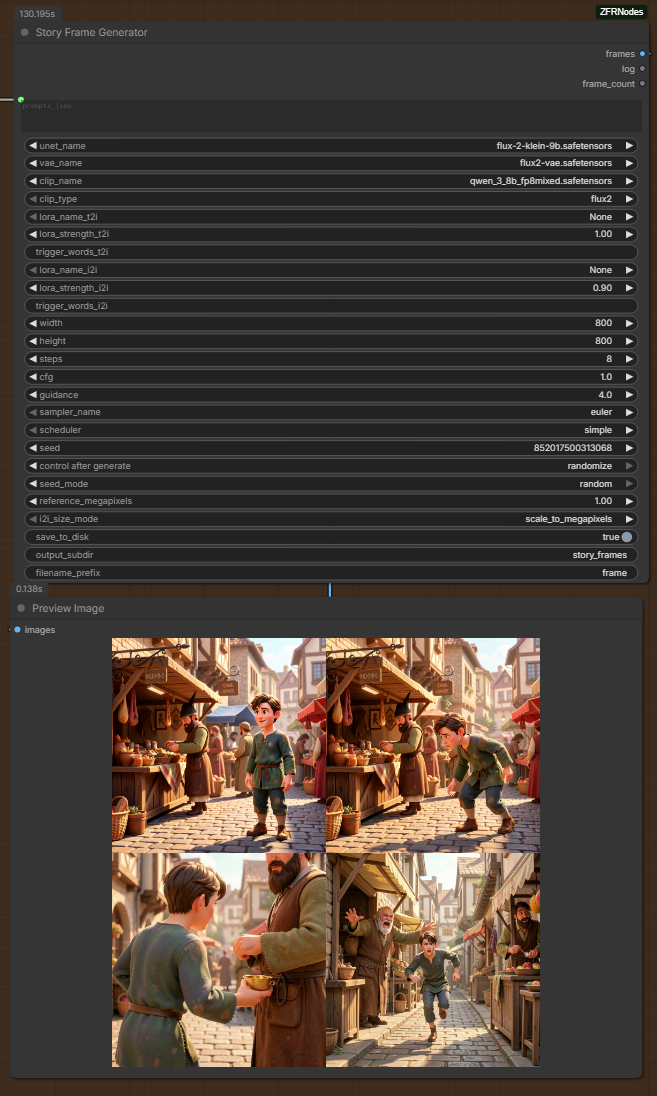
How the chain works
- First frame (
text_to_image): empty latent + denoise 1.0 → first image. - Following frames (
image_to_image): the previous frame is VAE-encoded and injected into the positive conditioning viaReferenceLatent; a new image is generated that continues from the previous one.
Models, CLIP, and VAE are loaded once and reused across all frames. Empty latents use
ComfyUI's own EmptyLatentImage so channel count / device / dtype match the host workflow.
Resolution stability (avoiding drift)
Quality drift / a "fading" look after a few frames is almost always the sampler's target latent size not matching the reference latent size. To prevent it, the i2i frame size is decided once and held constant for the rest of the chain:
scale_to_megapixels(default): first i2i frame scales the reference toreference_megapixels; that size is locked for all later i2i frames.match_first_frame: i2i frames reuse the first frame'swidth×height.
LoRAs and trigger words
t2i and i2i each have their own LoRA, strength, and trigger words, so they can use entirely
different LoRAs. Trigger words are prepended to that frame's prompt (trigger, <prompt>)
before encoding — how LoRAs that need activation keywords get triggered. Leave a trigger
empty to add nothing; set a LoRA to None to run that stage without one.
Story Director
Writes the prompts for the prompt writer. You give a short idea; Story Director outputs
a clean system_prompt + user_prompt for an LLM (e.g. Ollama) so the model returns valid
story JSON that Story Frame Generator can render directly. No prompt-engineering required.
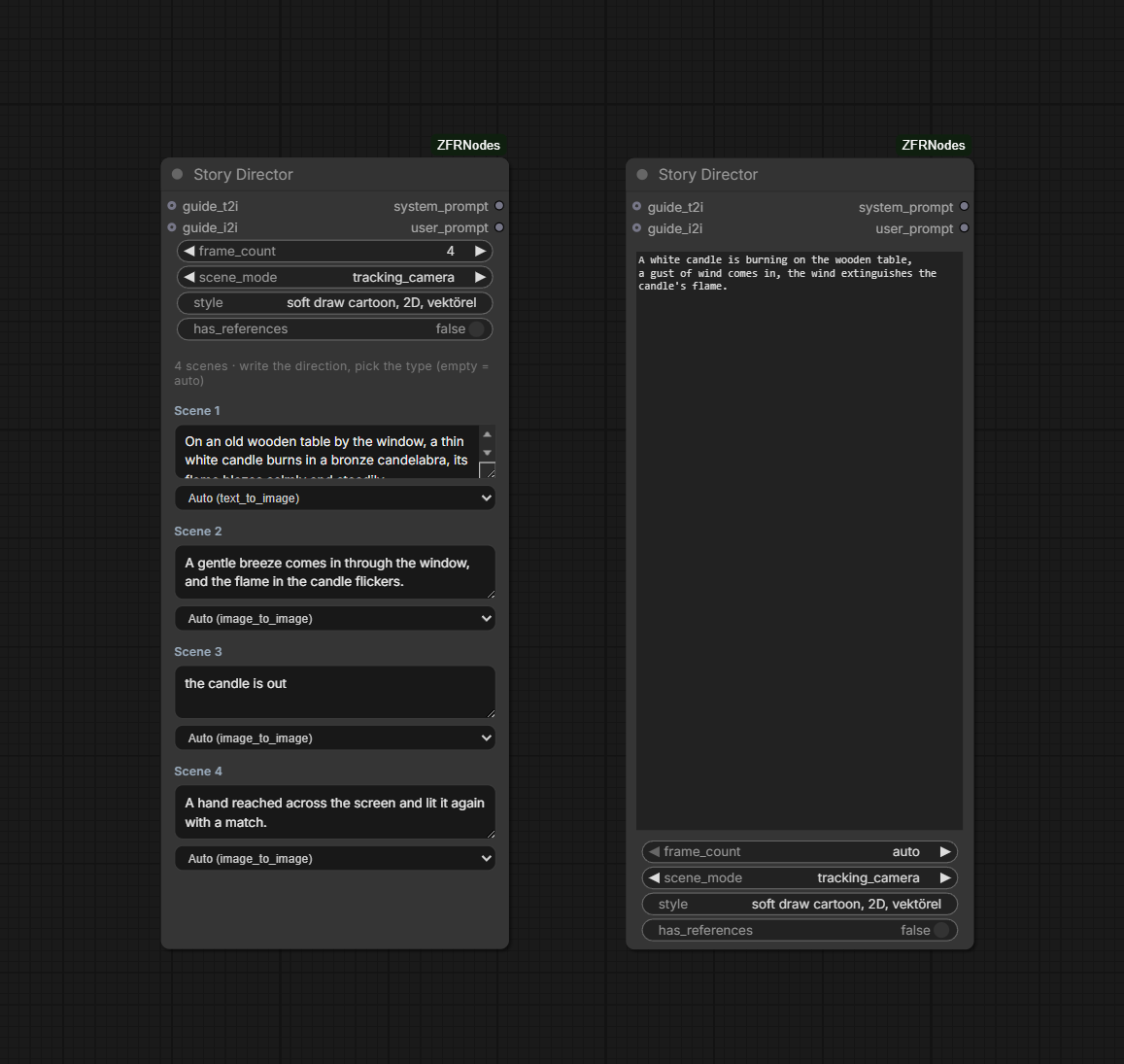
| Node UI | Output (system + user prompt) |
| --- | --- |
|  |
| 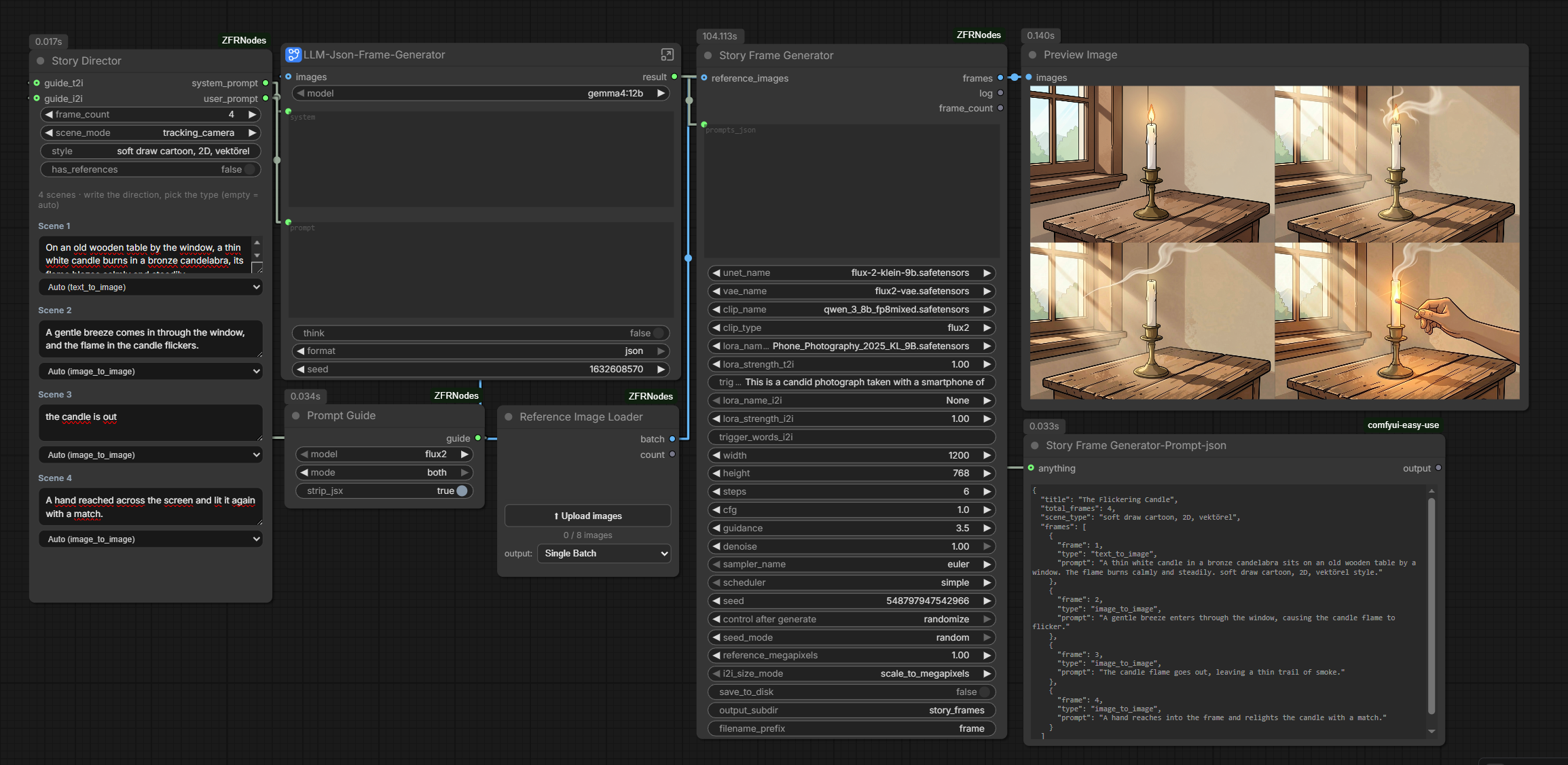 |
|
Inputs
| Input | Purpose |
| --- | --- |
| user_input | Your idea — a single short sentence, in any language (output prompts are always English). Used when frame_count = auto. |
| frame_count | auto (LLM decides) or a fixed number. Pick a number and N per-scene boxes appear below the node — one direction per frame. |
| scene_mode | auto / static_camera / tracking_camera / orbiting_camera / cutscene / storyboard — guides how the shots are staged. |
| style | Leave empty (LLM chooses) or set one, e.g. anime, noir, comic book. |
| has_references | Turn on when you've connected a reference image to your Ollama node, so the LLM refers to subjects as "the cat in Picture 1" instead of describing them. |
| (optional) guide_t2i, guide_i2i | Connect Prompt Guide outputs to ground prompt wording in model-specific docs. |
Per-scene boxes
When frame_count is a fixed number, each scene gets its own text box and a t2i/i2i type
select (Auto keeps the standard layout: frame 1 = text_to_image, the rest = image_to_image;
or force a type per scene). Leave the type on Auto and just write the action — or mix types
freely. The node packs everything into the user_prompt so the LLM produces exactly that
many frames, in order.
Outputs
system_prompt→ your Ollama node's system input.user_prompt→ your Ollama node's prompt input.
Story Director only writes text — it never calls a model itself. Wire its outputs into an Ollama (or any LLM) node, set the LLM output format to JSON, then feed the result into Story Frame Generator.
Reference Image Loader
Upload reference images inside the node — no chains of Load Image nodes. Pick several
files, see them as a compact thumbnail table, reorder/remove, and the node outputs them as a
single IMAGE batch ready for the multi-reference generators.
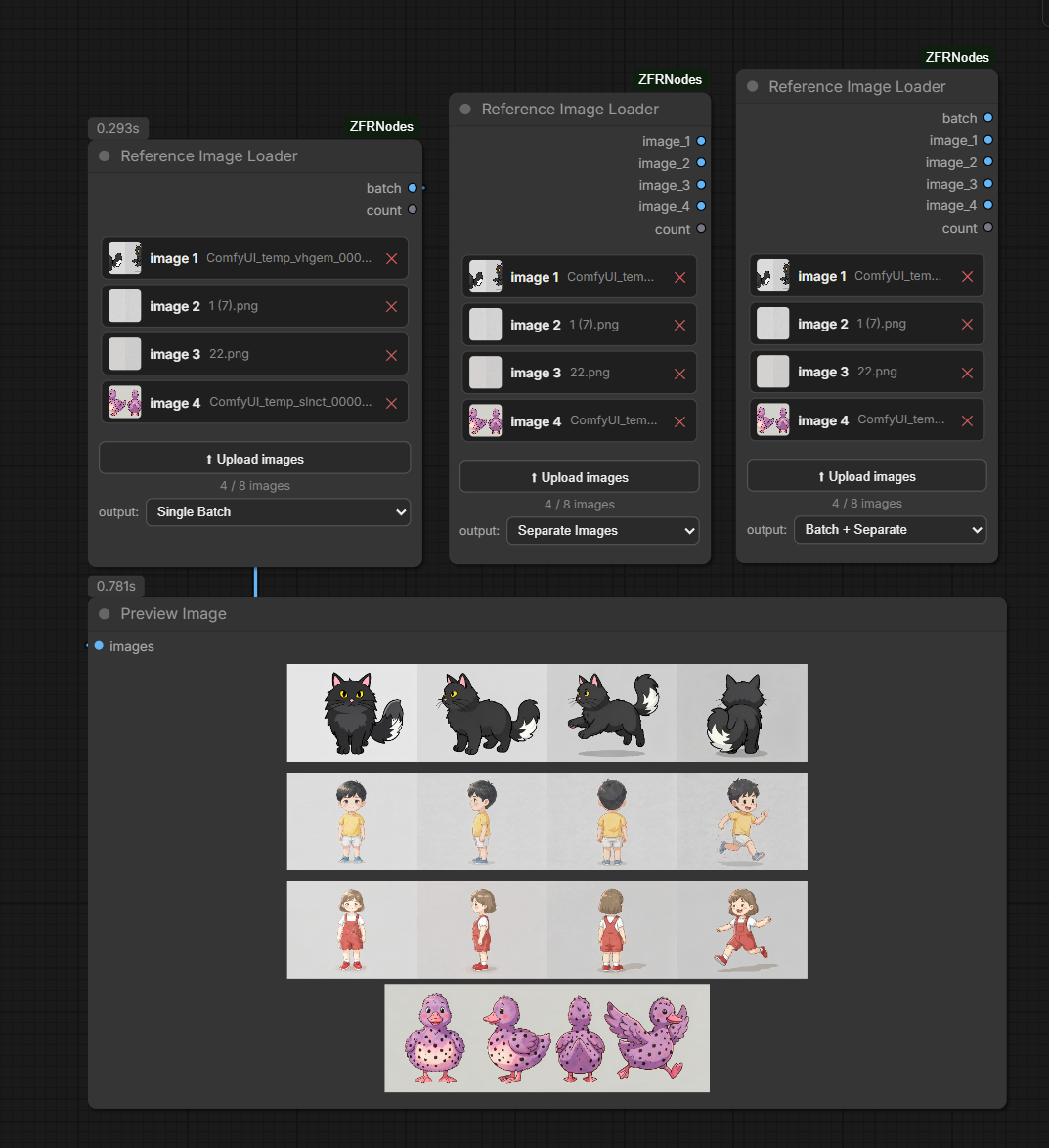
- "⬆ Upload images" button → choose one or many files (max 8).
- Each upload appears as
image 1, image 2, …; click a row to expand/collapse the preview. - Output mode select:
Single Batch,Separate Images, orBatch + Separate. - Outputs a
batchIMAGE and acount. Different-sized images are combined without cropping or stretching (transparent letterbox), so the batch stays consistent.
Typical wiring: Reference Image Loader → Simple Image Generator (Multiple) (reference_images),
or → Story Frame Generator (reference_images).
Reference Image Loader (Path)
The folder-based counterpart to Reference Image Loader: instead of uploading files one by one, point the node at a folder on disk and it loads every image inside automatically.
- "📁 Select folder" button opens your OS's native folder picker (Windows/macOS/Linux), or paste a path directly into the field.
- The frontend shows the folder's contents as a carousel — file name, resolution, arrow navigation, click-to-zoom, open-in-new-tab.
- Different-sized images are combined without cropping or stretching (transparent letterbox), same as Reference Image Loader.
- Re-runs automatically when the folder's contents change (file added/removed/modified).
Outputs:
images— the folder's images as one IMAGE batch.folder_path— the resolved folder path (STRING) — feeds Dataset Prep's output naming.image_count— number of images loaded.
| Input | Purpose |
| --- | --- |
| folder_path | Filled by the folder picker (or paste a path yourself). |
| max_images | Cap how many images to load (0 = all) — useful for quick dataset previews. |
Typical wiring: Reference Image Loader (Path) → Dataset Prep (images), or into any other
node that accepts an IMAGE batch.
Asset Sheet Director & Sheet Compositor
These two build reusable character / object reference sheets so a subject looks the same across an entire story.
Asset Sheet Director writes prompts (system + user) for an LLM to output sheet JSON. For
each detected character/object it produces a set of views — the first is text_to_image
(a clean reference plate on a plain grey background) and the rest are image_to_image edits
that rotate/re-pose the same individual, so all views look like one subject.
| Input | Purpose |
| --- | --- |
| user_input | The subject(s) — any language. e.g. characters: cat, dog. |
| asset_type | auto (LLM classifies each) / character / object. |
| views | Empty = default (character: front, side, action, back · object: front, side, three-quarter, back) — or your own comma-separated list, any number. |
| style | Empty (LLM chooses) or a named style. |
| (optional) guide_t2i, guide_i2i | Prompt Guide grounding. |
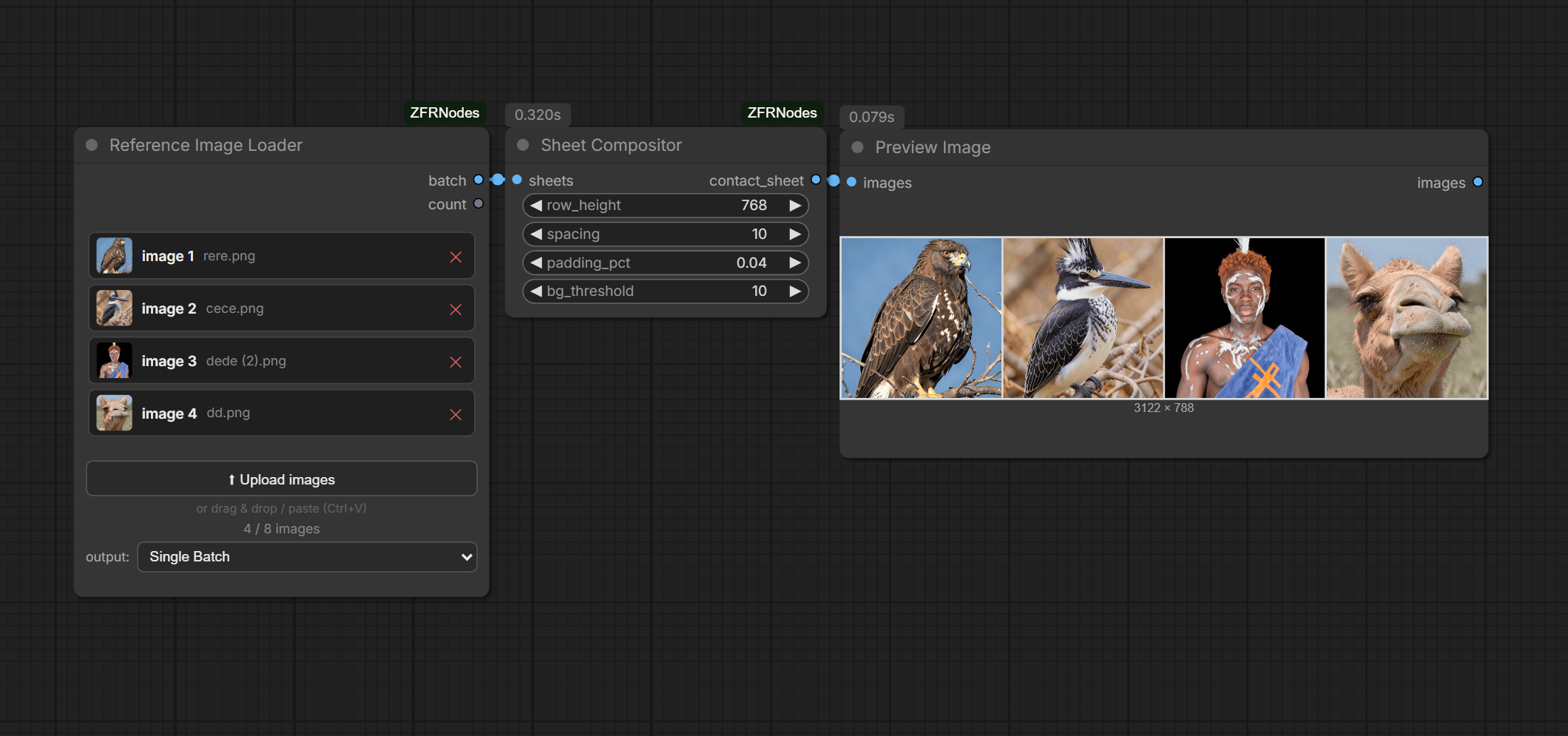
Sheet Compositor takes the rendered sheet images (an IMAGE batch), detects each figure
against the plain grey background, crops to content, scales them to a common height, and
lays them side by side into one tidy contact sheet — ideal as a single reference image
for Story Director (has_references = true) + Story Frame Generator (reference_images).
| Input | Purpose |
| --- | --- |
| sheets | IMAGE batch of generated sheets. |
| row_height | Common height all figures are scaled to. |
| spacing | Gap between figures and around the edges. |
| padding_pct | Small margin kept around each detected figure. |
| bg_threshold | How far a pixel must differ from #d9d9d9 to count as foreground. |
Dataset Prep & Caption Generator
These two turn a folder of reference images into a ready-to-train LoRA dataset: Dataset Prep generates the images, Caption Generator writes the matching text files.
Dataset Prep
Runs the same Flux2-style generation logic as Simple Image Generator (Multiple), but loops it over an entire folder of references (typically from Reference Image Loader (Path)) and saves every result to disk — one node call instead of queuing the graph per image.
| Mode | What happens |
| --- | --- |
| image_to_image | Every input image is used as a reference; the prompt describes how to transform it (e.g. pushing a set of scraped photos toward one consistent style). |
| text_to_image | Input images are ignored; the prompt alone generates num_images (or one per input image if num_images = 0) independent images. |
- Loads the model/VAE/CLIP/LoRA once and reuses them for every image — much faster than re-running a single-image node in a loop.
seed_mode = increment(default) advances the seed by one each image, so outputs vary instead of repeating.reference_size_mode:match_reference(keep each input's own aspect ratio) orfit_to_width_height(fit into a fixedwidth×heightbox, aspect preserved).- Frees GPU memory after each image, so large folders don't run out of VRAM mid-batch.
Outputs: images (all results as one batch, for a quick preview), log (per-image seed/size/
save status), count.
Typical wiring: Reference Image Loader (Path) → Dataset Prep (images, output_dir from
folder_path if you want it alongside the source folder).
Caption Generator
Sends every image in a folder to a vision-capable LLM and writes a training-ready caption
.txt file next to each one (cat_01.jpg → cat_01.txt) — the format LoRA trainers expect.
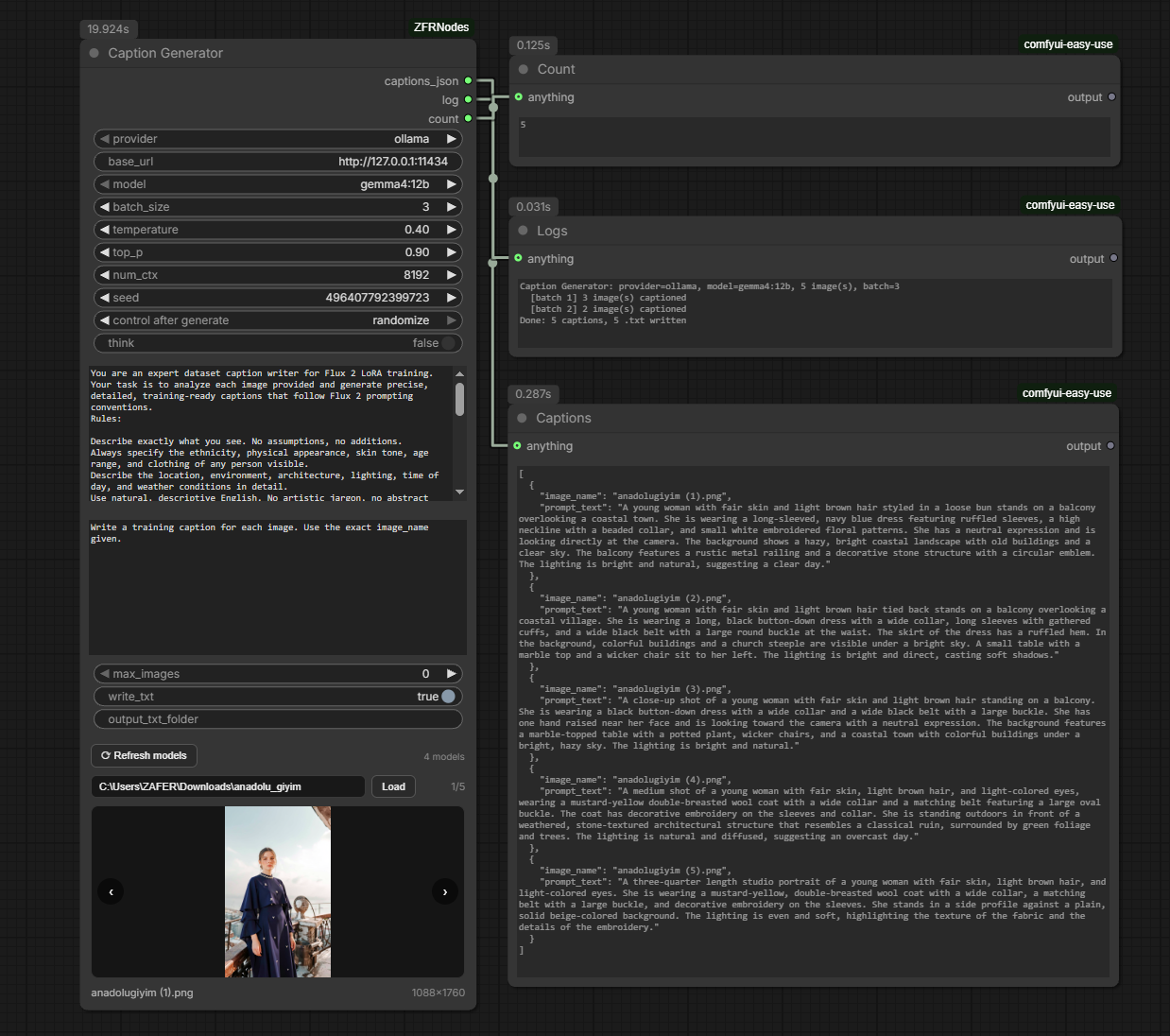
- Providers:
ollama(local/remote, e.g.qwen2.5vl,llava) or any OpenAI-compatible / Anthropic API —openai,deepseek,google,openrouter,anthropic. Non-Ollama providers need anapi_key. - Images are sent in small groups (
batch_size, default 3) so the LLM's context doesn't get overloaded, and the group prompt tells the model exactly which file names to use, in order. - The LLM must reply with a JSON array of
{image_name, prompt_text}; the node does not trust the LLM's returned file names — it matches captions back to real files strictly by order, so a typo in the model's output never mislabels an image. - Ships with a default
system_prompttuned for Flux 2 LoRA training: describe exactly what's visible (ethnicity, appearance, clothing, environment, lighting) and avoid vague words like "beautiful" or "stunning" — fully editable if you want a different captioning style.
| Input | Purpose |
| --- | --- |
| folder_path | Filled by the same folder picker as Reference Image Loader (Path). |
| provider, api_key, base_url, model | LLM connection. For Ollama, base_url and a "Refresh models" button fill model automatically. |
| batch_size, temperature, top_p, num_ctx, seed, think | Standard LLM sampling controls. |
| system_prompt, user_prompt | Fully editable — override the default captioning instructions. |
| max_images | Cap how many images to caption (0 = all). |
| write_txt, output_txt_folder | Whether to write .txt files, and where (empty = next to the source images). |
Outputs: captions_json (all captions as one JSON array), log, count.
Note: Caption Generator reads straight from disk (its own
folder_path), not from a connected IMAGE batch — there's no graph wire between it and Dataset Prep. Run Dataset Prep first, then point Caption Generator's folder picker at Dataset Prep'soutput_dirto caption the results it just saved. That takes you from "a folder of source photos" to "a captioned LoRA dataset" in two node runs.
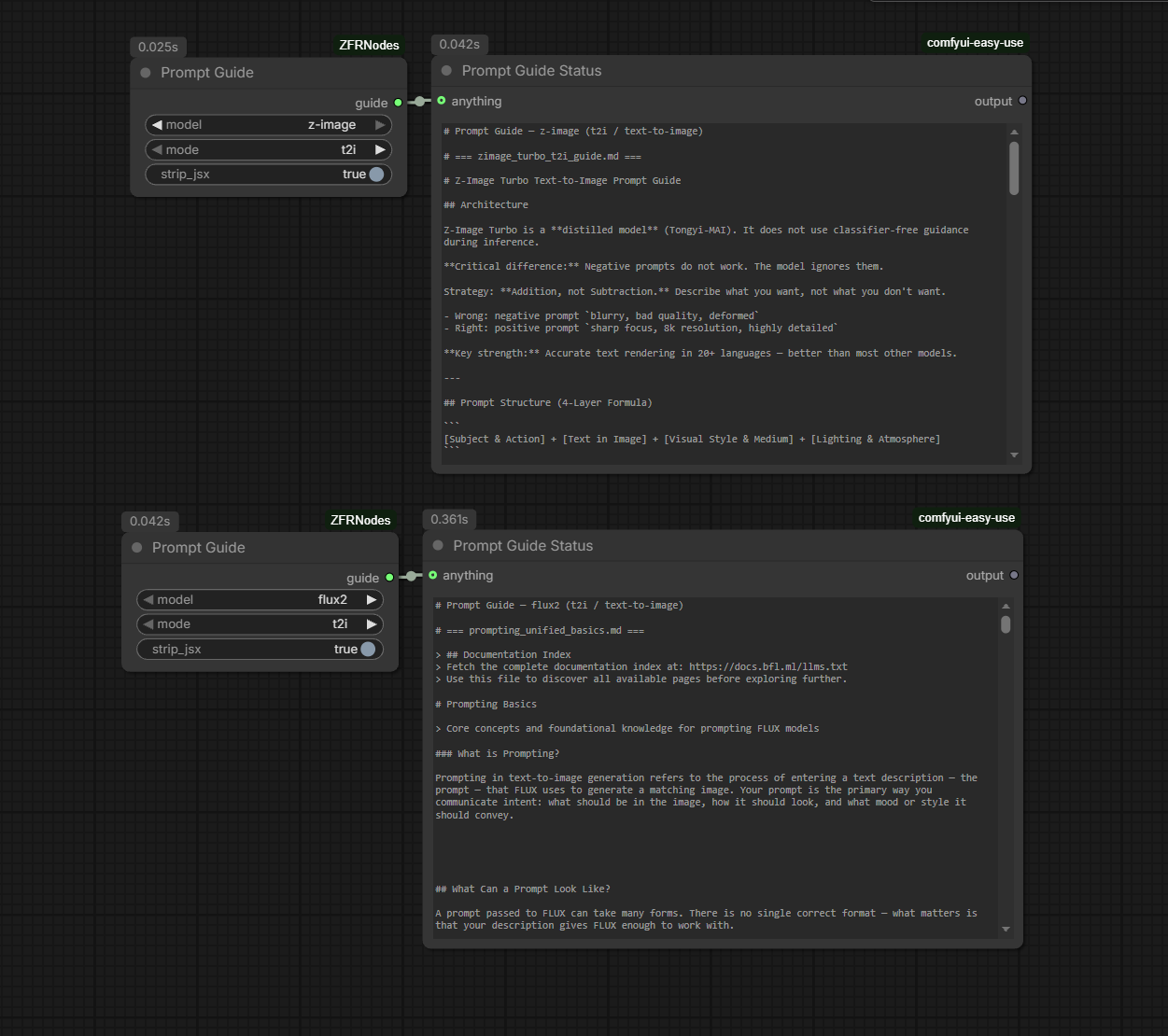
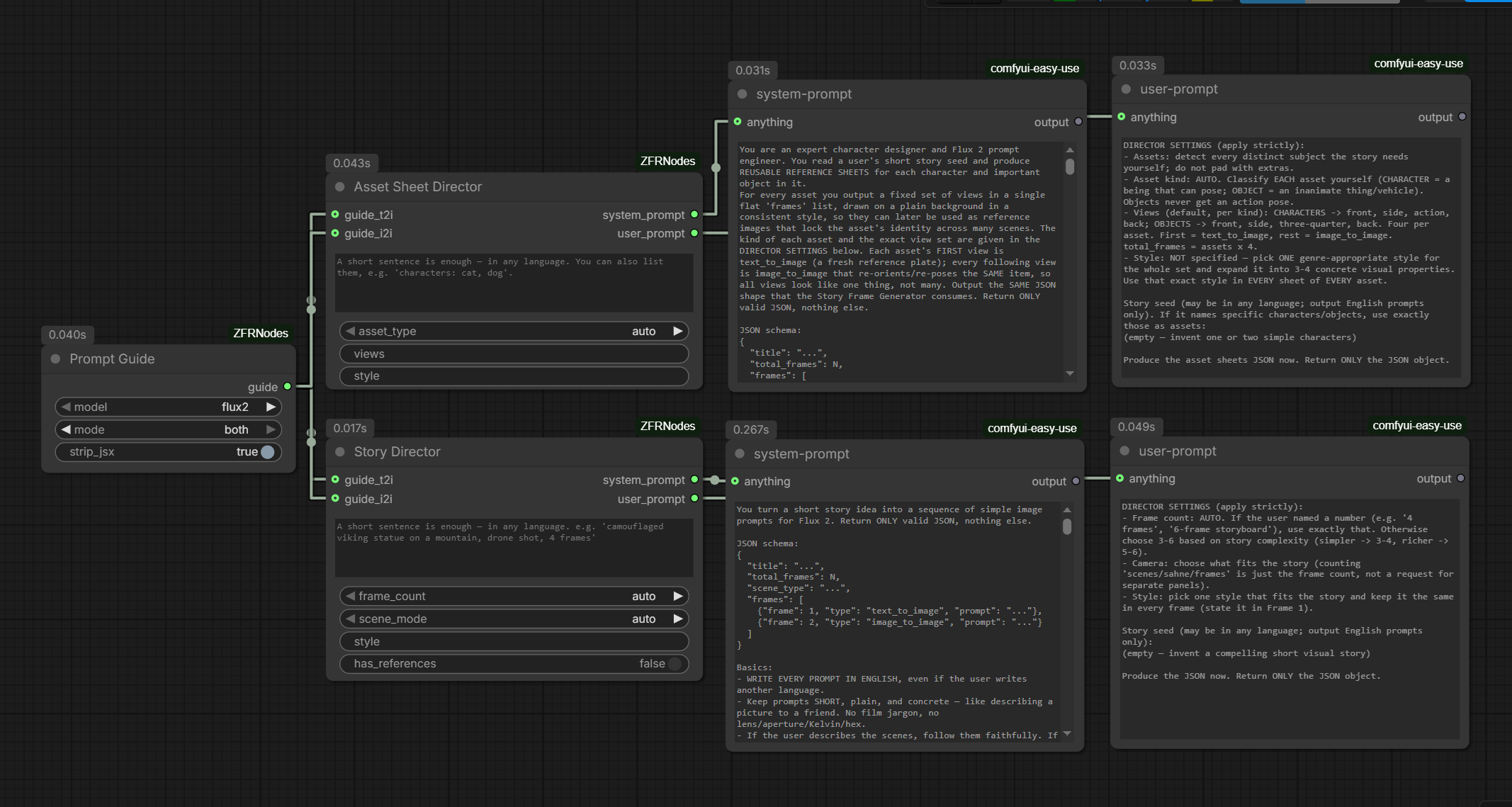
Prompt Guide
Loads the bundled model-specific prompting guides so you (or an LLM) write prompts the way each model expects. Pick a model folder and a mode; the node concatenates the matching markdown docs into one STRING.
| Node | Preview |
| --- | --- |
|  |
|  |
|
| Input | Purpose |
| --- | --- |
| model | Auto-listed from docs/models/ (e.g. flux2, sdxl, sd15, pony, z-image). |
| mode | t2i, i2i, or both (returns the text-to-image and image-to-image guides together, labeled). |
| strip_jsx | Removes JSX/React snippets from the docs, leaving clean readable guidance. |
Connect the guide output to Story Director / Asset Sheet Director (guide_t2i /
guide_i2i) to ground their wording in the chosen model's documentation.
Inpaint Studio
A self-contained "mini Photoshop" node: load an image, paint a mask directly on it, and inpaint just the masked area — model loading, masking, and sampling all live in one node, so there's no separate Load Image → Mask Editor → InpaintModelConditioning → KSampler chain to wire up.
- ⬆ Load Image — upload a file, drag-and-drop it onto the node, or paste with Ctrl+V while the node is selected.
- 🖌 Mask Editor — opens ComfyUI's built-in Mask Editor on the loaded image; paint the area you want regenerated, hit Save, and the mask is embedded in the image's alpha channel — the preview updates automatically once the mask is saved.
- Settings are organized into tabs (Model · Inpaint · Generation · Output) instead of one long scrolling list of widgets.
| Tab | Key settings |
| --- | --- |
| Model | unet_name, vae_name, clip_name, clip_type, lora_name / lora_strength, trigger_words, use_references (toggle optional reference_images — what should appear in the masked area). |
| Inpaint | denoise, grow_mask / feather_mask (expand/soften the mask edges), noise_mask, differential_diffusion (smoother blending at the mask boundary), composite_back (paste the result back onto the untouched original outside the mask). |
| Generation | steps, cfg, guidance, sampler_name, scheduler, seed / seed_mode. |
| Output | save_to_disk, output_subdir, filename_prefix. |
If the mask is left empty, the node warns and returns the original image unchanged instead of generating — a safeguard against accidentally running inpaint with nothing painted.
Outputs: image (the inpainted result), log.
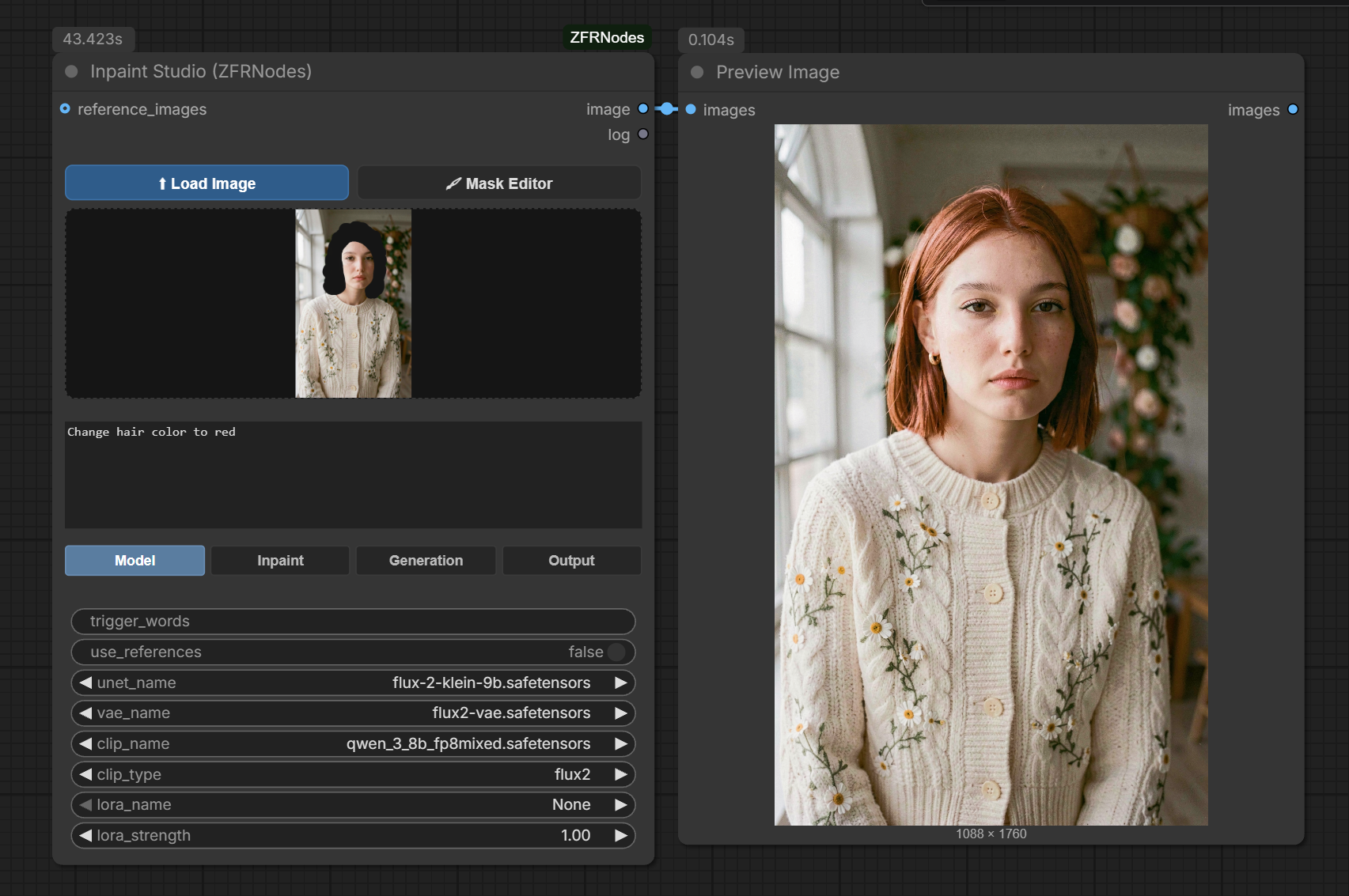
Plain prompt-driven inpaint
With use_references off, the masked area is repainted purely from the text prompt — e.g.
mask the hair and write "Change hair color to red". Everything outside the mask stays
pixel-identical (composite_back keeps it locked).
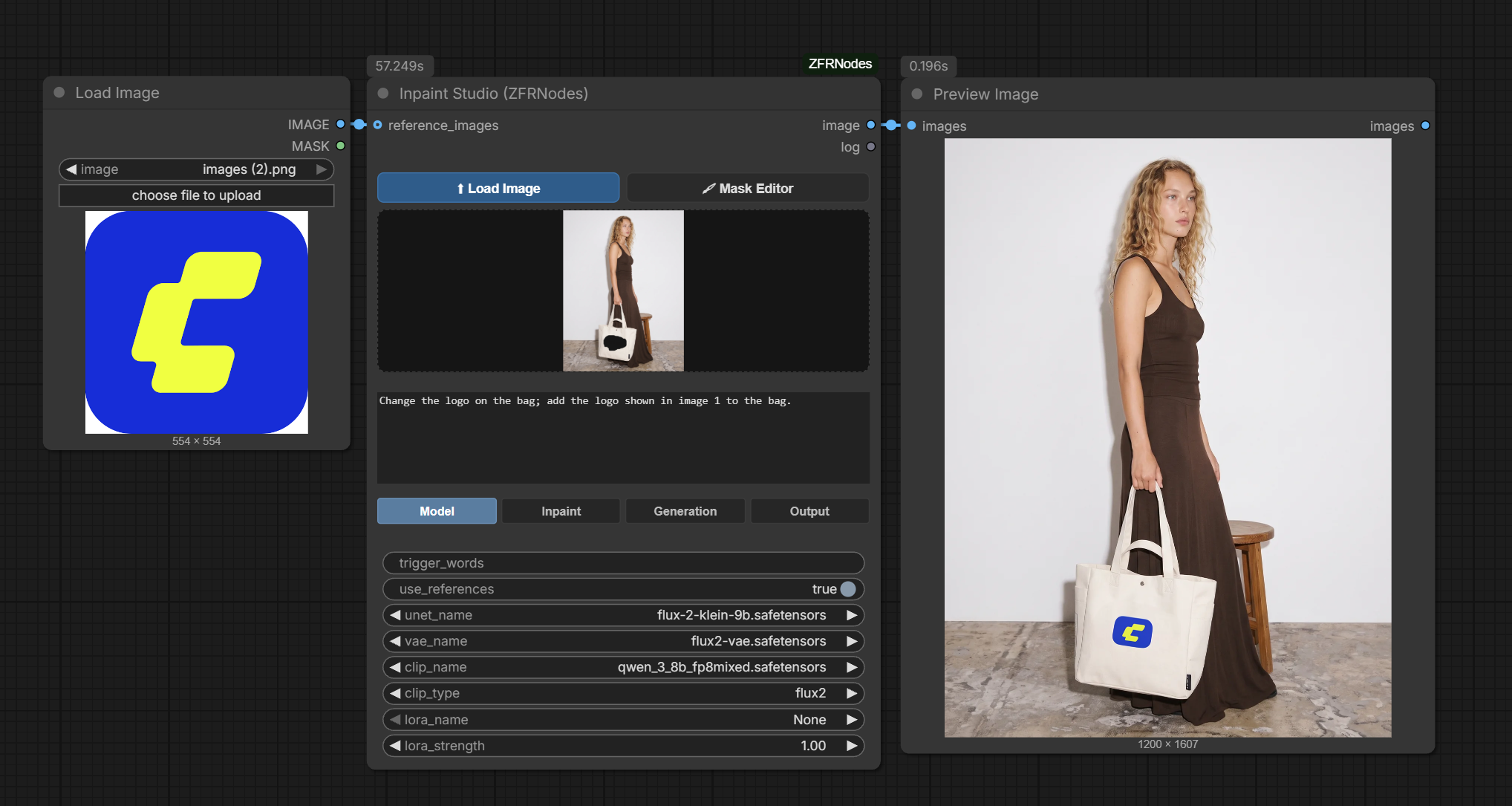
Reference-guided inpaint (adding an object into the mask)
Turn use_references on and connect an IMAGE to reference_images (a Load Image node,
a Reference Image Loader, or any IMAGE output) and the masked area can pull in content from
that reference instead of just following the text prompt — e.g. mask the bag and write
"add the logo shown in image 1 to the bag" to transfer a logo from a separate reference image
onto the product in the masked region.
This uses the same Flux2 ReferenceLatent mechanism as Simple Image Generator (Multiple) —
the reference is VAE-encoded and injected into the positive conditioning alongside the prompt,
so the model has both "what to do" (prompt) and "what it should look like" (reference) to work
from.
Notes / compatibility
- Built and tested with Flux2 (flux-2-klein) + a Qwen text encoder (
clip_type = flux2). The image-to-image path relies onReferenceLatent, so models that support reference-latent conditioning work best. Other models may need a differentclip_type/ may not support i2i. - After each frame the node frees intermediate tensors and calls
soft_empty_cache(), and finished frames are moved to CPU/RAM — keeping long sequences from running out of VRAM. - All nodes load from the
pysubpackage;any_type.pyprovides the wildcard type the converters use.
License
MIT © Zafer Söğütcü