
ComfyUI-TypeConverters
Simple and lightweight type conversion nodes for ComfyUI.
Nodes (4)
ComfyUI Convert Nodes
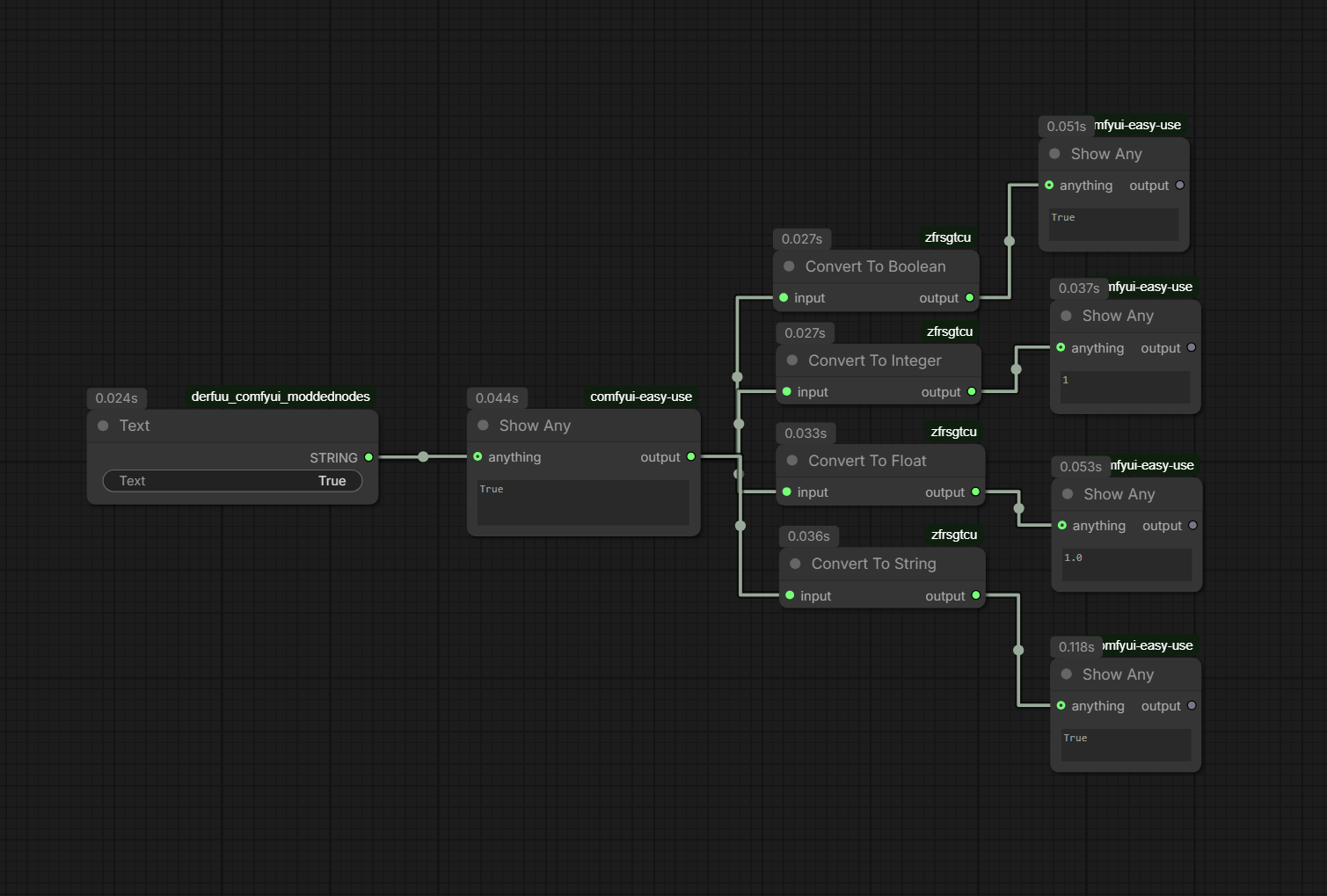
Simple and lightweight type conversion nodes for ComfyUI.
These nodes are designed to make workflow automation easier when working with LLMs, APIs, JSON data, custom nodes, loop systems, and dynamic workflow logic.
Features
- Convert any input to
INT - Convert any input to
FLOAT - Convert any input to
STRING - Convert any input to
BOOLEAN - Accepts a single
ANYinput - Returns a strongly typed ComfyUI output
- Safe fallback values on conversion errors
- Lightweight and easy to use
Included Nodes
Convert To Integer
Converts any supported input into an INT.
Examples:
| Input | Output |
| ----- | ------ |
| "6" | 6 |
| 6.9 | 6 |
| True | 1 |
| False | 0 |
| None | 0 |
Fallback value:
0
Convert To Float
Converts any supported input into a FLOAT.
Examples:
| Input | Output |
| ----- | ------ |
| "6.5" | 6.5 |
| 6 | 6.0 |
| True | 1.0 |
| False | 0.0 |
Fallback value:
0.0
Convert To String
Converts any input into a STRING.
Examples:
| Input | Output |
| ----- | ------ |
| 123 | "123" |
| True | "True" |
| 6.5 | "6.5" |
Convert To Boolean
Converts any supported input into a BOOLEAN.
Examples:
| Input | Output |
| ----- | ------ |
| "true" | True |
| "false" | False |
| 1 | True |
| 0 | False |
Fallback value:
False
Why Use These Nodes?
These nodes are particularly useful when working with:
- Ollama
- OpenAI
- Gemini
- JSON outputs
- Loop systems
- Conditional logic
- API integrations
- Dynamic ComfyUI workflows
Many LLM and API nodes return values as strings, while other ComfyUI nodes require specific data types such as INT, FLOAT, or BOOLEAN.
These conversion nodes provide a simple bridge between those systems.
Example:
Ollama
↓
Convert To Integer
↓
For Loop
Example:
JSON Extract
↓
Convert To Boolean
↓
Condition Switch
Installation
- Copy the
zfrsgtcu-ComfyUIfolder into your ComfyUIcustom_nodesdirectory.
Example:
ComfyUI/custom_nodes/zfrsgtcu-ComfyUI
- Restart ComfyUI.
- The nodes will appear under:
zfr-nodes
Category
zfr-nodes
Compatibility
- ComfyUI
- ComfyUI Portable
- Windows
- Linux
- macOS
License
MIT License
Feel free to use, modify, and distribute.