
Smart Save Image
A visual, template-driven ComfyUI image saver with live path previews
Smart Save Image
English | 简体中文
English
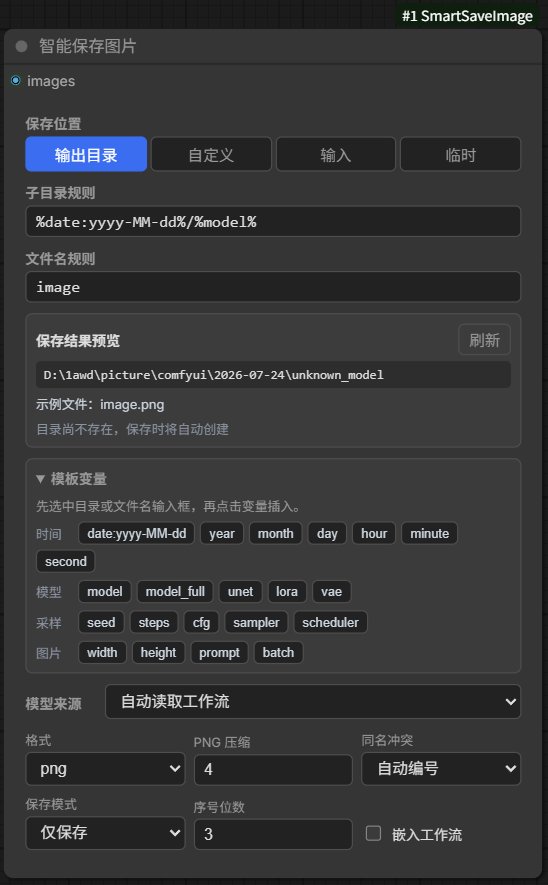
A visual, template-driven image saver for ComfyUI. It previews the final destination before execution and keeps folder and filename rules in one compact node.
Features
- Live destination folder and example filename preview.
- Output, input, temp, relative, and absolute destination roots.
- Reusable date, model, sampler, prompt, size, and batch tokens.
- Per-node overrides for every detected template value, plus unlimited custom tokens.
- PNG, JPEG, and WebP output.
- Collision-safe automatic numbering or overwrite mode.
- Optional workflow metadata embedding.
- English and Simplified Chinese UI.
Usage
- Add Smart Save Image and connect
images. - Choose a save location. A custom path may be absolute or relative to ComfyUI's output directory.
- Enter the subfolder and filename rules.
- Check Save Result Preview before queuing the workflow.
The template token panel is collapsed by default. Focus either rule field, then click a token to insert it.
Variable Overrides
Smart Save automatically detects model, LoRA, VAE, sampling, prompt, and image values. Open Variable Overrides only when this particular Save node needs different values:
- Click Add Override and choose a detected field, such as Seed, Sampler, or Positive Prompt.
- Enter the replacement value. The path preview updates immediately.
- Choose Custom to create a named token such as
project; use the row's%project%button to insert it into either rule.
Each Smart Save node stores its own unlimited list. A blank known value keeps the automatic value, and deleting an override restores automatic detection.
Supported rows also create an input socket beside that row. Runtime inputs take priority over the saved manual value; disconnecting restores the manual value or automatic detection. Seed, steps, CFG, dimensions, prompts, UNet, LoRA, VAE, and custom strings accept external inputs. UNet, LoRA, and VAE manual values use the same installed-file choices as ComfyUI loaders. Sampler and scheduler remain compact KSampler-style selectors and do not create sockets. Model Source has its own external model/name socket.
Template Tokens
- Time:
%date:yyyy-MM-dd%,%year%,%month%,%day%,%hour%,%minute%,%second% - Model:
%model%,%model_full%,%unet%,%lora%,%loras%,%vae% - Sampling:
%seed%,%steps%,%cfg%,%sampler%,%scheduler% - Image:
%width%,%height%,%prompt%,%negative%,%batch% - Custom: any valid name created in Variable Overrides, for example
%project%
Example for numbered images under a model folder:
Subfolder rule: krea/%model%
Filename rule: image
Name collision: Auto Number
PNG compression defaults to level 4, matching ComfyUI's built-in save node. PNG compression is always lossless. WebP is also saved losslessly. High-Quality Compression is off by default. When enabled, it allows small visual differences for a smaller PNG, JPEG, or WebP, but keeps the original encoding when the candidate is not smaller or exceeds the visual-difference limit. PNG changes each color channel by at most 2/255 and preserves alpha; JPEG/WebP candidates are checked against the normal save result. File format, dimensions, and workflow metadata stay unchanged. Saving requires an extra encode and may take longer.
Installation
Install smart-save-image from ComfyUI Manager, or clone this repository into ComfyUI/custom_nodes and restart ComfyUI.
简体中文
English | 简体中文
一个带实时路径预览的 ComfyUI 图片保存节点。节点菜单中搜索 智能保存图片。
使用方式
- 连接
images。 - 选择保存位置;自定义模式可填写绝对路径或相对
output的路径。 - 填写子目录规则和文件名规则。
- 在“保存结果预览”中确认最终目录与示例文件名。
模板变量默认折叠,展开后点击变量即可插入当前规则输入框。
变量覆盖
模型、LoRA、VAE、采样参数、提示词和图片尺寸仍会自动读取。只有当前保存节点需要不同值时,才展开“变量覆盖”:
- 点击“添加变量覆盖”,选择种子、采样器、正向提示词等现有变量并填写新值。
- 选择“自定义”可创建任意命名变量,例如
project;点击该行的%project%即可插入目录或文件名规则。 - 每个智能保存节点都有自己独立且不限数量的配置;删除一项后,该变量立即恢复自动读取。
模板新增 %loras%(全部 LoRA)和 %negative%(负向提示词),自定义变量使用 %变量名%。
支持外部值的变量会在对应行左侧生成输入端口。运行时输入优先于保存的手动值;断开后自动恢复手动值或工作流自动读取。Seed、步数、CFG、尺寸、提示词、UNet、LoRA、VAE 和自定义字符串均可连接外部节点。UNet、LoRA、VAE 的手动值使用与 ComfyUI 加载器相同的文件列表;采样器和调度器保持 KSampler 风格的下拉选择,不生成外部端口。“模型来源”有自己独立的模型对象/名称输入端口。
保存行为
- 支持 PNG、JPEG、WebP;PNG 默认压缩等级为 4,与 ComfyUI 自带保存节点一致,且始终无损;WebP 使用无损保存。
- “高品质压缩”默认关闭。开启后允许极小的视觉差异,仅当候选文件更小且通过误差检查时采用;PNG 每个颜色通道最多变化 2/255,透明度不变。格式、尺寸和工作流元数据保持不变,但额外编码可能增加保存时间。
- 自动编号不会覆盖已有文件;覆盖模式也会保证批量图片互不覆盖。
- PNG 使用 ComfyUI 原生元数据字段;关闭“嵌入工作流”后不写入生成信息。
- 保存到
output、input、temp时直接使用对应预览类型;其他绝对目录使用临时预览。 - 模型名自动从工作流读取,也可在“模型来源”中手动指定。
插件只依赖 ComfyUI 已包含的 Pillow 与 NumPy。