
Flow Branch
Named wireless results and an unlimited lazy stage orchestrator for ComfyUI
Nodes (6)
Grab any named output from anywhere, no wire required
The old boolean branch still in old workflows
Run a multi-stage pipeline and let it pick the path
The naming end of a wire-free workflow
Pick one of three options, or just pass through
Turn one processing step on or off, with graceful pass-through
Flow Branch
English | 简体中文
English
Named wireless results and an unlimited lazy stage orchestrator for robust ComfyUI workflows.
Nodes
- Publish Result gives any data a readable result name.
- Read Result retrieves a named result anywhere in the workflow, with an optional fallback.
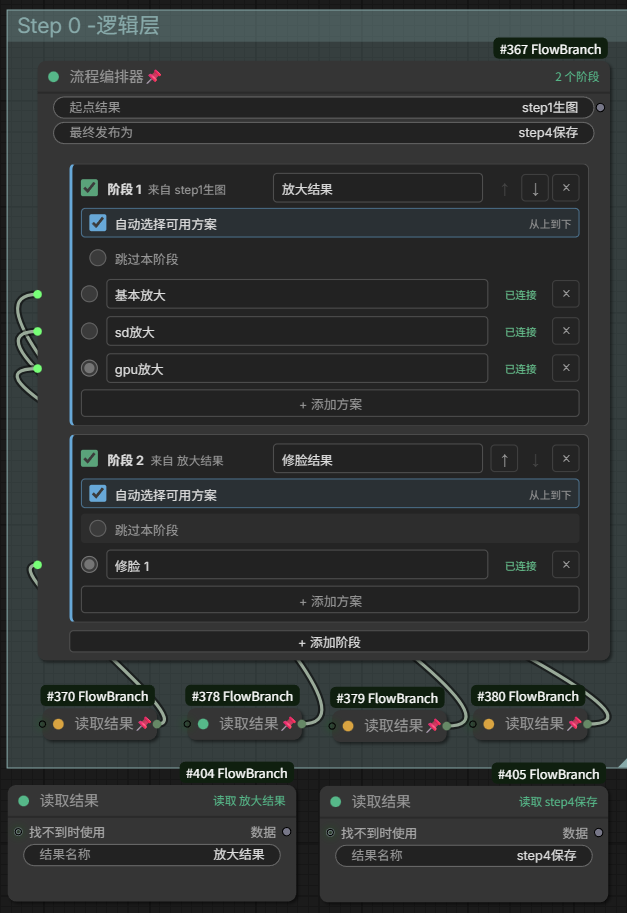
- Flow Orchestrator manages unlimited sequential stages and unlimited alternatives per stage. Only the selected usable alternative becomes an execution dependency.
Legacy Stage Switch, Multi-route, and Conditional Select nodes remain loadable for old workflows but are hidden from the add-node menu.
Quick Example
For generation, optional face restoration, and one of several upscalers:
- Connect the generated image to Publish Result and name it
Original Image. - Add a stage to Flow Orchestrator, name its result
Face Restored, then connectRead Result (Original Image) -> face restoration -> stage option. - Add another stage named
Upscaled. Add as many options as needed and connect each fromRead Result (Face Restored)through its own upscaler to an option socket. - Enable Auto-select available option to choose the first connected, non-bypassed option from top to bottom.
- Use the orchestrator output directly or read its final published name elsewhere.
If a stage is disabled, skipped, unconnected, or has no available automatic option, it passes the previous stage result through. The compiler validates that a selected option actually reads the preceding stage, preventing later processing from accidentally bypassing an unfinished earlier stage.
All stage configuration is stored in normal workflow data. Save/reload, workflow switching, and node duplication preserve stages, options, ordering, switches, selections, and dynamic sockets.
Stage Behavior
| Action | Result | | --- | --- | | Disable a stage | Runs none of its options and passes through the previous result | | Select Bypass this stage | Keeps the stage enabled but performs no processing for this run | | Selected option is not connected | Passes through the previous result and shows a warning | | Selected option is connected | Executes only that option | | Enable Auto-select available option | Picks the first available option from top to bottom; passes through if none are available | | Multiple automatic options are available | Picks only the highest option and reports the choice | | Starting result or every input is bypassed | Treats missing links as unconnected so unrelated optional inputs can keep running | | Delete an option or stage | Safely removes its dynamic socket and link |
Order Protection
Each stage header shows the previous named result it must read. A processing option must begin with a Read Result node using that exact name. If an upscaling option reads Original Image when it should read Face Restored, the compiler stops that path with a clear error instead of silently skipping face restoration.
When controlling automatic options with group Bypass (Ctrl+B), keep the option's final Publish Result node in the same group. Bypassing the group then removes that named result from the queued prompt, allowing automatic selection to correctly treat the option as unavailable.
A missing Read Result publisher with no fallback is removed from the queued prompt like an unconnected optional input. Ordinary nodes may continue when that input is optional, while ComfyUI still reports its normal missing-input error for required inputs. Duplicate names, dependency cycles, and invalid stage order remain explicit configuration errors.
At queue time, the visible plan is compiled into real ComfyUI lazy execution dependencies. The implementation uses no Python global state, does not depend on node placement order, and does not reserialize the workflow or alter random-seed widgets.
Persistence and Shortcuts
Stages, options, names, ordering, switches, current selection, and dynamic input IDs are ordinary node workflow data. Saving, reloading, switching workflows, and duplicating the node preserve all of them without browser storage or sidecar files.
- Right-click Publish Result and choose Create Paired Reader to add a matching reader on its right.
- Right-click Flow Orchestrator and choose Create Result Reader for any stage or final result.
- Right-click Read Result and choose Go to Publisher, or double-click it, to navigate to its unique publisher. Navigation refuses to guess when names conflict.
Installation
Install flow-branch from ComfyUI Manager, or clone this repository into ComfyUI/custom_nodes and restart ComfyUI. The UI supports English and Simplified Chinese.
简体中文
English | 简体中文
用于多阶段图像处理的无线结果与惰性流程编排节点。节点位于 流程分支 分类。
三个节点
- 发送结果:给一份数据起一个可读名称,例如“原始图像”。
- 流程编排器:按顺序管理所有处理阶段;阶段和每个阶段的方案数量都没有固定上限。
- 读取结果:在任意位置读取“原始图像”“修脸后”“放大后”或“最终图像”等命名结果。
旧版“阶段开关 / 多路方案 / 条件选择”只为兼容已经保存的工作流保留,已标记为弃用,不会出现在新增节点菜单中。
示例:生图、可选修脸、三种可选放大
1. 发布起点
把生图结果连接到 发送结果 的“数据”,结果名称填写:
原始图像
2. 添加修脸阶段
在 流程编排器 中设置:
起点结果:原始图像
最终发布为:最终图像
点击“添加阶段”,把阶段结果名称改为“修脸后”,把方案名称改为“FaceDetailer”。
修脸处理链必须这样开始和结束:
读取结果(原始图像) -> FaceDetailer -> 流程编排器的 FaceDetailer 方案插槽
3. 添加放大阶段
再次点击“添加阶段”,把阶段结果名称改为“放大后”。使用“添加方案”加入任意数量的放大方法,例如:
读取结果(修脸后) -> 放大方法 A -> 方案 A 插槽
读取结果(修脸后) -> 放大方法 B -> 方案 B 插槽
读取结果(修脸后) -> 放大方法 C -> 方案 C 插槽
有两种选择方式:
- 手动模式:用每行左侧的单选按钮选择本次运行的方案。
- 自动模式:开启“自动选择可用方案”,按从上到下的顺序选择第一个未被 Bypass 且确实有结果的方案。
两种模式都只会把最终选中的方案接入执行依赖,其余方案不会由流程编排器触发。
4. 使用最终结果
可以直接使用流程编排器的“流程结果”输出,也可以在其他位置添加:
读取结果(最终图像) -> 保存图片
阶段行为
| 操作 | 结果 | | --- | --- | | 关闭阶段开关 | 不执行该阶段的任何方案,直接沿用上一阶段 | | 选择“跳过本阶段” | 阶段保持启用,但本次不执行处理方案 | | 选中的方案没有连接 | 自动沿用上一阶段,并显示黄色状态 | | 选中的方案已经连接 | 只执行这个方案 | | 开启“自动选择可用方案” | 从上到下选择第一个可用方案;全部不可用时沿用上一阶段 | | 自动模式发现多个可用方案 | 只选择最上面的方案并给出提示 | | 起点或全部输入被 Bypass | 缺失连线按“未连接”处理;使用它的可选端口不会阻止节点继续运行 | | 删除方案或阶段 | 对应动态插槽和连线一并安全移除 |
顺序保护
每个阶段标题都会显示它应该读取的上一结果,例如“读取:修脸后”。选中的处理方案必须从同名 读取结果 节点开始。
使用组 Bypass(Ctrl+B)管理自动方案时,应把该方案末端的“发送结果”也放进同一个组。这样整组被 Bypass 后,对应命名结果会从队列 Prompt 中消失,自动模式才能准确判定它不可用。
如果“放大后”方案错误地读取了“原始图像”,编译器会明确报错并停止该流程,防止跳过修脸后仍继续放大和保存。
“读取结果”找不到同名发布位置且没有回退输入时,排队前会移除对应连线,效果与该端口从未连接完全相同。普通节点的可选输入缺失时仍可继续运行;必填输入缺失时则显示 ComfyUI 原生的缺少输入错误。名称重复、循环依赖和阶段顺序错误仍然是明确的配置错误。
排队时,可见流程会展开成真正的 ComfyUI 懒执行依赖。实现不使用 Python 全局变量,不依赖节点摆放顺序,也不会重新序列化工作流或修改其他节点的随机种子。
保存与复制
阶段、方案、名称、顺序、开关、当前选择和动态输入 ID 都保存在节点自身的普通工作流数据中。切换工作流、保存后重新打开、复制节点都会保留这些信息,不依赖浏览器缓存或工作流外文件。
快捷操作
- 右键 发送结果,选择“创建配对读取”,会在右侧创建一个同名 读取结果。
- 右键 流程编排器,选择“创建结果读取节点”,可以直接为任意阶段或最终结果创建读取节点。
- 右键 读取结果 选择“跳转到发送位置”,或直接双击节点,可以返回唯一的发送节点;名称冲突时不会擅自选择。