
Prompt Preset Manager
A shared, searchable prompt preset library with folders and in-node editing for ComfyUI
Prompt Preset Manager
English | 简体中文
A shared, searchable prompt preset library for ComfyUI. Keep reusable prompts organized without turning each workflow into a wall of text nodes.
Features
- Shared preset library: presets are stored locally and are available across workflows.
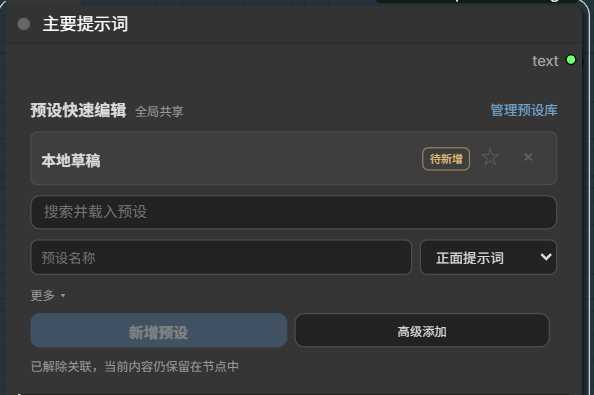
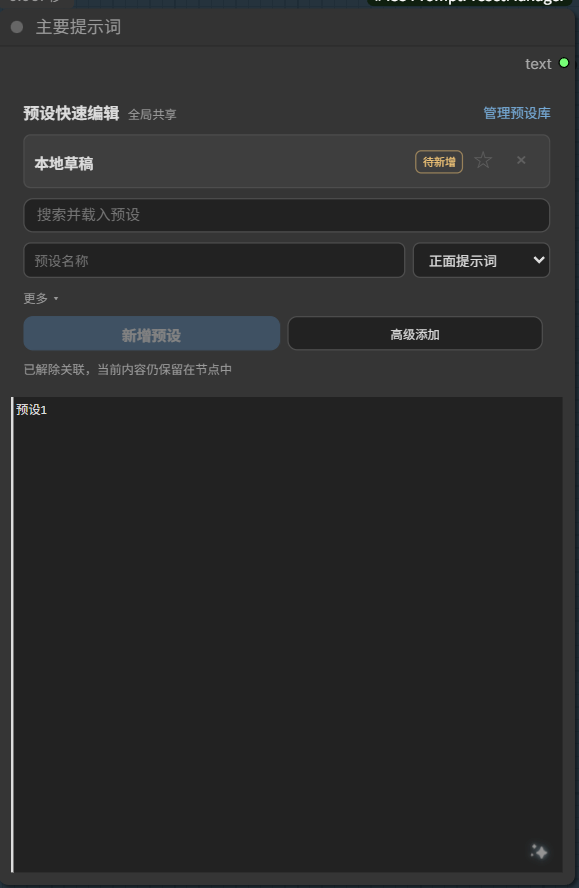
- Fast in-node editing: search, load, edit, favorite, overwrite, or save a variant without leaving the node.
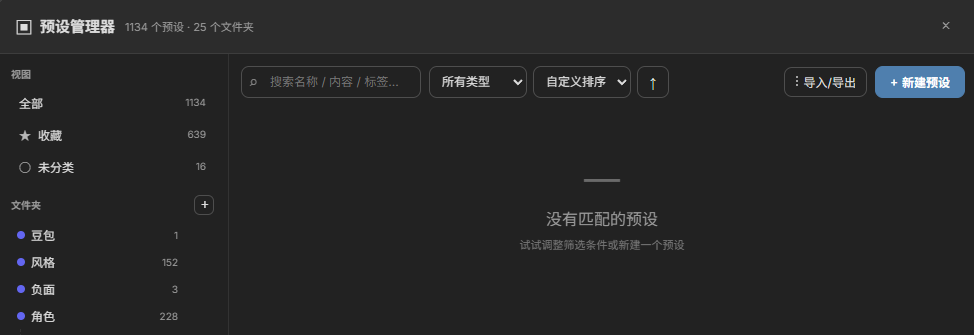
- Full library manager: organize presets with nested folders, types, tags, descriptions, favorites, filters, and sorting.
- Workflow-safe drafts: the selected preset and local edits are serialized with the node, including duplicated nodes and reopened workflows.
- Native text output: outputs one standard
STRING, so it works with normal ComfyUI prompt inputs. - Upstream text capture: connect any
STRINGoutput to the optionaltextinput; non-empty results are written back into the editable prompt box after execution. - Import and export: back up or move the whole library, a folder, a filtered view, or an individual preset.
- English and Chinese UI: follows the ComfyUI/browser locale automatically.
Installation
ComfyUI Manager
Search for Prompt Preset Manager and install it, then restart ComfyUI.
Manual
cd ComfyUI/custom_nodes
git clone https://github.com/yurishk/ComfyUI-PromptPresetManager.git
Restart ComfyUI after cloning. The plugin has no third-party Python dependencies.
Usage
- Add Prompt Preset Manager from
text/presets. - Open Preset Library, create folders and presets, or import an existing library.
- Search and select a preset in the node.
- Edit the native prompt box when a workflow needs a local variation.
- Optionally connect an upstream
STRINGto thetextinput to capture and continue editing its result. - Connect the
textoutput to any node that accepts aSTRINGprompt, or leave it unconnected and run this node as a text capture endpoint.
The shared library is stored in data/presets.json. Automatic backups are written to backups/. Both directories are local user data and are excluded from Git.
License
简体中文
English | 简体中文
一个适用于 ComfyUI 的全局提示词预设管理器。它可以集中管理常用提示词,避免每个工作流都堆满重复的文本节点。
功能
- 全局预设库:预设保存在本地文件中,可在不同工作流之间共享。
- 节点内快速编辑:无需离开节点即可搜索、载入、编辑、收藏、覆盖或另存变体。
- 完整管理界面:支持多级文件夹、类型、标签、说明、收藏、筛选与排序。
- 工作流持久化:当前选择和本地修改会随节点保存,复制节点、切换或重新打开工作流后仍可恢复。
- 原生文本输出:仅输出标准
STRING,可直接连接 ComfyUI 的普通提示词输入。 - 上游文本接收:可将任意
STRING输出连接到可选的text输入;执行后的非空结果会写回原生提示词框,方便继续修改。 - 导入与导出:可备份或迁移整个预设库、文件夹、筛选结果或单个预设。
- 中英文界面:根据 ComfyUI 或浏览器语言自动切换。
安装
ComfyUI Manager
搜索 Prompt Preset Manager 并安装,然后重启 ComfyUI。
手动安装
cd ComfyUI/custom_nodes
git clone https://github.com/yurishk/ComfyUI-PromptPresetManager.git
克隆完成后重启 ComfyUI。本插件不需要安装额外的 Python 依赖。
使用方法
- 从
text/presets分类添加 Prompt Preset Manager。 - 打开“预设库”,创建文件夹和预设,或导入已有预设库。
- 在节点中搜索并选择预设。
- 某个工作流需要单独调整时,直接编辑节点内的原生提示词文本框。
- 如需接收提示词强化等上游结果,将其
STRING输出连接到本节点的text输入。 - 可将本节点的
text输出继续连接到下游,也可以不连接,将本节点直接作为文本接收终点运行。
全局预设库保存在 data/presets.json,自动备份位于 backups/。这两个目录属于本地用户数据,不会提交到 Git。