
Anima LoRA Comparison
Batch LoRA comparison sampler for Anima/Cosmos models
Nodes (4)
The least glamorous node in the pack — and the one you need to read your results
Pick twenty, compare them all
Anima comes in three files — this node loads all of them at once
The 'XY' is a lie — it's a one-axis LoRA bake-off, and that's the good part
Anima(Cosmos 系列)模型的批量 LoRA 对比插件。
当前版本:v0.1.2
节点
| 节点 | 说明 | |------|------| | Anima Model Loader | UNET + CLIP + VAE 一体化加载器 | | Anima LoRA List | 下拉选择 LoRA,统一强度,最多 20 个。支持 Apply Mode(Standard / Anima 3.8B Bridge) | | Anima XY Sampler | 遍历 LoRA 列表,每个 LoRA 生成一张图,并输出对应 LoRA 名称 | | Anima Image Grid (with Labels) | 多图拼接(水平/垂直),可调间距,支持图片底部文字标注(自动跟随 LoRA 名称) |
安装
cd ComfyUI/custom_nodes
git clone https://github.com/yunqiankuangyu/comfyui-anima-lora-comparison.git
或通过 ComfyUI Manager 安装——搜索 comfyui-anima-lora-comparison。
使用方法
基本接线
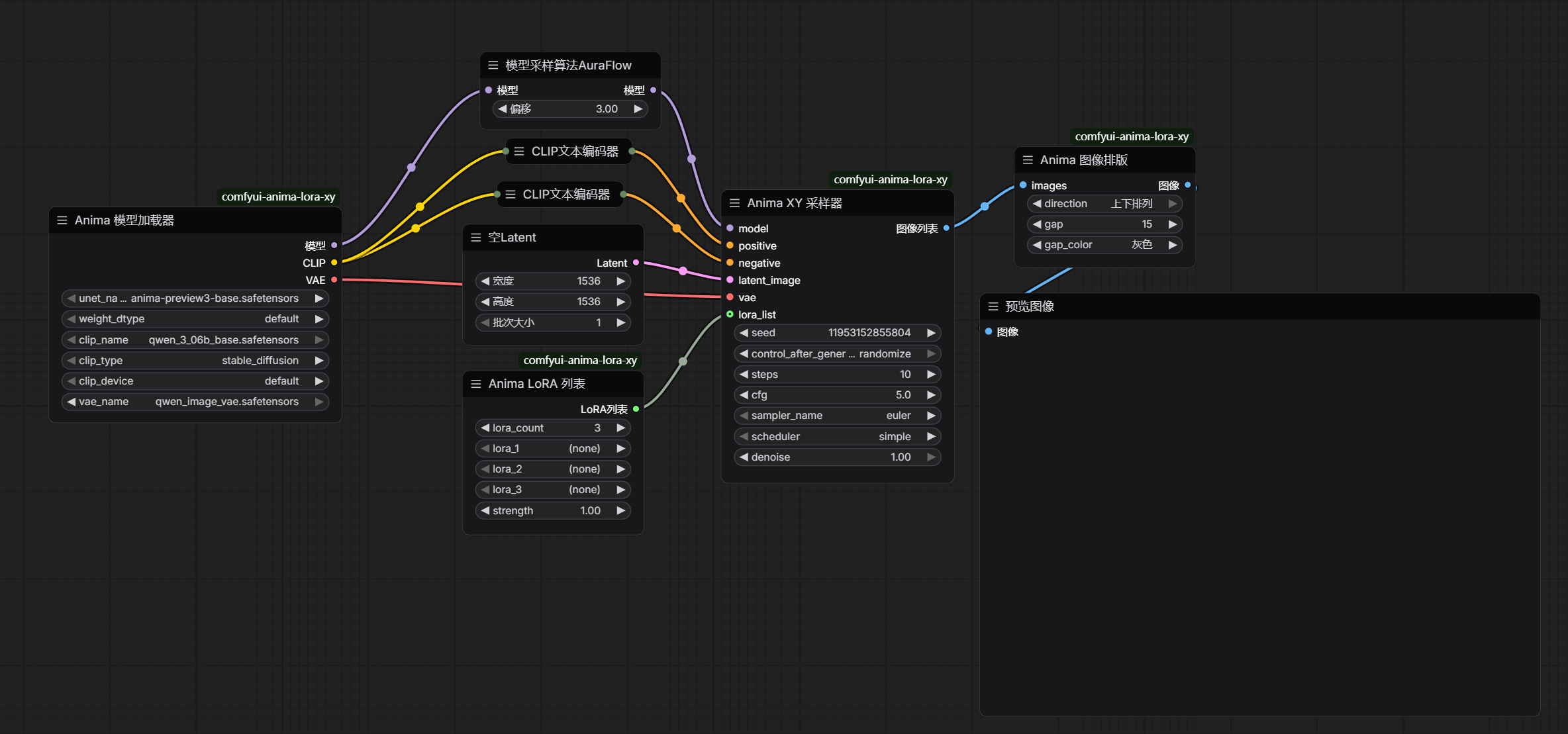
Anima Model Loader
UNET Model:选择 Anima UNET 模型文件Weight Precision:权重精度(如 fp16 / fp32)CLIP Model:选择 CLIP 模型CLIP Type:CLIP 类型CLIP Device:CLIP 运行设备VAE Model:选择 VAE- 输出:
MODEL/CLIP/VAE
Anima LoRA List 节点
Strength:所有 LoRA 统一强度LoRA Count:要对比的 LoRA 数量(1-20)lora_1~lora_N:下拉选择 LoRA 文件(动态槽位,数量由 LoRA Count 决定)lora_data:LoRA 数据集(可选输入)Apply Mode:选择 Standard 或 Anima 3.8B Bridge(见下文)- 输出:
LORA_LIST
Anima 3.8B Bridge 模式
本插件支持与 ComfyUI-Anima-3.8B-LoRA-Bridge 联动,让不同 Anima 模型变体训练的 LoRA 在其他变体上运行。
何时使用 Bridge 模式:
- 你的 LoRA 训练时用的模型与当前加载的模型不是同一个变体
- Bridge 模式会自动重映射 LoRA 层以匹配当前加载模型的架构
何时使用 Standard 模式:
- 你的 LoRA 与当前加载的模型架构一致(无需重映射)
Bridge 模式使用条件:
- 安装 ComfyUI-Anima-3.8B-LoRA-Bridge 到
custom_nodes/ - 在 Anima Model Loader 中加载目标模型
- 在 Apply Mode 下拉菜单中选择 "Anima 3.8B Bridge"
Anima-2.9B 支持
本插件同样支持 Anima-2.9B(40-block 深度扩展模型)。根据所使用 LoRA 的训练来源,分两种情况:
情况一:LoRA 在 Anima-2.9B 上训练(原生 40-block LoRA)
- 在 Anima Model Loader 中加载 2.9B 模型
- Apply Mode 选择 Standard
- 无需安装任何额外插件,正常生成即可
情况二:LoRA 在 Anima-Base v1.0 / v1.1 上训练(28-block LoRA),但在 2.9B 模型上出图
- Apply Mode 仍选择 Standard
- 同时必须安装以下两个加载期补丁(两个都要,缺一不可),它们会把 28-block LoRA 的权重正确重映射到 2.9B 的 40-block 布局:
- ComfyUI-Anima-2.9B-blocksPatch — 让 ComfyUI 正确识别 2.9B 的 40-block 架构(否则模型会被截断为 28 block 加载)
- ComfyUI-Anima-2.9B-loraPatch — 把 28-block LoRA 的层索引重映射到 2.9B 的对应位置
- 这两个补丁是 ComfyUI 加载期的 monkey-patch,不向画布添加节点,因此本插件节点层面仍用 Standard,跨 block 的重映射由它们底层处理
注意:情况一用的是 2.9B 原生 LoRA,架构与模型一致,走 Standard 即可;情况二的两个补丁仅用于「旧版 LoRA + 2.9B 模型」组合,与情况一无关。
Anima XY Sampler 节点
MODEL/Positive/Negative/Latent/VAE:来自上游节点的连接Seed/Steps/CFG/Sampler/Scheduler/Denoise:采样参数LoRA List(可选):接入 Anima LoRA List 的LORA_LIST- 输出:
IMAGE(拼接图) /LORA_NAMES(各图对应 LoRA 名称,自动传给下游)
Anima Image Grid 节点
Image:接入 Anima XY Sampler 的IMAGEDirection:水平 / 垂直Gap:0-256 像素(透明间隙)Show Labels:是否显示图片底部文字标签(True/False)Label Color:标签文字颜色(White, Black, Yellow, Cyan, Magenta, Red, Green, Blue)Label Background:标签背景颜色(Black, White, Gray, Red, Green, Blue, Transparent)LoRA Names(可选):接入LORA_NAMES即可自动标注,无需手动输入;留空则显示 "Image 1", "Image 2" 等
文字标注功能
v0.1.1 起支持:在图片底部添加文字标签,轻松识别每张图对应的 LoRA。
使用方法:
- 将 Anima XY Sampler 的
LORA_NAMES输出接入本节点的LoRA Names(推荐,零手工配置) - 或手动在
LoRA Names输入框中逐行输入 LoRA 名称,顺序需与图片一致 - 开启
Show Labels为 "True" - 调整标签颜色和背景以获得最佳视觉效果
这样生成的图片底部会显示对应的 LoRA 名称,再也不用分不清哪张图是哪个 LoRA 做的了!
开源协议
MIT