
GenMagic: 450+ AI models for image, video, audio and text
Images, video, speech, music and text from 450+ AI models (Veo, Kling, Seedance, Nano Banana, GPT Image, FLUX, Claude, GPT and more) with one GenMagic API key and one pay-as-you-go balance. Image-to-image and image-to-video included.
GenMagic for ComfyUI
Generate images, video, speech, music and text from 450+ AI models inside ComfyUI, with one API key and one pay-as-you-go balance: Veo, Kling, Seedance, Hailuo, Wan and Runway for video; Nano Banana, GPT Image, FLUX, Seedream, Recraft and more for images; Lyria for music; Claude, GPT, Gemini, Grok, DeepSeek and Qwen for text. No GPU, no model downloads, no subscription.
GenMagic runs every model through one API, so you pick a model from a dropdown instead of installing a pack per provider.
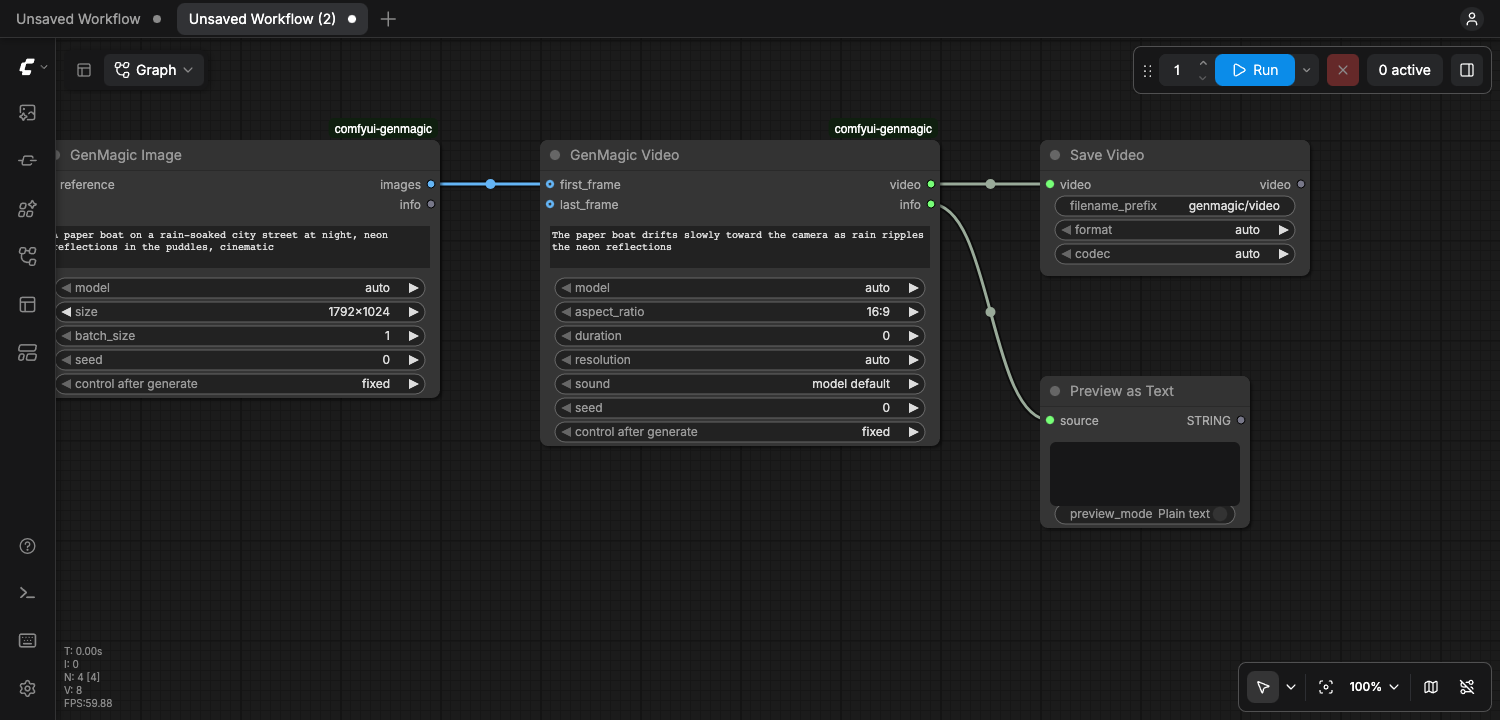
Nodes
| Node | What it does | Output |
| --- | --- | --- |
| GenMagic Image | Text-to-image with any image model, 1 to 4 images. Connect reference to transform an image (image-to-image). | IMAGE, info |
| GenMagic Video | Text-to-video with any video model, clip length, resolution and sound. Connect first_frame (and last_frame on models that take one) to animate an image (image-to-video). | VIDEO, info |
| GenMagic Speech | Text to speech, read verbatim, optional voice. | AUDIO, info |
| GenMagic Music | An original track from a description (genre, mood, instruments, tempo). | AUDIO, info |
| GenMagic Text | Any of 360+ language models, with an optional image to read. Good for writing prompts for the other nodes. | STRING, info |
info says which model ran, what the generation cost and the balance left. The VIDEO output works with ComfyUI's own Save Video, Get Video Components and Preview nodes; AUDIO with Save Audio and Preview Audio.
The model dropdowns read GenMagic's live catalog, newest first, so new models appear without updating the pack. auto runs GenMagic's recommended default.
Install
- ComfyUI Manager: search for GenMagic and install.
- Comfy CLI:
comfy node install genmagic - Manually:
git clone https://github.com/yumaheymans/comfyui-genmagicintoComfyUI/custom_nodes, then restart ComfyUI. The only dependency,requests, already ships with ComfyUI.
Needs ComfyUI 0.3.40 or newer (for the VIDEO type).
Your API key
- Create a free GenMagic account and an API key at genmagic.co/get-api-key.
- In ComfyUI open Settings > GenMagic > API key and paste it. Or set the
GENMAGIC_API_KEYenvironment variable before starting ComfyUI (it takes precedence, handy on a server).
The key stays in your ComfyUI settings on your machine. It is never written into a workflow or an image's metadata, so sharing a workflow never shares your key.
Pricing
Pay as you go from your GenMagic balance, at each model's own price: an image costs from under a cent, a video clip is priced per second by resolution, text by tokens. The live prices of every model are on genmagic.co/models. A video is billed only when the clip completes; a failed render costs nothing.
ComfyUI reruns a node only when one of its inputs changes, so queueing the same workflow again does not bill you again. To get a new take, change the node's seed (or set it to randomize). The seed is not sent to GenMagic.
Examples
The example_workflows folder (shown in ComfyUI's template browser under this pack) has:
- text_to_image: GenMagic Text writes a prompt, GenMagic Image draws it.
- image_to_video: an image animated into a clip with GenMagic Video.
- speech_and_music: a voice line and a music track.
Troubleshooting
- GenMagic needs an API key: paste it in Settings > GenMagic > API key, or set
GENMAGIC_API_KEY. - Your GenMagic balance is too low: add credits at genmagic.co/pricing.
- model_not_found: the model id in a saved workflow is no longer offered. Pick another from the dropdown.
- cannot use a last frame: that video model takes a first frame only. Disconnect
last_frameor choose a model that takes one. - The dropdowns show a short built-in list when GenMagic could not be reached at startup; they refresh within ten minutes.
Privacy
Your prompts, and any image you connect, are sent to GenMagic and to the provider of the model you chose, to make the generation. See genmagic.co/legal/privacy.
Support
[email protected] or an issue on this repository. API reference: genmagic.co/developers.
License
MIT