
VOSR 2.0
ComfyUI node for VOSR 2.0 (one-step 1.4B) image super-resolution.
Nodes (2)
ComfyUI-VOSR2
ComfyUI nodes for VOSR 2.0 — the one-step, 1.4B-parameter image
super-resolution model (LightningDiT + Qwen-Image 2D VAE + DINOv2-L
conditioning). This is a standalone community package; it is not part of the
upstream cswry/VOSR repository.
- Upstream code: https://github.com/cswry/VOSR
- Upstream weights: https://huggingface.co/CSWRY/VOSR
- This node package: https://github.com/ylchen333/ComfyUI-VOSR2
The model files download themselves on first use. The first time you run the
VOSR 2.0 Model Loader, any missing component is fetched from the pinned
CSWRY/VOSR Hugging Face repo into your
ComfyUI models/ directory (~7 GB total), thus the first run will take a second. Nothing downloads at import or
validation time, only the one pinned repo is ever contacted, and torch.hub is
never used. If you prefer to place the files by hand, see
Model files — the loader skips the download whenever they are
already present.
Nodes
Both appear under image/upscaling/VOSR2.
VOSR 2.0 Model Loader (VOSR2ModelLoader)
Loads a VOSR 2.0 bundle and returns a VOSR2_MODEL object. Split from the
upscale node so that queued images do not rebuild several GB of weights.
| Input | Default | Notes |
|---|---|---|
| model | VOSR2 | Bundle folder under models/vosr2/ — the DiT plus its matched VAE and vision encoder |
| dtype | default | default / fp16 / bf16 for the DiT + vision encoder. The VAE always runs in fp32. |
VOSR 2.0 is a fixed DiT + VAE + vision-encoder set — the DiT only works with
the specific Qwen 2D VAE it was trained against, so the VAE and vision encoder
aren't separate inputs; they live inside the bundle folder. Leave model on
VOSR2 unless you've added your own bundle. On the first run any missing part is
downloaded from CSWRY/VOSR; args.json is then validated against the fixed
VOSR 2.0 architecture before anything is constructed — an incompatible checkpoint
fails loudly instead of loading partially.
VOSR 2.0 Upscale (VOSR2Upscale)
One-step super-resolution on an IMAGE batch.
| Input | Default | Range | Notes |
|---|---:|---|---|
| model | — | VOSR2_MODEL | From the loader |
| image | — | IMAGE | Single image or batch |
| upscale | 4 | ≥ 1, uncapped | Exact output multiplier |
| seed | 42 | ≥ 0 | Latent-noise seed; batch item i uses seed + i |
| color_alignment | wavelet | wavelet / adain / none | Post-process against the bicubic target |
| tile_size | 0 | 0–4096, step 64 | DiT pixel tile; 0 disables tiling |
| tile_overlap | 32 | 0–512, step 8 | DiT tile overlap |
| vae_tile_size | 0 | 0–8192, step 64 | VAE pixel tile; 0 decodes the whole image in one pass |
| vae_tile_overlap | 32 | 0–512, step 8 | VAE tile overlap |
Tiling is not optional above 512 px. VOSR 2.0 was trained natively at up to
512 px, so whenever the upscaled output exceeds 512×512 set tile_size (e.g.
512) or quality degrades. For outputs much past 1024 px also set
vae_tile_size (e.g. 1024) or the full-image VAE decode will likely OOM.
Model files
The VAE's latent space is specific to
ema_model.safetensors— you can't swap in a different VAE (unless the VOSR authors release a new matched one). Same for the DINOv2-L encoder. All three are one set.
You normally don't need this section — the loader downloads everything below
from CSWRY/VOSR the first time it runs. It's
here for offline installs, air-gapped machines, or if you'd rather manage the
files yourself. The loader detects existing files and skips the download.
Because the three pieces are one set, they live in one bundle folder,
models/vosr2/VOSR2/:
ComfyUI/models/vosr2/VOSR2/
├── args.json
├── checkpoints/
│   └── ema_model.safetensors
├── Qwen-Image-vae-2d/
│   ├── config.json
│   └── diffusion_pytorch_model.safetensors
└── dinov2_vitl14.safetensors
| File in CSWRY/VOSR | Direct download | Put it at |
|---|---|---|
| VOSR2/args.json | link | models/vosr2/VOSR2/args.json |
| VOSR2/checkpoints/ema_model.safetensors | link | models/vosr2/VOSR2/checkpoints/ema_model.safetensors |
| Qwen-Image-vae-2d/config.json | link | models/vosr2/VOSR2/Qwen-Image-vae-2d/config.json |
| Qwen-Image-vae-2d/diffusion_pytorch_model.safetensors | link | models/vosr2/VOSR2/Qwen-Image-vae-2d/diffusion_pytorch_model.safetensors |
| torch_cache/checkpoints/dinov2_vitl14_pretrain.pth | link | convert → models/vosr2/VOSR2/dinov2_vitl14.safetensors (see below) |
The
modeldropdown is seeded withVOSR2and defaults to it. Drop additional bundle folders next to it and they'll appear in the dropdown too (any subfolder ofmodels/vosr2/with anargs.json), but onlyVOSR2is auto-downloaded.
The DINOv2-L file in the repo is a raw PyTorch pickle
(dinov2_vitl14_pretrain.pth); the loader converts it to
dinov2_vitl14.safetensors automatically. To do it by hand, run this where
ComfyUI's Python can import torch:
import torch
from safetensors.torch import save_file

sd = torch.load("dinov2_vitl14_pretrain.pth", map_location="cpu", weights_only=True)
save_file({k: v.contiguous() for k, v in sd.items()}, "dinov2_vitl14.safetensors")
then place dinov2_vitl14.safetensors in models/vosr2/VOSR2/. The keys
are the original Meta facebookresearch/dinov2 names
(blocks.N.attn.qkv.*, blocks.N.ls1.gamma, …), matching the vendored
architecture in models/dinov2.py — do not use the
Hugging Face transformers facebook/dinov2-large weights, whose keys differ.
Installation
Local ComfyUI
You need a reasonably recent ComfyUI (one that ships comfy_api.latest — any
build from 2025 onward). The only dependency is huggingface_hub (used to fetch
the weights), which already ships with ComfyUI; safetensors and einops do
too.
git clone (recommended until the node is on the Comfy Registry)
cd ComfyUI/custom_nodes
git clone https://github.com/ylchen333/ComfyUI-VOSR2
# restart ComfyUI
Then add a VOSR 2.0 Model Loader, leave model on VOSR2, and run — the
~7 GB bundle downloads from CSWRY/VOSR on that first execution and is reused
afterward. (To pre-place it instead, see Model files.)
Installing via Git URL
Manager → Custom Nodes Manager → Install via Git URL with
https://github.com/ylchen333/ComfyUI-VOSR2 also works, but recent
ComfyUI-Manager versions gate that button behind both:
allow_git_url_install = trueinconfig.ini([default]section — the file is atComfyUI/user/default/ComfyUI-Manager/config.ini), and- ComfyUI launched on a loopback address (
--listen 127.0.0.1,::1, or no--listenat all).
Both are read once at startup, so change them with the server stopped, then
restart. This is a ComfyUI-Manager policy, unrelated to this node — a plain
git clone sidesteps it entirely, and once the node is published to
registry.comfy.org it installs through Manager's normal search without either
toggle.
RunComfy
Via the Custom Nodes Manager, install 0.4.0 (or whatever the latest version is). Then restart.
Usage
Example workflows
-
example_workflows/vosr_workflow_examples.json— a drag-and-drop starter file. Drop it onto the ComfyUI canvas to load ready-made VOSR 2.0 graphs (loader → upscale, tiling presets already wired). The quickest way to get going. -
example_workflows/local_workflow.png— the same setup running locally in ComfyUI, for reference: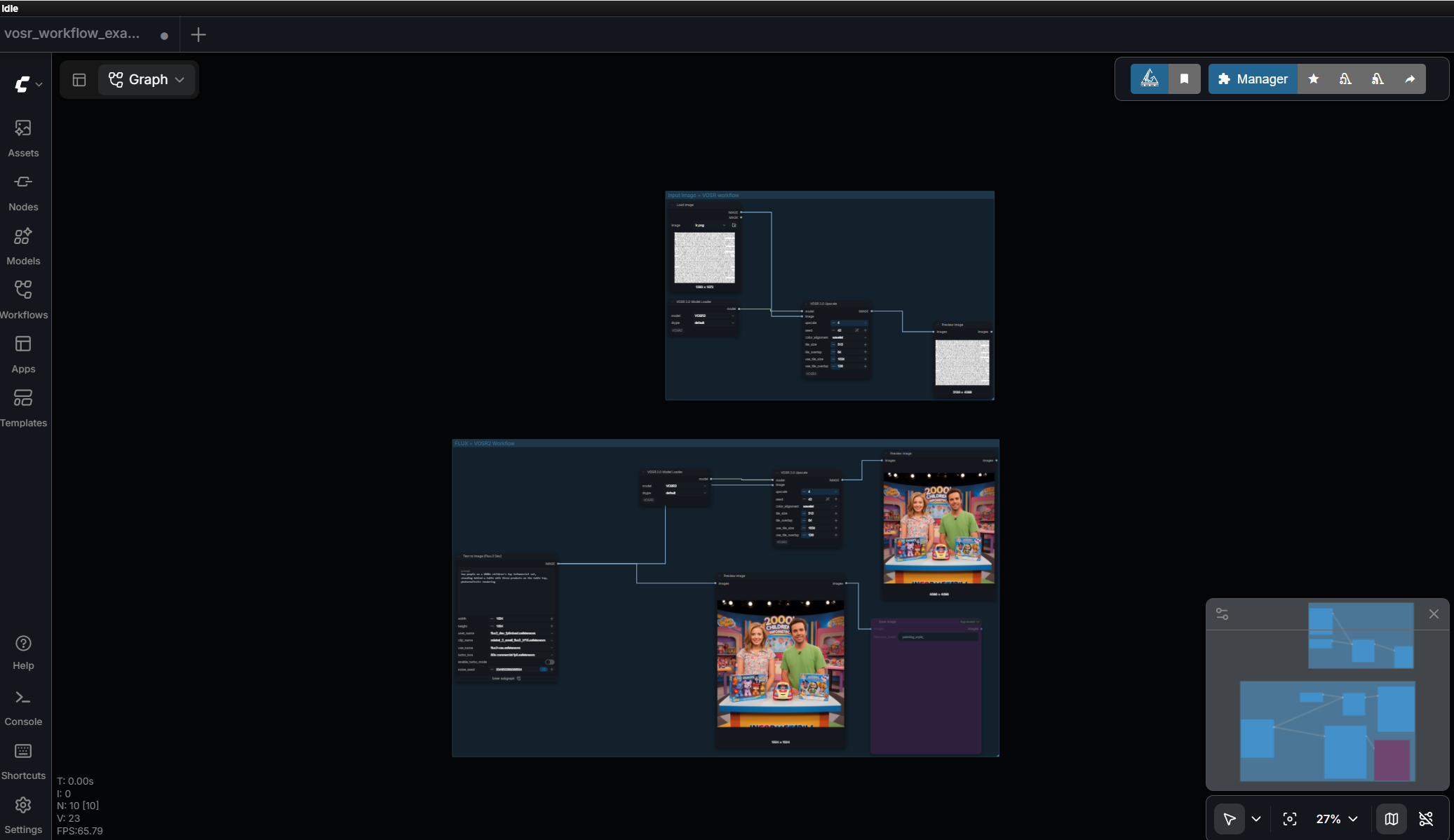
-
RunComfy — Link to workflow here.
-
Comfy Cloud — hosted example-workflow links will be added here once custom nodes are supported on Comfy Cloud.
Manual setup
- VOSR 2.0 Model Loader — leave
modelonVOSR2anddtypeondefault(usefp16/bf16to save VRAM). - Feed an image into VOSR 2.0 Upscale together with the loader's
modeloutput. - Set
upscale(≥ 1, no hard cap — VOSR 2.0 was trained on degradations up to 16x, but quality past ~4x isn't guaranteed and depends on the specific image and resolution, not just the factor). If the result exceeds 512 px on a side, settile_size = 512. If it exceeds ~1024 px, also setvae_tile_size = 1024. color_alignmentdefaults towavelet;adainornoneare available for comparison.
Recommended VOSR 2.0 Upscale settings
A solid general-purpose starting point (tiling on, for outputs past 512 px):
| Parameter | Value |
|---|---|
| upscale | 4 |
| seed | 42 |
| color_alignment | wavelet |
| tile_size | 512 |
| tile_overlap | 64 |
| vae_tile_size | 1024 |
| vae_tile_overlap | 128 |
The node's own defaults keep tiling off (tile_size / vae_tile_size = 0),
which is only appropriate when the upscaled output stays at or below 512 px — set
the values above for anything larger.
Batches are first-class: item i is seeded with seed + i, so a batch result
matches running each image separately.
Notes on VRAM and tiling
The upstream authors have no measured tile-size / VRAM table yet, and neither does this package. Treat these as starting points, not guarantees:
- ≤ 512 px output: no tiling needed.
- ~2048 px output:
tile_size = 512. - ~4096 px output:
tile_size = 512,vae_tile_size = 1024.
fp16 / bf16 (via the loader's dtype) roughly halves DiT + vision-encoder
memory; the Qwen VAE always runs in fp32.
VOSR2 examples
Interactive version: Visit VOSR 2.0 project page and drag-to-reveal slider over each pair.
<!-- <table> <tr> <td align="center"><b>Low resolution</b></td> <td align="center"><b>Upscaled</b></td> </tr> <tr> <td align="center">Building<br><img src="./VOSR_cases/building/lr.png" alt="low resolution building"></td> <td align="center">Building<br><img src="./VOSR_cases/building/vosr_2_0.png" alt="upscaled building"></td> </tr> <tr> <td align="center">Landscape<br><img src="./VOSR_cases/landscape/lr.png" alt="low resolution landscape"></td> <td align="center">Landscape<br><img src="./VOSR_cases/landscape/vosr_2_0.png" alt="upscaled landscape"></td> </tr> <tr> <td align="center">Faces<br><img src="./VOSR_cases/tiny_face/lr.png" alt="low resolution faces"></td> <td align="center">Faces<br><img src="./VOSR_cases/tiny_face/vosr_2_0.png" alt="upscaled faces"></td> </tr> <tr> <td align="center">English text<br><img src="./VOSR_cases/tiny_text_english/lr.png" alt="low resolution english text"></td> <td align="center">English text<br><img src="./VOSR_cases/tiny_text_english/vosr_2_0.png" alt="upscaled english text"></td> </tr> <tr> <td align="center">Chinese text<br><img src="./VOSR_cases/tiny_text_chinese/lr.png" alt="low resolution chinese text"></td> <td align="center">Chinese text<br><img src="./VOSR_cases/tiny_text_chinese/vosr_2_0.png" alt="upscaled chinese text"></td> </tr> </table> -->Status
In-progress v1.
Implemented: model discovery/validation, first-run auto-download from
CSWRY/VOSR, vendored DiT/VAE/DINOv2 architectures, ComfyUI-managed load/offload
via ModelPatcher, untiled and tiled (DiT + VAE) inference, per-item seeded
batching, torch-native wavelet / adain / none color alignment, and a
drag-and-drop example workflow.
Install paths: listed on the
Comfy Registry and installable
on RunComfy via its Custom Nodes Manager — see Installation.
Note: the registry's automated scan currently flags every release since
0.2.0 (the first-run remote download), so ComfyUI-Manager / comfy node install still serve 0.1.0. Use git clone for the current version until the
flag is cleared.
Verified in CI (comfy-test, Linux/CPU, Python 3.10, PyTorch 2.10, ComfyUI 0.35.0): the package installs against a fresh ComfyUI, imports without error, and both nodes register with valid schemas. The model load + inference path is not exercised in CI — it needs a GPU.
Not yet done: numeric validation against the upstream reference, measured VRAM/tile presets, GPU execution in CI, and the macOS / Windows CI matrix.
Licensing
This node package is released under the Apache License 2.0 (see
LICENSE), matching upstream VOSR.
The model weights are downloaded separately from
CSWRY/VOSR and carry their own terms —
including the DINOv2 checkpoint (Meta, facebookresearch/dinov2) and the
Qwen-Image VAE. Review those before redistribution or commercial use.
Credits
- VOSR / VOSR 2.0 — Rongyuan Wu et al. (cswry/VOSR)
- DINOv2 — Meta AI (facebookresearch/dinov2)
- Qwen-Image VAE — Qwen team
- ComfyUI integration: this repository