comfyui-depth-pro-2
A ComfyUI extension.
ComfyUI Depth Pro 2
English | 简体中文
ComfyUI nodes for Apple Depth Pro 2:
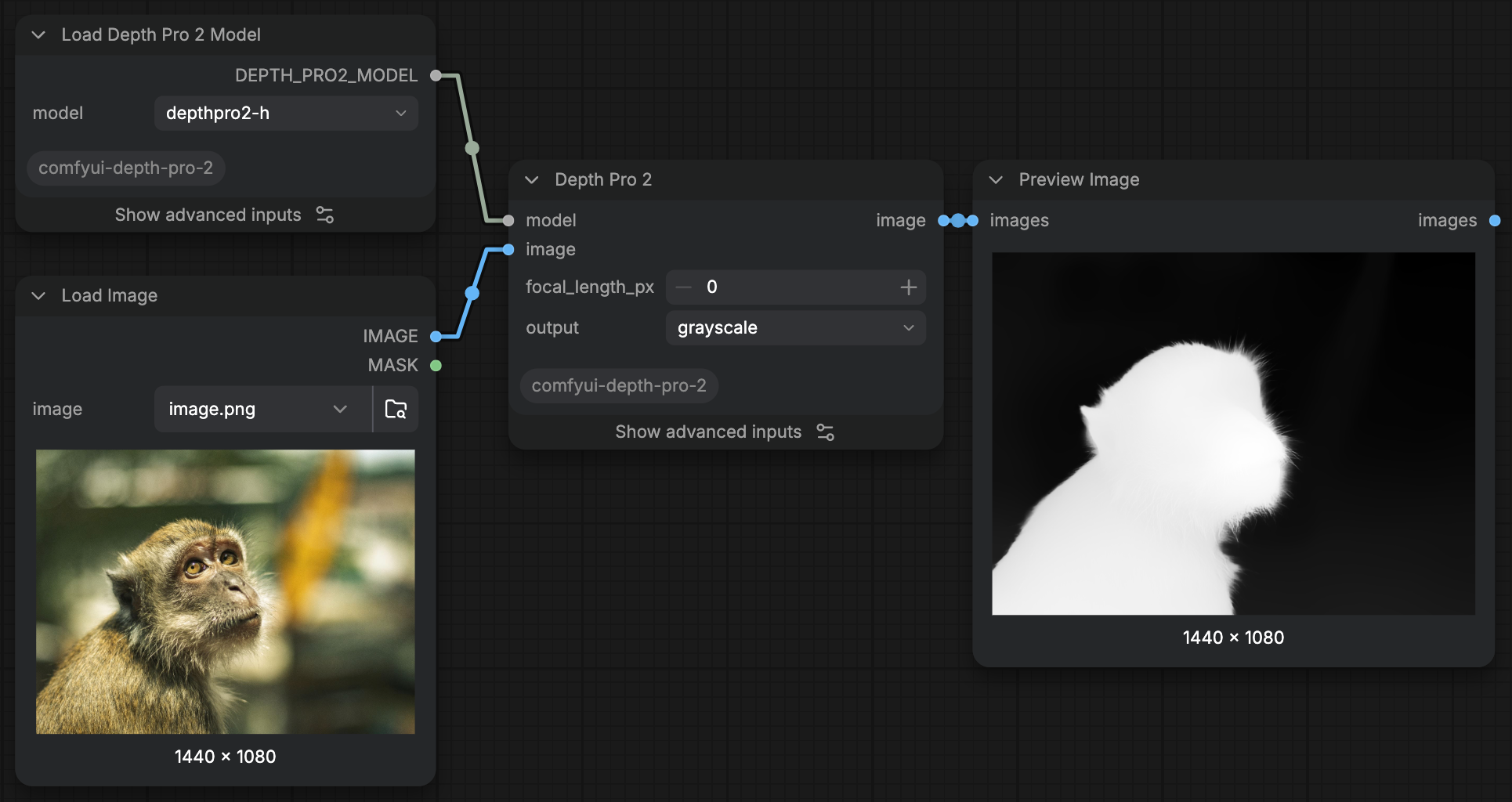
sharp metric monocular depth from a single photo, at full resolution. The depth node takes an
IMAGE and returns a depth map as IMAGE (inverse depth normalized per frame, white near /
black far).
Project page, with the paper, the comparison videos and the benchmarks: apple-aiml-research.github.io/ml-depth-pro-2. Upstream: paper · code · weights.
Install
cd ComfyUI/custom_nodes
git clone https://github.com/yanhuifair/comfyui-depth-pro-2
pip install -r comfyui-depth-pro-2/requirements.txt
Run the pip line in the Python environment that runs ComfyUI.
timm, huggingface-hub and certifi are the only additions, plus pyobjc-framework-CoreML on
macOS for the optional Core ML backend; torch, numpy, Pillow and av
already come with ComfyUI. timm is held below 1.1 because the vendored model code uses the
timm 1.0 vision-transformer API. Restart ComfyUI: Load Depth Pro 2 Model shows up under
model/loaders and Depth Pro 2 under depth. Any ComfyUI release with V3 node support
(comfy_entrypoint) works; tested on 0.45.4.
Usage
Connect Load Depth Pro 2 Model to the model socket of Depth Pro 2, feed your IMAGE into
image, and take the depth map to any image consumer (Save Image, ControlNet, masks, ...). One
loader can serve several depth nodes, and the weights stay loaded until ComfyUI drops them from the
node cache.
Video
Depth Pro 2 Video takes a VIDEO and returns a VIDEO, so ComfyUI's own nodes are all you
need: Load Video → Depth Pro 2 Video → Save Video. The frame rate and the audio come from
the source, and the images socket is there if you want the frames on their own.
The difference from pushing frames through the photo node one by one is that a clip of window
frames is predicted together, so neighbouring frames attend to each other and the map stops
crawling. Measured on a 12-frame clip at 512×512 with depthpro2-s, as the mean absolute difference
between consecutive normalized maps:
| How the clip is predicted | frame-to-frame change | | --- | --- | | frame by frame | 0.056 | | unbuffered, window 4 | 0.052 | | buffered, window 4, overlap 2 | 0.044 | | buffered, window 16, overlap 4 (default) | 0.030 |
Memory grows with window: that many frames go through the network at once. That is why max_side
starts at 1024 on this node instead of at full resolution. For scale, depthpro2-h took 6 s and
3.7 GB on Apple silicon for 16 frames at 1024×768 with the default window.
Compute follows the clip stride rather than the frame count: window 16 with overlap 4 advances 12 frames per pass, so a frame is computed about 1.3 times, while window 4 with overlap 3 advances one frame per pass and computes each frame four times — 6 s against 23 s on that clip.
Models
| Preset | File | Size | Notes |
| --- | --- | --- | --- |
| depthpro2-s | depthpro2-s-bgcc6f8bg3.pt | 97 MB | fastest |
| depthpro2-b | depthpro2-b-xb7m9egktw.pt | 386 MB | |
| depthpro2-l | depthpro2-l-tegstu7fim.pt | 1.3 GB | |
| depthpro2-h | depthpro2-h-eivtm5w7m5.pt | 3.5 GB | default, sharpest |
| FOV head | depthpro2-fov-ew55zg4kq7.pt | 94 MB | shared by every preset |
Checkpoints are downloaded on first use of the loader node, into models/depth_pro2/. That folder
is registered as depth_pro2 in folder_paths, so extra search paths from extra_model_paths.yaml
are used for both lookup and download.
Core ML (Apple silicon)
Load Depth Pro 2 Core ML runs a Core ML package on Apple's system runtime instead of PyTorch.
Its output is the same DEPTH_PRO2_MODEL socket, so it plugs into the same Depth Pro 2 node.
Needs macOS 15 or later on Apple silicon; the Python bridge comes from requirements.txt.
A Core ML package bakes in one input size, so you build one from the checkpoint you already have.
coremltools has no wheels past Python 3.13, so run the exporter with an older interpreter — uv
fetches one on the spot, and ComfyUI keeps running on its own Python:
cd ComfyUI/custom_nodes/comfyui-depth-pro-2
uv run --python 3.13 --with coremltools --with timm --with av \
    python tools/export_coreml.py --preset depthpro2-s --size 854x480 \
    --output ../../models/depth_pro2/depthpro2-s_854x480.mlpackage
Refresh the node list (r on the canvas) and the package shows up in the loader. Repeat with
another --size for another resolution; the export takes a couple of minutes and the package about
half the size of the .pt.
A package runs at its own size and nothing else: frames are scaled to cover it and center cropped,
and the depth map comes out at that size rather than the input size. There is no field-of-view head
and no temporal state, and max_side is ignored.
This is a way to run Depth Pro 2 outside PyTorch, not a speed-up. Measured with depthpro2-s at
854×480, one frame at a time, on Apple silicon:
| Backend | ms per frame | | --- | --- | | PyTorch, MPS, fp16 | 18 | | Core ML, GPU | 24 | | Core ML, CPU + neural engine | 48 | | Core ML, CPU only | 495 |
Apple's own packages (apple/DepthPro2-coreml)
cannot be loaded through the public Core ML API on macOS today: MLModel rejects them with
This MLModel doesn't support the multi-function description syntax without a functionName and
with .functionName must be nil unless the model type is ML Program when you give one. Same from
Swift, so exporting your own with the command above is the only way in for now.
Inputs
Load Depth Pro 2 Model
| Input | Default | Description |
| --- | --- | --- |
| model | depthpro2-h | Preset, see above. |
| precision | auto | Autocast dtype: auto is bfloat16 on GPU and float32 on CPU. Use fp16 on GPUs without bfloat16. Advanced. |
Load Depth Pro 2 Core ML
| Input | Default | Description |
| --- | --- | --- |
| package | first found | A .mlpackage folder in models/depth_pro2, which sets the output size. Refresh the node list after adding one. |
| compute_units | gpu | Where Core ML runs the package: gpu, neural_engine, cpu or all. The neural engine is usually slower here. Advanced. |
Depth Pro 2
| Input | Default | Description |
| --- | --- | --- |
| model | — | DEPTH_PRO2_MODEL from the loader node. |
| image | — | IMAGE batch, predicted one frame at a time. |
| focal_length_px | 0 | Focal length in pixels. 0 estimates it with the field-of-view network; a Core ML package has none and does not use one. |
| max_side | 0 | Downscale the longest side to this many pixels before inference; 0 keeps full resolution. A Core ML package ignores it and runs at its own size. Advanced. |
| output | grayscale | grayscale: inverse depth, white near. color: depth ramp, red near, blue far. |
Depth Pro 2 Video
| Input | Default | Description |
| --- | --- | --- |
| model | — | DEPTH_PRO2_MODEL from either loader. |
| video | — | VIDEO, typically from Load Video. |
| focal_length_px | 0 | Focal length in pixels for the whole clip; 0 takes the median of the estimates over the first window. |
| window | 16 | Frames attended together. Larger is steadier and costs more memory; 1 is frame by frame. |
| overlap | 4 | Frames two neighbouring clips share, cross-faded at the seam. Must stay below window; ignored by unbuffered. Advanced. |
| mode | buffered | buffered predicts overlapping clips, so a frame also sees later frames; unbuffered predicts each frame as it arrives, from itself and the earlier ones. Advanced. |
| max_side | 1024 | Downscale the longest side to this many pixels before inference; 0 keeps full resolution. A Core ML package ignores it. Advanced. |
| output | grayscale | grayscale: inverse depth, white near. color: depth ramp, red near, blue far. |
Outputs: video (VIDEO, with the source frame rate and audio), images (IMAGE batch), fps.
Notes
- The output is a normalized visualization map, not metric depth in meters. See the upstream repo if you need raw metric depth.
- Output resolution is the inference resolution: the input size, or the
max_side-reduced size. A Core ML package returns the size it was exported for. - The photo node predicts each frame of a batch on its own, each with its own focal length, so a batch of video frames has no consistency between them — even when it comes from Get Video Components. Depth Pro 2 Video is the temporal path, attending a clip together the way the video results on the project page do.
- A Core ML package keeps no state between frames, so the video node runs it frame by frame: no clip attention, and the whole clip gets the map size the package was exported for.
- The field-of-view head is loaded for every preset, even when
focal_length_pxis supplied. - Out of memory: lower
max_side; on the video node lowerwindowfirst, it is the multiplier. A supplied focal length is scaled by the same factor.
Troubleshooting
| Symptom | Cause |
| --- | --- |
| SSLCertVerificationError while downloading | The loader downloads through certifi, because python.org macOS builds ship an empty CA bundle. If it still fails, run Install Certificates.command in that Python's folder. |
| Depth scale or geometry looks wrong | focal_length_px is a guess when left at 0; pass the real focal length in pixels. |
Files
nodes.py             loader nodes, depth node, checkpoint lookup and download
tools/               export_coreml.py, torch checkpoint to .mlpackage
vendor/depth_pro_2/  Apple's inference code, see vendor/LICENSE
examples/            screenshot above
License
The node code is MIT, see LICENSE. The vendored depth_pro_2 sources are Apple's, under
vendor/LICENSE. The model weights are
research-use only.
Check both before shipping anything made with them.
Support
WeChat tip code, if this node saved you some time: