
Load Image (Recursive)
Load Image that lists sub-directories of ComfyUI/input, with a folder dropdown, a root-only filter, working sub-directory previews, and cyclic arrow navigation.
Load Image (Recursive)
A drop-in replacement for ComfyUI's built-in Load Image node that also lists
images from sub-directories of ComfyUI/input, adds a folder dropdown to
filter the list, and — unlike the other subfolder loaders — actually makes those
sub-directory images load: canvas preview, image viewer and mask editor all
work, instead of being handed a path that can only 404.
中文说明见 下方。
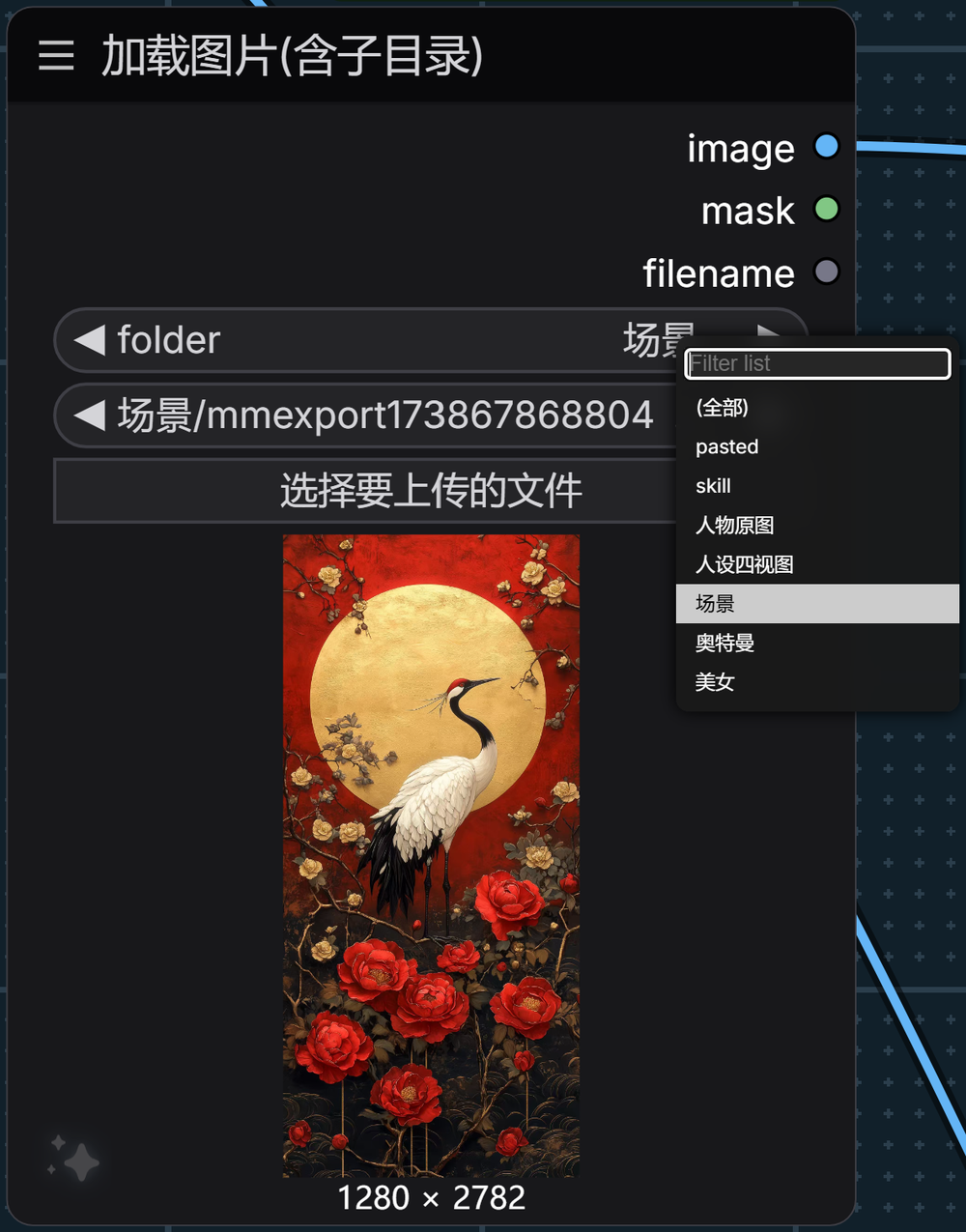
The problem
The stock Load Image node only lists files sitting directly in
ComfyUI/input. Anything you filed into folders is invisible:
input/
├── 001.png              ← visible
├── portraits/
│   └── maya.png         ← invisible
└── scans/
    └── 2026/
        └── roll-01.tif  ← invisible
So you end up either dumping everything into one flat folder, or copying files out of your library every single time.
There are already a few "load image from subfolder" nodes around. They solve the
listing problem and then hit a second wall: the image never actually loads.
ComfyUI resolves a /view filename against the input root, so a value like
scans/2026/roll-01.tif can only ever 404 — blank canvas preview, blank viewer,
and nothing for the mask editor to open. That is a gap in ComfyUI's server rather
than in those nodes, and this node closes it.
What it does
- Recursive listing — every image under
input/, at any depth, with paths relative toinput(scans/2026/roll-01.tif). - Folder dropdown — pick a folder and the image list narrows to just that
folder. Turns a 1200-entry scroll into a 40-entry scroll. A dedicated
root-folder entry isolates the files sitting directly in
input/, so the top level stays browsable on its own instead of only being reachable through the "all" entry. - Sub-directory images actually load — canvas preview, image viewer and mask
editor all work for files in subfolders, because the real path is resolved
before ComfyUI's
/viewhandler sees it. Preview-sized requests are capped at 384 px, so browsing a folder does not pull every file down at full resolution. - Bidirectional sync — pick an image and the folder dropdown jumps to its folder; pick a folder and the list filters.
- The ◀ ▶ arrows wrap around — stepping past the last image lands on the
first, and stepping back from the first lands on the last. Stock combos go
grey and stop at either end. Wrapping never drags the folder dropdown along,
so a loop over
(all)keeps covering every image instead of snapping into whichever subfolder it happens to reach.
Everything else is inherited from the stock node, unchanged: decoding, EXIF
handling, alpha→mask, the upload button, drag & drop, paste, mask editor,
path-safety checks. Outputs are identical (IMAGE, MASK, STRING).
Install
cd ComfyUI/custom_nodes
git clone https://github.com/yadoo7/load_image_recursive.git
Restart ComfyUI. No dependencies, no patch scripts, nothing to configure.
Usage
Add Load Image (Recursive) from the image category (or search for
recursive, subfolder, 子目录).
| Widget | What it does |
|---|---|
| folder | Filter only. (全部) / (All) shows everything. Does not affect the output. |
| image | The actual pick. Paths include the sub-folder, e.g. scans/2026/roll-01.tif. |
| (upload button) | Same as the stock node. Uploaded files land in the root of input/. |
Switching folders deliberately does not change your current image selection — it only narrows the list. You re-pick explicitly. Nothing silently swaps your input behind your back.
Keeping the list fresh
INPUT_TYPES is only fetched when the node is created, so a list built then goes
stale as soon as you add a folder or drop a file into input/. Three paths
rebuild it, and they all go through the same authoritative /object_info call:
- Automatically when ComfyUI rebuilds combo lists — via the official
refreshComboInNodesextension hook. Without this the rebuild would wipe the folder filter, since ComfyUI assignsoptions.valueswholesale. - After using the upload button (the value lands a moment later, so the rebuild is deferred).
- Manually, right-click the node → ⟳ 刷新图片列表.
Refreshing keeps your folder selection — it only rebuilds the lists. If the
folder you were on no longer exists, it falls back to (全部).
Why sub-directory images break (and how this fixes it)
Worth reading if you are curious why every other sub-folder loader shows a blank preview.
A note on dropdown thumbnails. Up to roughly ComfyUI 1.4x the combo dropdown rendered a thumbnail next to every entry, and that is what this middleware originally targeted. Frontend 1.5x replaced the combo dropdown with a plain text list, so no node shows thumbnails in the dropdown any more — including the stock
Load Image. The underlying path problem is unchanged though: it still breaks the canvas preview, the image viewer and the mask editor, and that is what this node fixes.
ComfyUI's frontend builds combo thumbnail URLs with an internal
getMediaUrl(filename, type, kind) helper, which emits:
/api/view?filename=<filename>&type=input
Two problems with that, for sub-folder-aware nodes:
- No
subfolder. Our values arescans/2026/roll-01.tif, so the server resolves the basename against theinputroot, finds nothing, and returns 404. No thumbnail. - No
max. Even when it does resolve, the server ships the full-resolution original. Fine for a 200 KB PNG, fatal for a 52 MP camera scan.
Both are fixable by editing server.py and the frontend bundle — but that means
patching ComfyUI core, which breaks on every update and can't be shipped as a
custom node.
So this node installs an aiohttp middleware instead, and fixes both on the
way in, before any handler sees the request. Zero files outside
custom_nodes/load_image_recursive/ are modified.
The routing rule, in order:
| Request | Action |
|---|---|
| channel= present | MaskEditor needs real pixels → pass through, only inject subfolder |
| max= present | Frontend asked for a specific size → serve that thumbnail ourselves |
| preview= present | Canvas / image viewer → pass through, only inject subfolder |
| filename contains / | Bare dropdown request → serve a 384 px WebP ourselves |
| anything else | Untouched. Native ComfyUI behaviour. |
That fourth rule is the key one: filename containing / is provably broken
natively (it can only ever 404), so taking it over can't regress anything.
Requests that natively work are left alone.
Thumbnails are cached in-process, keyed on (path, mtime, size, limit), so
re-opening the dropdown is free and editing a file invalidates its entry.
/view has supported subfolder= natively all along, with a directory-escape
check — the frontend just never used it.
Optional: speed up the root folder too
The middleware only takes over requests that are broken natively. Images in the
root of input/ resolve fine, so ComfyUI serves them at full resolution —
that's native behaviour, and this node leaves it alone.
If your input/ root also holds big files and the dropdown feels slow, run:
python tools/patch_frontend_thumb.py            # patch
python tools/patch_frontend_thumb.py --check    # status only
python tools/patch_frontend_thumb.py --revert   # undo
It makes the frontend ask for max=384 on combo thumbnails; the middleware then
honours it. This one does patch a file outside this folder
(comfyui_frontend_package/static/assets/*.js) and it is reverted by a frontend
update — hence optional, and with a --revert.
On frontend 1.5x and later the combo dropdown no longer renders thumbnails at all, so this patch has no visible effect there. It only matters on older frontends.
Compatibility
- ComfyUI 0.39.x — tested against
0.39.1. - Needs
aiohttpandPillow, both already required by ComfyUI. - If the middleware fails to install for any reason, the node still works — it logs a warning and thumbnails fall back to native behaviour. Node loading is never blocked.
Development
python -m unittest discover -s tests -v
32 tests covering recursive scanning, directory-escape protection, thumbnail
downscaling and LRU eviction, the middleware routing table, and the
VALIDATE_INPUTS / INPUT_TYPES contract.
The suite works in two environments:
- Inside ComfyUI — uses the real
folder_pathsandnodes. - Bare environment — detects that ComfyUI is missing and installs minimal
stubs, so CI only needs
pip install aiohttp pillow(no torch).
Both paths are verified to pass. tests/test_load_image_recursive.py picks
automatically.
Frontend behaviour (the folder filter and the three refresh paths) is not covered by unit tests — it needs a live ComfyUI. Those were verified end-to-end with a headless browser instead.
Known limitations
- The
folderwidget is a front-end filter. It is not stored as a meaningful value and does not participate in caching, so switching folders never re-triggers a run. - Folders are derived from the files inside them. An empty folder won't appear in the dropdown.
clipspace/is skipped — that's MaskEditor scratch space, pure noise here.
Credits
- Subclasses
LoadImagefrom ComfyUI by comfyanonymous. All decoding, masking and validation behaviour is theirs. - The
folder/imagesplit is inspired by the folder-tree combos in ComfyUI-Custom-Scripts by pythongosssss — a different implementation for a different problem, but the "pick the folder first" interaction comes from there.
License
MIT — see LICENSE.
Note that this is a plugin for ComfyUI, which is licensed under GPL-3.0. This node imports and subclasses ComfyUI code at runtime; how that interacts with MIT for a plugin is a judgment call you should make for your own use. Every custom node in the ecosystem does the same thing.
中文说明
「加载图像(含子目录)」 —— 原生 加载图像 的替代品,把 ComfyUI/input 下
各级子目录里的图片一起列进下拉,并多加一个「目录」下拉做过滤。
中文名走 ComfyUI 的官方语言包机制(
locales/zh/nodeDefs.json,经/api/i18n下发), 所以中文界面下它会和原生「加载图像」并排出现;英文界面下显示Load Image (Recursive)。 搜索框里输加载图像、加载图片、子目录、递归都能搜到。
解决什么
原生节点只列 input 根目录里的文件。你按项目分好的文件夹(人像/、扫描/2026/)
它完全看不见,只能把所有图堆成一个平铺目录,或者每次从图库里往外拷。
装上就有
- 递归扫描任意层级,路径相对
input(如扫描/2026/roll-01.tif) - 「目录」下拉:选完目录,图片列表只列该目录下的文件。多一个「(根目录)」,
只列直接躺在
input/里的那些 —— 根目录的图不用再混在「(全部)」里翻 (根目录一张图都没有时,这个选项不出现) - 子目录的图真的能加载 —— 画布预览、图片查看器、遮罩编辑器都能正常打开子目录里的图 (请求进来前先把真实路径解析好)。预览类的请求会先压到 384px 再发, 翻目录不会把每张原图整张拉下来
- 双向联动:选图 → 目录自动跳过去;选目录 → 列表收窄,并且画布上的预览跟着切到该目录的第一张 (原生节点的预览只认自己的 callback,光改候选列表不会刷新,所以这里手动触发了同一套回调)
- ◀ ▶ 箭头首尾相接 —— 最后一张再往右是回到第一张,第一张再往左是跳到最后一张 (原生 combo 走到头就变灰、点不动)。而且箭头循环时不会把目录下拉一起带走, 所以在「(全部)」里一路点下去,是真的把整库绕一圈,而不是半路被吸进某个子目录
解码、EXIF、alpha→mask、上传按钮、拖拽粘贴、遮罩编辑器、路径安全校验
全部继承原生实现,输出完全一致(IMAGE / MASK / STRING)。
安装
cd ComfyUI/custom_nodes
git clone https://github.com/yadoo7/load_image_recursive.git
重启 ComfyUI 即可。无依赖、无补丁脚本、无需配置。
列表怎么保持最新
INPUT_TYPES 只在建节点时取一次,所以之后往 input/ 里新建文件夹、拖图进去,
下拉里都看不到。三条路径都会重建,而且都走同一个权威来源(/object_info):
- 自动 —— ComfyUI 重建 combo 列表时,通过官方扩展钩子
refreshComboInNodes。 没有这个钩子的话,ComfyUI 会直接整体替换options.values,把目录过滤冲掉 - 上传后自动 —— 值要过一会儿才落下来,所以是延时重建
- 手动 —— 右键节点 →「⟳ 刷新图片列表」
刷新会保留你当前选的目录,只重建列表;如果那个目录已经不存在了,才退回 (全部)。
为什么别人的子目录加载器预览是空白
ComfyUI 前端拼 /view 地址时只带 filename + type:不带 subfolder,也不带 max。
于是 扫描/2026/roll-01.tif 这种值被服务端当成根目录文件去找 → 404。
画布预览、图片查看器、遮罩编辑器统统打不开。
关于缩略图:ComfyUI 1.4x 前后,下拉里每个条目会渲染一张缩略图,当时的补丁就是冲这个去的。 前端 1.5x 把 combo 下拉改成了纯文字列表,现在任何节点(包括原生「加载图像」)下拉里都没有缩略图了。 但同一个路径问题依然会让画布预览、查看器、遮罩编辑器失效,本节点解决的就是这个。
这两点要么改 server.py + 前端打包产物(改核心,升级就冲突,没法作为
custom node 发布),要么在节点里挂一个 aiohttp middleware 在请求进入 handler
之前拦下来。本项目选后者:custom_nodes/load_image_recursive/ 以外的文件
一个都没改。
分流规则见上表。关键判据是第四条 —— filename 里带 / 的请求在原生实现下
必然 404,接管它不可能让情况变差;原生能正常处理的请求一律不碰。
可选:根目录大图也加速
middleware 只接管原生必然失败的请求。input 根目录的图原生能正常解析,
所以还是按原尺寸发。如果你的根目录也有大文件、下拉觉得卡,跑
tools/patch_frontend_thumb.py(带 --check / --revert)。这一步会改到
custom_nodes/ 以外的文件,所以标为可选。
开发 / 测试
python -m unittest discover -s tests -v
32 个测试,覆盖递归扫描、目录逃逸防护、缩略图降采样与 LRU 淘汰、
middleware 分流表、以及 INPUT_TYPES / VALIDATE_INPUTS 契约。
装了 ComfyUI 就用真模块,没装就自动装 stub(CI 里只要 aiohttp + Pillow,
不用拉 torch)。前端行为需要活的 ComfyUI,是用无头浏览器端到端验证的。
注意
- 「目录」只是前端过滤器,不参与出图,也不参与缓存判定(切目录不会触发重跑)
- 切目录不会自动改你已选的图 —— 需要重新选。这是故意的,不能悄悄换掉出图输入
- 空目录不会出现在下拉里(目录是从文件反推的)
clipspace/会被跳过(那是 MaskEditor 的临时目录)