
Save Image with Metadata Universal
Node for saving PNGs, WEBPs, and JPEGs with rich automatically captured metadata from any node: prompts, model/VAE/LoRA names & hashes, sampler & scheduler (Civitai-compatible), optional workflow embedding, dynamic rule scanning + forced include system, deterministic ordering, filename tokens, and staged JPEG metadata fallback.
Nodes (10)
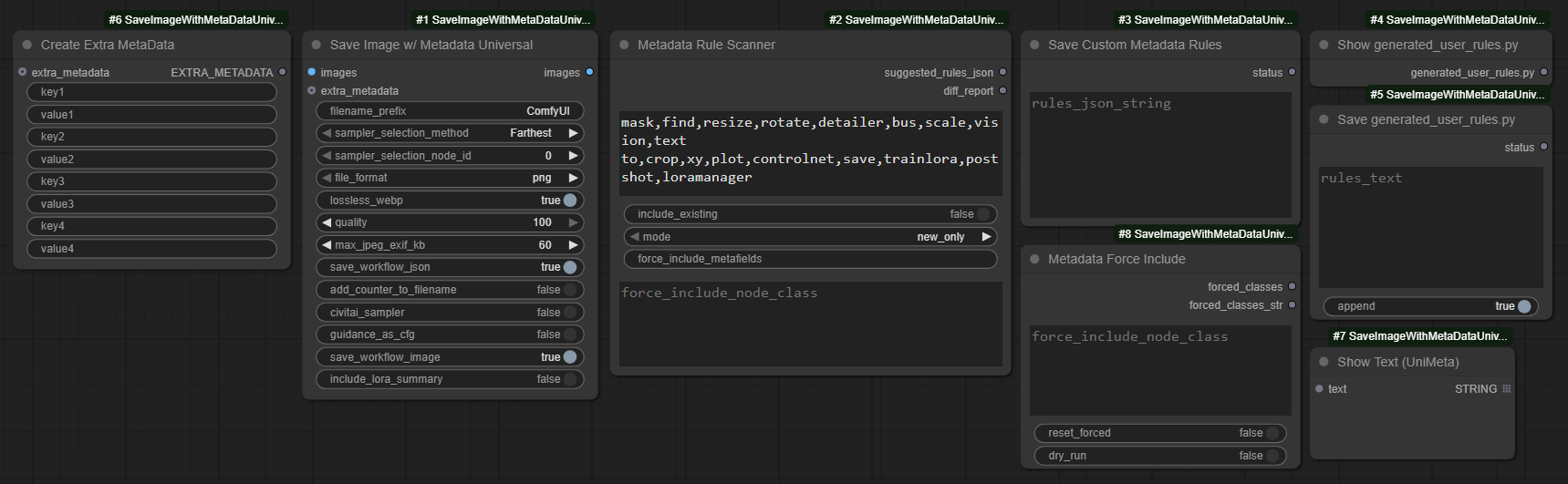
Stamp your own key-value pairs onto every saved image
When the scanner keeps skipping a node, force it
Point this at your node jungle and get capture rules back
Test your metadata pipeline without loading a single model
Save the scanner's output before your ruleset becomes a memory
Write your hand-edited capture rules back without touching a text editor
The save node that makes Civitai actually read your ComfyUI images
Turn any node output into a string, then stamp it into your metadata
Actually look at the rules file before you trust it
A text display node that's worth keeping around
ComfyUI-SaveImageWithMetaDataUniversal
Enhanced Automatic1111‑style, Civitai-compatible metadata capture with extended support for prompt encoders, LoRA and model loaders, embeddings, samplers, clip models, guidance, shift, and more.
- An extensive rework of the ComfyUI custom node pack ComfyUI-SaveImageWithMetaData, that attempts to add universal support for all custom node packs, while also adding explicit support for a few custom nodes.
- The
Save Image w/ Metadata Universalnode saves images with metadata extracted automatically from the input values of any node—no manual node connecting required. - Provides full support for saving workflows and metadata to WEBP images.
- Supports saving workflows and metadata to JPEGs (limited to 64KB—only smaller workflows can be saved to JPEGs).
- Stores model hashes in
.sha256files so you only ever have to hash models once, saving lots of time. - Includes
Metadata Rule ScannerandSave Custom Metadata Rulesnodes, which scan all installed nodes and generate metadata capture rules - Designed to work with most custom packs and fall back gracefully when a node lacks heuristics (I can't test with every custom node pack, but it has been working well so far).
- Since the value extraction rules are created dynamically, values output by most custom nodes can be added to metadata.
- Tested with SD1.5, SDXL, FLUX, QWEN, WAN (2.1 supported); GGUF, Nunchaku
Table of Contents
<details open> <summary><strong></strong></summary>-
Getting Started
-
Core Nodes & Features
-
Metadata & Encoding
-
Advanced / Power Users
-
Reference & Support
</details>
Note
<details open> <summary><strong></strong></summary>- I'm an amateur at coding, at best. I started writing this myself, but as I began increasing the scope of the project I started using GitHub Copilot.
- If you have any questions, think any documentation is lacking, or experience issues with certain workflows or custom node packs, create a new issue and I'll try and see if it's something I can address.
Installation
<details open> <summary><strong></strong></summary>- Install ComfyUi.
- Clone this repo into
custom_nodes:cd <ComfyUI directory>/custom_nodes git clone https://github.com/xxmjskxx/ComfyUI_SaveImageWithMetaDataUniversal.git
Quick Start
<details open> <summary><strong></strong></summary>- Use the
Metadata Rule Scanner+Save Custom Metadata Rulesnodes to create and save capture rules.- Use the simple workflow if you want quick and easy.
- If you want to manually edit the generated rules JSON before saving it, use the advanced workflow.
- NOTE: These two nodes should be rerun every time you update this node pack or add new nodes to ComfyUI that you want to capture from, using either of the above workflows.
- Add
Save Image w/ Metadata Universalto your workflow and connect to the image input to save images using your custom capture ruleset. - (Optional) Use
Create Extra MetaDatanode(s) to manually record additional info. - (Optional) For full Civitai style parity enable the
civitai_sampler,guidance_as_cfg, andlora_strengths_in_prompttoggles in the save node. - Prefer PNG (or lossless WebP) when you need guaranteed full workflow embedding (JPEG has strict size limits—see tips below).
- Hover any parameters on the nodes in this pack for concise tooltips (fallback stages,
max_jpeg_exif_kb, LoRA summary toggle, guidance→CFG mapping, sampler naming, filename tokens). For further detail see: Node UI Parameters, JPEG Metadata Size & Fallback Behavior; advanced env tuning: Environment Flags.


Nodes
<details> <summary><strong>More:</strong></summary>| Node | Purpose |
| ---- | ------- |
| SaveImageWithMetaDataUniversal | Save images + produce enriched metadata (PNGInfo / EXIF) & parameter string. |
| Create Extra MetaData | Inject any additional custom key-value metadata pairs. |
| Metadata Rule Scanner | Scan installed nodes to suggest metadata capture rules (options for: exclude keywords, modes, metafield forcing). |
| Save Custom Metadata Rules | Save generated rule suggestions to generated_user_rules.py (append or overwrite). |
| Show generated_user_rules.py | Display the current merged user rules file contents for review/editing (optional). |
| Save generated_user_rules.py | Validate and write edited rules text back to the user rules file (optional). |
| Metadata Force Include | Configure global forced node class names for capture definition loading (optional). |
| Show Text (UniMeta) | Local variant for displaying connected text outputs; based on pythongosssss Show Text 🐍 (MIT). |
| Show Any (Any to String) | Display any connected value by converting it to a string; useful to wire ints/floats/etc. into Create Extra MetaData. |
Feature Overview
<details> <summary><strong>More:</strong></summary>- Automatic1111‑style, Civitai-compatible parameter string (single‑line) with optional multi‑line deterministic test mode (
METADATA_TEST_MODE=1). - Dynamic rule generation:
Metadata Rule Scanner+Save Custom Metadata Rulescreate and save user rules, allowing broad custom node coverage. - LoRA handling:
-
Detects single and stack loaders & inline
<div style="width:60%;"><lora:name:sm[:sc]>tags such as those used in ComfyUI Prompt Control and ComfyUI LoRA Manager:
</div>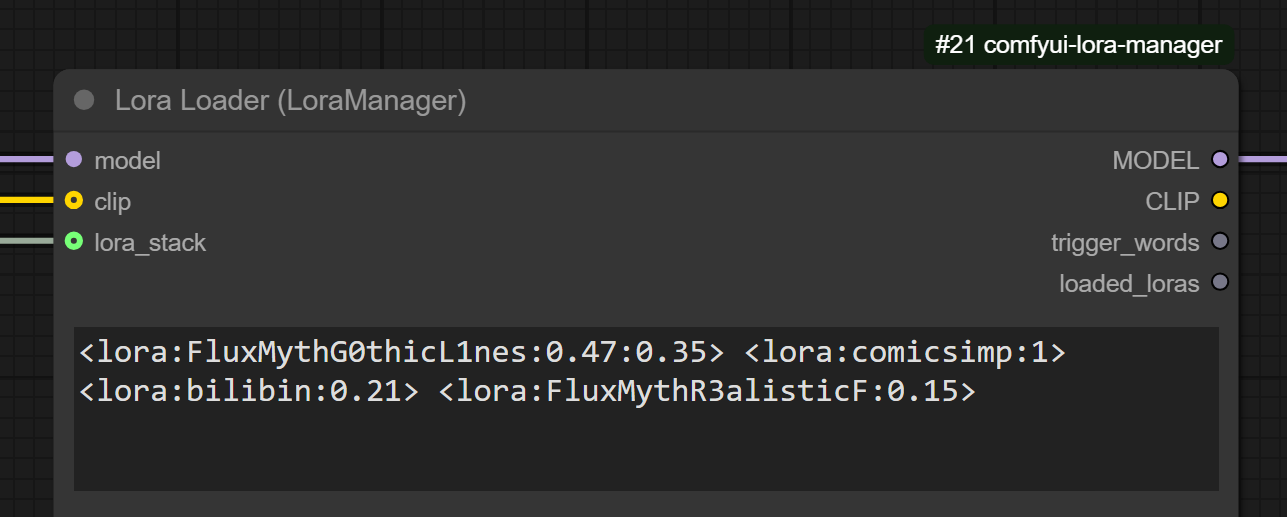
-
Aggregated optional condensed summary line
LoRAs: name(str_model/str_clip)plus per‑LoRA detailed entries (hashes & strengths retained even if summary hidden).
-
- Prompt encoder compatibility: handles multiple encoder styles (e.g. dual Flux T5 + CLIP) with aliasing and suppression of redundant unified positives.
- Full PNG + lossless WebP workflow + metadata embedding; JPEG with staged fallback under 64KB EXIF limit.
- See detailed fallback staging: docs/JPEG_METADATA_FALLBACK.md
- Embedding name resolution & hashing with safe path normalization; model hash caching via
.sha256sidecar files for speed after first run. - Civitai hashing: AutoV1 (8), AutoV2 (10), AutoV3 (12), and full SHA-256 (64) are computed for models/VAEs/LoRAs/UNets. AutoV1/AutoV3 are cached in a central JSON cache (
hash-cache.jsonunder ComfyUI's user directory) while.sha256sidecars stay unchanged. The structuredHash detailsection includes all four hashes when available. - Configurable guidance mapping (
guidance_as_cfg) and sampler naming normalization (minimal, avoids unexpected renames) for Civitai compatibility. Create Extra MetaDatanode specifies metadata to be added to the image to be saved. Example: In extra_metadata.json.- Selective verbosity: hide hash detail (
METADATA_NO_HASH_DETAIL) and/or aggregated LoRA summary (METADATA_NO_LORA_SUMMARYor UI toggle). - Stable field ordering for reproducible diffs & tooling.
- Runtime evaluation of env flags—restart not required for changes.
- Environment flag reference: Environment Flags
- Clear fallback signaling via
Metadata Fallback: <stage>token in parameter string when JPEG trimming occurs. - Wan 2.1 example workflow is available: example_workflows/wan21_text_to_image.json. It demonstrates prompt encoding, WanVideo Sampler with combined "scheduler" input (parsed into Sampler/Scheduler), VAE decode, and saving with enriched metadata.
- Plays nicely with most custom node packs out‑of‑the‑box (in my somewhat limited testing).
Format & Fallback Quick Tips
<details> <summary><strong>More:</strong></summary>- JPEG vs PNG/WebP: JPEG has a hard ~64KB EXIF ceiling for text data; large workflows trigger staged fallback trimming (see detailed fallback). Use PNG / lossless WebP for archival.
- Control JPEG attempt text data size:
max_jpeg_exif_kb(default 60, max 64) caps EXIF payload before fallback (see Node UI Parameters). (i.e. sets max text written to JPEG) before fallback stages engage. - Detect fallback: If the metadata parameters string ends with
Metadata Fallback: <stage>, this means max JPEG text data limit was hit and trimming occurred (reduced-exif,minimal, orcom-marker) — see Fallback Stages. - LoRA summary line: Toggle with
include_lora_summary. Adds an abbreviated summary of LoRAs used. If off, only individualLora_*entries remain.
Sampler Selection Method
<details> <summary><strong>More:</strong></summary>- Specifies how to select a KSampler node that has been executed before this node.
- Farthest Selects the farthest KSampler node from this node.
- Auto (Nearest) Selects the nearest KSampler node to this node (the legacy value "Nearest" is still accepted).
- By node ID Selects the KSampler node whose node ID is set in
sampler_selection_node_id.
Model Selection Method
<details> <summary><strong>More:</strong></summary>- Specifies how the primary base model (recorded as
Model/Model hash) is chosen.- Auto Selects the nearest model loader reached by walking upstream from the sampler's model input; ties are broken deterministically.
- By node ID Selects the loader whose node ID is set in
model_selection_node_id.
- Additional base models are emitted as
Model 2/Model 2 hash,Model 3/Model 3 hash, and so on.
Metadata to be Captured
<details> <summary><strong>More:</strong></summary>- Positive prompt
- Negative prompt
- Steps
- Sampler
- Scheduler
- CFG Scale
- Guidance
- Denoise
- Shift, max_shift, base_shift
- Seed
- Clip skip
- Clip model
- Size
- Model
- Model hash
- VAE
- It is referenced from the input of
Save Image w/ Metadata Universalnode, not KSampler node.
- It is referenced from the input of
- VAE hash
- It is referenced from the input of
Save Image w/ Metadata Universalnode, not KSampler node.
- It is referenced from the input of
- Loras
- Model name
- Model hash
- Strength model
- Strength clip
- Embeddings
- Name
- Hash
- If batch size >= 2 :
- Batch index
- Batch size
- Hashes
- Model, Loras, Embeddings
- For Civitai
- AutoV1 (8), AutoV2 (10), AutoV3 (12), and full SHA-256 (64) are surfaced in the structured
Hash detailsection when available
</details>
Filename Token Reference
<details> <summary><strong>More:</strong></summary>| Token | Replaced With |
|-------|---------------|
| %seed% | Seed value |
| %width% | Image width |
| %height% | Image height |
| %pprompt% | Positive prompt |
| %pprompt:[n]% | First n chars of positive prompt |
| %nprompt% | Negative prompt |
| %nprompt:[n]% | First n chars of negative prompt |
| %model% | Model base name |
| %model:[n]% | First n chars of model name |
| %date% | Timestamp (yyyyMMddhhmmss) |
| %date:[format]% | Custom pattern (yyyy, MM, dd, hh, mm, ss) |
Date pattern components:
yyyy | MM | dd | hh | mm | ss
All expanded tokens are sanitized before writing: absolute paths, drive letters, UNC roots, .. traversal, reserved Windows device names (CON, COM1, …), and invalid filename characters are neutralized. Each path component is clamped to 120 chars and the full template to 512. See SECURITY_REDACTION_AND_PATH_SAFETY.md.
</details>
Node UI Parameters (Key Additions)
<details> <summary><strong>More:</strong></summary>Key quality‑of‑life and compatibility controls exposed by the primary save node:
include_lora_summary(BOOLEAN, default False): Toggles the aggregatedLoRAs:summary line; when False only individualLora_*entries are emitted. UI setting overrides env flags.guidance_as_cfg(BOOLEAN, default False): Substitutes the capturedGuidancevalue intoCFG scaleand omits the separateGuidance:field for better A1111 / Civitai parity when models expose guidance separately.max_jpeg_exif_kb(INT, default 60, min 4, max 64): UI‑enforced ceiling for attempted JPEG EXIF payload. Real-world single APP1 EXIF segment limit is ~64KB; exceeding it triggers staged fallback (reduced-exif → minimal → com-marker). For large workflows prefer PNG / lossless WebP.lora_strengths_in_prompt(BOOLEAN, default False): When enabled, A1111-style LoRA designations (e.g.<lora:name:strength>) are appended to the positive prompt text andLora hashesmetadata is included so that Civitai can recognise LoRA strengths.suppress_missing_class_log(BOOLEAN, default True): Hide the informational log listing missing classes that would trigger a user JSON rules merge. Useful to reduce noise in large custom node environments.sanitize_metadata(BOOLEAN, default True): Redact secret-like values (API keys, tokens, passwords, bearer credentials, absolute paths) from the embedded workflow JSON before writing. Bounded and fail-open — if a safety limit is hit the raw workflow is embedded instead. See SECURITY_REDACTION_AND_PATH_SAFETY.md.
JPEG Metadata Size & Fallback Behavior
<details> <summary><strong>More:</strong></summary>JPEG metadata is constrained by a single APP1 (EXIF) segment (~64KB). This repository enforces a hard UI cap of 64KB for max_jpeg_exif_kb; values above this provide no benefit and are rejected by Pillow or stripped by consumers. Large prompt + workflow JSON + hash detail can exceed the limit quickly.
When saving JPEG, the node evaluates total EXIF size vs max_jpeg_exif_kb (<=64) and applies staged fallback, attempting to write as much info to the EXIF as possible:
- full (no message) — Full EXIF (workflow + parameters) fits.
- reduced-exif — EXIF shrunk to parameters-only
UserComment. - minimal — Trimmed parameter string (core fields + LoRAs + hashes) embedded as EXIF.
- com-marker — EXIF dropped entirely; trimmed parameters stored in a JPEG COM marker.
If a fallback stage is used the parameters string gets an appended token: Metadata Fallback: <stage>.
Recommendations:
- Keep
max_jpeg_exif_kbbetween 48–64 (the upper bound is enforced). - Prefer PNG or lossless WebP when you require guaranteed full workflow embedding.
- Treat JPEG as delivery/export; archive originals as PNG if full metadata fidelity matters.
Limitations:
- Social platforms often strip both EXIF and COM markers; consider sidecar archival if critical.
- COM marker text has no structure; downstream tooling must parse the plain parameter string.
- Multi-segment APPn fragmentation (splitting across several EXIF/APP markers) is not implemented (deferred; see WORKFLOW_COMPRESSION_DESIGN.md).
- For more nuance on staged trimming: JPEG_METADATA_FALLBACK.md
Fallback Stages & Indicator
JPEG saves record a Metadata Fallback: stage when size constraints trigger progressive trimming:
| Stage | Meaning |
| ----- | ------- |
| none | Full EXIF (workflow + parameters) written within limit (stage not emitted) |
| reduced-exif | EXIF shrunk to parameters-only UserComment |
| minimal | Parameters string trimmed to minimal allowlist (prompt, negative prompt, core generation fields, LoRA entries, hashes) and embedded as EXIF |
| com-marker | All EXIF removed (too large); minimal parameters written into a JPEG COM marker |
When a fallback occurs the Metadata Fallback: <stage> marker is appended to the parameters string to aid downstream tooling.
NOTE: The force_include_node_class input is provided by the Metadata Rule Scanner node.
Metadata Rule Tools
<details> <summary><strong>More:</strong></summary>Two cooperating nodes plus optional force inputs help build and refine your capture rules:
Scanner (Metadata Rule Scanner)
Inputs:
| Input | Purpose |
|-------|---------|
| exclude_keywords | Comma keywords to skip noisy class names (case-insensitive substring). |
| mode | new_only (only new fields per existing node + all fields for brand new nodes), all, existing_only. |
| include_existing | When True show both existing & new fields. When False activates the missing-only lens (only fields/roles not yet captured in baseline). |
| force_include_metafields | Always show specified metafields (MetaField constant names) even if already present. |
| force_include_node_class | Always include certain node classes (comma or newline separated). Emits empty object if no suggestions. |
Outputs:
- JSON suggestions (nodes + samplers + status tags for tooling).
- Diff summary string; includes
BaselineCache=hit:X|miss:Yand forced class listing.
Caching:
- Baseline (defaults + extensions + user rules) cached across scans using file mtimes. Re-run scanner repeatedly for quick iteration; hits/misses visible in
diff_report.
Missing-only Lens (include_existing=False):
- Filters out metafields and sampler roles already captured in the baseline union so you can focus on gaps.
force_include_metafieldsoverrides filtering for the specified field names.
Force Include (Metadata Force Include)
Maintains a global set of node class names guaranteed to be treated as required when loading user definitions.
Inputs: force_include_node_class (multiline), reset_forced, optional dry_run.
Outputs: Updated forced class list (string + list form) for display/auditing.
Saving Rules (Save Custom Metadata Rules)
- Modes:
overwrite(replace) orappend_new(add only missing; optional conflict replacement). - Automatic timestamped backups (limit retained sets) + dropdown restore (
restore_backup_set). - Generates deterministic
generated_user_rules.py(disable viarebuild_python_rulestoggle for speed while iterating). - The generated module embeds a
RULES_VERSIONmatching the installed node pack. The save node logs a[Metadata Loader] ... version ...warning if your saved rules are missing/outdated—rerun the scanner + saver or useexample_workflows/refresh-rules.jsonafter updating the pack. - Rules JSON field tooltip documents required schema (top-level
nodes&samplers).statuskeys from scanner are ignored when saving.
Troubleshooting / FAQ
<details> <summary><strong>More:</strong></summary>Metadata Rule Scanner doesn't find the nodes I want to capture
- Check
exclude_keywordson the scanner. If a class name or pack prefix matches, the scanner filters it out. - Set
modeto the broadest scan (e.g., include new + existing) and enableinclude_existingso suggestions merge with known rules. - Use
force_include_node_class(exact class names, comma/newline separated) to force discovery even if it would be filtered.- Tip: Find the exact class name via the node's "type" in ComfyUI (or export workflow JSON and copy the class name).
- Use the
Metadata Force Includenode and wire itsforced_classes_strtoShow Text (UniMeta)to verify your forced list. - If the node still doesn't appear, open an issue with: node pack name, node class, your scanner inputs, and a minimal workflow.
Scanner found my nodes but the suggested rules look wrong or fields are missing
- Treat the scanner output as a starting point. Some nodes require manual mapping of inputs to metadata fields.
- Check the outputs from the
Metadata Rule ScannerandShow generated_user_rules.pynodes, reference the files mentioned in reference examples, make any necessary changes, and then save the adjusted rules withSave Custom Metadata RulesorSave generated_user_rules.py, respectively - Use the
Show generated_user_rules.pynode, adjust the suggested capture paths to match your node's sockets/fields, then save withSave generated_user_rules.py. - Prefer explicit hints:
- Use scanner input
force_include_metafieldsto bias suggestions toward specific fields you care about first. - If your downstream needs Civitai-style names, enable
civitai_samplerin the save node andguidance_as_cfgwhen appropriate.
- Use scanner input
- Sampler/scheduler mismatches: verify the node that actually did sampling (see Sampler Selection Method) and ensure its inputs are captured.
- LoRA/embedding not showing:
- Ensure those loaders exist in the graph upstream of sampling and are not bypassed.
- Inline tags like
<lora:name:sm[:sc]>are detected; loader nodes may still need class forcing so they're included in rule generation.
- Hashes missing: make sure models/VAEs/LoRAs are readable by the process; hash sidecars (
.sha256) are used when present, else computed. - Hash detail JSON absent: check that
METADATA_NO_HASH_DETAILis not set (UI parameter takes precedence where applicable). - JPEG missing fields is not a rules error: it's a size fallback. Use PNG/WebP or increase
max_jpeg_exif_kbwithin the 64KB cap.
Quick checklist when metadata seems incomplete:
- Run the save with
METADATA_TEST_MODE=1for deterministic multiline output and easier diffing. - Temporarily set a small
max_jpeg_exif_kbto exercise fallback stages and confirm minimal allowlist contents. - Enable
METADATA_DEBUG_PROMPTS=1to log prompt/alias capture decisions (review logs for skipped or aliased fields). - Force‑include the node classes involved, rescan, and re‑save user rules; then verify with
Show generated_user_rules.py.
Why is my workflow JSON missing in a JPEG?
The save exceeded max_jpeg_exif_kb and fell back to reduced-exif, minimal, or com-marker. Use PNG / WebP or lower the workflow size.
I see Metadata Fallback: minimal — did I lose important info?
Only non-core keys were trimmed. Prompts, sampler settings, LoRAs, hashes, seed, model & VAE info remain.
Forced node shows up with empty {} in scanner output. Bug?
No—force_include_node_class guarantees presence even if no heuristic rules match yet; use it as an anchor for manual rules.
My LoRA summary line disappeared.
Either include_lora_summary=False in the node or the METADATA_NO_LORA_SUMMARY env flag was set (UI param takes precedence).
Parameter string suddenly multiline.
Environment variable METADATA_TEST_MODE=1 was set (intended for tests). Unset it for production single-line mode.
Why are hashes missing detail JSON?
Environment flag METADATA_NO_HASH_DETAIL suppresses the extended hash breakdown.
How do I know which fallback stage occurred programmatically?
Parse the tail of the parameters string for Metadata Fallback:. (A future explicit key may be added.)
Reference examples (JSON/Python)
<details> <summary><strong>More:</strong></summary>Reference-only files you can use as a guide when customizing rules. These are never loaded by the runtime as-is:
saveimage_unimeta/user_captures_examples.json— JSON examples for capture rules. Copy snippets you need intosaveimage_unimeta/user_captures.jsonto activate. Uses MetaField names as strings (e.g., "MODEL_HASH") and callable names as strings (e.g., "calc_model_hash").saveimage_unimeta/user_samplers_example.json— JSON examples for sampler role mapping. Copy intosaveimage_unimeta/user_samplers.jsonif you need to map semantic roles ("positive"/"negative") to actual input names on sampler-like nodes.saveimage_unimeta/defs/ext/generated_user_rules_examples.py— Python examples mirroring the realgenerated_user_rules.pyschema, including aKNOWNmapping for callables. This module is not imported by the loader and serves only as a reference.
Notes:
- All Python extensions in
saveimage_unimeta/defs/ext/are loaded, except any module named__*, ending in*_examples, orgenerated_user_rules_exampleswhich are intentionally skipped. - The only JSONs conditionally merged at runtime when needed are
saveimage_unimeta/user_captures.jsonandsaveimage_unimeta/user_samplers.json.
Advanced / Power Users
<details> <summary><strong>More:</strong></summary>Design / Future Ideas
Deferred and exploratory concepts are documented in:
- WORKFLOW_COMPRESSION_DESIGN.md (workflow compression placeholder)
- FUTURE_AND_PROTOTYPES.md (archived prototype UI + additional speculative enhancements; Wan2.2 and multi-model workflow support)
- SECURITY_REDACTION_AND_PATH_SAFETY.md (embedded-workflow secret redaction + output filename sanitization)
Environment Flags
| Flag | Effect |
| ---- | ------ |
| METADATA_NO_HASH_DETAIL | Suppress structured Hash detail JSON section. |
| METADATA_NO_LORA_SUMMARY | Suppress aggregated LoRAs: summary (UI include_lora_summary overrides). |
| METADATA_TEST_MODE | Switch parameter string to multiline deterministic format for tests. |
| METADATA_DEBUG_PROMPTS | Enable verbose prompt capture / aliasing debug logs. |
| METADATA_HASH_LOG_MODE | Hash logging mode: none (default), filename, path, detailed, debug (includes candidate lists + full hash timing). |
| METADATA_HASH_LOG_PROPAGATE | 0 to suppress propagation to root logger (keep logs local); 1 (default) to propagate. |
| METADATA_FORCE_REHASH | When set to 1, recomputes hashes ignoring existing .sha256 sidecars (diagnostics / mismatch recovery). |
| METADATA_DUMP_LORA_INDEX | When set: dump LoRA index JSON after first build. Value 1 → _lora_index_dump.json in CWD; otherwise trim whitespace and use the value as the output path. |
| METADATA_DUMP_CHECKPOINT_INDEX | When set: dump checkpoint index JSON after first build. Value 1 → _checkpoint_index_dump.json in CWD; otherwise trim whitespace and use the value as the output path. |
| METADATA_DUMP_UNET_INDEX | When set: dump UNet index JSON after first build. Value 1 → _unet_index_dump.json in CWD; otherwise trim whitespace and use the value as the output path. |
| METADATA_ENABLE_TEST_NODES | Enable lightweight stub nodes (e.g., MetadataTestSampler) for metadata-only workflows without loading real models. |
Additional Support:
- LoRA / model file extension recognition includes
.stwherever.safetensorsis accepted (hashing, detection, index building).
Precedence for LoRA summary: UI param include_lora_summary (explicit) > env flag > default include.
Parameter String Formatting Modes
- Production: Single-line A1111-compatible string.
- Test: One key per line (stable ordering) when
METADATA_TEST_MODEis set—facilitates snapshot diffing.
Ordering Guarantees
Stable output characteristics to aid tooling & reproducibility:
- Stable ordering of captured metadata fields; new fields are appended only.
- Parameter string key order deterministic (single‑line & test multi‑line modes).
- Fallback marker (
Metadata Fallback: <stage>) appended at most once and only when trimming occurred. - JPEG fallback stage tracking aligns with documented progression (full → reduced-exif → minimal → com-marker).
Changelog
Latest Release: v1.4.4 (2026-09-03)
Fix for a metadata capture crash on list-of-dicts widget values:
- Crash fix:
Trace.traceand the prompt validator now use the shared_is_link_inputpredicate, so list-of-dicts widget values (such as LoRA stacks) are skipped instead of crashing withTypeError: unhashable type: 'dict'. (#145)
Recent Prior Releases
- v1.4.3 (2026-07-21): LoRA Manager hash/path-resolution fixes, extra-metadata robustness, bugfixes, and UI enhancements.
- v1.4.2 (2026-03-19): Prompt-routing and metadata-validation hardening release.
- v1.4.1 (2026-03-18): Save Image widget ordering and fit hotfix release.
- v1.4.0 (2026-03-17): ComfyUI 0.3.65+ compatibility,
lora_strengths_in_prompt, and extension hardening release.
See CHANGELOG.md for complete details or RELEASE_NOTES_v1.4.4.md for the full release notes.
Previous Notable Changes:
- Refactor notice: legacy monolithic module removed; see CHANGELOG.md for new direct import paths
- JPEG fallback staging, 64KB EXIF cap enforcement
- Dynamic rule scanner separation
- Logging overhaul and documentation structure improvements
Development & Testing
For testing workflows locally, see DEV_WORKFLOW_TESTING.md for:
- Running workflows from the command line with
tests/tools/run_dev_workflows.py - Automatically cleaning test output folders
- Validating generated image metadata with
tests/tools/validate_metadata.py