
Fish S2 GGUF (s2.cpp)
Local Fish Audio S2 Pro GGUF speech generation in ComfyUI via s2.cpp, with multi-speaker and voice-management nodes.
ComfyUI-FishS2-GGUF
Local Fish Audio S2-Pro GGUF text-to-speech for ComfyUI, powered by the independent s2.cpp inference engine. Multi-speaker workflows, voice reuse, native node controls, audio preview and WAV export.
Maintained by xuanhai0 · English | 简体中文
Already have s2.cpp working? → Jump straight to ComfyUI Node Setup. You do not need to rebuild it to use this plugin.
New to s2.cpp? → Windows compilation & folder-layout guide. The engine was marked ALPHA / EXPERIMENTAL during this plugin's development (October 2026). Original s2.cpp project.
TL;DR — check these first
| Checkpoint | Where to go |
|---|---|
| s2.cpp compiles with your MSVC + CMake + CUDA Toolkit, and the ggml submodule is present | Windows build prerequisites |
| You found the actual s2.exe, DLL directory, GGUF and tokenizer; Windows Release paths may differ from Linux README examples | Find the real paths |
| s2.cpp can create a WAV without ComfyUI, first from CLI and then HTTP | Independent smoke tests |
| Configure Fish S2 Server Control first, then connect its server_config output to the other Fish S2 nodes to reuse server settings | Centralized server configuration |
| Confirm gpu_layers=-1, codec_backend=Auto, per_sentence=true, let_server_segment_sentences=true | Key setting checks |
| Understand built-in saved voices versus overriding with Fish S2 Voice Input | Two illustrated workflows |
Features and scope
- Control a local s2.cpp HTTP server: paths, start/stop, status, voice refresh, separate Server Monitor.
- Create reusable
.s2voiceprofiles from reference audio + transcript with Fish S2 Voice Create. - Generate 1–10 speakers with
[speakerN]labels, built-in saved-voice selectors, or a per-speaker Fish S2 Voice Input override. - Optional sentence segmentation within each request; segment logs and files, WAV preview/download, output-folder access and final loudness processing.
- ComfyUI-native node widgets; independent HTML monitors only in separate windows.
Distribution: this plugin ships no s2.cpp binaries/source, model weights, tokenizer files, user voices, or example reference audio. Those must be obtained separately. This is an independent community integration, not an official Fish Audio/ComfyUI release.
Prerequisites and installation
- ComfyUI installed locally, with an appropriate Python environment (the plugin imports
torch,numpy,scipyandaiohttpas part of its existing integration). - A separately installed, functioning build of s2.cpp, plus a compatible S2-Pro GGUF model,
tokenizer.json, and a voice directory. - Windows with NVIDIA CUDA was the development setup. Other platforms/backends are not claimed to be tested here.
- FFmpeg is useful for compressed reference-audio formats. It is not required to compile s2.cpp; the plugin attempts to discover it for applicable inputs.
Installation: back up any existing plugin folder and workflow JSON; close ComfyUI. Copy the contents of this repository into ComfyUI/custom_nodes/ComfyUI-FishS2-GGUF/ (for the portable build, ComfyUI_windows_portable/ComfyUI/custom_nodes/ComfyUI-FishS2-GGUF/). Replace the old plugin directory rather than installing duplicate node copies. Restart ComfyUI and hard-refresh the browser (Ctrl+F5).
If you have not built s2.cpp yet, follow Windows build: English / Windows 编译:中文. Verify independent CLI and HTTP synthesis before testing the nodes.
Illustrated workflows
Recommended: configure Fish S2 Server Control once, then connect its server_config output to every Fish S2 node in the workflow that exposes a server_config input. Connected nodes automatically reuse the relevant server configuration instead of requiring duplicate paths or addresses. See ComfyUI Node Setup for the exact fields.
Workflow A — saved-voice dropdown
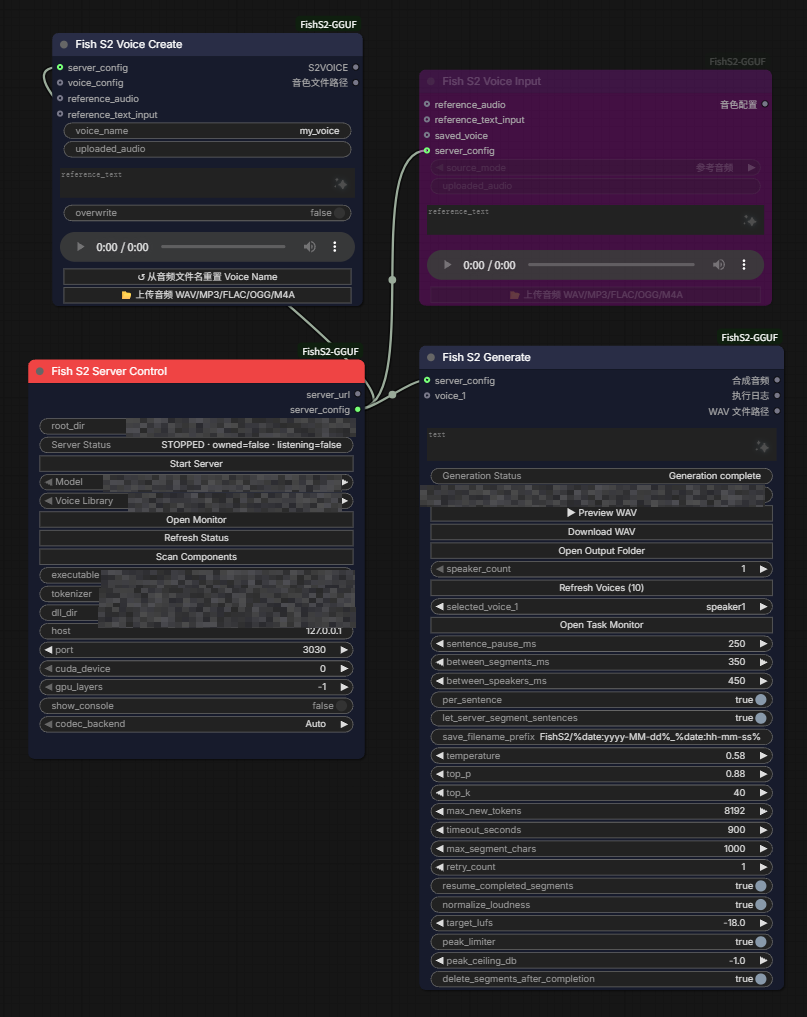
Connect Fish S2 Server Control → Fish S2 Generate using their server_config sockets. The Generate node's selected_voice_1 drop-down chooses a voice from the server's library; press Refresh Voices after creating new profiles. Fish S2 Voice Create can save reusable profiles; it has its own server_config input. The purple Voice Input shown above is not connected to Generate in this example. No voice override is active.
Workflow B — external voice overrides the selector
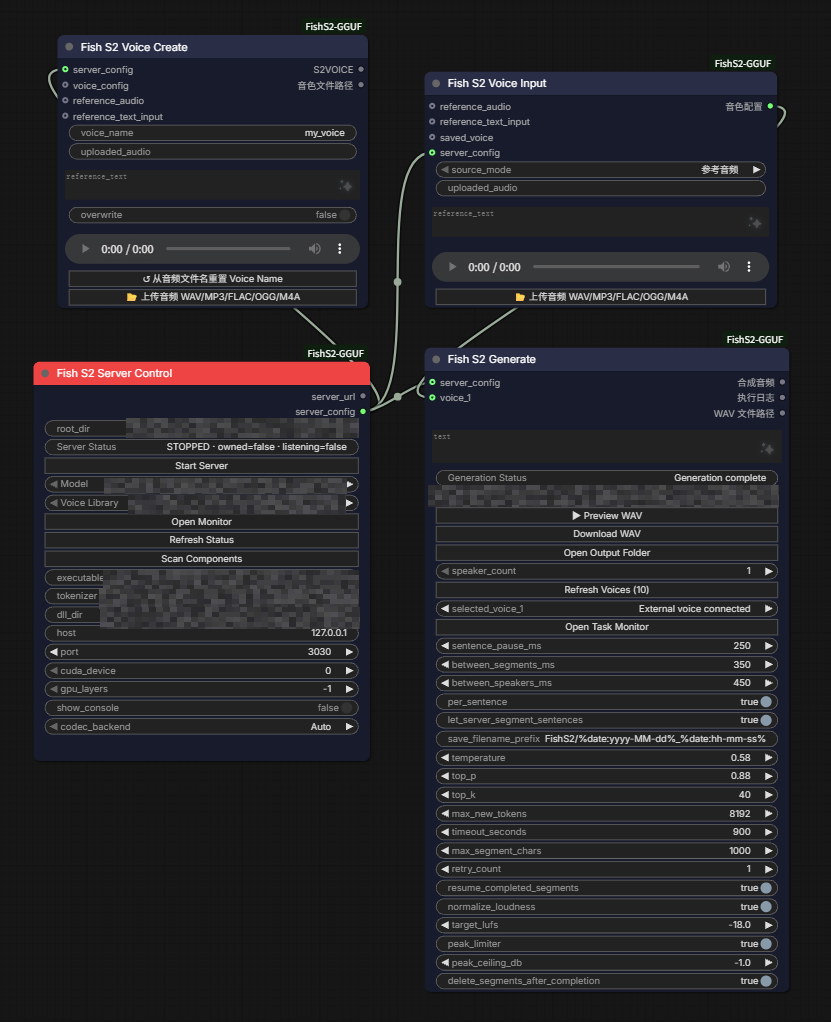
Connect Server Control → Voice Input via server_config, and connect Voice Input → Generate voice_1 via its voice configuration output. The Generate node then displays External voice connected, and this input takes precedence over selected_voice_1. Connect further Voice Input nodes to voice_2 etc. for additional speakers.
These are wiring examples, not proof that the pictured server is running: the screenshots show
STOPPED. Empty audio fields are intentional placeholders. All absolute local paths were obscured in the distributed images.
ComfyUI Node Setup
This section is the fast path for people whose s2.cpp CLI and HTTP server already work.
Recommended wiring — configure once, reuse everywhere: First finish the paths, server address and GPU settings in Fish S2 Server Control. Then connect its
server_configoutput (not theserver_urloutput) to theserver_configinput of Fish S2 Generate, Fish S2 Voice Create and Fish S2 Voice Input whenever those nodes are used. This centralizes server-related settings: Generate automatically takes the HTTP URL and hides itsserver_urlwidget; Voice Create inheritsexecutable,model,tokenizer,voice_dir,dll_dir,cuda_deviceandgpu_layers, and hides these duplicate widgets. Voice Input uses the connected server's voice directory for saved-voice selection. It can sometimes discover the directory via a connected Generate node, but a direct link is clearer and avoids ambiguity when multiple servers are present. Connecting these sockets does not start the server automatically; start it explicitly in Server Control.
- Add Fish S2 Server Control, set
root_dirto the s2.cpp project root, and click Scan Components. Checkexecutable,Model,Voice Library,tokenizer, anddll_diragainst the actual files. The scanner checks common locations; it is not a filesystem-wide search. If necessary, fill paths manually. Changingroot_diragain may refresh/replace those selections. - Set
host=127.0.0.1,port=3030(or your desired non-conflicting port),cuda_device=0andgpu_layers=-1for an NVIDIA CUDA setup. Choose Codec Backend: Auto. Click Start Server, then Refresh Status / Open Monitor to inspect the real log. Stop any independently launched server using the same port first. - Add Fish S2 Generate. Connect Server Control → Generate using their
server_configsockets (not the similarly namedserver_urloutput). The Generate node then uses the Server Control address automatically, and its ownserver_urlfield is hidden. Choosespeaker_countand press Refresh Voices, or connect Fish S2 Voice Input as in Workflow B. - Enter a short test line. For multiple voices, put
[speaker1],[speaker2], etc. at the start of each line. Click Queue Prompt; inspect Open Task Monitor, then Preview WAV or Download WAV after success. - Optionally connect Server Control → Voice Create via
server_config, then supply reference audio + matching transcript to create a reusable.s2voicefile; the executable/model/tokenizer/path and GPU fields are taken from Server Control. When using Voice Input, connect Server Control to itsserver_configinput as well so its saved-voice browser can resolve the correct library. Refresh voices in Generate after creating profiles.
[speaker1] Hello! This is a short test.
[speaker2] Hello from the second speaker.
For a single speaker, untagged plain text is accepted. The defaults are new-node defaults, not a migration of existing saved workflow values.
Key setting checks
| Widget | Default for new nodes | Interpretation |
|---|---|---|
| Server gpu_layers | -1 | Offload all available transformer layers when CUDA is selected (0 means no transformer offload). |
| Server codec_backend | Auto | Let s2.cpp benchmark the codec backends. |
| Generate per_sentence | true | Each [speakerN]-labeled line is a separate server request; no additional punctuation splitting by the plugin. |
| Generate let_server_segment_sentences | true | Send segment_sentences=true so the s2.cpp server can additionally segment sentences inside that request. |
| Generate normalize_loudness / target_lufs | true / -18.0 | Final audio loudness handling. |
| Generate peak_limiter / peak_ceiling_db | true / -1.0 | Peak limiting. |
Known caveats: previously saved workflows may restore older widget positions incorrectly, especially target_lufs and peak_ceiling_db. Check values after upgrading. The current partial-cache mechanism does not guarantee reliable automatic recovery when Queue Prompt is run again with a new timestamp-based output prefix. Successful runs normally delete their segment caches. True multi-request GPU batching is not implemented; s2.cpp may return HTTP 503 on concurrent synthesis requests. Always test with your own build.
Licensing, support and acknowledgments
The original code and documentation in this plugin repository are released under GNU GPL-3.0-only, Copyright (C) 2026 xuanhai0, to the extent the maintainer holds the necessary rights. Redistribution of covered modifications must comply with GPL-3.0; commercial use and sale of the GPL-covered plugin code are permitted. This license does not relicense Fish Audio S2-Pro model weights, tokenizer, s2.cpp, or any other third-party materials. Fish Audio S2-Pro weights and the upstream s2.cpp engine have separate Fish Audio Research License terms; commercial use of those components requires a separate agreement. Review third-party notices and upstream licenses before use. Voice cloning also requires appropriate consent and rights.
The maintainer provides this project on a best-effort, spare-time basis without promised support SLAs or guaranteed compatibility. v0.5.3 is the initial public release, but the complete package has not undergone clean-environment Windows regression testing and should not be treated as production-validated.
Acknowledgments: This project was created and repeatedly revised with substantial help from OpenAI's ChatGPT, including implementation drafts, debugging, code revisions, test planning, and documentation. xuanhai0 directed the feature requirements, evaluated alternatives, performed local Windows testing, and maintains/releases the project. ChatGPT is acknowledged as an AI assistant, not an official project author, maintainer, or sponsor. See ACKNOWLEDGMENTS.md.