
H3 Continuum Plus
Integrated N-chunk continuation for ComfyUI native MiniMax H3 video and audio
ComfyUI-H3-Continuum-Plus
Timeline Studio (draft integration)
The chunk editor traces connected IMAGE paths back through unambiguous single-input image processors (including a Media Resolution node) to Image Conveyor. It shows the active Conveyor shelf's thumbnail, filename and original source provenance beside each chunk's reference checkbox. Thumbnails are source previews, not the output of any intermediate resizing/processing nodes; actual sampling continues to receive the existing connected processed IMAGE tensor. Shelf changes and output toggles refresh while Studio remains open. Reference checkbox edits preserve video playback and do not rebuild movie tracks.
The chunk workspace uses the full desktop width, with one scrollable content
region for its chunk cards and expandable advanced sampler diagnostics. Main
viewer still images first expose a cached low-detail source preview while the
high-detail image is decoded; failures are reported on-screen rather than
leaving an unexplained black viewport. Neither preview derivative participates
in H3 sampling or video export. The current native/editor compatibility
contract is h3-timeline-conveyor-preview-v8.
Timeline Studio (draft integration)
Chunk-first H3 preparation: Timeline Studio now opens on the selected number of
logical H3 generation chunks and their exact 24 fps duration, synchronized with
the connected Continuum Timeline Sampler. Each chunk has a prompt textarea,
per-chunk selections from the connected Image Conveyor reference shelf, source-PTS-addressed video guidance
cuts, and separately routed audio guide/reference/final cuts. The panel identifies
persistent node connections and values, plus any native input precedence.
A long source movie can still be inspected in the optional full-film timeline.
See chunk-first authoring
for scope, connected sequence_prompt behavior, and chunk re-timing semantics.
Timeline filmstrips reuse immutable cached JPEG derivatives from long linked movies instead of repeating identical decoder seeks for each scroll/track redraw. Preview status distinguishes direct-source seeking from slower composition, without silently lowering output resolution. Timeline queues respect connected DoRA State Manager's persistent prompt write protection: if a selected preset is empty while a controlled Text Box has unsaved text, save it explicitly through State Manager's Save connected before queueing.
A compact Timeline Studio node opens a resizable editor for retained footage,
scoped prompts/references/audio, native Continuum jobs, alternatives and final
composition. True no-copy Explorer drag requires the Windows
Continuum Timeline Desktop wrapper.
Electron's native webUtils.getPathForFile supplies the actual selected path
privately; the WSL backend links and hashes that exact source in place, stores
only a small content-addressed pointer, and never scans directories.
The native UI neither uploads nor duplicates the original movie.
Important: ordinary Chrome cannot expose a dropped source's absolute path.
In Chrome the editor explicitly refuses zero-copy import; it does not scan,
upload or silently create a managed copy. The desktop wrapper must be launched
once instead of a normal Chrome tab; an ordinary ComfyUI custom node/Patcher
install cannot grant browser-level native file permissions. The Windows desktop
package has now passed a real packaged-Windows startup and OS-backed File IPC smoke test. Physical Explorer drag into actual WSL ComfyUI, media sampling/export and code signing still require qualification. Startup also verifies the installed Timeline Python/frontend no-scan protocol rather than trusting a possibly stale Patcher overlay. It refuses the old recursive-search implementation with actionable diagnostics. Startup probes the local ComfyUI /system_stats API and presents connection diagnostics and a local URL field instead of a blank page; native path registration uses main-process IPC.
The editor distinguishes source-native export resolution from the lower H3
sampling canvas. Export creates a file, not H3 guidance; select retained footage
and click Guide H3 with selected clip, then Queue selection, to condition
MiniMax-H3 directly on the registered media and its source timing. Recreate uses
retained footage as guidance automatically in eligible windows. Source-size FFV1
remains an 8-bit RGB re-encode rather than an original-bitstream copy.
Whole-stream PCM disk caching is disabled by default. Existing V3.4 nodes
remain available unchanged. See the user guide,
architecture,
validation, and
importable examples. Trained-H3 hardware acceptance remains
pending before production release.
v3.4.11 — Comfy Registry ownership (17 October 2026)
The Plus fork is configured for publishing with PublisherId = "xmarre" and its own Registry node ID, comfyui-h3-continuum-plus. This identifies the maintained Plus fork separately from upstream ukr8b3g-cmyk/ComfyUI-H3-Continuum. The original author is still credited in the package metadata.
After a successful GitHub release, the Registry workflow verifies that release is the exact current main commit, checks its publisher ID and package identity, then uploads using a Registry API key from the repository secret REGISTRY_ACCESS_TOKEN. It does not publish an untested branch, stale release or unverified package. Registry publishing requires the repository secret to be configured with an API key authorized for xmarre; a successful GitHub release does not alone establish Registry availability.
Installation compatibility: Plus retains its existing ComfyUI runtime node identifiers, but its Registry distribution ID is different from the upstream package. Do not install both Continuum variants in the same ComfyUI instance; they expose overlapping node identifiers. Existing Git/Manager installations are not migrated by changing the Registry distribution metadata. All previously documented V3.4 production defaults and v3.4.10 speech fixes are preserved.
v3.4.10 — H3 speech-control isolation (17 October 2026)
PR #49 removes Continuum's internally generated phrases (including "Immutable carried continuation context" and terminal/padding instructions) from shared H3 text/audio conditioning. Exact protected prefixes, fresh gaps and terminal intervals retain their structural timing records; the sampler's native latent mask, user-authored speech and routing remain intact. Experimental Qwen dialogue history now passes only authored speaker/dialogue content, not machine-written JSON or explanatory wrappers. The owner confirmed the reported unwanted spoken phrases were eliminated in their generation test. Automated validation includes Qwen token-input checks and 499 passing tests on Python 3.10–3.13. This does not establish universal speech completion or silence at the output trim.
See audio prompt boundaries, dialogue history, and the changelog. Compatible companion releases remain Flow v0.3.14, Sol-H3 v0.1.11 and VDN-H3-Plus v1.5.10. This Plus fork still declares the upstream Comfy Registry publisher ID; v3.4.10 is a GitHub release, not an unauthorized Registry publication.
v3.4.9 — coordinated release (17 October 2026)
This release merges Continuum #44/#46/#47 alongside Flow v0.3.14, VDN-H3-Plus v1.5.10 and Sol-H3 v0.1.11. #47's Qwen Lookahead (default true, eligible fixed-geometry chunks only) retains one descriptor-checked, detached CPU conditioning result; logs H3C-PT236 (prepared), H3C-PT237 (consumed) confirm reuse. Use H3C_CONDITIONING_LOOKAHEAD=0 to disable globally. #46's causal overlap-dialogue conditioning is experimental, not a demonstrated gibberish fix; use H3C_CAUSAL_DIALOGUE_HISTORY=0 for comparison. #44 fixes delayed flash and Auto 3 tone-repair release edges but does not guarantee underlying model tone continuity. Existing standard/Turbo workflows preserve native masked continuation, strong 39-frame overlap, Auto audio, Auto 3 tone, and audible-tail-safe assembly. See v3.4 settings, causal dialogue, and Qwen lifecycle.
Publishing note: GitHub release v3.4.9 is independent of the Comfy Registry. This Plus fork's pyproject.toml still declares the upstream registry PublisherId=ukr8b3g-cmyk; registry publishing is withheld pending an authorized publisher identity and credentials. No Keyless changes are included.
Plus fork: This is the
xmarremaintained Plus fork of ukr8b3g-cmyk/ComfyUI-H3-Continuum. It preserves the upstream project's foundation while carrying additional features, integrations, fixes, and behavior that may intentionally diverge from upstream.
Long-form MiniMax H3 video generation for ComfyUI with restartable chunks, persistent references, Driving Audio, Video Reference, seam correction, and optional Spectrum interoperability.
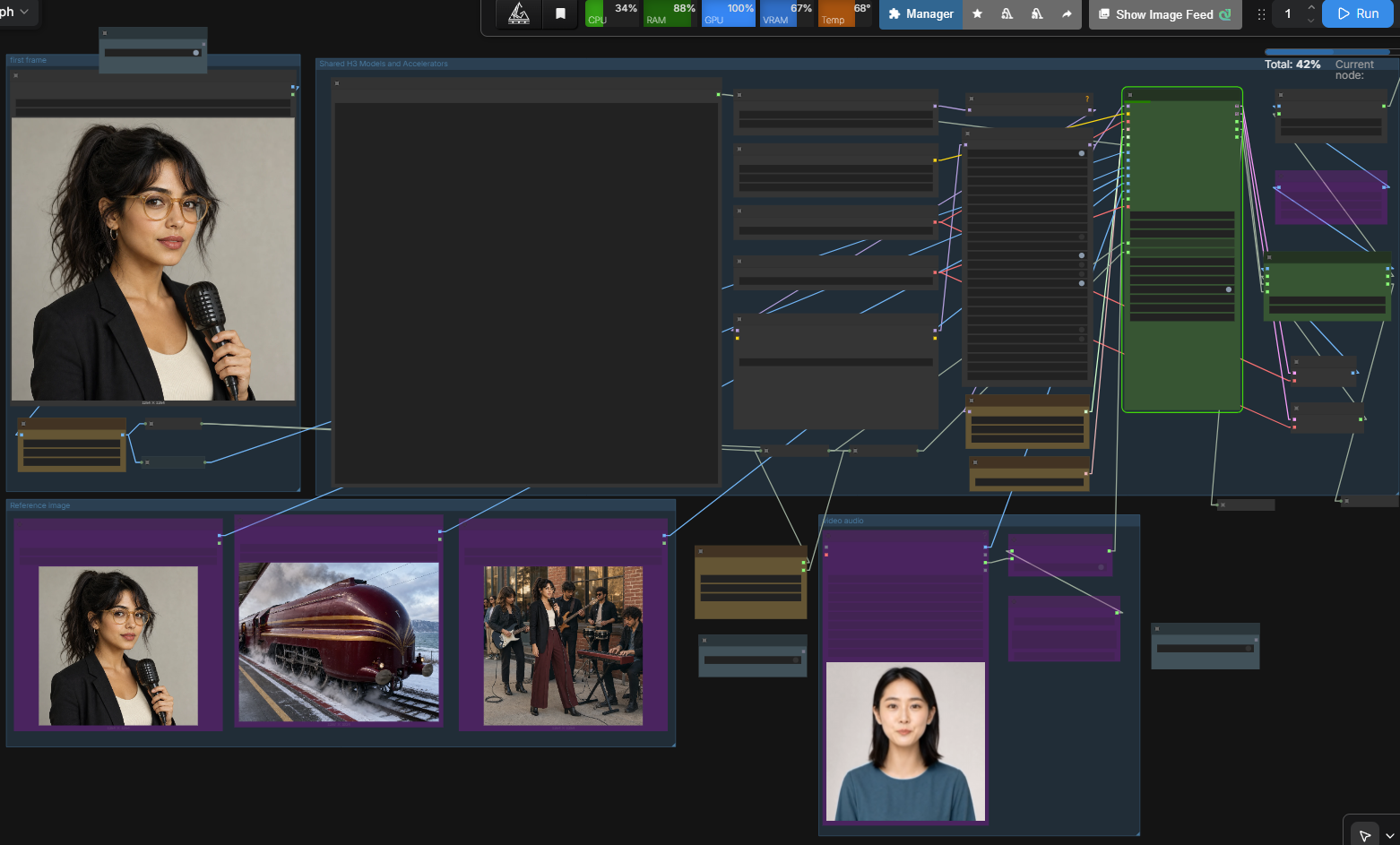
V3.4 is the current stable release. V3.3 legacy nodes remain available for existing workflows.
Native masked continuation feature
V3.4 now includes Native Masked — exact continuation (Recommended) as the default for exact same-shot continuation. It uses the MiniMax H3 per-token denoise-mask implementation merged in ComfyUI PR #15375 (merge commit ff6c8a8af144fc9e9e7bc436b1b202f9316848d8) and requires a Core revision exposing that H3 mask API.
For chunk 2 and later, Continuum copies the previous accepted H3 video latent tail directly into the start of the next target latent. With generated Audio Continuity enabled and no Driving Audio, it also copies the exactly aligned previous H3 audio latent tail. Native Core masks mark the copied prefix with 0 = preserve and the new region with 1 = generate.
This path does not turn the previous chunk into a Continuum minimax_refs block and does not use Continuum's position_ids/RoPE rewrite for the protected continuation data. The existing Guide / Motion Context method remains available for softer contextual influence and shot transitions. Existing V2/V3.3 nodes retain their Guide behavior.
At 24 fps video and 40 Hz H3 audio, the current exact generated-AV profile is 39 video frames = 65 audio latent steps. New V3.4 Native Masked workflows therefore default to Strong — 39 frames. Native video-only continuation can still use 5/22/39 frames. Explicit 5/22-frame Native Masked generated-audio continuation is rejected rather than rounded silently.
Driving Audio remains authoritative source audio: Native Masked protects the video prefix, leaves generated target audio unprotected, applies the existing absolute-time Driving Audio guide slice, and final assembly still selects the preserved source audio.
See Native Masked AV Continuation for the data flow, temporal math, Run Storage contract, reference/keyframe rules, Spectrum separation, and runtime validation checklist.
V3.4 overview
V3.4 focuses on the two reference workflows that are most useful in normal production:
- Driving Audio: use an existing audio source as the preserved final audio while it guides the H3 generation across chunks.
- Video Reference: use an existing video as persistent visual reference for appearance, motion, framing, and timing without treating it as a frame-by-frame copy.
- Restartable chunks: reuse completed chunks with Run Storage and regenerate only the selected part when the generation contract remains compatible.
- Core compatibility: remove Continuum-only rejection of unknown upstream/custom nodes and remove the obsolete
strict_compatibilitycontrol. - Spectrum interoperability: use the official H3 Continuum Interop API v1 when Spectrum is installed; Spectrum remains optional.
- Simpler public interface: Timeline Video and the earlier timeline-audio paths are hidden from the V3.4 public sampler interface rather than being presented as stable production features.
Direction change: from timeline generation to preserved references
Earlier development explored Timeline Video and timeline-audio conditioning. Those paths can be useful for experiments, but they are not the default production behavior: chunk boundaries can change visual content, and generated audio can diverge from a supplied song, dialogue, or effects track.
V3.4 therefore prioritizes:
- Driving Audio for cases where the supplied audio should remain the final audio stream.
- Video Reference for cases where the supplied video should guide the generated result without requiring exact frame reproduction.
- Chunked generation and Run Storage for practical retries and long-form work.
This is a usability and reliability decision, not a claim that the experimental timeline paths are impossible. They are hidden from the stable interface while the public workflow stays focused on predictable user-controlled inputs.
Example workflows
- V3.4 standard
- V3.4 Turbo
- V3.4 recommended settings reference (readable settings reference, not an importable ComfyUI graph)
New V3.4 nodes and the maintained V3.4 templates default to Continuation Method = Native Masked — exact continuation (Recommended). Saved legacy V3.4 graphs that do not serialize continuation_method are migrated on load to Guide / Motion Context so reopening them preserves their previous guide/RoPE generation semantics. For new Native Masked workflows with generated Audio Continuity enabled, use Continuity = Strong — 39 frames (or Auto, which resolves to the same exact AV boundary).
The maintained V3.4 standard and Turbo templates now explicitly serialize Video Seam = Auto 3 (Sustained Tone), Audio Seam = Auto, Timeline Output = Preserve audible tail (recommended), and Image Output Device = Auto. The assembler's new-node Video Seam default is also Auto 3. Existing saved workflows retain their explicit Auto/Auto 2 selections; selecting Auto 3 for those graphs remains a manual choice. Older V3 experimental nodes are unchanged.
The templates include optional external nodes such as Spectrum, Video Helper Suite, rgthree, EasyUse, and RTX Video Super Resolution. Install, replace, connect, or bypass them according to your installation. Media and acceleration choices remain under user control.
V3.4 features
Driving Audio
Driving Audio is the primary V3.4 audio path.
- Source audio guides each chunk at its absolute sequence position.
- The original effective stream is preserved for final output.
- Generated audio and Audio Seam processing are bypassed while Driving Audio is active.
- Audio is not independently rewritten at every chunk boundary.
- Perfect lip sync is not guaranteed; results still depend on H3, source material, prompts, and sampling.
Video Reference
Video Reference provides a persistent native H3 video reference across all chunks.
- It guides motion, framing, timing, and appearance.
- It is not a direct pixel-copy or deterministic identity-transfer system.
- Video and audio are independent. Route a loader's IMAGE output to Video Reference and AUDIO output to Driving Audio.
- Source decoding and frame-rate conversion remain loader responsibilities. Continuum does not impose an unnecessary forced 24 fps conversion.
| Video Reference Size | Purpose | |---|---| | Efficient - 0.4 MP | Default; lower token cost and faster iteration. | | Balanced - 0.6 MP | More detail at a higher compute cost. | | Match Output | Largest reference input; potentially much slower and heavier. |
Core-first, permissive execution
V3.4 removes or relaxes Continuum-only rejection rules that blocked otherwise runnable Core H3 experiments.
- Prompt problems prefer warnings and fallback behavior instead of stopping.
- Unknown upstream/custom wrapper classes are not blanket-rejected.
- There is no model allowlist and no automatic model replacement.
- The obsolete strict_compatibility control is removed from the V3.4 interface.
- Current Core PackedLayout behavior is supported without requiring the removed legacy frame_count argument.
- Native Masked continuation performs capability detection against Core's MiniMax H3 mask API and reports an actionable compatibility error when PR #15375-equivalent support is absent.
Hard stops remain only for states that cannot execute safely, including corrupt latent topology, incompatible assembly data, invalid persisted revisions, or unusable mandatory payloads.
Cleaner interface
The public nodes focus on normal production controls. Developer diagnostics and detailed reports are available through ComfyUI settings.
Timeline paths
Experimental Timeline Video and earlier timeline-audio paths are no longer public V3.4 inputs. They are hidden rather than destructively removed. Existing V3.3 workflows can continue through legacy nodes, but new stable workflows should use Driving Audio and Video Reference.
Installation
Updating an existing installation
For a Git checkout, run the update from the custom-node directory:
cd ComfyUI/custom_nodes/ComfyUI-H3-Continuum
git pull --ff-only origin main
Restart ComfyUI after the update. If the node was installed with ComfyUI Manager, use its Update action instead of running git pull manually. Do not mix Manager updates and a separate Git checkout for the same installation.
Search for H3 Continuum or Continuum in ComfyUI Manager, or install manually:
cd ComfyUI/custom_nodes
git clone https://github.com/xmarre/ComfyUI-H3-Continuum-Plus.git ComfyUI-H3-Continuum
Restart ComfyUI after installation or update.
V3.4 nodes
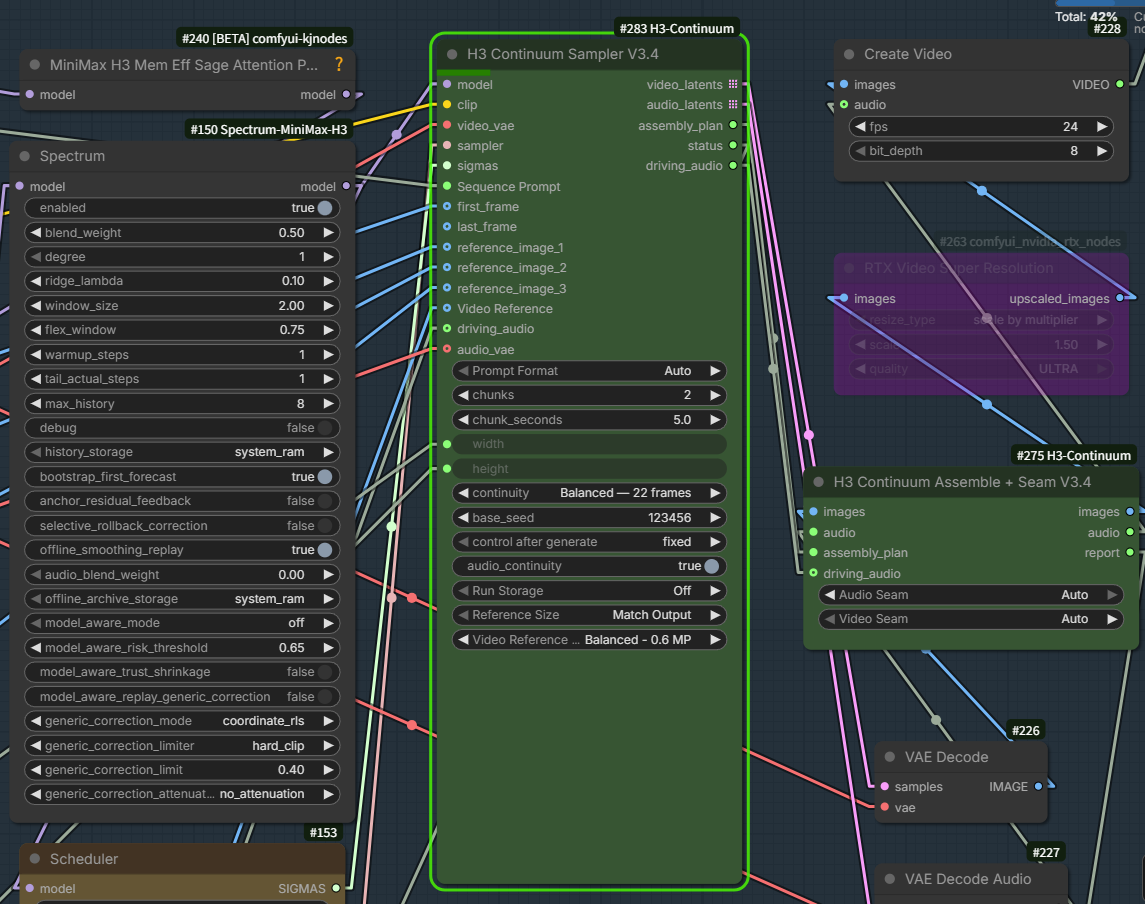
H3 Continuum Sampler V3.4
Main inputs:
- model, clip, video_vae, sampler, sigmas
- Sequence Prompt
- first_frame, last_frame
- reference_image_1 through reference_image_8
- Video Reference
- driving_audio, audio_vae
Outputs:
- video_latents, audio_latents
- assembly_plan, status
- driving_audio
Visible controls:
- Prompt Format, chunks, chunk_seconds
- width, height, continuity
- Continuation Method: Native Masked or Guide / Motion Context
- base_seed, control after generate
- audio_continuity
- Run Storage
- Reference Size
- Video Reference Size
H3 Continuum Assemble + Seam V3.4
Inputs: images, audio, assembly_plan, and driving_audio.
Controls: Audio Seam, Video Seam, and Timeline Output.
Timeline Output defaults to Preserve audible tail (recommended). The normal
exact-length result is retained when the discarded decoder tail is quiet. If enforcing the
target duration would discard active decoded PCM, Continuum preserves the full video and
audio together instead, rather than cutting through speech or desynchronizing lips.
For example, 345 retained frames for a requested 336-frame output produce 14.375 seconds
instead of clipping the last 0.375 seconds. The H3C-PT229 receipt and node report explicitly
record this decision. This policy is deterministic, output-only, and uses no new H3 or VAE calls.
For exact frame counts irrespective of active audio, explicitly select
Strict exact duration (may truncate active audio). The older saved selector literal
Exact requested duration (Recommended) remains accepted but now uses audible-tail protection
rather than silently dropping speech; it can exceed the target duration.
Video Seam defaults to Auto 3 (Sustained Tone) on new V3.4 assembler nodes.
It remains a content-dependent photometric correction; Auto and Auto 2
remain selectable, and saved graphs retain their chosen modes.
Auto 3 retains ordinary guarded transient corrections and, when no previous
patch applies and the shot is continuous, estimates a bounded per-frame RGB
affine adjustment from stationary background regions. Only newly generated
decoded frames are modified: the authoritative prefix, audio and spatial
geometry remain untouched. The estimator rejects insufficient static support,
avoids initial scene cuts and stops correction at a later detected cut.
Auto 3 has been verified in a rendered continuation to reduce sustained
darkening at a chunk boundary. It does not correct geometric drift, cumulative
zoom, loss of fine background detail, or incomplete speech. Its applicability
and quality remain scene-dependent. For a controlled comparison or when Auto 3
misclassifies a shot, keep the same seed, reference inputs and sampling settings
and switch only Video Seam to Auto (or Analyze Only for read-only diagnostics).
Explicit subject substitutions in Timeline prompts: When a prompt states, for example,
Replace Clark's identity with <Subject 1>, the physical compiler now
rebinds generated visual role mentions such as Clark (S2),
Clark/Maekar, and Clark's expression to <Subject 1> in every relevant
physical chunk. It leaves <d>...</d> dialogue unchanged and does not infer
unspecified identity mappings. For maximum reference fidelity, name
<Subject N> (Sx) directly at every speaker appearance, and distinguish a
composition/clothing-only reference from the reference defining facial
identity. This is semantic prompt conditioning, not a guarantee of a perfect
face match on every stochastic H3 sample.
Partial Timeline previews: If the authored Timeline contains later sections
(for example, [14-21s] and [21-28s]) but only two 7-second chunks are
requested, the physical prompt compiler no longer falsely treats the
14-second preview boundary as the story's end. It preserves the current
chunk's ongoing-dialogue prompt through native-grid overrun instead of
injecting a terminal speech-free lead-out. Later sections remain excluded
from the current chunk's conditioning. This does not generate the
missing future dialogue: render the later chunks to hear a scripted
utterance continue into them. Dense dialogue that cannot fit at a natural
speaking rate within its assigned chunk also requires re-timing or a
time-aligned Driving Audio source; audio assembly cannot reconstruct
words the model did not intelligibly generate.
Select Natural retained timeline (Refinement) on H3 Continuum Assemble + Seam V3.4
when a downstream operation must process every physical decode-group frame. After that
operation, connect its IMAGE result, the assembler AUDIO, and the same assembly_plan to
H3 Continuum Finalize Duration V3.4, which has the same safe/strict/natural choices.
Natural mode always keeps the full generated timeline, even with quiet padding.
Limitations: This protects material already generated beyond the exact endpoint. It cannot invent missing words or force the diffusion model to finish a spoken line; a mid-sequence chunk handoff with interrupted linguistic content needs a separate generation/conditioning repair. Audible audio might be music or ambience rather than speech; the policy protects any substantially non-silent tail.
When Driving Audio is connected, preserved source audio is selected for final output and generated audio seam processing is bypassed.
Connection order
H3 model / CLIP / Video VAE / sampler / sigmas
                         |
                         v
              H3 Continuum Sampler V3.4
                 |       |        |
          video_latents  |   assembly_plan
                         |
                  audio_latents

video_latents -> Core VAE Decode ------- images --+
audio_latents -> Core VAE Decode Audio -- audio  --+--> H3 Continuum Assemble + Seam V3.4
assembly_plan -------------------------------------+
driving_audio -------------------------------------+
For a post-assembly image refinement branch:
H3 Continuum Assemble + Seam V3.4
  Timeline Output = Natural retained timeline (Refinement)
                  |
                  +--> natural images --> downstream refine/stitch --+
                  +--> audio -----------------------------------------+--> H3 Continuum Finalize Duration V3.4
assembly_plan ---------------------------------------------------------+
For a source video with sound:
Video loader IMAGE -> Video Reference
Video loader AUDIO -> driving_audio
The supplied templates use Video Helper Suite for this split. Any compatible IMAGE/AUDIO loader may be substituted.
Prompt formats
Timeline
[0-5s]
First section: action, camera movement, and scene progression.

[5-10s]
Continue from the exact final state of the previous section.

[10-15s]
Continue naturally without resetting the scene.
Each [start-end] header must be on its own line, followed by the prompt text. The ranges must use the active chunk_seconds boundaries. Inline forms such as [0-5s] prompt text are not Timeline syntax and Auto may treat them as Fixed input.
List, Fixed, and Auto
List prompts use --- separators. Fixed reuses one prompt for every chunk. Auto detects the available structure. If a timeline cannot be parsed, V3.4 reports a warning and uses an applicable fallback rather than rejecting an otherwise runnable workflow.
FL2VA terminal merge
V3.4 latent-first FL2VA runs with 5-second logical chunks can keep the final two chunks as one physical H3 sample through external Core VAE decode. This preserves the terminal First/Last Frame path while Run Storage continues to address logical chunks.
- A 2×5-second FL2VA run is one Core-equivalent 10-second initial sample under either continuation method.
- In runs of three or more chunks, terminal merge is enabled only for Guide / Motion Context with Balanced — 22 frames, matching the validated upstream terminal-prefix contract.
- Long Native Masked runs retain one physical sample per logical chunk because exact generated-AV continuation uses the fork's 39-video-frame / 65-audio-step boundary.
- Timeline Video and non-5-second requests retain their established per-chunk path.
- The two logical terminal records are reused or regenerated atomically, and their overlap must be bit-exact before physical reconstruction.
Hybrid First/Last/Reference presentation
When First Frame or Last Frame is combined with Reference Images, Qwen now sees the applicable keyframe images as well as the references. Public prompt numbering remains stable: write Reference Image 1 through 8 as <Picture 1> through <Picture 8>; Continuum remaps those tags internally after the keyframe presentation items. Last Frame is included only in final conditioning, so earlier chunks do not receive the terminal target.
Run Storage
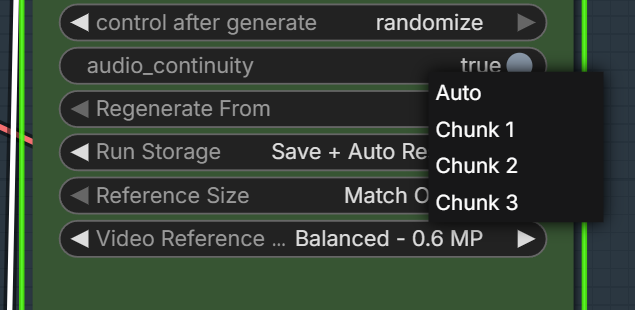
Run Storage preserves completed chunks and can reuse them after restarting ComfyUI. Regenerate From selects the first chunk to regenerate; earlier compatible chunks remain unchanged.
- Use a fixed seed for reproducible resume.
- Changing persistent models, LoRAs, references, prompts, resolution, or sampling settings can create a new revision.
- Native Masked and Guide continuation chunks use different generation contracts. Native mask contract changes also produce a different continuation-chunk fingerprint.
- Chunk 1 has no continuation prefix and remains reusable when only the continuation method changes; incompatible chunk 2+ state is not silently reused.
- Unknown upstream node classes no longer cause rejection by themselves; reuse still depends on compatible observable contracts and hashes.
Spectrum interoperability
Spectrum is optional. Current Spectrum releases officially support H3 Continuum Interop API v1.
- Chunk 1 uses the normal initial path.
- Chunk 2 and later request Actual Prefix 2.
- Native Masked keeps this request without using Continuum's layout/RoPE rewrite.
- Successful continuation logs accepted H3 Continuum API v1, actual prefix=2.
- Unsupported Spectrum versions fall back without a private patch.
See Spectrum v0.2.15 H3 Continuum interoperability.
Turbo LoRA and Spectrum are not mutually exclusive. Quality and speed remain workflow-dependent.
V3.4 input connection patterns
V3.4 separates the visual reference input from the driving-audio input. Choose the connection pattern that matches your source material.
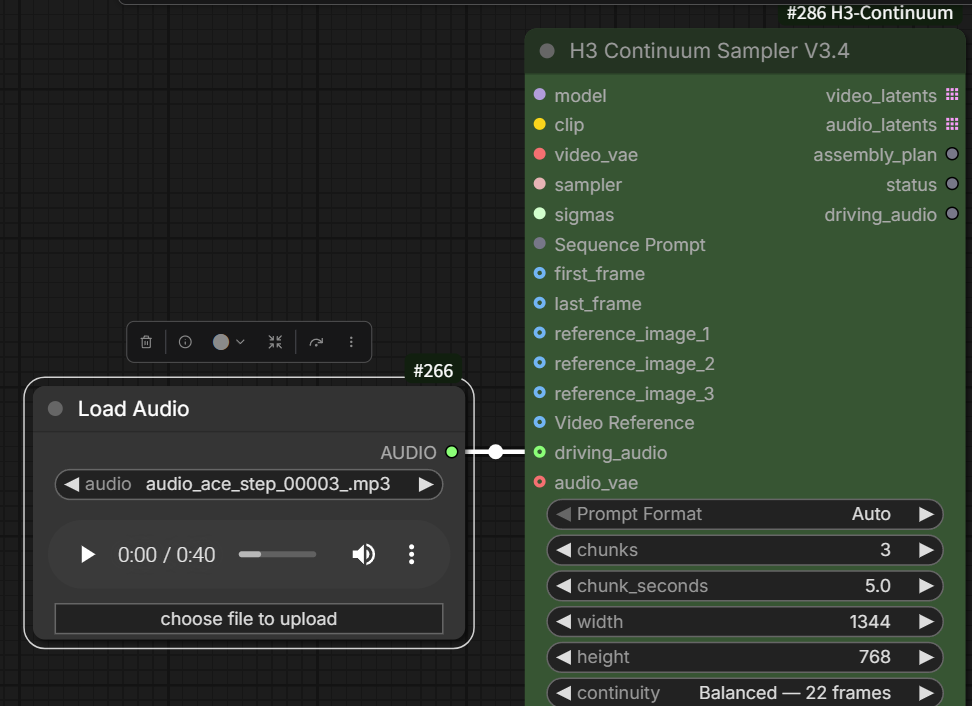
1. Audio only
Connect Load Audio to driving_audio. Use this when an existing song, dialogue track, or sound effect should remain the final audio. A Video Reference is not required.
2. Video with its own audio
Connect Load Video (Upload) IMAGE to Video Reference. If the uploaded video contains the audio you want to preserve, connect its AUDIO output to driving_audio as well.
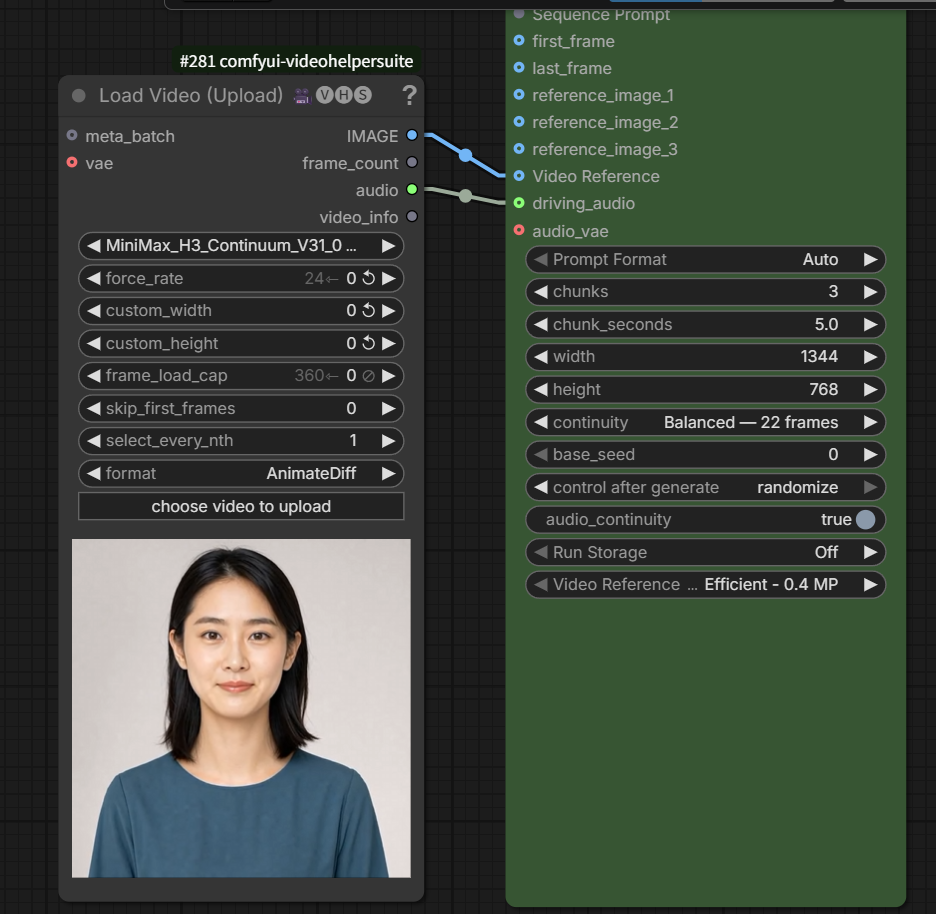
3. Video and audio from separate sources
Connect Load Video (Upload) IMAGE to Video Reference, then connect a separate Load Audio node to driving_audio. Use this when the visual reference video and the final audio source are different files.
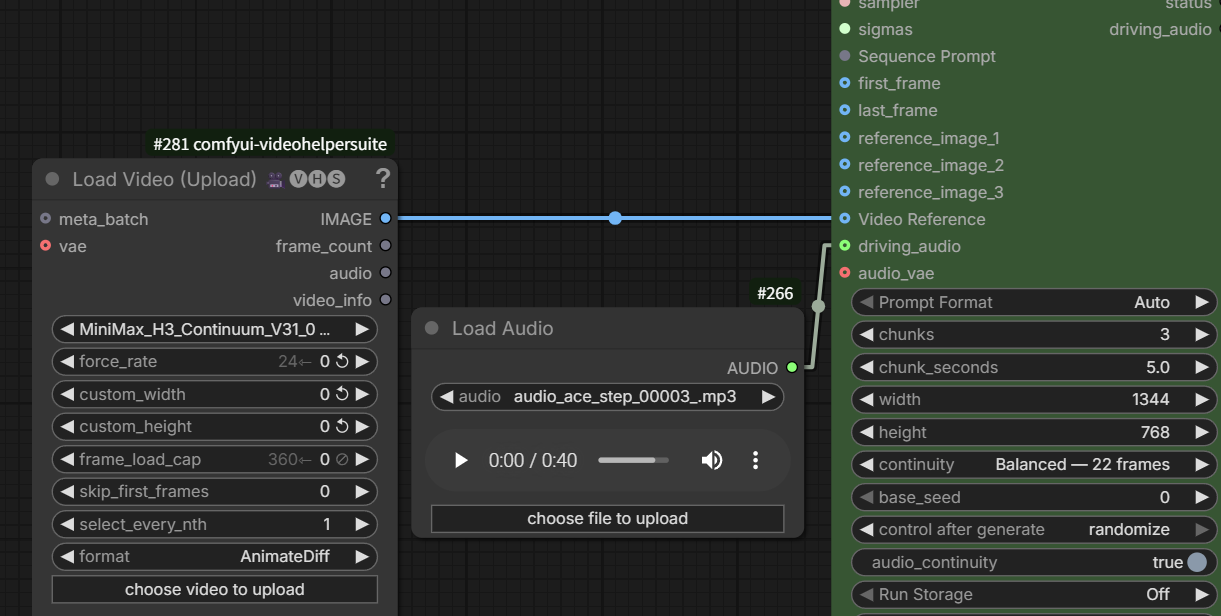
Both inputs are optional. Connect Video Reference when visual guidance is needed, and connect driving_audio when the supplied audio should be preserved in the final output.
Video Reference frame rate
Use a 24 fps source for Video Reference. Load Video (Upload) may accept files recorded at 25 fps or another frame rate, but acceptance alone does not guarantee correct temporal alignment with H3. For a non-24 fps source, set force_rate to 24 in Load Video (Upload), or convert the file to 24 fps before loading it. If the source is already 24 fps, leave force_rate at its default and do not resample it.
Current validation status
V3.4 stable has been exercised locally with:
- 1, 2, and 3 chunks
- standard and Turbo paths
- Spectrum enabled and disabled
- I2VA, Reference, and selected FL2VA configurations
- Driving Audio with short, exact-length, and longer sources
- Video Reference with source audio routed separately
- 0.4 MP and 0.6 MP reference sizing
- Run Storage reuse and selected-chunk regeneration
- Core VAE Decode and final assembly
The Native Masked feature adds automated coverage for exact target-prefix copying, video/audio mask semantics, temporal boundary validation, Guide separation, keyframe/reference coexistence, Run Storage method/version separation, Spectrum Actual Prefix request independence, source immutability, and the existing assembly/duration suite. A real current-Core H3 generation is still required before claiming perceptual/runtime validation of the new mechanism; use the precise checklist in docs/NATIVE_MASKED_CONTINUATION.md.
No OOM was observed in the cited recent local V3.4 stable checks, including two-chunk 800 x 800 runs. This is not a universal memory guarantee. Model precision, LoRAs, source resolution, optional nodes, GPU, and RAM affect memory use.
Limits
- Native Masked exact continuation requires ComfyUI Core with PR #15375-equivalent H3 mask support.
- Generated-audio Native Masked continuation currently uses the 39-frame exact AV profile; explicit 5/22-frame generated-audio requests fail instead of shifting audio timing.
- Guide / Motion Context remains model conditioning and does not freeze an exact target prefix.
- Video Reference guides H3; it does not reproduce every source frame.
- Driving Audio preserves selected audio, but visual lip synchronization remains model-dependent.
- Match Output can be substantially slower than 0.4 MP or 0.6 MP.
- Seam correction may keep the native boundary when a proposed correction is not safer.
- Optional template nodes must be installed, replaced, or bypassed by the user.
Upstream issue and pull-request responses
Responses to upstream issues #3 and #4 and pull requests #1, #2 and #5 are in docs/UPSTREAM_RESPONSES.md.
Coordinated H3 release set
H3 Continuum-Plus is released together with the other H3 components. Per-version details are in CHANGELOG.md.
| Component | Release | Included PRs | | --- | --- | --- | | Flow-Aligned Regenerate | v0.3.11 | #97 | | Sol-H3 | v0.1.10 | #40 | | VDN-H3-Plus | v1.5.9 | #39, #40 | | H3 Continuum-Plus | v3.4.6 | unchanged | | Latent Upscaler-Plus | v0.2.2 | unchanged |
Spectrum MiniMax H3 v0.2.28 is the unchanged companion. Separate Keyless, audio-training and rejected decoded-geometry experiments are outside this release set.
The tested Core adapter repair is ComfyUI #16783. For INT8 fused MLP runtime adapters, retain that ComfyUI Patcher PR overlay until the repair is available upstream. The independent Core #16720 optimization is not included in this release set.
License
See LICENSE.
Timeline Studio’s Import… supports selective ZIP/JSON/text/media and read-only State Manager prompt imports, with global identity, editable chunk sections and original soundtrack routing. See the import guide. Frontend, backend and desktop must use the matching v21 contract.
Experimental source-audio target lock
Timeline Studio Scene setup offers independent H3 audio generation and Final audio for new takes controls. Guided audio remains the default. Source Audio Locked protects the complete source-encoded target audio during video sampling; lip-sync quality and GPU performance require validation. See the source-audio lock contract and limitations.