
Prompt Enhancer
Prompt enhancer nodes for ComfyUI: Qwen Image 2.1 prompt expansion (PE-T2I / PE-I2I), MiniMax H3 video prompts, and general image prompts.
Prompt Enhancer
一个 ComfyUI 提示词增强节点包,覆盖三条线:
- Qwen Image 2.1:封装官方
prompt_rewrite工具链(PE-T2I / PE-I2I),把简短需求扩写成 2.1 真正吃的长提示词 - MiniMax H3:为 H3 生成可直接使用的视频提示词,支持参考图、参考视频、参考音频与官方创意 skills
- 普通图像提示词:根据原始需求和最多两张参考图,生成 SDXL / Illustrious / NoobAI 标签式提示词,或中英文自然语言提示词
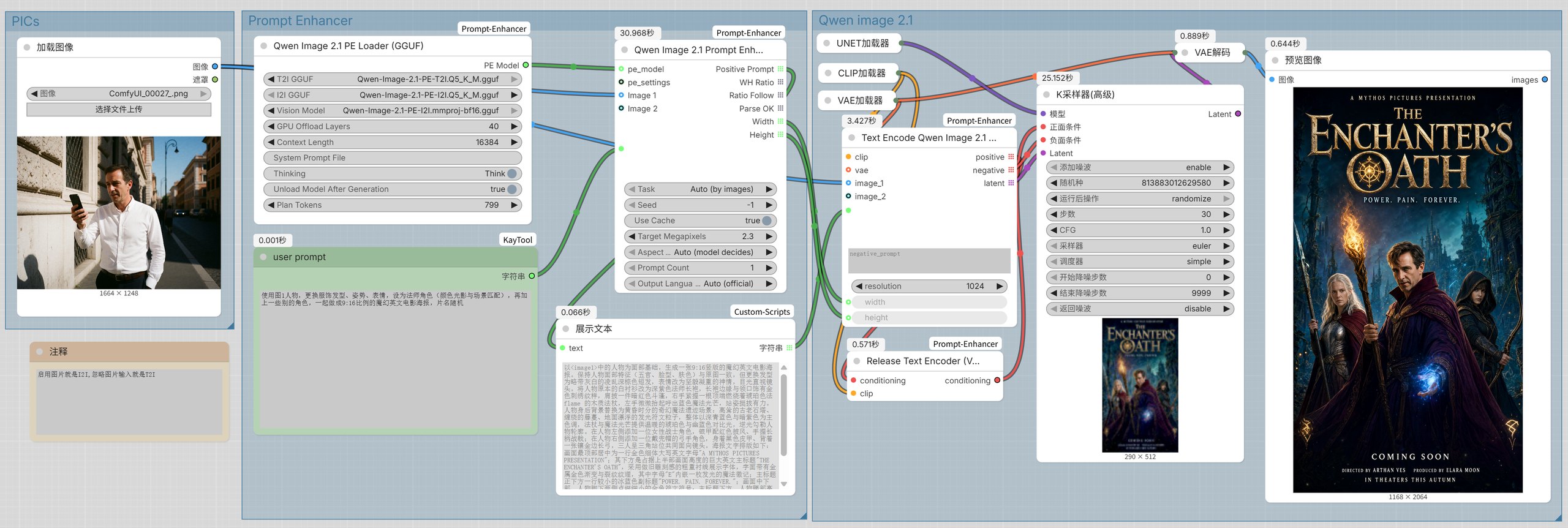
上图就是 example_workflows/Qwen-Image-2.1-PE.json:左边一张参考图加一句简单需求,PE 加载器挑好 T2I / I2I
权重,增强节点把需求扩写成 2.1 真正吃的长提示词,右边直接出图。
安装
cd ComfyUI/custom_nodes
git clone https://github.com/xiaowuapple-pixel/ComfyUI-Prompt-Enhancer.git
或者在 ComfyUI-Manager 里用 Install via Git URL 粘贴同一个地址,然后重启 ComfyUI。
依赖(在 ComfyUI 使用的 Python 环境里执行):
pip install -r requirements.txt
# 只有用本地 GGUF 推理时才需要,按你的 CUDA 版本选构建
pip install -r requirements-local-gguf.txt
模型下载
| 用途 | 文件 | 放哪里 | 下载 |
| --- | --- | --- | --- |
| H3 视频提示词 | 任意 Qwen3.5 / Qwen3.8 系视觉语言模型(*.gguf)+ 配套的 mmproj-*.gguf;节点自动扫描 models/LLM,不限定模型来源 | models/LLM/ | 见下一行的备选模型,或换成你已经在用的同代模型 |
| H3 视频提示词(备选) | Qwen3.8-9B-Q6_K.gguf / Qwen3.8-9B-Q8_0.gguf | models/LLM/ | empero-ai/Qwen3.8-9B-Distill-GGUF |
| Qwen Image 2.1 扩写(推荐) | Qwen-Image-2.1-PE-T2I.Q5_K_M.gguf | models/LLM/ | prithivMLmods/Qwen-Image-2.1-PE-T2I-GGUF |
| Qwen Image 2.1 扩写(带图改写) | Qwen-Image-2.1-PE-I2I.Q5_K_M.gguf + Qwen-Image-2.1-PE-I2I.mmproj-bf16.gguf | models/LLM/ | prithivMLmods/Qwen-Image-2.1-PE-I2I-GGUF |
| Qwen Image 2.1 扩写(官方权重) | qwen3.5_9b_qwen_image_2.1_pe_t2i.int8_convrot.safetensors、..._pe_i2i... | models/text_encoders/ | Comfy-Org/Qwen-Image-2.1 |
GGUF 走 llama.cpp,实测比 int8 safetensors 快约 5 倍,16GB 显存建议走 GGUF。
模型也可以放在 extra_model_paths.yaml 注册的其它目录里,节点会一起扫描。
视觉投影文件(mmproj)只要是同代 Qwen3.5 / Qwen3.8 的视觉投影即可,节点只要求它能被 llama.cpp 的
Qwen 视觉 handler 加载,不要求文件名配对。
范例工作流
example_workflows/ 里放了三份可直接拖进 ComfyUI 的完整工作流,本包的节点都已经接好在里面。
第三方节点没装的话会显示成红色,按第三列补齐即可:
| 范例 | 内容 | 除本包外还需要 |
| --- | --- | --- |
| Qwen-Image-2.1-PE.json | Qwen Image 2.1 文生图 / 改图:PE-GGUF 加载 + 提示词增强 + 最多 10 张参考图 + 列表编码 + 释放文本编码器 | KayTool(Text 节点)、ComfyUI-Custom-Scripts(ShowText) |
| MiniMax-H3-multi-reference.json | H3 多参考视频:音频精修、冻结缓存、RTX 超分 | ComfyUI-H3-Multishot、ComfyUI-H3-AudioRefine、comfyui-minimax-h3-audio-T8、ComfyUI-KJNodes、ComfyUI-VideoHelperSuite、ComfyUI-DLSS5-Enhancer、Nvidia_RTX_Nodes_ComfyUI、ComfyUI-SolAttn_triton、ComfyUI-Easy-Use、KayTool |
| MiniMax-H3-two-pass-multi-reference.json | H3 二采多参考:Turbo 采样 + 潜空间放大 | ComfyUI-H3-Multishot、ComfyUI-MiniMax-H3-Turbo、Comfyui_Minimax_h3_latent_Upscaler、ComfyUI-KJNodes、ComfyUI-VideoHelperSuite、ComfyUI-SolAttn_triton、rgthree-comfy、ComfyUI-Easy-Use、KayTool |
同名 .jpg 是范例的缩略图(Qwen-Image-2.1-PE.jpg 就是上面那张截图)。这些范例同时会出现在 ComfyUI 的
工作流 → 浏览模板 里(官方规定:custom node 目录下的 example_workflows/ 会被模板浏览器读取,
同名 .jpg 作为缩略图)。所以装完本包不用去 GitHub 找,直接在模板浏览器里就能打开。
中文说明
独立的 ComfyUI 节点,使用本地 GGUF 视觉语言模型或在线 OpenAI 兼容 API, 为 MiniMax H3 生成可直接使用的视频提示词。支持 1-9 张参考图、纯文生视频、 最多 3 个参考视频、最多 3 段参考音频、纯文生视频、生成类型选择、 创意技能选择,以及英文/简体中文输出切换。
功能
- 扫描
models/LLM和extra_model_paths.yaml注册的全部 LLM 路径 - 本地 GGUF +
mmproj视觉模型推理,支持 GPU 卸载层数 - 在线 OpenAI 兼容
chat/completionsAPI,模型可自动从/models获取 - 在线模型刷新按钮与模型下拉选择,无需手动输入模型名
- “模型来源”使用开关切换:关闭为本地模型,开启为线上 LLM
- 自动判别、文生视频、图生视频、首尾帧、尾帧和多参考生成
- 支持 1-9 张参考图、1-3 个参考视频、1-3 段参考音频,输入端口按需动态增加
- 视频和音频使用
<Video N>、<Audio N>标签引用,可用于指定对白、语音和节奏 - 用户输入引号内的对白会逐字保留,不会改写或截断
- 使用随仓库附带的 MiniMax 官方 skills 本地副本,不运行时联网
- 可选择生成后卸载本地模型(默认开启)
- 3D 动画、品牌宣传、产品广告、音乐字幕、纸艺科普等创意技能
- Image Prompt Generator:根据原始需求和最多两张参考图生成多条图像提示词
- 图像提示词支持
SDXL / Illustrious / NoobAI Tags或Natural Language格式 - Image Prompt Generator 同样支持在线模型刷新按钮与模型下拉选择
- 提供常用画面比例:1:1、4:3、3:4、16:9、9:16、2:3、21:9,也可自动判断
- 生成时会把画面比例作为构图约束,考虑主体尺度、取景、裁切边界和留白
- 提供随机种子:固定种子可复现生成结果,设为
-1时每次执行都会绕过缓存并重新随机 - Qwen Image 2.1 Prompt Enhancer:封装官方 prompt_rewrite 工具链,把简短需求扩写成 2.1 用的长提示词
- 提供「上下文长度」参数:决定 KV 缓存的显存占用,显存不足时调小可让更大的模型放进显卡
- 上下文调小后会自动压缩单次输出上限,避免生成到一半被截断
- 提供「Enable Thinking」开关(默认关闭):开启后让推理模型先内部思考再输出,思考内容不会写进提示词
- 按 GGUF 元数据识别模型架构,而不是文件名,所以 Qwen3.8 等新命名也能用上正确的对话模板
- 两种格式均只输出正面提示词,不生成 negative prompt、negative tags 或排除项
安装与使用
将仓库目录放入 ComfyUI/custom_nodes/ 后重启 ComfyUI。依赖文件说明:
requirements.txt:基础依赖,在线 API 模式必须安装requirements-local-gguf.txt/-cu131/-cu128:可选依赖,只有使用本地 GGUF 时安装, 按你的 CUDA 版本选一个(见下)
在 ComfyUI 使用的 Python 环境中执行:
pip install -r requirements.txt
在线 API 模式无需安装 llama-cpp-python。
本地 GGUF 模式要额外装一个带 CUDA 的 llama-cpp-python。注意 不要写
pip install llama-cpp-python>=0.3.46:PyPI 上最新只到 0.3.35,而且完全没有 Windows 轮子,
pip 只会报 No matching distribution。0.3.46 目前只有预编译 CUDA 轮子(来自
JamePeng/llama-cpp-python),本仓库的三个文件就是按
平台 + Python 版本自动挑轮子:
python -c "import sys, torch; print(sys.version.split()[0], torch.version.cuda)"   # 先看自己的版本
pip install -r requirements-local-gguf.txt          # Windows + CUDA 13.0
pip install -r requirements-local-gguf-cu131.txt    # CUDA 13.1(Windows / Linux)
pip install -r requirements-local-gguf-cu128.txt    # CUDA 12.8(Windows / Linux)
CPU 或 macOS:pip install llama-cpp-python==0.3.35(需要本地编译工具链),macOS 也可以直接用上面 releases 里的
Metal 轮子。轮子是 300MB 级的,装完重启 ComfyUI 即可。
在节点中选择模型、生成类型和创意技能;无图且选择“自动判别”时会自动采用文生视频方式。
GPU 卸载层数默认为 -1,表示全部放入显存;显存不足时可改为 16-24。
在线模式要求服务支持 OpenAI 多模态消息格式;API Key 只在节点运行时使用,不写入文件。
Qwen Image 2.1 Prompt Enhancer
把官方 prompt_rewrite 工具链封装成一个节点。它用的是 Qwen-Image-2.1 官方提示词增强模型 (PE-T2I / PE-I2I,基于 Qwen3.5-VL 9B 微调),把简短需求扩写成 2.1 真正吃的长提示词。
- 两个任务各有独立权重和独立系统提示词,节点已原样内置在
pe_prompts/,不会与权重脱节 - 输出四路:
Positive Prompt、WH Ratio、Ratio Follow、Parse OK - 另外输出
Width/Height两个整数:都是「画幅 ×Target Megapixels」——t2i 的画幅由模型选,edit 沿用参考图的画幅,像素量始终按你设的算;旁路(关闭增强)时没有模型可用,Auto就按参考图 1 的比例算,接不到参考图才交给下游文本编码节点 t2i只接受文字;edit最多 10 张参考图(模型上限),按顺序用<image1>… 引用,顺序不能乱- 图片端口是动态的:默认只显示
Image 1,连上以后才长出Image 2,依次类推,最多 10 个 - 思考默认开启,长度由加载节点上的
Plan Tokens控制(默认 800,-1为不限);思考内容始终不会写进提示词 - 采样默认使用官方出厂值:
t2i的presence_penalty=1.5,edit为0;切成Custom才能手改 - 本地 GGUF 与在线 LLM 都支持,和 H3 Prompt 共用同一套运行时
- 解析失败时
Positive Prompt回退为原始回答文本,并输出Parse OK=false,不会静默丢结果
这套功能是四个节点,各管一件事:
| 节点 | 负责什么 |
| --- | --- |
| Qwen Image 2.1 PE Loader (safetensors) | 官方 PE 权重(推荐):T2I Encoder / I2I Encoder 两个选择,从 text_encoders 里读 |
| Qwen Image 2.1 PE Loader (GGUF) | PE 的 GGUF 量化版:T2I GGUF + I2I GGUF + Vision Model(mmproj) + GPU Offload Layers。实测比原生 int8 快约 5 倍 |
| Qwen Image 2.1 PE Settings(可选) | 采样参数:预设、temperature、top_p、top_k、presence_penalty、max_new_tokens。接到主节点的 pe_settings;不接就用官方出厂值 |
| Qwen Image 2.1 Prompt Enhancer | 只有每次运行才会变的东西:提示词、任务、种子、画幅、目标像素、缓存开关、输出条数,以及 1-10 张参考图 |
还有一个支持列表的文本编码节点 Text Encode Qwen Image 2.1 (List)。官方的 Text Encode Qwen Image 2.1 只吃单个字符串,把增强节点的 Positive Prompt(列表)接过去会直接崩在
'list' object has no attribute 'startswith'。这个节点输入输出都是列表:prompts 接列表,
positive / negative / latent 也按同样的条数输出,所以 Prompt Count 大于 1 时每条提示词
都能各自走到采样器。它的 Batch Size 就是 latent 自己的批次维度(和「空Latent」的批次数目同义):
一次采样出几张,批内每张的噪声各不相同。参考图只缩放和 VAE 编码一次,所有提示词共用。
另外还有一个通用小工具节点 Release Text Encoder (VRAM):把它串在文本编码之后、采样器之前
还有一个 Load Image (recursive):和官方的「加载图像」一样,但下拉里会列出 input/ 的全部子目录
(比如粘贴进来的 pasted/image (64).png)。以前这个便利是靠改写核心 LoadImage 节点实现的,
而那正是官方 Standards 里"不得干扰其它节点"禁止的做法——现在换成我们自己的节点,官方节点完全不动。
工作流里把「加载图像」换成它即可,路径不用改。
还有 RTX Image Super Resolution (RGBA):给静止图像做 RTX 超分,RGB 和 RGBA 都吃。
官方的 RTX Video Super Resolution 只往引擎里送三通道,所以 Qwen Image 2.1 那种带 alpha 的成图
过不去(透明通道没地方放)。这个节点把 alpha 拆出来单独放大、再合并回去,抠好的海报放大后
透明度原样保留。档位除了 LOW/MEDIUM/HIGH/ULTRA,还开放了 nvvfx 的 DENOISE_* 与 DEBLUR_*
(那是给视频帧用的)。需要 NVIDIA 的 VFX 运行时:pip install -r requirements-rtx.txt
(或 pip install -e .[rtx]),装完重启 ComfyUI;其余节点不依赖它。
(conditioning 进、conditioning 出,另接同一路 clip),它会在条件已经算完之后把文本编码器
从显存里放掉。条件是现成的,所以画面不受影响;释放的是你指定的那个编码器(以及本包自己缓存的 PE 编码器),
不会碰扩散模型、VAE 或其它任何已载入的模型。实测一次释放 7.6GB → 14.6GB 可用显存。
关于透明背景:模型对 alpha 的判断很不稳定——同一句提示词、换一张参考图就可能在"透明"和"白底" 之间翻转,而且不由提示词决定(实测:只改提示词没有变化,只改参考图就翻转)。 所以节点不做任何透明相关的改写:模型写成什么就是什么。 需要稳定透明,走二次编辑——先出图,再用同一个模型跑一次"去掉白底"的编辑(这条路对很细的文字边缘 也很有效);或者后期用抠图模型处理。
输出语言(Output Language)
官方契约是死的:t2i 恒英文、edit 跟随你输入的语言。想反过来(t2i 写中文、或用英文做编辑比对)
就选 Output Language:
| 选项 | 行为 |
| --- | --- |
| Auto (official) | 官方规则,不干预 |
| Chinese / English | 强制描述性文字用该语言 |
实测(同一张图、同一句请求):t2i 从 100% 英文变成 100% 中文;编辑从 96% 中文变成 100% 英文。
实现上是三重叠加,缺一不可:系统提示词里的语言规则段整段改写 → 用户回合开头加"语言指令"并把请求 重新标注为"按意思理解、别照抄语言" → 末尾再补一道语言锁。只改系统提示词是没用的(语言是训进权重的), 只加一句软指令也没用。画进图里的文字不受影响(引号内文字仍按官方那套优先级决定)。
两个加载节点输出同一种 PE Model,用哪个就接哪个——这样每个模式只显示它需要的选择,
不会出现"选了 A 还要面对 B 的空白控件":
| 你的情况 | 用哪个加载节点 | 它上面有几个选择 |
| --- | --- | --- |
| 官方 safetensors(质量基准) | PE Loader (safetensors) | 两个:T2I、I2I |
| 想要速度(GGUF 量化) | PE Loader (GGUF) | 三个:T2I、I2I、mmproj |
两个加载节点都自己负责载入与释放:一次只驻留一个模型,用完就还显存。 两个任务的选择只做一次(把 T2I 和 I2I 都选好),由主节点按有没有连图自动决定用哪个, 不需要自己保证"任务和模型"配对。
这个节点只服务于 PE 权重。在线 LLM 和普通 Qwen3.5 之类的通用模型已从节点里移除: 它们能读到系统提示词、甚至能照结构输出,但没在这套答案契约上训练过,吐不出下游要的 JSON, 跑一次要几分钟却只换来
Parse OK=false。GGUF 下拉里也只列出 PE 检查点。
Task 默认是 Auto (by images):连了图片就走 edit,没连图片就走 t2i,节点按这个自动选权重和系统提示词。
两个 PE 编码器各 8.8 GB,不可能同时放进 16GB 显卡,所以节点全程只驻留一个:
只有在真正需要时才载入,切换任务时先释放另一个,Unload Model After Generation 打开时用完即放。
释放只丢掉编码器自己的引用(实测 14.6 GB → 1.4 GB),不会牵连你的扩散模型。
输出怎么接:
| 输出 | 接到哪 |
| --- | --- |
| Positive Prompt | 2.1 的文本编码节点(CLIPTextEncode / TextEncodeQwenImage21)的正向输入 |
| Width / Height | 接 Text Encode Qwen Image 2.1 (List) 的 width / height。这两个数是 16 的倍数,正是 2.1 的 latent 能精确表示、并且带 alpha 层的尺寸;接普通 空Latent 也能出图,但那条路没有 alpha 层,背景必然是不透明的 |
| WH Ratio | 不用接,是模型选画幅的原始记录(形如 16:9)。注意官方 分辨率选择器 的选项带后缀(16:9 (Widescreen)),直接连过去校验不过,所以宽高已经帮你算好了 |
| Ratio Follow | 不用接,edit 专用信息(形如 <image1>),表示输出沿用哪张参考图的画幅 |
| Parse OK | 不用接。false 表示模型没吐出预期 JSON,此时 Positive Prompt 是原始回答文本,可以用来判断这次结果要不要用 |
画幅有专门的 Aspect Ratio 选择:默认 Auto (model decides) 是官方行为(模型自己定,结果从 WH Ratio 读)。
想固定就选一个比例,节点会做两件事:把这个画幅写进交给模型的请求(中英双语标注,
避免 edit 任务的输出语言被带偏),并让 Width / Height 按它计算。这样提示词描述的构图和实际画布是一致的。
如果模型的判断和你的设定不同,日志里会提示一句。
Prompt Count 决定一次输出几条提示词。六路输出都是列表(长度等于条数),
下游节点会按条数各跑一次——比如接一个 KSampler 就是一轮出 N 张。
- 同批各条用
Seed、Seed+1、Seed+2…,所以固定 Seed 能复现整批 - 耗时基本线性叠加:官方契约一次回答只给一条,每条都得完整生成一遍。 16GB 卡 + GGUF 实测:t2i 每条约 20-35 秒,edit 约 45-50 秒
- 唯一省下的是模型载入:整批只载入一次、只释放一次(省十几秒,不是每条都省)
- 配合缓存:同一批重复执行是毫秒级
关掉 Prompt Enhancement(旁路)时 Prompt Count 不生效:节点只输出你写的那一条提示词。
复制 N 条相同的提示词没有意义——种子、提示词、尺寸完全一样,采样出来就是同一张图,白跑 N 遍。
旁路想一次出多张,用文本编码节点的 Batch Size:那是 latent 自己的批次维度,一次采样里噪声张量
的每个槽位各不相同,所以一批就是几张真正不同的图——和「空Latent」调批次数目是同一回事。
旁路的画幅同样受控,Target Megapixels 不会失效:强制了 Aspect Ratio 就按它算;
留在 Auto 且接了参考图时,按参考图 1 的比例 × Target Megapixels 算(i2i 沿用原图构图、
像素量还是你定的那个);只有一张参考图都没有时,才把画幅交给下游文本编码节点按它的 resolution 决定。
官方 PE 编码器(放到 models/text_encoders/):
qwen3.5_9b_qwen_image_2.1_pe_t2i.int8_convrot.safetensors— t2i 扩写qwen3.5_9b_qwen_image_2.1_pe_i2i.int8_convrot.safetensors— 带图改写真
来源:Comfy-Org/Qwen-Image-2.1。每个 8.82 GB,16GB 显卡可以跑。 实测 4080 上约 14 token/s,一次 t2i 扩写(含思考块)约 2 分钟。
关于速度
4080 16GB + Q5_K_M GGUF,一次带图改写实测(请求:五张参考图 + 角色卡设定):
| 模式 | 耗时 | 提示词 |
| --- | --- | --- |
| Direct(关思考) | 约 9 秒 | 455 字,没有权衡需求的过程,细节明显变少 |
| Think + Plan Tokens 800(默认) | 约 26 秒 | 688 字 |
| Think + Plan Tokens 400 | 约 15 秒 | 666 字 |
| Think + Plan Tokens -1(官方完整思考) | 约 92 秒 | 720 字 |
| 原生 int8 safetensors(开思考) | 十分钟以上 | — |
时间几乎全花在那轮思考上:同一条请求,模型写了 7038 个 token 的规划、89 秒,
而真正的答案只有 350 个 token。所以 Plan Tokens 是这里最值钱的开关:写到上限就收住,
把已经写好的规划交还给模型直接写答案(多付一次预填充,约 2-3 秒)。
规划越短越容易漏掉请求里的隐含要求——上面同一条请求里"附带详细文字说明",
完整思考的版本写出了文字框和标题,400 的版本就没写。
这两个 checkpoint 没有 MTP 头,投机解码用不上(节点里的"auto"会退化成普通采样)。
能用的加速手段,按效果排序:
- 调
Plan Tokens。默认 800(约 26 秒);追求快就 400(约 15 秒), 追求细节就-1(约 92 秒)。它只在Thinking打开时生效。 - 反复调提示词时关掉
Unload Model After Generation。节点会留着已载入的模型, 下一次运行连载入都省掉(实测 4.0 秒 → 0.0 秒)。跑完整出图工作流前记得再打开, 否则那 6 GB 会一直占着显存。 - 用 GGUF 路线。同机实测:ComfyUI 原生 int8_convrot 约 14 token/s, llama.cpp 跑同级别 9B GGUF 约 75 token/s。见上面 GGUF 表格。
- 开
Use Cache(默认开启)。相同请求 + 相同种子会直接复用上次结果,第二次起是毫秒级。 反复调图时这个开关能省掉绝大部分等待。缓存放在ComfyUI/user/qwen_image21_pe_cache/, 要强制重新生成就关掉它或清空这个目录。 - 不用管输出上限。节点在答案的 JSON 闭合的那一刻就停止生成, 官方那两个巨大的上限(16256 / 24000 个新 token)不再意味着要等满。
建议的本地模型(适配 16GB 显存,来源见下方链接):
| 用途 | 文件 | 大小 |
| --- | --- | --- |
| t2i | Qwen-Image-2.1-PE-T2I.Q5_K_M.gguf | 6.02 GB |
| t2i(更省显存) | Qwen-Image-2.1-PE-T2I.Q4_K_M.gguf | 5.24 GB |
| edit | Qwen-Image-2.1-PE-I2I.Q5_K_M.gguf + Qwen-Image-2.1-PE-I2I.mmproj-bf16.gguf | 6.02 + 0.86 GB |
| edit(更省显存) | Qwen-Image-2.1-PE-I2I.Q4_K_M.gguf + Qwen-Image-2.1-PE-I2I.mmproj-bf16.gguf | 5.24 + 0.86 GB |
- 量化版:Qwen-Image-2.1-PE-T2I-GGUF、Qwen-Image-2.1-PE-I2I-GGUF
- 官方权重:Qwen/Qwen-Image-2.1-PE-T2I、Qwen/Qwen-Image-2.1-PE-I2I(bf16 约 20 GB,16GB 显卡放不下)
推荐设置:Context Length 用 16384,GPU Offload Layers 用 -1。
把基座模型(例如普通的 Qwen3.5-9B)填进去也能跑,
但它没按这套系统提示词训练过,Parse OK 基本会是 false。
English
Standalone ComfyUI node for generating production-ready MiniMax H3 video prompts with a local GGUF vision-language model or an OpenAI-compatible hosted API. It supports 1-9 reference images, up to three reference videos, up to three reference audio clips, text-to-video mode, generation-type selection, creative skill selection, and English/Chinese output.
Features
- Scans local
models/LLMplus paths registered inextra_model_paths.yaml - Local GGUF +
mmprojvision inference with configurable GPU offload layers (default:-1, all layers on GPU) - OpenAI-compatible
chat/completionsAPI with automatic/modelsdiscovery - Refresh button and dropdown selection for hosted models; no manual model-name entry required
- A simple source switch selects local models (off) or hosted LLM (on)
- Auto, text-to-video, image-to-video, first/last-frame, last-frame, and multi-reference modes
- 1-9 reference images, 1-3 reference videos, and 1-3 reference audio clips, with sockets added on demand
- Videos and audio are referenced with
<Video N>and<Audio N>tags for dialogue, speech, and rhythm - Quoted dialogue in the request is reproduced verbatim and is never rewritten or truncated
- Vendored MiniMax official skills are used locally; no runtime network synchronization
- Optional model unload after generation (enabled by default)
- Creative skills for 3D shorts, brand ads, product ads, music subtitles, and paper-craft explainers
- Image Prompt Generator creates multiple image prompts from the request and up to two reference images
- Image prompts support
SDXL / Illustrious / NoobAI TagsandNatural Languageformats - Image Prompt Generator shares the same online model refresh button and dropdown selection
- Common aspect ratios are available: 1:1, 4:3, 3:4, 16:9, 9:16, 2:3, and 21:9, plus Auto
- The selected ratio is treated as a composition constraint for framing, subject scale, crop boundaries, and negative space
- A Seed control is available: fixed seeds improve reproducibility;
-1bypasses the execution cache and selects a new random seed on every run - Qwen Image 2.1 Prompt Enhancer: wraps the official prompt_rewrite toolchain to expand a short request into a 2.1-ready long prompt
- A Context Length control sets the KV-cache footprint, so a smaller window lets a larger model stay on the GPU
- A smaller context length automatically trims the per-call reply budget so responses are not cut off halfway
- An Enable Thinking switch (off by default) lets reasoning models think internally while the reasoning is kept out of the prompt output
- The chat handler is chosen from the GGUF metadata rather than the file name, so newer names such as Qwen3.8 still get the correct chat template
- Both formats output positive prompts only; no negative prompts, negative tags, or exclusions are generated
Qwen Image 2.1 Prompt Enhancer
Wraps the official prompt_rewrite toolchain. It drives the official Qwen-Image-2.1 prompt-enhancer checkpoints (PE-T2I / PE-I2I, fine-tuned Qwen3.5-VL 9B) and turns a short request into the long prompt 2.1 expects.
- Each task has its own checkpoint and its own system prompt; both prompts ship verbatim in
pe_prompts/ - Six outputs:
Positive Prompt,WH Ratio,Ratio Follow,Parse OK,Width,Height Width/Heightare pixels: ratio xTarget Megapixelsin both tasks -- the model picks the ratio for t2i, edit follows the reference image's ratio, and the pixel count is always the one you set. Bypassed there is no model to ask, soAutouses reference image 1's ratio instead, and only falls back to the downstream text encoder when no reference is connectedt2itakes text only;edittakes up to 10 reference images (the model's limit), referenced as<image1>... in connection order- Image sockets are dynamic: only
Image 1shows at first, and connecting it revealsImage 2, up to ten - Thinking is on by default and its length is capped by the loader's
Plan Tokens(800 by default, -1 for no cap); the reasoning never leaks into the prompt - Official per-task sampling by default (
presence_penalty1.5 for t2i, 0 for edit); switch toCustomto override - Local GGUF and hosted LLM sources, sharing the same runtime as H3 Prompt
- On a parse failure
Positive Promptfalls back to the raw answer andParse OKis false, so nothing is lost silently
This is four nodes now, each owning one concern:
| Node | Owns |
| --- | --- |
| Qwen Image 2.1 PE Loader (safetensors) | The official PE weights (recommended): two pickers, T2I Encoder / I2I Encoder, read from text_encoders |
| Qwen Image 2.1 PE Loader (GGUF) | The PE GGUF quants: T2I GGUF + I2I GGUF + Vision Model (mmproj) + GPU Offload Layers. Measured about 5x faster than the native int8 path |
| Qwen Image 2.1 PE Settings (optional) | Sampling: preset, temperature, top_p, top_k, presence_penalty, max_new_tokens. Wire it into pe_settings; leave it off to use the official settings |
| Qwen Image 2.1 Prompt Enhancer | Only what changes per run: prompt, task, seed, aspect ratio, target megapixels, cache toggle, prompt count, and 1-10 reference images |
There is also a list-aware text encoder, Text Encode Qwen Image 2.1 (List). The stock
Text Encode Qwen Image 2.1 takes one string, so wiring the enhancer's Positive Prompt (a list) into
it dies with 'list' object has no attribute 'startswith'. This one takes a list in and returns lists
of positive / negative / latent, so a Prompt Count above 1 reaches the sampler one prompt at a
time. Its Batch Size is the latent's own batch dimension (the same meaning it has on the stock Empty
Latent Image), so a single prompt can also come back as several different pictures from one run.
Reference images are resized and VAE-encoded once and shared by every prompt.
There is also a small general-purpose node, Release Text Encoder (VRAM). Wire it between the text
And Load Image (recursive): the same as the stock Load Image, except the dropdown covers every
subfolder of input/ (pasted files land in input/pasted/). That convenience used to come from
rewriting the core LoadImage node, which is exactly the cross-node interference the registry's
standards forbid -- it is this pack's own node now, and the core node is left untouched. Swap the
image node in your workflow for it; the file paths stay the same.
And RTX Image Super Resolution (RGBA): RTX upscaling for stills that takes RGB and RGBA. The
stock RTX Video Super Resolution hands the engine three-channel frames only, so a Qwen Image 2.1
result with an alpha channel cannot go through it. This node lifts the alpha out, upscales the visible
three channels with the same nvvfx engine, enlarges the alpha to match and reattaches it, so a cut-out
poster stays cut out. It also exposes nvvfx's DENOISE_* and DEBLUR_* levels (meant for footage) on top
of LOW/MEDIUM/HIGH/ULTRA. Needs NVIDIA's VFX runtime: pip install -r requirements-rtx.txt (or
pip install -e .[rtx]), then restart ComfyUI. Nothing else in the pack depends on it.
There is also a small general-purpose node, Release Text Encoder (VRAM). Wire it between the text
encode and the sampler (conditioning in, conditioning out, plus the same clip), and it drops the
text encoder once the conditioning exists. The conditioning is already computed, so the image is
unaffected, and only the encoder you named (plus this pack's own cached PE encoder) is touched --
never the diffusion model, the VAE or anything else loaded. Measured: 7.6 GB -> 14.6 GB free.
On transparent backgrounds: the model's alpha decision is unstable -- the same prompt flips between transparent and white when the reference image changes, and it is not controlled by the prompt (measured: changing only the prompt changed nothing, changing only the reference flipped it). The node therefore does no transparency rewriting: whatever the model writes is what you get. For dependable alpha, generate first and run a second edit pass with the same model to drop the white background -- that works well even for very fine text edges -- or cut the subject out with a matte model.
Output Language
The official contract is fixed: t2i always answers in English, edit mirrors the language you typed in.
Output Language is for when you want the other one -- Chinese from t2i, or English for an edit.
| Choice | Behaviour |
| --- | --- |
| Auto (official) | The contract as-is, nothing touched |
| Chinese / English | Force the descriptive prose into that language |
Measured on one request and one image: t2i went from 100% English to 100% Chinese, edit from 96% Chinese to 100% English.
It takes all three of these, not any one of them: rewriting the language rule inside the system prompt, a directive at the top of the user turn that also relabels the request as "follow the meaning, not the language", and a language lock at the end. The rule alone does nothing -- the language is baked into the weights -- and a single soft sentence does nothing either. Text painted into the image is unaffected; it still follows the official priority order.
Both loaders output the same PE Model type, so you wire whichever one matches your case -- and each shows
only the pickers it needs:
| Your case | Loader | Pickers on it |
| --- | --- | --- |
| Official safetensors (quality reference) | PE Loader (safetensors) | two: T2I, I2I |
| Speed (GGUF quants) | PE Loader (GGUF) | three: T2I, I2I, mmproj |
Both loaders own loading and unloading: one model resident at a time, released as soon as the run ends. You pick both tasks once (T2I and I2I); the enhancer decides which one a run needs from whether images are connected -- no need to keep "task and model" in sync by hand.
This node serves PE checkpoints only. The online-LLM path and plain Qwen3.5-style models were removed: they read the system prompt and even mirror its structure, but they were never trained on its answer contract, so a run that costs minutes returns
Parse OK=false. The GGUF dropdown lists PE checkpoints only.
Task defaults to Auto (by images): images connected means an edit request, no images means text-to-image,
and the node picks the matching weights and system prompt by itself. The two PE encoders are 8.8 GB each and
cannot both fit a 16 GB card, so only one is ever resident: it is loaded on first need, the other is released
when the task switches, and Unload Model After Generation frees it after the run. That release only drops the
encoder's own reference (measured 14.6 GB -> 1.4 GB) and never touches your diffusion model.
Where the outputs go:
| Output | Destination |
| --- | --- |
| Positive Prompt | the positive side of the 2.1 text encoder (CLIPTextEncode / TextEncodeQwenImage21) |
| Width / Height | into Text Encode Qwen Image 2.1 (List)'s width / height. They are multiples of 16, which is a size 2.1's latent represents exactly and carries an alpha layer for; an Empty Latent Image also renders, but it has no alpha layer, so the background comes out opaque |
| WH Ratio | leave unconnected; it is the model's own record of the canvas (16:9). The core Resolution Selector expects labels with suffixes (16:9 (Widescreen)), so a direct link will not validate -- that is why Width/Height are computed for you |
| Ratio Follow | leave unconnected; edit only, names the reference image whose framing the output keeps (<image1>) |
| Parse OK | leave unconnected; false means the answer was not the expected JSON and Positive Prompt holds the raw text |
Aspect Ratio controls the canvas: Auto (model decides) is the official behaviour (read the result from WH Ratio).
Pick a ratio to fix it and the node does two things: it tells the model about it (bilingual marker, so an edit run's
output language is not dragged along) and it makes Width / Height follow it. The description and the frame then
agree, and the log notes it when the model's own choice differed.
Prompt Count sets how many prompts a run returns. All six outputs are lists (length = count), so downstream
nodes run once per prompt -- one KSampler wired to it renders N images.
- Variants use
Seed,Seed+1,Seed+2, ... so a fixed seed reproduces the whole batch - Cost is essentially linear: the official contract allows one answer per response, so every prompt is a full generation. Measured on a 16 GB card with GGUF: about 20-35 s per t2i prompt, 45-50 s per edit prompt
- The only saving is the model load: one load and one release for the whole batch (tens of seconds, not per prompt)
- With the cache on, re-running the same batch costs milliseconds
With Prompt Enhancement switched off (bypass), Prompt Count does not apply: the node emits the one
prompt you typed. N identical entries would be N runs of the same prompt under the same sampler seed --
the same picture N times, for N times the sampling cost. To get several pictures out of one bypassed
prompt, use the text encoder's Batch Size: it is the latent's own batch dimension, so a single
sampling run holds one different noise slice per picture -- exactly what the stock Empty Latent Image does.
The canvas is under the same rules when bypassed, and Target Megapixels keeps working: a forced
Aspect Ratio is used as given, and Auto with a reference image follows reference image 1's ratio
at your pixel budget (i2i keeps the source's framing without giving up the size control). Only with no
reference image at all does the downstream text encoder decide, from its own resolution.
Official PE encoders (put them in models/text_encoders/):
qwen3.5_9b_qwen_image_2.1_pe_t2i.int8_convrot.safetensorsfor t2i expansionqwen3.5_9b_qwen_image_2.1_pe_i2i.int8_convrot.safetensorsfor edit rewriting
From Comfy-Org/Qwen-Image-2.1. Each is 8.82 GB and fits a 16 GB card. Measured on a 4080: about 14 tokens/s, so one t2i expansion including its thinking block takes roughly two minutes.
About speed
Measured on a 4080 (16 GB) with the Q5_K_M GGUF, one edit rewrite (five reference images plus a character-card request):
| Mode | Time | Prompt |
| --- | --- | --- |
| Direct (thinking off) | ~9 s | 455 characters, written without weighing the request |
| Think + Plan Tokens 800 (default) | ~26 s | 688 characters |
| Think + Plan Tokens 400 | ~15 s | 666 characters |
| Think + Plan Tokens -1 (the official setting) | ~92 s | 720 characters |
| Native int8 safetensors (thinking on) | ten minutes or more | -- |
The time is almost entirely the plan: the same request emitted 7038 tokens of planning (89 s) against a
350-token answer. Plan Tokens is the lever -- the node stops reading once the budget is spent and hands the
plan back so the model writes the answer (one extra prefill, 2-3 s). Shorter plans miss implied requirements:
on that request "include a detailed text description", the full plan produced a text panel with a title, the
400-token one did not. Neither checkpoint ships an MTP head, so speculative decoding is not available (the
node's "auto" quietly falls back to plain sampling).
What actually helps, best first:
- Pick a
Plan Tokensbudget. 800 is the default (~26 s); 400 is ~15 s;-1is the official full plan (~92 s). It only applies whileThinkingis on. - Turn
Unload Model After Generationoff while you iterate. The node then keeps the runtime resident and a second run skips the load entirely (measured: 4.0 s -> 0.0 s). Turn it back on before queueing a full image workflow, or the 6 GB stays parked in VRAM. - Use the GGUF path. ComfyUI's native int8_convrot runs at about 14 tokens/s; llama.cpp runs the same 9B quant at about 75 tokens/s. Both numbers are from the same card.
- Keep
Use Cacheon (default). Same request plus same seed reuses the previous result, so repeat runs are instant. The cache lives inComfyUI/user/qwen_image21_pe_cache/; disable it or clear that folder to force a fresh generation. - Leave the output budget alone. The node stops the moment the answer's JSON closes, so the enormous official ceilings (16256 / 24000 new tokens) no longer cost anything.
Suggested local models for a 16 GB card (Qwen-Image-2.1-PE-T2I-GGUF, Qwen-Image-2.1-PE-I2I-GGUF):
| Task | Files | Size |
| --- | --- | --- |
| t2i | Qwen-Image-2.1-PE-T2I.Q5_K_M.gguf | 6.02 GB |
| t2i (leaner) | Qwen-Image-2.1-PE-T2I.Q4_K_M.gguf | 5.24 GB |
| edit | Qwen-Image-2.1-PE-I2I.Q5_K_M.gguf + Qwen-Image-2.1-PE-I2I.mmproj-bf16.gguf | 6.02 + 0.86 GB |
| edit (leaner) | Qwen-Image-2.1-PE-I2I.Q4_K_M.gguf + Qwen-Image-2.1-PE-I2I.mmproj-bf16.gguf | 5.24 + 0.86 GB |
Use Context Length 16384 and GPU Offload Layers -1. The default window used to be 32768; with the thinking
block off a reply is only a few hundred tokens, and the smaller window frees about 3 GB of VRAM without costing
any speed. Raise it only if you turn Thinking on or feed very long reference material.
A stock base model will load too, but it was never trained against these
system prompts, so Parse OK will be false on most runs.
Installation
cd ComfyUI/custom_nodes
git clone https://github.com/xiaowuapple-pixel/ComfyUI-Prompt-Enhancer.git
Or install it from ComfyUI-Manager with Install via Git URL and the same address, then restart
ComfyUI. Install the base dependencies from requirements.txt. Online API mode does not require
llama-cpp-python.
For local GGUF inference, do not run pip install llama-cpp-python>=0.3.46: PyPI's newest release
is 0.3.35 and it ships no Windows wheels at all, so pip can only answer No matching distribution.
The 0.3.46 builds live on the JamePeng/llama-cpp-python
releases page as prebuilt CUDA wheels, and these files pick one from your platform and Python version:
python -c "import sys, torch; print(sys.version.split()[0], torch.version.cuda)"   # check yours first
pip install -r requirements-local-gguf.txt          # Windows + CUDA 13.0
pip install -r requirements-local-gguf-cu131.txt    # CUDA 13.1 (Windows / Linux)
pip install -r requirements-local-gguf-cu128.txt    # CUDA 12.8 (Windows / Linux)
CPU or macOS: pip install llama-cpp-python==0.3.35 (needs a local toolchain), or take a Metal wheel
from the same releases page. The wheels are ~300 MB; restart ComfyUI afterwards.
With no image connected and generation type set to Auto, the node automatically uses text-to-video.
Models
| Use | Files | Where | Download |
| --- | --- | --- | --- |
| H3 video prompts | Any Qwen3.5 / Qwen3.8 vision-language GGUF (*.gguf) plus its matching mmproj-*.gguf; the node scans models/LLM, no model source is required | models/LLM/ | See the alternative row below, or keep whatever same-generation model you already use |
| H3 video prompts (alternative) | Qwen3.8-9B-Q6_K.gguf / Qwen3.8-9B-Q8_0.gguf | models/LLM/ | empero-ai/Qwen3.8-9B-Distill-GGUF |
| Qwen Image 2.1 expansion (recommended) | Qwen-Image-2.1-PE-T2I.Q5_K_M.gguf | models/LLM/ | prithivMLmods/Qwen-Image-2.1-PE-T2I-GGUF |
| Qwen Image 2.1 edit | Qwen-Image-2.1-PE-I2I.Q5_K_M.gguf + Qwen-Image-2.1-PE-I2I.mmproj-bf16.gguf | models/LLM/ | prithivMLmods/Qwen-Image-2.1-PE-I2I-GGUF |
| Qwen Image 2.1 expansion (official weights) | qwen3.5_9b_qwen_image_2.1_pe_t2i.int8_convrot.safetensors, ..._pe_i2i... | models/text_encoders/ | Comfy-Org/Qwen-Image-2.1 |
The GGUF path runs on llama.cpp and measured about 5x faster than the int8 safetensors path, so it is
what a 16 GB card should use. Models placed in other directories registered by extra_model_paths.yaml
are picked up too.
Any same-generation Qwen3.5 / Qwen3.8 vision projection works as the mmproj; the node only needs
llama.cpp's Qwen vision handler to load it, the file names do not have to match.
Example workflow
example_workflows/ ships three complete workflows you can drag straight into ComfyUI, with this
pack's nodes already wired in. Nodes from third-party packs show up red until you install them --
the third column lists what each one needs beyond this pack:
| Example | What it does | Also needs |
| --- | --- | --- |
| Qwen-Image-2.1-PE.json | Qwen Image 2.1 text-to-image / edit: PE GGUF loader, prompt enhancer, up to 10 reference images, list encoder, text-encoder release | KayTool (Text node), ComfyUI-Custom-Scripts (ShowText) |
| MiniMax-H3-multi-reference.json | H3 multi-reference video: audio refine, frozen cache, RTX upscaling | ComfyUI-H3-Multishot, ComfyUI-H3-AudioRefine, comfyui-minimax-h3-audio-T8, ComfyUI-KJNodes, ComfyUI-VideoHelperSuite, ComfyUI-DLSS5-Enhancer, Nvidia_RTX_Nodes_ComfyUI, ComfyUI-SolAttn_triton, ComfyUI-Easy-Use, KayTool |
| MiniMax-H3-two-pass-multi-reference.json | H3 two-pass multi-reference: turbo sampling plus latent upscaling | ComfyUI-H3-Multishot, ComfyUI-MiniMax-H3-Turbo, Comfyui_Minimax_h3_latent_Upscaler, ComfyUI-KJNodes, ComfyUI-VideoHelperSuite, ComfyUI-SolAttn_triton, rgthree-comfy, ComfyUI-Easy-Use, KayTool |
The matching .jpg is the example's thumbnail (Qwen-Image-2.1-PE.jpg is the screenshot above). The same
files show up in ComfyUI's Workflows -> Browse Templates browser: by ComfyUI's convention an
example_workflows/ folder inside a custom node is read by the template browser. Install the pack and the
example is one click away.
For online mode, the endpoint must support OpenAI multimodal messages. API keys are used only at runtime and are never written to disk.
License
See the upstream MiniMax-H3 license for the bundled official skills and the repository license.