
ComfyUI-XeLion
A small utility custom nodes.
ComfyUI - XeLion
Nodes in a workflow
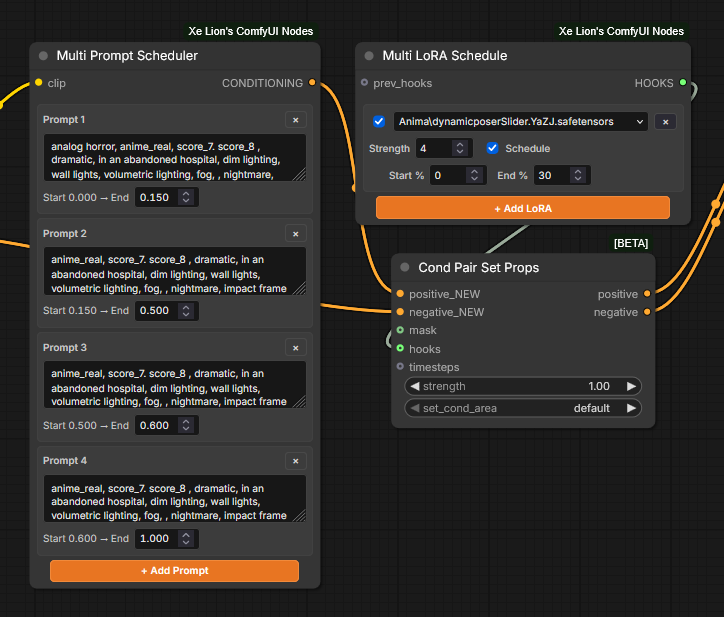
Multi LoRA Schedule
A ComfyUI custom node that creates model-only LoRA hooks and combines them into one HOOKS output. Each row can be enabled independently, assigned its own model strength, and optionally scheduled over a sampling percentage range.
Install
Copy this folder into ComfyUI/custom_nodes/ (or clone this repository there), then restart ComfyUI. The node appears under advanced/hooks/scheduling as Multi LoRA Schedule.
Use
- Click + Add LoRA for each LoRA; use the
×button on its row to remove it. - Choose a LoRA and set its model strength.
- Turn on Schedule to set the sampling Start % and End %. The LoRA holds its configured strength during that interval and is off outside it.
- Turn scheduling off to apply the LoRA at its configured strength for the full sampling run.
- Connect the output to the existing ComfyUI hook/conditioning nodes that accept
HOOKS. - Optionally connect existing
HOOKStoprev_hooksto combine them with these LoRAs.
The percentage inputs are 0–100. Start must be lower than end. LoRA selection is model-only, matching CreateHookLoraModelOnly in the supplied workflow. The frontend script is loaded from the custom-node root so it is discoverable when the node is installed from this folder.
Multi Prompt Scheduler
The Multi Prompt Scheduler accepts CLIP and returns one combined CONDITIONING output. Add prompt rows in top-to-bottom order, enter each prompt, and set its end point between 0.000 and 1.000. The first prompt starts at 0.000; each next prompt starts at the previous prompt's end. A new row uses the remaining interval through 1.000. Add is disabled when the timeline is full; shorten the last interval to make room for another prompt. Connect the output to the positive or negative conditioning input on PairConditioningSetProperties.