
XENodes
A collection of custom nodes and UI extensions for ComfyUI, featuring Multi-Switch, Multi-Pipe, Slider, Slider 2D, SDR to HDR, Save Image, Save Video, Save Audio, Combo Selector, Show Any, Load Image From Folder nodes, and UI extensions (Node Execution Time, Progress Bar).
Nodes (17)
Pick a dropdown value by number, and drive it from a wire
Flip whole sections of your workflow off without deleting them
Feed a whole folder to the queue, one image at a time, untouched
The .pth that invents the highlights your SDR never had
Bundle a workflow's guts into a single pipe
Unpack one wire into fifty
The switch that only runs the branch you picked
The save node your TTS output has been missing
Real HDR AVIF from an SDR render, no AI models involved
Encode your video as 10-bit HDR with the same tone-map math
PNG master or WebP gallery copy, with the workflow still inside
Codec-level control over your video saves — AV1 included
Turn your SDR generations into real HDR — no model, just math
Hand the highlights to a net instead of a curve
See what's actually flowing through that wire
An actual slider for numbers, instead of typing into a box
Two knobs on one pad — and it snaps
ComfyUI-XENodes
A collection of custom nodes and UI extensions for ComfyUI, featuring Multi-Switch, Multi-Pipe, Slider, Slider 2D, SDR to HDR, Save Image, Save Video, Save Audio, Combo Selector, Show Any, Load Image From Folder nodes, and Node Execution Time helper.
Features
- Nodes 2.0 Support: Modern UI and compatibility for latest ComfyUI versions.
Requirements
- FFmpeg: Required for
Save Video,Save Image(AVIF format), andSave Audionodes. Ensureffmpegis installed and available in your system's PATH.
Installation
-
Clone this repository into your
ComfyUI/custom_nodesdirectory:cd ComfyUI/custom_nodes git clone https://github.com/xeinherjer-dev/ComfyUI-XENodes.git xenodes -
Start (or restart) ComfyUI.
Included Nodes
Multi-Switch
A general-purpose switch node that selects one input from many and routes it to a single output.
- Nodes 2.0 Compatible: Dynamic UI that stays clean and responsive in the latest ComfyUI.
- Autogrow: Input slots automatically increase as you connect more nodes.
- Custom UI: Convenient selection buttons are displayed directly on the node, showing the source node names of connected inputs.
- Hide Connections: Toggle the visibility of connection slots via the right-click menu to keep your workflow clean and compact.
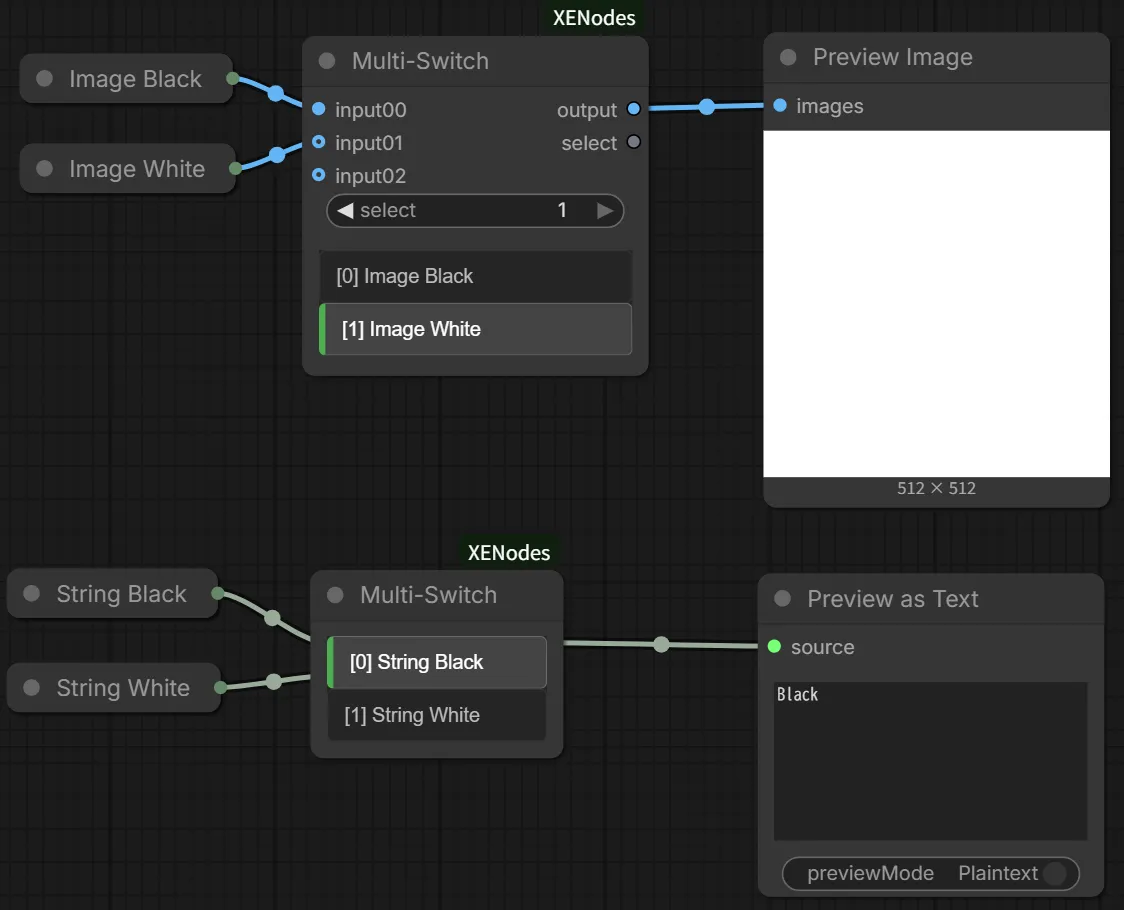
Multi-Pipe
Bundle multiple inputs into a single XE_MULTI_PIPE connection and unpack them later.
- Autogrow: Input slots on
Multi-Pipe Inautomatically increase as you connect more nodes. - Dynamic Sync:
Multi-Pipe Outautomatically synchronizes its output names with the connectedMulti-Pipe Innode.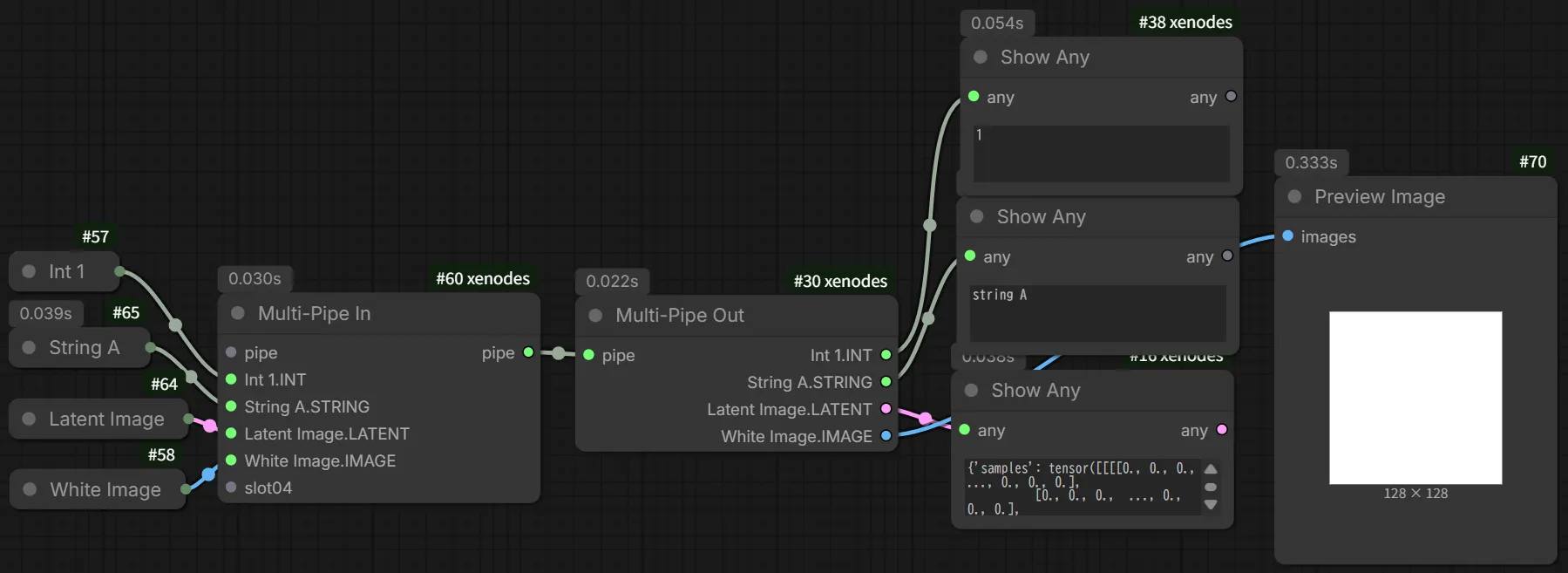
Slider
A versatile slider node where the output port type dynamically switches between INT and FLOAT based on the step setting.
- Dynamic Type Switching: Automatically sets the output type to
INTfor integer steps andFLOATfor decimal steps, ensuring seamless connectivity with other nodes. - Automatic Casting: During backend execution, numerical values are appropriately output as
intfor whole numbers andfloatfor fractional ones.
Slider 2D
An intuitive 2D slider node for manipulating X and Y values simultaneously on a coordinate plane.
- Precision Auto-Detection: Automatically adjusts the display precision (number of decimal places) based on the
stepXandstepYsettings. - Dynamic Type Switching: Similar to the Slider node, the output port types for each axis change dynamically based on their respective step settings.
- Snap Feature: Enable the
snapproperty to snap the handle to the specified step increments.
SDR to HDR
Expands SDR images, video frames, or video into 10-bit HDR using Inverse Tone Mapping and wide color gamut conversion.
- Inverse Tone Mapping (ITM): Soft-knee luminance expansion with configurable
peak_nits,itm_knee, anditm_exponent. - Wide Color Gamut: Converts linear BT.709 to linear BT.2020 color space.
- HDR Transfer Functions: Supports both HDR PQ (SMPTE ST 2084 / HDR10) and HDR (ITU-R BT.2100 / HLG) curves, consistent with ComfyUI core nodes.
- Image & Video Support: Accepts
IMAGEorVIDEOinputs and outputs HDRIMAGEand 10-bit HDRVIDEO. - Chunked Processing: Memory-safe batch execution for high-resolution images and video frames.
SDR to HDR (using Model) [Beta]
Expands SDR images or video to HDR using learned Inverse Tone Mapping neural models (HDRTVNet, HDRTVNet++, HDRTVDM, ITMLUT).
- Learned Inverse Tone Mapping: Semantic-aware HDR reconstruction preserving natural midtones while boosting highlights.
- Supported Models (automatically downloaded on-demand):
HR.pth: Highest Visual Quality (HDRTVNet++, MIT License). GAN-refined Highlight Refinement with perceptual loss for enhanced highlight contrast and vivid BT.2020 wide-gamut colors (recommended for anime, CG, art, and illustrations).HDRTVDM_params_3DM.pth: Live-Action & Artifact Restoration (HDRTVDM, MPL-2.0 License). TriSegNet Transformer-UNet trained to suppress real-world compression artifacts, banding, and noise (recommended for live-action video and movies).ITMLUT_params.pth: Ultra-Fast & Lightweight (ITMLUT, MPL-2.0 License). Real-time 3D-LUT running orders of magnitude faster than deep models (recommended for long video batches and low VRAM).
- Luminance Fine-Tuning: Linear HDR luminance controls (
exposurefor EV stops,liftfor shadow/midtone floor boost) with strict color/hue preservation. - HDR Transfer Functions: Outputs native HDR PQ or HDR (HLG) formats compatible with
Save ImageandSave Video. - Note on Commercial vs. Academic Use: Pretrained weights are downloaded automatically on-demand from upstream open-source repositories. Note that some models (such as HDRTVNet++) were trained on datasets collected under academic research terms. Please review respective licenses and terms in THIRD_PARTY_LICENSES.md if deploying in commercial environments.
Save Image
An image saving node with configurable format, compression, and HDR support.
- Format Support: Encode to
png,webp(with lossless and quality control), or 10-bitavif. - Automatic HDR Detection: Automatically detects HDR color space metadata from
SDR to HDRand applies proper CICP parameters for AVIF export. - Metadata Embedding: Embeds ComfyUI workflow and prompt metadata into AVIF (via
exiftool), PNG, and WebP.
Save Video
A video saving node with configurable format, codec, and 10-bit HDR encoding support.
- Format & Codec Support: Encode to
mp4orwebmusingh264,h265,av1, or GPU-accelerated NVENC codecs. - HDR Pipeline: Automatically applies 10-bit pixel formats (
yuv420p10le,p010le) and BT.2020/PQ/HLG metadata tags to FFmpeg when processing HDR video. - Quality Control: Configurable
crfand audio bitrate settings.
Save Audio
Save audio clips natively with professional codec support.
- Format Support: Encode to
mp3,opus, orflac. - Bitrate Control: Select from standard bitrates or use variable bitrate (V0) for MP3.
- Native Preview: Includes a built-in audio player for immediate feedback in the ComfyUI interface.
Save HDR Image / Save HDR Video [Deprecated]
[!WARNING] These standalone experimental nodes are now deprecated. Please use
SDR to HDRcombined withSave Image(AVIF) orSave Videoinstead.
Combo Selector
A utility node that allows selecting a COMBO (dropdown) value by its numerical index.
- Auto-Discovery: Dynamically reads the available options from the connected target node.
- Index Selection: Input an
INTto select items by index. - Dual Output: Provides both COMBO and STRING types for flexible connectivity.
Show Any
A visual debug node that displays any input value as text directly on the node.
- Any Input: Accepts any data type and converts it to a readable string representation (JSON for complex objects).
- Composite ID Support: Fully compatible with Nodes 2.0 Group Nodes, ensuring progress is saved correctly even when nested.
Load Image From Folder
Loads a single image from a directory or direct file path without resizing, designed specifically for batch queue workflows and Vision LLMs (e.g., Ollama).
- No Resizing / Quality Loss: Retains the exact original resolution and aspect ratio as a single image tensor (
[1, H, W, 3]). - Built-in Image Preview: Automatically displays a preview of the loaded image directly on the node upon execution.
- Auto-Increment & Loop: The
indexinput supportscontrol_after_generate(increment,randomize, etc.) for seamless sequential processing, automatically looping back to the first image when exceeding the total count. - Multiple Sort Modes: Sort by filename (
name),date_modified,date_created, orrandom, with options forreverseand recursivesubfolderssearch. - Windows / WSL Path Compatibility: Automatically resolves Windows path formats (e.g.
C:\Users\...) to WSL paths (/mnt/c/Users/...) when running in WSL environments. - Rich Metadata Outputs: Outputs
IMAGE,MASK,filename(STRING),filepath(STRING),index(INT), andtotal_images(INT).
Node Execution Time (UI Extension)
Measures and displays the execution time for each node in your workflow directly on the node itself.
- Subtle Badges: Renders non-intrusive gray badges displaying execution times in milliseconds (
ms) or seconds (s). - Subgraph Support: Recursively calculates and sums up the execution times for ComfyUI GroupNodes and standard LiteGraph subgraphs.
- Double Counting Prevention: Automatically detects if other extensions (e.g.
comfyui-easy-use) have already measured the time, avoiding double counting. - Toggleable: Easily enable or disable the display via the ComfyUI Settings panel under
XENodes -> Node Execution Time.
Progress Bar (UI Extension)
A powerful, subgraph-aware progress bar and node navigator for ComfyUI.
- Subgraph Deep Drill-down: Click anywhere on the progress bar to instantly open nested subgraphs (Nodes 2.0 Subgraphs & GroupNodes) and smoothly center on the currently executing node.
- Multi-Workflow Tab Aware: Clicking the progress bar automatically switches to the executing workflow tab if a different tab is currently active.
- Hierarchy Breadcrumb Path: Displays the full subgraph hierarchy path directly in the progress text (e.g.,
(1) 54% - [Music Generation > Step 2] MiniMax Text Encode (40%)). - Pulse Glow Effect: Highlights the focused node with a vibrant pulsing glow to make active execution instantly visible.
- Quick Navigation: Right-click on the progress bar to quickly jump back to the root graph.
- Toggleable: Easily enable or disable the progress bar via the ComfyUI Settings panel under
XENodes -> Progress Bar.
License
This project is licensed under the GNU General Public License v3.0 - see the LICENSE file for details.
Third-Party Licenses & Attributions
This repository incorporates model architectures adapted from open-source research projects:
- HDRTVNet / HDRTVNet++: Licensed under the MIT License (Copyright (c) 2021 XyChen / 2023 Hoven Li).
- HDRTVDM: Licensed under Mozilla Public License 2.0 (MPL-2.0, Copyright (c) 2023 Cheng Guo et al.).
- ITMLUT: Licensed under Mozilla Public License 2.0 (MPL-2.0, Copyright (c) 2023 Cheng Guo et al.).
- Restormer: Licensed under the MIT License (Copyright (c) 2022 Syed Waqas Zamir and contributors).
- AdaInt: Licensed under Apache License 2.0 (Copyright (c) 2022 Canqian Yang et al. / MMEditing Authors).
Full details and license texts are documented in THIRD_PARTY_LICENSES.md.