
GG Tools
Frontend-only ComfyUI nodes for tidy, switchable workflows: wireless Pipe To / Pipe From (also across subgraphs) and a Boolean Fast Muter.
GG Tools for ComfyUI
Frontend-only nodes for keeping large ComfyUI workflows tidy and switchable. No Python packages or extra requirements.
| Node | What it does | | --- | --- | | Pipe To / Pipe From (ggtools) | Send connections anywhere in the workflow, including into and out of subgraphs, without wires. | | Boolean Fast Muter (ggtools) | Switch a connection, or a group of source nodes, on and off with a Boolean. |
All three are under Add Node → ggtools.
Pipe To and Pipe From
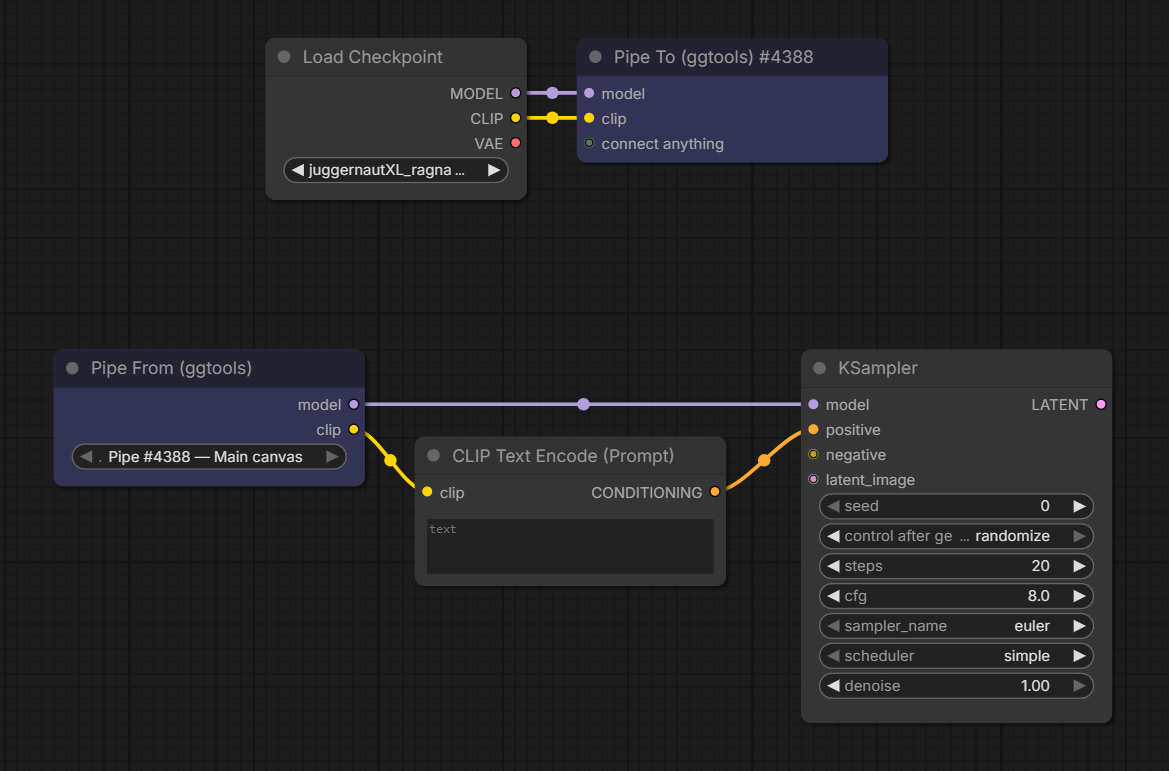
- Connect anything to Pipe To (ggtools). Each connection becomes a named entry, and a spare
connect anythinginput appears for the next one. - Add Pipe From (ggtools) anywhere, on the main canvas or inside a subgraph, and pick the Pipe To in its
pipedropdown, for examplePipe #12 — Main canvas. - Connect the outputs you need.
Entries are named automatically, and renames show up straight away:
| Source | Entry name |
| --- | --- |
| A named output, such as Get Image Size | width, height |
| A KJNodes Get or Set node | its variable, such as Image_BG |
| A source that also feeds another node's input or a Set node, when those names agree | that input's name or the Set variable, such as positive or Clip_Base |
| Anything else | the type, such as model, clip, then model_2 for a second one |
A renamed node always wins: your title leads and the source's own name follows in brackets, unless the title already contains it: Background size [width], Base CLIP [Clip_Base], Encode Load Image [latent]. Renaming an output slot or a subgraph input names the value directly.
![Load Checkpoint and a LoRA node renamed Detail Lora both feed Pipe To, which shows model, Detail Lora [model] and Detail Lora [clip]. The Pipe From sends model to one Basic Guider and Detail Lora [model] to another.](https://raw.githubusercontent.com/xducer/comfyui-gg-tools/HEAD/assets/pipes_example_02.png)
Same-type values stay apart by name, so each one goes exactly where you connect it.
- Any connection type works, and several Pipe To and Pipe From nodes can share a workflow. A new Pipe From selects the Pipe To automatically when there is only one.
- Inside a subgraph, This instance reads the Pipe To in the same copy of the subgraph, so each copy of a reused subgraph sends its own values.
- Pipes keep working through copy and paste, cut and paste, Convert to Subgraph and unpacking. A Pipe To copied together with its Pipe From becomes a new, independent pair.
- Switching a Pipe From to another pipe keeps the connections whose name and type exist on the new pipe. Anything else, including an entry removed from the Pipe To, is marked
(missing)rather than silently fed a different value. If the selected pipe itself is gone, the dropdown showsMissing: …; a pasted Pipe From that can't tell which copy of a pipe it belongs to asks you toSelect copied pipe source.
When you queue, each used output becomes an ordinary link to the original source, and the pipe nodes never reach the server. Unused outputs are ignored. If a muted or bypassed source leaves an entry empty, the receiving input is left unconnected, as if it were wired directly. Queuing stops with an error naming the Pipe From if a used output is (missing), its pipe was deleted, or no pipe is selected.
Boolean Fast Muter
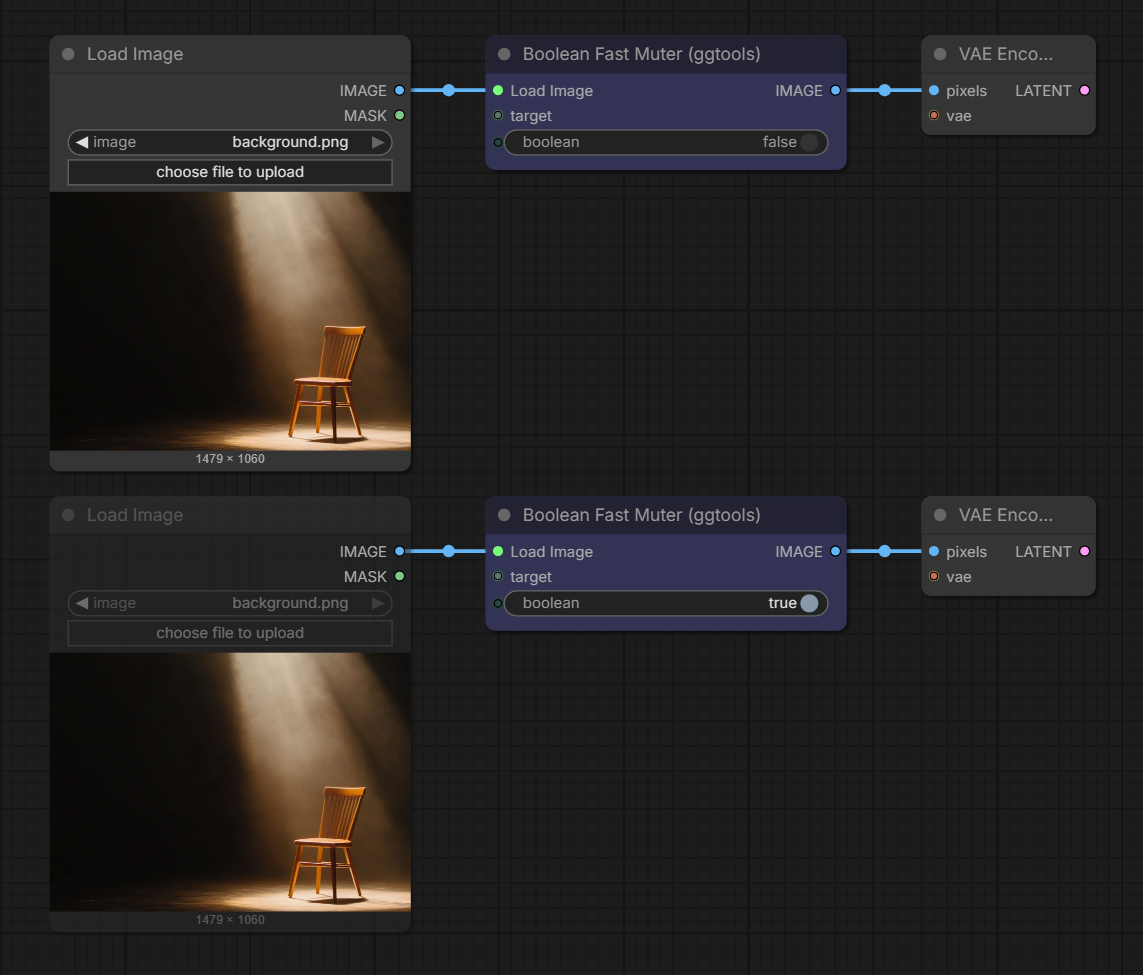
Connect a source node's output to target, then connect OPT_CONNECTION to the input it should feed. Once connected, the sockets show the source's name and type instead.
| boolean | Result |
| --- | --- |
| false (default) | The source runs and its output passes through. |
| true | The source is muted and the connection is left out of the queued prompt. |
-
Use the toggle on the node, or connect a core Boolean, Primitive or Easy-Use boolean node. Other Boolean sources, including values calculated during execution, stop the queue with an error.
-
Connect several targets to switch them together.
OPT_CONNECTIONforwards the first connected target. Targets can sit behind reroutes or rgthree Node Collector / Node Combiner nodes. -
Several muters can control the same node; it stays muted while any of them is
true. A muter can also target another muter:truemutes that muter and cuts its output. -
While a muter is
false, its targets are kept enabled. Inside a subgraph, targets are muted only in the queued prompt, separately for each copy of the subgraph, and don't look muted on the canvas. -
Disconnecting a target, deleting the muter or bypassing it re-enables what it muted.
-
A left-out connection is simply absent, not
None. The muter can't make an input optional, so what happens next depends on the receiving node:- Widget input (a value you can also type in): falls back to its widget value.
- Optional input the node really supports leaving empty: the node runs without it.
- Required input: fails with
Required input is missing. - Optional input the node doesn't really support: the node may raise its own error, or pass
Noneon, so the next node fails instead. ComfyUI's Switch node does this when the selected input is missing.
Place the muter right before a node that is built to run without that input, and test the
truecase once. Nodes reading the muted source directly, not throughOPT_CONNECTION, also receive nothing.For an input that needs a value, use ComfyUI's Switch node instead:
on_false= your source,on_true= a stand-in (for example an empty latent or a blank image) and the same Boolean onswitch. Its inputs are lazy, so the branch it doesn't select isn't computed.
Controlling a subgraph from outside
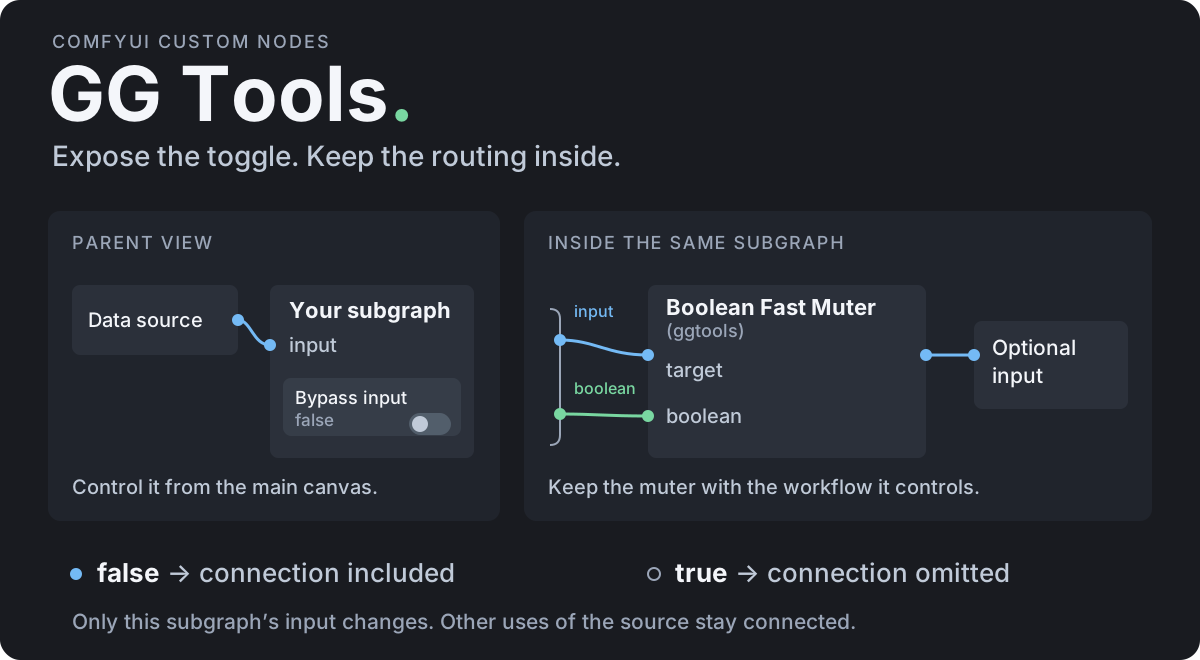
Put the muter inside the subgraph with its targets, and drag its boolean socket onto the subgraph's input slot to create a Boolean subgraph input. The toggle then appears on the parent subgraph node, and each copy of the subgraph can have its own value. Use one muter per subgraph input you want to switch independently.
Install
Search for GG Tools in ComfyUI Manager, or clone it:
cd /path/to/ComfyUI/custom_nodes
git clone https://github.com/xducer/comfyui-gg-tools.git
Restart ComfyUI and refresh the browser. To update, run git pull --ff-only in custom_nodes/comfyui-gg-tools, then restart and refresh. Tested with ComfyUI 0.37 and frontend 1.53; the nodes rely on the subgraph features of recent frontends.
Workflows that use these nodes need the pack installed to open; exported API prompts don't.
Notes
- The nodes work in the browser; the queued prompt contains only ordinary nodes and links. Export (API) includes their effect, but an exported prompt does not change if you toggle afterwards, and prompts already queued are unaffected.
- Boolean Fast Muter is inspired by Fast Muter from rgthree-comfy.
License
Apache-2.0, see LICENSE.