
GG Krea2
Requires comfyui-krea2edit 2.0.0+ (install it with git clone; the registry has 1.2.3). Add-on node that turns zero, one or two reference images into a ready model and conditioning for KSampler, for the Krea 2 Edit V2 LoRAs.
GG Krea2
An add-on node for comfyui-krea2edit by lbouaraba. Not part of that pack; install it first.
Krea2 Edit Prep (gg) turns zero, one or two reference images into a ready model, positive and negative for a KSampler, for Krea 2 with a Krea 2 Edit LoRA. It runs the Krea2 Edit nodes (grounded encode and source patch) internally, so you don't place them yourself.
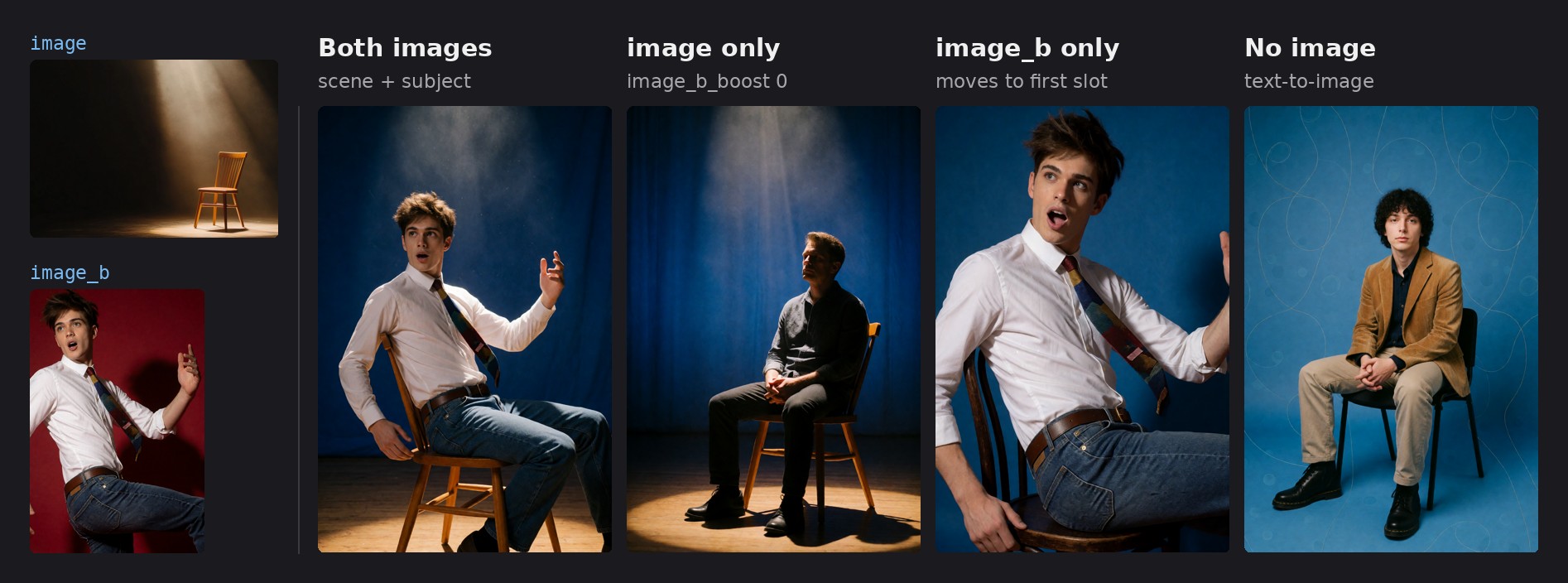
One prompt and seed for all four: "the person from the second image sitting on the chair in the first image, blue backdrop"; the single-image routes reuse it to show what each route keeps. Krea 2 Turbo with the Identity Edit V2 and General Edit V2 LoRAs at 0.5 each, 9 steps, CFG 1, euler / normal, 832 × 1264, rebalance 0.7, other node settings at their defaults.
Requirements
-
comfyui-krea2edit 2.0.0 or newer (older versions don't support the position settings). Install it with
git clone: the Comfy Registry, which ComfyUI Manager installs from, still has 1.2.3. -
Krea 2 with the edit LoRAs (weights) applied before this node, plus any other LoRAs you use:
krea2_identity_edit_v2to put a person from one photo into a scene, pose or outfit;krea2_general_edit_v2for instruction edits (remove, recolour, relight, backgrounds, objects, text);krea2_identity_edit_v1_2, the older identity LoRA, still works.
Both V2 LoRAs at 1.0 break the image; krea2edit suggests about 0.6 each when combining them. We use 0.5 each.
-
The Krea 2 text encoder (Qwen3-VL) loaded with type
krea2, as the Krea2 Edit nodes require.
Install
Search for GG Krea2 in ComfyUI Manager, or clone it:
cd ComfyUI/custom_nodes
git clone https://github.com/xducer/comfyui-gg-krea2.git
Restart ComfyUI. The node is under krea2edit → gg as Krea2 Edit Prep (gg).
Wiring
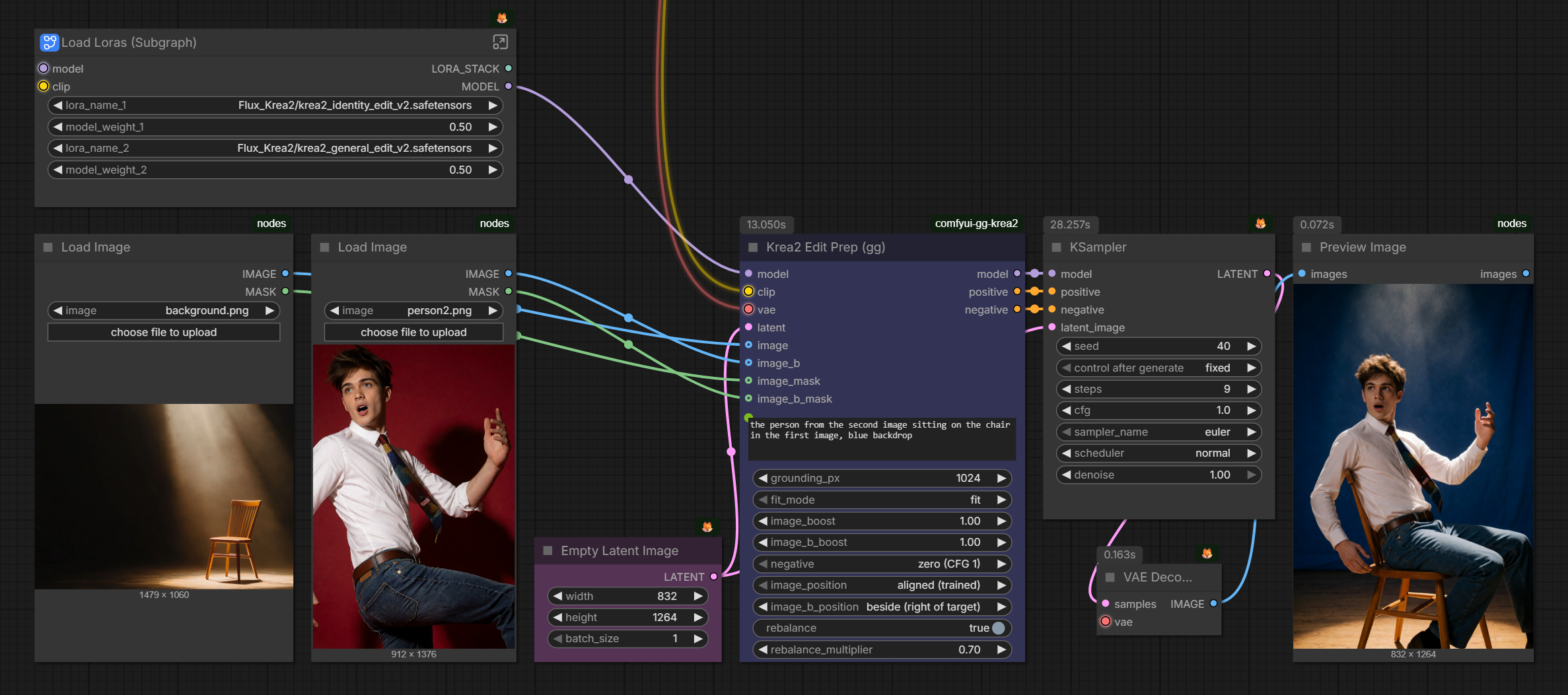
- Into the node:
model(Krea 2 + edit LoRAs and any other LoRAs),clip,vae,latent,prompt, and optionallyimage,image_band their masks. - Out to the KSampler:
model,positiveandnegative.
Connect the same latent to the KSampler. Any batch size works. Seed, steps and sampler stay on the KSampler.
Negative: connect the node's negative straight to the KSampler; no extra ConditioningZeroOut is needed. With negative set to zero, the output already is the zeroed positive, and at CFG 1 ComfyUI doesn't evaluate the negative at all.
Rebalance: turn on rebalance to apply the default per-layer weights of Conditioning Krea2 Rebalance by nova452 (ComfyUI-ConditioningKrea2Rebalance) on every route, to positive and to a grounded negative, so CFG doesn't amplify it. rebalance_multiplier is on the same scale as their node's multiplier (which defaults to 4.0) and scales every layer, not just the boosted ones. For other per-layer weights, leave rebalance off and put their node between the node's positive and the KSampler; with a grounded negative at CFG above 1, apply it to negative too, or CFG amplifies it.
Other conditioning nodes go between the node's positive and the KSampler as well.
The two image slots
image is always the first reference and image_b the second, whatever your files are called:
| Slot | Role |
| --- | --- |
| image (first) | Scene: the setting, plus the pose and clothing of any person already in it. Also the slot for single-image edits. |
| image_b (second) | Subject: the person carried into the scene, usually with their clothing unless the prompt changes it. |
| What arrives | Result |
| --- | --- |
| no image, or both boosts at 0 | Text-to-image: plain text encoding, no source patch on the model (your LoRAs stay applied). |
| one image (the other missing or at boost 0) | Single-image edit. A lone image_b moves into the first slot. |
| both | Scene + subject edit. |
With two images, "the first image" in the prompt is image and "the second image" is image_b. With one image, whichever slot it is in, it is the only image the model sees, so call it "the image".
Text-to-image in an edit workflow
With no image (or both boosts at 0) the same workflow generates from the prompt alone, so you don't need a separate text-to-image workflow. The node applies no source patch then, but the edit LoRAs stay loaded and still change the look.
With both V2 LoRAs at 0.5, rebalance on at a rebalance_multiplier of 0.7–0.8 gave us the best overall results. Without an edit LoRA, or with Identity Edit V1.2, 1.0 works better.
Boosts and masks
A boost sets how closely the result copies that image.
| Boost | Effect | | --- | --- | | 1.0 | Neutral (default). | | above 1 | Copies that image more closely. With the V2 LoRAs 1.0 is usually enough; try 1.3–1.5 when likeness is weak. Far above 2 it can copy too literally (pasted-in lighting, the reference's pose or backdrop, duplicates). | | below 1 | Copies it more loosely, so edits take hold more easily. | | 0 | Leaves that image out entirely. |
A mask limits that image's boost to the painted area. Outside it the image keeps the neutral weight. It is not an inpainting mask: the prompt can still change anything anywhere.
- Paint it in the mask editor of the picture's Load Image node (right-click → Open in MaskEditor) and connect that node's
MASK. - The boost must differ from 1.0, or the mask has no effect.
- With both images, only
image_b_maskapplies; the scene can't be masked. With one image, that image's own mask applies. - An empty mask (nothing painted) means the whole image, so leaving
MASKconnected is safe, unless the picture has transparency: Load Image then makes the transparent area the mask.
At 1.0 the identity LoRA usually reproduces the face well already. When you need a stronger boost on an aligned image, a face mask keeps it on the face, so the rest of the photo isn't copied too literally (see the board below).
Positions
A position sets whether the result keeps that image's layout. Each image has its own; like the boosts, it follows the image, whichever slot it ends up in. image defaults to aligned, image_b to beside.
| Position | Effect | | --- | --- | | aligned (trained) | Pinned to the output layout, as the LoRAs were trained. | | beside (right of target) | Placed next to the canvas: the identity still comes through, but the layout pin is gone, so the person can be restaged more freely. | | bag of features | Experimental: the image's content without its layout. |
Keep the scene aligned so its layout and lighting carry over. For the person, beside keeps the likeness but copies much less of the photo's pose and lighting, also at higher boosts; on aligned the V2 identity LoRA tends to copy both. For a single-image edit that should keep the picture's layout, use image (aligned).
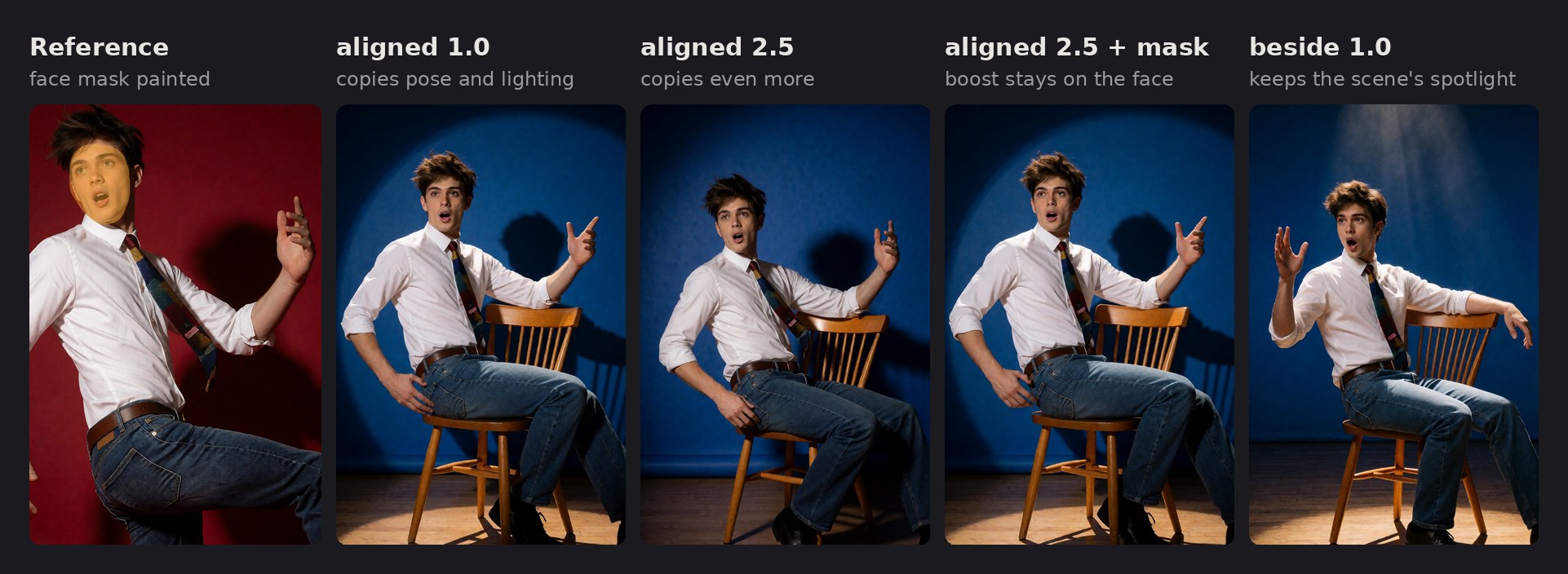
Same scene, prompt, seed and sampler in all four; image stays aligned at 1.0. Only image_b's position, boost and mask change.
With beside, use an output width that is a multiple of 16 (for example 832 × 1264). Other widths get a streak of noise along the right edge (krea2edit#35).
Recipes
Put the person from one photo into a scene (Identity Edit V2)
image= the scene;image_b= the person. Leave the positions at their defaults (scene aligned, person beside).- Prompt: The man from the second image sitting on the chair in the first image.
Put the face from one photo onto the person in another (Identity Edit V2)
image= the photo with the body, pose, clothes and background to keep.image_b= the photo with the face. Leave the defaults.- Prompt: Give the man in the first image the face of the man in the second image. Keep his pose, clothing and the background unchanged.
The LoRA restages a person; it is not a pixel-exact face swap. The hair stays from the first image unless the prompt asks for it. A higher image_b_boost with a face mask changes little.
Edit one picture (General Edit V2)
Connect only image and describe the edit (change his shirt to a black suit). At the default boost the face, pose and background usually stay as they are.
Remove something (General Edit V2)
Connect only image and name what to remove (remove the chair). This works at CFG 1 on Turbo. If the object comes back re-rendered instead of removed, use Krea 2 Raw (the non-Turbo model) at CFG ~3 with negative set to grounded.
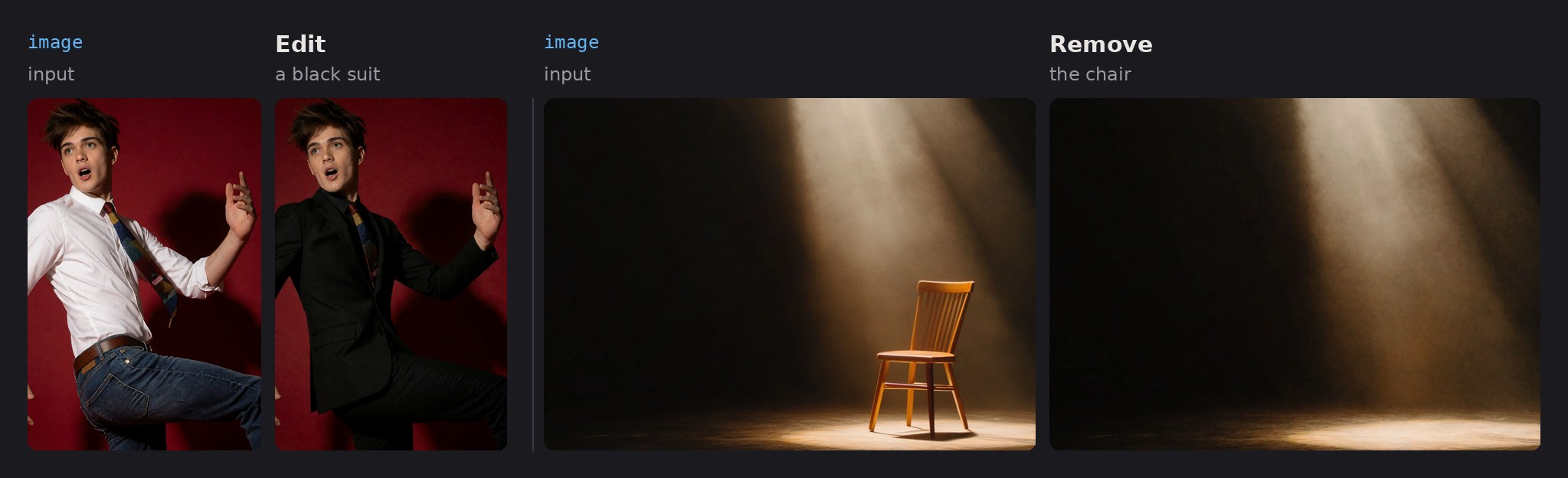
Krea 2 Turbo with the General Edit V2 LoRA, 9 steps, CFG 1, euler / normal, default node settings. Prompts: "Change his shirt to a black suit." and "Remove the chair."
An edit that won't take (General Edit V2)
In a single-image edit, paint the stubborn area (for example the shirt) into that image's mask and set its boost to 0.6–0.8 to loosen it. Keep it above 0, because 0 leaves the image out. Lowering grounding_px (for example to 512) also helps an edit take.
Text-to-image Disconnect both images, mute or bypass their Load Image nodes, or set both boosts to 0. See Text-to-image in an edit workflow for the LoRA and Rebalance settings we use.
Other settings
negative: zero for CFG 1 (Turbo, the negative isn't evaluated). grounded for CFG above 1 (e.g. the Raw model at CFG ~3): an empty prompt on the same images, the trained unconditional. It costs one extra encoder pass.grounding_px: caps the longest side of each image shown to the text encoder (smaller images are not enlarged; 0 = native size). Lower follows the instruction more, higher keeps identity better; 1024 suits people.fit_mode: keepfit;crop (legacy)is for older weights, and masks drift more with it.- Generate at about 2 MP or less; larger outputs can bleed source content or duplicate subjects.
License
Apache-2.0, see LICENSE.