
ComfyUI Extension
ComfyUI Nixie Timer
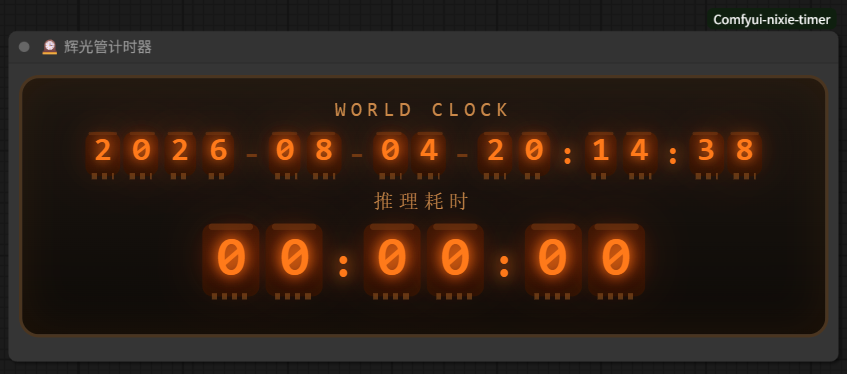
Nixie-tube styled world clock and inference timer node for ComfyUI. Drag it into a workflow to show a glowing vintage vacuum-tube clock + inference timer that follows the canvas and auto-scales.
wul7chaos/Comfyui-nixie-timer
Nodes1
On cloudLocal install
Categoryutils
Stars1
Updated3 months ago
Readme
ComfyUI Nixie Timer 🕰️
A Nixie-tube (辉光管) styled world clock + inference timer node for ComfyUI.
Drag the node into your workflow and it starts working immediately — no configuration needed.
Features
- Nixie-tube glow style — classic orange vacuum-tube digits with electrode details, built in pure CSS
- World clock — live date & time in
YYYY-MM-DD-HH:MM:SSformat - Inference timer — press Queue / Queue Front to start counting, stops automatically when the queue finishes (or on error)
- Multi-language — labels follow ComfyUI's UI language automatically (zh / en / ja / ko / ru / de / fr / es / pt / it)
- Time is kept after completion (not reset) until you Queue again
- Canvas-anchored — the panel lives inside the node, moves/scales with the canvas like any normal node
- Auto scale — drag the node's border to scale the whole panel proportionally (text + background together)
- Multiple instances — add several nodes, each shows its own panel; timers stay in sync
Installation
Option 1: Clone (recommended)
cd ComfyUI/custom_nodes
git clone https://github.com/wul7chaos/Comfyui-nixie-timer.git
Option 2: Manual copy
Copy the Comfyui-nixie-timer folder into ComfyUI/custom_nodes/.
Then restart ComfyUI (the extension is registered server-side on startup) and refresh the browser (Ctrl+Shift+R).
Usage
- In ComfyUI, double-click the canvas and search for
NixieTimer(or辉光管) — categoryutils - Add it to the canvas — the panel appears automatically
- Press Queue — the timer starts counting
- When the run finishes, the timer stops and keeps the elapsed time
- Delete the node to remove the panel
Notes
- Requires a modern browser (Chromium / Firefox / Edge) — uses
ResizeObserver,pointer events, CSStransform - The node itself performs no computation (returns nothing); it is a pure UI element
License
MIT — use it freely, commercially or personally, no restrictions.