
ComfyUI-GridSplit
Auto-detect seams in stitched grid/carousel/collage images and split into panels — no model, any resolution, even/uneven/irregular layouts.
Nodes (3)
ComfyUI-AutoGrid
A small pack of grid tools for ComfyUI — no model, no weights, CPU, any resolution. Split a stitched image back into its panels, or stitch images into a clean grid using an interactive, in-node layout picker.
- Auto Grid / Carousel Split — detect how a stitched image is divided and split it into its panels.
- Auto Grid / Stitch (one image) — tile one image into an R×C grid.
- Auto Grid / Stitch Advanced (multi-image) — stitch many images into a grid, with an interactive picker and auto / manual modes.
All three live under the image/grid category.
The interactive grid picker
The two Stitch nodes draw a 4×4 grid picker right inside the node. Hover to preview a block (it fills from the bottom-left); click to lock a rows×cols layout. Each selected cell shows the image slot number it maps to — top-left origin, row-major — so you see exactly where each input lands:
1×2→ 1 top, 2 bottom2×1→ 1 left, 2 right2×2→ 1 2 top row, 3 4 bottom row
On Stitch Advanced, choosing a layout also adds/removes the image_i input ports to
match (2×1 → 2 inputs, 3×3 → 9). Max 4×4 = 16 cells.
The picker is a small frontend widget (served from
web/). After installing or updating, restart ComfyUI and hard-refresh the browser so it loads.
Auto Grid / Carousel Split
Auto-detect how a stitched image is divided and split it into its individual panels. Handles three kinds of layout automatically:
| Layout | example | how | |---|---|---| | Regular grid | 2×2 of variations | global seam projection | | Uneven grid | 3 side-by-side, unequal widths | global seam projection | | Irregular collage ("bento") | different split lines per region, a cell split again | recursive guillotine on the gutters |
It auto-routes: if the image has solid separator bands (black/white/any flat gutter) it uses recursive guillotine decomposition (each region finds its own local cuts, so irregular layouts work). If the panels are seamless (abut with no gutter) it uses global row×column seam detection. Content edges (faces, text, etc.) never trigger a split.
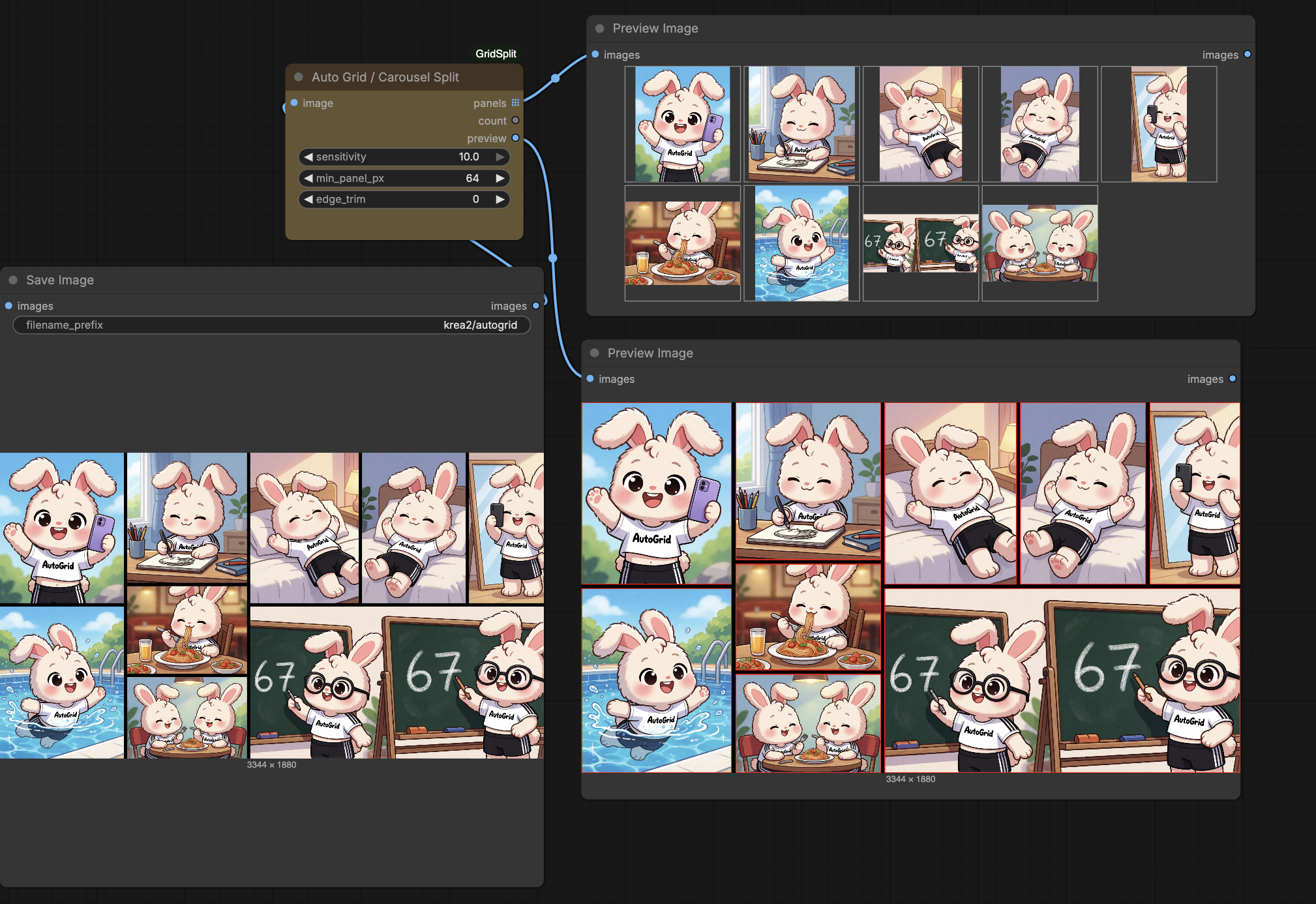
Validated: 2048² 2×2 → 4 tiles · 2728×1536 uneven 1×3 → 928/976/824 tiles · 3344×1880 irregular 10-panel collage (incl. a column that's itself split in two).
Examples
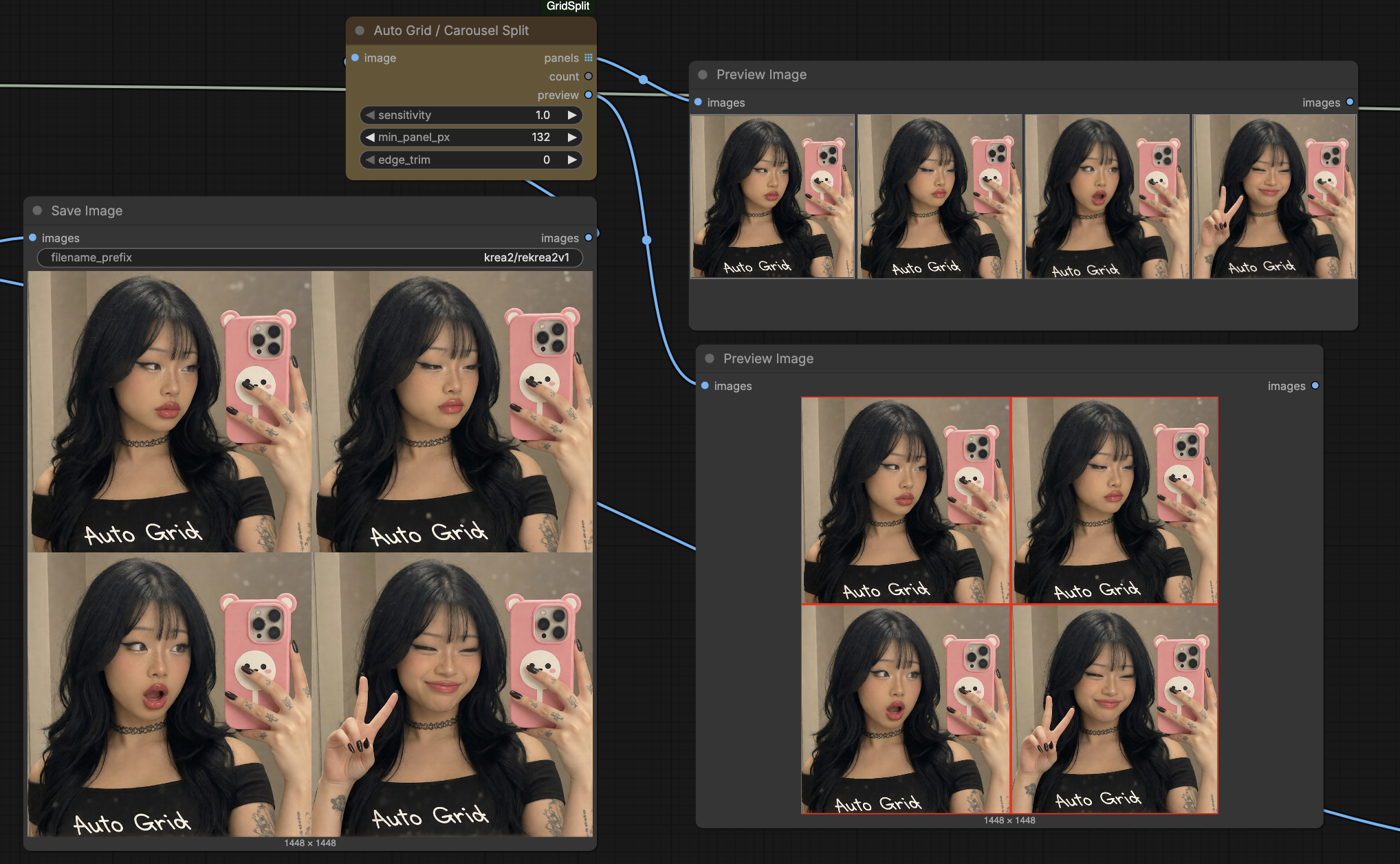
Simple 2×2 grid → 4 clean panels (bottom-right shows the preview output with detected boxes in red):
Irregular collage → 10 panels — note the bottom-middle cell is itself split into two, while the pool and chalkboards stay whole:
Inputs / outputs
Inputs
| name | what |
|------|------|
| image | the stitched grid / carousel / collage |
| sensitivity | default 1 (standard). Higher = splits more eagerly / catches weaker seamless seams. Only affects the seamless path. |
| min_panel_px | reject any split that would make a panel smaller than this |
| edge_trim | shave N px off each panel edge (kills blend / halo / anti-aliased gutter fringe) |
Outputs
| name | what |
|------|------|
| panels | list of images (tiles keep their native size) → feed into SaveImage to write N files |
| count | number of panels detected |
| preview | the input with detected panel boxes drawn in red — for visual QA |
panels is a list because panels have different sizes and can't share one batch tensor.
A non-grid image passes through unchanged as a single panel.
Auto Grid / Stitch (one image)
Tile one image into an R×C grid, scaled to a target megapixels. It runs the exact same stitch engine as the Advanced node — the single image just fills every cell — so it's the quick path for single-image grids. Layout is set with the interactive picker.
Inputs
| name | what |
|------|------|
| image | the image to tile into every cell |
| rows, cols | grid dimensions (via the picker), up to 4×4 |
| megapixels | target total size of the stitched grid |
| scale_method | resample filter (default lanczos) |
Outputs: grid, width, height.
Auto Grid / Stitch Advanced (multi-image)
Stitch multiple images into an R×C grid, with the interactive picker managing the input ports. Two modes:
auto — preserve every image, no cropping. Exactly like ComfyUI's built-in Stitch
Images (match_image_size): each image is resized to share its neighbour's edge
(aspect-preserved, lanczos), no padding — a clean filled rectangle even when the inputs are
different sizes and ratios.
manual — pick one target ratio and every image is center-cropped to it first,
then tiled into a uniform grid. Use this when you want all cells identical (e.g. a tidy 3:4
or 1:1 grid). Cropping is always a center crop (trim the long side, no distortion).
Ratios: 1:1, 3:4, 4:3, 2:3, 3:2, 4:5, 9:16, 16:9. (The ratio dropdown only appears in manual mode.)
Inputs
| name | what |
|------|------|
| rows, cols | grid dimensions via the picker (up to 4×4) |
| mode | auto (preserve, no crop) or manual (center-crop all to one ratio) |
| ratio | manual only — the aspect every image is cropped to |
| megapixels | target total size of the grid |
| scale_method | resample filter (default lanczos) |
| image_1 … image_16 | one image per cell, row-major (image_1 = top-left). Ports appear/disappear with the picker. Empty cells → black |
Outputs: grid, width, height.
A common loop: assemble scenes with Stitch Advanced → run through Krea2 img2img → break the result back apart with Carousel Split.
Install
cd ComfyUI/custom_nodes
git clone https://github.com/workordie/ComfyUI-AutoGrid.git
# restart ComfyUI, then hard-refresh the browser (loads the picker widget)
No dependencies beyond torch/numpy (already in ComfyUI).
Example workflows
Updated example workflows are on the way.