comfyui-some-image-processing-stuff
Some ComfyUI nodes that provide some image-processing functionality. Resampling, Color Grading, Inpainting, ...
Nodes (22)
Feather your inpaint mask so the seam disappears
The color grade that works in HDR space and tonemaps its way back
The 0.5-gray trick for clean full-denoise inpainting
Stitch it back, seam-free
Mask, crop, and prep
Paste a crop back where it came from, exactly
Crop to a mask without the resize — for inpainters who bring their own pipeline
Resize an image properly, without the gamma smear
Resize a latent with an actual filter, not a crude nearest-neighbor
Resize a mask without turning its edge into mush
Shrink images without the moiré — the area-average filter
Rotationally symmetric, and worth the wait
Lanczos, done properly
The cubic that's sharper than bilinear and won't ring on you
Pixel-perfect resizing, for masks and pixel art only
Smooth, safe, no ringing
Scale by area, not by side — the multiplier that keeps its shape
Resize to an exact resolution — and the aspect-ratio trap inside it
Target a pixel budget, not a dimension — 'give me about 1MP'
Nudge a resolution by pixels, not factors
The one-knob 'just make it bigger' rule from Some Image Processing Stuff
The stretchy resize rule — and where it bites
Some Image Processing Stuff for ComfyUI
This is a collection of some image processing nodes that I have written both for my own use and curiosity.
Nodes
Resampling
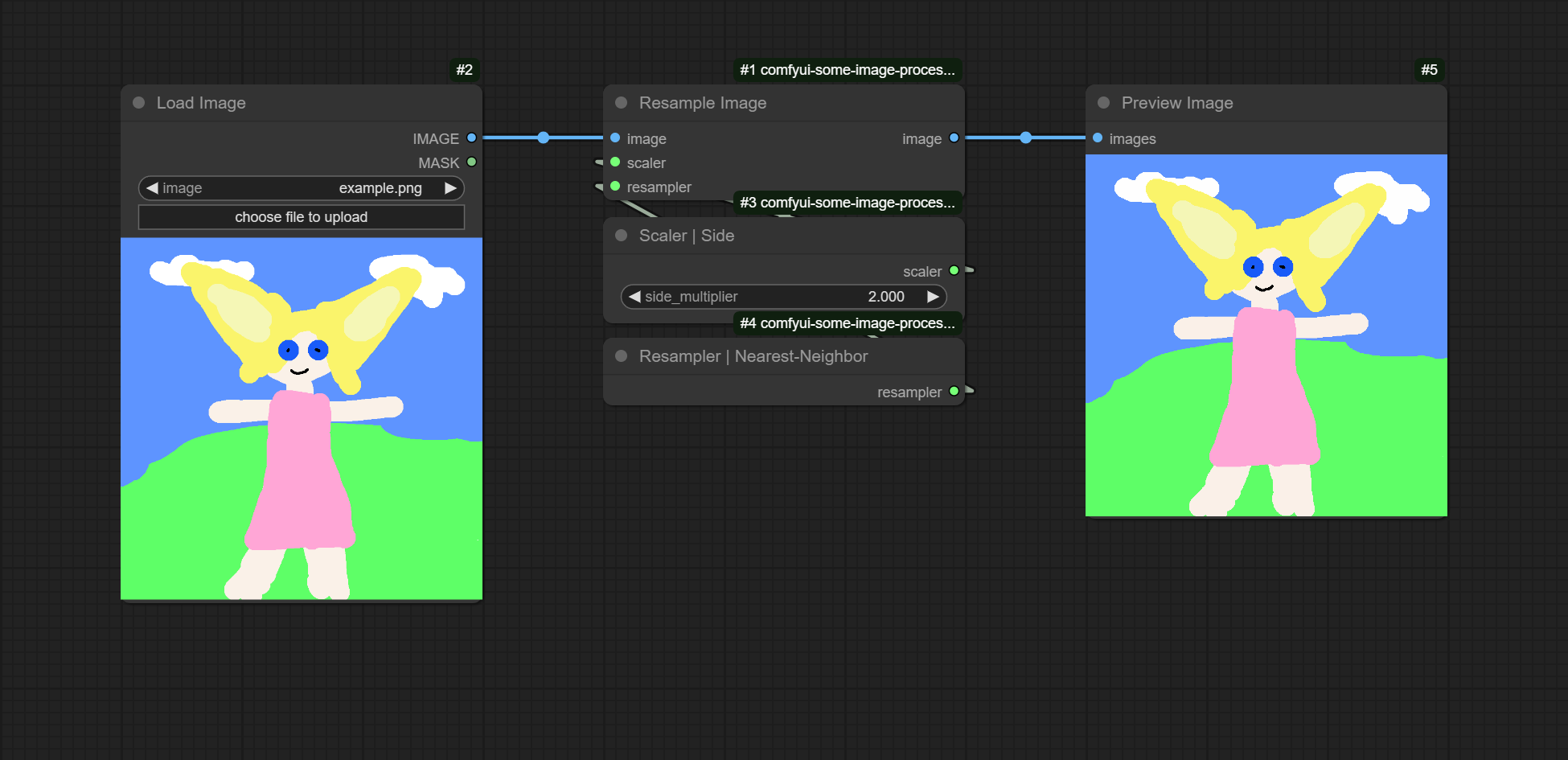
The resampling nodes handle resizing images using nearest-neighbour and filter-based resampling methods. The process of resampling can be applied to images, masks, and latents. This is done through the use of one of the base resampling nodes:
- Resample Image
- Resample Mask
- Resample Latent
These nodes takes an input as well as a resampler and scaler. The resampler provides the resampling method to be used for resampling, and the scaler provides the method for determining the size of the output.
We provide the following resamplers:
- Resampler | Nearest-Neighbor
- Resampler | Triangle
- Resampler | Lanczos
- Resampler | Jinc-Lanczos
- Resampler | Mitchel-Netravali
- Resampler | Area
We provide the following scalers: | Scaler | Description | |-|-| | Scaler | Side | Scale both sides by a single multiplier. | | Scaler | Sides Unlinked | Scale each side by their own multiplier. | | Scaler | Fixed | Scale the image to a fixed resolution. | | Scaler | Pixel Deltas | Each side has a delta added to their length. | | Scaler | Area | Scale the area of the image by a multiplier while maintaining the aspect-ratio of the image. | | Scaler | Megapixels | Scale the area of the image to a set number of megapixels while maintaining the aspect-ratio of the image. |
Color Grading
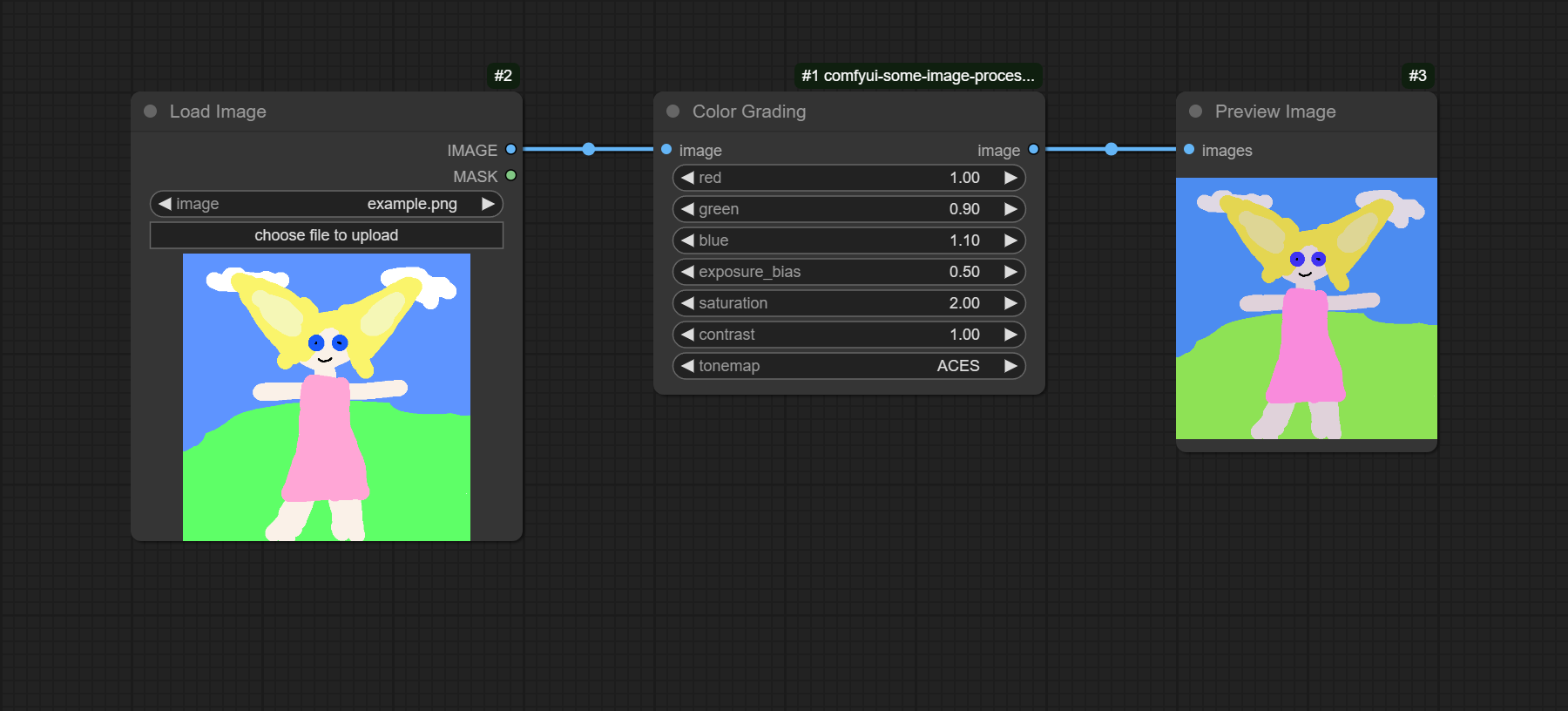
The Color Grading node provides the following color grading operations: | Operation | Associated Input | |-|-| | Color Filter | red, green, blue | | Exposure Adjustment | exposure | | Saturation Adjustment | saturation | | Contrast Adjustment | contrast | | Tonemapping | tonemap |
Each of the color grading operations in done in a HDR colorspace, which is why a final tonemapping operation is required to return the image to an SDR colorspace.
Inpainting
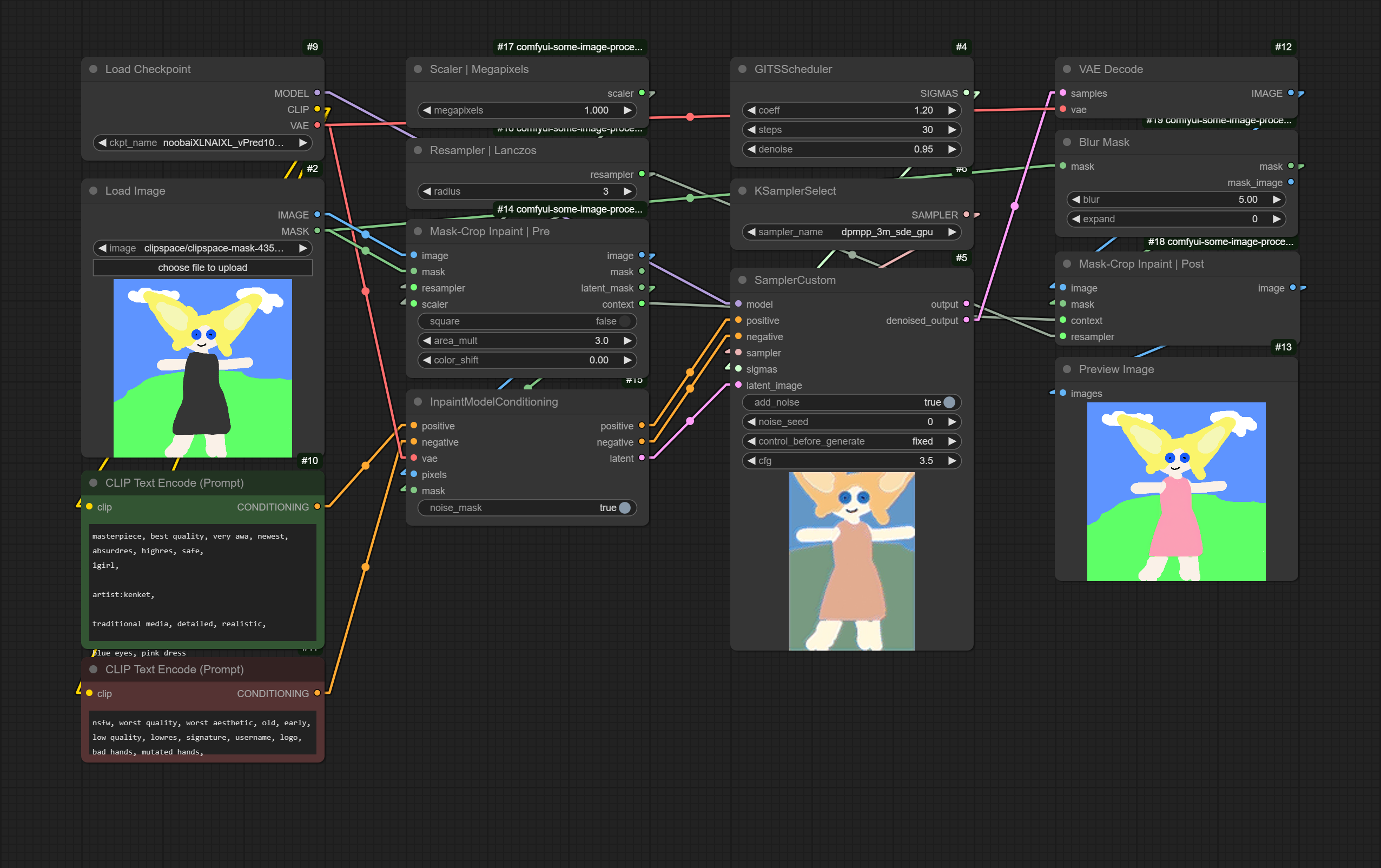
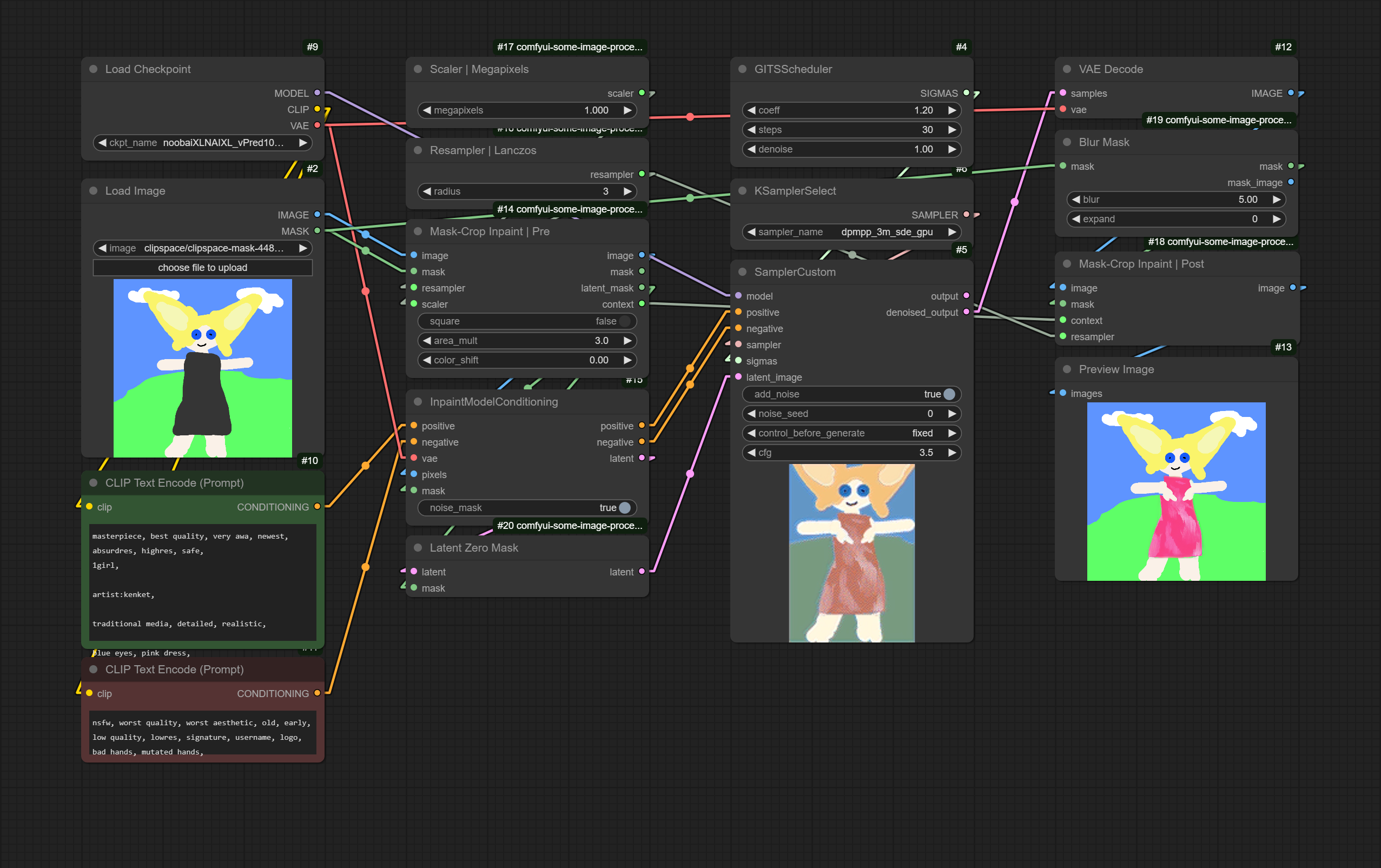
The inpainting nodes provide the operation necessary for mask-crop inpainting, i.e. inpainting where you crop to some bounding box around the to-be-inpainted area before running it through the model. The two main nodes are Mask-Crop Inpaint | Pre and Mask-Crop Inpaint | Post, which together handle croping and resizing of the image and mask before inpainting, and the resizing and compositing of the inpainted area back on to the original image after inpainting.
Mask-Crop Inpaint | Pre
| Input | Description | |-|-| | image | The image to be inpainted. | | mask | The mask of the area to be inpainted. | | resampler | The resampler to be used to resize the cropped region. | | scaler | The scaler to be used to determined the resized size of the cropped region. | | square | Whether the bounding-box of the mask should be forced to be square. | | area_mult | How much the area of the bounding-box of the mask should be multiplied by to determine the cropped region. | | color_shift | To what the average value of the cropped region should be adjusted (0.0 disables this). |
| Output | Description | |-|-| | image | The cropped and resized region. | | mask | The mask similarly cropped and resized. | | latent_mask | The above mask properly resized for use for masking the latent. | | context | The context that Mask-Crop Inpaint | Post requires for the post inpaniting operations. |
Mask-Crop Inpaint | Post
| Input | Description | |-|-| | image | The inpainted image. | | mask | The mask to be used for compositing the inpainted area onto the original image. | | context | The context from the Mask-Crop Inpaint | Pre node. | | resampler | The resampler to be used to resize the inpainted output before compositing. |
| Output | Description | |-|-| | image | The result of compositing the resized, inpainted area back on to the original image. |
Other
| Node | Description | |-|-| | Latent Zero Mask | Zeros a masked area of a latent to prepare it for full-denoise inpainting. | | Blur Mask | Blurs and expands a mask to facilitate better compositing of inpainted areas. | | Mask-Crop | Pre and Mask-Crop | Post | Stripped down versions of the main inpainting nodes that do no resizing or color shifting for use with other tools and workflows. |
Examples
Resampling
Color Grading
Inpainting
Detailing