
Wangz_camera_prompt_studio
One node combining camera angle, lens, depth of field, film filter, and mood controls with dropdowns for ComfyUI workflows. (Description by CC)
📷 Wangz Camera Prompt Studio
**One node. Full cinematic control.**
카메라 앵글 · 렌즈 · 심도 · 필터 · 무드를 드롭다운 하나로 제어하는 ComfyUI 통합 프롬프트 노드



---
✨ What is this?
Wangz Camera Prompt Studio replaces the need for multiple nodes by combining camera angle, lens, depth of field, film filter, and mood into a single clean node with dropdown controls.
기존의 Qwen Multiangle Camera + CR Prompt Text 두 노드를 하나로 합쳐, 스파게티 선 없이 깔끔하게 최종 프롬프트를 출력합니다.
결과물 예시 / Example output:
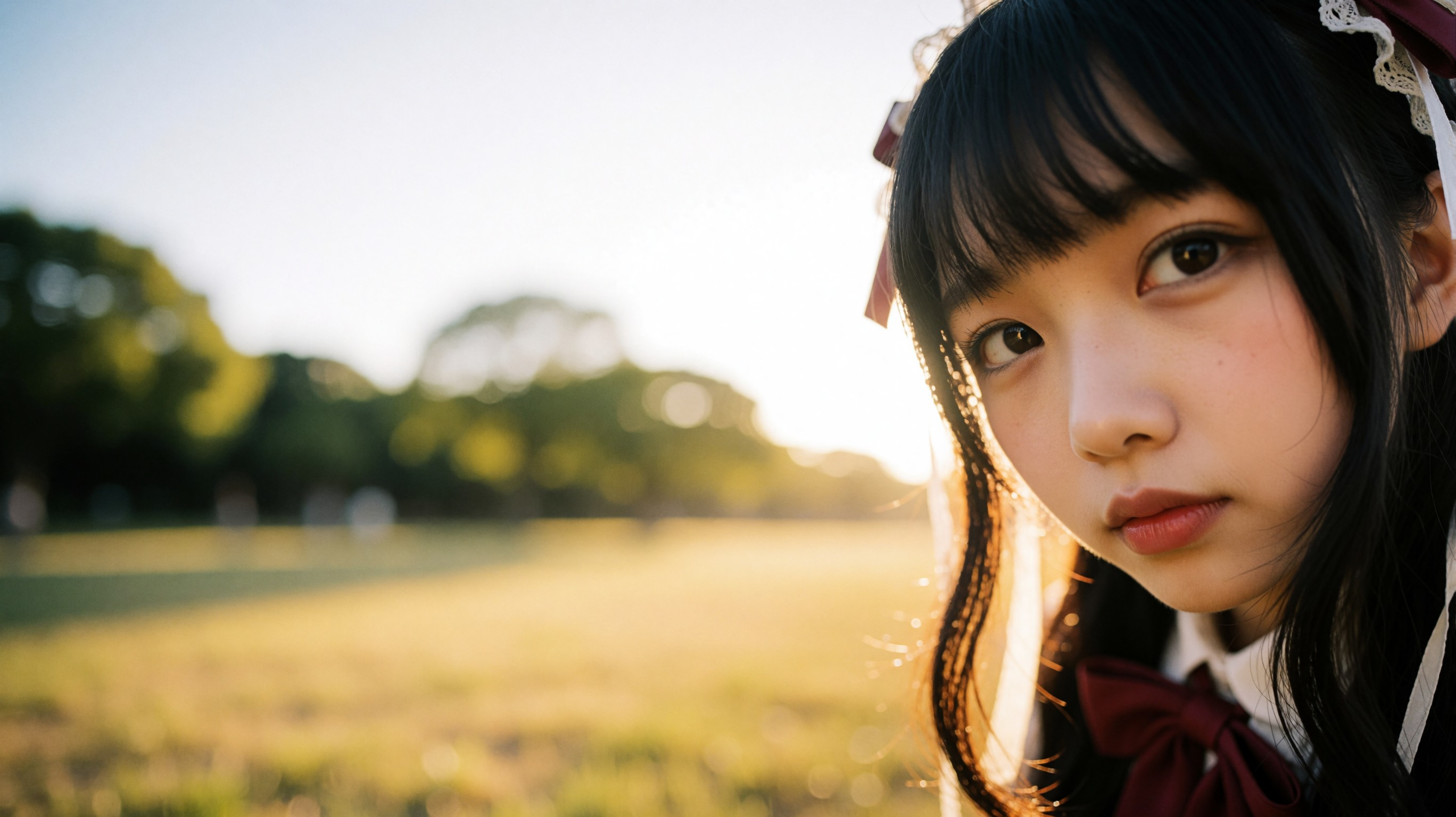
*right side extreme low-angle wide shot, 28mm wide-angle lens, extremely shallow depth of field heavy bokeh, 35mm film grain analog texture, Japanese Gothic-style ribbon-decorated maid girl, golden hour warm sunlight glowing rim light --ar 16:9 --v 6.0*
---
📦 Installation / 설치 방법
Option 1 — Manual (수동 설치)
ComfyUI/
└── custom_nodes/
    └── Wangz_camera_prompt_studio/   ← 이 폴더를 여기에 복사
        ├── __init__.py
        └── camera_prompt_node.py
ComfyUI를 재시작한 후 노드 검색창에 "Camera Prompt Studio" 또는 "📷" 로 검색하세요.
After restarting ComfyUI, search for "Camera Prompt Studio" or "📷" in the node search.
Option 2 — ComfyUI Manager
ComfyUI Manager → Install via Git URL 에 아래 주소를 입력:
https://github.com/wjs0502m-design/Wangz_camera_prompt_studio
---
🎛️ Node Inputs / 노드 입력 설명
|Input|Type|Options|Description|
|-|-|-|-|
|horizontal_angle|Dropdown|front, front-right quarter, right side... (8종)|수평 앵글|
|vertical_angle|Dropdown|eye-level, low-angle, extreme low-angle... (6종)|수직 앵글|
|shot_distance|Dropdown|extreme close-up → extreme wide (8종)|거리 / 샷 크기|
|lens_type|Dropdown|85mm, 28mm wide-angle, Anamorphic... (10종 + none)|렌즈 종류|
|depth_of_field|Dropdown|shallow bokeh, deep sharp, dreamy blur... (6종)|심도 / 초점|
|film_filter|Dropdown|mist, 35mm grain, light leak... (9종 + none)|필름 / 필터 효과|
|mood_preset|Dropdown|golden hour, noir, city pop... (7종 + none)|분위기 프리셋|
|base_prompt|Text|free input|인물 / 배경 묘사 자유 입력|
|tail_params|Text|e.g. --ar 16:9 --v 6.0|후미 파라미터|
|separator|Dropdown|comma / newline / comma+newline|블록 구분자|
|include_angle_prefix|Toggle|true / false|<sks> 프리픽스 자동 삽입 여부|
|external_angle_prompt (optional)|String|—|Qwen Multiangle 등 외부 노드 연결 시 앵글 덮어쓰기|
---
📤 Output Structure / 출력 구조
[<sks>] [앵글] + [렌즈, 심도, 필터] + [기본 프롬프트] + [무드] + [--파라미터]
Example:
<sks> front-right quarter slightly high-angle close-up, 85mm portrait lens,
shallow depth of field bokeh background, mist diffusion filter soft glow,
a dreamy and ethereal portrait of a young woman,
city pop retro 1980s Japan aesthetic neon reflections --ar 16:9 --v 6.0
---
🔗 External Node Integration / 외부 노드 연동
Qwen Multiangle Camera를 그대로 쓰고 싶다면?
Qwen Multiangle Camera의 prompt 출력 → 이 노드의 external_angle_prompt 입력에 연결하면,
드롭다운 앵글 대신 Qwen의 3D UI 앵글 텍스트가 우선 적용됩니다.
Connect Qwen Multiangle Camera's prompt output → this node's external_angle_prompt input.
Qwen's 3D angle text will override the dropdown — switch freely between both modes.
---
🗂️ Category
prompt / camera
---
👤 Author
Wangz — Music Producer & AI Media Creator
🎵 YouTube: @wangzbymusiq
🐙 GitHub: wjs0502m-design
---
⭐ If this helped you
Star this repo — it helps more creators find it!
도움이 됐다면 Star ⭐ 눌러주세요. 더 많은 분들께 닿을 수 있어요!