
ComfyUI Workspaces
Provides a structured model and helper nodes for organizing output files in ComfyUI.
Nodes (4)
Point every save node at its own project directory
The node in this pack you should skip
This node finally turns your ComfyUI output folder into actual projects
Reopen a whole project without re-picking anything
ComfyUI Workspaces
Tame the chaos of your generated outputs! ComfyUI Workspaces is a custom node extension that brings project-based organization to your ComfyUI workflow.
✨ Features
- 📁 Project-Based Workspaces - Dedicated spaces for each project
- 🗂️ Automatic Folder Structure - Organized under ./output/workspaces/
- ⚙️ Context-Aware Workspaces - Store and have access to: width, height and other properties
- 📂 Flexible Sub-Folders - Create specific directories within workspaces
- 🔌 Easy Integration - Plug full_path into any save node
- 🛠️ Extensible for Developers - Make your nodes workspace-aware
🚀 Installation
This node's features will only be useful when its name starts with underscore, so i cannot deploy to comfyui registry, git clone updates only for now.
Method 1: Via ComfyUI Manager
- Install ComfyUI Manager
TODO use git url
Method 2: Manual Installation
cd custom_nodes
git clone https://github.com/wgedeon/_comfyui_user_workspaces.git
🛠️ How to Use
🎥 Watch Video Tutorial on YouTube
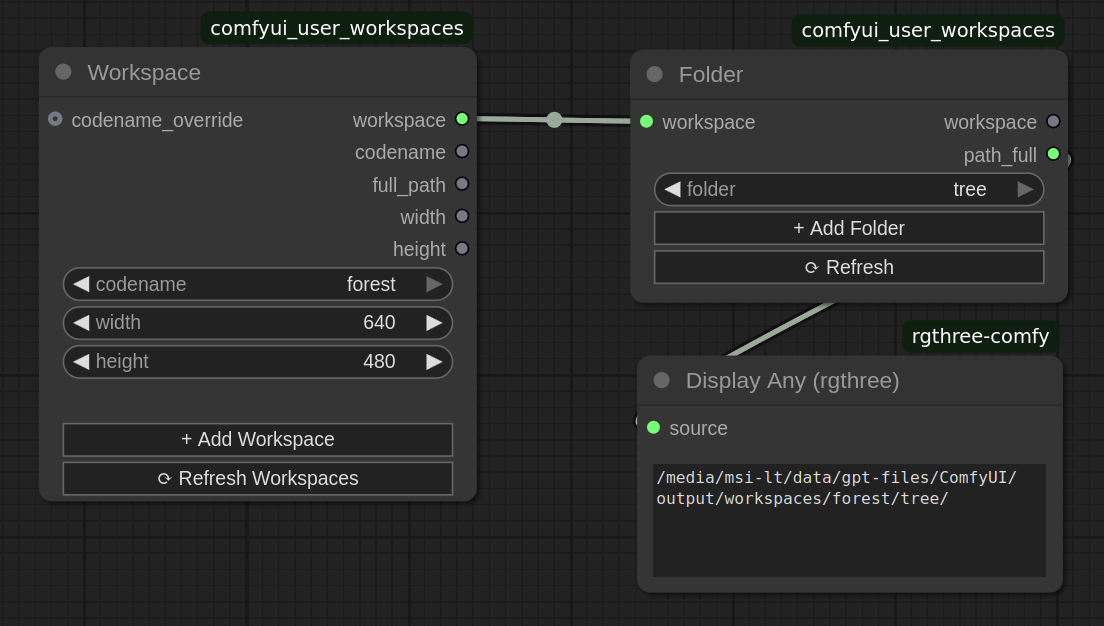
Workspace Node
- CATEGORY: Feller of Trees/Workspaces
- INPUTS: codename, width, height
- OUTPUTS: workspace (object), and properties
Folder Node
- CATEGORY: Feller of Trees/Workspaces
- INPUTS: workspace, folder
- OUTPUTS: workspace (object), path_full
👨💻 For Node Developers
Workspace Consumer
Declare your node as a workspace consumer, and add the corresponding input:
python:
class MyCustomNode:
    @classmethod
    def INPUT_TYPES(cls):
        ui_features = {
            "is_workspace_consumer": {},
            "is_workspace_producer": {}  # Optional for chaining functionality
        }
        return {
            "required": {
                "workspace": ("WORKSPACE",),
            },
            "hidden": {
                "ui_features": ("STRING", {"default": json.dumps(ui_features)}),
            }
        }

    def process(self, workspace):
        # Access workspace properties
        height = workspace.full_path
        width = workspace.width
        height = workspace.height

# ...
UI Real-Time Updates with Callbacks
javascript:
app.registerExtension({
    async beforeRegisterNodeDef(nodeType, nodeSpecs, app) {
        // filter your extensions
        const onWorkspaceCodenameUpdated = nodeType.prototype.onWorkspaceCodenameUpdated;
        nodeType.prototype.onWorkspaceCodenameUpdated = async (node) => {
            onWorkspaceCodenameUpdated?.apply(this, arguments);
            console.log("Workspace updated - refreshing UI");
            // refresh something based on the updated workspace info
        }
    }
});
🎯 Best Practices
-
✅ Always include ui_features for proper integration
-
✅ Handle optional workspace inputs gracefully
-
✅ Use real-time updates for dynamic UI
-
✅ Clean up resources on workspace changes
-
✅ Provide fallback behavior when no workspace