
ComfyUI HTTP - REST API Nodes
Powerful REST API nodes for ComfyUI that enable seamless HTTP/REST integration into your workflows.
Nodes (23)
Decode base64 straight into an IMAGE batch
Stop pasting the same token into every request node
Make API JSON readable, or minify it back down for the wire
Cleaning up remote state from inside a workflow
Finally, an output node that shows you what the API said
Ship a local file to any API endpoint
The glue that turns fields and files into a multipart body
When one form isn't big enough, merge two
The simplest form field you'll ever build
Drop a file from disk into your multipart form
POST a generated image straight from the latent → VAE pipeline
A text form field, when you also care about its content type
Pull data into your workflow from anywhere
Turn an API's JSON soup into a string you can actually use
Check that an endpoint exists without downloading a byte of it
Turn a URL into a real IMAGE tensor — even an authenticated one
Ask the server what it'll let you do
Send partial updates to APIs that want them
The node that sends your images and prompts to the outside world
Replace a whole resource on the server, the REST way
One login, one base URL, many requests
The one ComfyUI-HTTP node that never makes an HTTP request
Get images back from ComfyUI without saving files to disk
ComfyUI-HTTP


Professional HTTP integration nodes for ComfyUI workflows - Transform your ComfyUI experience with seamless web API connectivity, enabling powerful automation and data exchange capabilities.
Features
- Complete HTTP Methods: GET, POST, PUT, PATCH, DELETE, HEAD, OPTIONS
- Session Management: Persistent sessions with cookies and authentication
- Authentication Support: Basic, Bearer, API Key, Token, OAuth2
- Form Data Handling: Text fields, file uploads, image uploads, multipart forms
- JSON Processing: Parse, format, extract fields with JSONPath support
- Image Operations: Load images from URLs, convert to/from base64
- File Operations: Upload files of any type with automatic content-type detection
- Utilities: URL encoding, timestamps, signatures, and more
- Error Handling: Robust error handling with retry logic
- Proxy Support: HTTP/HTTPS proxy configuration
Installation
Method 1: ComfyUI Manager (Recommended)
- Open ComfyUI Manager
- Search for "ComfyUI-HTTP"
- Click Install
Method 2: Manual Installation
cd ComfyUI/custom_nodes/
git clone https://github.com/wawahuy/ComfyUI-HTTP.git
cd ComfyUI-HTTP
pip install -r requirements.txt
Node Categories
HTTP/Session
- HTTP Session Manager: Create and manage persistent HTTP sessions
- HTTP Authentication: Configure various authentication methods
HTTP/Methods
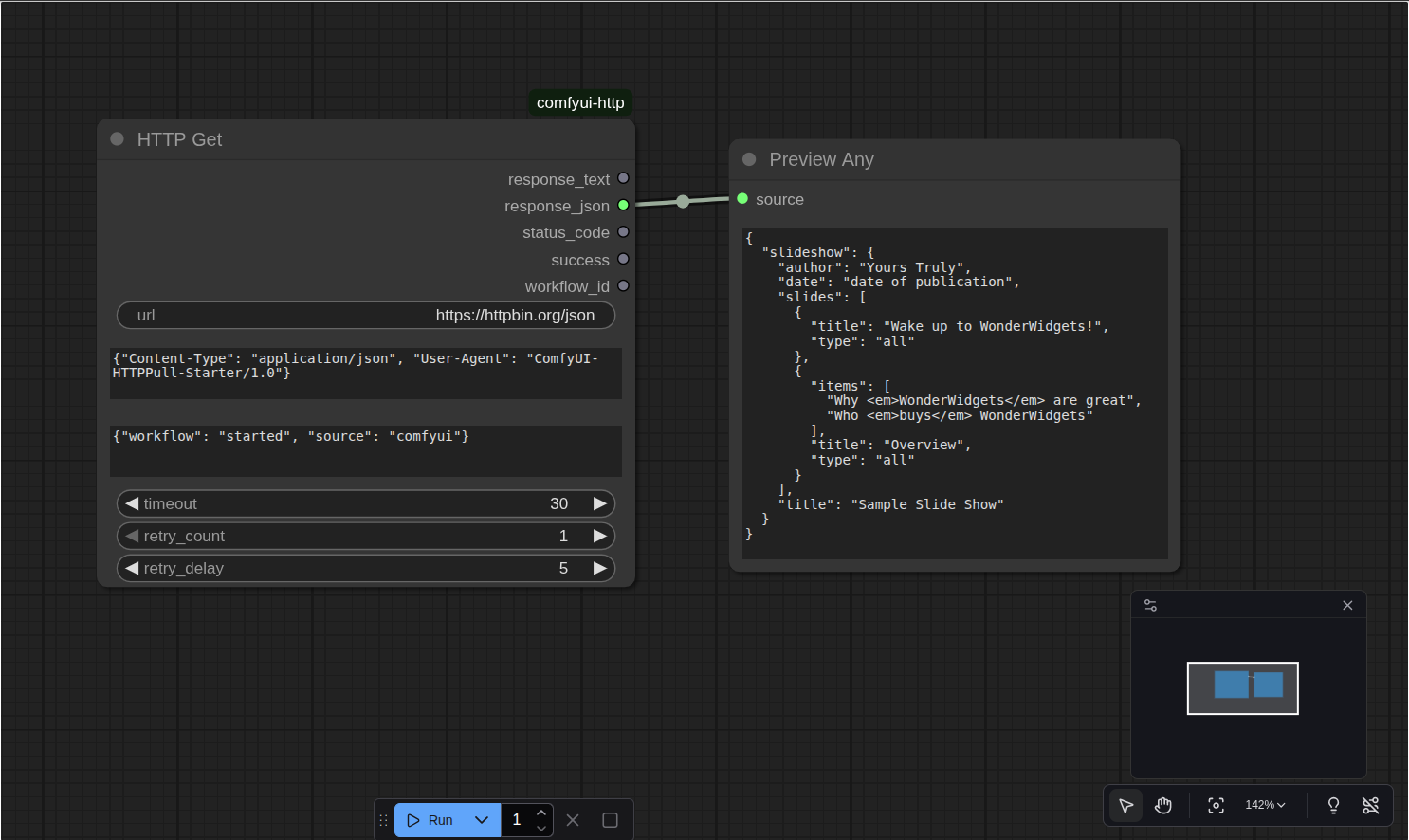
- HTTP GET Request: Perform GET requests with full configuration
- HTTP POST Request: POST with JSON, form data, or raw data support
- HTTP PUT Request: PUT requests for updates
- HTTP PATCH Request: PATCH requests for partial updates
- HTTP DELETE Request: DELETE requests
- HTTP HEAD Request: HEAD requests to get headers only
- HTTP OPTIONS Request: OPTIONS requests for CORS and allowed methods
HTTP/Form Data
- HTTP Form Data: Container for multipart form data
- HTTP Form Data Item: Basic form field
- HTTP Form Text Item: Text form field with content type
- HTTP Form File Item: File upload field
- HTTP Form Image Item: Image upload field (from ComfyUI IMAGE)
- HTTP Form Data Concat: Combine multiple form data objects
HTTP/JSON
- HTTP Convert JSON: Parse, format, stringify, minify JSON
- HTTP Get JSON Field: Extract fields using JSONPath or simple notation
HTTP/File Operations
- HTTP File Upload: Upload files with progress and configuration
HTTP/Image Operations
- HTTP Image Loader: Load images from URLs with resizing options
HTTP/Image Conversion
- Base64 to Image: Convert base64 strings to ComfyUI IMAGE
- Image to Base64: Convert ComfyUI IMAGE to base64 strings
HTTP/Display
- HTTP Display Result: Format and display HTTP responses
HTTP/Utilities
- HTTP Utils: Various utility functions (URL encoding, signatures, etc.)
Usage Examples
Basic GET Request
[HTTP GET Request]
url: "https://api.github.com/users/octocat"
↓
status_code: 200
headers: {...}
content: {"login": "octocat", ...}
json: (formatted JSON)
POST with JSON Data
[HTTP POST Request]
url: "https://api.example.com/users"
content_type: "json"
json_data: '{"name": "John", "email": "[email protected]"}'
↓
status_code: 201
content: {"id": 123, "name": "John", ...}
Session with Authentication
[HTTP Session Manager]
session_name: "api_session"
base_url: "https://api.example.com"
auth_type: "bearer"
token: "your_token_here"
↓
session → [HTTP GET Request]
           url: "/users/me"
Form Data with File Upload
[HTTP Form File Item]          [HTTP Form Text Item]
name: "document"               name: "title"
file_path: "/path/to/file.pdf" value: "My Document"
↓                              ↓
form_item                      form_item
         ↓                ↓
      [HTTP Form Data]
      ↓
      form_data → [HTTP POST Request]
                  content_type: "form-data"
Image Upload from ComfyUI
[Load Image] → [HTTP Form Image Item]
               name: "photo"
               format: "JPEG"
               quality: 95
               ↓
               form_item → [HTTP Form Data] → [HTTP POST Request]
Load Image from URL
[HTTP Image Loader]
url: "https://example.com/image.jpg"
resize_mode: "fit"
target_width: 512
target_height: 512
↓
image (ComfyUI IMAGE tensor)
JSON Field Extraction
[HTTP GET Request] → [HTTP Get JSON Field]
                     field_path: "$.data.users[0].name"
                     extraction_method: "jsonpath"
                     ↓
                     value: "John Doe"
Authentication Methods
Basic Authentication
{
  "auth_type": "basic",
  "username": "your_username",
  "password": "your_password"
}
Bearer Token
{
  "auth_type": "bearer",
  "token": "your_bearer_token"
}
API Key
{
  "auth_type": "api_key",
  "api_key": "your_api_key",
  "api_key_header": "X-API-Key"
}
Custom Headers
{
  "auth_type": "none",
  "custom_headers": "{\"Authorization\": \"Custom your_token\"}"
}
Session Management
Sessions maintain:
- Cookies across requests
- Authentication credentials
- Custom headers
- Connection pooling
- Base URL for relative requests
[HTTP Session Manager] → [Multiple HTTP Requests]
Error Handling
All nodes include robust error handling:
- Network timeouts with retries
- SSL verification options
- Proxy support
- Detailed error messages
- Graceful fallbacks
JSONPath Support
Extract data from JSON responses using JSONPath expressions:
$.data- Root data field$.users[0].name- First user's name$.users[*].email- All user emails$..price- All price fields recursively
Utility Functions
The HTTP Utils node provides:
- URL encoding/decoding
- Base64 encoding/decoding
- JSON escaping/unescaping
- HTML escaping/unescaping
- Timestamp generation
- UUID generation
- HMAC signature generation
- URL parsing and building
- Email validation
- Authentication header creation
Best Practices
- Use Sessions: For multiple requests to the same API, use HTTP Session Manager
- Handle Errors: Always check status codes and use HTTP Display Result
- Secure Credentials: Use environment variables for sensitive data
- Timeout Configuration: Set appropriate timeouts for your use case
- Content Types: Specify correct content types for better API compatibility
- Rate Limiting: Implement delays between requests if needed
License
This project is licensed under the MIT License - see the LICENSE file for details.
Acknowledgments
- ComfyUI Team - For creating an amazing platform for AI workflows
- Contributors - Thank you to all who have contributed to this project
- Community - For feedback, bug reports, and feature requests
Support
- GitHub Issues: Report bugs or request features
- GitHub Discussions: Ask questions or share ideas
- Documentation: Check this README and code comments for usage examples
<div align="center">
Star this project | Fork it | Report Issues
Made with love for the ComfyUI community
</div>