
ComfyUI-Text-Utility
Custom node to handle text. Save and load text files. Remove comments from text.
Nodes (12)
<ADD:...> and <REMOVE:...> commands
Read prompts and text from a file instead of pasting them into a box
Feed A1111-style prompts (--seed 123 --steps 28) into ComfyUI, with only the pins you need
The A1111-style parser with all 23 outputs on the table at once
Expand __wildcards__ and {a|b|c} in your prompt with a seed you control
Batch through a prompt list where every line also rolls the wildcard dice
Strip // and /* */ comments out of prompt text before it hits your encoder
Declare $variables at the top of your prompt and reference them everywhere
Chain variables, wildcards, and cleanup in one node — with a loop for the nasty nesting
Stop Losing Your Prompts and Logs to the Void
Pull one line at a time out of a textbox
Turn one semicolon-separated string into a list
ComfyUI-Text-Utility
[English][<a href="README_ja.md">日本語</a>]
Custom node to handle text.
Note: Custom nodes using wildcards internally call the wildcard processing of ComfyUI-Impact-Pack. Therefore, ComfyUI-Impact-Pack must be installed beforehand.
For details on wildcards, refer to ImpactWildcard.
Load Text File
Loads a specified file.
Save Text File
Saves the text to the specified file.
If the directory does not exist, it is created.
If overwrite is set to True, overwrites the file. If overwrite is False, no action is taken if the file exists.
Remove Comments
Delete comment.Line comments and block comments are supported.
- line_comment : The string used to start a single line comment (default: //)
- block_comment_start : The string used to start a block comment (default: /*)
- block_comment_end : The string used to end a block comment (default: */)
- remove_linefeed : remove linefeed or not (default: No)
- No : do not remove
- All : remove all
- Blank Lines Only : remove blank lines only
- normalize_commas : Normalize commas at word separators and remove extra commas (default: False)
Strings from textbox
Extracts a single line from multiple lines of text entered in a textbox.
When executed in batch using batch count, it takes out one line at a time, incrementing from the start line each time it is executed. You can use it like WebUI (A1111)'s Prompts from file or textbox.
If you want to use wildcards, use "Prompts from textbox".
If you want to use command-line style arguments, use "Parse Prompt (Full)" or "Parse Prompt (Custom)".
- text: Source text (multiple lines) to be extracted
- start: The line to start with
- mode: Whether to update each time start is processed (default: Continued)
- Fixed : do not update
- Continued : updated
- repeats_per_line: Number of repetitions per line
- counter: Internal management counter (will be ignored even if set)
Strings to List
Splits the input text into lines and returns them as a list.
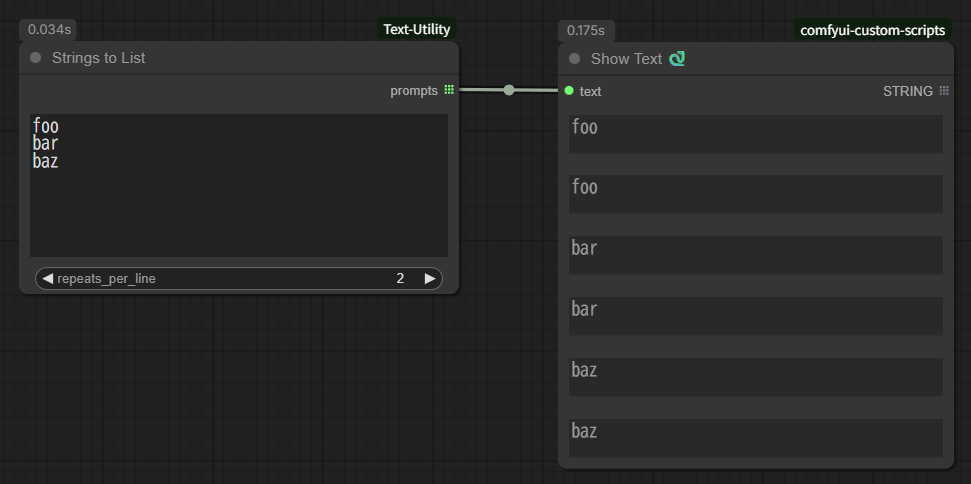
- text: Source text (multiple lines)
- repeats_per_line: Number of repetitions per line
Prompts from textbox
"Strings from textbox" with wildcard support.
- wildcard_text: The source wildcard text (multiple lines) to be extracted
- seed: Seed to use for wildcard processing
- start: The line to start with
- mode: Whether to update each time start is processed (default: Fixed)
- Fixed : do not update
- Continued : updated
- repeats_per_line: Number of repetitions per line
- counter: Internal management counter (will be ignored even if set)
Replace Variables
Replaces variables in the input text using definitions.
- Variable definition syntax:
$name="value"(value must be enclosed in double quotes) - Multiple variables can be defined.
- Variable usage syntax:
$name - Example input:
$animal="cat" $color="black" The $color $animal sleeps on the sofa. - Example output:
The black cat sleeps on the sofa.
Process Wildcard
This is a single-function node for expanding wildcards in Impact Pack. It processes wildcards within the input text using the specified seed and returns the result.
- wildcard_text: Wildcard text to expand (multiple lines allowed)
- seed: Seed used for wildcard processing
Replace Variables and Process Wildcard (Loop)
Replaces variables and then expands wildcards, in that order, repeating the pair of operations loop_count times. Useful when variable values contain wildcards or when multi-step expansion is needed.
-
text: Input text that may include variable definitions, variable references, and wildcard expressions
- Variable definition:
$name="value"(value must be in double quotes) - Variable reference:
$name - Variable definitions are removed from the text before processing
- Variable definition:
-
seed: Seed used for wildcard processing
-
remove_linefeed: Whether to remove line breaks from the result
- No: keep line breaks
- All: remove all line breaks
- Blank Lines Only: remove only blank lines
-
normalize_commas: Normalize comma spacing and remove extra commas
-
remove_undefined_variables: Remove any
$varreferences that are not defined -
process_conditional_tags: Execute the same processing as the <a href="doc/ConditionalTagProcessor.md">Conditional Tag Processor</a> exactly once at the end.
-
loop_count: Number of times to repeat “replace variables → process wildcards”
-
Example input:
$adj="beautiful" $thing="__objects__" A $adj $thing -
Example output:
A beautiful flower
Conditional Tag Processor
Adds or removes tags when conditions match.
For details, see <a href="doc/ConditionalTagProcessor.md">Conditional Tag Processor</a>.
Parse Prompt (Full)
Parses a prompt string containing command-line style arguments (e.g., --width 512 --seed 123) and outputs all supported parameters.
This is the same format as WebUI (A1111)'s "Prompts from file or textbox".
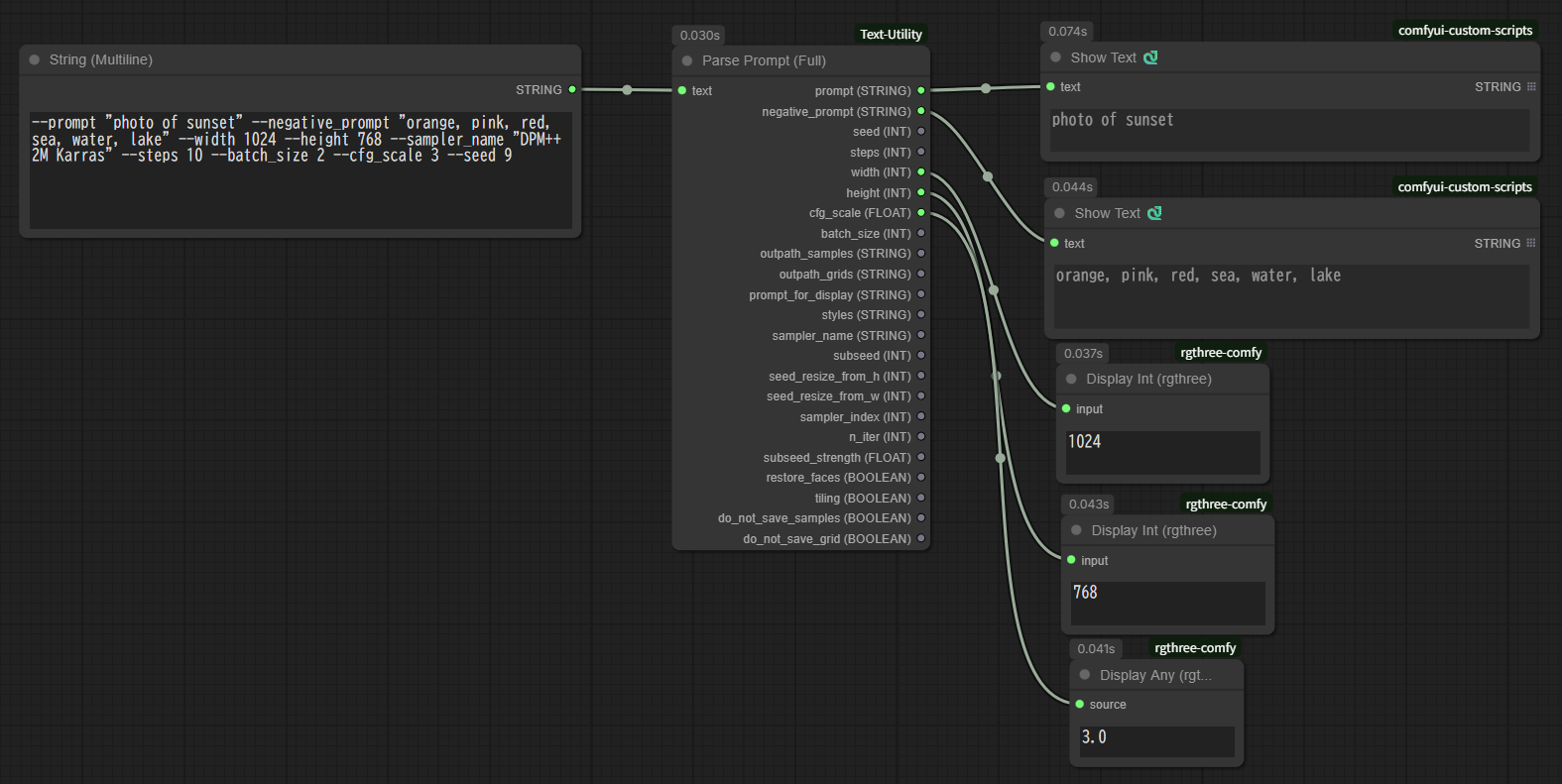
- Input:
text: The prompt string to parse.
- Output:
- Returns values for all supported tags.
Supported Tags
| Tag | Type | Description |
| :--- | :--- | :--- |
| prompt | STRING | The main prompt text. |
| negative_prompt | STRING | The negative prompt text. |
| seed | INT | Seed value. |
| steps | INT | Sampling steps. |
| width | INT | Image width. |
| height | INT | Image height. |
| cfg_scale | FLOAT | CFG Scale. |
| batch_size | INT | Batch size. |
| outpath_samples | STRING | Output path for samples. |
| outpath_grids | STRING | Output path for grids. |
| prompt_for_display | STRING | Prompt for display purposes. |
| styles | STRING | Style names. |
| sampler_name | STRING | Sampler name. |
| subseed | INT | Subseed value. |
| seed_resize_from_h | INT | Seed resize from height. |
| seed_resize_from_w | INT | Seed resize from width. |
| sampler_index | INT | Sampler index. |
| n_iter | INT | Number of iterations. |
| subseed_strength | FLOAT | Subseed strength. |
| restore_faces | BOOLEAN | Enable face restoration. |
| tiling | BOOLEAN | Enable tiling. |
| do_not_save_samples | BOOLEAN | Do not save samples. |
| do_not_save_grid | BOOLEAN | Do not save grids. |
Parse Prompt (Custom)
Same as Parse Prompt (Full), but allows you to dynamically select which outputs to display.
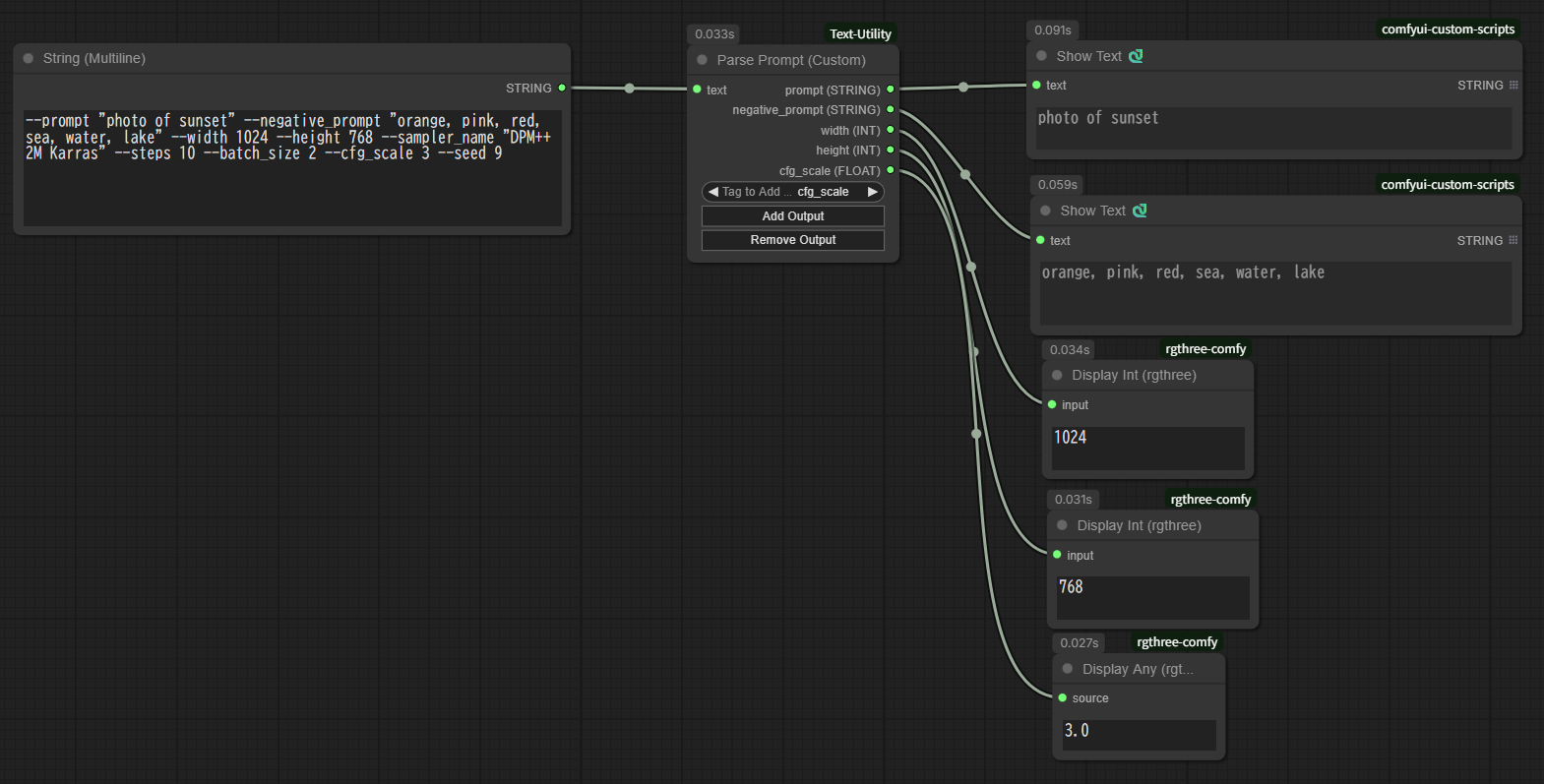
- Input:
text: The prompt string to parse.
- Output:
- Dynamically selected outputs.
- Usage:
- Select a tag from the "Tag to Add/Remove" dropdown.
- Click "Add Output" to add the output pin.
- Click "Remove Output" to remove the selected output pin.
Changelog
- V1.6.0 (2025-11-29)
- Added
Parse Prompt (Full)node andParse Prompt (Custom)node
- Added
- V1.5.3 (2025-11-28)
- Changed to import
ComfyUI-Impact-Packonly when needed
- Changed to import
- V1.5.2 (2025-11-28)
- Added
Strings to Listnode
- Added
- V1.5.1 (2025-10-01)
- Fixed a bug in the
line_counteroutput of theStrings from textboxnode and thePrompts from textboxnode
- Fixed a bug in the
- V1.5.0 (2025-09-30)
- Added
Conditional Tag Processornode - Added
process_conditional_tagsoption toReplace Variables and Process Wildcard (Loop)node
- Added
- V1.4.2 (2025-09-29)
- Added
line_counterandtotal_counterto the output of theStrings from textboxnode andPrompts from textboxnode
- Added
- V1.4.1 (2025-09-29)
- Added
repeats_per_linesetting toStrings from textboxnode andPrompts from textboxnode
- Added
- V1.4.0 (2025-09-28)
- Added
Process Wildcardnode - Added
Replace Variables and Process Wildcard (Loop)node
- Added
- v1.3.1 (2025-04-22)
- Added
normalize_commasoption toRemove Commentsnode
- Added
- v1.3.0 (2025-04-22)
- Add
Replace VariablesNode
- Add
- v1.2.0 (2025-04-06)
- Add
Prompts from textboxNode
- Add
- v1.1.0 (2025-04-05)
- Add
Strings from textboxNode
- Add