
comfyui-dots.tts
Dots TTS — 2B-parameter fully continuous, end-to-end autoregressive text-to-speech system with zero-shot voice cloning support.
comfyui-dots.tts
Dots TTS — 2B-parameter fully continuous, end-to-end autoregressive (AR) text-to-speech system. The backbone pairs a semantic encoder, an LLM, and an autoregressive flow-matching acoustic head over a 48 kHz AudioVAE, with no discrete tokens anywhere in the pipeline.
ComfyUI 自定义节点,将 Dots TTS 封装为可视化节点,支持文本转语音和零样本声音克隆。
模型变体
| 模型 | 说明 | 推荐参数 |
|---|---|---|
| dots.tts-base | 预训练基座 (~1.5M h),完整 CFG / NFE 控制 | num_steps=10~32, guidance_scale=1.0~1.2 |
| dots.tts-soar | + Self-corrective Alignment,最高零样本说话人相似度(推荐) | num_steps=10~32, guidance_scale=1.0~1.2 |
| dots.tts-mf | + MeanFlow 蒸馏,NFE=4 快速推理,CFG 已融合进学生模型 | num_steps=4,guidance_scale 为空操作 |
安装
1. 安装 Dots TTS 核心库
.\python_embeded\python.exe -m pip install --no-deps "git+https://github.com/rednote-hilab/dots.tts.git"
.\python_embeded\python.exe -m pip install lingua-language-detector
--no-deps 避免覆盖 ComfyUI 现有的 PyTorch 版本。缺少的依赖会在首次加载节点时自动提示。
lingua-language-detector 是 dots.tts 自动检测输入语言所需的依赖。
2. 安装 ComfyUI 插件
cd custom_nodes
git clone https://github.com/wanaigc/comfyui-dots.tts.git
或者直接将 comfyui-dots.tts 文件夹放入 ComfyUI/custom_nodes/。
3. 下载模型
下载 HuggingFace 模型放入 ComfyUI/models/TTS/ 目录:
ComfyUI/models/TTS/
└── rednote-hilab/
    ├── dots.tts-base/
    ├── dots.tts-soar/  (推荐)
    └── dots.tts-mf/
插件会自动扫描该目录,模型会出现在下拉菜单中。
或使用 HuggingFace repo ID 自动下载:在下拉菜单中选择 rednote-hilab/dots.tts-*,首次生成时会自动从 HuggingFace 下载。
4. 重启 ComfyUI
重启后在节点菜单中找到 DotsTTS 分类。
节点说明
Dots TTS Model Loader
加载模型,输出模型引用供 Generate 节点使用。
| 参数 | 说明 |
|---|---|
| model_name | 自动扫描 ComfyUI/models/TTS/ 下的本地模型 + HuggingFace repo ID + custom |
| custom_path | model_name 选 custom 时,手动输入路径或 repo ID |
| precision | bfloat16(默认)/ float16 / float32 |
| max_generate_length | 最大音频 patch 数(500 默认,越大支持越长音频但更耗显存) |
Dots TTS Generate
执行文本转语音,输出 AUDIO 供后续节点(保存/播放)使用。
| 参数 | 说明 |
|---|---|
| model | 来自 Loader 的模型 |
| text | 待合成文本(支持多行) |
| prompt_audio (可选) | 参考音频,接入后启用零样本声音克隆 |
| prompt_text (可选) | 参考音频的准确文本 |
| num_steps | 扩散步数:base/soar 用 10~32,mf 用 4 |
| guidance_scale | CFG 指导强度:base/soar 用 1.0~1.2,mf 为空操作 |
| speaker_scale | 说话人嵌入缩放(默认 1.5) |
| template_name | tts / instruction_tts / text_to_audio |
| language | 语言标签(留空自动检测,填写 EN/ZH/JA 等) |
| seed | 随机种子(0=完全随机) |
| normalize_text | 是否归一化文本 |
典型工作流
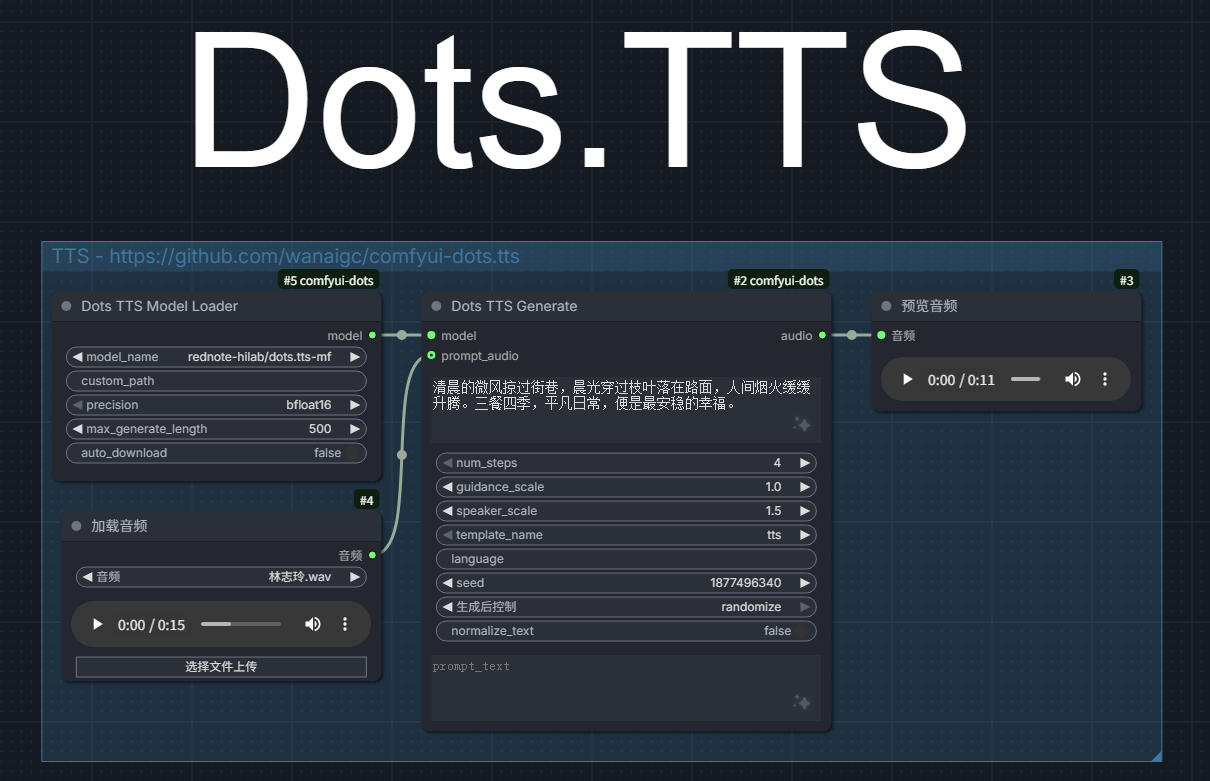
Dots TTS Model Loader ──► Dots TTS Generate ──► VHS VideoCombine (音频)
                                 ▲
                           [可选] prompt_audio
- Dots TTS Model Loader:选择
rednote-hilab/dots.tts-soar,精度bfloat16 - Dots TTS Generate:输入文本,连接参考音频(需要声音克隆时)
- 保存音频:用 VideoHelperSuite 的
VHS VideoCombine或 Save Audio 节点
注意事项
- 显存:bf16 精度约需 4-6 GB VRAM,fp32 约 8-12 GB
- 参考音频:3-15 秒清晰人声效果最佳
- mf 模型:
guidance_scale无效,num_steps推荐 4 - 首次加载:模型从 HuggingFace 下载时视网络情况可能需要几分钟
- 国内用户:设置 HuggingFace 镜像
set HF_ENDPOINT=https://hf-mirror.com