
ComfyUI Extension
ComfyUI-Translate
Multilingual Translation for Text & Images
wanaigc/ComfyUI-Translate
Nodes1
On cloudLocal install
CategoryTranslate/Local
Stars2
Updated9 months ago
Readme
ComfyUI-Translate
[中文] | [English]
这是一个 ComfyUI 的本地翻译节点,支持 Google TranslateGemma-4B 模型。 It allows you to use the TranslateGemma-4b-it model directly within ComfyUI for text translation and image-text extraction.
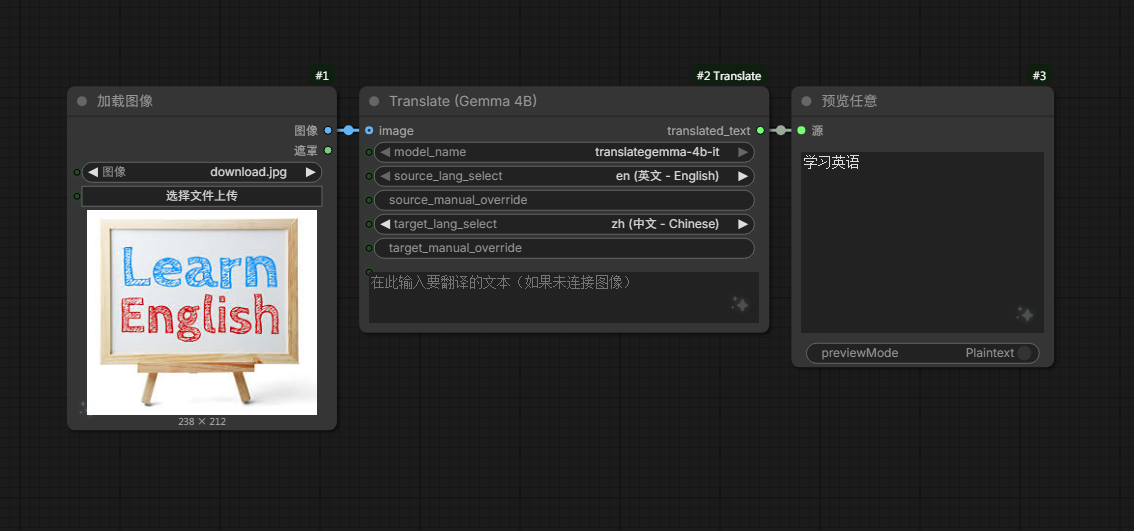
✨ Features (功能)
- 🚀 Local Inference: Runs locally, no API key required. (本地运行,无需 API Key)
- 🖼️ Multimodal: Supports text-to-text and image-to-text translation. (支持文本翻译及图像文字提取翻译)
- ⚡ Auto Caching: Loads model once, fast inference for subsequent runs. (自动缓存模型,拒绝重复加载)
- 🛠️ Smart UI: Dropdown menu for common languages + Manual override support. (常用语言下拉菜单 + 支持手动输入代码)
📦 Installation (安装)
1. Clone the repository (克隆代码)
Go to your ComfyUI custom_nodes folder and run:
cd ComfyUI/custom_nodes/
git clone https://github.com/wanaigc/ComfyUI-Translate
2. Install Dependencies (安装依赖)
Important! You must install the required Python packages:
cd ComfyUI-Translate
pip install -r requirements.txt
(Requires transformers>=4.48.0, accelerate, sentencepiece)
📥 Model Download (下载模型)
Please download the model from HuggingFace or ModelScope (Recommended for CN users).
- HuggingFace: google/translategemma-4b-it
- ModelScope: google/translategemma-4b-it
Directory Structure (目录结构必须如下):
ComfyUI/
  models/
    Translate/
      translategemma-4b-it/
        ├── config.json
        ├── model.safetensors
        ├── tokenizer.json
        └── ... (other model files)
🛠️ Usage (使用说明)
- Restart ComfyUI.
- Double click on the canvas and search for: "Translate (Gemma 4B)".
- Connect your text or image input.
- Select source/target languages and run!
Developed by WanAIGC Team.