
RectumFire
Daily-use ComfyUI utilities for workflow repair, subgraph previews, clean switching, and better run feedback.
Nodes (6)
The node that puts your subgraph's insides on the canvas
A done-bell for the branch you actually care about
The Load Image you can actually reach inside a collapsed subgraph
The note node that keeps your workflow-repair intel
An ANY switch that doesn't leave ghost inputs behind
A run-clock you'll actually want to keep on the canvas
ComfyUI RectumFire
Languages: English | 简体中文
RectumFire is a small ComfyUI utility pack for solving everyday workflow pain.
This is not a pack of niche one-off tricks. It is a pack of nodes for the problems that come back all the time:
- broken imported workflows
- missing model selections
- ugly or cluttered routing
- no runtime feedback
- no good visual preview from subgraphs
That is why it is called RectumFire.
What Is In This Pack
Fire ResolveFire CopyFire NoteFire BannerFire Load ImageFire SwitchFire TimerFire DoneFire LabelFire LinksFire Filename
Installation
Put this repository into ComfyUI/custom_nodes/.
If you use git:
cd ComfyUI/custom_nodes
git clone https://github.com/vladgohn/ComfyUI-RectumFire.git
Then restart ComfyUI.
The Core Of RectumFire
RectumFire started from one problem: you open someone else's workflow, and it breaks because models are missing, renamed, or stored under different paths.
Without tooling, fixing that is slow and irritating. RectumFire turns it into a simple loop:
- try to auto-fix
- extract what is missing
- keep the repair info inside the graph
Fire Resolve
Hotkey: Shift + Alt + R
Fire Resolve is the fastest way to repair broken imported workflows.
Select a node, press the hotkey, and if the needed model exists in your available options, the node tries to relink it automatically.
The value is simple:
- less manual searching
- less typing
- less stupid repair work
Update
Fire Resolvenow also supportsrgthree Power Lora Loaderandrgthree Lora Loader Stack. It can resolve their LoRA rows against your locally available LoRA files, and shows a clear per-row status: green if the LoRA is found, red if it is missing. This matters because these rgthree loader nodes are widely used in real workflows, and partial LoRA failure is otherwise easy to miss.
Fire Copy
Hotkey: Shift + Alt + C
If Fire Resolve cannot repair the node automatically, Fire Copy pulls out the useful references for you.
Usually that means model filenames. If not, it falls back to a compact JSON snapshot of the node.
This matters because even when auto-fix fails, you still get the exact data you need without digging through workflow files by hand.
Fire Note
Hotkey for paste: Shift + Alt + V
Fire Note is where the repair context lives.
After copy, paste creates a note near the cursor and inserts the collected info directly into the workflow.
Found models are marked with ✅, missing ones with ❌.
That makes the next step much faster:
- you instantly see what exists locally
- you instantly see what is missing
- you can copy missing filenames into model archive search without guessing
These three are meant to be used together. They are the foundation of the whole pack.
Fire Banner
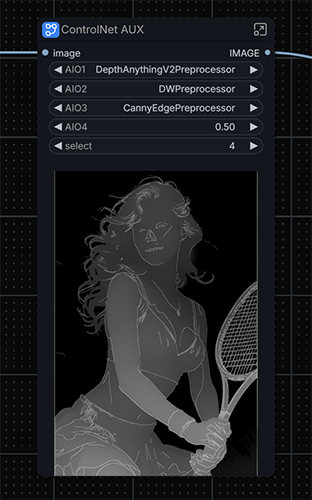
Fire Banner is the killer feature of this pack.
ComfyUI subgraphs hide what happens inside them: once a sampler sits in a subgraph, you no longer see it render. On the classic (LiteGraph) canvas the current frontend does not draw promoted previews on the subgraph node at all (upstream: ComfyUI_frontend#9859). Nodes 2.0 shows them, but many custom nodes do not render there yet.
Fire Banner draws the preview directly on the collapsed subgraph node, on the classic canvas:
- Live sampling preview — while anything inside the subgraph is sampling (KSampler or any node that sends preview frames), the frames appear on the subgraph node with a small green
LIVEtag. This works for every subgraph, even without aFire Bannernode inside. - Final image — when the
Fire Bannernode inside the subgraph executes, its image replaces the live frames. Without a banner, the lastPreview Image/Save Imageoutput inside the subgraph is shown instead. - Nested subgraphs — the preview appears on every parent subgraph node up to the root.
- The subgraph node grows automatically when it has no room for the image; resize it freely afterwards and the image fits.
Usage: put Fire Banner inside the subgraph and connect your final IMAGE to it. Widget promotion is no longer needed.
Notes:
- Live frames require a live preview method (Settings → Execution → Live preview method, e.g.
latent2rgborauto). - The preview lives in the browser tab only; after a page reload it appears again on the next run.
Fire Bannerwrites its image to ComfyUItemp, notoutput. AddSave Imageif you want to keep the result.- Tested with ComfyUI 0.39.2 / frontend 1.53.10, classic canvas.
Fire Load Image
Fire Load Image is the core Load Image made usable inside a subgraph.
A normal Load Image inside a subgraph is unreachable once the subgraph is collapsed: there is no way to drop a new picture into it from outside.
Put Fire Load Image inside the subgraph instead, and the collapsed subgraph node gets an input preview:
- the preview of the current image is drawn on the subgraph node
- drop an image file on the preview, or click it, to upload a new image into that loader
- several
Fire Load Imagenodes in one subgraph are shown side by side; the drop goes to the one under the cursor - an empty loader shows a dashed
drop image / clickslot - output previews (
Fire Banner, live sampling) are drawn below the input preview
Previews are drawn at the top of the subgraph node, above its widgets, so a growable widget such as a promoted multiline text field sits below the picture and ends at the bottom of the node.
Notes:
- clicking the preview opens the file picker, so drag the subgraph node by its title
- double-click on a subgraph node still opens the subgraph
- to pick an already uploaded file from the list, promote the
imagewidget with Edit subgraph widgets
Fire Links
Fire Links is a frontend fix for links inside subgraphs.
Links from the subgraph input node sometimes leave the input to the left and bend back in a loop.
The frontend takes the start direction of these links from the target input, and some inputs carry dir = LEFT.
Fire Links starts such links to the right, so they run straight again. Other links are not touched.
Fire Filename
Fire Filename replaces the default ComfyUI filename prefix with the current date and time when a job is queued.
- A prefix that is exactly
ComfyUI(optionally inside a folder, e.g.krea/ComfyUI) becomes2026-10-10_15-04-27, so files from different workflows never collide asComfyUI_00001_.png. - Custom prefixes are left untouched, and the workflow itself keeps its own value; only the queued prompt changes.
- Settings: RectumFire → Filename (on/off and date template, default
yyyy-MM-dd_HH-mm-ss).
Fire Switch
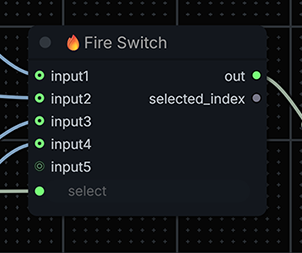
Fire Switch is an ANY switch for interchangeable branches.
Nodes like this already exist, but this version fixes one annoying issue: ghost inputs that stay behind after disconnecting or reworking links.
The point of this node is not novelty. The point is cleaner behavior and less graph trash.
Known limitation for now:
this node currently switches by selected index.
It does not yet mirror the behavior of Switch (Any) where muting one source lets the next available source take over automatically.
That behavior is known, planned, and not implemented yet.
Quality-Of-Life Utilities
Fire Timer
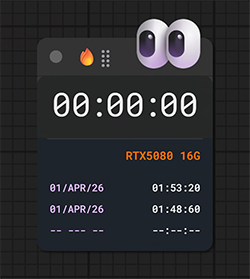
Fire Timer is a runtime clock you actually want to keep on the canvas.
It gives immediate visual feedback that a workflow is running, keeps the final elapsed time visible when execution ends, and does it with a UI that is intentionally more stylish than a plain debug widget.
The expanded timer drawer now also keeps the last three runs inside the workflow:
- final render time
- render date
- GPU name and VRAM used for that run
That matters when you come back to a workflow later, compare runs, or share it with someone else.
20 seconds is much more useful when you can also see which GPU produced that result.
This is one of those nodes that becomes hard to live without once you start using it.
Fire Done
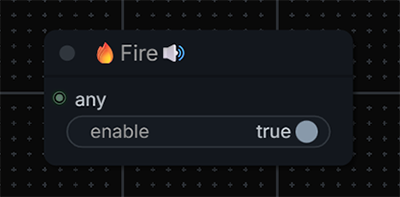
Fire Done is a simple completion bell.
It exists because "queue finished" is not always the same thing as "the branch I care about actually finished." Put it at the exact point that matters, and it gives you a visible and audible signal.
If you already know PlaySound from Custom Scripts, this node fills a similar role.
The difference is that Fire Done is intentionally simpler, lighter, and comes with a different default sound.
This version is intentionally simpler than some alternatives.
No bloated sound-picker UI, no extra overdesign.
If you want another sound, replace js/assets/done.wav.
Update
Fire Donenow also includes optional VRAM cleanup. A newclear_vramtoggle is enabled by default, so heavy workflows can ring the completion sound and clear used VRAM in the same final node. This keeps end-of-run setups cleaner, especially for long video or other memory-heavy renders whereDoneand VRAM cleanup are usually placed together anyway.
Fire Label
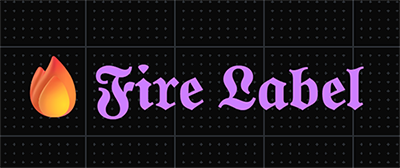
Fire Label makes gothic-style headings directly in the graph.
It is not about raw functionality. It is about making big workflows easier and nicer to read. It looks good, it is lightweight, and it does not depend on installing a custom font.
Notes
- The backend nodes exported by the pack are
Fire Timer,Fire Done,Fire Note,Fire Switch,Fire Banner, andFire Load Image. Fire Label,Fire Copy,Fire Resolve,Fire Links, andFire Filenameare frontend tools/extensions.fire_route.pyexists in the repository but is not currently exported as an active node.
Troubleshooting
Nodes do not appear
- make sure the repository is inside
ComfyUI/custom_nodes/ - restart ComfyUI fully
- check ComfyUI console for import errors
Fire Done does not play sound
- make sure the node actually executed
- make sure
enableis on - interact with the browser tab first if autoplay is blocked
Fire Resolve does nothing
- select the node first
- use
Shift + Alt + R - it can only auto-fix models that already exist in your available options
Fire Banner does not show preview
- make sure an image is connected
- make sure the branch actually executed
- make sure ComfyUI temp output is writable
- no live frames: set a live preview method in Settings → Execution
- hard-refresh the browser tab (F5) after updating the pack
License
This repository is licensed under Apache-2.0. Attribution is preserved through the license and the included NOTICE file.
Support
If RectumFire saves you time, you can support the project through GitHub Sponsors:
If you need paid help, the best fit is:
- ComfyUI workflow repair
- workflow cleanup and graph UX improvement
- subgraph observability / utility-node integration