
🦄 MurMur
Tiny ComfyUI styling utility for fast node and group coloring with emoji labels for nodes.
🦄 MurMur
Candy-grade color styling for ComfyUI nodes and groups
</div>English
MurMur is a tiny ComfyUI custom-node package made for one unapologetically simple job:
decorate your graph fast.
No giant utility pack. No “install 80 extra nodes for one picker” nonsense. Just a lightweight floating picker for color, a small emoji strip for node labels, and a workflow that stays out of your way.
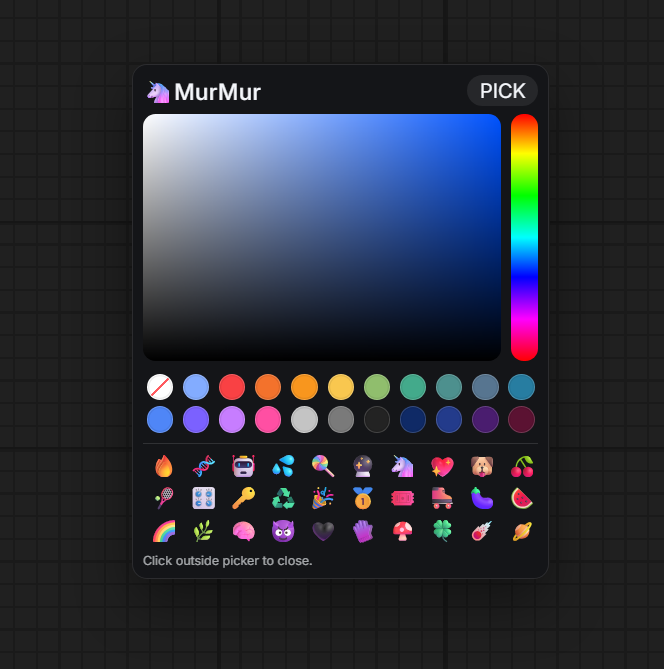
Keywords: ComfyUI color picker, ComfyUI node colors, ComfyUI group colors, color nodes in ComfyUI, fast ComfyUI styling, ComfyUI node decoration.
✦ Why MurMur Exists
Most color pickers in the ComfyUI ecosystem arrive as side features inside big packs. That is a bad trade if the only thing you actually want is:
- Select a node or group
- Open a picker instantly
- Color it
- Continue working
MurMur exists specifically for that exact use case.
It is not a “production pipeline node” in the usual sense. It is a quality-of-life node. Its whole purpose is to make the workspace easier to read, easier to scan, and less miserable to work in all day.
✦ What It Does
- Opens a floating color picker with
Tab - Colors selected nodes
- Colors selected groups
- Adds emoji prefixes to selected node titles
- Remembers picker position when dragged by the header
- Keeps a quick-access slot for the last used color
- Resets color back to the default theme color
✦ If You Were Searching For...
You probably want MurMur if you were searching for:
- how to color nodes in ComfyUI
- how to color groups in ComfyUI
- ComfyUI color picker
- ComfyUI node styling
- a simple ComfyUI node for coloring without installing a huge pack
- a fast way to make workflows easier to read
✦ Important Behavior
- Emoji labels apply to selected nodes only
- Groups can be colored, but emoji are not inserted into group titles
- Clicking outside the picker closes it
- The package includes only one simple registered node, because the UI tool is the real point
✦ Installation
- Copy this folder into
ComfyUI/custom_nodes/ - Restart ComfyUI
- Search for
MurMur
✦ Usage
- Select a node or a group
- Press
Tab - Pick a color, reuse the last-used slot, or reset color
- Optionally click an emoji to prefix selected node titles
- Click outside the picker to close it
✦ Files
- init.py: ComfyUI package registration
- murmur_picker.py: the single registered node
- js/murmur.js: floating picker UI, color logic, emoji palette
✦ README Language Note
GitHub README files do not support real interactive language tabs.
This repository uses an in-page language switcher at the top of README.md
and also provides a dedicated README.zh-CN.md.
✦ Suggested GitHub Topics
If you want this repository to be easier to find, add these topics on GitHub:
comfyuicomfyui-custom-nodescomfyui-nodecolor-pickernode-stylingworkflow-uigraph-uiquality-of-lifeemojicustom-nodes
✦ Short Promo Text
Use this anywhere you want to mention the project:
MurMur is a tiny ComfyUI custom node made only for fast node and group coloring. No giant utility pack, no buried color picker, just a simple floating styling tool that makes workflows easier to read and nicer to work in.
✦ One-Line Registry Description
Tiny ComfyUI styling utility for fast node and group coloring with emoji labels for nodes.
简体中文
MurMur 是一个非常小的 ComfyUI 自定义节点包,只做一件事:
让你的工作流更快、更顺手地“装饰起来”。
不需要安装一个庞大的节点包,不需要为了一个颜色选择器顺带背上一堆没用的功能。 它就是一个轻量悬浮颜色面板,加上一小排 emoji 标签,专门服务于节点和分组的快速美化。
关键词:ComfyUI 颜色选择器、ComfyUI 节点上色、ComfyUI 分组上色、ComfyUI 工作流美化、ComfyUI 节点装饰。
✦ 为什么会有 MurMur
ComfyUI 里很多颜色相关功能都只是大包里的附带功能。 如果你真正想要的只是下面这件事:
- 选中节点或分组
- 秒开颜色面板
- 改一下颜色
- 继续工作
那装整包并不划算。
MurMur 就是专门为这个场景做的。
它不是传统意义上的“生产节点”。 它是一个非常纯粹的体验改良工具。 目标只有一个:让工作流更清晰、更好看、更容易读。
✦ 功能
- 按
Tab打开悬浮颜色选择器 - 给已选中的节点上色
- 给已选中的分组上色
- 给已选中的节点标题加 emoji 前缀
- 可以拖动标题栏移动面板,并记住位置
- 调色板里保留“最近一次使用的颜色”
- 可以恢复为主题默认颜色
✦ 如果你搜索的是这些
如果你在找下面这些东西,那你大概率就是在找 MurMur:
- 如何给 ComfyUI 节点上色
- 如何给 ComfyUI 分组上色
- ComfyUI 颜色选择器
- ComfyUI 节点美化
- 不想装大包,只想单独要一个上色工具
- 想让工作流更容易阅读、更舒服
✦ 重要说明
- Emoji 只会写入已选中的节点标题
- 分组可以上色,但不会写入 emoji 到分组标题
- 点击面板外部即可关闭
- 这个包只注册了一个简单节点,因为真正的重点是这个 UI 工具
✦ 安装
- 把整个目录复制到
ComfyUI/custom_nodes/ - 重启 ComfyUI
- 在节点列表中搜索
MurMur
✦ 使用方法
- 选中节点或分组
- 按
Tab - 选择颜色、使用最近颜色,或恢复默认颜色
- 如有需要,点击 emoji 给已选中节点标题加前缀
- 点击面板外部关闭
✦ 文件
- init.py:ComfyUI 包注册
- murmur_picker.py:唯一注册的节点
- js/murmur.js:悬浮选择器 UI、颜色逻辑、emoji 调色板
✦ 语言切换说明
GitHub 的 README 不支持真正可交互的语言标签页。 所以这个仓库采用:
README.md顶部页内语言切换入口- 单独的 README.zh-CN.md 中文文件
✦ 推荐 GitHub Topics
如果你希望这个仓库更容易被搜到,可以在 GitHub 里添加这些 topics:
comfyuicomfyui-custom-nodescomfyui-nodecolor-pickernode-stylingworkflow-uigraph-uiquality-of-lifeemojicustom-nodes
✦ 简短介绍文案
MurMur 是一个超小型 ComfyUI 自定义节点,只做节点和分组的快速上色。不需要安装一整包工具,不需要忍受埋得很深的颜色面板,就是一个简单直接的悬浮样式工具,让工作流更清晰、更好看、更容易使用。