
SenseNova U1.5 AEGIS
SenseNova U1.5 INT8 ConvRot + AEGIS VRAM runtime for ComfyUI
Nodes (4)
It refuses to download the weights, and that's the point
Image Edit with multiple references — the node that shows what the model can actually do
The 8-step LoRA is the real reason this node exists
Eight steps or fifty, it's one node — just let it auto-pick
ComfyUI SenseNova U1.5 AEGIS
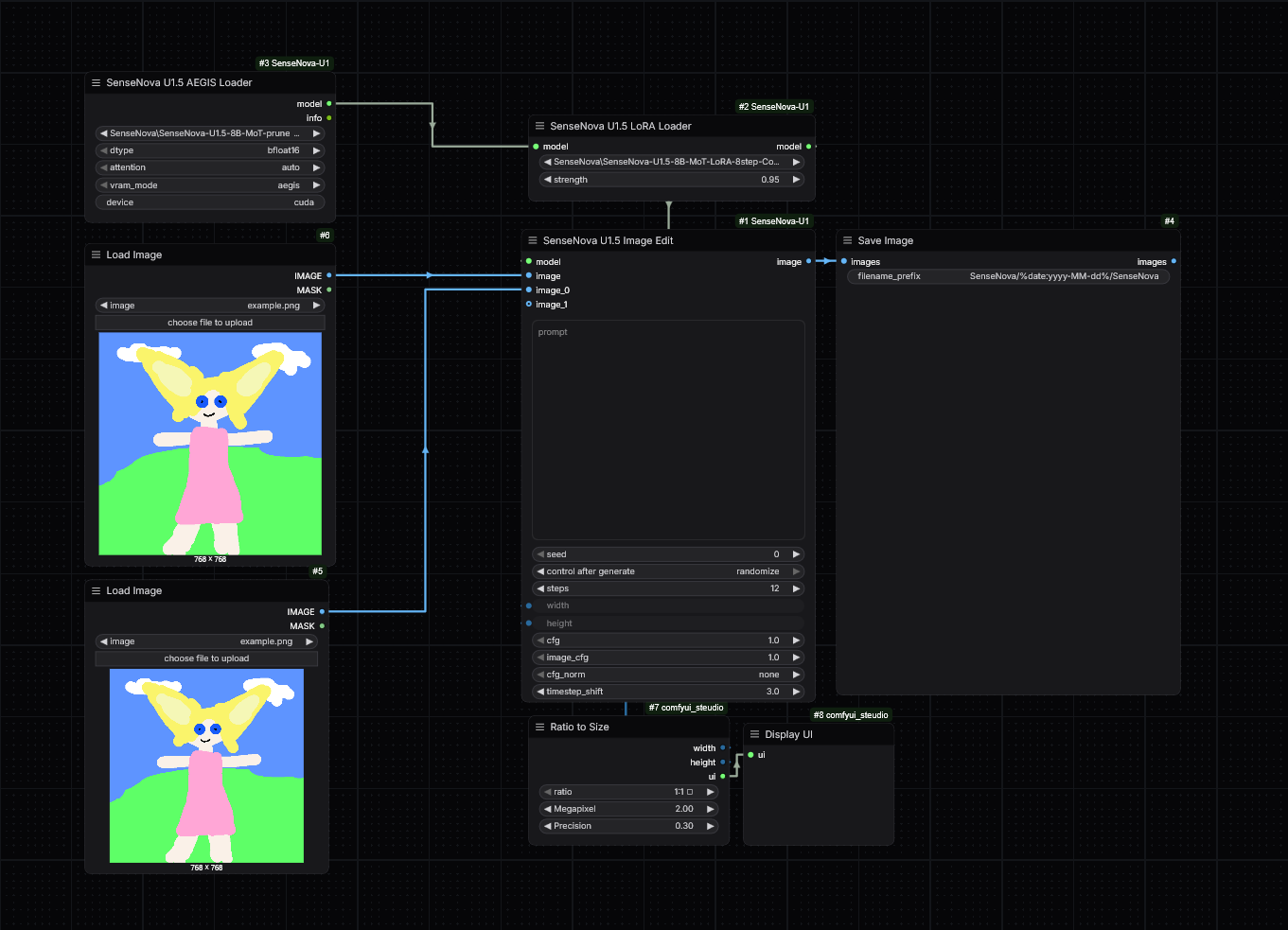
High-performance local SenseNova U1.5 nodes for ComfyUI.
Features:
- local single-file INT8 ConvRot checkpoint loading;
- AEGIS hybrid VRAM residency and async layer prefetch;
- official SenseNova U1.5 LoRA support;
- Text-to-Image and multi-reference Image Edit;
- automatic FlashAttention → PyTorch SDPA fallback;
- automatic runtime/dependency preparation after ComfyUI restart;
- no automatic download of model weights.
This project targets the final SenseNova-U1.5-8B-MoT, not the older Preview checkpoint.
Example workflow
A cleaned example workflow is included in:
examples/SenseNova-U1.5-AEGIS.json
Load your own reference images after importing the workflow. Model and LoRA filenames are placeholders matching the recommended files from the Models section.
Models
Recommended ComfyUI checkpoint
SenseNova-U1.5-8B-MoT-pruned-int8_convrot.safetensors
ComfyUI-ready INT8 ConvRot checkpoint:
https://huggingface.co/joyfox/SenseNova-U1.5-8B-MoT-FP8
Place it in:
ComfyUI/models/diffusion_models/
The same repository also contains BF16, scaled FP8 and a ComfyUI-converted 8-step LoRA.
Official base model
https://huggingface.co/sensenova/SenseNova-U1.5-8B-MoT
Official 8-step LoRA
https://huggingface.co/sensenova/SenseNova-U1.5-8B-MoT-LoRAs
Official file:
SenseNova-U1.5-8B-MoT-LoRA-8step.safetensors
For the ComfyUI-converted LoRA used with this project, place the file in:
ComfyUI/models/loras/
Example filename:
SenseNova-U1.5-8B-MoT-LoRA-8step-ComfyUI.safetensors
Installation
- Copy the complete node folder to:
ComfyUI/custom_nodes/ComfyUI-SenseNova-U1.5-AEGIS/
- Put the INT8 ConvRot checkpoint into:
ComfyUI/models/diffusion_models/
- Optional: put the 8-step LoRA into:
ComfyUI/models/loras/
- Restart ComfyUI.
On startup the node checks/prepares its runtime and auxiliary Python dependencies automatically. It does not download SenseNova model weights.
For ComfyUI Manager installation: install the node, restart ComfyUI, then place the model files in the folders above.
Nodes
- SenseNova U1.5 AEGIS Loader
- SenseNova U1.5 LoRA Loader
- SenseNova U1.5 Text to Image
- SenseNova U1.5 Image Edit
Image Edit supports multiple reference images through dynamic image inputs.
Recommended settings
Base model — maximum quality
steps:          50
cfg:            4.0
cfg_norm:       none
timestep_shift: 3.0
LoRA:           disabled
Official 8-step LoRA — fast Text-to-Image
steps:          8
cfg:            1.0
cfg_norm:       none
timestep_shift: 3.0
LoRA strength:  1.0
0.90–1.00 LoRA strength can be useful for tuning, but 1.0 matches the intended distilled configuration.
The official 8-step LoRA is released for Text-to-Image. Image Edit usage should currently be considered experimental.
Image Edit without LoRA
steps:          50
cfg:            4.0
image_cfg:      1.0
cfg_norm:       none
timestep_shift: 3.0
VRAM modes
aegis — recommended
Hybrid GPU residency with asynchronous layer prefetch.
Current default profile:
prefetch:           4
VRAM fraction:      0.94
headroom:           2 GiB
activation reserve: 3 GiB
balanced
Lower residency and lower VRAM pressure.
low
Maximum offload for GPUs with limited VRAM.
full
Moves the full model to GPU and may OOM on consumer GPUs.
Console progress
Since previous development builds, progress is measured from the model's actual
fm_modules.timestep_embedder. The bar advances when the denoise timestep
changes, so repeated CFG/image-CFG forwards do not create fake extra steps.
Example:
SenseNova U1.5 Edit: 5/8 [00:11<00:06, 2.1s/step, t=0.428571]
Notes
- The loader uses a local checkpoint only.
attention=autosafely falls back to PyTorch SDPA if FlashAttention is unavailable or broken.- INT8 ConvRot is loaded directly into a meta model to avoid a redundant full-precision model copy.
- AEGIS keeps generation weights resident where possible to reduce CPU ↔ GPU transfers.
Upstream
SenseNova-U1 / U1.5:
https://github.com/OpenSenseNova/SenseNova-U1
Official ComfyUI integration:
https://github.com/OpenSenseNova/ComfyUI-SenseNova-U1
SenseNova U1.5 cookbook / best practices:
https://github.com/OpenSenseNova/SenseNova-U1/blob/main/docs/u1.5_best_practices.md
License
Please review the licenses of the upstream SenseNova project and the model checkpoints you download.
Shared-core LoRA lifecycle
SenseNova U1.5 AEGIS uses a shallow-copy shared-core design for LoRA:
base runtime ─────┐
                  ├── shared _core -> model / tokenizer
LoRA copy.copy ───┘
        │
        └──────────── same shared patcher
model and tokenizer live only inside _core. clone_with_lora() uses
copy.copy(), so LoRA clones share both the same heavyweight core and the same
ComfyUI patcher.
This fixes RAM retention during unload: when ComfyUI unloads the shared patcher,
the shared model/tokenizer are released for the base runtime and all LoRA clones
at once. Lazy reload uses register=False and reuses the existing patcher, so no
orphan model registrations are created.