
Retro Pixel-Matrix Dither 👾
An advanced multi-ratio Bayer matrix dithering node for ComfyUI with edge protection.
ComfyUI-Retro-Pixel-Matrix-Dither
An advanced custom node for ComfyUI designed to convert images into authentic, low-color retro graphics and pixel art. Unlike standard dithering algorithms, this tool uses a specialized multi-ratio matrix mixing technique combined with human-eye perception logic.
Developed via human-AI collaboration: Algorithm conceptualized by me, code implementation by Gemini.
🚀 Key Features
- Intelligent Cone-Model Clashing Protection: Automatically calculates perceptual color distances using an absolute H-S-Luminance cone weight system. It prevents ugly, high-contrast dithering patterns (like mixing blue and yellow) while allowing smooth shading between similar tones.
- Contour & Edge Protection: Built-in edge detection ensures sharp object outlines remain clean and solid, avoiding messy dithering noise on distinct borders.
- Classic Hardware Presets: Built-in palettes optimized for iconic retro systems: Amiga, Atari ST, EGA, Commodore 64, GameBoy (DMG-01), and CGA.
- Fully Custom Palettes: Paste your own HEX codes or RGB values directly into the node.
- Interactive Tuning: Calibrate your weights visually using the included web-based Matrix Tuner tool.
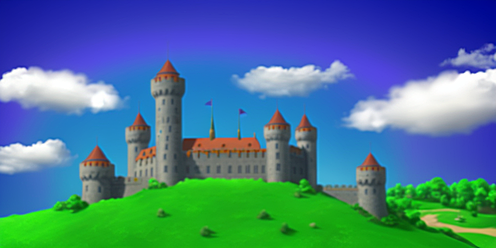
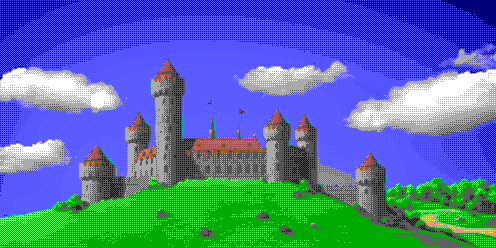
Gallery
| Original Image | Dithered Result (customized EGA Palette) |
| :---: | :---: |
|  |
|  |
|
🎛️ Diagnostic Pattern Matrix & Calibration
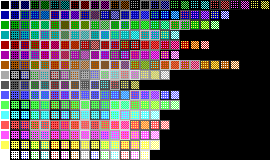
The script allows you to export a diagnostic matrix image (-w / --show-patterns) to visually evaluate which 2x2 Bayer dither textures are permitted by your current settings.
Understanding the Matrix Cell Backgrounds
Each cell in the grid displays a 2x2 multi-ratio dither blend between two colors. The background frame behind the pattern represents its Reliability calculated by the perceptual algorithm:
- Bright/White Background: High reliability. The color combination is perceptually harmonious, smooth, and safe to use.
- Dark/Black Background: High penalty. The colors clash too aggressively in brightness or hue; the algorithm suppresses this pattern to avoid noisy artifacts.
Calibration Examples
Default Sweetspot (-m 105 -cw 20 -bw 260)
Fine-tuned coeficients.
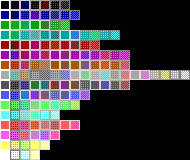
Balanced / Strict (-m 150 -cw 50 -bw 100)
More combinations allowed with custom weights.
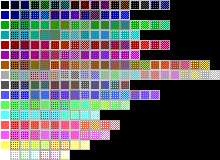
No Distance Limit (-m 255 -cw 20 -bw 260)
Every mix is allowed. High noise.
🌐 Web-Based Color & Matrix Tuner
Want to find your own perfect dither preset? We've included an interactive HTML tool called color-tuner.html 😉. It lets you tweak the distance limits and weights in real-time with visual sliders and instantly copies the values for your ComfyUI nodes.
How to run the Tuner:
You don't need to install anything. You can launch it instantly directly from this repository:
- 🌐 Launch Retro Dither Matrix Tuner Pro Pro Live
- Alternatively, just download the
color-tuner.htmlfile from this repo and open it locally in any web browser.
💻 Standalone CLI Usage
The core algorithm can be executed directly from your terminal without launching ComfyUI. This is perfect for batch processing or quick parameter tuning.
Syntax
python retro_matrix_dither.py [input_path] [output_path] [options]
CLI Arguments Reference
| Argument / Flag | Long Flag | Default | Description | | :---: | :---: | :---: | :---: | | input | Positional | None | Path to the source image file (Required unless using -w). | | output| Positional | [base]_16.png | Optional destination path. Defaults to input name with _16 suffix. | | -l | --pal | ega | Retro hardware preset (c64, atari, amiga, ega, ega-mod, gameboy, cga). | | -m | --max-dist | 105 | Maximum perceptual RGB distance allowed for color mixing (0-255). | | -e | --edge |0.5 | Edge protection multiplier. Higher values keep outlines cleaner. | | -cw | --color-weight | 20 | Saturation and Hue clashing penalty multiplier. | | -bw | --brightness-weight | 260 | Brightness/Luminance disparity penalty multiplier. | | -w |--show-patterns | Flag | Generates and saves the diagnostic patterns.png matrix preview. |
CLI Examples
Basic processing with GameBoy aesthetic:
python retro_matrix_dither.py photo.png --pal gameboy
High-protection crisp setup with custom output path:
python retro_matrix_dither.py art.png output_ega.png -e 1.2 -m 90
Generate matrix preview sheet only (no input image needed):
python retro_matrix_dither.py -w --pal cga -cw 40 -bw 180
History
July 11, 2026 (v1.2.0)
- Mathematical Calibration & Tuner Sync: Synchronized the Python rendering backend with the web-based HTML tuner. The diagnostic
-wpattern mappers now accurately reflect the 0–100% "Reliability" shading, making Python matrix exports perfectly consistent with the web interface. - Expanded Retro Roster: Added iconic 4-color ancient hardware presets: GameBoy (DMG-01) green-phosphor aesthetic and the high-contrast CGA (Palette 1).
- New Optimized Defaults: Shifted to an experimentally proven sweet spot (
max_mix_rgb_distance=105,color_weight=20,brightness_weight=260) as the absolute out-of-the-box standard for superior pixel-art gradients.
July 11, 2026 (v1.1.0)
- Lazy Pattern Generation: Added a
patterns_previewwidget switch (enable/disable). Bypasses heavy diagnostic calculations when disabled for instant ComfyUI workflow execution. - Architecture Refactoring: Isolated the pattern-rendering logic into
core_generate_patternsfor identical behavior between ComfyUI and standalone CLI.
July 10, 2026 (v1.0.0)
- Initial release