
ComfyUI Body Decal
Pose-aware decal placement, projection, masking, displacement, and compositing tools for ComfyUI.
Nodes (10)
The one node that sticks tattoos, logos and scars onto bodies so they don't look pasted on
The finishing step that decides whether the decal reads as ink, paint or neon
Seven blend presets so you don't have to remember which mode a tattoo wants
The two-mask combinator that actually knows which side is which
Turn a flat decal into a body-wrapped layer
Tell the pack where the decal goes — then hand it off to Body Decal Place
Displacement and depth warping for decals
Pick a hex, get a skin (or shirt) mask
Face paint, eye bands and mouth masks from DWPose face landmarks, in one node
Make a displacement map from any image, no model download required
ComfyUI Body Decal
Pose-aware decal placement, masking, warping, and compositing for ComfyUI.



Apply tattoos, scars, body paint, cybernetic markings, glowing circuitry, logos, makeup, and more directly onto generated or existing images using body-aware placement regions, perspective warping, displacement maps, and depth maps.
Features
Automatic Body Placement
Place decals on:
- Nose
- Neck
- Upper Arm
- Forearm
- Torso Side
- Torso Front
- Thigh
- Lower Leg
The system automatically detects body landmarks from DWPose/OpenPose and adapts placement, scale, and rotation to the target region.
Manual Region Placement
Prefer complete control?
Use a custom mask as the placement region.
This allows decals to be applied to:
- Custom body areas
- Clothing
- Props
- Armor
- Background objects
- One-off image edits
without requiring pose estimation.
Perspective Warp
Project decals directly onto body regions using perspective-correct quad warping.
Perfect for:
- Chest tattoos
- Rib tattoos
- Sleeve tattoos
- Logos
- Body paint
Surface Displacement
Use displacement maps to conform decals to:
- Muscle definition
- Clothing wrinkles
- Fabric folds
- Surface texture
Depth Map Deformation
Supports depth-based decal deformation using:
- Depth Anything
- MiDaS
- Other ComfyUI depth map generators
This allows decals to better follow body contours and perspective.
Blend Modes
Included blend modes:
- Normal
- Multiply
- Overlay
- Screen
- Add
Suitable for everything from realistic tattoos to glowing cybernetic effects.
Face Region Masking
Generate masks for:
- Full Face
- Left Face
- Right Face
- Forehead
- Eye Band
- Mouth Area
Useful for:
- Face paint
- Makeup
- Cybernetic markings
- Scars
- Tattoos
Included Nodes
Core Nodes
Body Decal Apply
All-in-one workflow.
Provides:
- Placement
- Masking
- Perspective Warp
- Depth Warp
- Displacement Warp
- Blending
Ideal for quick workflows.
Body Decal Region
Generates placement regions and body masks.
Outputs:
- Region Data
- Region Mask
- Debug Preview
Body Decal Place
Handles:
- Placement
- Scaling
- Rotation
- Perspective Warping
- Alpha Processing
Body Decal Surface Warp
Handles:
- Displacement Maps
- Depth Maps
- Surface Conformation
Body Decal Composite
Handles:
- Blend Modes
- Opacity
- Final Compositing
Utility Nodes
Color Range Mask
Generate masks based on color selection.
Useful for:
- Skin detection
- Clothing detection
- Region isolation
Body Decal Mask Combine
Combine multiple masks using:
- Add
- Multiply
- Subtract
- Maximum
- Minimum
Image To Displacement Map
Generate displacement maps directly from images.
Includes:
- Grayscale
- High Pass
- Soft High Pass
- Contrast Controls
- Blur Controls
Face Region Mask
Generate facial masks from detected face landmarks.
Body Decal Composite Preset
Quick presets for:
- Tattoo
- Dark Tattoo
- Glow Circuit
- Soft Body Paint
- Scar
- Clothing Logo
- Makeup
Example Workflow
Quick Start Workflow
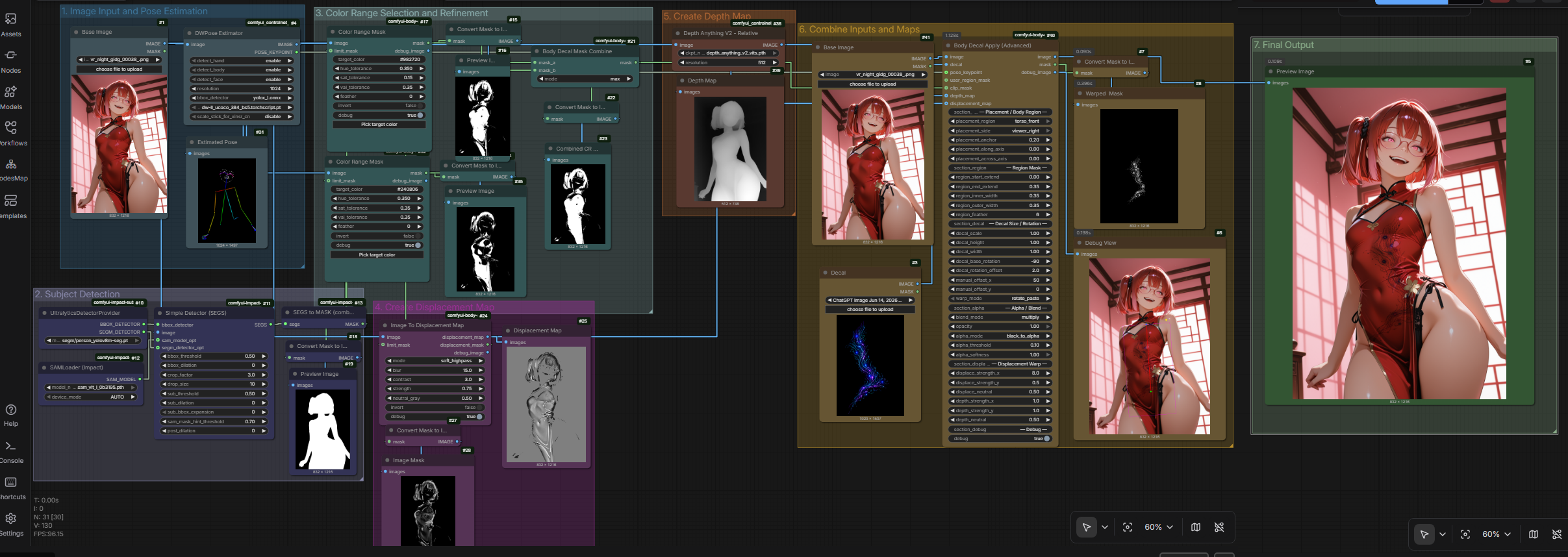
Uses the all-in-one Body Decal Apply node for rapid setup.
Recommended for most users.
Advanced Modular Workflow
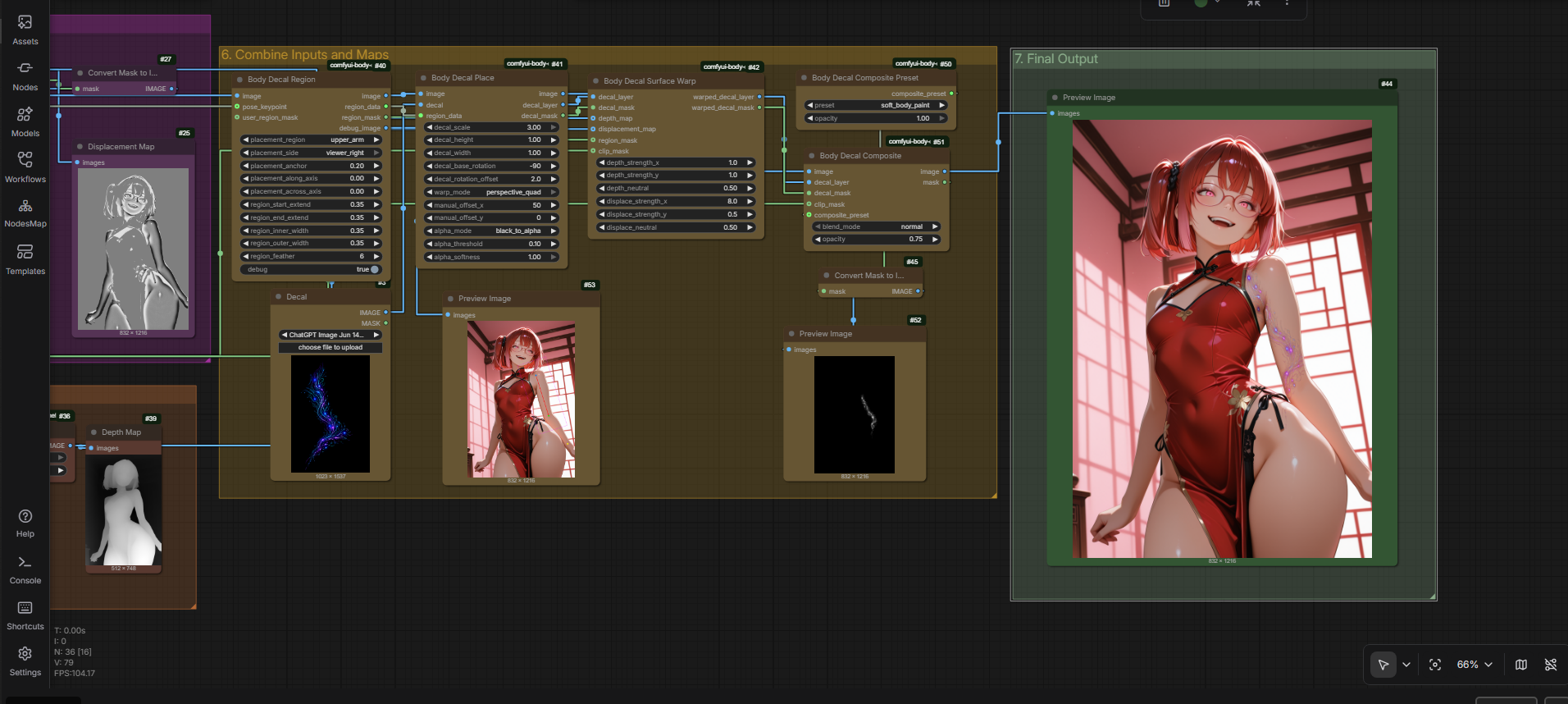
Uses individual nodes:
Body Decal Region → Body Decal Place → Body Decal Surface Warp → Body Decal Composite
Provides maximum flexibility and customization.
Example Result
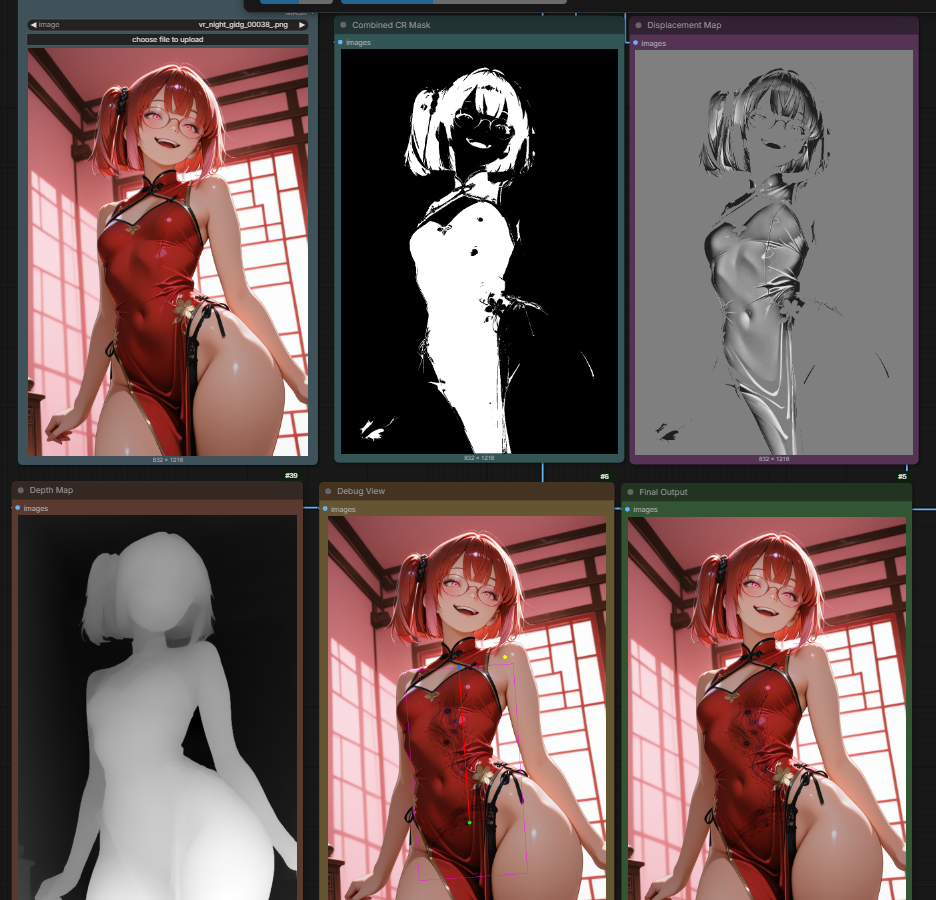
- Base Image
- Region Detection
- Color Range Masking
- Displacement Map
- Depth Map
- Final Result Composited Using Multiply
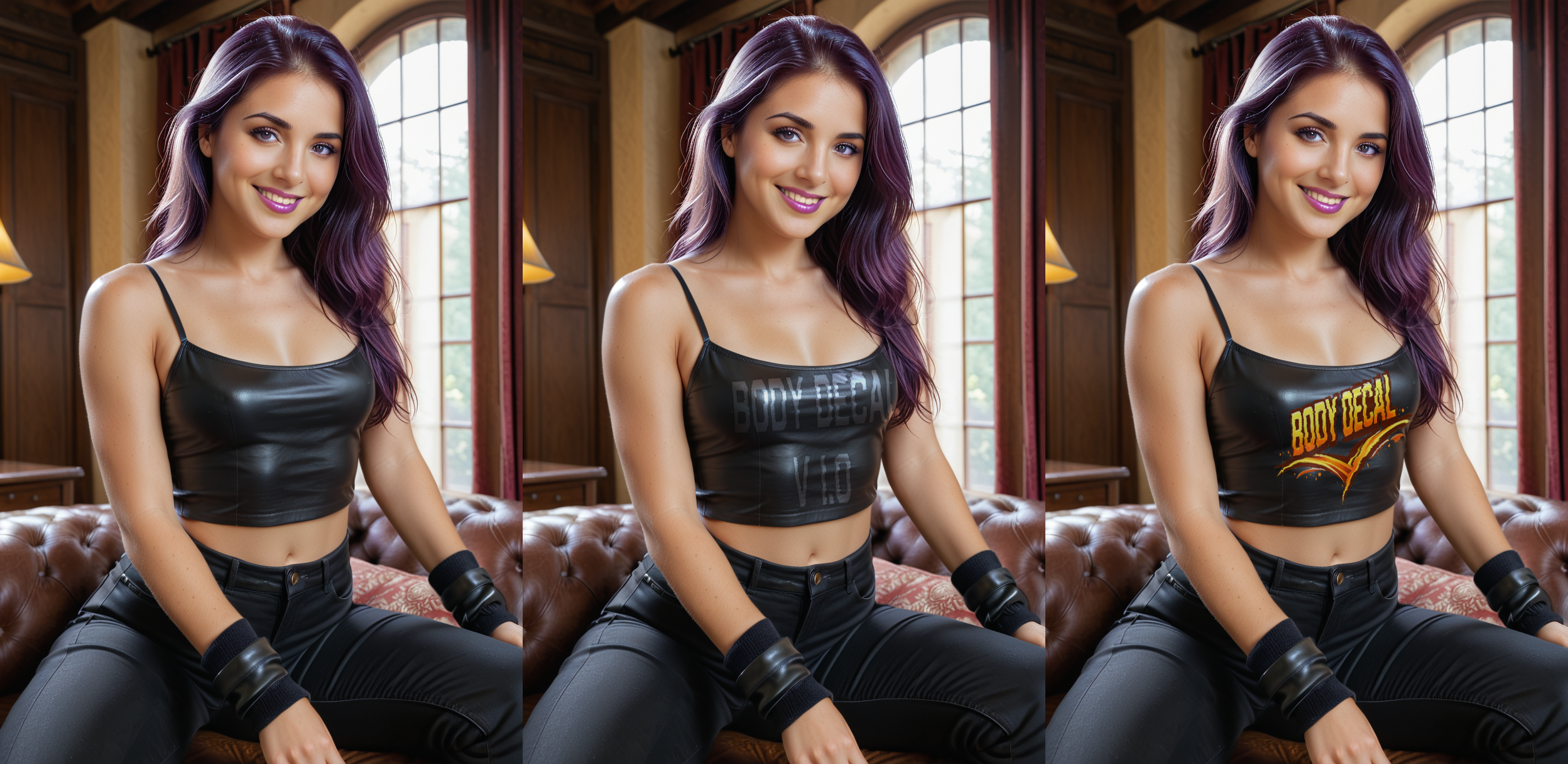
Text and Logo Examples
Text Example
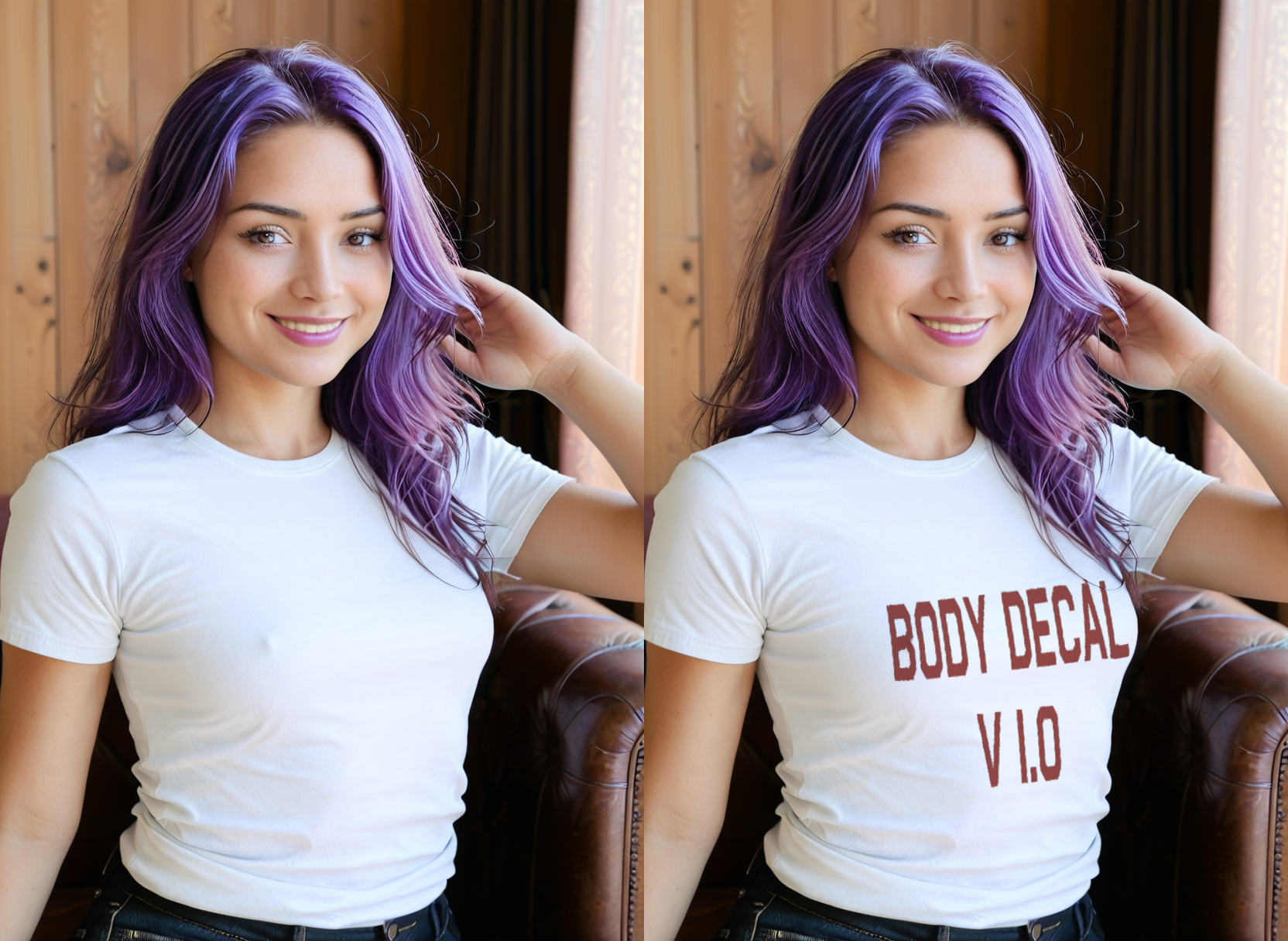
Text and Logo Examples
Installation
Navigate to your ComfyUI custom_nodes directory:
Clone into:
custom_nodes/comfyui-body-decal
cd ComfyUI/custom_nodes
git clone https://github.com/verias/comfyui-body-decal.git
Then restart ComfyUI.
Dependencies are automatically installed via:
requirements.txt
and
install.py
Requirements
- ComfyUI
- NumPy
- Pillow
Optional:
- DWPose / OpenPose
- Depth Anything
- MiDaS
for advanced placement and depth workflows.
Version
Current Version: 1.0.0
License
MIT License
Credits
Created by Keira Sharpe
Special thanks to the ComfyUI community for testing, feedback, and inspiration.