
ComfyUI Prompt Bookmarks
Lightweight, dependency-free ComfyUI sidebar for bookmarking, organizing, searching, copying, and restoring personal prompts without adding workflow nodes.
ComfyUI Prompt Bookmarks
<p align="center"> <strong>A lightweight, dependency-free personal prompt organizer for ComfyUI.</strong><br> Bookmark, group, search, copy, and restore prompts directly from the sidebar — without adding nodes or cluttering your canvas. </p> <p align="center"> <a href="README.md">English</a> · <a href="README.zh-CN.md">简体中文</a> </p> <p align="center"> <img alt="ComfyUI" src="https://img.shields.io/badge/ComfyUI-sidebar%20extension-5b5bd6"> <img alt="Extra dependencies" src="https://img.shields.io/badge/extra%20dependencies-none-2ea44f"> <img alt="Workflow nodes" src="https://img.shields.io/badge/workflow%20nodes-none-2ea44f"> <img alt="License" src="https://img.shields.io/badge/license-MIT-blue"> </p>Why Prompt Bookmarks?
ComfyUI makes it easy to experiment with prompts, but good prompts often end up scattered across workflow files, text notes, chat history, or copy-paste snippets.
ComfyUI Prompt Bookmarks is a small sidebar extension focused on one job: organizing your own reusable prompts inside ComfyUI.
- Lightweight — no framework runtime and no heavy service layer.
- No extra dependencies — no additional Python packages to install; the backend uses the Python standard library, including
sqlite3. - No extra workflow nodes — it does not add loader/saver nodes to your graph.
- No canvas clutter — everything lives in the ComfyUI sidebar.
- Personal-first — designed as a private prompt library/bookmark manager, not a marketplace or cloud service.
- Workflow-aware — remember which prompt fields belong to each workflow and restore them with one click.
If you are searching for a ComfyUI prompt manager, prompt library, prompt organizer, or prompt bookmark sidebar, this project is intentionally built to stay simple and out of the way.
Screenshots
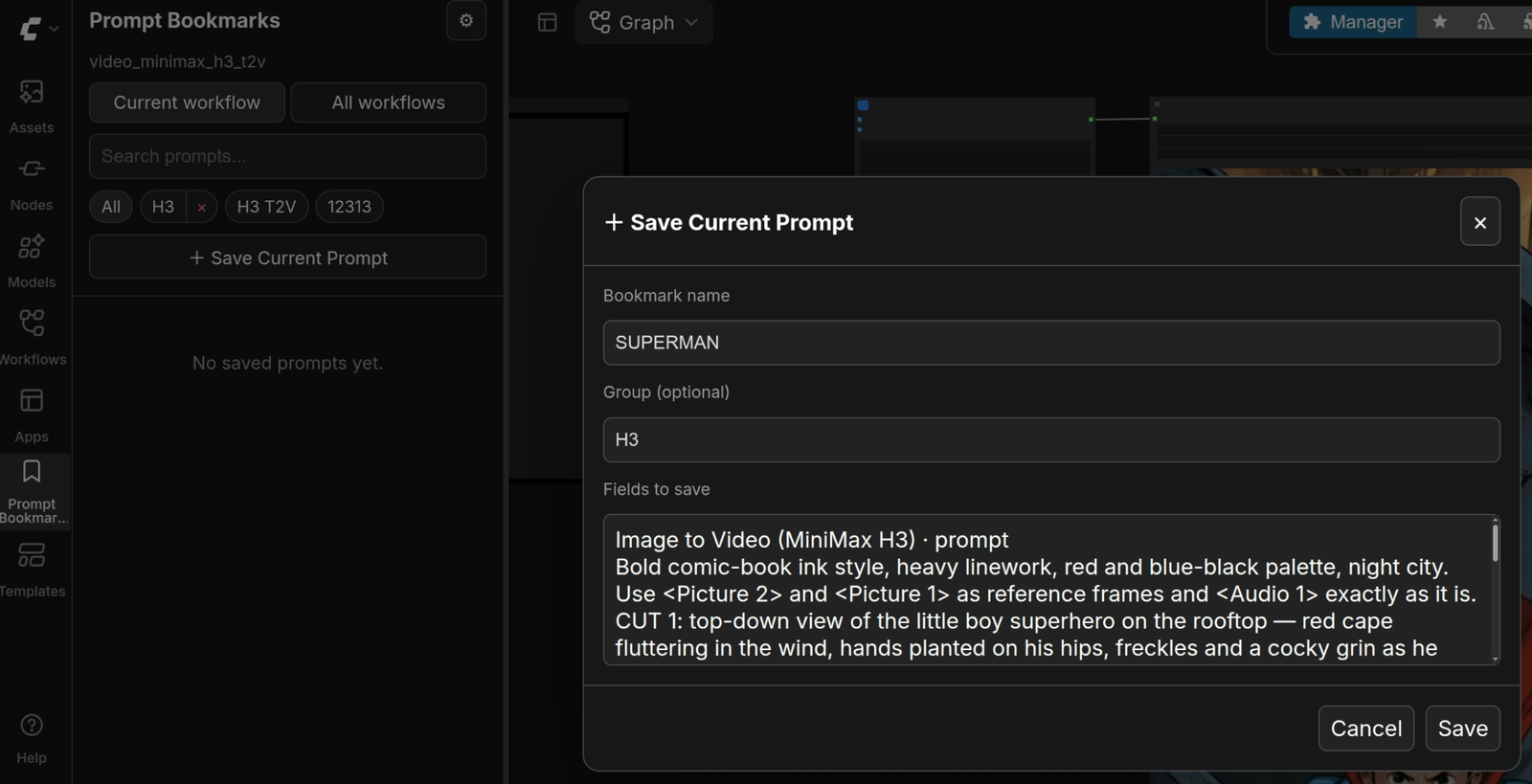
Save the current prompt without touching the workflow graph
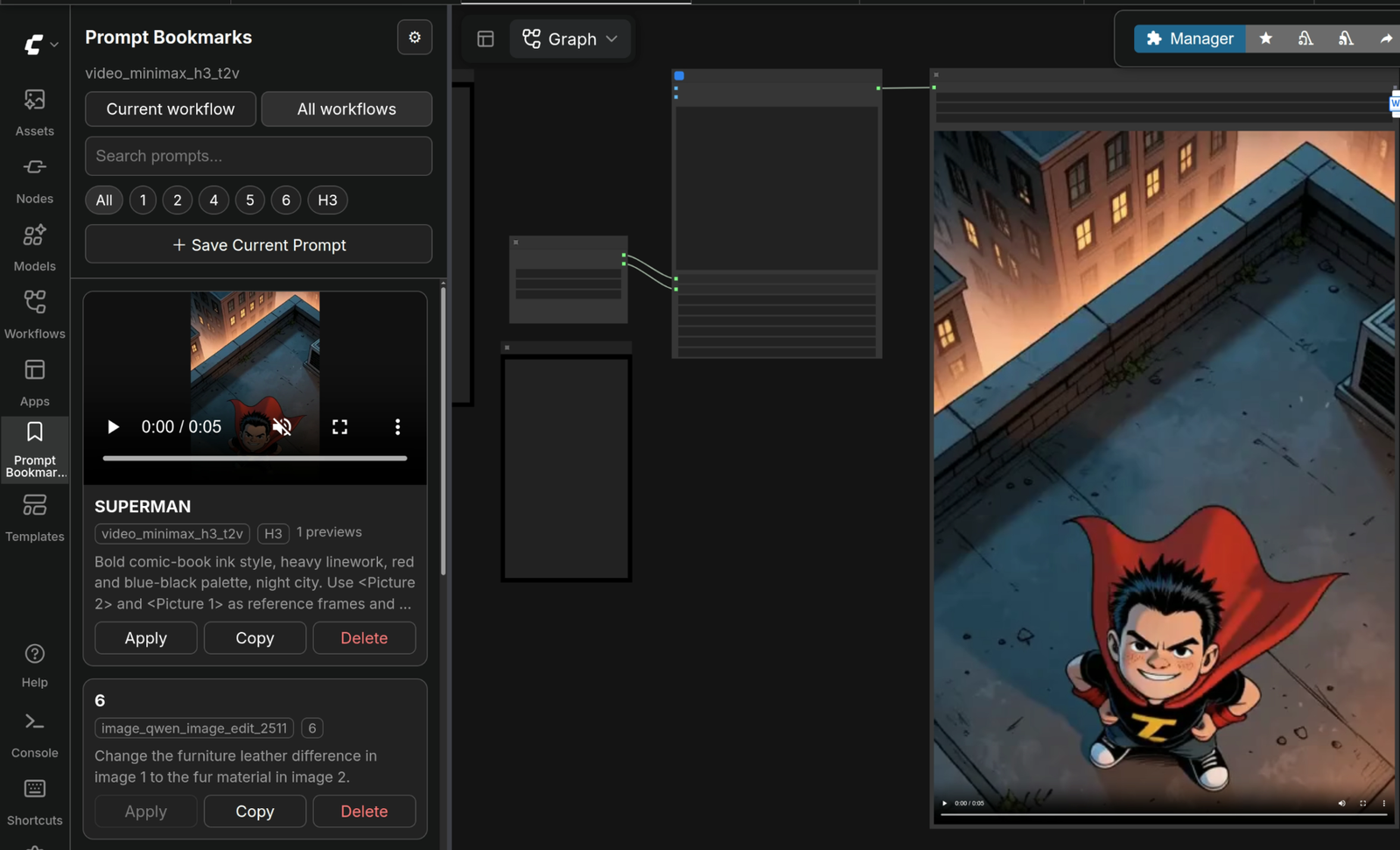
Browse saved prompts with generated image/video previews in the sidebar
Features
- Sidebar-first prompt library with no added workflow nodes
- English and Simplified Chinese UI
- Automatically follows the active workflow, including workflows whose template UUIDs collide
- Visual prompt-field picker — select fields with checkboxes; no node IDs need to be entered manually
- Smart prompt/text field recommendations while keeping Note/Markdown fields unchecked by default
- Locate action to jump to the source node on the canvas
- Normal ComfyUI group path display
- Supports editable text widgets exposed by Group Nodes / Subgraphs
- More resilient exposed-field matching when node IDs change, while avoiding ambiguous guesses
- Save multiple fields as one bookmark, such as:
- main prompt
- motion/camera prompt
- negative prompt
- Organize prompts by workflow + group
- Delete empty groups safely
- Search saved prompts
- Sort by recently used, recently saved, name, or use count
- One-click restore/apply inside the matching workflow
- Copy prompts from any workflow, with a clipboard fallback for non-secure/local HTTP environments
- Export and import a portable JSON backup of prompt data and media references
- SQLite persistence under the ComfyUI user directory with lightweight schema migrations
- Best-effort automatic image/video preview linking after successful executions
- Lazy video preview loading with optional muted autoplay
- Generated media is referenced, not duplicated
Installation
ComfyUI Manager
The project includes Comfy Registry metadata and has been submitted for official ComfyUI Manager listing. Until it appears in Manager search, use the manual installation below.
Once listed, search for:
ComfyUI Prompt Bookmarks
or:
Prompt Bookmarks
Manual installation
cd /path/to/ComfyUI/custom_nodes
git clone https://github.com/vdeng-ai/ComfyUI-Prompt-Bookmarks.git
Restart ComfyUI and refresh the browser. A bookmark icon will appear in the sidebar.
No pip install, requirements.txt, Node.js package install, or build step is required for normal use.
Quick start
- Open a workflow in ComfyUI.
- Open Prompt Bookmarks from the sidebar.
- Click Choose Prompt Fields.
- Confirm the editable text fields you want to save together.
- Click Save Current Prompt.
- Give it a name and optional group.
- Later, click Apply to restore those fields or Copy to reuse the text elsewhere.
Prompt Bookmarks stores node/widget binding metadata internally only so it can find the selected fields again. You never need to manage those identifiers yourself.
What it does not do
Prompt Bookmarks intentionally stays small. It does not try to become a workflow manager, model manager, prompt marketplace, cloud sync service, or AI prompt rewriting tool.
It also does not save sampler/model/seed/CFG settings as part of a prompt bookmark. The focus is your prompt text library.
Groups, Group Nodes, and Subgraphs
Prompt Bookmarks follows a conservative compatibility rule:
- Normal canvas groups — fully transparent. The picker shows group paths such as
Video Generation › Character Prompt › text. - Group Nodes / Subgraphs with exposed text widgets — supported through the widgets visible on the outer node.
- Hidden internal Subgraph widgets — not modified directly. Expose the desired field first.
For exposed fields, Prompt Bookmarks stores a lightweight binding key based on the field's visible context and still falls back only to an unambiguous node-type/widget match. This improves resilience without depending on fragile hidden graph internals.
Language
Prompt Bookmarks follows ComfyUI's global Language setting. There is no separate plugin language selector.
- English is the source language and fallback.
- Simplified Chinese is provided through ComfyUI's official custom-node locale system (
locales/zh/main.json).
Change the language in ComfyUI Application Settings and the sidebar will update automatically.
Automatic previews
After a successful execution, Prompt Bookmarks can read ComfyUI history, reconstruct the configured prompt fields, match them against saved prompt fingerprints, and associate matching generated media with the bookmark.
Media files are not copied into the plugin database. Prompt Bookmarks stores references to existing ComfyUI output files.
Common image outputs are supported, plus MP4, WebM, MOV, MKV, and M4V when the output exposes ComfyUI-style file metadata. Video sources are loaded lazily near the visible sidebar area, and muted autoplay can be enabled from settings.
JSON backup
The sidebar settings include Export JSON and Import JSON.
The backup contains workflows, prompt-field bindings, groups, prompt sets, usage metadata, and media references. It does not copy generated image/video files.
Import is merge-style: matching bookmark IDs are updated, while unrelated existing bookmarks remain in place. This makes the JSON file suitable for manual backups or moving a personal prompt library between ComfyUI installations without replacing the SQLite database directly.
Data location
Your prompt library is stored outside the custom-node repository:
<ComfyUI user directory>/prompt_bookmarks/prompt_bookmarks.db
Updating, replacing, or reinstalling this repository does not remove your saved prompts. Database schema upgrades are applied automatically by the extension.
Compatibility notes
- Prompt discovery works with editable string widgets visible on the active/root canvas.
- Hidden internal Subgraph fields must be exposed first.
- Cross-workflow Copy is supported.
- Cross-workflow Apply is disabled by design to avoid writing to unrelated node layouts.
- Automatic media association is best-effort and never blocks generation.
Development
Backend tests require no third-party packages:
python -m unittest discover -s tests -v
Frontend syntax check:
for file in web/*.js; do node --check "$file"; done
Comfy Registry / Manager metadata
Registry metadata lives in pyproject.toml. The repository also includes a manual GitHub Actions workflow for publishing a tagged/versioned release to the Comfy Registry after a maintainer configures REGISTRY_ACCESS_TOKEN.
ComfyUI Manager supports both its node database and the official Comfy Registry during the ongoing transition. See the official Manager documentation for current publishing/discovery behavior.
License
MIT