
ValiTools
ValiTools node collection: VSmartPrompt (Dynamic Prompts with rich-text editor, reusable variables, switcher conditions, chaining inputs and post-run selection highlighting), VFileRandom (no-repeat random image loader) and VRandomSelector (lazy random passthrough of N same-type inputs) and VWaitForVRAM (hold execution until enough VRAM is free).
Nodes (4)
Random reference images that draw like a shuffled deck, not dice
Pick one input at random — and only that branch actually runs
{a|b} prompts with an editor that shows you what it picked
Stop a second ComfyUI run from stomping your VRAM
ValiTools
A collection of ComfyUI custom nodes. More tools will be added over time.
Nodes
VSmartPrompt
A Dynamic Prompts node with a rich-text (syntax-highlighted) prompt editor.
- Combinations:
{a|b}with optionalN::weights, nested at will, per-level coloring - Wildcards:
__file__pulls a random line from a.txtinwildcard_directory(subfolders supported); typing__opens an autocomplete dropdown of the existing wildcard files; CTRL+Click opens or creates the file in a built-in editor (works on remote installs too) - Variables:
{a|b}==<name>,__file__==<name>orword==<name>store the resolved value - rolled ONCE, constant everywhere you reuse<name>; assignments inside combination branches only fire for the selected branch; typing<opens an autocomplete dropdown of all assigned variables. Silent variant==!<name>stores the value but outputs nothing at the definition site - only the<name>references emit it (references work even before the assignment). A value may itself contain<other>references ({on <ground>}==!<pose>); they are filled in when<pose>is printed - Comments:
#to end of line, inline#comment#,##/###headline styles, or multi-line/# comment #/blocks - Find & replace + undo/redo: hovering or focusing the editor shows a small toolbar (undo / redo / find).
CTRL+Fopens find,CTRL+Hjumps straight to the replace field;ENTER/SHIFT+ENTERstep through matches,Aatoggles case sensitivity,⧉restricts find & replace to the selected text (a multi-line selection sets this automatically),ESCcloses. The⎘button copies the whole prompt as plain text. Undo/redo works via the buttons orCTRL+Z/CTRL+SHIFT+Z/CTRL+Y(typing bursts collapse into one step) - Prompt versions: put a
#v13#line in the prompt (it is an inline comment, so it never reaches the output) and that is all. Every execution of the node stores the prompt under that number - one entry per number, the same number overwrites, a cached (unchanged) node stores nothing. The dropdown next toVlists all stored versions with their save time; picking one loads it as a single undo step.Vstores the current text right away without a run.🗑deletes the stored entry of the number currently in the text (pick a version in the dropdown first to delete that one). Entries live in the node's properties, so they travel with the workflow and a copied node - Prompt slots: four numbered buttons in the editor toolbar hold four prompt variants per node. Click loads a slot (one undo step, so
CTRL+Zbrings the old text back), SHIFT+Click saves the current prompt into it, and SHIFT+Click with an empty editor clears it. Filled slots are highlighted and their tooltip shows a preview plus the save time. The slots live in the node's properties, so they are saved with the workflow and copied along with the node - Output cleanup switches work again:
single_line_output,remove_whitespacesandremove_empty_tagswere forced on in code, which made the widgets decorative. Turnsingle_line_outputoff to keep the line structure (MiniMax H3 field blocks, Seedance shot lists); turnremove_whitespacesoff to keep blank lines as well. Multi-line combinations resolve identically either way - Output modes: a dropdown in the editor toolbar selects
normal,H3 t2v,H3 r2vorSeedance(2.0 and 2.5, same rules); it writes a/# mode: ... #/directive into the prompt (you can also type it by hand). Seedance mode keeps{...}literal unless it holds a|or a::weight, is followed by==<name>, or sits behind a switcher guard (<name>==value::{...}), so dialogue braces survive into the output while switchers keep working; H3 mode protects the speech/structure tags from variable substitution. All other syntax is unaffected, and a prompt without a directive behaves exactly as before - Post-run feedback: the branches actually selected during execution are marked in the editor; resolved wildcards show their pulled line on hover; variables (assignments, references and switcher conditions) show their rolled value on hover
- String inputs: six optional input sockets
in1-in6; connected text is available in the prompt as<in1>-<in6>(inserted as-is, not re-resolved) - chain VSmartPrompt nodes by wiring one's output into another's socket - Variable hand-over: wire a node's
variablesoutput into the next node'svars_ininput and every<name>it assigned works there too - references, switcher conditions and all. Inherited variables travel on down the chain; a local assignment to the same name wins - Switcher: glue
<name>==value::directly in front of a{...}block or__wildcard__to gate it on a variable's value (case-insensitive) - match resolves normally, mismatch outputs nothing.<name>!=value::is the NOT form (fires for every other value). Several values separated by commas act as OR:<surface>==counter,table,desk::{...}. Tag the state with silent branch assignments ({... cake==!<act>|... glass==!<act>}), then later<act>==cake::{...}/<act>!=cake::{...}. Works within1-in6too; assign the tag before the switch - Outputs:
prompt(resolved),original_prompt,variables(forvars_inof another VSmartPrompt)
Example - every feature at a glance
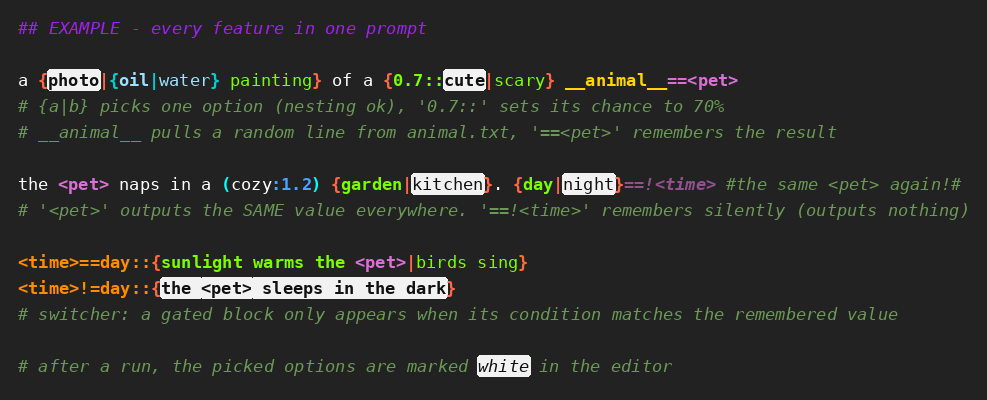
## EXAMPLE - every feature in one prompt

a {photo|{oil|water} painting} of a {0.7::cute|scary} __animal__==<pet>
# {a|b} picks one option (nesting ok), '0.7::' sets its chance to 70%
# __animal__ pulls a random line from animal.txt, '==<pet>' remembers the result

/# This can span several lines.
   Its syntax is ignored completely. #/

the <pet> naps in a (cozy:1.2) {garden|kitchen}. {day|night}==!<time> #the same <pet> again!#
# '<pet>' outputs the SAME value everywhere. '==!<time>' remembers silently (outputs nothing)

<time>==day::{sunlight warms the <pet>|birds sing}
<time>!=day::{the <pet> sleeps in the dark}
# switcher: a gated block only appears when its condition matches the remembered value
With the picks shown above (white marks), the output is:
a photo of a cute fox the fox naps in a (cozy:1.2) kitchen. the fox sleeps in the dark
Colors: green/blue = combination options per nesting level, gold = wildcards, violet = variables, orange = switcher conditions, green italics = comments, white marks = what the last run actually picked.
Based on ComfyUI-RichText_BasicDynamicPrompts (heavily modified fork).
VFileRandom
Loads a random image from a folder — like a shuffled deck: no image repeats until every image in the folder has been drawn once, then the deck reshuffles.
- The cycle is remembered per folder in
vfile_random_state.json(survives ComfyUI restarts) - Images added mid-cycle join the current cycle; deleted ones are dropped
include_subfoldersscans recursively;reset_cyclestarts a fresh shuffled cyclefoldermust lie inside ComfyUI'sinput/output/tempfolder (relative paths start ininput/) or a folder allowed inallowed_folders.json- see Allowed folders- Keep
seedon randomize — it only triggers a new draw each queue; fix it to pause drawing - Outputs:
image,mask(from alpha),filename(relative to folder),remaining_in_cycle,filename_noext - After each run the node displays the cycle progress (e.g.
45 / 235) so you can see when the deck reshuffles
VRandomSelector
Passes one of its connected inputs through at random. Accepts any input type — all inputs must share one type; the first connection locks it.
- Variable input count: a new empty slot appears as you connect (up to 30)
- Lazy evaluation: only the selected input's upstream branch executes — unselected branches stay cold
from_input/to_inputrestrict the pick to a slot range (0 = no limit)- Keep
seedon randomize — same seed + same connections = same pick - Outputs:
selected(typed like the inputs),selected_index(1-based)
VWaitForVRAM
Holds execution until the GPU has a minimum amount of free VRAM.
- Splice it into a wire ahead of the memory-hungry part of the graph (usually the sampler's
latent_imageormodelinput) - everything downstream of it waits, the value onany_inis passed through untouched - Free memory is read from the CUDA driver. VRAM held by this ComfyUI counts as available (
count_own_vram, on by default) because ComfyUI frees its own models when it needs room - so what you actually wait for is other processes letting go. Switch it off for a strict driver-only reading (the node will then block once a model is resident) - It only waits: it never unloads or frees anything itself
min_free_gb,device_index,poll_seconds,timeout_seconds(0 = wait forever),on_timeout(continue/error),count_own_vram- Waiting is cancellable with ComfyUI's stop button; the node shows the live reading while it waits
- Without a CUDA device it passes through immediately
- Outputs:
any_out(the passed-through value),free_gb
Allowed folders
Workflows and browser requests are untrusted, so ValiTools only reads or writes files inside fixed folders:
- Wildcards (
wildcard_directory, the__-dropdown, the CTRL+Click editor): the package's ownwildcards/folder. A relativewildcard_directoryis taken inside it; an absolute one outside the allowed folders falls back to it (also what happens with a workflow from another machine) - VFileRandom
folder: ComfyUI'sinput,outputandtempfolders. A relative path starts ininput/
More folders can be allowed by the server admin in allowed_folders.json next to the package's __init__.py (read on every use, no restart needed; it cannot be changed from the browser):
{
  "wildcard_dirs": ["/srv/my_wildcards"],
  "image_dirs": ["/home/me/Pictures/AI"]
}
Subfolders of an allowed folder are allowed too; symlinks that lead out of it are not followed.
Changelog
- v1.21.0
- Path containment for every file ValiTools touches (requested in the ComfyUI-Manager review). Paths are resolved with
realpathand accepted only inside a fixed folder - see Allowed folders. The wildcard routes no longer trust the directory sent by the browser beyond that, the CTRL+Click editor sends the file name relative to the wildcard folder (absolute paths and..are rejected), and symlinked wildcard files or folders that lead outside are ignored - VFileRandom:
foldermust lie inside ComfyUI'sinput/output/tempor a folder listed underimage_dirsinallowed_folders.json; relative paths start ininput/. Existing workflows with folders elsewhere stop with an error until that folder is added there. The no-repeat cycles of existing folders are kept
- Path containment for every file ValiTools touches (requested in the ComfyUI-Manager review). Paths are resolved with
- v1.20.7
- VSmartPrompt: variables inside a variable's value are expanded.
{lying on <ground>}==!<pose>used to print<ground>literally when<pose>was referenced; the value is now expanded when it is printed, so the order of the assignments no longer matters (<ground>may be set later, e.g. inside a switcher block). Socket (in1-in6) and inheritedvars_invalues stay as-is, and a self or cyclic reference stays literal instead of looping. Existing prompts resolve unchanged
- VSmartPrompt: variables inside a variable's value are expanded.
- v1.20.6
- VSmartPrompt:
🗑button next to the version dropdown deletes the stored entry of the current#vN#number - VSmartPrompt: a stored version's time stamp is now the time of the latest save under that number, also when the text was unchanged (it kept the first save's time before)
- VSmartPrompt:
- v1.20.5
- VSmartPrompt: toolbar state survives load and tab switch.
FindReplaceBarhad two methods namedrefresh(); the find-match one (defined later) silently replaced the one that rebuilds the mode dropdown, prompt slots and version list. So after a workflow load or tab switch the bar showednormal, an empty version dropdown, no tooltips and grey buttons until the next run. Renamed the match refresh torefreshMatches(); the full refresh now runs on every load, hover and edit and also refreshes matches
- VSmartPrompt: toolbar state survives load and tab switch.
- v1.20.4
- VSmartPrompt: prompt versions are always on; the per-node switch is gone (a stored off-flag on older nodes is ignored). The
Vbutton now stores the current text under its#vN#marker immediately, without waiting for a run
- VSmartPrompt: prompt versions are always on; the per-node switch is gone (a stored off-flag on older nodes is ignored). The
- v1.20.3
- VSmartPrompt: prompt versions and slots survive a workflow switch. A store written after a run only repainted the canvas; the frontend change tracker never snapshotted it, so the workflow was not flagged modified and switching tabs restored the old snapshot without the new versions. Every store write now triggers the tracker (
captureCanvasState), so the tab keeps them, the workflow shows as modified, and autosave (if on) picks them up. Save the workflow as before to keep them on disk
- VSmartPrompt: prompt versions and slots survive a workflow switch. A store written after a run only repainted the canvas; the frontend change tracker never snapshotted it, so the workflow was not flagged modified and switching tabs restored the old snapshot without the new versions. Every store write now triggers the tracker (
- v1.20.2
- VSmartPrompt: prompt versions are on by default. They were off per node, so every new or rebuilt node silently stored nothing until
Vwas clicked. A node switched off explicitly stays off
- VSmartPrompt: prompt versions are on by default. They were off per node, so every new or rebuilt node silently stored nothing until
- v1.20.1
- VSmartPrompt: prompt versions - a
#vN#marker line plus theVswitch in the editor toolbar keep a per-node history: each execution stores the prompt under its number (one entry per number, same number overwrites), the dropdown loads any stored version as one undo step. Off by default, stored in the node's properties
- VSmartPrompt: prompt versions - a
- v1.19.0
- VSmartPrompt: Seedance mode switchers fixed - a
{...}block glued to a switcher guard (<top>==cabrio::{no window},<pose>==x::{{a|b}}) was treated as literal text, so the guard never fired and the prefix leaked into the output ascabrio==cabrio::. Guarded blocks are now always live; every other brace pair stays literal as before. Editor highlighting mirrors the rule - VSmartPrompt: the output cleanup switches are visible again -
single_line_output,remove_whitespacesandremove_empty_tagswere still hidden and forced on by the editor script, so v1.17's backend fix could not be used. Noteremove_empty_tagsalso collapses.., which turns...into.; switch it off to keep ellipses in dialogue - VSmartPrompt: ellipses survive cleanup -
...(and longer dot runs) are dialogue punctuation and are no longer collapsed to.byremove_empty_tags. The switch now defaults to off for new nodes; existing nodes keep their saved value - VSmartPrompt: the mode dropdown entry is now just
Seedance- 2.0 and 2.5 need the same node behaviour;seedance 2.5/sd25are accepted directive spellings too - VSmartPrompt: the syntax reference no longer switches itself into Seedance mode - it quotes
/# mode: seedance #/inside a comment line, and the unanchored directive match picked that up, so the demo prompt resolved with Seedance brace rules and leaked its switcher guards (bedroom!=kitchen::{...}) into the output. The directive now has to open its line; a directive written after other text on the same line is ignored - VSmartPrompt: in Seedance mode a one-choice block that carries its assignment inside (
{cake==!<act>}) left a bare{}in the output - the braces were taken for literal text while the assignment inside was still consumed. Such a block now counts as live, like{a|b}and{...}==<v> - VSmartPrompt: Seedance dialogue braces no longer vanish - after resolving, the node re-ran the resolver on its own output for LoRA cleanup even when no LoRA tag was present. That second pass had lost the
/# mode #/directive and ate{spoken line}as a one-choice combination. The re-run now only happens when a LoRA tag was really stripped, and it keeps the mode
- VSmartPrompt: Seedance mode switchers fixed - a
- v1.18.0
- VSmartPrompt: output modes - a dropdown in the editor toolbar switches between
normal,H3 t2v,H3 r2vandSeedance 2.0. The mode is stored as a comment directive inside the prompt (/# mode: seedance #/), so it travels with the workflow and reaches the backend. Without a directive nothing changes: a prompt resolves exactly as it did before - VSmartPrompt: in Seedance mode a
{...}group only rolls when it carries a top-level|or a::weight, or when==<name>follows it. Every other pair stays literal text, so spoken lines like{Hello, world}reach the output unchanged. Literal braces are blue in the editor, rolling ones keep their usual frame colour - VSmartPrompt: in H3 mode the speech and structure tags (
<d>,<i>,<breath>,<pause>,<scenetrans>,<cutoff>, ...) are never read as variable references, even when a variable of that name exists, and are coloured as tags - The full VSmartPrompt syntax - combinations, wildcards, variables, switchers, comments - keeps working unchanged in every mode
- VSmartPrompt: output modes - a dropdown in the editor toolbar switches between
- v1.17.0
- VSmartPrompt:
single_line_output,remove_whitespacesandremove_empty_tagsare honoured again - they were overwritten with True inmain(), so the widgets did nothing and every output was flattened onto one line. Empty lines were also dropped unconditionally instead of followingremove_whitespaces. Defaults are unchanged, so existing workflows keep their current output
- VSmartPrompt:
- v1.16.0
- VSmartPrompt: four prompt slots per node - numbered buttons in the editor toolbar, click to load, SHIFT+Click to save, SHIFT+Click with an empty editor to clear. Stored in the node's properties, so they travel with the workflow and with a copied node; loading is a single undo step
- v1.15.2
- VSmartPrompt: the syntax reference is a compact one-screen sheet (60 lines instead of 160) - same rules, no prose
- VSmartPrompt: the syntax reference now spells out that braces belong on the assignment side but never in a switcher condition - a condition value is plain text and may contain spaces, while braces there are a real combination block and make the condition random. This is the asymmetry LLMs kept getting wrong
- VSmartPrompt: the default prompt was rewritten as a precise syntax reference an LLM can follow - every construct spelled out, plus a section of the rules that are easy to get wrong (
==<name>binds only to the construct in front of it,word==<name>takes a single word, wildcard files are read line by line, a switcher must touch its block and needs its tag assigned earlier). Also corrects the CTRL+Click description, which still promised an external text editor
- v1.15.1
- VSmartPrompt: a variable assigned from another variable inside a nested block stored the literal reference instead of its value (
{<stab>}==!<grip>gavegrip = "<stab>"). Parked assignments are now substituted again when they are committed, are held back while a referenced variable is still unknown, and word assignments are collected before parked ones are written
- VSmartPrompt: a variable assigned from another variable inside a nested block stored the literal reference instead of its value (
- v1.15.0
- VSmartPrompt: six string input sockets instead of four (
in1-in6), usable as<in5>/<in6>in references and switcher conditions; the socket list is now a single constant, so the count is a one-line change
- VSmartPrompt: six string input sockets instead of four (
- v1.14.4
- VSmartPrompt: added
/# multi-line comments #/; block contents are stripped before resolution and cannot trigger rolls, wildcards, variables, or switchers - VSmartPrompt: a
#belonging to a/#or#/marker no longer closes an inline#comment#, so both comment styles stay independent - VSmartPrompt:
#comments are line-bound again - after the switch to whole-text comment stripping they ran to the end of the whole prompt, swallowing every line below them
- VSmartPrompt: added
- v1.14.3
- VSmartPrompt: the
<dropdown missed variables assigned to a NESTED block ({large {left|right} chest}==<part>) - the editor coloured them as defined while the dropdown claimed there was nothing to complete. Both now read the same scan, so they can no longer disagree; nested assignments also get a proper preview
- VSmartPrompt: the
- v1.14.2
- VWaitForVRAM: the node now also reads ComfyUI's own model bookkeeping (
current_loaded_models), not just the torch allocator pool, when deciding how much of the occupied VRAM is its own - the pool alone can report far less than is actually held. Each run logs the breakdown (driver free / torch pool / ComfyUI models) to the console
- VWaitForVRAM: the node now also reads ComfyUI's own model bookkeeping (
- v1.14.1
- VWaitForVRAM: fixed the node blocking forever from the second render on. The driver's free value collapses once ComfyUI has a model resident, so the node waited for memory it was holding itself. VRAM used by this process now counts as available (
count_own_vram, on by default) - the wait is for other processes, which is the point of the node
- VWaitForVRAM: fixed the node blocking forever from the second render on. The driver's free value collapses once ComfyUI has a model resident, so the node waited for memory it was holding itself. VRAM used by this process now counts as available (
- v1.14.0
- New node: VWaitForVRAM - holds execution until the GPU has a minimum amount of free VRAM (driver reading, so other processes count), with timeout policy, live status on the node and a cancellable wait
- v1.13.0
- VSmartPrompt: switcher conditions accept several values as OR -
<surface>==counter,table,desk::{...}fires for any of them,!=then means none of them. Spacing around the commas is ignored; a value that itself contains a comma keeps matching as a whole, so existing prompts are unaffected
- VSmartPrompt: switcher conditions accept several values as OR -
- v1.12.2
- VSmartPrompt: fixed switcher conditions reacting to a discarded branch. A
{...}==<name>or__file__==<name>sitting INSIDE another block assigned its value as soon as it resolved - which happens innermost-first, before the outer block has even picked a branch. Guards further down then judged against a value from a branch that was never selected (<shot>readupper chestwhileforeheadwon). Such assignments are now parked and only applied once their branch has actually survived
- VSmartPrompt: fixed switcher conditions reacting to a discarded branch. A
- v1.12.1
- VSmartPrompt: copying is guaranteed plain text - the handler no longer falls through to the browser's default (which would copy the highlighting HTML) when the selection cannot be mapped, and it explicitly clears the rich-text flavour. New
⎘toolbar button copies the entire prompt as plain text
- VSmartPrompt: copying is guaranteed plain text - the handler no longer falls through to the browser's default (which would copy the highlighting HTML) when the selection cannot be mapped, and it explicitly clears the rich-text flavour. New
- v1.12.0
- VSmartPrompt: typing
__opens a dropdown of the existing wildcard files, just like<does for variables - filters as you type (substring match, prefix matches first), UP/DOWN + ENTER/TAB or click inserts__name__. Only offered while a__is actually open, so a finished__wildcard__no longer triggers it
- VSmartPrompt: typing
- v1.11.0
- VSmartPrompt: variables can be handed from node to node - new
variablesoutput andvars_ininput. Everything a prompt assigned (including what it inherited itself) is available in the next node as a normal<name>, works with switcher conditions, and a local assignment to the same name still wins. Thein1-in6socket names are deliberately not passed on. Changed inherited values re-roll the downstream picks even with a fixed seed
- VSmartPrompt: variables can be handed from node to node - new
- v1.10.0
- VSmartPrompt: CTRL+Click on a wildcard now opens its
.txtin a built-in editor overlay (load, edit, save) instead of handing the path to the operating system's file handler. This removes the last system call from the package - the old behaviour never worked on remote ComfyUI installs and got the package flagged by the registry's security scan - Packaging: registry metadata completed (
[project.urls]table,requires-python, classifiers, emptyIconremoved),.comfyignoreadded, build artifacts (node.zip,.codex,.tracking) removed from git, and a GitHub Action publishes automatically whenpyproject.tomlchanges
- VSmartPrompt: CTRL+Click on a wildcard now opens its
- v1.9.3
- VSmartPrompt: find & replace can be restricted to the selected text - selecting several lines and pressing
CTRL+Fscopes it automatically, the⧉button toggles it, and the scoped region is tinted in the editor
- VSmartPrompt: find & replace can be restricted to the selected text - selecting several lines and pressing
- v1.9.2
- VSmartPrompt: fixed undo/redo staying greyed out - ComfyUI's widget setter fires
callback()on every assignment, so the node's own edits looked like external changes and reset the history on each keystroke. Own writes are now recognised; typed words group into one undo step, everything else (paste, cut, Enter, Tab, autocomplete, weighting, find & replace, external changes) is its own step, 500 steps deep
- VSmartPrompt: fixed undo/redo staying greyed out - ComfyUI's widget setter fires
- v1.9.1
- VSmartPrompt: the editor toolbar is easier to reach - it shows while the mouse is anywhere over the editor area, stays visible while the cursor travels to it, and dims to 55% opacity until hovered
- v1.9.0
- VSmartPrompt: find & replace in the editor (
CTRL+F/CTRL+H, plain text, case toggle, match counter, replace / replace all) and a real undo/redo history with toolbar buttons andCTRL+Z/CTRL+SHIFT+Z/CTRL+Y- the browser's own undo was dead because every edit rewrites the highlighted markup. Matches are painted with the CSS Custom Highlight API, so the syntax highlighting stays untouched
- VSmartPrompt: find & replace in the editor (
- v1.8.1
- VSmartPrompt: hovering a variable after a run shows its rolled value - works on assignments (
==<name>), references (<name>) and switcher conditions; resolved variables get a subtle violet underline like resolved wildcards
- VSmartPrompt: hovering a variable after a run shows its rolled value - works on assignments (
- v1.8.0
- VFileRandom: cycle progress counter shown on the node after each run (
45 / 235= 45th image drawn of a 235-image cycle)
- VFileRandom: cycle progress counter shown on the node after each run (
- v1.7.2
- VSmartPrompt: comments are now stripped BEFORE resolution - text inside comments can no longer trigger variable assignments, switcher guards, wildcard pulls or combination rolls (previously a comment like
'==<pet>' rememberssilently overwrote the variable) - README: visual all-features example with editor coloring
- VSmartPrompt: comments are now stripped BEFORE resolution - text inside comments can no longer trigger variable assignments, switcher guards, wildcard pulls or combination rolls (previously a comment like
- v1.7.1
- VSmartPrompt: copying/cutting from the editor now puts plain text on the clipboard - previously the syntax-highlighting HTML came along and markdown-aware paste targets rendered the bold styling as
**...**
- VSmartPrompt: copying/cutting from the editor now puts plain text on the clipboard - previously the syntax-highlighting HTML came along and markdown-aware paste targets rendered the bold styling as
- v1.7.0
- VSmartPrompt: switcher NOT guards -
<name>!=value::fires for every value except the given one; never-assigned variables remove the construct like with==
- VSmartPrompt: switcher NOT guards -
- v1.6.4
- VSmartPrompt: the white mark for a chosen zero-length branch (
{text|}) now actually renders - it marks the|delimiter (the mark's HTML previously misnested across the branch split and was dropped by the browser)
- VSmartPrompt: the white mark for a chosen zero-length branch (
- v1.6.3
- VSmartPrompt: guard against the prompt editor collapsing to a narrow strip - editor asserts full node width (100% + border-box), node keeps a 360px minimum width, re-checked on resize and workflow load
- v1.6.2
- VSmartPrompt: selection marks survive on branches whose stored value differs from the branch text (e.g.
{large chest chest==!<part>|stomach}==<part>); silent==!<name>blocks now also white-mark their chosen branch
- VSmartPrompt: selection marks survive on branches whose stored value differs from the branch text (e.g.
- v1.6.1
- VSmartPrompt:
in1-in4are lazy - an upstream node chain only executes when its<inN>actually appears in the prompt text; nodes skipped this way get their stale white selection marks cleared after the run (cached nodes keep theirs)
- VSmartPrompt:
- v1.6.0
- VSmartPrompt: switcher guards -
<name>==value::glued before a{...}block or__wildcard__gates it on a variable's value; false or never-assigned guards remove the construct (and skip its assignments); guards render orange in the editor (red when the variable is unassigned)
- VSmartPrompt: switcher guards -
- v1.5.1
- VSmartPrompt: fixed a serious RNG bias - the resolver reseeded the random generator with the same seed on every resolution pass, replaying the identical draw stream and locking picks of different passes together (worst case: a nested wildcard's line pick was 100% correlated with its parent's - half of the combinations could never occur). One RNG stream per run now; note: the same seed produces a different (unbiased) result than in older versions
- v1.5.0
- VSmartPrompt: connected
in1-in4texts are mixed into the effective seed - when an upstream node re-rolls, this node's combination/wildcard picks re-roll too, even with a fixed seed. Same seed + same prompt + same input texts stays fully reproducible
- VSmartPrompt: connected
- v1.4.3
- VSmartPrompt: post-run selection marking now survives variable substitution - a chosen branch consisting of references (e.g.
{0.4::<in1>|<in2>}) marks the<name>chars in the editor
- VSmartPrompt: post-run selection marking now survives variable substitution - a chosen branch consisting of references (e.g.
- v1.4.2
- VSmartPrompt: post-run selection marking now also shows picks of empty / whitespace-only branches - the branch's spaces are marked, or for zero-length branches the preceding
|delimiter
- VSmartPrompt: post-run selection marking now also shows picks of empty / whitespace-only branches - the branch's spaces are marked, or for zero-length branches the preceding
- v1.4.1
- VSmartPrompt: fixed CTRL+Left/Right word jump (and CTRL+SHIFT word selection) inside the editor - was swallowed by the global CTRL+arrow listener
- v1.4.0
- VSmartPrompt: four optional string input sockets
in1-in4, referenced in the prompt as<in1>-<in4>for chaining VSmartPrompt nodes; connected sockets show in the autocomplete dropdown and validate the references violet
- VSmartPrompt: four optional string input sockets
- v1.3.0
- VSmartPrompt: silent variable assignment
==!<name>- assigns without emitting the value at the definition site; works on all three forms ({a|b}==!<name>,__file__==!<name>,word==!<name>); silent assignments render dimmed/italic in the editor
- VSmartPrompt: silent variable assignment
- v1.2.1
- VFileRandom: new
filename_noextoutput (filename without extension)
- VFileRandom: new
- v1.2.0
- New node: VRandomSelector — random passthrough of one of N connected same-type inputs, lazy-evaluated, with optional slot-range restriction
- v1.1.0
- New node: VFileRandom — random image loader with no-repeat shuffle-bag cycling
- v1.0.0
- Initial release: VSmartPrompt (renamed from the SILVER_BasicDynamicPrompts fork v4.1.0, new node identifier and
/valitools/API routes so it can coexist with the original)
- Initial release: VSmartPrompt (renamed from the SILVER_BasicDynamicPrompts fork v4.1.0, new node identifier and